
使用weave管理docker网络
weave简介
Weave creates a virtual network that connects Docker containers deployed across multiple hosts.
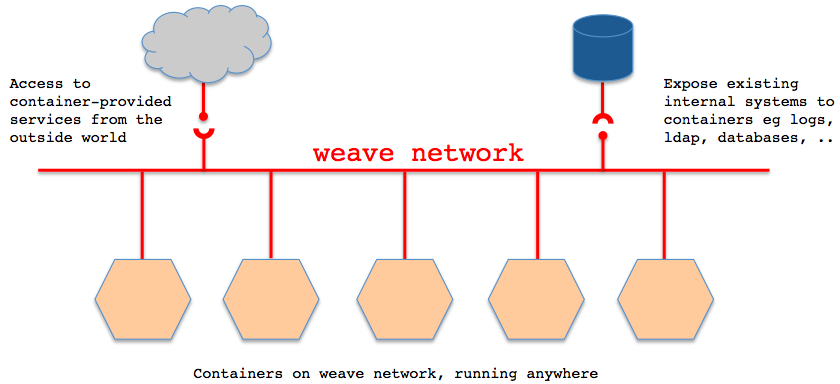
Applications use the network just as if the containers were all plugged into the same network switch, with no need to configure port mappings, links, etc. Services provided by application containers on the weave network can be made accessible to the outside world, regardless of where those containers are running. Similarly, existing internal systems can be exposed to application containers irrespective of their location.
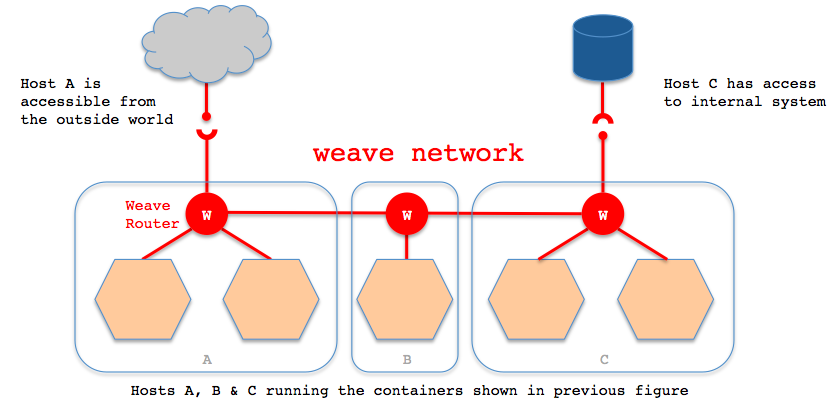
Weave can traverse firewalls and operate in partially connected networks. Traffic can be encrypted, allowing hosts to be connected across an untrusted network.
With weave you can easily construct applications consisting of multiple containers, running anywhere.
Weave works alongside Docker's existing (single host) networking capabilities, so these can continue to be used by containers.
weave简单使用
sudo wget -O /usr/local/bin/weave https://raw.githubusercontent.com/zettio/weave/master/weave

sudo chmod a+x /usr/local/bin/weave
启动weave路由器,这个路由器其实也是在docker中启动的:
[root@h-46mow360 ~]# weave launch
Unable to find image 'zettio/weave' locally
3b3a3db2c186fccb5203dcc269b3febbbbf126591a7ebd8117a8a5250683749f
[root@h-46mow360 ~]# brctl show
bridge name bridge id STP enabled interfaces
docker0 8000.56847afe9799 no veth801050a
weave 8000.7afc2a03325e no vethwepl2146
[root@h-46mow360 ~]# docker ps
CONTAINER ID IMAGE COMMAND CREATED STATUS PORTS NAMES
3b3a3db2c186 zettio/weave:git-a34e214201cb "/home/weave/weaver About a minute ago Up About a minute 0.0.0.0:6783->6783/tcp, 0.0.0.0:6783->6783/udp weave在两台物理机上分别启动一个容器:c1=$(weave run 10.0.3.3/24 -t -i -v /sys/fs/cgroup:/sys/fs/cgroup:ro -v /tmp/$(mktemp -d):/run systemd:systemd /usr/lib/systemd/systemd)c2=$(weave run 10.0.3.5/24 -t -i -v /sys/fs/cgroup:/sys/fs/cgroup:ro -v /tmp/$(mktemp -d):/run systemd:systemd /usr/lib/systemd/systemd)这个时候,两个容器之间是不通的,需要在两台weave的路由器之间建立连接:( if there is a firewall between $HOST1 and $HOST2, you must open port 6783 for TCP and UDP)weave connect 10.33.0.9这样,两台容器之间通了:# nsenter --mount --uts --ipc --net --pid --target $(docker inspect --format "{{.State.Pid}}" "$c2")
-bash-4.2# ping -c 3 10.0.3.3
PING 10.0.3.3 (10.0.3.3) 56(84) bytes of data.
64 bytes from 10.0.3.3: icmp_seq=1 ttl=64 time=2.34 ms
64 bytes from 10.0.3.3: icmp_seq=2 ttl=64 time=1.52 ms
64 bytes from 10.0.3.3: icmp_seq=3 ttl=64 time=1.13 ms
--- 10.0.3.3 ping statistics ---
3 packets transmitted, 3 received, 0% packet loss, time 2003ms
rtt min/avg/max/mdev = 1.131/1.667/2.345/0.505 ms- 应用隔离:不同子网容器之间默认隔离的,即便它们位于同一台物理机上也相互不通;不同物理机之间的容器默认也是隔离的
- 物理机之间容器互通:weave connect $OTHER_HOST
- 动态添加网络:对于不是通过weave启动的容器,可以通过weave attach 10.0.1.1/24 $id来添加网络(detach删除网络)
- 安全性:可以通过weave launch -password wEaVe设置一个密码用于weave peers之间加密通信
- 与宿主机网络通信:weave expose 10.0.1.102/24,这个IP会配在weave网桥上
- 查看weave路由状态:weave ps
- 通过NAT实现外网访问docker容器
Weave creates a network bridge on the host. Each container is connected to that bridge via a veth pair, the container side of which is given the IP address & netmask supplied in ‘weave run’. Also connected to the bridge is the weave router container.
A weave router captures Ethernet packets from its bridge-connected interface in promiscuous mode, using ‘pcap’. This typically excludes traffic between local containers, and between the host and local containers, all of which is routed straight over the bridge by the kernel. Captured packets are forwarded over UDP to weave router peers running on other hosts. On receipt of such a packet, a router injects the packet on its bridge interface using ‘pcap’ and/or forwards the packet to peers.
Weave routers learn which peer host a particular MAC address resides on. They combine this knowledge with topology information in order to make routing decisions and thus avoid forwarding every packet to every peer. The topology information captures which peers are connected to which other peers; weave can route packets in partially connected networks with changing topology.
Weave routers establish TCP connections to each other, over which they perform a protocol handshake and subsequently exchange topology information. These connections are encrypted if so configured. Peers also establish UDP “connections”, possibly encrypted, for the aforementioned packet forwarding. These “connections” are duplex and can traverse firewalls.
[Unit]
Documentation=http://zettio.github.io/weave/After=docker.service
[Service]
ExecStartPre=/usr/local/bin/weave launch
ExecStart=/usr/bin/docker logs -f weave
SuccessExitStatus=2
ExecStop=/usr/local/bin/weave stop
[Install]
WantedBy=multi-user.target
使用weave管理docker网络的更多相关文章
- FW:使用weave管理docker网络
Posted on 2014-11-12 22:20 feisky 阅读(1761) 评论(0) 编辑 收藏 weave简介 Weave creates a virtual network that ...
- 【docker专栏8】使用IDEA远程管理docker镜像及容器服务
使用命令行的方式管理服务器镜像及容器是运维人员最常用的方式,但是有的时候我们不得不远程操作docker或者是面向对docker并不熟悉的技术人员提供能力(配置管理员.测试人员),这种情况下图形界面就有 ...
- Docker网络解决方案 - Weave部署记录
前面说到了Flannel的部署,今天这里说下Docker跨主机容器间网络通信的另一个工具Weave的使用.当容器分布在多个不同的主机上时,这些容器之间的相互通信变得复杂起来.容器在不同主机之间都使用的 ...
- Docker网络 Weave
当容器分布在多个不同的主机上时,这些容器之间的相互通信变得复杂起来.容器在不同主机之间都使用的是自己的私有IP地址,不同主机的容器之间进行通讯需要将主机的端口映射到容器的端口上,而且IP地址需要使用主 ...
- [经验分享] Docker网络解决方案-Weave部署记录
前面说到了Flannel的部署,今天这里说下Docker跨主机容器间网络通信的另一个工具Weave的使用.当容器分布在多个不同的主机上时,这些容器之间的相互通信变得复杂起来.容器在不同主机之间都使用的 ...
- docker网络配置方法总结
docker启动时,会在宿主主机上创建一个名为docker0的虚拟网络接口,默认选择172.17.42.1/16,一个16位的子网掩码给容器提供了65534个IP地址.docker0只是一个在绑定到这 ...
- 【转】Docker网络详解及pipework源码解读与实践
好文必转 原文地址: http://www.infoq.com/cn/articles/docker-network-and-pipework-open-source-explanation-prac ...
- Docker网络模式
[编者的话] 本文是<Docker网络及服务发现>一书的一个章节,介绍了搭建Docker单主机网络的基础内容.关于Docker网络的更多内容,包括多主机的网络,请参考该书的其他章节. @C ...
- 一文搞懂各种 Docker 网络 - 每天5分钟玩转 Docker 容器技术(72)
前面各小节我们先后学习了 Docker Overaly,Macvaln,Flannel,Weave 和 Calico 跨主机网络方案.目前这个领域是百家争鸣,而且还有新的方案不断涌现. 本节将从不同维 ...
随机推荐
- angular 滚动
AngularJs $anchorScroll.$controller.$document $anchorScroll 根据HTML5的规则,当调用这个函数时,它检查当前的url的hash值并且滚动到 ...
- Valid Palindrome ---- LeetCode 125
Given a string, determine if it is a palindrome, considering only alphanumeric characters and ignori ...
- Object.prototype 与 Function.prototype 与 instanceof 运算符
方法: hasOwnProperty isPrototypeOf propertyIsEnumerable hasOwnProperty 该方法用来判断一个对象中的某一个属性是否是自己提供的( 住要用 ...
- softwareTesting_work2_question2
work2类 package com.Phantom; import java.util.Scanner; import javax.print.DocFlavor.INPUT_STREAM; pub ...
- redis-cluster 单个节点不可用
背景: 公司的音视频 盗版检测业务,使用redis-cluster作为 key-value 数据库, 使用张图片的 特征hash值作key.因为数据量太大,机器有限,集群内没有slaver 问题描述 ...
- hibernate persist update 方法没有正常工作(不保存数据,不更新数据)
工程结构 问题描述 在工程中通过spring aop的方式配置事务,使用hibernate做持久化.在代码实现中使用hibernate persit()方法插入数据到数据库,使用hibernate u ...
- EntityFramework 优化
1.分页的时候,尽量在数据库里面去分页. //在数据库中分页 ).Take().ToList(); //先把数据从数据库中查出来,然后才分页 ).Take(); 2.尽量禁用延迟加载,尽量使用预加载和 ...
- PHP character garbled
MySql 控制台查询时出现乱码 Database&Table 的字符集 于Mysql控制台显示的字符集不一样 右键单击mysql控制台边框 单击属性 查看当前代码页的字符集模式是否于数 ...
- TOJ3136
3136: Ubiquitous Religions 时间限制(普通/Java):2000M ...
- JavaScript,DOM经典基础面试题
JavaScript的数据类型 JavaScript的数据类型可以分为原始类型和对象类型 原始类型包括string,number和Boolean三种,其中字符串是使用一对单引号或者一堆双引号括起来的任 ...