
DirectX.Capture Class Library
DirectX.Capture Class Library


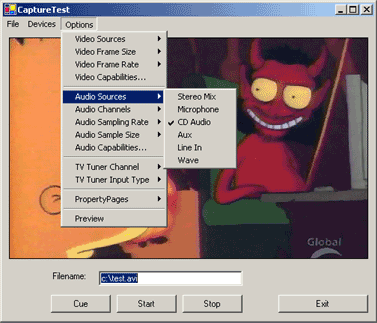
Introduction
This article presents a class library for capturing audio and video to AVI files in .NET. Some of the features of this library:
- List and select hardware devices
- Access to common audio and video settings (e.g. frame rate, size)
- Support audio and video compression codecs
- Support video preview
- Support TV tuners
- Support crossbars and audio mixers
- Retrieve device capabilities
- Show property pages exposed by drivers
- MSDN-style documentation included
Using the Code
The Capture class is the core of this library. Here is a simple example:
// Remember to add a reference to DirectX.Capture.dll

using DirectX.Capture

// Capture using the first video

// and audio devices available

Capture capture = new Capture( Filters.VideoInputDevices[0],

                               Filters.AudioInputDevices[0] );

// Start capturing

capture.Start();

// Stop capturing

capture.Stop();
Remember to add a reference in your project to DirectX.Capture.dll. This DLL requires DShowNET.dll, so make sure they are both in the same directory. Once you add the reference, Visual Studio .NET should take care of the copying for you.
This example will capture video and audio using the first video and audio devices installed on the system. To capture video only, pass a null as the second parameter to the constructor.
The class is initialized to a valid temporary file in the Windows temp folder. To capture to a different file, set the Capture.Filename property before you begin capturing.
A Second Example
This next example shows how to change video and audio settings. Properties such as Capture.FrameRate and Capture.AudioSampleSize allow you to programmatically adjust the capture. Use Capture.VideoCaps and Capture.AudioCaps to determine valid values for these properties.
Capture capture = new Capture( Filters.VideoInputDevices[0],

                               Filters.AudioInputDevices[1] );

capture.VideoCompressor = Filters.VideoCompressors[0];

capture.AudioCompressor = Filters.AudioCompressors[0];

capture.FrameRate = 29.997;                 // NTSC

capture.FrameSize = new Size( 640, 480 );   // 640x480

capture.AudioSamplingRate = 44100;          // 44.1 kHz

capture.AudioSampleSize = 16;               // 16-bit

capture.AudioChannels = 1;                  // Mono

capture.Filename = "C:\MyVideo.avi";

capture.Start();

...

capture.Stop();
The example above also shows the use of video and audio compressors. In most cases, you will want to use compressors. Uncompressed video can easily consume over 1GB of disk space per minute. Whenever possible, set the Capture.VideoCompressor and Capture.AudioCompressor properties as early as possible. Changing them requires the internal filter graph to be rebuilt which often causes most of the other properties to be reset to default values.
Behind the Scenes
This project uses 100% DirectShow to capture video. Once a capture is started, DirectShow spawns another thread and handles retrieving/moving all the video and audio data itself. That means you should be able to capture at the same speed and quality as an application written in C.
DirectShow is implemented as a set of COM components and we use .NET Interop to access them. The pioneering work on this was done by NETMaster with the DShowNET project. This Capture library uses DShowNET for the interop layer with only a few extensions. This is the DShowNET.dll mentioned earlier.
Sitting on top of all of this is the Capture class library. The center of any DirectShow app is the filter graph and the filter graph manager. For a good overview, see The Filter Graph and Its Components from the MSDN.
The Least Work Possible
The library tries at all times to do the least amount of work possible. The problem is: DirectShow is very flexible, but has few firm standards for driver developers and I have limited hardware to test with. As a result, the class tries to avoid doing any work that may not be necessary, hopefully avoiding potential incompatibilities in the process.
One example is video preview. You can start and stop preview with:
// Start preview

capture.PreviewWindow = myPanelControl;

// Stop preview

capture.PreviewWindow = null;
Hopefully this is simple to use. Internally, DirectShow does a lot of work: add required upstream filters for WDM devices, search for preview pins, use the Overlay Manager for video ports (hardware overlays), insert SmartTee filters when a separate preview pin is not available and more. Instead of rendering the preview stream as soon as the class is created, the class waits until the PreviewWindow property is set.
For developers who don't need preview, none of this work will ever be done. That means your application is more likely to work on a wider range of hardware. For developers that do need preview, this makes it easier to locate the cause of the problem and fix it or handle it gracefully.
Performance Tips
Many of the properties on the Capture class are retrieved directly from the underlying DirectShow COM components. If you need to refer to the property repeatedly in a block of code, take a copy of the value and use your copy.
// AudioSampleSize is retrieved from DirectShow each iteration

for ( int c = 0; c < 32; c++ )

{

    if ( c == capture.AudioSampleSize )

        MessageBox.Show( "Found!" );

}

// A faster solution

int x = capture.AudioSampleSize;

for ( int c = 0; c < 32; c++ )

{

    if ( c == x )

        MessageBox.Show( "Found!" );

}
Why doesn't the class simply cache the value internally? We don't know when the filter (device driver) will change this value, so we have to retrieve the value every time. This means you will always get the real value of the property.
Credits
The DirectShow interop layer was developed by NETMaster in the DShowNET project. The MDSN-style documentation was generated from the source code using nDoc.
Troubleshooting
I have tested this with an Asus v7700 (NVidia GeForce2, reference drivers) and my onboard sound card. I can't guarantee any other hardware will work. However, I expect most video capture cards and sound cards will work. You may have trouble with TV Tuner cards and DV devices (Firewire camcorders) though they should be solvable.
Try the AMCap sample from the DirectX SDK (DX9\Samples\C++\DirectShow\Bin\AMCap.exe) or Virtual VCR, a free DirectShow capture application.
This class library uses COM Interop to access the full capabilities of DirectShow, so if there is another application that can successfully use a hardware device then it should be possible to modify this class library to use the device. Please post your experiences, good or bad, in the forum below.
User Enhancements
The following enhancements have been posted to the discussion board:
- Frequency Overrides for the Tuner class by fdaupias
- Radio Tuning for the Tuner class by dauboro
Thanks to fdaupias and dauboro for their submissions. I have not had time to post a tested, updated version with these enhancements. If anyone wants to make an updated download zip, mail it to me and I will added it to this page. Keep the enhancements coming.
DirectX.Capture Wiki
A Wiki for this project is available here. This Wiki can be edited by anyone, no registration is required. I hope this Wiki will allow interested users to more easily collaborate on this project. New versions, enhancements, tips and tricks can be posted on the Wiki.
License
This article, along with any associated source code and files, is licensed under A Public Domain dedication
DirectX.Capture Class Library的更多相关文章
- DirectX.Capture Namespace
DirectX.Capture Class Library DirectX.Capture Namespace The DirectX.Capture namespace contains cla ...
- DirectShowNet 使用摄像头录像+录音
http://www.cnblogs.com/endv/p/6052511.html // ------------------------------------------------------ ...
- net 中捕获摄像头视频的方式及对比(How to Capture Camera Video via .Net) (转)
作者:王先荣前言 随着Windows操作系统的不断演变,用于捕获视频的API接口也在进化,微软提供了VFW.DirectShow和MediaFoundation这 三代接口.其中VFW早已被Di ...
- AudioCapabilities成员
参考:http://www.ajerp.com/Cs/DirectX/Capture/DirectX.Capture.html 使用有道翻译2.0 AudioCapabilities成员 公共实例字段 ...
- cadence 16.6 Pspice 仿真步骤
从ADI官网下载后缀为 cir 的文件,AD8210 为例 进行仿真 1 打开 Cadence -> Release 16.6 -> PSpice Accessories -> Mo ...
- ubuntu 深度学习cuda环境搭建,docker-nvidia 2019-02
ubuntu 深度学习cuda环境搭建 ubuntu系统版本 18.04 查看GPU型号(NVS 315 性能很差,比没有强) 首先最好有ssh服务,以下操作都是远程ssh执行 lspci | gre ...
- configure: error: The LBL Packet Capture Library, libpcap, was not found!
configure: error: The LBL Packet Capture Library, libpcap, was not found! yum install libpcap*
- DirectX.DirectSound声音播放资料
参考:https://msdn.microsoft.com/en-us/library/windows/desktop/bb318665(v=vs.85).aspx Microsoft DirectS ...
- DirectX Graphics Infrastructure(DXGI):最佳范例 学习笔记
今天要学习的这篇文章写的算是比较早的了,大概在DX11时代就写好了,当时龙书11版看得很潦草,并没有注意这篇文章,现在看12,觉得是跳不过去的一篇文章,地址如下: https://msdn.micro ...
随机推荐
- Windows Phone App的dump文件实例分析- System.ExecutionEngineException
前言 在开始这篇文章之前我们先来讲讲如何从高度优化的Release版的Dump中找到正确的异常上下文地址,并手动恢复异常发生的第一现场. 1. 什么是异常上下文 简单来说,在windows体系的操作系 ...
- Flash 与 php 使用 amfphp
创建 Flash 项目 使用 Flash Builder 创建一个项目. 创建 Flash 项目时,选择服务器技术为 PHP,并配置好服务器的 Web 根文件夹及根 URL 地址(这里设置根文件夹时, ...
- django开发个人简易Blog——数据模型
提到数据模型,一定要说一下MVC,MVC框架是现代web开发中最流行的开发框架,它将数据与业务逻辑分开,减小了应用之间的高度耦合.个人非常喜欢MVC开发框架,除了具有上述特性,它使得web开发变得非常 ...
- node.js小结 2
下载node安装npm什么的就不说了 入门总结 http://www.cnblogs.com/Darren_code/archive/2011/10/31/nodejs.html 进入node_HOM ...
- Thrift架构~动态Thrift插件的注入
先说AOP 说到注入,大家就会想起来IoC和AOP,确实如些,这一讲中,我们通过unity来实现对thrift插件的动态注入,事实上,这个功能在以后的项目中经常要用到,比如,你将一些功能分发到指定服务 ...
- Atitit 发帖机实现(4 )- usbQBM1601 gui操作标准化规范与解决方案attilax总结
Atitit 发帖机实现(4 )- usbQBM1601 gui操作标准化规范与解决方案attilax总结 1.1. 根据gui的类型使用不同的gui调用api1 1.2. Script化1 1.3. ...
- YaHoo 前端优化军规
1.Minimize HTTP Requests 减少HTTP请求 图片.css.script.flash等等这些都会增加http请求数,减少这些元素的数量就能减少响应时间.把多个JS.CSS在可能的 ...
- Mybatis中SqlMapper配置的扩展与应用(1)
奋斗了好几个晚上调试程序,写了好几篇博客,终于建立起了Mybatis配置的扩展机制.虽然扩展机制是重要的,然而如果没有真正实用的扩展功能,那也至少是不那么鼓舞人心的,这篇博客就来举几个扩展的例子. 这 ...
- css基础总结一
最近在弄一个简单管理系统的前端,所以打算将做项目的一些个人感想以及总结简单罗列下,当然,主要针对前端的基础部分以及一些常用的前端个人简单技巧总结.主要分为js部分和css部分,下面是css的基础部分总 ...
- Enterprise Solution 2.3
1. 登陆窗体和主界面增加语言选项,同时可记住用户登陆的语言和数据库. 2. 主界面的树功能可记住上次打开的模块菜单. 3. 修复主界面菜单生成问题和导航图区上下文菜单生成问题. 4. 增加自动更新功 ...