
Java消息队列--ActiveMq 实战
1、下载安装ActiveMQ
ActiveMQ官网下载地址:http://activemq.apache.org/download.html
ActiveMQ 提供了Windows 和Linux、Unix 等几个版本,楼主这里选择了Linux 版本下进行开发。
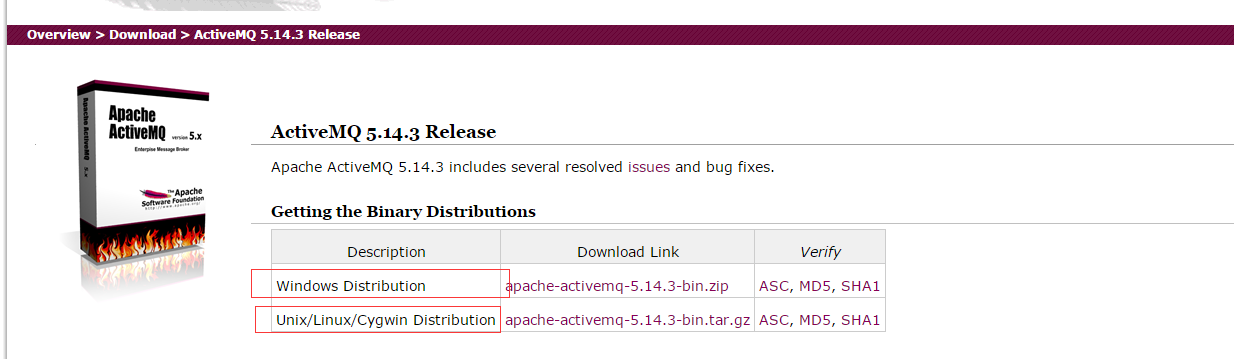
下载完安装包,解压之后的目录:

从它的目录来说,还是很简单的:
- bin存放的是脚本文件
- conf存放的是基本配置文件
- data存放的是日志文件
- docs存放的是说明文档
- examples存放的是简单的实例
- lib存放的是activemq所需jar包
- webapps用于存放项目的目录
2、启动ActiveMQ
进入到ActiveMQ 安装目录的Bin 目录,linux 下输入 ./activemq start 启动activeMQ 服务。
输入命令之后,会提示我们创建了一个进程IP 号,这时候说明服务已经成功启动了。

ActiveMQ默认启动时,启动了内置的jetty服务器,提供一个用于监控ActiveMQ的admin应用。
admin:http://127.0.0.1:8161/admin/
我们在浏览器打开链接之后输入账号密码(这里和tomcat 服务器类似)
默认账号:admin
密码:admin
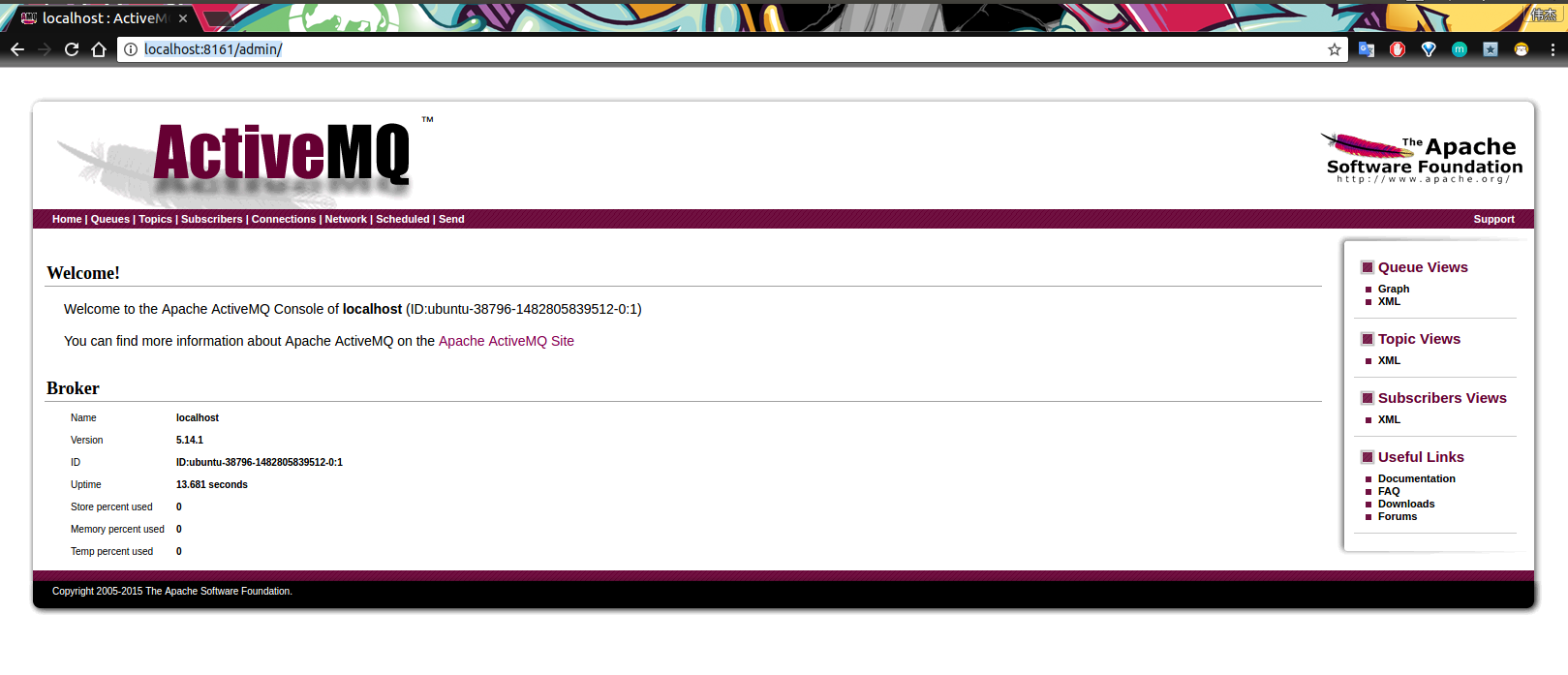
到这里为止,ActiveMQ 服务端就启动完毕了。
ActiveMQ 在linux 下的终止命令是 ./activemq stop
3、创建一个ActiveMQ工程
项目目录结构:
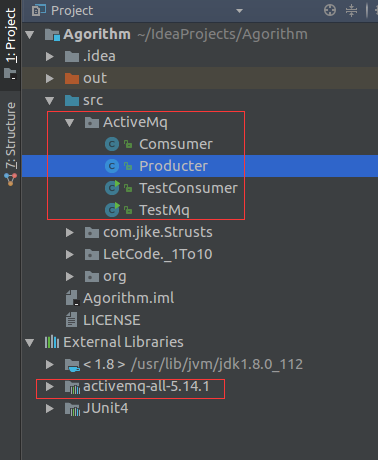
上述在官网下载ActiveMq 的时候,我们可以在目录下看到一个jar包:

这个jar 包就是我们需要在项目中进行开发中使用到的相关依赖。
3.1 创建生产者
public class Producter {

    //ActiveMq 的默认用户名

    private static final String USERNAME = ActiveMQConnection.DEFAULT_USER;

    //ActiveMq 的默认登录密码

    private static final String PASSWORD = ActiveMQConnection.DEFAULT_PASSWORD;

    //ActiveMQ 的链接地址

    private static final String BROKEN_URL = ActiveMQConnection.DEFAULT_BROKER_URL;

    AtomicInteger count = new AtomicInteger(0);

    //链接工厂

    ConnectionFactory connectionFactory;

    //链接对象

    Connection connection;

    //事务管理

    Session session;

    ThreadLocal<MessageProducer> threadLocal = new ThreadLocal<>();

    public void init(){

        try {

            //创建一个链接工厂

            connectionFactory = new ActiveMQConnectionFactory(USERNAME,PASSWORD,BROKEN_URL);

            //从工厂中创建一个链接

            connection  = connectionFactory.createConnection();

            //开启链接

            connection.start();

            //创建一个事务(这里通过参数可以设置事务的级别)

            session = connection.createSession(true,Session.SESSION_TRANSACTED);

        } catch (JMSException e) {

            e.printStackTrace();

        }

    }

    public void sendMessage(String disname){

        try {

            //创建一个消息队列

            Queue queue = session.createQueue(disname);

            //消息生产者

            MessageProducer messageProducer = null;

            if(threadLocal.get()!=null){

                messageProducer = threadLocal.get();

            }else{

                messageProducer = session.createProducer(queue);

                threadLocal.set(messageProducer);

            }

           while(true){

                Thread.sleep(1000);

                int num = count.getAndIncrement();

                //创建一条消息

                TextMessage msg = session.createTextMessage(Thread.currentThread().getName()+

                        "productor:我是大帅哥,我现在正在生产东西!,count:"+num);

                System.out.println(Thread.currentThread().getName()+

                        "productor:我是大帅哥,我现在正在生产东西!,count:"+num);

                //发送消息

                messageProducer.send(msg);

                //提交事务

                session.commit();

            }

        } catch (JMSException e) {

            e.printStackTrace();

        } catch (InterruptedException e) {

            e.printStackTrace();

        }

    }

}
3.2 创建消费者
public class Comsumer {

    private static final String USERNAME = ActiveMQConnection.DEFAULT_USER;

    private static final String PASSWORD = ActiveMQConnection.DEFAULT_PASSWORD;

    private static final String BROKEN_URL = ActiveMQConnection.DEFAULT_BROKER_URL;

    ConnectionFactory connectionFactory;

    Connection connection;

    Session session;

    ThreadLocal<MessageConsumer> threadLocal = new ThreadLocal<>();

    AtomicInteger count = new AtomicInteger();

    public void init(){

        try {

            connectionFactory = new ActiveMQConnectionFactory(USERNAME,PASSWORD,BROKEN_URL);

            connection  = connectionFactory.createConnection();

            connection.start();

            session = connection.createSession(false,Session.AUTO_ACKNOWLEDGE);

        } catch (JMSException e) {

            e.printStackTrace();

        }

    }

    public void getMessage(String disname){

        try {

            Queue queue = session.createQueue(disname);

            MessageConsumer consumer = null;

            if(threadLocal.get()!=null){

                consumer = threadLocal.get();

            }else{

                consumer = session.createConsumer(queue);

                threadLocal.set(consumer);

            }

            while(true){

                Thread.sleep(1000);

                TextMessage msg = (TextMessage) consumer.receive();

                if(msg!=null) {

                    msg.acknowledge();

                    System.out.println(Thread.currentThread().getName()+": Consumer:我是消费者,我正在消费Msg"+msg.getText()+"--->"+count.getAndIncrement());

                }else {

                    break;

                }

            }

        } catch (JMSException e) {

            e.printStackTrace();

        } catch (InterruptedException e) {

            e.printStackTrace();

        }

    }

}
4、运行ActiveMQ项目
4.1 生产者开始生产消息
public class TestMq {

    public static void main(String[] args){

        Producter producter = new Producter();

        producter.init();

        TestMq testMq = new TestMq();

        try {

            Thread.sleep(1000);

        } catch (InterruptedException e) {

            e.printStackTrace();

        }

        //Thread 1

        new Thread(testMq.new ProductorMq(producter)).start();

        //Thread 2

        new Thread(testMq.new ProductorMq(producter)).start();

        //Thread 3

        new Thread(testMq.new ProductorMq(producter)).start();

        //Thread 4

        new Thread(testMq.new ProductorMq(producter)).start();

        //Thread 5

        new Thread(testMq.new ProductorMq(producter)).start();

    }

    private class ProductorMq implements Runnable{

        Producter producter;

        public ProductorMq(Producter producter){

            this.producter = producter;

        }

        @Override

        public void run() {

            while(true){

                try {

                    producter.sendMessage("Jaycekon-MQ");

                    Thread.sleep(10000);

                } catch (InterruptedException e) {

                    e.printStackTrace();

                }

            }

        }

    }

}
运行结果:
 INFO | Successfully connected to tcp://localhost:61616

Thread-6productor:我是大帅哥,我现在正在生产东西!,count:0

Thread-4productor:我是大帅哥,我现在正在生产东西!,count:1

Thread-2productor:我是大帅哥,我现在正在生产东西!,count:3

Thread-5productor:我是大帅哥,我现在正在生产东西!,count:2

Thread-3productor:我是大帅哥,我现在正在生产东西!,count:4

Thread-6productor:我是大帅哥,我现在正在生产东西!,count:5

Thread-3productor:我是大帅哥,我现在正在生产东西!,count:6

Thread-5productor:我是大帅哥,我现在正在生产东西!,count:7

Thread-2productor:我是大帅哥,我现在正在生产东西!,count:8

Thread-4productor:我是大帅哥,我现在正在生产东西!,count:9

Thread-6productor:我是大帅哥,我现在正在生产东西!,count:10

Thread-3productor:我是大帅哥,我现在正在生产东西!,count:11

Thread-5productor:我是大帅哥,我现在正在生产东西!,count:12

Thread-2productor:我是大帅哥,我现在正在生产东西!,count:13

Thread-4productor:我是大帅哥,我现在正在生产东西!,count:14

Thread-6productor:我是大帅哥,我现在正在生产东西!,count:15

Thread-3productor:我是大帅哥,我现在正在生产东西!,count:16

Thread-5productor:我是大帅哥,我现在正在生产东西!,count:17

Thread-2productor:我是大帅哥,我现在正在生产东西!,count:18

Thread-4productor:我是大帅哥,我现在正在生产东西!,count:19

4.2 消费者开始消费消息
public class TestConsumer {

    public static void main(String[] args){

        Comsumer comsumer = new Comsumer();

        comsumer.init();

        TestConsumer testConsumer = new TestConsumer();

        new Thread(testConsumer.new ConsumerMq(comsumer)).start();

        new Thread(testConsumer.new ConsumerMq(comsumer)).start();

        new Thread(testConsumer.new ConsumerMq(comsumer)).start();

        new Thread(testConsumer.new ConsumerMq(comsumer)).start();

    }

    private class ConsumerMq implements Runnable{

        Comsumer comsumer;

        public ConsumerMq(Comsumer comsumer){

            this.comsumer = comsumer;

        }

        @Override

        public void run() {

            while(true){

                try {

                    comsumer.getMessage("Jaycekon-MQ");

                    Thread.sleep(10000);

                } catch (InterruptedException e) {

                    e.printStackTrace();

                }

            }

        }

    }

}
运行结果:
 INFO | Successfully connected to tcp://localhost:61616

Thread-2: Consumer:我是消费者,我正在消费MsgThread-5productor:我是大帅哥,我现在正在生产东西!,count:4--->0

Thread-3: Consumer:我是消费者,我正在消费MsgThread-4productor:我是大帅哥,我现在正在生产东西!,count:36--->1

Thread-4: Consumer:我是消费者,我正在消费MsgThread-3productor:我是大帅哥,我现在正在生产东西!,count:38--->2

Thread-5: Consumer:我是消费者,我正在消费MsgThread-6productor:我是大帅哥,我现在正在生产东西!,count:37--->3

Thread-2: Consumer:我是消费者,我正在消费MsgThread-6productor:我是大帅哥,我现在正在生产东西!,count:2--->4

Thread-3: Consumer:我是消费者,我正在消费MsgThread-5productor:我是大帅哥,我现在正在生产东西!,count:40--->5

Thread-4: Consumer:我是消费者,我正在消费MsgThread-6productor:我是大帅哥,我现在正在生产东西!,count:42--->6

Thread-5: Consumer:我是消费者,我正在消费MsgThread-4productor:我是大帅哥,我现在正在生产东西!,count:41--->7

Thread-2: Consumer:我是消费者,我正在消费MsgThread-3productor:我是大帅哥,我现在正在生产东西!,count:1--->8

Thread-3: Consumer:我是消费者,我正在消费MsgThread-2productor:我是大帅哥,我现在正在生产东西!,count:44--->9

Thread-4: Consumer:我是消费者,我正在消费MsgThread-4productor:我是大帅哥,我现在正在生产东西!,count:46--->10

Thread-5: Consumer:我是消费者,我正在消费MsgThread-5productor:我是大帅哥,我现在正在生产东西!,count:45--->11

Thread-2: Consumer:我是消费者,我正在消费MsgThread-2productor:我是大帅哥,我现在正在生产东西!,count:3--->12

Thread-3: Consumer:我是消费者,我正在消费MsgThread-3productor:我是大帅哥,我现在正在生产东西!,count:48--->13

Thread-4: Consumer:我是消费者,我正在消费MsgThread-5productor:我是大帅哥,我现在正在生产东西!,count:50--->14

Thread-5: Consumer:我是消费者,我正在消费MsgThread-2productor:我是大帅哥,我现在正在生产东西!,count:49--->15

Thread-4: Consumer:我是消费者,我正在消费MsgThread-2productor:我是大帅哥,我现在正在生产东西!,count:54--->16

Thread-2: Consumer:我是消费者,我正在消费MsgThread-5productor:我是大帅哥,我现在正在生产东西!,count:6--->17

Thread-3: Consumer:我是消费者,我正在消费MsgThread-6productor:我是大帅哥,我现在正在生产东西!,count:52--->18

Thread-5: Consumer:我是消费者,我正在消费MsgThread-3productor:我是大帅哥,我现在正在生产东西!,count:53--->19

Thread-4: Consumer:我是消费者,我正在消费MsgThread-3productor:我是大帅哥,我现在正在生产东西!,count:58--->20
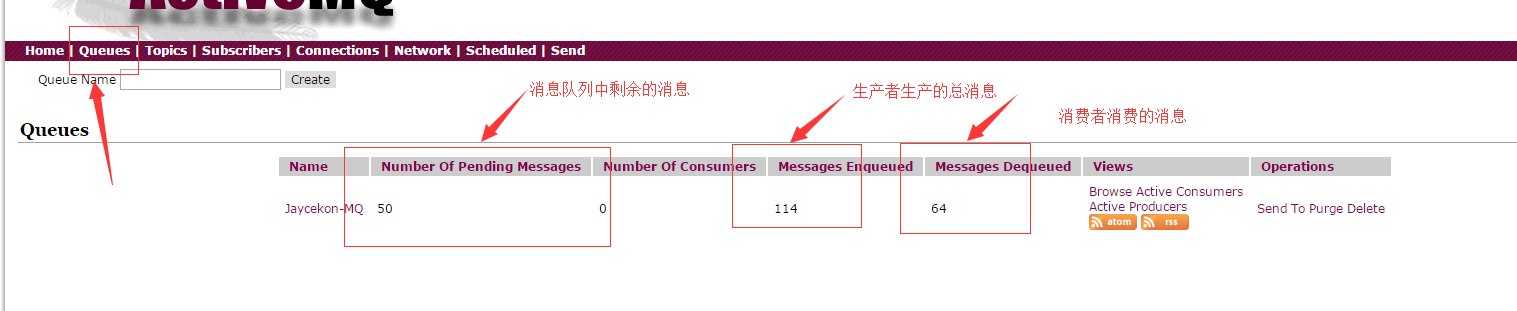
查看运行结果,我们可以做ActiveMQ 服务端:http://127.0.0.1:8161/admin/ 里面的Queues 中查看我们生产的消息。
5、ActiveMQ的特性
5.1 ActiveMq 的特性
- 多种语言和协议编写客户端。语言: Java, C, C++, C#, Ruby, Perl, Python, PHP。应用协议: OpenWire,Stomp REST,WS Notification,XMPP,AMQP
- 完全支持JMS1.1和J2EE 1.4规范 (持久化,XA消息,事务)
- 对Spring的支持,ActiveMQ可以很容易内嵌到使用Spring的系统里面去,而且也支持Spring2.0的特性
- 通过了常见J2EE服务器(如 Geronimo,JBoss 4, GlassFish,WebLogic)的测试,其中通过JCA 1.5 resource adaptors的配置,可以让ActiveMQ可以自动的部署到任何兼容J2EE 1.4 商业服务器上
- 支持多种传送协议:in-VM,TCP,SSL,NIO,UDP,JGroups,JXTA
- 支持通过JDBC和journal提供高速的消息持久化
- 从设计上保证了高性能的集群,客户端-服务器,点对点
- 支持Ajax
- 支持与Axis的整合
- 可以很容易得调用内嵌JMS provider,进行测试
5.2 什么情况下使用ActiveMQ?
- 多个项目之间集成
(1) 跨平台
(2) 多语言
(3) 多项目 - 降低系统间模块的耦合度,解耦
(1) 软件扩展性 - 系统前后端隔离
(1) 前后端隔离,屏蔽高安全区
关于JMS(Java 消息服务) 的一些概述可以参考我的上一篇博客:http://www.cnblogs.com/jaycekon/p/6220200.html
Java消息队列--ActiveMq 实战的更多相关文章
- activemq学习总结 (转)Java消息队列--ActiveMq 实战
转:https://www.cnblogs.com/jaycekon/p/6225058.html 感谢作者 ActiveMQ官网下载地址:http://activemq.apache.org/dow ...
- Java消息队列--ActiveMq 初体验
1.下载安装ActiveMQ ActiveMQ官网下载地址:http://activemq.apache.org/download.html ActiveMQ 提供了Windows 和Linux.Un ...
- java消息队列--ActiveMQ
1.下载安装ActiveMQ ActiveMQ官网下载地址:http://activemq.apache.org/download.html ActiveMQ 提供了Windows 和Linux.Un ...
- Java消息队列ActiveMQ (一)--JMS基本概念
摘要:The Java Message Service (JMS) API is a messaging standard that allows application components bas ...
- Java消息队列-Spring整合ActiveMq
1.概述 首先和大家一起回顾一下Java 消息服务,在我之前的博客<Java消息队列-JMS概述>中,我为大家分析了: 消息服务:一个中间件,用于解决两个活多个程序之间的耦合,底层由Jav ...
- 消息队列ActiveMQ的使用详解
通过上一篇文章 <消息队列深入解析>,我们已经消息队列是什么.使用消息队列的好处以及常见消息队列的简单介绍. 这一篇文章,主要带大家详细了解一下消息队列ActiveMQ的使用. 学习消息队 ...
- JMS(Java消息服务)与消息队列ActiveMQ基本使用(一)
最近的项目中用到了mq,之前自己一直在码农一样的照葫芦画瓢.最近几天研究了下,把自己所有看下来的文档和了解总结一下. 一. 认识JMS 1.概述 对于JMS,百度百科,是这样介绍的:JMS即Java消 ...
- java之消息队列ActiveMQ实践
原创论文:https://www.cnblogs.com/goujh/p/8510239.html 消息队列的应用场景: 消息队列应用场景 异步处理,应用解耦,流量削锋和消息通讯四个场景 异步处理: ...
- lesson5:利用jmeter来压测消息队列(activemq)
本文讲述了利用jmeter来压测消息队列,其中消息队列采用apache的activemq,jmeter本身是支持符合jms标准消息队列的压测,由于jmeter的官方sampler配置比较复杂,本文直接 ...
随机推荐
- [APUE]UNIX进程的环境(下)
一.共享库 共享库使得可执行文件中不再需要包含常用的库函数,而只需在所有进程都可存取的存储区中保存这种库例程的一个副本.程序第一次执行的时候或第一次调用某个库函数的时候,用动态链接方法将程序与共享库函 ...
- 简单粗暴地理解js原型链--js面向对象编程
原型链理解起来有点绕了,网上资料也是很多,每次晚上睡不着的时候总喜欢在网上找点原型链和闭包的文章看,效果极好. 不要纠结于那一堆术语了,那除了让你脑筋拧成麻花,真的不能帮你什么.简单粗暴点看原型链吧, ...
- Sublime Text 3中文乱码解决方法以及安装包管理器方法
一般出现乱码是因为文本采用了GBK编码格式,Sublime Text默认不支持GBK编码. 安装包管理器 简单安装 使用Ctrl+`快捷键或者通过View->Show Console菜单打开命令 ...
- App你真的需要么
随着智能手机.移动路联网的普及,APP火的一塌糊涂,APP应用可谓五花八门,街上经常看到各种推广:扫码安装送东西,送优惠券.仿佛一夜之间一个企业没有自己的APP就跟不上时代了. 有时我在想:APP,你 ...
- JavaWeb——Servlet
一.基本概念 Servlet是运行在Web服务器上的小程序,通过http协议和客户端进行交互. 这里的客户端一般为浏览器,发送http请求(request)给服务器(如Tomcat).服务器接收到请求 ...
- WPF 普通属性变化通知
问题描述:使用ObservableCollection<OrderItem> source 给Datagrid.ItemsSource赋值,在后台更新source集合后,前台Datagri ...
- 你所能用到的BMP格式介绍
原理篇: 一.编码的意义. 让我们从一个简单的问题开始,-2&-255(中间的操作符表示and的意思)的结果是多少,这个很简单的问题,但是能够写出解答过程的人并不 多.这个看起来和图片格式没有 ...
- 在centos7(EL7.3 即 kernel-3.10.0-514.X )上安装BCM4312无线网卡驱动要注意的问题
我新装的centos7主机无法使用里面自带的网卡,查询后发现网卡型号为BCM4312.我在看资料安装的过程中遇到了些问题,纠结了好久,现在分享下要注意的点,为后来的遇到同样问题的人提供点帮助.现在开始 ...
- 第14章 Linux启动管理(1)_系统运行级别
1. CentOS 6.x 启动管理 (1)系统运行级别 ①运行级别 运行级别 含义 0 关机 1 单用户模式,可以想象为Windows的安全模式,主要用于系统修复.(但不是Linux的安全模式) 2 ...
- 个人也能申请微信小程序获得APPID和手机测试效果
微信小程序昨晚火爆公测,我也第一时间注册了小程序账号开启公测之旅. 注册过程可以看文档:https://my.oschina.net/imhoodoo/blog/780901 进入后台之后我们其实主要 ...