
IOS自定义表格UITableViewCell
在UITableView中,自定义表格,最原始是继承UITableViewCell,然后通过写代码方式去搞,但是这个费事了。
1.在storyboard中
给一个ViewController的tabieview增加自定义的UITableViewCell,可以直接从 object Library里面选取UITableViewCell拖动到tableview中,然后添加界面上自定义元素,然后补充cell的类,重用id等信息。
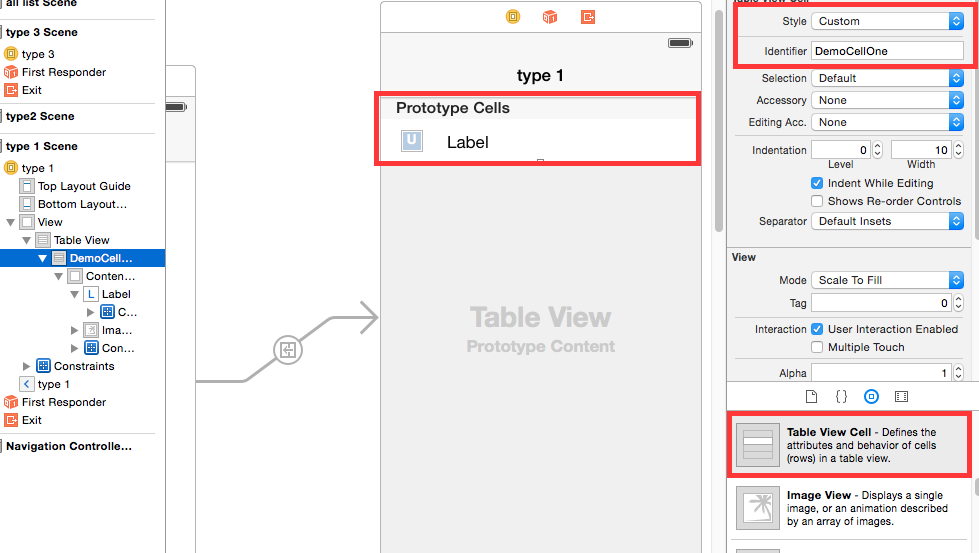
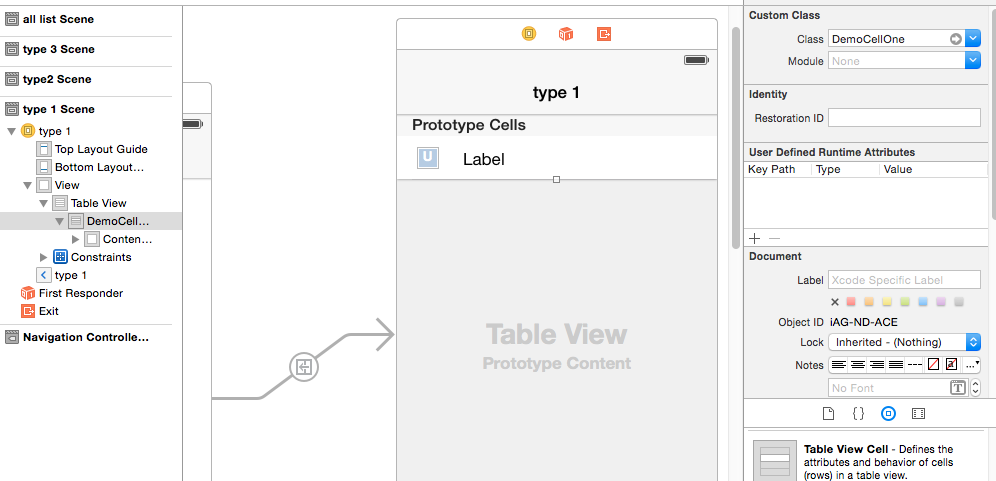
补充完成后,需要在工程中添加对应的cell的类文件,并做代码和xib的关联。
@interface DemoCellOne : UITableViewCell

@property (weak, nonatomic) IBOutlet UIImageView *imageInfoView;

@property (weak, nonatomic) IBOutlet UILabel *contentInfoLabel;

@end
然后就可以在相应的viewcontroller里面使用了,如下:
- (UITableViewCell*)tableView:(UITableView *)tableView cellForRowAtIndexPath:(NSIndexPath *)indexPath

{

    DemoCellOne *cell = [tableView dequeueReusableCellWithIdentifier:@"DemoCellOne"];

    cell.contentInfoLabel.text = [self.datasource objectAtIndex:indexPath.row];

    return cell;

}
2.在普通的xib文件中
如果ios工程还是之前那种xib形式的,则可以给工程添加新文件,添加时候选择添加新的类,从UITableViewCell继承,然后在生成源码文件之前,先在确认界面勾选上生成对应的xib文件。
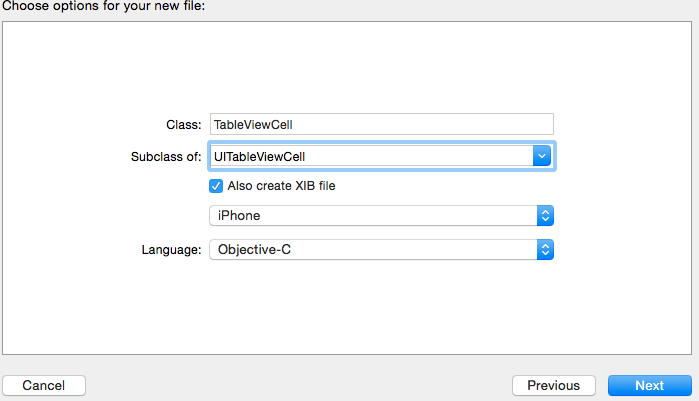
生成好之后,在xib中给UITableViewCell添加个性化元素,然后在代码中加载。
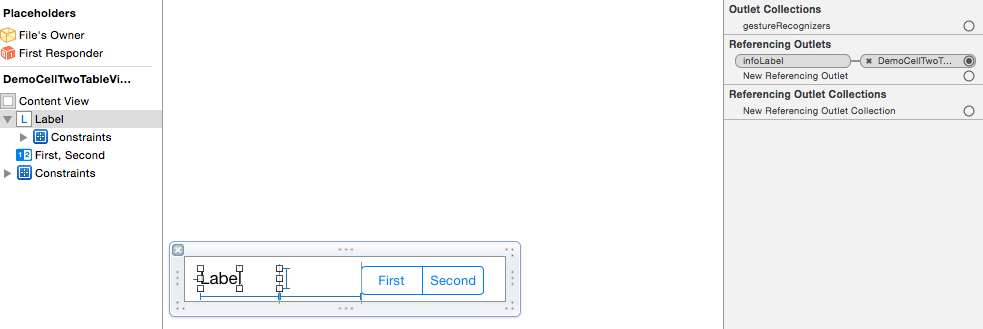
以下是cell对应的类的定义,为了便于修改,做了xib和代码之间的IBOutlet关联。
 @interface DemoCellTwoTableViewCell : UITableViewCell

 @property (weak, nonatomic) IBOutlet UILabel *infoLabel;

 @property (weak, nonatomic) IBOutlet UISegmentedControl *segmentControl;

 @end
以下是在viewcontroller中使用
@interface ViewController2 ()<UITableViewDelegate,UITableViewDataSource>

@property (weak, nonatomic) IBOutlet UITableView *contentTableView;

@property(nonatomic,strong) NSMutableArray * datasource;

@end

@implementation ViewController2

- (void)viewDidLoad {

    [super viewDidLoad];

    // Do any additional setup after loading the view.

    [self.contentTableView registerNib:[UINib nibWithNibName:@"DemoCellTwoTableViewCell" bundle:nil] forCellReuseIdentifier:@"DemoCellTwoTableViewCell"];

    self.datasource = [NSMutableArray array];

    [self loadDataSource];

}

- (void)didReceiveMemoryWarning {

    [super didReceiveMemoryWarning];

    // Dispose of any resources that can be recreated.

}

- (void)loadDataSource

{

    [self.datasource addObject:@"a1"];

    [self.datasource addObject:@"a2"];

}

- (NSInteger)tableView:(UITableView *)tableView numberOfRowsInSection:(NSInteger)section

{

    return [self.datasource count];

}

- (CGFloat)tableView:(UITableView *)tableView heightForRowAtIndexPath:(NSIndexPath *)indexPath

{

    return 60.0f;

}

- (UITableViewCell*)tableView:(UITableView *)tableView cellForRowAtIndexPath:(NSIndexPath *)indexPath

{

    DemoCellTwoTableViewCell * cell = [tableView dequeueReusableCellWithIdentifier:@"DemoCellTwoTableViewCell"];

    cell.infoLabel.text = [self.datasource objectAtIndex:indexPath.row];

    return cell;

}

@end
上面是通过注册tableview的cell对应的nib文件的方式来重用cell的。还有一种方式如下:
- (UITableViewCell*)tableView:(UITableView *)tableView cellForRowAtIndexPath:(NSIndexPath *)indexPath

{

    DemoCellTwoTableViewCell * cell = [tableView dequeueReusableCellWithIdentifier:@"DemoCellTwoTableViewCell"];

    if (nil == cell)

    {

        NSArray *objs = [[NSBundle mainBundle] loadNibNamed:@"DemoCellTwoTableViewCell" owner:self options:nil];

        cell = [objs objectAtIndex:];

    }

    cell.infoLabel.text = [self.datasource objectAtIndex:indexPath.row];

    return cell;

}
这种方式不需要在viewcontroller的viewdidload方法里面注册重用的nib文件。只是在cell重用处加载nib。
注意:第二种方式,在自定义cell的xib文件中,file owner不需要修改,保持默认值就行了。

IOS自定义表格UITableViewCell的更多相关文章
- 【iOS自定义键盘及键盘切换】详解
[iOS自定义键盘]详解 实现效果展示: 一.实现的协议方法代码 #import <UIKit/UIKit.h> //创建自定义键盘协议 @protocol XFG_KeyBoardDel ...
- 可任意自定义的 UITableViewCell
可任意自定义的 UITableViewCell UITableView的强大更多程度上来自于可以任意自定义UITableViewCell单元格.通常,UITableView中的Cell是动态的,在使用 ...
- iOS自定义的UISwitch按钮
UISwitch开关控件 开关代替了点选框.开关是到目前为止用起来最简单的控件,不过仍然可以作一定程度的定制化. 一.创建 UISwitch* mySwitch = [[ UISwitchalloc] ...
- Android中使用ListView绘制自定义表格(2)
上回再写了<Android中使用ListView绘制自定义表格>后,很多人留言代码不全和没有数据样例.但因为项目原因,没法把源码全部贴上来.近两天,抽空简化了一下,做了一个例子. 效果图如 ...
- 如何实现 iOS 自定义状态栏
给大家介绍如何实现 iOS 自定义状态栏 Sample Code: 01 UIWindow * statusWindow = [[UIWindow alloc] initWithFrame:[UIAp ...
- Dev_GridView自定义表格
#region 自定义表格 //初始化测斜分析数据表 BandedGridView view = advBandedGridView1 as BandedGridView; view.BeginUpd ...
- iOS自定义组与组之间的距离以及视图
iOS自定义组与组之间的距离以及视图 //头视图高度 - (CGFloat)tableView:(UITableView *)tableView heightForHeaderInSection:(N ...
- iOS 自定义转场动画
代码地址如下:http://www.demodashi.com/demo/12955.html 一.总效果 本文记录分享下自定义转场动画的实现方法,具体到动画效果:新浪微博图集浏览转场效果.手势过渡动 ...
- iOS 自定义转场动画浅谈
代码地址如下:http://www.demodashi.com/demo/11612.html 路漫漫其修远兮,吾将上下而求索 前记 想研究自定义转场动画很久了,时间就像海绵,挤一挤还是有的,花了差不 ...
随机推荐
- 【Learning Python】【第四章】Python代码结构(一)
这一章的主旨在于介绍python的代码结构 缩进 在很多的编程语言中,一般{}用于控制代码块,比如以下的一段C代码 if(var <= 10) { printf("....." ...
- MVC5 CodeFirst (一)
创建一个MVC5项目,VS生成了AccountController.HomeController,F5直接运行,实现了注册.登录.修改……但是注册的用户只是在内存里,下面我们来持久化. 三个命令:en ...
- 解决Tomcat7“At least one JAR was scanned for TLDs yet contained no TLDs”问题
解决Tomcat7“At least one JAR was scanned for TLDs yet contained no TLDs”问题 2013-12-05 21:58:00| 分类: t ...
- 【转】家庭wifi覆盖指导
网址:家庭wifi覆盖指导 私以为,目前民用 wifi 路由器市场已经完全走上了邪路.天线越来越大,发射功率越做越高.都敢冒着法律的风险使用大大超过 100mW 的发射功率了.且不论巨大的发射功率可能 ...
- 提升Nginx+PHP-FPM性能技巧
/etc/php-fpm.d 2.1进程数 php-fpm初始/空闲/最大worker进程数 pm.max_children = 300 pm.start_servers = ...
- C# DES进行加解密
DES加解密 /// 进行DES加密. /// </summary> /// <param name="pToEncrypt">要加密的字符串.</p ...
- PHP乱码问题,UTF-8(乱码) (share)
一.PHP页面转UTF-8编码问题 1.在代码开始出加入一行: header("Content-Type: text/html;charset=utf-8"); 2.PHP文件编码 ...
- 【Cocos2d-x 3.x】内存管理机制与源码分析
侯捷先生说过这么一句话 : 源码之前,了无秘密. 要了解Cocos2d-x的内存管理机制,就得阅读源码. 接触Cocos2d-x时, Cocos2d-x的最新版本已经到了3.2的时代,在学习Coco ...
- WebAPI的Get和Post访问
/// <summary> /// MVC 调用webapi接口返回框架快捷按钮和一级菜单(Get) /// </summary> /// <param name=&qu ...
- ajax处理的方式
1.方式一:在一个web页面中 [System.Web.Services.WebMethod],有点象webservers的方法! 前台: 返回的数据: msg:Object {d: "He ...