
IOS自定义表格UITableViewCell
在UITableView中,自定义表格,最原始是继承UITableViewCell,然后通过写代码方式去搞,但是这个费事了。
1.在storyboard中
给一个ViewController的tabieview增加自定义的UITableViewCell,可以直接从 object Library里面选取UITableViewCell拖动到tableview中,然后添加界面上自定义元素,然后补充cell的类,重用id等信息。
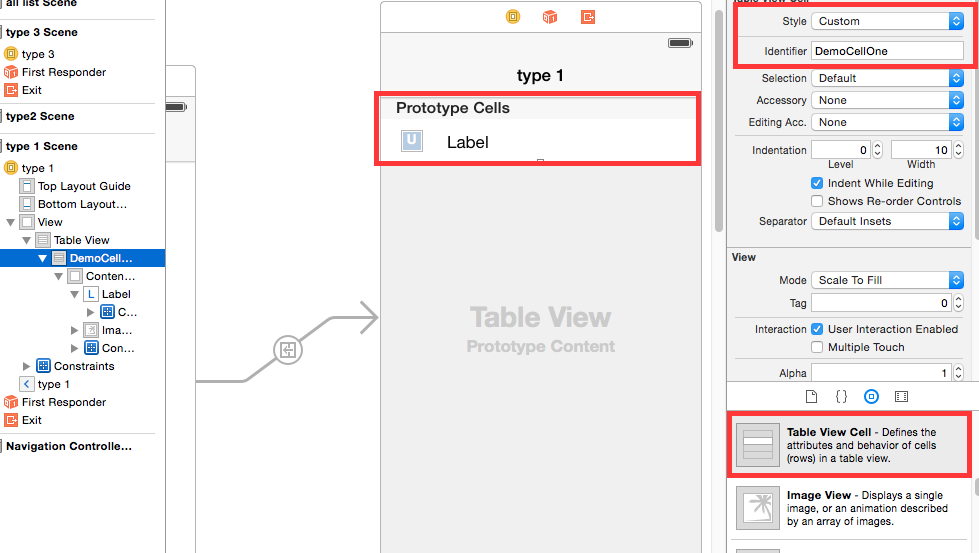
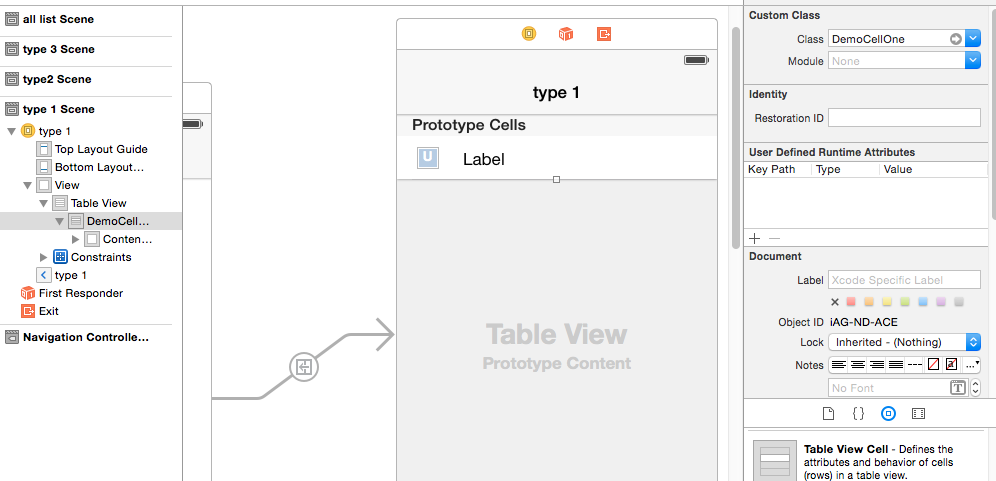
补充完成后,需要在工程中添加对应的cell的类文件,并做代码和xib的关联。
@interface DemoCellOne : UITableViewCell

@property (weak, nonatomic) IBOutlet UIImageView *imageInfoView;

@property (weak, nonatomic) IBOutlet UILabel *contentInfoLabel;

@end
然后就可以在相应的viewcontroller里面使用了,如下:
- (UITableViewCell*)tableView:(UITableView *)tableView cellForRowAtIndexPath:(NSIndexPath *)indexPath

{

    DemoCellOne *cell = [tableView dequeueReusableCellWithIdentifier:@"DemoCellOne"];

    cell.contentInfoLabel.text = [self.datasource objectAtIndex:indexPath.row];

    return cell;

}
2.在普通的xib文件中
如果ios工程还是之前那种xib形式的,则可以给工程添加新文件,添加时候选择添加新的类,从UITableViewCell继承,然后在生成源码文件之前,先在确认界面勾选上生成对应的xib文件。
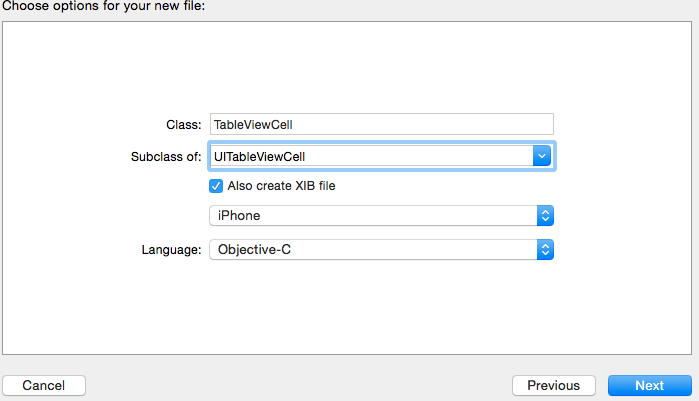
生成好之后,在xib中给UITableViewCell添加个性化元素,然后在代码中加载。
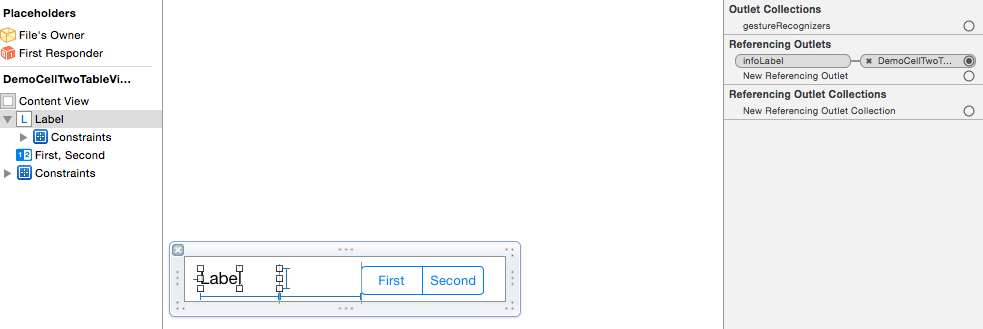
以下是cell对应的类的定义,为了便于修改,做了xib和代码之间的IBOutlet关联。
 @interface DemoCellTwoTableViewCell : UITableViewCell

 @property (weak, nonatomic) IBOutlet UILabel *infoLabel;

 @property (weak, nonatomic) IBOutlet UISegmentedControl *segmentControl;

 @end
以下是在viewcontroller中使用
@interface ViewController2 ()<UITableViewDelegate,UITableViewDataSource>

@property (weak, nonatomic) IBOutlet UITableView *contentTableView;

@property(nonatomic,strong) NSMutableArray * datasource;

@end

@implementation ViewController2

- (void)viewDidLoad {

    [super viewDidLoad];

    // Do any additional setup after loading the view.

    [self.contentTableView registerNib:[UINib nibWithNibName:@"DemoCellTwoTableViewCell" bundle:nil] forCellReuseIdentifier:@"DemoCellTwoTableViewCell"];

    self.datasource = [NSMutableArray array];

    [self loadDataSource];

}

- (void)didReceiveMemoryWarning {

    [super didReceiveMemoryWarning];

    // Dispose of any resources that can be recreated.

}

- (void)loadDataSource

{

    [self.datasource addObject:@"a1"];

    [self.datasource addObject:@"a2"];

}

- (NSInteger)tableView:(UITableView *)tableView numberOfRowsInSection:(NSInteger)section

{

    return [self.datasource count];

}

- (CGFloat)tableView:(UITableView *)tableView heightForRowAtIndexPath:(NSIndexPath *)indexPath

{

    return 60.0f;

}

- (UITableViewCell*)tableView:(UITableView *)tableView cellForRowAtIndexPath:(NSIndexPath *)indexPath

{

    DemoCellTwoTableViewCell * cell = [tableView dequeueReusableCellWithIdentifier:@"DemoCellTwoTableViewCell"];

    cell.infoLabel.text = [self.datasource objectAtIndex:indexPath.row];

    return cell;

}

@end
上面是通过注册tableview的cell对应的nib文件的方式来重用cell的。还有一种方式如下:
- (UITableViewCell*)tableView:(UITableView *)tableView cellForRowAtIndexPath:(NSIndexPath *)indexPath

{

    DemoCellTwoTableViewCell * cell = [tableView dequeueReusableCellWithIdentifier:@"DemoCellTwoTableViewCell"];

    if (nil == cell)

    {

        NSArray *objs = [[NSBundle mainBundle] loadNibNamed:@"DemoCellTwoTableViewCell" owner:self options:nil];

        cell = [objs objectAtIndex:];

    }

    cell.infoLabel.text = [self.datasource objectAtIndex:indexPath.row];

    return cell;

}
这种方式不需要在viewcontroller的viewdidload方法里面注册重用的nib文件。只是在cell重用处加载nib。
注意:第二种方式,在自定义cell的xib文件中,file owner不需要修改,保持默认值就行了。

IOS自定义表格UITableViewCell的更多相关文章
- 【iOS自定义键盘及键盘切换】详解
[iOS自定义键盘]详解 实现效果展示: 一.实现的协议方法代码 #import <UIKit/UIKit.h> //创建自定义键盘协议 @protocol XFG_KeyBoardDel ...
- 可任意自定义的 UITableViewCell
可任意自定义的 UITableViewCell UITableView的强大更多程度上来自于可以任意自定义UITableViewCell单元格.通常,UITableView中的Cell是动态的,在使用 ...
- iOS自定义的UISwitch按钮
UISwitch开关控件 开关代替了点选框.开关是到目前为止用起来最简单的控件,不过仍然可以作一定程度的定制化. 一.创建 UISwitch* mySwitch = [[ UISwitchalloc] ...
- Android中使用ListView绘制自定义表格(2)
上回再写了<Android中使用ListView绘制自定义表格>后,很多人留言代码不全和没有数据样例.但因为项目原因,没法把源码全部贴上来.近两天,抽空简化了一下,做了一个例子. 效果图如 ...
- 如何实现 iOS 自定义状态栏
给大家介绍如何实现 iOS 自定义状态栏 Sample Code: 01 UIWindow * statusWindow = [[UIWindow alloc] initWithFrame:[UIAp ...
- Dev_GridView自定义表格
#region 自定义表格 //初始化测斜分析数据表 BandedGridView view = advBandedGridView1 as BandedGridView; view.BeginUpd ...
- iOS自定义组与组之间的距离以及视图
iOS自定义组与组之间的距离以及视图 //头视图高度 - (CGFloat)tableView:(UITableView *)tableView heightForHeaderInSection:(N ...
- iOS 自定义转场动画
代码地址如下:http://www.demodashi.com/demo/12955.html 一.总效果 本文记录分享下自定义转场动画的实现方法,具体到动画效果:新浪微博图集浏览转场效果.手势过渡动 ...
- iOS 自定义转场动画浅谈
代码地址如下:http://www.demodashi.com/demo/11612.html 路漫漫其修远兮,吾将上下而求索 前记 想研究自定义转场动画很久了,时间就像海绵,挤一挤还是有的,花了差不 ...
随机推荐
- Unity自动场景保存脚本
新建一个名为AutoSave的编辑器脚本,并放于Assets/Editor下. using System; using UnityEditor; using UnityEditor.SceneMana ...
- C# 字符编码类Encoding
在网络通信中,很多情况下都是将字符信息转成字节序列进行传输.将字符序列转为字节序列的过程称为编码.当这些字节传送到接收方,接收方需要逆向将字节序列转为字符序列.这个过程就是解码. 常见编码有ASCII ...
- 用powershell批量新增user profile
SharePoint 2013 新系统,要在User Profile Service里把人全加一下,其实同步ad更方便,但ad里的人太多,没必要全要,只要大中华区就行了,问hr要了一份人员名单,写了个 ...
- 33条C#和.NET经典面试题目及答案
1. .NET中类和结构的区别? 答:结构和类具有大体的语法,但是结构受到的限制比类要多. a. 结构不能有默认的构造函数,因为结构的副本是用编译器创建和销毁的,所以不需要默认的构造函数和析构函数. ...
- webdriver 获取佰词斩的单词(涉及字符串转换)
from selenium import webdriver def finds(da): d = da.split(',"') t = {} for i in (d[1], d[2], d ...
- svn客户端命令
记几个常用的命令. 首次拉仓库时,先要进行检出(url可以带端口号): svn checkout http://svn.example.com:9834/repos svn checkout file ...
- java.lang.ClassCastException: org.slf4j.impl.Log4jLoggerFactory cannot be cast to ch.qos.logback.classic.LoggerContext问题原因及解决方法
一.错误信息 java.lang.ClassCastException: org.slf4j.impl.Log4jLoggerFactory cannot be cast to ch.qos.logb ...
- appium 执行demo
appium很早就了解了,一直没有之际操作过,最近把官网的demo搞下来执行了一遍,还是很有意思的 经过测试是可以跑起来的,不过跑得过程中,输入法需要默认为英文的,如果是中文的码输入的时候有点问题,可 ...
- http学习 1-3 chapter3-报文
如果说HTTP是因特网的信使,那么HTTP报文就是它用来搬东西的包裹了. 报文是如何流动的. HTTP报文的三个组成部分(起始行.首部和实体的主体部分) 请求和响应报文之间的区别 请求报文支持的各种功 ...
- Javascript中的数组方法总结
1.concat():将两个或多个数组合并成一个数组 arrayObject.concat(arrayX,arrayX,......,arrayX),返回一个新的数据,arrayX可以是数值也可以是数 ...