
Android忘记密码功能实现
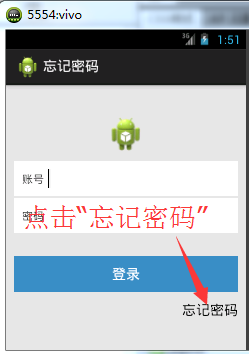
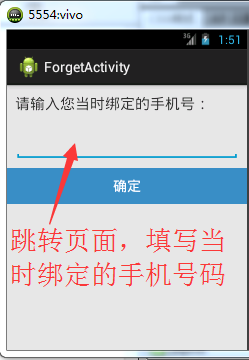
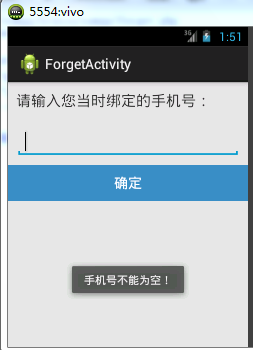
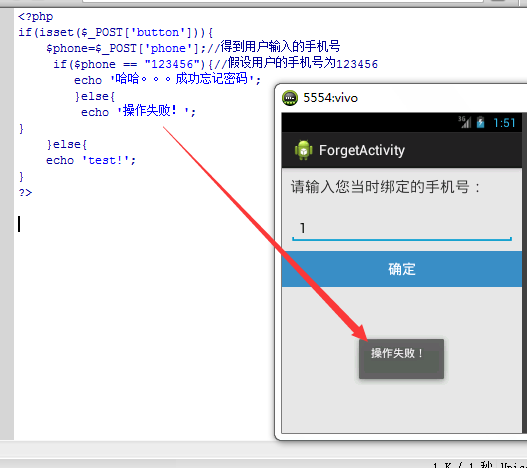
连续好几天学习都没有什么进展,然而在今天这个烂漫的日子。突然有了学习的动力。想起来前几日老师给布置的android忘记密码的功能实现。今天也有了想法。就是按照老师的建议,简单的回答一个问题,实现此功能。我就模仿之前写的登录的例子。实现了此功能。我的想法是:回答之前绑定的手机号。如果正确则忘记密码成功。反之失败。
现在开始上效果图片:
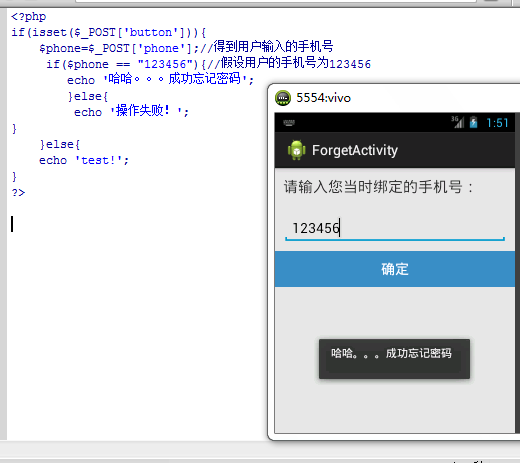
android端的代码:
ForgetActivity.java
package com.itcast.forget;

import java.io.InputStream;

import java.net.HttpURLConnection;

import java.net.URL;

import android.os.Bundle;

import android.os.Handler;

import android.os.Message;

import android.app.Activity;

import android.content.Intent;

import android.text.TextUtils;

import android.view.Menu;

import android.view.View;

import android.widget.EditText;

import android.widget.Toast;

public class ForgetActivity extends Activity {

        private EditText et_phone;

        protected static final int ERROR = 2;

        protected static final int SUCCESS = 1;

        private Handler handler = new Handler(){

        public void handleMessage(Message msg) {

            switch (msg.what) {

            case SUCCESS:

                Toast.makeText(ForgetActivity.this,(String)msg.obj, 1).show();

                break;

            case ERROR:

                Toast.makeText(ForgetActivity.this,"失败", 1).show();

                break;

            }

        };

         };

    @Override

    protected void onCreate(Bundle savedInstanceState) {

        super.onCreate(savedInstanceState);

        setContentView(R.layout.activity_forget);

        et_phone = (EditText) findViewById(R.id.et_phone);

    }

    public void btn_ok(View view){

        final String phone = et_phone.getText().toString().trim();

        if (TextUtils.isEmpty(phone)) {

            Toast.makeText(this, "手机号不能为空!", 0).show();

            return;

        }

        new Thread(){

            public void run(){

                try{

                    String path = "http://192.168.1.105:80/xampp/forget.php";

                    URL url = new URL(path);

                    HttpURLConnection conn = (HttpURLConnection) url.openConnection();

                    conn.setRequestMethod("POST");

                     conn.setRequestProperty("User-Agent", "Mozilla/5.0(compatible;MSIE 9.0;Windows NT 6.1;Trident/5.0)");

                     conn.setRequestProperty("Content-Type", "application/x-www-form-urlencoded");//请求的类型  表单数据

                     String data = "phone="+phone+"&button=";

                     conn.setRequestProperty("Content-Length", data.length()+"");//数据的长度

                     conn.setDoOutput(true);//设置向服务器写数据

                     byte[] bytes = data.getBytes();

                     conn.getOutputStream().write(bytes);//把数据以流的方式写给服务

                     int code = conn.getResponseCode();

                     if(code == 200){

                         InputStream is = conn.getInputStream();

                         String  result = StreamTools.readStream(is);

                         Message mas= Message.obtain();

                         mas.what = SUCCESS;

                         mas.obj = result;

                         handler.sendMessage(mas);

         }else{

             Message mas = Message.obtain();

             mas.what = ERROR;

             handler.sendMessage(mas);

             }

                }catch(Exception e){

                     Message mas = Message.obtain();

                        mas.what = ERROR;

                        handler.sendMessage(mas);

                }

            };

        }.start();

    }

}
MainActivity.java
package com.itcast.forget;

import android.os.Bundle;

import android.app.Activity;

import android.content.Intent;

import android.view.Menu;

import android.view.View;

import android.widget.Button;

public class MainActivity extends Activity {

    @Override

    protected void onCreate(Bundle savedInstanceState) {

        super.onCreate(savedInstanceState);

        setContentView(R.layout.activity_main);

    }

    public void forget(View view){

        Intent intent = new Intent(this,ForgetActivity.class);

        startActivity(intent);

    }

}
StreamTools.java
package com.itcast.forget;

import java.io.ByteArrayOutputStream;

import java.io.IOException;

import java.io.InputStream;

public class StreamTools {

    public static String readStream(InputStream is){

        try {

            ByteArrayOutputStream baos = new ByteArrayOutputStream();

            byte[] buffer = new byte[1024];

            int len = -1;

            while ((len = is.read(buffer))!=-1) {

                baos.write(buffer,0,len);

            }

            baos.close();

            return new String(baos.toByteArray());

        } catch (IOException e) {

            // TODO Auto-generated catch block

            e.printStackTrace();

            return "";

        }

    }

}
activity_forget.xml
<LinearLayout xmlns:android="http://schemas.android.com/apk/res/android"

    android:layout_width="fill_parent"

    android:layout_height="fill_parent"

     android:background="#E6E6E6"

    android:orientation="vertical" >

    <TextView

        android:id="@+id/tv"

        android:layout_width="wrap_content"

        android:layout_height="wrap_content"

        android:textSize="20sp"

        android:layout_margin="10dp"

        android:text="请输入您当时绑定的手机号:" />

   <EditText

        android:id="@+id/et_phone"

        android:layout_width="match_parent"

        android:layout_height="wrap_content"

        android:layout_margin="10dp"

        android:inputType="phone" >

    </EditText>

   <Button

       android:onClick="btn_ok"

       android:layout_width="match_parent"

       android:layout_height="wrap_content"

       android:background="#3C8DC4"

       android:textColor="#FFFFFF"

       android:text="确定" />

</LinearLayout>
activity_main.xml
<RelativeLayout xmlns:android="http://schemas.android.com/apk/res/android"

    xmlns:tools="http://schemas.android.com/tools"

    android:layout_width="match_parent"

    android:layout_height="match_parent"

    android:background="#E6E6E6"

     android:orientation="vertical">

     <ImageView

         android:id="@+id/iv_head"

         android:layout_width="50dp"

         android:layout_height="50dp"

         android:layout_centerHorizontal="true"

         android:layout_marginTop="40dp"

         android:src="@drawable/ic_launcher"/>

     <LinearLayout

         android:id="@+id/layout"

         android:layout_width="match_parent"

         android:layout_height="wrap_content"

         android:layout_below="@+id/iv_head"

         android:layout_margin="10dp"

         android:background="#FFFFFF"

         android:orientation="vertical">

         <RelativeLayout

             android:id="@+id/rl_username"

             android:layout_width="match_parent"

             android:layout_height="wrap_content"

             android:layout_margin="10dp">

             <TextView

                 android:id="@+id/tv_name"

                 android:layout_width="wrap_content"

                 android:layout_height="wrap_content"

                 android:layout_centerVertical="true"

                 android:text="账号"/>

             <EditText

                 android:id="@+id/et_number"

                 android:layout_width="match_parent"

                 android:layout_height="wrap_content"

                 android:layout_marginLeft="5dp"

                 android:layout_toRightOf="@+id/tv_name"

                 android:background="@null"/>

         </RelativeLayout>

         <View

             android:layout_width="match_parent"

             android:layout_height="2dp"

             android:background="#E6E6E6"/>

          <RelativeLayout

             android:id="@+id/rl_userpsd"

             android:layout_width="match_parent"

             android:layout_height="wrap_content"

             android:layout_margin="10dp">

             <TextView

                 android:id="@+id/tv_psw"

                 android:layout_width="wrap_content"

                 android:layout_height="wrap_content"

                 android:layout_centerVertical="true"

                 android:text="密码"/>

             <EditText

                 android:id="@+id/et_password"

                 android:layout_width="match_parent"

                 android:layout_height="wrap_content"

                 android:layout_marginLeft="5dp"

                 android:layout_toRightOf="@+id/tv_psw"

                 android:inputType="textPassword"

                 android:background="@null"/>

         </RelativeLayout>

     </LinearLayout>

     <Button

         android:onClick="login"

         android:id="@+id/btn_login"

         android:layout_width="match_parent"

         android:layout_height="wrap_content"

         android:layout_below="@+id/layout"

         android:layout_centerHorizontal="true"

         android:layout_marginLeft="10dp"

         android:layout_marginRight="10dp"

         android:layout_marginTop="20dp"

         android:background="#3C8DC4"

         android:text="登录"

         android:textColor="#FFFFFF"/>

     <Button

         android:onClick="forget"

         android:id="@+id/btn_forget"

         android:layout_width="wrap_content"

         android:layout_height="wrap_content"

         android:layout_alignParentRight="true"

         android:layout_marginRight="10dp"

         android:layout_below="@+id/btn_login"

         android:background="#E6E6E6"

         android:text="忘记密码" />

</RelativeLayout>
添加权限:

<uses-permission android:name="android.permission.INTERNET"/>
PHP代码:
<?php

if(isset($_POST['button'])){

    $phone=$_POST['phone'];//得到用户输入的手机号

     if($phone == "123456"){//假设用户的手机号为123456

        echo '哈哈。。。成功忘记密码';

        }else{

         echo '操作失败!';

}

    }else{

    echo 'test!';

}

?>
Android忘记密码功能实现的更多相关文章
- C#.NET 大型通用信息化系统集成快速开发平台 4.1 版本 - 忘记密码功能改进、手机短信、电子邮件
由于我们的系统接近有100000个用户账户,经常会有忘记密码的时候,用户多了,很小的一个功能,每天都会有很多人在用,每个功能都非常友善,会提高提系统的效率,提高用户体验. 一天最多能返回3次手机短信, ...
- Android找回密码功能 手机找回、邮箱找回
找回密码功能设计:https://blog.csdn.net/qq_33472765/article/details/82287404?utm_source=blogxgwz0 手机找回:https: ...
- asp.net忘记密码功能
//调用接口 post public string GetResponseByPost(string mobile, string messcode, string values, string ut ...
- android: SharedPreferences实现记住密码功能
既然是实现记住密码的功能,那么我们就不需要从头去写了,因为在上一章中的最佳实 践部分已经编写过一个登录界面了,有可以重用的代码为什么不用呢?那就首先打开 BroadcastBestPractice 项 ...
- java web实现 忘记密码(找回密码)功能及代码
java web实现 忘记密码(找回密码)功能及代码 (一).总体思路 (二).部分截图 (三).部分代码 (一).总体思路: 1.在 找回密码页面 录入 姓名.邮箱和验证码,录入后点击[提交]按钮, ...
- Android 开发笔记___SQLite__优化记住密码功能
package com.example.alimjan.hello_world; /** * Created by alimjan on 7/4/2017. */ import com.example ...
- django 开发忘记密码通过邮箱找回功能
一.流程分析: 1.点击忘记密码====>forget.html页面,输入邮箱和验证码,发送验证链接网址的邮件====>发送成功,跳到send_success.html提示 2.到邮箱里找 ...
- Android忘记锁屏密码如何进入手机?
Android忘记锁屏密码如何进入手机? 1.关闭手机 2.进入recovery模式(即恢复模式,记住不是挖煤模式.进入恢复模式不同手机有不同方法,三星的话安主页键,关机键和音量+(或-键), ...
- Android实战(一)学习了多个控件实现登录及记住密码功能
首先确定一下需要的控件: 两个EditText:用于输入账号和密码 一个button:用于登录查看账号和密码是否正确 一个checkbox:用于记住密码和账户 一个Androidstudio:用于编写 ...
随机推荐
- js实现对json数据的序列化(兼容ie6以上浏览器)
/** * 增加对JSON数据的序列化方法, * 主要用于IE6.7不支持JSON对象的浏览器 */ var xue = xue || {};xue.json = xue.json || {}; xu ...
- Android抓包方法(一)之Fiddler代理
Android抓包方法(一) 之Fiddler代理 前言: 做前端测试,基本要求会抓包,会分析请求数据包,查看接口是否调用正确,数据返回是否正确,问题产生是定位根本原因等. 不管是之前做HTML5手机 ...
- Azure Redis Cache (3) 在Windows 环境下使用Redis Benchmark
<Windows Azure Platform 系列文章目录> 熟悉Redis环境的读者都知道,我们可以在Linux环境里,使用Redis Benchmark,测试Redis的性能. ht ...
- resin4 发布war包
1.将web项目打包成xxxx.war 2.将war包放到webapps下 3.修改conf/resin.xml文件如下部分: <!-- - Configures the main applic ...
- 分享几个原生javascript面向对象设计小游戏
一.序言 不知大家是不是和我一样,当初都有个梦想.学编程,就是想开发游戏.结果进入大学学习之后,才知道搞的是数据库应用程序开发!在此,本人就分享下业余时间做的几个小游戏吧!本打算想用winform或w ...
- C#编程总结(三)线程同步
C#编程总结(三)线程同步 在应用程序中使用多个线程的一个好处是每个线程都可以异步执行.对于 Windows 应用程序,耗时的任务可以在后台执行,而使应用程序窗口和控件保持响应.对于服务器应用程序,多 ...
- 导出Excel文件(针对Dev)
文件类: using System;using System.Collections.Generic;using System.Linq;using System.Text;using System. ...
- jquery层级原则器(匹配前一个元素后的下一个元素,必须是挨着的)
<!DOCTYPE html PUBLIC "-//W3C//DTD XHTML 1.0 Transitional//EN" "http://www.w3.org/ ...
- 用Supervisord管理Python进程
http://feilong.me/2011/03/monitor-processes-with-supervisord Supervisord是用Python实现的一款非常实用的进程管理工具,类似于 ...
- 算法:欧几里得求最大公约数(python版)
#欧几里得求最大公约数 #!/usr/bin/env python #coding -*- utf:8 -*- #iteration def gcd(a,b): if b==0: return a e ...