
Assets.car 解压工具 cartool 使用报错 segmentation fault cartool 解决方案
1 cartool 下载地址 https://github.com/steventroughtonsmith/cartool
由于在macOS Mojave系统上 之前代码会报错需要修改main.m中的代码修改如下图 参考地址 https://github.com/steventroughtonsmith/cartool/pull/26/commits/93c1cedd304bb4b4ad987bb1be10e453536b9300
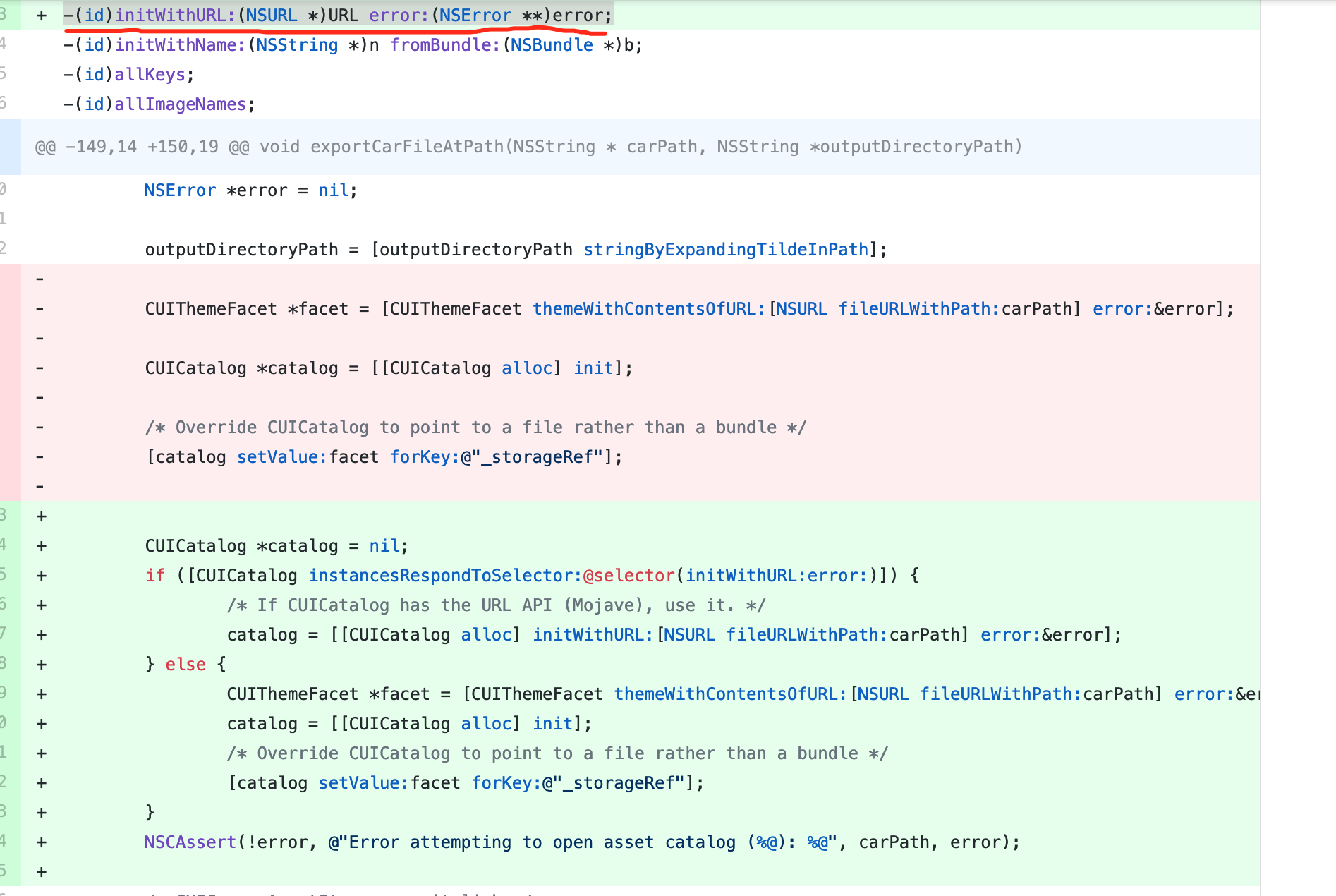
main.m修改后的代码
//

//  main.m

//  cartool

//

//  Created by Steven Troughton-Smith on 14/07/2013.

//  Copyright (c) 2013 High Caffeine Content. All rights reserved.

//

#import <Foundation/Foundation.h>

typedef enum _kCoreThemeIdiom {

    kCoreThemeIdiomUniversal,

    kCoreThemeIdiomPhone,

    kCoreThemeIdiomPad,

    kCoreThemeIdiomTV,

    kCoreThemeIdiomCar,

    kCoreThemeIdiomWatch,

    kCoreThemeIdiomMarketing

} kCoreThemeIdiom;

typedef NS_ENUM(NSInteger, UIUserInterfaceSizeClass) {

    UIUserInterfaceSizeClassUnspecified = ,

    UIUserInterfaceSizeClassCompact     = ,

    UIUserInterfaceSizeClassRegular     = ,

};

@interface CUICommonAssetStorage : NSObject

-(NSArray *)allAssetKeys;

-(NSArray *)allRenditionNames;

-(id)initWithPath:(NSString *)p;

-(NSString *)versionString;

@end

@interface CUINamedImage : NSObject

@property(readonly) CGSize size;

@property(readonly) CGFloat scale;

@property(readonly) kCoreThemeIdiom idiom;

@property(readonly) UIUserInterfaceSizeClass sizeClassHorizontal;

@property(readonly) UIUserInterfaceSizeClass sizeClassVertical;

-(CGImageRef)image;

@end

@interface CUIRenditionKey : NSObject

@end

@interface CUIThemeFacet : NSObject

+(CUIThemeFacet *)themeWithContentsOfURL:(NSURL *)u error:(NSError **)e;

@end

@interface CUICatalog : NSObject

@property(readonly) bool isVectorBased;

-(id)initWithURL:(NSURL *)URL error:(NSError **)error;

-(id)initWithName:(NSString *)n fromBundle:(NSBundle *)b;

-(id)allKeys;

-(id)allImageNames;

-(CUINamedImage *)imageWithName:(NSString *)n scaleFactor:(CGFloat)s;

-(CUINamedImage *)imageWithName:(NSString *)n scaleFactor:(CGFloat)s deviceIdiom:(int)idiom;

-(NSArray *)imagesWithName:(NSString *)n;

@end

void CGImageWriteToFile(CGImageRef image, NSString *path)

{

    CFURLRef url = (__bridge CFURLRef)[NSURL fileURLWithPath:path];

    CGImageDestinationRef destination = CGImageDestinationCreateWithURL(url, kUTTypePNG, , NULL);

    CGImageDestinationAddImage(destination, image, nil);

    if (!CGImageDestinationFinalize(destination)) {

        NSLog(@"Failed to write image to %@", path);

    }

    CFRelease(destination);

}

NSString *idiomSuffixForCoreThemeIdiom(kCoreThemeIdiom idiom)

{

    switch (idiom) {

        case kCoreThemeIdiomUniversal:

            return @"";

            break;

        case kCoreThemeIdiomPhone:

            return @"~iphone";

            break;

        case kCoreThemeIdiomPad:

            return @"~ipad";

            break;

        case kCoreThemeIdiomTV:

            return @"~tv";

            break;

        case kCoreThemeIdiomCar:

            return @"~carplay";

            break;

        case kCoreThemeIdiomWatch:

            return @"~watch";

            break;

        case kCoreThemeIdiomMarketing:

            return @"~marketing";

            break;

        default:

            break;

    }

    return @"";

}

NSString *sizeClassSuffixForSizeClass(UIUserInterfaceSizeClass sizeClass)

{

    switch (sizeClass)

    {

        case UIUserInterfaceSizeClassCompact:

            return @"C";

            break;

        case UIUserInterfaceSizeClassRegular:

            return @"R";

            break;

        default:

            return @"A";

    }

}

NSMutableArray *getImagesArray(CUICatalog *catalog, NSString *key)

{

    NSMutableArray *images = [[NSMutableArray alloc] initWithCapacity:];

    for (NSNumber *scaleFactor in @[@, @, @])

    {

        CUINamedImage *image = [catalog imageWithName:key scaleFactor:scaleFactor.doubleValue];

        if (image && image.scale == scaleFactor.floatValue) [images addObject:image];

    }

    return images;

}

void exportCarFileAtPath(NSString * carPath, NSString *outputDirectoryPath)

{

    NSError *error = nil;

    outputDirectoryPath = [outputDirectoryPath stringByExpandingTildeInPath];

//    CUIThemeFacet *facet = [CUIThemeFacet themeWithContentsOfURL:[NSURL fileURLWithPath:carPath] error:&error];

//

//    CUICatalog *catalog = [[CUICatalog alloc] init];

//

//    /* Override CUICatalog to point to a file rather than a bundle */

//    [catalog setValue:facet forKey:@"_storageRef"];

    /* CUICommonAssetStorage won't link */

    CUICatalog *catalog = nil;

    if ([CUICatalog instancesRespondToSelector:@selector(initWithURL:error:)]) {

        /* If CUICatalog has the URL API (Mojave), use it. */

        catalog = [[CUICatalog alloc] initWithURL:[NSURL fileURLWithPath:carPath] error:&error];

    } else {

        CUIThemeFacet *facet = [CUIThemeFacet themeWithContentsOfURL:[NSURL fileURLWithPath:carPath] error:&error];

        catalog = [[CUICatalog alloc] init];

        /* Override CUICatalog to point to a file rather than a bundle */

        [catalog setValue:facet forKey:@"_storageRef"];

    }

    NSCAssert(!error, @"Error attempting to open asset catalog (%@): %@", carPath, error);

    CUICommonAssetStorage *storage = [[NSClassFromString(@"CUICommonAssetStorage") alloc] initWithPath:carPath];

    for (NSString *key in [storage allRenditionNames])

    {

        printf("%s\n", [key UTF8String]);

        NSArray* pathComponents = [key pathComponents];

        if (pathComponents.count > )

        {

            // Create subdirectories for namespaced assets (those with names like "some/namespace/image-name")

            NSArray* subdirectoryComponents = [pathComponents subarrayWithRange:NSMakeRange(, pathComponents.count - )];

            NSString* subdirectoryPath = [outputDirectoryPath copy];

            for (NSString* pathComponent in subdirectoryComponents)

            {

                subdirectoryPath = [subdirectoryPath stringByAppendingPathComponent:pathComponent];

            }

            [[NSFileManager defaultManager] createDirectoryAtPath:subdirectoryPath

                                      withIntermediateDirectories:YES

                                                       attributes:nil

                                                            error:&error];

        }

        NSMutableArray *images = getImagesArray(catalog, key);

        for( CUINamedImage *image in images )

        {

            if( CGSizeEqualToSize(image.size, CGSizeZero) )

                printf("\tnil image?\n");

            else

            {

                CGImageRef cgImage = [image image];

                NSString *idiomSuffix = idiomSuffixForCoreThemeIdiom(image.idiom);

                NSString *sizeClassSuffix = @"";

                if (image.sizeClassHorizontal || image.sizeClassVertical)

                {

                    sizeClassSuffix = [NSString stringWithFormat:@"-%@x%@", sizeClassSuffixForSizeClass(image.sizeClassHorizontal), sizeClassSuffixForSizeClass(image.sizeClassVertical)];

                }

                NSString *scale = image.scale > 1.0 ? [NSString stringWithFormat:@"@%dx", (int)floor(image.scale)] : @"";

                NSString *name = [NSString stringWithFormat:@"%@%@%@%@.png", key, idiomSuffix, sizeClassSuffix, scale];

                printf("\t%s\n", [name UTF8String]);

                if( outputDirectoryPath )

                    CGImageWriteToFile(cgImage, [outputDirectoryPath stringByAppendingPathComponent:name]);

            }

        }

    }

}

int main(int argc, const char * argv[])

{

    @autoreleasepool {

        if (argc < )

        {

            printf("Usage: cartool <path to Assets.car> [outputDirectory]\n");

            return -;

        }

        exportCarFileAtPath([NSString stringWithUTF8String:argv[]], argc >  ? [NSString stringWithUTF8String:argv[]] : nil);

    }

    return ;

}
使用方法 生成了可执行文件 放在usr/local/bin 下面
cartool <path to Assets.car> [outputDirectory]
中间用空格隔开就好
Assets.car 解压工具 cartool 使用报错 segmentation fault cartool 解决方案的更多相关文章
- ADB安装应用报错 Segmentation fault pm install /data...
路径一定不能有中文…… 路径一定不能有中文…… 路径一定不能有中文…… 路径一定不能有中文…… 路径一定不能有中文……
- 文件压缩、解压工具类。文件压缩格式为zip
package com.JUtils.file; import java.io.BufferedOutputStream; import java.io.File; import java.io.Fi ...
- Linux打包压缩解压工具
第1章 Linux 打包压缩解压工具一.压缩.解压工具 compress/uncompress gzip/gunzip bzip2/bunzip2/ bzcat xz/unxz/ xzcat ...
- adb驱动安装和使用报错笔记
adb驱动安装 adb驱动下载地址:https://adb.clockworkmod.com/ 安装时候选择一个容易记住的路径,这个很重要,因为adb驱动没有自动配置环境变量,所以实验时候将adb安装 ...
- VirtualBox使用报错
VirtualBox使用报错 1.启动报错:Failed to instantiate CLSID_VirtualBox... 报错内容: Failed to instantiate CLSID_Vi ...
- 解压tar.gz文件报错gzip: stdin: not in gzip format解决方法
解压tar.gz文件报错gzip: stdin: not in gzip format解决方法 在解压tar.gz文件的时候报错 1 2 3 4 5 [Sun@localhost Downloads] ...
- animate is not a function(zepto 使用报错)[转]
animate is not a function(zepto 使用报错) 1.为什么使用zepto写animate报错? 因为zepto默认构建包含: Core, Ajax, Event, Form ...
- Windows下Git使用报错:warning:LF will be replaced by CRLF in ××××.××
Windows下Git使用报错: warning:LF will be replaced by CRLF in ××××.××(文件名) The file will have its original ...
- yum源使用报错
CentOS系统yum源使用报错:Error: Cannot retrieve repository metadata (repomd.xml) for repository: rpmforge. 服 ...
随机推荐
- React Native & Android & iOS & APK
React Native & Android & iOS & APK https://play.google.com/apps/publish/signup/ $ 25 bui ...
- 修改注册表信息来兼容当前WebBrower程序
public class WebBrower { /// <summary> /// 修改注册表信息来兼容当前程序 /// /// </summary> public stat ...
- Spring MVC 使用介绍(十五)数据验证 (二)依赖注入与方法级别验证
一.概述 JSR-349 (Bean Validation 1.1)对数据验证进一步进行的规范,主要内容如下: 1.依赖注入验证 2.方法级别验证 二.依赖注入验证 spring提供BeanValid ...
- 实习初步认识_1:部署renren-fast v2.0遇到的问题及解决方案
部署renren-fast v2.0可参考官方文档https://www.renren.io/guide/#fornt(注意红色部分) 部署后台时一切正常,一下是官方文档内容: 2.1.后端部署 环境 ...
- bzoj 2002 : [Hnoi2010]Bounce 弹飞绵羊 (LCT)
链接:https://www.lydsy.com/JudgeOnline/problem.php?id=2002 题面: 2002: [Hnoi2010]Bounce 弹飞绵羊 Time Limit: ...
- P1462 通往奥格瑞玛的道路 (二分+最短路)
题目 P1462 通往奥格瑞玛的道路 给定\(n\)个点\(m\)条边,每个点上都有点权\(f[i]\),每条边上有边权,找一条道路,使边权和小于给定的数\(b\),并使最大点权最小. 解析 二分一下 ...
- Ceph rdb
Ceph 独一无二地用统一的系统提供了对象.块.和文件存储功能,它可靠性高.管理简便.并且是自由软件. Ceph 的强大足以改变公司的 IT 基础架构.和管理海量数据. Ceph 可提供极大的伸缩性— ...
- linux下python安装
下载包: wget https://www.python.org/ftp/python/3.6.3/Python-3.6.3.tar.gz 解压安装: tar -zvxf Python-3.6.3. ...
- Qt: usb热插拔检测(windows);
Qt提供了QAbstractNativeEventFilter来实现本地时间得过滤,通过对本地事件的检测,判断usb热插拔:(这里是windows 的例子); 首先,以QWidget, QAbstra ...
- Django web编程1 -- 创建项目和应用
python:3.7.2 Django:2.1.7 1.创建虚拟环境 虚拟环境是系统的一个位置,可以在其中安装包,并将其与其他python包隔离. 创建目录,命名为learning_log,并切换到这 ...