
SpringCloud Config服务端
1、导入依赖
<dependency>

    <groupId>org.springframework.cloud</groupId>

    <artifactId>spring-cloud-config-server</artifactId>

</dependency>
2、使用@EnableConfigServer开启配置中心服务端支持
import org.springframework.boot.autoconfigure.SpringBootApplication;

import org.springframework.boot.builder.SpringApplicationBuilder;

import org.springframework.cloud.client.discovery.EnableDiscoveryClient;

import org.springframework.cloud.config.server.EnableConfigServer;

@SpringBootApplication

@EnableDiscoveryClient

@EnableConfigServer //开启配置中心服务端支持

public class ConfigServerApplication {

    public static void main(String[] args) {

        new SpringApplicationBuilder(ConfigServerApplication.class).web(true).run(args);

    }

}
3、创建git仓库项目并上传配置文件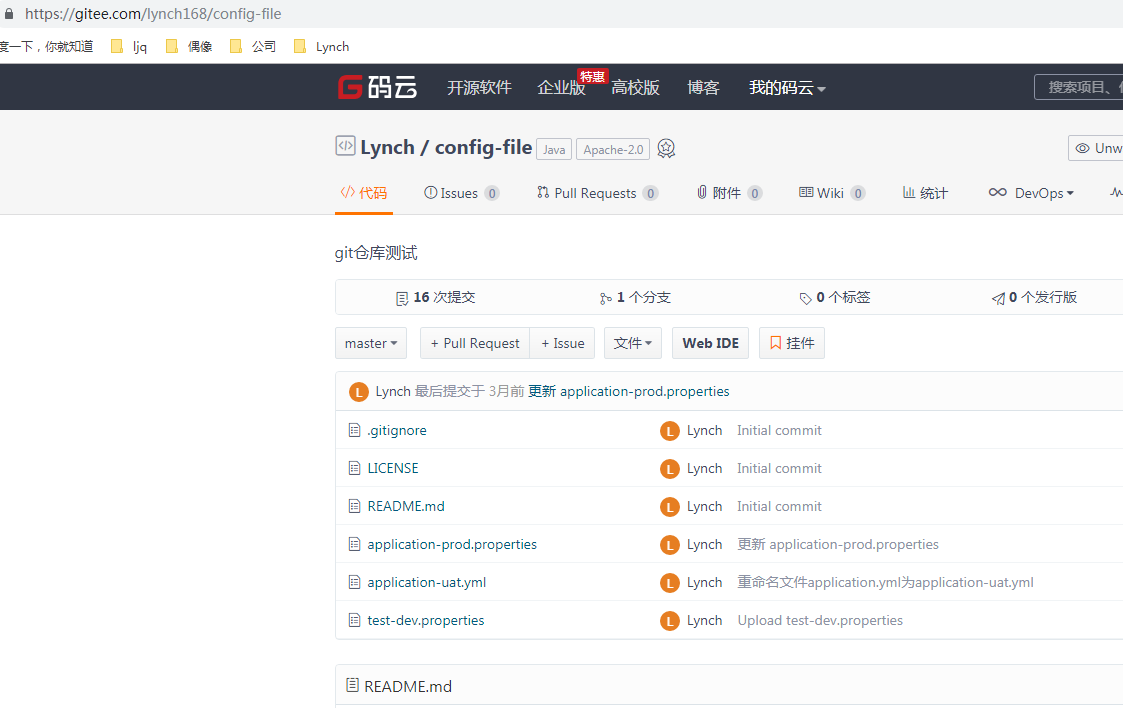
4、在application.yml文件中配置git远程仓库信息
security:

  basic:

    enabled: false

spring:

  application:

    name: mima-cloud-config-server

  cloud:

    consul:

      discovery:

        instanceId: ${spring.application.name}:${server.port}

      host: localhost

      port: 8500

      config:

        enabled: true #false\u7981\u7528Consul\u914d\u7f6e\uff0c\u9ed8\u8ba4true

        format: YAML    # \u8868\u793aconsul\u4e0a\u9762\u6587\u4ef6\u7684\u683c\u5f0f \u6709\u56db\u79cd YAML PROPERTIES KEY-VALUE FILES

        #data-key: configuration    #\u8868\u793aconsul\u4e0a\u9762\u7684KEY\u503c(\u6216\u8005\u8bf4\u6587\u4ef6\u7684\u540d\u5b57) \u9ed8\u8ba4\u662fdata

        data-key: data    #\u8868\u793aconsul\u4e0a\u9762\u7684KEY\u503c(\u6216\u8005\u8bf4\u6587\u4ef6\u7684\u540d\u5b57) \u9ed8\u8ba4\u662fdata

        #prefix\u8bbe\u7f6e\u914d\u7f6e\u503c\u7684\u57fa\u672c\u6587\u4ef6\u5939

        #defaultContext\u8bbe\u7f6e\u6240\u6709\u5e94\u7528\u7a0b\u5e8f\u4f7f\u7528\u7684\u6587\u4ef6\u5939\u540d\u79f0

        #profileSeparator\u8bbe\u7f6e\u7528\u4e8e\u4f7f\u7528\u914d\u7f6e\u6587\u4ef6\u5728\u5c5e\u6027\u6e90\u4e2d\u5206\u9694\u914d\u7f6e\u6587\u4ef6\u540d\u79f0\u7684\u5206\u9694\u7b26\u7684\u503c

    config:

      server:

        git:

          #git远程地址

          uri: https://gitee.com/lynch168/config-file

          #搜索目录

          search-paths: /**

          #git默认分支

          default-label: master

          #如果为私有仓库,需要设置用户名、密码

          #username:

          #password:

      #是否开启配置中心

      enabled: true

      #默认的分支

      label: master

server:

  port: 6063
启动config-server服务。
5、浏览器上访问配置文件
http://localhost:6063/application-prod.properties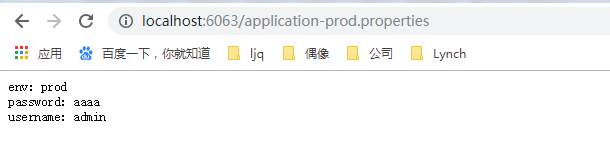
http://localhost:6063/application-uat.yml
SpringCloud Config服务端的更多相关文章
- Spring Cloud Config 服务端与 客户端之间的关系
1.服务端有两个可配置项 # 是否在服务器端进行解密操作,默认开启. # 如果改为不在服务器端开启(false) # 那么一定要将encrypt.key 删除. # 否则会出现客户端无法解密. # 为 ...
- Spring Cloud (6)A config 服务端配置 与github通信
1. 在git上创建一个库,并复制库地址 2.用git clone项目到本地,并创建application.yml application.yml 内容 --下一步 3.将application.ym ...
- SpringCloud与微服务Ⅹ --- SpringCloud Config分布式配置中心
一.SpringCloud Config是什么 分布式系统面临的问题 --- 配置问题 微服务意味着要将单体应用中的业务拆分成一个个子服务,每个服务的粒度相对较小,因此系统中会出现大量的服务.由于每个 ...
- SpringCloud Config客户端
SpringCloud Config服务端 1.导入依赖 <dependency> <groupId>org.springframework.cloud</groupI ...
- SpringCloud 进阶之分布式配置中心(SpringCloud Config)
1. SpringCloud Config SpringCLoud Config 为微服务架构中的微服务提供集中化的外部配置支持,配置服务器为各个不同微服务应用 的所有环境提供了一个中心化的外部配置; ...
- SpringCloud学习笔记(二、SpringCloud Config)
目录: 配置中心简介 SpringCloud Config服务端 SpringCloud Config客户端 动态配置属性bean 一些补充(源码分析):Spring事件监听.健康检查health() ...
- SpringCloud学习笔记(九):SpringCloud Config 分布式配置中心
概述 分布式系统面临的-配置问题 微服务意味着要将单体应用中的业务拆分成一个个子服务,每个服务的粒度相对较小,因此系统中会出现大量的服务.由于每个服务都需要必要的配置信息才能运行,所以一套集中式的.动 ...
- SpringCloud-微服务配置统一管理SpringCloud Config(七)
前言:对于应用,配制文件通常是放在项目中管理的,它可能有spring.mybatis.log等等各种各样的配置文件和属性文件,另外你还可能有开发环境.测试环境.生产环境等,这样的话就得一式三份,若是传 ...
- SpringCloud微服务学习笔记
SpringCloud微服务学习笔记 项目地址: https://github.com/taoweidong/Micro-service-learning 单体架构(Monolithic架构) Mon ...
随机推荐
- MVC简单的增删改查
最近的学习了一下mvc,现在做一个mvc的CRUD例子. 1.创建实体模型 2.创建一个UserInfo的控制器 3.查询数据 code public IList<UserInfo> us ...
- 启动两个tomcat服务,以及使用nginx代理实现访问
1.shoudowm.bat\startup.bat\catalina.bat, 将CATALINA_HOME修改为CATALINA_HOME_2 2.server.xml <Server po ...
- TCP 三次握手、四次挥手
三次握手:(主要是server.client相互同步系列号) SYN:同步序列号 ACK:确认序列号 第一次握手:client 向server 发送SYN,seq=x,申请同步client端序列号,c ...
- vue的环境安装(二)
1.安装淘宝镜像 打开命令行,输入以下命令:npm install -g cnpm --registry= https://registry.npm.taobao.org2.全局安装 vue- ...
- IOS开发中将定时器添加到runLoop中
runLoop主要就是为线程而生的.他能够让线程在有任务的时候保持工作状态,没有任务的时候让线程处于休眠待备状态. 主线程的runloop默认是开启的.主线程上创建的定时器已经默认添加到runLoop ...
- 2.SSM整合_多表_一对一或多对一的增删改查
一对一和多对一配置一样,这里就放到一起. 1.配置文件跟上一章一样,这里就不多写了,主要是Mapper映射文件 多 接口 public interface NewsMapper { public vo ...
- 像屎一样的 Spring Boot入门,总算有反应了
我特么最烦的就是现在Java不知道抽什么风,喜欢用maven这种,怎么搞都会有错误提示的玩意.搞个spring boot,官方的所谓http://start.spring.io/生成的项目启动不了. ...
- 【DFS】求水洼的数目
题目: 有一个大小为 N*M 的园子,雨后积起了水.八连通的积水被认为是连接在一起的.请求出园子里总共有多少水洼?(八连通指的是下图中相对 W 的*的部分) *** *W* *** 限制条件:N, M ...
- [Swift]LeetCode189. 旋转数组 | Rotate Array
Given an array, rotate the array to the right by k steps, where k is non-negative. Example 1: Input: ...
- [Swift]LeetCode266.回文全排列 $ Palindrome Permutation
Given a string, determine if a permutation of the string could form a palindrome. For example," ...