
Module 3 - Azure - Web Apps
Module 3 - 微软云 Azure - Web Apps
1. Create new Web application in the Azure Portal
Azure Portal -> App Services -> Add -> Web App。
在这个过程中,Azure Portal 会要求你创建一个 Resource Group(资源组),在资源组里面,你会看到 App Service, App Service Plan, Application Insights(Optional)。
2. Deploy your application from Visual Studio to Azure by using deployment slot
首先在个人电脑上安装 Microsfot Visual Studio Community 2019;
然后按照教程 在Azure中创建ASP.net Core Web App 一步一步操作即可。
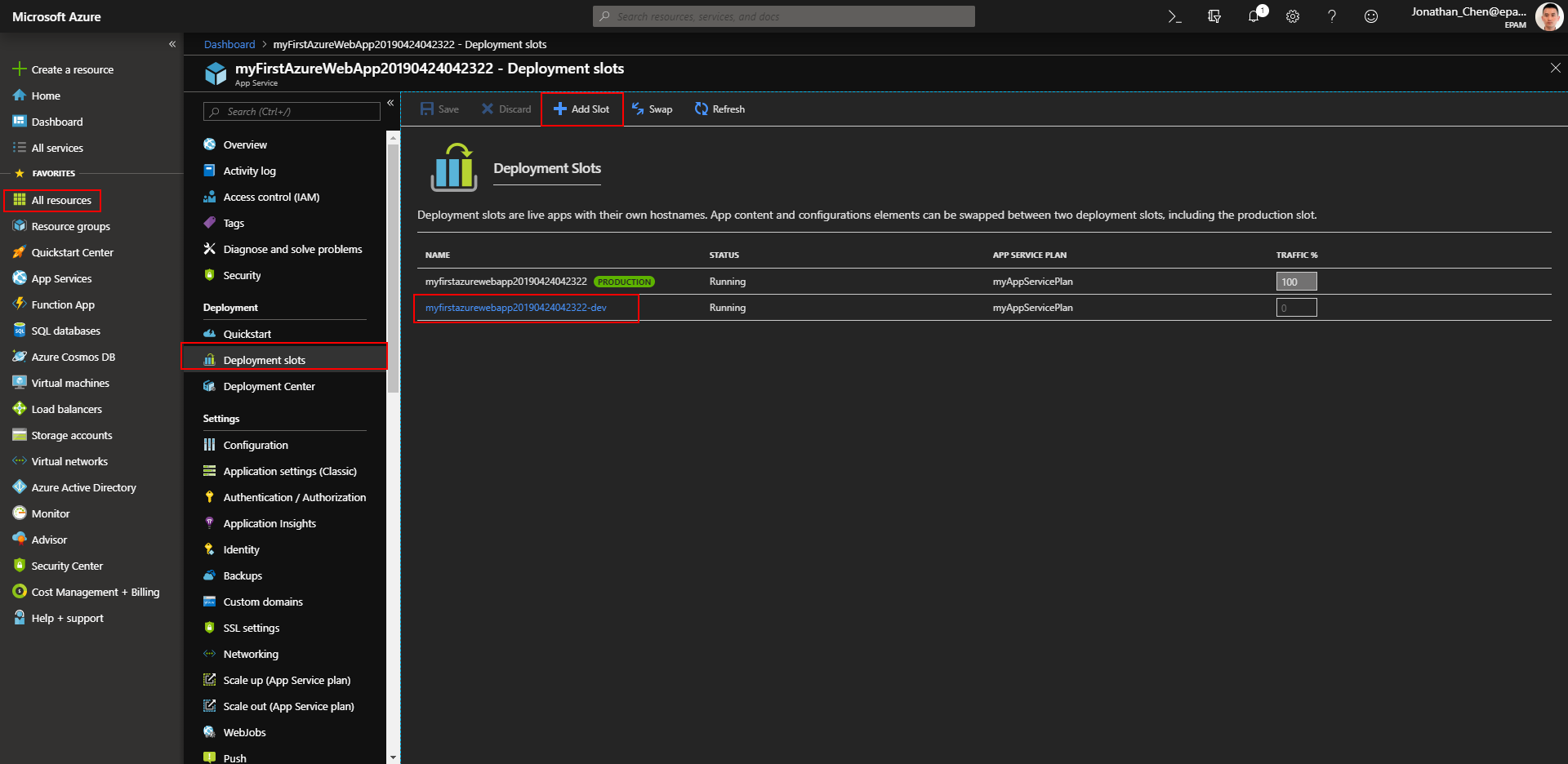
完成之后,在 Azure Portal 选中你所创建的 App Service,再选择 Deployment Slot,再选择 Add Slot,即可创建一个Slot(插槽)。
比如说,你可以为 Dev、SIT、UAT、PreProd(Staging)、PROD、BCP等分别创建不同的插槽。插槽的妙处在于你可以在类似生产的环境进行验证之后,然后对 Staging 和 Production 的内容进行交换(Swap)。
Add Slot
3. Move you project to Version Control system (Git or TFS) and set up Continuous Deployment process from your VC system to Azure
我选择的仓库托管中心是 GitHub,所以首先确保在 github.com 拥有自己的账号。
并且在个人电脑上安装 Git 的客户端。确保可以在本地磁盘打开 Git Bash。
Git 中 SSH key 生成步骤 按照该文章的说明,运行 ssh-keygen -t rsa -C "youremail@example.com" 在 ~/.ssh 目录下生成私钥 id_rsa 和公钥 id_rsa.pub,
并且需要把公钥的内容配置到 GitHub 网站。
在 GitHub 上新建一个仓库,名字和我的 Visual Studio 的项目的名字一致 myFirstAzureWebApp。
然后在本地磁盘的 myFirstAzureWebApp 项目文件夹下打开 Git Bash,
通过以下命令建立 本地库 和 远程库 之间的联系。
echo "# myFirstAzureWebApp" >> README.md

git init

git status

git add --all

git commit -m "first commit" -a

git remote add origin git@github.com:kingmax-chan/myFirstAzureWebApp.git

git push -u origin master
以后的新增开发一般通过 git status, git add, git commit, git push 等命令,就可以满足基本需求。
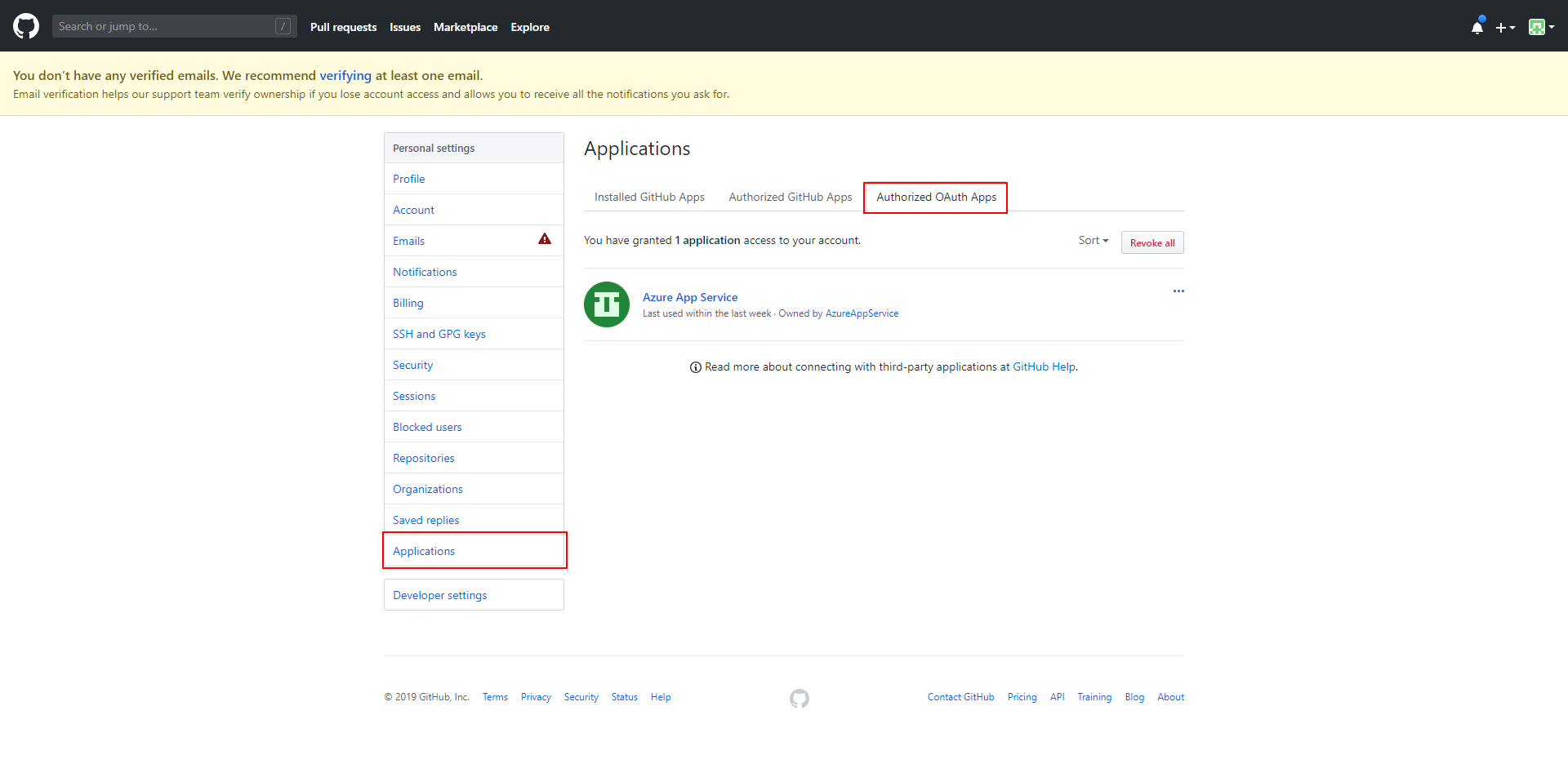
在 GitHub 授权给 Azure App Service。
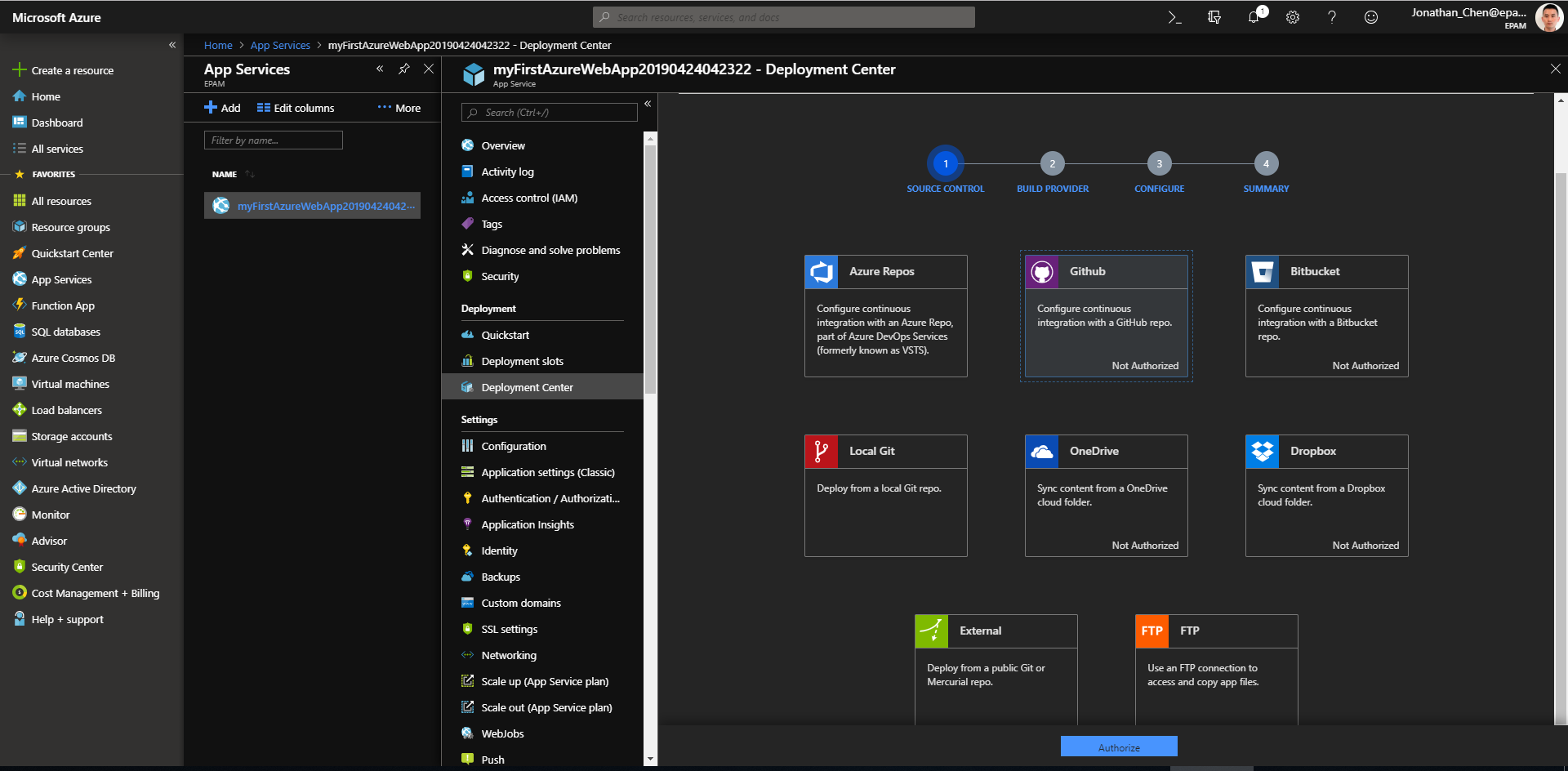
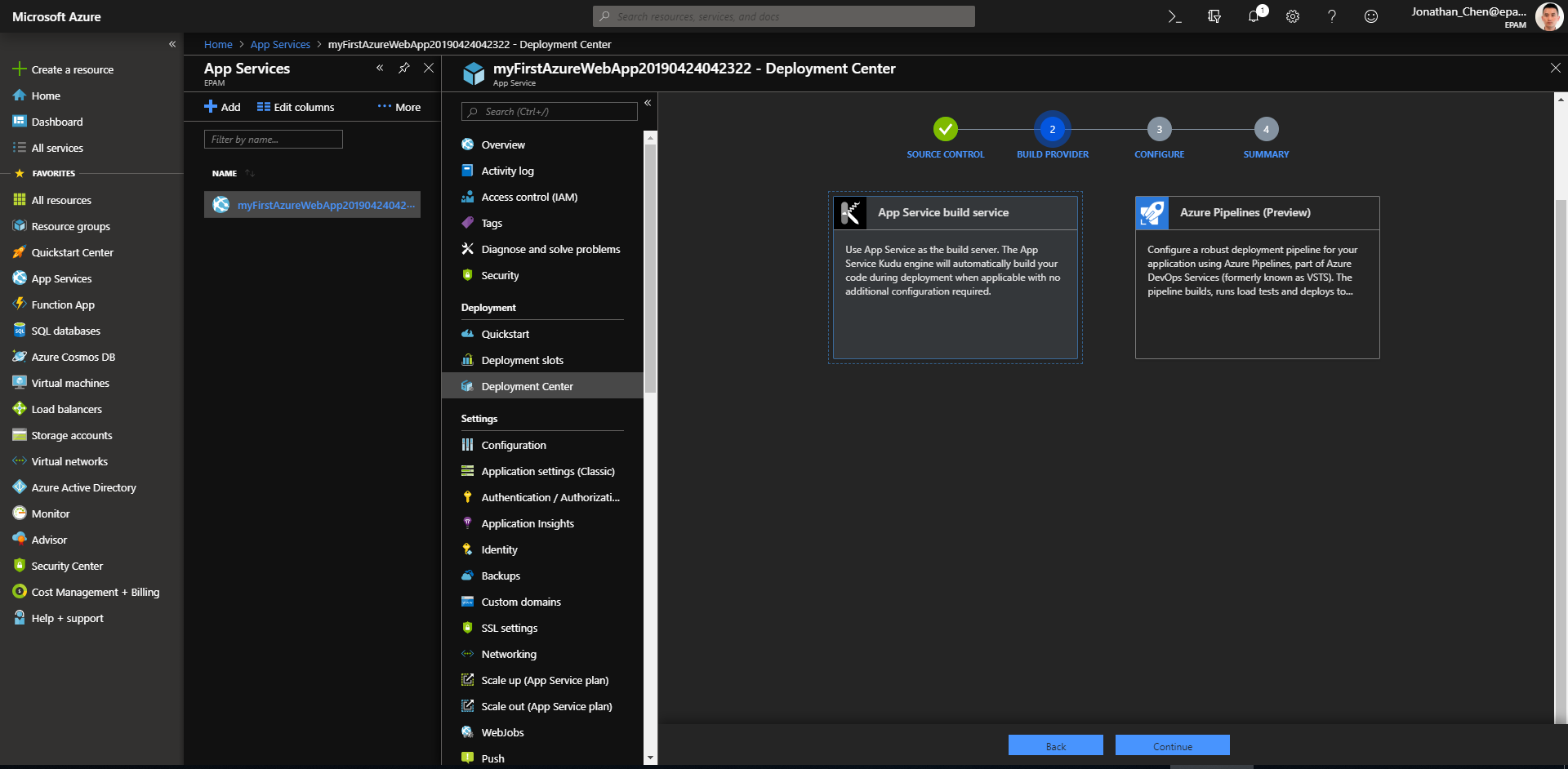
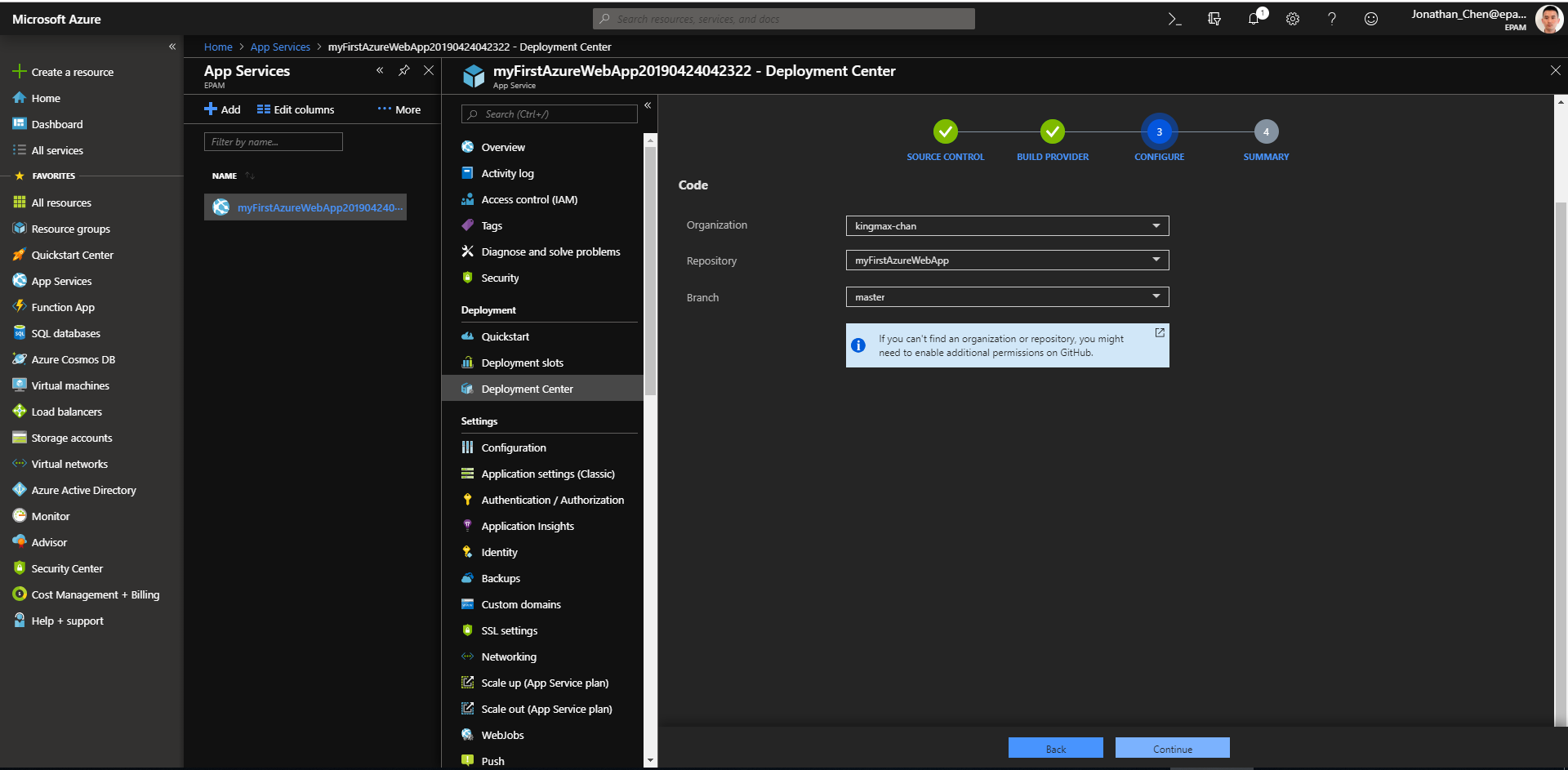
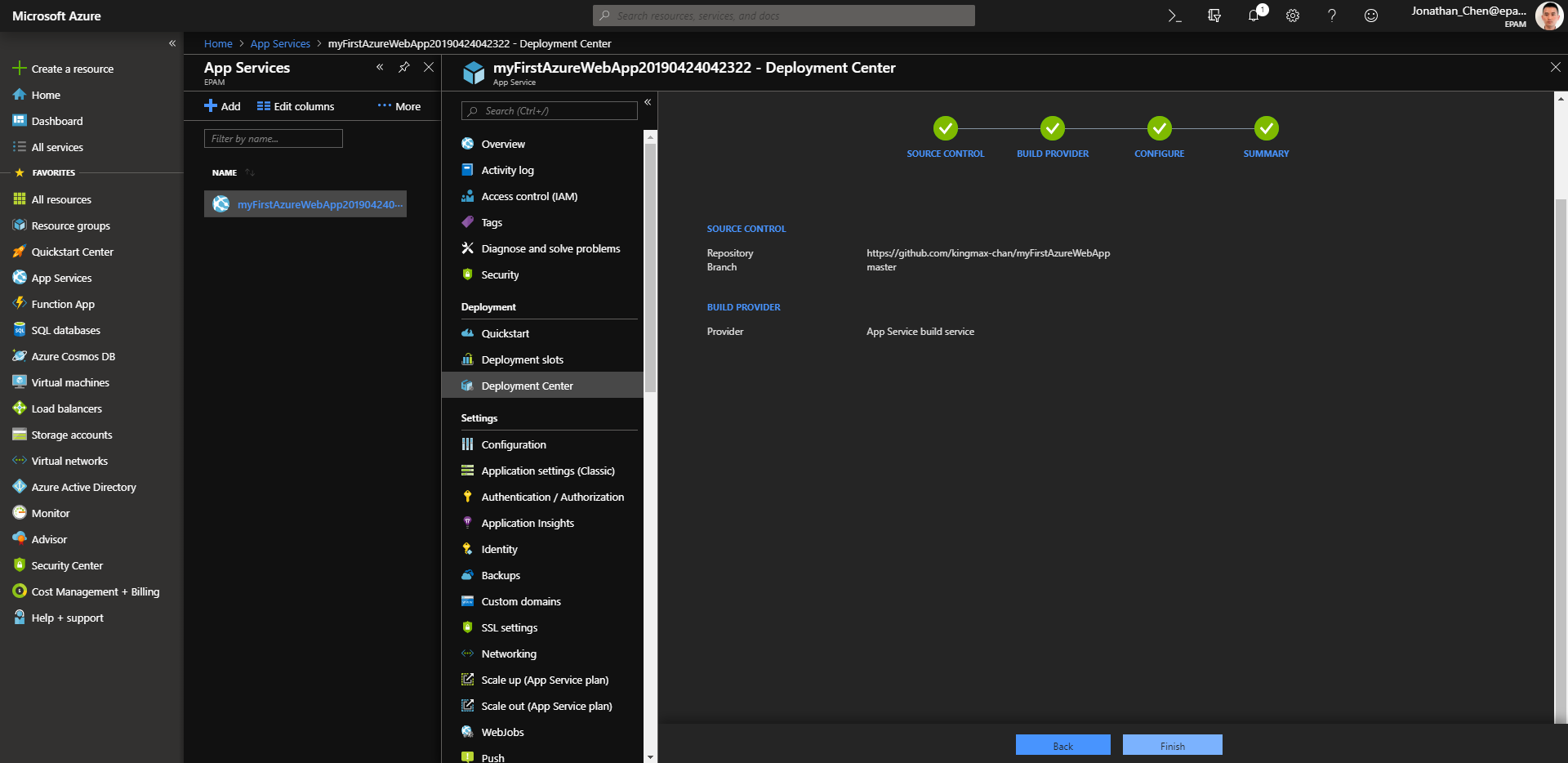
通过 Azure Portal -> App Services -> Deployment Center -> Source Control -> Build Provider -> Configure -> Summary,
可以建立 GitHub 的特定代码库 到 Azure的特定App Service 或 Web App 之间的联系。
建立本地库--》远程库--》Azure Web Serice 的联系之后,以后每次在本地进行 git push 操作,都会向远程库推送,进而触发Azure中对应的App Service的 Build 和 Deploy 的操作。
而这一系列的动作,除了 git push,都是自动进行的。
Deployment Center ---> Source Control
Deployment Center ---> Build Provider
Deployment Center ---> Configure
Deployment Center ---> Summary
Module 3 - Azure - Web Apps的更多相关文章
- 免费电子书:Azure Web Apps开发者入门
(此文章同时发表在本人微信公众号"dotNET每日精华文章",欢迎右边二维码来关注.) 题记:之前介绍过微软正在逐步出版一个名为Azure Essential的入门系列教程,最近刚 ...
- Windows Azure Web Site (7) Web Site配置
<Windows Azure Platform 系列文章目录> 在上一章内容中,我们已经部署了Azure WebSite.我们可以在Web Site配置页面进行配置.如下图: 另外,我们还 ...
- 如何修改Windows Azure Web App的时区
Windows Azure的时区默认使用UTC,如果是VM可以直接修改,但Azure Web Apps的隔离性导致我们无法进行设置.应用系统使用DateTime.Now的地方很多,不可能做出一一修改. ...
- 尝鲜一试,Azure静态网站应用服务(Azure Static Web Apps) 免费预览,协同Github自动发布静态SPA
背景 最近在浏览微软的文档的时候发现,微软喜欢用Hugo这个文档框架,有些技术产品的文档页面就用Hugo来做的,同时搭配Github + Azure Static Web Apps Service这个 ...
- Microsoft Azure Web Sites应用与实践【2】—— 通过本地IIS 远程管理Microsoft Azure Web Site
Microsoft Azure Web Sites应用与实践 系列: [1]—— 打造你的第一个Microsoft Azure Website [2]—— 通过本地IIS 远程管理Microsoft ...
- Windows Azure Web Site (1) 用户手册
<Windows Azure Platform 系列文章目录> 下载地址: Web Apps用户手册
- Building Modern Web Apps-构建现代的 Web 应用程序
Building Modern Web Apps-构建现代的 Web 应用程序 视频长度:1 小时左右 视频作者:Scott Hunter 和 Scott Hanselman 视频背景:Visual ...
- Java create azure web app
create a certificate <java-install-dir>/bin/ keytool -genkey -alias <keystore-id> -keyst ...
- Microsoft Azure Web Sites应用与实践【4】—— Microsoft Azure网站的“后门”
Microsoft Azure Web Sites应用与实践 系列: [1]—— 打造你的第一个Microsoft Azure Website [2]—— 通过本地IIS 远程管理Microsoft ...
随机推荐
- IIS 支持 m3u8
加上俩 MIME 类型就可以了 <mimeMap fileExtension=".m3u8" mimeType="application/x-mpegURL&quo ...
- tensorflow会话控制-【老鱼学tensorflow】
在tensorflow中,当定义好结构后,就要通过tf.session()来建立运行时的会话. 本例子应该不难理解,我们用tensorflow来计算一下一个1行2列的矩阵和2行1列矩阵的乘积: imp ...
- android setCompoundDrawables和setCompoundDrawablesWithIntrinsicBounds区别
手工设置文本与图片相对位置时,常用到如下方法: setCompoundDrawables(left, top, right, bottom) setCompoundDrawablesWithIntri ...
- IntelliJ IDEA 中 Web项目 目录结构
--src 应用程序源代码和测试程序代码的根目录 --main --java 应用程序源代码目录 --resources 应用程序用到的资源文件(一般都是配置文件) --webapp web项 ...
- Docker操作笔记(三)数据管理
数据管理 一.数据卷 数据卷 是一个可供一个或多个容器使用的特殊目录,它绕过 UFS,可以提供很多有用的特性: 数据卷 可以在容器之间共享和重用 对 数据卷 的修改会立马生效 对 数据卷 的更新,不会 ...
- Anaconda基础(一)
目录 Conda常见命令 环境管理 包管理 conda管理 小技巧 Conda常见命令 环境管理 创建环境 conda create -n 环境名 包列表 进入环境 source activate 环 ...
- HTML(五)
HTML5新结构标签 h5新增的主要语义化标签如下: 1.header 页面头部.页眉2.nav 页面导航3.article 一篇文章4.section 文章中的章节5.aside 侧边栏6.foot ...
- UIButton设置标题左对齐
Button.contentHorizontalAlignment = UIControlContentHorizontalAlignmentLeft;//左对齐(UIControlContentHo ...
- 关于Android文件Apk下载的那点事
1.Android文件Apk下载变ZIP压缩包解决方案 如果你的下载服务器为Nginx服务器,那么,在Nginx安装目录下的conf/mime.types文件的对应位置,加上以下一行语句,指定APK文 ...
- __x__(32)0908第五天__Photoshop的基本操作
1. 设置 Photoshop 的单位为 像素px 2. 标尺 显示与隐藏 Ctrl + r 3. 放大与缩小 Ctrl + 1 放大到100% Ctrl + 0 适应屏幕 Alt + ...