
使用Microsoft.Office.Interop.Excel.dll 文件来生成excel 文件
日常工作中经常需要将后台的数据导出成excel 格式,这里通过调用微软提供的类库来生成excel 文件。
具体是引用 了Microsoft.Office.Interop.Excel.dll 类库文件来生成excel 文件,这样使用起来比较方便,这是我的实例代码:
 public static void ExportExcel() {

            // excel 文件的数据源

            DataSet ds = CommonDB.executeQuery(CommandType.StoredProcedure, "GetAllProducts");

            try

            {

                Application statusExcel = new Microsoft.Office.Interop.Excel.Application();

                Workbook statusWorkbook = statusExcel.Application.Workbooks.Add(true);

                Worksheet wsStatusSheet = (Worksheet)statusWorkbook.Worksheets.Add(statusWorkbook.Sheets[1], Type.Missing, Type.Missing, Type.Missing);

                ((Worksheet)statusWorkbook.Sheets["Sheet1"]).Delete();

                wsStatusSheet.Name = "Status11";

                int excelCurrRow = 1;

                wsStatusSheet.Cells[excelCurrRow, 1] = "Name";

                wsStatusSheet.Cells[excelCurrRow, 2] = "Category";

                wsStatusSheet.Cells[excelCurrRow, 3] = "Price";

                wsStatusSheet.Cells[excelCurrRow, 4] = "Description";

                Range firstHeaderRow = wsStatusSheet.get_Range("A1:D1", System.Type.Missing);

                firstHeaderRow.Font.Bold = true;

                firstHeaderRow.Interior.Color = System.Drawing.ColorTranslator.ToOle(System.Drawing.ColorTranslator.FromHtml("#808080"));

                firstHeaderRow.Font.Color = 2;

                firstHeaderRow.Font.Name = "Calibri";

                firstHeaderRow.EntireRow.RowHeight = 30;

                firstHeaderRow.VerticalAlignment = Microsoft.Office.Interop.Excel.XlVAlign.xlVAlignCenter;

                Range statusSheetFirstColumn = wsStatusSheet.get_Range("A:A", System.Type.Missing);

                statusSheetFirstColumn.EntireColumn.ColumnWidth = 36.43;

                Range statusSheetSecondColumn = wsStatusSheet.get_Range("B:B", System.Type.Missing);

                statusSheetSecondColumn.EntireColumn.ColumnWidth = 15.71;

                Range statusSheetThirdColumn = wsStatusSheet.get_Range("C:C", System.Type.Missing);

                statusSheetThirdColumn.EntireColumn.ColumnWidth = 15.43;

                Range statusSheetFourthColumn = wsStatusSheet.get_Range("D:D", System.Type.Missing);

                statusSheetFourthColumn.EntireColumn.ColumnWidth = 17.86;

                excelCurrRow++;

                for (int i = 0; i < ds.Tables[0].Rows.Count; i++)

                {

                    for (int j = 1; j <= 4; j++)

                    {

                        wsStatusSheet.Cells[excelCurrRow, j] = ds.Tables[0].Rows[i][j - 1].ToString();

                    }

                    excelCurrRow++;

                }

                // 指定生成的文件名和路径

                string statusFilePath = ConfigurationManager.AppSettings["statusExcelPath"];

                string fileName = "Result_" + DateTime.Now.ToString("yyyyMMddHHmmss") + ".xlsx";

                fileName = statusFilePath + fileName;

                if (File.Exists(fileName))

                {

                    File.Delete(fileName);

                }

                object missing = System.Reflection.Missing.Value;

                // 保存excel 文件

                statusWorkbook.SaveAs(fileName, XlFileFormat.xlOpenXMLWorkbook, missing, missing, false, false, XlSaveAsAccessMode.xlNoChange,

       XlSaveConflictResolution.xlUserResolution, true, missing, missing, missing);

            }

            catch (Exception ex) {

            }

        }
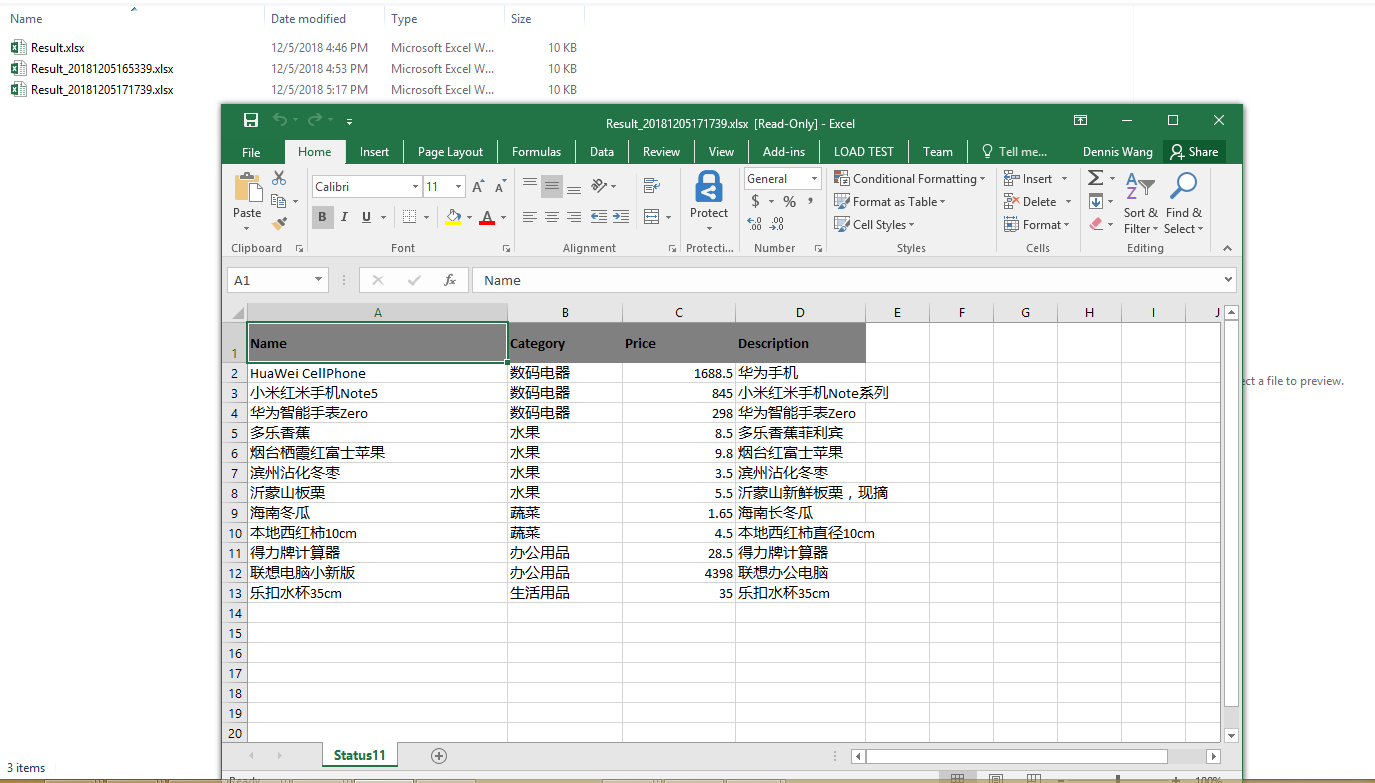
如下是生成的excel 文件截图:
使用Microsoft.Office.Interop.Excel.dll 文件来生成excel 文件的更多相关文章
- C# Microsoft.Office.Interop.Owc11 导出excel文件
C# Microsoft.Office.Interop.Owc11 导出excel文件 1.新建项SupremeWindowsForms窗体应用项目(项目平台设置称X86) 注意:因为大多数第三方写的 ...
- VS编程中找不到Microsoft.Office.Core、Microsoft.Office.Interop.Word和VBIDE
在使用vs2005. vs2008. vs2010 制作包含 word等office的应用程序时,有时找不到对Microsoft.Office.Core. Microsoft.Office.Inter ...
- c#操作excel方式三:使用Microsoft.Office.Interop.Excel.dll读取Excel文件
1.引用Microsoft.Office.Interop.Excel.dll 2.引用命名空间.使用别名 using System.Reflection; using Excel = Microsof ...
- Excel操作 Microsoft.Office.Interop.Excel.dll的使用
----转载: http://www.cnblogs.com/lanjun/archive/2012/06/17/2552920.html 先说说题外话,前段时间近一个月,我一直在做单据导入功能,其中 ...
- NPOI写Excel,Microsoft.Office.Interop.excel.dll 转换Excel为PDF
首先要引用NPOI动态库和Microsoft.Office.Interop.excel.dll (Microsoft.Office.Interop.excel.dll 下载链接 ,下载以后解压文件,把 ...
- Visual Studio 进行Excel相关开发,Microsoft.Office.Interop.Excel.dll库
1. Interop.Excel.dll 的查找 本文中将 Microsoft.Office.Interop.Excel.dll库简称为Interop.Excel.dll库 其实在使用Visual S ...
- C# 使用自带Microsoft.Office.Interop.Excel简单操作Excel文件
项目添加应用 Microsoft.Office.Interop.Excel.dll 文件 引用命名空间: using Excel = Microsoft.Office.Interop.Excel; 简 ...
- Microsoft.Office.Interop.Excel操作Excel文件时出现的问题及解决方案
问题描述: Microsoft.Office.Interop.Excel.Worksheet 打不开文件 Microsoft Office Excel 不能访问文件"a.xls". ...
- C# Microsoft.Office.Interop.Excel.ApplicationClass 加载类型库/DLL 时出错
问题 无法将类型为“Microsoft.Office.Interop.Excel.ApplicationClass”的 COM 对象强制转换为接口类型“Microsoft.Office.Intero ...
随机推荐
- 使用VS调试DUMP文件
使用前准备: 1.保存编译文件的PDB文件(要和生成exe文件的对应) 2.在开发机器上,使用vs直接双击打开dmp文件,注意 进程名称 ,这个是程序运行crash的时候所在的目录位置,这个很重要. ...
- Hadoop学习------Hadoop安装方式之(二):伪分布部署
要想发挥Hadoop分布式.并行处理的优势,还须以分布式模式来部署运行Hadoop.单机模式是指Hadoop在单个节点上以单个进程的方式运行,伪分布模式是指在单个节点上运行NameNode.DataN ...
- Representations of graphs
We can choose between two standard ways to represent a graph as a collection of adjacency lists or a ...
- leetcode 第4题 Median of Two Sorted Arrays
class Solution { public: double findMedianSortedArrays(vector<int>& nums1, vector<int&g ...
- Goland配置
Global GOPATH 用来设置所有go项目的大目录 Project GOPATH 用来设置单项目目录 2个目录必须配置
- c++中的两种getline用法
参考 https://blog.csdn.net/Big_laoshu/article/details/79345351
- 11.2.0.1单实例DGduplicate过程
记录一次duplicate完整过程1)环境说明数据库版本oracle11.2.0.1,os linux 6.6备库应用的归档,最近一次是三个月前,由于DG环境以前是好的,因此直接迁移数据即可.本次使用 ...
- ssl.SSLError: [SSL: CERTIFICATE_VERIFY_FAILED] certificate verify failed (_ssl.c:847)
/******************************************************************************* * ssl.SSLError: [SS ...
- 20个可用于商业用途的免费 CC0 授权的高分辨率图库
如今国人已经越来越重视版权了. 而用CC0 授权的图片不用担心版权的问题,那么什么是CC0授权呢?简单来说就是「公共领域贡献宣告」授权,当创作者在自身作品使用 CC0 授权时,代表于符合法律规定的最大 ...
- Pycharm 常用快捷键与设置
pycharm高频率使用的快捷键 Ctrl+Shift+F10 运行当前的页面 Ctrl + / 注释(取消注释)选择的行 Ctrl+Shift+F 高级查找 Shift + Enter 开始新行 T ...