
C# 微信开发-----微信会员卡(一)
这是微信的官方文档:https://mp.weixin.qq.com/wiki?t=resource/res_main&id=mp1451025283,能看懂的朋友就请不要往下看了,我是看不懂的。我通过网上找到的资料来进行开发的;
第一步:先看官方文档的接口是怎么说的
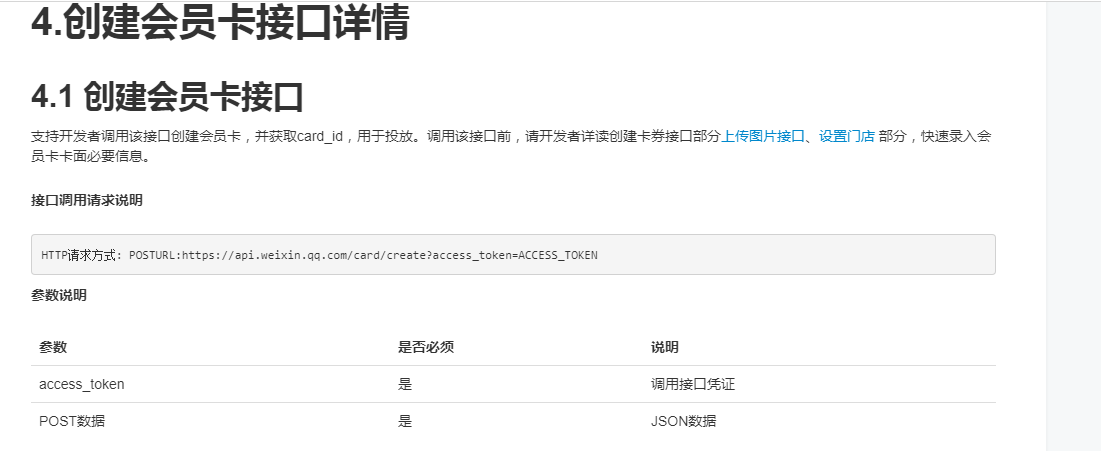
这是重点,微信的都是以这种方式来请求的
HTTP请求方式: POSTURL:https://api.weixin.qq.com/card/create?access_token=ACCESS_TOKEN其次就是拼接他的POST数据很长一篇
POST数据示例:

{

    "card": {

        "card_type": "MEMBER_CARD",

        "member_card": {

            "background_pic_url": "https://mmbiz.qlogo.cn/mmbiz/",

            "base_info": {

                "logo_url": "http://mmbiz.qpic.cn/mmbiz/iaL1LJM1mF9aRKPZ/0",

                "brand_name": "海底捞",

                "code_type": "CODE_TYPE_TEXT",

                "title": "海底捞会员卡",

                "color": "Color010",

                "notice": "使用时向服务员出示此券",

                "service_phone": "020-88888888",

                "description": "不可与其他优惠同享",

                "date_info": {

                    "type": "DATE_TYPE_PERMANENT"

                },

                "sku": {

                    "quantity":

                },

                "get_limit": ,

                "use_custom_code": false,

                "can_give_friend": true,

                "location_id_list": [

                    ,

                ],

                "custom_url_name": "立即使用",

                "custom_url": "http://weixin.qq.com",

                "custom_url_sub_title": "6个汉字tips",

                "promotion_url_name": "营销入口1",

                "promotion_url": "http://www.qq.com",

                "need_push_on_view": true

            },

             "advanced_info": {

               "use_condition": {

                   "accept_category": "鞋类",

                   "reject_category": "阿迪达斯",

                   "can_use_with_other_discount": true

               },

             "abstract": {

                   "abstract": "微信餐厅推出多种新季菜品,期待您的光临",

                   "icon_url_list": [

                       "http://mmbiz.qpic.cn/mmbiz/p98FjXy8LacgHxp3sJ3vn97bGLz0ib0Sfz1bjiaoOYA027iasqSG0sj

  piby4vce3AtaPu6cIhBHkt6IjlkY9YnDsfw/"

                   ]

               },

               "text_image_list": [

                   {

                       "image_url": "http://mmbiz.qpic.cn/mmbiz/p98FjXy8LacgHxp3sJ3vn97bGLz0ib0Sfz1bjiaoOYA027iasqSG0sjpiby4vce3AtaPu6cIhBHkt6IjlkY9YnDsfw/0",

                       "text": "此菜品精选食材,以独特的烹饪方法,最大程度地刺激食 客的味蕾"

                   },

                   {

                       "image_url": "http://mmbiz.qpic.cn/mmbiz/p98FjXy8LacgHxp3sJ3vn97bGLz0ib0Sfz1bjiaoOYA027iasqSG0sj piby4vce3AtaPu6cIhBHkt6IjlkY9YnDsfw/0",

                       "text": "此菜品迎合大众口味,老少皆宜,营养均衡"

                   }

               ],

               "time_limit": [

                   {

                       "type": "MONDAY",

                       "begin_hour":,

                       "end_hour":,

                       "begin_minute":,

                       "end_minute":

                   },

                   {

                       "type": "HOLIDAY"

                   }

               ],

               "business_service": [

                   "BIZ_SERVICE_FREE_WIFI",

                   "BIZ_SERVICE_WITH_PET",

                   "BIZ_SERVICE_FREE_PARK",

                   "BIZ_SERVICE_DELIVER"

               ]

           },

            "supply_bonus": true,

            "supply_balance": false,

            "prerogative": "test_prerogative",

            "auto_activate": true,

            "custom_field1": {

                "name_type": "FIELD_NAME_TYPE_LEVEL",

                "url": "http://www.qq.com"

            },

            "activate_url": "http://www.qq.com",

            "custom_cell1": {

                "name": "使用入口2",

                "tips": "激活后显示",

                "url": "http://www.qq.com"

            },

            "bonus_rule": {

                "cost_money_unit": ,

                "increase_bonus": ,

                "max_increase_bonus": ,

                "init_increase_bonus": ,

                "cost_bonus_unit": ,

                "reduce_money": ,

                "least_money_to_use_bonus": ,

                "max_reduce_bonus":

            },

            "discount":

        }

    }

}
看着头大了都,有没得Demo。所以网上找的资料直接使用。
我是使用的一般处理程序文件来创建的

具体代码会贴出来
先看如何上传临时素材
public void Wx_UploadImg()

        {

            string result = "";//

            try

            {

                string getAuthorize = GetAuthorize();

                string access_token = "";

                string urlPath = "";

                string imgName = "";

                if (getAuthorize != "")

                {

                    getAuthorize = "[" + getAuthorize + "]";

                    Newtonsoft.Json.Linq.JArray javascript = (Newtonsoft.Json.Linq.JArray)JsonConvert.DeserializeObject(getAuthorize);

                    Newtonsoft.Json.Linq.JObject obj = (Newtonsoft.Json.Linq.JObject)javascript[];

                    if (obj["access_token"] != null && obj["access_token"].ToString() != "")

                    {

                        access_token = obj["access_token"].ToString();//获取微信token

                    }

                    if (!string.IsNullOrEmpty(access_token))

                    {

                        string url = string.Format("https://api.weixin.qq.com/cgi-bin/material/add_material?access_token={0}&type={1}", access_token, "image");

                        #region base64转成图片

                        string logoImg = !string.IsNullOrEmpty(Request["imgInfo"]) ? Request["imgInfo"].ToString() : "";//图片base64码

                        string imgType = !string.IsNullOrEmpty(Request["imgType"]) ? Request["imgType"].ToString() : "";//LogoUrl表示会员卡logo CardCoverUrl表示会员卡图片

                        if (!string.IsNullOrEmpty(logoImg))

                        {

                            string[] ddLen = logoImg.Split(',');

                            var bytes = Convert.FromBase64String(ddLen[].ToString());

                            if (imgType == "LogoUrl")

                            {

                                imgName = "/images/MerchantLogo.jpg";

                                urlPath = HttpRuntime.AppDomainAppPath.ToString() + imgName;//会员卡的logo(图片存储到服务器的物理地址路径)

                            }

                            if (imgType == "CardCoverUrl")

                            {

                                imgName = "/images/MemCover.jpg";

                                urlPath = HttpRuntime.AppDomainAppPath.ToString() + imgName;//会员卡的卡面图片(图片存储到服务器的物理地址路径)

                            }

                            using (var imageFile = new FileStream(urlPath, FileMode.Create))

                            {

                                imageFile.Write(bytes, , bytes.Length);

                                imageFile.Flush();

                            }

                            #endregion

                            string resultUpload = HttpUploadFile(url, urlPath, bytes);//上传临时图片素材

                            resultUpload = "[" + resultUpload + "]";

                            Newtonsoft.Json.Linq.JArray javascript1 = (Newtonsoft.Json.Linq.JArray)JsonConvert.DeserializeObject(resultUpload);

                            Newtonsoft.Json.Linq.JObject obj1 = (Newtonsoft.Json.Linq.JObject)javascript1[];

                            if (obj1["url"] != null && obj1["url"].ToString() != "")

                            {

                                string imgUrl = obj1["url"].ToString();

                                string[] tmp = imgUrl.Split('?');

                                result = imgName;

                            }

                        }

                    }

                }

            }

            catch (Exception ex)

            {

                LogError(ex);

                result = "";

            }

            Context.Response.Write(result);

        }
#region 上传微信临时素材

        public static string HttpUploadFile(string url, string path, byte[] bf)

        {

            return HttpUploadPhoto(url, path, bf);

        }

        public static string HttpUploadPhoto(string url, string path, byte[] bf)

        {

            HttpWebRequest request = WebRequest.Create(url) as HttpWebRequest;

            CookieContainer cookieContainer = new CookieContainer();

            request.CookieContainer = cookieContainer;

            request.AllowAutoRedirect = true;

            request.Method = "POST";

            string boundary = DateTime.Now.Ticks.ToString("X"); // 随机分隔线

            request.ContentType = "multipart/form-data;charset=utf-8;boundary=" + boundary;

            byte[] itemBoundaryBytes = Encoding.UTF8.GetBytes("\r\n--" + boundary + "\r\n");

            byte[] endBoundaryBytes = Encoding.UTF8.GetBytes("\r\n--" + boundary + "--\r\n");

            int pos = path.LastIndexOf("\\");

            string fileName = path.Substring(pos + );

            //请求头部信息

            StringBuilder sbHeader = new StringBuilder(string.Format("Content-Disposition:form-data;name=\"media\";filename=\"{0}\"\r\nContent-Type:application/octet-stream\r\n\r\n", fileName));

            byte[] postHeaderBytes = Encoding.UTF8.GetBytes(sbHeader.ToString());

            Stream postStream = request.GetRequestStream();

            postStream.Write(itemBoundaryBytes, , itemBoundaryBytes.Length);

            postStream.Write(postHeaderBytes, , postHeaderBytes.Length);

            postStream.Write(bf, , bf.Length);

            postStream.Write(endBoundaryBytes, , endBoundaryBytes.Length);

            postStream.Close();

            //发送请求并获取相应回应数据

            HttpWebResponse response = request.GetResponse() as HttpWebResponse;

            Stream instream = response.GetResponseStream();

            StreamReader sr = new StreamReader(instream, Encoding.UTF8);

            string content = sr.ReadToEnd();

            return content;

        }

        #endregion
 //网页授权access_token

        public string GetAuthorize()

        {

            string strWeiXinAppID = "xxxxxx";

            string strWeiXinAppSecret = "xxxxxxxx";

            if (strWeiXinAppID != null && strWeiXinAppSecret != null)

            {

                string templateUrl = "https://api.weixin.qq.com/cgi-bin/token?grant_type=client_credential&appid={0}&secret={1}";

                templateUrl = string.Format(templateUrl, strWeiXinAppID, strWeiXinAppSecret);

                HttpRequestHelper hrh = new HttpRequestHelper();

                return hrh.Reqeust(templateUrl);

            }

            else

            {

                return "";

            }

        }
post请求使用封装文件
HttpRequestHelper.cs
using System;

using System.Collections.Generic;

using System.Net;

using System.Text;

using System.Web;

using System.Security.Cryptography.X509Certificates;

namespace Chain.Wechat

{

    public class HttpRequestHelper

    {

        public string Reqeust(string url)

        {

            System.Net.HttpWebRequest request;

            // 创建一个HTTP请求

            request = (System.Net.HttpWebRequest)WebRequest.Create(url);

            request.Method="GET";

            System.Net.HttpWebResponse response;

            response = (System.Net.HttpWebResponse)request.GetResponse();

            System.IO.StreamReader reader = new System.IO.StreamReader(response.GetResponseStream(), Encoding.UTF8);

            string responseText = reader.ReadToEnd();

            reader.Close();

            return responseText;

        }

        public string Reqeust(string url, string postText, bool isUseCert, string SSLCERT_PATH, string SSLCERT_PASSWORD)

        {

            System.Net.HttpWebRequest request;

            request = (System.Net.HttpWebRequest)WebRequest.Create(url);

            //是否使用证书

            if (isUseCert)

            {

                string path = HttpContext.Current.Request.PhysicalApplicationPath + SSLCERT_PATH;

                X509Certificate2 cert = new X509Certificate2(path, SSLCERT_PASSWORD,X509KeyStorageFlags.PersistKeySet | X509KeyStorageFlags.MachineKeySet);

                request.ClientCertificates.Add(cert);

            }

            //Post请求方式

            request.Method = "POST";

            // 内容类型

            request.ContentType = "application/x-www-form-urlencoded";

            //// 参数经过URL编码

            //string paraUrlCoded = System.Web.HttpUtility.UrlEncode(postText);

            byte[] payload;

            //将URL编码后的字符串转化为字节

            payload = System.Text.Encoding.UTF8.GetBytes(postText);

            //设置请求的 ContentLength

            request.ContentLength = payload.Length;

            //获得请 求流

            System.IO.Stream writer = request.GetRequestStream();

            //将请求参数写入流

            writer.Write(payload, , payload.Length);

            // 关闭请求流

            writer.Close();

            System.Net.HttpWebResponse response;

            // 获得响应流

            response = (System.Net.HttpWebResponse)request.GetResponse();

            System.IO.StreamReader reader = new System.IO.StreamReader(response.GetResponseStream(), Encoding.UTF8);

            string responseText = reader.ReadToEnd();

            reader.Close();

            return responseText;

        }

        public string Reqeust(string url, string postText)

        {

            System.Net.HttpWebRequest request;

            request = (System.Net.HttpWebRequest)WebRequest.Create(url);

            //Post请求方式

            request.Method = "POST";

            // 内容类型

            request.ContentType = "application/x-www-form-urlencoded";

            //// 参数经过URL编码

            //string paraUrlCoded = System.Web.HttpUtility.UrlEncode(postText);

            byte[] payload;

            //将URL编码后的字符串转化为字节

            payload = System.Text.Encoding.UTF8.GetBytes(postText);

            //设置请求的 ContentLength

            request.ContentLength = payload.Length;

            //获得请 求流

            System.IO.Stream writer = request.GetRequestStream();

            //将请求参数写入流

            writer.Write(payload, , payload.Length);

            // 关闭请求流

            writer.Close();

            System.Net.HttpWebResponse response;

            // 获得响应流

            response = (System.Net.HttpWebResponse)request.GetResponse();

            System.IO.StreamReader reader = new System.IO.StreamReader(response.GetResponseStream(), Encoding.UTF8);

            string responseText = reader.ReadToEnd();

            reader.Close();

            return responseText;

        }

        public string ReqeustPost(string url)

        {

            System.Net.HttpWebRequest request;

            // 创建一个HTTP请求

            request = (System.Net.HttpWebRequest)WebRequest.Create(url);

            request.Method = "POST";

            System.Net.HttpWebResponse response;

            response = (System.Net.HttpWebResponse)request.GetResponse();

            System.IO.StreamReader reader = new System.IO.StreamReader(response.GetResponseStream(), Encoding.UTF8);

            string responseText = reader.ReadToEnd();

            reader.Close();

            return responseText;

        }

    }

}
创建会员卡
#region 创建会员卡

        public void CreateWxMemCard()

        {

            string flag = "";

            try

            {

                string brand_name = !string.IsNullOrEmpty(Request["Wxbrand_name"]) ? Request["Wxbrand_name"].ToString() : "";

                string title = !string.IsNullOrEmpty(Request["Wxtitle"]) ? Request["Wxtitle"].ToString() : "";

                string prerogative = !string.IsNullOrEmpty(Request["Wxprerogative"]) ? Request["Wxprerogative"].ToString() : "";

                string description = !string.IsNullOrEmpty(Request["Wxdescription"]) ? Request["Wxdescription"].ToString() : "";

                string cardLogo = !string.IsNullOrEmpty(Request["WxMemCardLog"]) ? Request["WxMemCardLog"].ToString() : "";

                string cardCover = !string.IsNullOrEmpty(Request["WxMemCardCover"]) ? Request["WxMemCardCover"].ToString() : "";

                string getAuthorize = GetAuthorize();

                    string access_token = "";

                    if (getAuthorize != "")

                    {

                        getAuthorize = "[" + getAuthorize + "]";

                        Newtonsoft.Json.Linq.JArray javascript = (Newtonsoft.Json.Linq.JArray)JsonConvert.DeserializeObject(getAuthorize);

                        Newtonsoft.Json.Linq.JObject obj = (Newtonsoft.Json.Linq.JObject)javascript[];

                        if (obj["access_token"] != null && obj["access_token"].ToString() != "")

                        {

                            access_token = obj["access_token"].ToString();

                        }

                    }

                    string url_Menu_Create = "https://api.weixin.qq.com/card/create?access_token=" + access_token;

                    string postData = CreateMenuDate(brand_name, title, prerogative, description);

                    string result = PostWebRequest(url_Menu_Create, postData);

                    if (!string.IsNullOrEmpty(result))

                    {

                        result = "[" + result + "]";

                        string cardId = "";

                        Newtonsoft.Json.Linq.JArray cardResult = (Newtonsoft.Json.Linq.JArray)JsonConvert.DeserializeObject(result);

                        Newtonsoft.Json.Linq.JObject cardObj = (Newtonsoft.Json.Linq.JObject)cardResult[];

                        if (cardObj["errmsg"] != null)

                        {

                            if (!string.IsNullOrEmpty(cardObj["errmsg"].ToString()))

                            {

                                if (cardObj["errmsg"].ToString() == "ok")

                                {

                                    cardId = cardObj["card_id"].ToString();//微信卡券ID

                                    #region 获取二维码数据

                                    string strQRcode = WxCreateQRcode(access_token, cardId);

                                    string wxQRcode = "";

                                    if (strQRcode != "-1" && strQRcode != "")

                                    {

                                        wxQRcode = strQRcode;

                                    }

                                    #endregion

                                    #region 保存到数据库

                                    Chain.Model.WxMemCard modelWxMC = new Chain.Model.WxMemCard();

                                    Chain.BLL.WxMemCard bllWxMC = new Chain.BLL.WxMemCard();

                                    modelWxMC.WxMemCardLogo = cardLogo;

                                    modelWxMC.WxMemCardName = brand_name;

                                    modelWxMC.WxMemCardTitle = title;

                                    modelWxMC.WxMemCardCover = cardCover;

                                    modelWxMC.WxMemCardPrivilege = prerogative;

                                    modelWxMC.WxMemCardUserNotice = description;

                                    modelWxMC.WxMemCardCreateTime = DateTime.Now;

                                    modelWxMC.WxMemCardUpDateTime = DateTime.Now;

                                    modelWxMC.WxMemCardQRURL = wxQRcode;

                                    modelWxMC.CardID = cardId;

                                    modelWxMC.AccessToken = access_token;

                                    flag = bllWxMC.Add(modelWxMC) >  ? "" : "-1";

                                    #endregion
                      #region 添加激活时的自定义字段
                      //下章在讲
                      #endregion
                                }

                                else

                                {

                                    flag = "-1";

                                }

                            }

                        }

                    }

            }

            catch (Exception ex)

            {

                flag = "-1";

                LogError(ex);

            }

            Context.Response.Write(flag);

        }

        /// <summary>

        /// 构造Json参数和值

        /// </summary>

        /// <returns></returns>

        public string CreateMenuDate(string brand_name, string title, string prerogative, string description)

        {

            string postData = "{";

            postData += "\"card\": {";

            postData += "\"card_type\": \"MEMBER_CARD\",";

            postData += "\"member_card\": {";

            postData += "\"background_pic_url\": \"http://mmbiz.qpic.cn/mmbiz_png/ySO19CiarcdMbs3ckFC0icAPnic8XMjWH1eB8vNuu8n7uhW1F5mkw5ZIiaEUtRlQ5RVty6MkJV6MQbYmXJTnpOCrCA/0\",";

            postData += "\"base_info\": {";

            postData += "\"logo_url\": \"http://mmbiz.qpic.cn/mmbiz_png/ySO19CiarcdPa3tkCvgclHiciacQEqDyb0LibyNnc9st3cDsLLxEZ7YDqMRfbB6DJwbxuFZOWAuELqcC7AHJ3pBdoA/0\",";

            postData += "\"brand_name\": \"" + brand_name + "\",";

            postData += "\"code_type\": \"CODE_TYPE_BARCODE\",";

            postData += "\"title\": \"" + title + "\",";

            postData += "\"color\": \"Color010\",";

            postData += "\"notice\": \"使用时向服务员出示此会员卡\",";

            postData += "\"service_phone\": \"0335-5300544\",";

            postData += "\"description\": \"" + description + "\",";

            postData += "\"date_info\": {";

            postData += "\"type\": \"DATE_TYPE_PERMANENT\"";

            postData += "},";

            postData += "\"sku\": {";

            postData += "\"quantity\": 100000000";

            postData += "},";

            postData += "\"get_limit\": 1,";

            postData += "\"use_custom_code\": false,";

            postData += "\"can_give_friend\": true,";

            postData += "\"custom_url_name\": \"会员卡中心\",";

            postData += "\"custom_url\": \"http://www.zhiluo.cc/mobile/member/login.aspx/\"";

            postData += "},";

            postData += "\"supply_bonus\": false,";

            postData += "\"supply_balance\": false,";

            postData += "\"prerogative\": \"" + prerogative + "\",";

            postData += "\"wx_activate\": true,";

            postData += "\"wx_activate_after_submit\": true,";

            postData += "\"wx_activate_after_submit_url\": \"http://www.baidu.com\"";

            postData += "}";

            postData += "}";

            postData += "}";

            return postData;

        }

        /// <summary>

        /// 发送Post请求到微信端

        /// </summary>

        /// <param name="postUrl">请求的路径</param>

        /// <param name="paramData">发送的数据</param>

        /// <returns></returns>

        public string PostWebRequest(string postUrl, string paramData)

        {

            string ret = string.Empty;

            try

            {

                byte[] byteArray = Encoding.UTF8.GetBytes(paramData); //转化

                HttpWebRequest webReq = (HttpWebRequest)WebRequest.Create(new Uri(postUrl));

                webReq.Method = "POST";

                webReq.ContentType = "application/json";

                webReq.ContentLength = byteArray.Length;

                Stream newStream = webReq.GetRequestStream();

                newStream.Write(byteArray, , byteArray.Length);//写入参数

                newStream.Close();

                HttpWebResponse response = (HttpWebResponse)webReq.GetResponse();

                StreamReader sr = new StreamReader(response.GetResponseStream(), Encoding.UTF8);

                ret = sr.ReadToEnd();

                sr.Close();

                response.Close();

                newStream.Close();

            }

            catch (Exception ex)

            {

                LogError(ex);

            }

            return ret;

        }

        #endregion
删除微信会员卡券
#region 删除微信会员卡券

        public void DelWxMemCard()

        {

            int flag = ;

            string getAuthorize = GetAuthorize();

            string access_token = "";

            try

            {

                if (getAuthorize != "")

                {

                    getAuthorize = "[" + getAuthorize + "]";

                    Newtonsoft.Json.Linq.JArray javascript = (Newtonsoft.Json.Linq.JArray)JsonConvert.DeserializeObject(getAuthorize);

                    Newtonsoft.Json.Linq.JObject obj = (Newtonsoft.Json.Linq.JObject)javascript[];

                    if (obj["access_token"] != null && obj["access_token"].ToString() != "")

                    {

                        access_token = obj["access_token"].ToString();

                    }

                }

                string postUrl = "https://api.weixin.qq.com/card/delete?access_token=" + access_token;

                string cardId = "prXT7wZYBhzfTc8xv7O5wKbRe44w";

                string postData = "{\"card_id\":\"" + cardId + "\"}";

                string result = PostWebRequest(postUrl, postData);

                if (!string.IsNullOrEmpty(result))

                {

                    result = "[" + result + "]";

                    Newtonsoft.Json.Linq.JArray cardResult = (Newtonsoft.Json.Linq.JArray)JsonConvert.DeserializeObject(result);

                    Newtonsoft.Json.Linq.JObject cardObj = (Newtonsoft.Json.Linq.JObject)cardResult[];

                    if (cardObj["errmsg"] != null && cardObj["errmsg"].ToString() != "")

                    {

                        if (cardObj["errmsg"].ToString() == "ok")

                        {

                            flag = ;

                        }

                        else

                        {

                            flag = -;

                        }

                    }

                }

            }

            catch (Exception ex)

            {

                LogError(ex);

                flag = -;

            }

            Context.Response.Write(flag);

        }

        #endregion
查询卡券列表
#region 查询卡券列表 参考:https://mp.weixin.qq.com/wiki?t=resource/res_main&id=mp1451025272&anchor=4

        public void GetWxMemCardList()

        {

            int flag = ;

            string getAuthorize = GetAuthorize();

            string access_token = "";

            try

            {

                if (getAuthorize != "")

                {

                    getAuthorize = "[" + getAuthorize + "]";

                    Newtonsoft.Json.Linq.JArray javascript = (Newtonsoft.Json.Linq.JArray)JsonConvert.DeserializeObject(getAuthorize);

                    Newtonsoft.Json.Linq.JObject obj = (Newtonsoft.Json.Linq.JObject)javascript[];

                    if (obj["access_token"] != null && obj["access_token"].ToString() != "")

                    {

                        access_token = obj["access_token"].ToString();

                    }

                }

                string postUrl = "https://api.weixin.qq.com/card/batchget?access_token=" + access_token;

                string postData = "{\"offset\":\"0\",\"count\":\"10\",\"status_list\":[\"CARD_STATUS_VERIFY_OK\",\"CARD_STATUS_DISPATCH\"]}";

                string result = PostWebRequest(postUrl, postData);

                if (!string.IsNullOrEmpty(result))

                {

                    result = "[" + result + "]";

                    Newtonsoft.Json.Linq.JArray cardResult = (Newtonsoft.Json.Linq.JArray)JsonConvert.DeserializeObject(result);

                    Newtonsoft.Json.Linq.JObject cardObj = (Newtonsoft.Json.Linq.JObject)cardResult[];

                    //card_id_list    卡券ID列表。

                }

            }

            catch (Exception ex)

            {

                LogError(ex);

                flag = -;

            }

            Context.Response.Write(flag);

        }

        #endregion
把卡券生成二维码
#region 通过生成二维码让会员来领取微信会员卡 参考:https://mp.weixin.qq.com/wiki?t=resource/res_main&id=mp1451025062

        public void WxCreateQRcode()

        {

            string flag = "";

            string getAuthorize = GetAuthorize();

            string access_token = "";

            try

            {

                if (getAuthorize != "")

                {

                    getAuthorize = "[" + getAuthorize + "]";

                    Newtonsoft.Json.Linq.JArray javascript = (Newtonsoft.Json.Linq.JArray)JsonConvert.DeserializeObject(getAuthorize);

                    Newtonsoft.Json.Linq.JObject obj = (Newtonsoft.Json.Linq.JObject)javascript[];

                    if (obj["access_token"] != null && obj["access_token"].ToString() != "")

                    {

                        access_token = obj["access_token"].ToString();

                    }

                }

                string postUrl = "https://api.weixin.qq.com/card/qrcode/create?access_token=" + access_token;

                string postData = "{";

                postData += "\"action_name\":\"QR_CARD\",";

                postData += "\"expire_seconds\":\"\",";

                postData += "\"action_info\":{";

                postData += "\"card\": {";

                postData += "\"card_id\":\"prXT7wb2qAGJOLAkAuacfWtwBss0\",";

                postData += "\"code\":\"\",";

                postData += "\"openid\":\"\",";

                postData += "\"is_unique_code\":false,";

                postData += "\"outer_str\":\"12b\"";

                postData += "}";

                postData += "}";

                postData += "}";

                string result = PostWebRequest(postUrl, postData);

                if (!string.IsNullOrEmpty(result))

                {

                    result = "[" + result + "]";

                    Newtonsoft.Json.Linq.JArray cardResult = (Newtonsoft.Json.Linq.JArray)JsonConvert.DeserializeObject(result);

                    Newtonsoft.Json.Linq.JObject cardObj = (Newtonsoft.Json.Linq.JObject)cardResult[];

                    if (cardObj["errmsg"] != null && cardObj["errmsg"].ToString() != "")

                    {

                        if (cardObj["errmsg"].ToString() == "ok")

                        {

                            flag = cardObj["show_qrcode_url"].ToString();

                        }

                        else

                        {

                            flag = "-1";

                        }

                    }

                }

            }

            catch (Exception ex)

            {

                LogError(ex);

                flag = "-1";

            }

            Context.Response.Write(flag);

        }

        #endregion
LogError(ex);这个是我封装的一个异常日志,你们复制过去了会报错,删了就是了,不影响的
C# 微信开发-----微信会员卡(一)的更多相关文章
- C# 微信开发-----微信会员卡(二)
主要说说如何使用微信的激活会员卡 如图: 点击激活会员卡时,要跳转到如下的图片: 要实现这个功能,首先我们在创建会员卡后就操作如下代码 #region 添加激活时的自定义字段 string custo ...
- C#微信开发-微信JS-SDK(1)之通过config接口注入权限验证配置
官方文档是微信JS-SDK的使用步骤http://mp.weixin.qq.com/wiki/7/aaa137b55fb2e0456bf8dd9148dd613f.html#JSSDK.E4.BD.B ...
- html 微信开发——微信授权
微信JS-SDK说明文档 链接地址:http://mp.weixin.qq.com/wiki/7/aaa137b55fb2e0456bf8dd9148dd613f.html 微信web开发:http: ...
- C# 微信开发-----微信会员卡(三)激活会员卡
在会员领取了会员卡之后需要做 一个跳转性激活,模式请看下图: 在创建会员卡的时候需要配置下这个参数的值: memberActivate.aspx页面代码如下: <%@ Page Language ...
- [微信开发] 微信网页授权Java实现
功能:主要用于在用户通过手机端微信访问第三方H5页面时获取用户的身份信息(openId,昵称,头像,所在地等..)可用来实现微信登录.微信账号绑定.用户身份鉴权等功能. 开发前的准备: 1.需 ...
- 微信开发——微信公众平台实现消息接收以及消息的处理(Java版)
本文主要讲述了如何在微信公众平台实现消息接收以及消息的处理,使用java语言开发,现在把实现思路和代码整理出来分先给兄弟们,希望给他们带来帮助. 温馨提示: 这篇文章是依赖前几篇的文章的. 第一篇:微 ...
- 微信开发-微信JSSDK错误:invalid url domain
错误类型:invalid url domain 调试返回参数: { "errMsg": "config:invalid url domain" } 截图: 环境 ...
- [微信开发] 微信JSAPI - 获取用户地理位置信息
参考博客 http://blog.csdn.net/u013142781/article/details/50503299 主要JS 方法 wx.getLocation 获取地理位置信息传递参数 成功 ...
- [微信开发] - 微信支付 JSAPI 形式
微信官方的JSAPI文档 微信官方的JSAPI支付SDK与DEMO下载 查看JSAPI的API可以从这里看 下载了支付DEMO其实有些地方不对的,比如如果做沙盒测试的时候,需要使用getsignkey ...
随机推荐
- lombok的简单使用小结
1.idea安装lombok插件 关于lombok如何在idea中使用,下面这篇博客写的很到位,并且提供了本地安装对应idea版本的lombok插件的地址.如果无法通过idea直接安装lombok,可 ...
- 在线解析JSON+ AsyncTaskLoader
效果图: 获取并解析Json package com.example.admin.quakereport; import android.text.TextUtils;import android.u ...
- c语言提高第二天
一.指针强化1.指针也是一种数据类型,指针变量也是一种变量,和int a本质是一样的 1)指针变量也是一种变量,也有空间,32位程序大小为4个字节 int *p = 0x1122; 2)*操作符,*相 ...
- springdata find立即加载 get延迟加载 get返回的是一个动态代理对象 特点是 用的时候才会查询 否则不查询
- Java拓展接口-default关键词
Java接口在使用过程中有两点规定: 1.接口中只能有定义方法名.方法返回类型,不能有方法的实现. 2.实现接口的类,必须实现接口中所有的方法. 例如下面的例子: //定义接口 public inte ...
- java编译过程(字节码编译和即时编译)
Javac编译与JIT编译 简介: 编译包括两种情况: 1,源码编译成字节码 2,字节码编译成本地机器码(符合本地系统专属的指令) 解释执行也包括两种情况: 1,源码解释执行 2,字节码解释执行 解释 ...
- React Native——react-navigation的使用
在 React Native 中,官方已经推荐使用 react-navigation 来实现各个界面的跳转和不同板块的切换. react-navigation 主要包括三个组件: StackNavig ...
- jmeter笔记(3)--响应结果中文乱码的解决方式
1.举例 新建HTTP请求访问百度首页,响应结果如下: 2.原因 Jmeter安装目录/bin/jmeter.properties中sampleresult.default.encoding默认为IS ...
- Kibana登录认证设置
Kibana从5.5开始不提供认证功能,想用官方的认证,X-Pack,收费滴 . 所以就自己动手吧,用nginx的代理功能了. 1.安装Nginx: [root@ELK /]# yum -y inst ...
- vue实战记录(二)- vue实现购物车功能之创建vue实例
vue实战,一步步实现vue购物车功能的过程记录,课程与素材来自慕课网,自己搭建了express本地服务器来请求数据 作者:狐狸家的鱼 本文链接:vue实战-实现购物车功能(二) GitHub:sue ...