
centos6.5使用LVM
1、添加硬盘
centos6以前的版本用kudzu来不重启识别新硬件。
[root@xen01 ~]# /etc/init.d/kudzu start
-bash: /etc/init.d/kudzu: No such file or directory
centos6以后的版本用以下方式来不重启识别新硬件。
[root@xen01 ~]# start_udev
Starting udev: [ OK ]
[root@xen01 ~]# fdisk -l
#没有识别到新增加的硬盘
Disk /dev/sda: 21.5 GB, 21474836480 bytes
255 heads, 63 sectors/track, 2610 cylinders
Units = cylinders of 16065 * 512 = 8225280 bytes
Sector size (logical/physical): 512 bytes / 512 bytes
I/O size (minimum/optimal): 512 bytes / 512 bytes
Disk identifier: 0x000137ae
Device Boot Start End Blocks Id System
/dev/sda1 * 1 26 204800 83 Linux
Partition 1 does not end on cylinder boundary.
/dev/sda2 26 52 204800 82 Linux swap / Solaris
Partition 2 does not end on cylinder boundary.
/dev/sda3 52 2611 20560896 83 Linux
确定磁盘的总线号,重新扫描scsi总线来添加设备,出现多个需要逐个去重新扫描
[root@xen01 ~]# ls /sys/class/scsi_host/
host0 host11 host14 host17 host2 host22 host25 host28 host30 host4 host7
host1 host12 host15 host18 host20 host23 host26 host29 host31 host5 host8
host10 host13 host16 host19 host21 host24 host27 host3 host32 host6 host9
[root@xen01 ~]# echo "- - -" > /sys/class/scsi_host/host1/scan
[root@xen01 ~]# fdisk -l
Disk /dev/sda: 21.5 GB, 21474836480 bytes
255 heads, 63 sectors/track, 2610 cylinders
Units = cylinders of 16065 * 512 = 8225280 bytes
Sector size (logical/physical): 512 bytes / 512 bytes
I/O size (minimum/optimal): 512 bytes / 512 bytes
Disk identifier: 0x000137ae
Device Boot Start End Blocks Id System
/dev/sda1 * 1 26 204800 83 Linux
Partition 1 does not end on cylinder boundary.
/dev/sda2 26 52 204800 82 Linux swap / Solaris
Partition 2 does not end on cylinder boundary.
/dev/sda3 52 2611 20560896 83 Linux
如果没有识别到,继续来。
[root@xen01 ~]# echo "- - -" > /sys/class/scsi_host/host2/scan
[root@xen01 ~]# fdisk -l
Disk /dev/sda: 21.5 GB, 21474836480 bytes
255 heads, 63 sectors/track, 2610 cylinders
Units = cylinders of 16065 * 512 = 8225280 bytes
Sector size (logical/physical): 512 bytes / 512 bytes
I/O size (minimum/optimal): 512 bytes / 512 bytes
Disk identifier: 0x000137ae
Device Boot Start End Blocks Id System
/dev/sda1 * 1 26 204800 83 Linux
Partition 1 does not end on cylinder boundary.
/dev/sda2 26 52 204800 82 Linux swap / Solaris
Partition 2 does not end on cylinder boundary.
/dev/sda3 52 2611 20560896 83 Linux
#识别到增加的两块硬盘
Disk /dev/sdb: 5368 MB, 5368709120 bytes
255 heads, 63 sectors/track, 652 cylinders
Units = cylinders of 16065 * 512 = 8225280 bytes
Sector size (logical/physical): 512 bytes / 512 bytes
I/O size (minimum/optimal): 512 bytes / 512 bytes
Disk identifier: 0x00000000
Disk /dev/sdc: 6442 MB, 6442450944 bytes
255 heads, 63 sectors/track, 783 cylinders
Units = cylinders of 16065 * 512 = 8225280 bytes
Sector size (logical/physical): 512 bytes / 512 bytes
I/O size (minimum/optimal): 512 bytes / 512 bytes
Disk identifier: 0x00000000
2、fdisk分区
2.1、sdb
[root@xen01 ~]# fdisk /dev/sdb
Device contains neither a valid DOS partition table, nor Sun, SGI or OSF disklabel
Building a new DOS disklabel with disk identifier 0x9468268b.
Changes will remain in memory only, until you decide to write them.
After that, of course, the previous content won't be recoverable.
Warning: invalid flag 0x0000 of partition table 4 will be corrected by w(rite)
WARNING: DOS-compatible mode is deprecated. It's strongly recommended to
switch off the mode (command 'c') and change display units to
sectors (command 'u').
Command (m for help): m
Command action
a toggle a bootable flag
b edit bsd disklabel
c toggle the dos compatibility flag
d delete a partition #删除分区
l list known partition types
m print this menu #打印菜单
n add a new partition #创建新分区
o create a new empty DOS partition table
p print the partition table #打印分区表
q quit without saving changes
s create a new empty Sun disklabel
t change a partition's system id #改变分区id
u change display/entry units
v verify the partition table
w write table to disk and exit #保存并退出
x extra functionality (experts only)
Command (m for help): p
Disk /dev/sdb: 5368 MB, 5368709120 bytes
255 heads, 63 sectors/track, 652 cylinders
Units = cylinders of 16065 * 512 = 8225280 bytes
Sector size (logical/physical): 512 bytes / 512 bytes
I/O size (minimum/optimal): 512 bytes / 512 bytes
Disk identifier: 0x9468268b
Device Boot Start End Blocks Id System
Command (m for help): n
Command action
e extended
p primary partition (1-4)
p
Partition number (1-4): 1
First cylinder (1-652, default 1):
Using default value 1
Last cylinder, +cylinders or +size{K,M,G} (1-652, default 652): #可写+2G,或者+200K,+200M
Using default value 652
Command (m for help): p
Disk /dev/sdb: 5368 MB, 5368709120 bytes
255 heads, 63 sectors/track, 652 cylinders
Units = cylinders of 16065 * 512 = 8225280 bytes
Sector size (logical/physical): 512 bytes / 512 bytes
I/O size (minimum/optimal): 512 bytes / 512 bytes
Disk identifier: 0x9468268b
Device Boot Start End Blocks Id System
/dev/sdb1 1 652 5237158+ 83 Linux
#将分区修改成支持LVM的格式
Command (m for help): t
Selected partition 1
Hex code (type L to list codes): L
0 Empty 24 NEC DOS 81 Minix / old Lin bf Solaris
1 FAT12 39 Plan 9 82 Linux swap / So c1 DRDOS/sec (FAT-
2 XENIX root 3c PartitionMagic 83 Linux c4 DRDOS/sec (FAT-
3 XENIX usr 40 Venix 80286 84 OS/2 hidden C: c6 DRDOS/sec (FAT-
4 FAT16 <32M 41 PPC PReP Boot 85 Linux extended c7 Syrinx
5 Extended 42 SFS 86 NTFS volume set da Non-FS data
6 FAT16 4d QNX4.x 87 NTFS volume set db CP/M / CTOS / .
7 HPFS/NTFS 4e QNX4.x 2nd part 88 Linux plaintext de Dell Utility
8 AIX 4f QNX4.x 3rd part 8e Linux LVM df BootIt
9 AIX bootable 50 OnTrack DM 93 Amoeba e1 DOS access
a OS/2 Boot Manag 51 OnTrack DM6 Aux 94 Amoeba BBT e3 DOS R/O
b W95 FAT32 52 CP/M 9f BSD/OS e4 SpeedStor
c W95 FAT32 (LBA) 53 OnTrack DM6 Aux a0 IBM Thinkpad hi eb BeOS fs
e W95 FAT16 (LBA) 54 OnTrackDM6 a5 FreeBSD ee GPT
f W95 Ext'd (LBA) 55 EZ-Drive a6 OpenBSD ef EFI (FAT-12/16/
10 OPUS 56 Golden Bow a7 NeXTSTEP f0 Linux/PA-RISC b
11 Hidden FAT12 5c Priam Edisk a8 Darwin UFS f1 SpeedStor
12 Compaq diagnost 61 SpeedStor a9 NetBSD f4 SpeedStor
14 Hidden FAT16 <3 63 GNU HURD or Sys ab Darwin boot f2 DOS secondary
16 Hidden FAT16 64 Novell Netware af HFS / HFS+ fb VMware VMFS
17 Hidden HPFS/NTF 65 Novell Netware b7 BSDI fs fc VMware VMKCORE
18 AST SmartSleep 70 DiskSecure Mult b8 BSDI swap fd Linux raid auto
1b Hidden W95 FAT3 75 PC/IX bb Boot Wizard hid fe LANstep
1c Hidden W95 FAT3 80 Old Minix be Solaris boot ff BBT
1e Hidden W95 FAT1
Hex code (type L to list codes): 8e
Changed system type of partition 1 to 8e (Linux LVM)
Command (m for help): w
The partition table has been altered!
Calling ioctl() to re-read partition table.
Syncing disks.
2.2、sdc
[root@xen01 ~]# fdisk /dev/sdc
Device contains neither a valid DOS partition table, nor Sun, SGI or OSF disklabel
Building a new DOS disklabel with disk identifier 0xc3c8a444.
Changes will remain in memory only, until you decide to write them.
After that, of course, the previous content won't be recoverable.
Warning: invalid flag 0x0000 of partition table 4 will be corrected by w(rite)
WARNING: DOS-compatible mode is deprecated. It's strongly recommended to
switch off the mode (command 'c') and change display units to
sectors (command 'u').
Command (m for help): p
Disk /dev/sdc: 6442 MB, 6442450944 bytes
255 heads, 63 sectors/track, 783 cylinders
Units = cylinders of 16065 * 512 = 8225280 bytes
Sector size (logical/physical): 512 bytes / 512 bytes
I/O size (minimum/optimal): 512 bytes / 512 bytes
Disk identifier: 0xc3c8a444
Device Boot Start End Blocks Id System
Command (m for help): n
Command action
e extended
p primary partition (1-4)
p
Partition number (1-4): 1
First cylinder (1-783, default 1):
Using default value 1
Last cylinder, +cylinders or +size{K,M,G} (1-783, default 783):
Using default value 783
Command (m for help): p
Disk /dev/sdc: 6442 MB, 6442450944 bytes
255 heads, 63 sectors/track, 783 cylinders
Units = cylinders of 16065 * 512 = 8225280 bytes
Sector size (logical/physical): 512 bytes / 512 bytes
I/O size (minimum/optimal): 512 bytes / 512 bytes
Disk identifier: 0xc3c8a444
Device Boot Start End Blocks Id System
/dev/sdc1 1 783 6289416 83 Linux
Command (m for help): 8e
8: unknown command
Command action
a toggle a bootable flag
b edit bsd disklabel
c toggle the dos compatibility flag
d delete a partition
l list known partition types
m print this menu
n add a new partition
o create a new empty DOS partition table
p print the partition table
q quit without saving changes
s create a new empty Sun disklabel
t change a partition's system id
u change display/entry units
v verify the partition table
w write table to disk and exit
x extra functionality (experts only)
Command (m for help): t
Selected partition 1
Hex code (type L to list codes): 8e
Changed system type of partition 1 to 8e (Linux LVM)
Command (m for help): p
Disk /dev/sdc: 6442 MB, 6442450944 bytes
255 heads, 63 sectors/track, 783 cylinders
Units = cylinders of 16065 * 512 = 8225280 bytes
Sector size (logical/physical): 512 bytes / 512 bytes
I/O size (minimum/optimal): 512 bytes / 512 bytes
Disk identifier: 0xc3c8a444
Device Boot Start End Blocks Id System
/dev/sdc1 1 783 6289416 8e Linux LVM
Command (m for help): w
The partition table has been altered!
Calling ioctl() to re-read partition table.
Syncing disks.
[root@xen01 ~]# fdisk -l
Disk /dev/sda: 21.5 GB, 21474836480 bytes
255 heads, 63 sectors/track, 2610 cylinders
Units = cylinders of 16065 * 512 = 8225280 bytes
Sector size (logical/physical): 512 bytes / 512 bytes
I/O size (minimum/optimal): 512 bytes / 512 bytes
Disk identifier: 0x000137ae
Device Boot Start End Blocks Id System
/dev/sda1 * 1 26 204800 83 Linux
Partition 1 does not end on cylinder boundary.
/dev/sda2 26 52 204800 82 Linux swap / Solaris
Partition 2 does not end on cylinder boundary.
/dev/sda3 52 2611 20560896 83 Linux
Disk /dev/sdb: 5368 MB, 5368709120 bytes
255 heads, 63 sectors/track, 652 cylinders
Units = cylinders of 16065 * 512 = 8225280 bytes
Sector size (logical/physical): 512 bytes / 512 bytes
I/O size (minimum/optimal): 512 bytes / 512 bytes
Disk identifier: 0x9468268b
Device Boot Start End Blocks Id System
/dev/sdb1 1 652 5237158+ 8e Linux LVM
Disk /dev/sdc: 6442 MB, 6442450944 bytes
255 heads, 63 sectors/track, 783 cylinders
Units = cylinders of 16065 * 512 = 8225280 bytes
Sector size (logical/physical): 512 bytes / 512 bytes
I/O size (minimum/optimal): 512 bytes / 512 bytes
Disk identifier: 0xc3c8a444
Device Boot Start End Blocks Id System
/dev/sdc1 1 783 6289416 8e Linux LVM
3、PV+VG+LV关系及常用命令
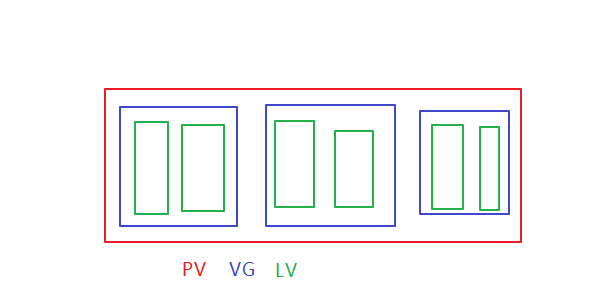
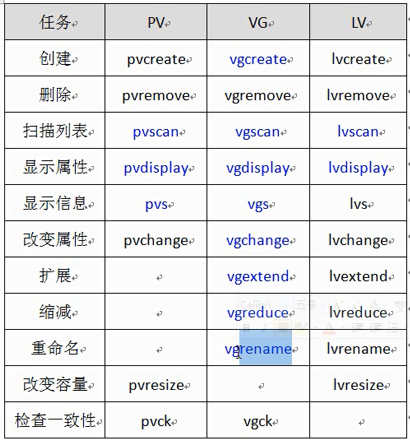
4、pvcreate创建物理卷PV
扫描
[root@xen01 ~]# pvscan
No matching physical volumes found
初始化物理卷被lvm使用
[root@xen01 ~]# pvcreate /dev/sdb1
Physical volume "/dev/sdb1" successfully created
[root@xen01 ~]# pvcreate /dev/sdc1
Physical volume "/dev/sdc1" successfully created
[root@xen01 ~]# pvscan
PV /dev/sdb1 lvm2 [4.99 GiB]
PV /dev/sdc1 lvm2 [6.00 GiB]
Total: 2 [10.99 GiB] / in use: 0 [0 ] / in no VG: 2 [10.99 GiB]
5、创建卷组VG
xen01可以被替换为其他。
[root@xen01 ~]# vgcreate xen01 /dev/sdb1 /dev/sdc1
Volume group "xen01" successfully created
[root@xen01 ~]# vgscan
Reading all physical volumes. This may take a while...
Found volume group "xen01" using metadata type lvm2
[root@xen01 ~]# vgdisplay
--- Volume group ---
VG Name xen01
System ID
Format lvm2
Metadata Areas 2
Metadata Sequence No 1
VG Access read/write
VG Status resizable
MAX LV 0
Cur LV 0
Open LV 0
Max PV 0
Cur PV 2
Act PV 2
VG Size 10.99 GiB
PE Size 4.00 MiB
Total PE 2813
Alloc PE / Size 0 / 0
Free PE / Size 2813 / 10.99 GiB
VG UUID 3eYQvn-Q3oa-UVND-e4ed-3G7z-w5jN-GABLbY
[root@xen01 ~]# vgreduce xen01 /dev/sdb1 #缩减
Removed "/dev/sdb1" from volume group "xen01"
[root@xen01 ~]# vgcreate xen01 /dev/sdb1 #
A volume group called xen01 already exists.
[root@xen01 ~]# vgextend xen01 /dev/sdb1 #扩展
Volume group "xen01" successfully extended
6、创建磁盘分区LV
1G大小 -n卷组名称 卷组
[root@xen01 ~]# lvcreate -L 1024M -n vm01 xen01 #1G大小 -n卷组名称 卷组
Logical volume "vm01" created
[root@xen01 ~]# lvscan
ACTIVE '/dev/xen01/vm01' [1.00 GiB] inherit
[root@xen01 ~]# lvdisplay
--- Logical volume ---
LV Path /dev/xen01/vm01
LV Name vm01
VG Name xen01
LV UUID b117OV-I1Qe-lcnB-Gwz3-97Fx-CKIr-xiOPdy
LV Write Access read/write
LV Creation host, time xen01, 2018-08-25 15:48:42 +0800
LV Status available
# open 0
LV Size 1.00 GiB
Current LE 256
Segments 1
Allocation inherit
Read ahead sectors auto
- currently set to 256
Block device 253:0
6.1、格式化
[root@xen01 ~]# mkfs.ext3 /dev/xen01/vm01
[root@xen01 ~]# tune2fs -c -1 /dev/xen01/vm01
tune2fs 1.41.12 (17-May-2010)
Setting maximal mount count to -1
7、挂载
[root@xen01 ~]# mkdir /mnt/lvm
[root@xen01 ~]# mount -t ext3 /dev/xen01/vm01 /mnt/lvm
[root@xen01 ~]# df -h
Filesystem Size Used Avail Use% Mounted on
/dev/sda3 20G 1.7G 17G 9% /
tmpfs 53M 0 53M 0% /dev/shm
/dev/sda1 194M 34M 151M 19% /boot
/dev/mapper/xen01-vm01 1008M 34M 924M 4% /mnt/lvm
配置到fstab中,开机自动挂载。不做演示。
[root@xen01 ~]# cat /etc/fstab
#
# /etc/fstab
# Created by anaconda on Mon Aug 7 03:13:11 2017
#
# Accessible filesystems, by reference, are maintained under '/dev/disk'
# See man pages fstab(5), findfs(8), mount(8) and/or blkid(8) for more info
#
UUID=209c7eeb-42ac-4d7f-abb2-eae032369328 / ext4 defaults 1 1
UUID=aca5cf44-755b-43fa-ab80-f3852ce6647d /boot ext4 defaults 1 2
UUID=8441093c-c618-4517-bb08-3863434f9018 swap swap defaults 0 0
tmpfs /dev/shm tmpfs defaults 0 0
devpts /dev/pts devpts gid=5,mode=620 0 0
sysfs /sys sysfs defaults 0 0
proc /proc proc defaults 0 0
8、扩展lvm
本来是1G,再加4G,到5G
[root@xen01 lvm]# lvextend -L +4096M /dev/xen01/vm01
Extending logical volume vm01 to 5.00 GiB
Logical volume vm01 successfully resized
[root@xen01 lvm]# lvscan
ACTIVE '/dev/xen01/vm01' [5.00 GiB] inherit
8.1、再创建一个LV卷
[root@xen01 lvm]# lvcreate -L 4096M -n vm02 xen01
Logical volume "vm02" created
[root@xen01 lvm]# lvscan
ACTIVE '/dev/xen01/vm01' [5.00 GiB] inherit
ACTIVE '/dev/xen01/vm02' [4.00 GiB] inherit
centos6.5使用LVM的更多相关文章
- CentOS6.8 配置LVM
LVM是逻辑盘卷管理(Logical Volume Manager)的简称,Linux环境下对磁盘分区进行管理的一种机制,LVM是建立在硬盘和分区之上的一个逻辑层,来提高磁盘分区管理的灵活性. LVM ...
- centos6下的lvm逻辑卷的管理
LVM:Logical Volume Manager 将多块设备组合成一个来使用 dm:device mapper 设备映射 设备文件 /dev/卷组名/逻辑卷名 /dev/mapp ...
- 006.ks.cfg文件相关
一 图形化生成ks.cfg文件 [root@server ~]# yum -y install system-config-kickstart #安装图形化kickstart工具 [root@serv ...
- VMware下CentOS6.8配置GFS文件系统
1.GFS介绍 GFS简要说明,它有两种: 1. Google文件系统:GFS是GOOGLE实现的是一个可扩展的分布式文件系统,用于大型的.分布式的.对大量数据进行访问的应用.它运行于廉价的普通硬件上 ...
- linux磁盘限额和进阶文件系统的管理 quota RAID LVM
概念: Quota 的一般用途: 针对 WWW server ,例如:每个人的网页空间的容量限制! 针对 mail server,例如:每个人的邮件空间限制. 针对 file server,例如:每个 ...
- 烂泥:kickstart无人值守安装CentOS6.5
本文由秀依林枫提供友情赞助,首发于烂泥行天下. 在本次实验进行之前,首先我们要把公司的网络环境进行介绍. 注意这个网络拓扑图,也是生产环境的一个实例.同时服务器192.168.1.214已关闭ipta ...
- 烂泥:LVM学习之LVM基础
本文由秀依林枫提供友情赞助,首发于烂泥行天下. 有关LVM的好处我就不在此多介绍了,有空的话自己可以去百度百科中看看.我们在此之进行LVM的相关操作,以及命令的学习. 要想使系统支持LVM,我们必须安 ...
- 烂泥:centos安装LVM方式
本文由秀依林枫提供友情赞助,首发于烂泥行天下. 最近开始打算学习有关LVM逻辑卷的知识,由于以前没有接触过,看了很多有关这方面的视频.但是一直不深入.今天就先不管了,先把centos系统安装在LVM上 ...
- CentOS6 启动流程图文解剖
我们在使用Linux操作系统的时候,我们只需按下电源键,等待,然后输入账户和密码就可以使用Linux操作系统了.那么在按下电源到输入账号和密码之前,操作系统都做了些什么?下面就来讲述在这段时间发生的动 ...
随机推荐
- mybatis中 keyProperty="id" 的作用
keyProperty="id"的作用是: 一般都是结合数据库自动生成主键来使用,由于是数据库生成的主键, 所以在这个对象持久化到数据库之前是对象中的这个属性是没有属性值的,但是在 ...
- PHP代码审计之命令注入
命令注入 命令注入就是通过利用无验证变量构造特殊语句对服务器进行渗透. 注入的种类有很多,而不仅仅是SQL Injection. php常见注入有以下几种(常见:,常见!!): 命令注入 (Comma ...
- 12、Filter(拦截器)
一.过滤器(Filter):又称拦截器.实现Filter接口的类我们称之为Filter(过滤器或拦截器),Filter可以对用户访问的资源进行拦截.例如:客户端发送请求是,先将请求拦截下来,判断用户是 ...
- python+redis+kairosdb+cassandra+mysql环境搭建
环境搭建: python安装: redis安装: 下载.解压.安装 1.wget http://download.redis.io/releases/redis-5.0.0.tar.gz 2.tar ...
- .net core 2.0 报错:error NU1102: Unable to find package 。。。
这种是nuget无法还原的问题.解决问题的方法: 在项目文件所在的目录下创建文件:NuGet.Config 里面内容: "?> <configuration> <pa ...
- day 24-1 继承
继承 什么是继承: 继承是一种创建新类的方式,在 python 中,新建的类可以继承一个或多个父类,父类又可称为基类或超类,新建的类称为派生类或子类 父类必须在子类上面 一个类 可以被多个类继承 一个 ...
- CSS字体渐变 & 隐藏浏览器滚动条 & grid布局(转载)
字体渐变 https://www.zhangxinxu.com/study/201104/css3-text-gradient-2.html 隐藏浏览器滚动条 https://blog.csdn. ...
- 2018-2019-2 20165337《网络攻防技术》Exp5 MSF基础应用
一.实践目标 1.一个主动攻击实践 ms08_067 2.一个针对浏览器的攻击 ms13-069 3.一个针对客户端的攻击 adobe (Adobe_toolbutton客户端漏洞) 4.成功应用任何 ...
- 用mongo和redis查询排行榜、统计活跃用户
nosql数据库能解决关系型数据库遇到的性能和扩展性的问题,本博客将以mongodb和redis两种nosql数据库为基础,简单的介绍下面两个业务场景的解决方案: 1.查询排行榜(以当日总步数排名为例 ...
- JAVA学习笔记(2)—— java初始化三个原则
1. 初始化原则 (1) 静态对象(变量)优先于非静态对象(变量)初始化,其中静态对象(变量)初始化一次,非静态对象(变量)可能会初始化多次. (2) 父类优先于子类初始化 (3) 按照成 ...