
Aspose.Words 自定义文档模版生成操作类
/// <summary>
/// 操作word通用类 LIYOUMING add 2017-12-27
/// </summary>
public class DocHelper
{ /// <summary>
/// 获取模版设计服务数据服务
/// </summary>
private static IOccupationDesigner _sqlServices = AutofacWorkContainer.Resolve<IOccupationDesigner>();
/// <summary>
/// 拼接组合多个Word文档
/// </summary>
/// <param name="filepaths">模版文件多个</param>
/// <param name="savepath">保存文件地址</param>
public static void BeachReadWord(List<WordSeting> wordSetings, string unitid, out MemoryStream stream)
{ if (wordSetings == null || wordSetings.Count == )
{
throw new Exception("未设置Word模版");
}
//载入第一个模版
Document doc = new Document();//载入模板
doc.RemoveAllChildren(); wordSetings.ForEach(c =>
{
Document srcDoc = ReadWord(c, unitid);
srcDoc.FirstSection.PageSetup.SectionStart = SectionStart.Continuous;
doc.AppendDocument(srcDoc, ImportFormatMode.KeepSourceFormatting); }); stream = new MemoryStream();
doc.Save(stream, Aspose.Words.Saving.SaveOptions.CreateSaveOptions(SaveFormat.Docx));
// doc.Save(stream, SaveFormat.Docx);
} /// <summary>
/// 业务操作
/// </summary>
/// <param name="filepath"></param>
private static Document ReadWord(WordSeting wordSeting, string unitid)
{
Document srcDoc = new Document(wordSeting.WordPath);
switch (wordSeting.WordType)
{
case (int)Models.Enum.WordType.Column:
InsertPic_Column3D(srcDoc, wordSeting, unitid);
break;
case (int)Models.Enum.WordType.PIE:
InsertPic_Pie3D(srcDoc, wordSeting, unitid);
break;
case (int)Models.Enum.WordType.Line:
InsertPic_Line3D(srcDoc, wordSeting, unitid);
break;
case (int)Models.Enum.WordType.TEXT:
InsertData_Replace(srcDoc, wordSeting, unitid);
break;
case (int)Models.Enum.WordType.Table:
InsertData_Table(srcDoc, wordSeting, unitid);
break;
case (int)Models.Enum.WordType.HTML:
InsertData_HTML(srcDoc, wordSeting, unitid);
break;
}
#region 测试版本呢
//if (typeId == 0)
//{
// #region 虚拟化数据
// //DataTable datasource = new DataTable("tb");
// //datasource.Columns.Add("类型");
// //datasource.Columns.Add("已预约");
// //datasource.Columns.Add("体检中");
// //datasource.Columns.Add("已打印");
// //for (int i = 0; i < 3; i++)
// //{
// // var row = datasource.NewRow(); // // row["类型"] = "分组" + i;
// // row["已预约"] = 5 * (i + 1);
// // row["体检中"] = 3 * (i + 1);
// // row["已打印"] = 9 * (i + 1); // // datasource.Rows.Add(row); // //}
// #endregion
// InsertPic_Column3D(srcDoc, wordSeting, unitid);
//}
//if (typeId == 1)
//{
// #region 虚拟化数据
// //DataTable datasource = new DataTable("tb");
// //datasource.Columns.Add("类型");
// //datasource.Columns.Add("已预约");
// //datasource.Columns.Add("体检中");
// //datasource.Columns.Add("已打印");
// //for (int i = 0; i < 1; i++)
// //{
// // var row = datasource.NewRow(); // // row["类型"] = "分组" + i;
// // row["已预约"] = 5 * (i + 1);
// // row["体检中"] = 3 * (i + 1);
// // row["已打印"] = 9 * (i + 1); // // datasource.Rows.Add(row); // //}
// #endregion
// InsertPic_Pie3D(srcDoc, wordSeting, unitid);
//} //if (typeId == 2)
//{
// #region 虚拟化数据
// //DataTable datasource = new DataTable("tb");
// //datasource.Columns.Add("类型");
// //datasource.Columns.Add("已预约");
// //datasource.Columns.Add("体检中");
// //datasource.Columns.Add("已打印");
// //for (int i = 0; i < 1; i++)
// //{
// // var row = datasource.NewRow(); // // row["类型"] = "分组" + i;
// // row["已预约"] = 5 * (i + 1);
// // row["体检中"] = 3 * (i + 1);
// // row["已打印"] = 9 * (i + 1); // // datasource.Rows.Add(row); // //}
// #endregion
// InsertData_Table(srcDoc, wordSeting, unitid);
//} //if (typeId == 3)
//{
// #region 虚拟化数据
// //DataTable datasource = new DataTable("tb");
// //datasource.Columns.Add("类型");
// //datasource.Columns.Add("已预约");
// //datasource.Columns.Add("体检中");
// //datasource.Columns.Add("已打印");
// //for (int i = 0; i < 3; i++)
// //{
// // var row = datasource.NewRow(); // // row["类型"] = "分组" + i;
// // row["已预约"] = 5 * (i + 1);
// // row["体检中"] = 3 * (i + 1);
// // row["已打印"] = 9 * (i + 1); // // datasource.Rows.Add(row); // //}
// #endregion
// InsertPic_Line3D(srcDoc, wordSeting, unitid);
//} //if (typeId == 4)
//{
// #region 虚拟化数据
// //DataTable datasource = new DataTable("tb");
// //datasource.Columns.Add("类型");
// //datasource.Columns.Add("已预约");
// //datasource.Columns.Add("体检中");
// //datasource.Columns.Add("已打印");
// //for (int i = 0; i < 1; i++)
// //{
// // var row = datasource.NewRow();
// // row["类型"] = "分组" + i;
// // row["已预约"] = 5 * (i + 1);
// // row["体检中"] = 3 * (i + 1);
// // row["已打印"] = 9 * (i + 1); // // datasource.Rows.Add(row); // //}
// ////替换数据处理
// //DataSet ds = new DataSet();
// //ds.Tables.Add(datasource);
// #endregion
// InsertData_Replace(srcDoc, wordSeting, unitid);
//}
#endregion
return srcDoc;
} /// <summary>
/// 添加分组列说明 liyouming
/// </summary>
/// <param name="chart"></param>
/// <param name="seriesSize">分组数量</param>
/// <param name="lableSize">列组数量</param>
private static void SetLable_Column(Chart chart, int seriesSize, int lableSize)
{
for (int j = ; j < seriesSize; j++)
{
ChartDataLabelCollection dataLabelCollection = chart.Series[j].DataLabels; for (int i = ; i < lableSize; i++)
{
ChartDataLabel chartDataLabel = dataLabelCollection.Add(i);
chartDataLabel.ShowLegendKey = true;
chartDataLabel.ShowLeaderLines = true;
chartDataLabel.ShowCategoryName = false;
//chartDataLabel.ShowPercentage = true;
chartDataLabel.ShowSeriesName = true;
chartDataLabel.ShowValue = true;
chartDataLabel.Separator = " ";
} } }
/// <summary>
/// 设置显示Lable
/// </summary>
/// <param name="chart"></param>
/// <param name="lableSize"></param>
private static void SetLable_Pie(Chart chart, int lableSize)
{ ChartDataLabelCollection dataLabelCollection = chart.Series[].DataLabels; for (int i = ; i < lableSize; i++)
{
ChartDataLabel chartDataLabel = dataLabelCollection.Add(i);
chartDataLabel.ShowLegendKey = true;
chartDataLabel.ShowLeaderLines = true;
chartDataLabel.ShowCategoryName = true;
chartDataLabel.ShowPercentage = true;
chartDataLabel.ShowSeriesName = false;
chartDataLabel.ShowValue = true;
chartDataLabel.Separator = " ";
} }
/// <summary>
/// 饼状图
/// </summary>
/// <param name="doc"></param>
/// <param name="with"></param>
/// <param name="height"></param>
/// <param name="datasource"></param>
private static Document InsertPic_Pie3D(Document doc, WordSeting wordseting, string UinitId)
{ DataTable datasource = null;
if (string.IsNullOrEmpty(wordseting.WordData))
{
throw new Exception("Pie图形未设置数据源");
}
//获取数据源
datasource = _sqlServices.GetWordDataBySql(wordseting.WordData, UinitId).Tables[]; Aspose.Words.DocumentBuilder builder = new Aspose.Words.DocumentBuilder(doc);
ChartType imagestype = ChartType.Pie;
if (wordseting.ImgageType == )
{
imagestype = ChartType.Pie3D;
} Shape shape = builder.InsertChart(imagestype, (double)wordseting.Width, (double)wordseting.Height);
shape.Title = wordseting.Title;
Chart chart = shape.Chart;
ChartSeriesCollection seriesColl = chart.Series;
seriesColl.Clear(); //生成word 分组统计图,说明 liyouming add
/*
------类型[固定]---series1-----series2------
------分组名1--------22----------62---------- ----------------------------------------------
*/
List<string> lstCategories = new List<string>();
if (datasource != null && datasource.Rows.Count > )
{
List<DataRow> lstRows = new List<DataRow>();
foreach (DataRow row in datasource.Rows)
{ lstRows.Add(row);
} List<double> doub = new List<double>();
foreach (DataColumn col in datasource.Columns)
{
if (col.ColumnName != "类型")
{ lstCategories.Add(col.ColumnName);
foreach (var datarow in lstRows)
{
double doubx = ;
double.TryParse(datarow[col.ColumnName] + "", out doubx);
doub.Add(doubx);
} }
}
string[] categories = lstCategories.ToArray();
seriesColl.Add(shape.Title, categories, doub.ToArray()); if (wordseting.IfChartLabel == )
{
SetLable_Pie(chart, lstCategories.Count);
} } return builder.Document; }
/// <summary>
/// 柱状分组图
/// </summary>
/// <param name="doc"></param>
/// <param name="with"></param>
/// <param name="height"></param>
/// <param name="datasource"></param>
private static Document InsertPic_Column3D(Document doc, WordSeting wordseting, string UinitId)
{ DataTable datasource = null;
if (string.IsNullOrEmpty(wordseting.WordData))
{
throw new Exception("Column图形未设置数据源");
}
//获取数据源
datasource = _sqlServices.GetWordDataBySql(wordseting.WordData, UinitId).Tables[]; Aspose.Words.DocumentBuilder builder = new Aspose.Words.DocumentBuilder(doc);
ChartType imagestype = ChartType.Column;
if (wordseting.ImgageType == )
{
imagestype = ChartType.Column3D;
}
Shape shape = builder.InsertChart(imagestype, (double)wordseting.Width, (double)wordseting.Height);
shape.Title = wordseting.Title;
Chart chart = shape.Chart;
ChartSeriesCollection seriesColl = chart.Series;
seriesColl.Clear();
//生成word 分组统计图,说明 liyouming add
/*
------类型[固定]---series1-----series2------
------分组名1--------22----------62----------
------分组名2--------88----------33----------
----------------------------------------------
*/
List<string> lstCategories = new List<string>();
if (datasource != null && datasource.Rows.Count > )
{
List<DataRow> lstRows = new List<DataRow>();
foreach (DataRow row in datasource.Rows)
{
lstCategories.Add(row["类型"] + "");
lstRows.Add(row);
} string[] categories = lstCategories.ToArray();
foreach (DataColumn col in datasource.Columns)
{
if (col.ColumnName != "类型")
{
List<double> doub = new List<double>();
foreach (var datarow in lstRows)
{
double doubx = ;
double.TryParse(datarow[col.ColumnName] + "", out doubx);
doub.Add(doubx);
}
seriesColl.Add(col.ColumnName, categories, doub.ToArray());
}
}
if (wordseting.IfChartLabel == )
{
SetLable_Column(chart, seriesColl.Count, lstCategories.Count);
} } return builder.Document; }
/// <summary>
/// 添加线性图
/// </summary>
/// <param name="doc"></param>
/// <param name="with"></param>
/// <param name="height"></param>
/// <param name="datasource"></param>
private static Document InsertPic_Line3D(Document doc, WordSeting wordseting, string UinitId)
{ DataTable datasource = null;
if (string.IsNullOrEmpty(wordseting.WordData))
{
throw new Exception("Line图形未设置数据源");
}
//获取数据源
datasource = _sqlServices.GetWordDataBySql(wordseting.WordData, UinitId).Tables[];
DocumentBuilder builder = new DocumentBuilder(doc);
ChartType imagestype = ChartType.Line;
if (wordseting.ImgageType == )
{
imagestype = ChartType.Line3D;
}
Shape shape = builder.InsertChart(imagestype,(double)wordseting.Width, (double)wordseting.Height);
shape.Title = wordseting.Title;
Chart chart = shape.Chart;
ChartSeriesCollection seriesColl = chart.Series;
seriesColl.Clear(); List<string> lstCategories = new List<string>();
if (datasource != null && datasource.Rows.Count > )
{
List<DataRow> lstRows = new List<DataRow>();
foreach (DataRow row in datasource.Rows)
{
lstCategories.Add(row["类型"] + "");
lstRows.Add(row);
} string[] categories = lstCategories.ToArray(); foreach (DataColumn col in datasource.Columns)
{
if (col.ColumnName != "类型")
{
List<double> doub = new List<double>();
foreach (var datarow in lstRows)
{
double doubx = ;
double.TryParse(datarow[col.ColumnName] + "", out doubx);
doub.Add(doubx); }
seriesColl.Add(col.ColumnName, categories, doub.ToArray());
}
}
if (wordseting.IfChartLabel == )
{
SetLable_Column(chart, seriesColl.Count, );
} } return builder.Document;
}
/// <summary>
/// 添加统计列表Table
/// </summary>
/// <param name="doc"></param>
/// <param name="with"></param>
/// <param name="height"></param>
/// <param name="datasource"></param>
private static Document InsertData_Table(Document doc, WordSeting wordseting, string UinitId)
{ DataTable datasource = null;
if (string.IsNullOrEmpty(wordseting.WordData))
{
throw new Exception("Table未设置数据源");
}
//获取数据源
datasource = _sqlServices.GetWordDataBySql(wordseting.WordData, UinitId).Tables[]; DocumentBuilder builder = new DocumentBuilder(doc);
builder.Write(" ");
if (datasource != null && datasource.Rows.Count > )
{
Table table = builder.StartTable(); foreach (DataColumn col in datasource.Columns)
{
builder.InsertCell();
table.AutoFit(AutoFitBehavior.FixedColumnWidths);
builder.CellFormat.VerticalAlignment = CellVerticalAlignment.Center;
//builder.CellFormat.SetPaddings(5, 5, 5, 5);
builder.CellFormat.Width = (double)wordseting.Width;
builder.Write(col.ColumnName);
} builder.EndRow();
foreach (DataRow row in datasource.Rows)
{
foreach (DataColumn col in datasource.Columns)
{
builder.InsertCell(); builder.CellFormat.VerticalAlignment = CellVerticalAlignment.Center;
//builder.CellFormat.SetPaddings(5, 5, 5, 5);
builder.CellFormat.Width = (double)wordseting.Width;
builder.Write(row[col.ColumnName] + "");
}
builder.EndRow();
}
builder.EndTable(); }
return builder.Document; }
/// <summary>
/// 添加HTML数据
/// </summary>
/// <param name="doc"></param>
/// <param name="with"></param>
/// <param name="height"></param>
/// <param name="datasource"></param>
private static Document InsertData_HTML(Document doc, WordSeting wordseting, string UinitId)
{ DataSet datasource = null; //获取数据源 DocumentBuilder builder = new DocumentBuilder(doc); string htmlConetent = wordseting.WordHtml;
//没有数据源就直接插入html内容
if (datasource == null)
{ }
//有数据源把html当作模版写入 这里模版分为类型
else
{ Regex regtag = new Regex(@"<temp class='TempIndex\d*'.*?>.*?</temp>");
MatchCollection colectiontag = regtag.Matches(htmlConetent);
datasource = _sqlServices.GetWordDataBySql(wordseting.WordData, UinitId); #region TempIndex模版
if (colectiontag.Count > )
{
for (int p = ; p < colectiontag.Count; p++)
{
var _sb1 = new StringBuilder();
var temp = colectiontag[p].Value;
int tableIndex = ;
int.TryParse(temp.Substring(temp.IndexOf("TempIndex") + , ), out tableIndex);
DataTable defaultTabel = datasource.Tables[tableIndex];
if (defaultTabel.Rows.Count > )
{ string tempall = string.Empty;
foreach (DataRow row1 in defaultTabel.Rows)
{
string rowtemp = temp;
foreach (DataColumn dc in defaultTabel.Columns)
{
if (row1[dc.ColumnName] != null && temp.Contains("@" + dc.ColumnName))
{
rowtemp = Regex.Replace(rowtemp, "@" + dc.ColumnName, (row1[dc.ColumnName] + "").Replace("\r\n", "<br/>"));
} }
_sb1.Append(rowtemp);
}
htmlConetent = htmlConetent.Replace(temp, _sb1.ToString());
}
}
}
#endregion Regex regtable = new Regex(@"<table class='TableIndex\d*'.*?>.*?</table>");
MatchCollection colectiontable = regtable.Matches(htmlConetent); #region TableIndex模版
if (colectiontable.Count > )
{
for (var i = ; i < colectiontable.Count; i++)
{
var _sb1 = new StringBuilder();
var temp = colectiontable[i].Value;
int tableIndex = ;
int.TryParse(temp.Substring(temp.IndexOf("TableIndex") + , ), out tableIndex);
DataTable dt = datasource.Tables[tableIndex]; List<ItemsInfo> dic = new List<ItemsInfo>();
string rowtemp = temp;
if (dt.Rows.Count > )
{ foreach (DataRow row in dt.Rows)
{
dic.Add(new ItemsInfo { ProName = row["Name"] + "", ResultVal = row["Value"] + "" });
}
} try
{
Regex tep = new Regex(@"@.*?@");
MatchCollection groupVal = tep.Matches(temp); for (var j = ; j < groupVal.Count; j++)
{
var v = groupVal[j].Value;
string citem = v.Substring(, v.Length - ); var keyVal = dic.Where(x => x.ProName == citem).FirstOrDefault(); if (keyVal != null)
{
rowtemp = Regex.Replace(rowtemp, v, (keyVal.ResultVal + "").Replace("\\r\\n", "<br/>").Replace("\r\n", "<br/>")); }
else
{
rowtemp = Regex.Replace(rowtemp, v, ""); } }
_sb1.Append(rowtemp);
}
catch (Exception e)
{ }
htmlConetent = htmlConetent.Replace(temp, _sb1.ToString()); } }
#endregion
}
builder.InsertHtml(htmlConetent);
return builder.Document;
}
/// <summary>
/// 替换文本
/// </summary>
/// <param name="doc"></param>
/// <param name="datasource"></param>
/// <returns></returns>
private static Document InsertData_Replace(Document doc, WordSeting wordseting, string UinitId)
{
DataSet datasource = null;
if (string.IsNullOrEmpty(wordseting.WordData))
{
throw new Exception("Replace未设置数据源");
}
//获取数据源
datasource = _sqlServices.GetWordDataBySql(wordseting.WordData, UinitId);
if (datasource != null && datasource.Tables.Count > )
{
foreach (DataTable table in datasource.Tables)
{
if (table != null && table.Rows.Count == )
{
foreach (DataColumn col in table.Columns)
{
Regex reg1 = new Regex(@"{" + col.ColumnName + "}");
doc.Range.Replace(reg1, table.Rows[][col.ColumnName].ToString());
}
}
else if (table != null)
{
//这种设计数据源需用 Name Value 处理
foreach (DataRow row in table.Rows)
{
Regex reg1 = new Regex(@"{" + row["Name"] + "}");
doc.Range.Replace(reg1, row["Value"] + "");
}
}
}
}
return doc;
} }
Aspose.Words
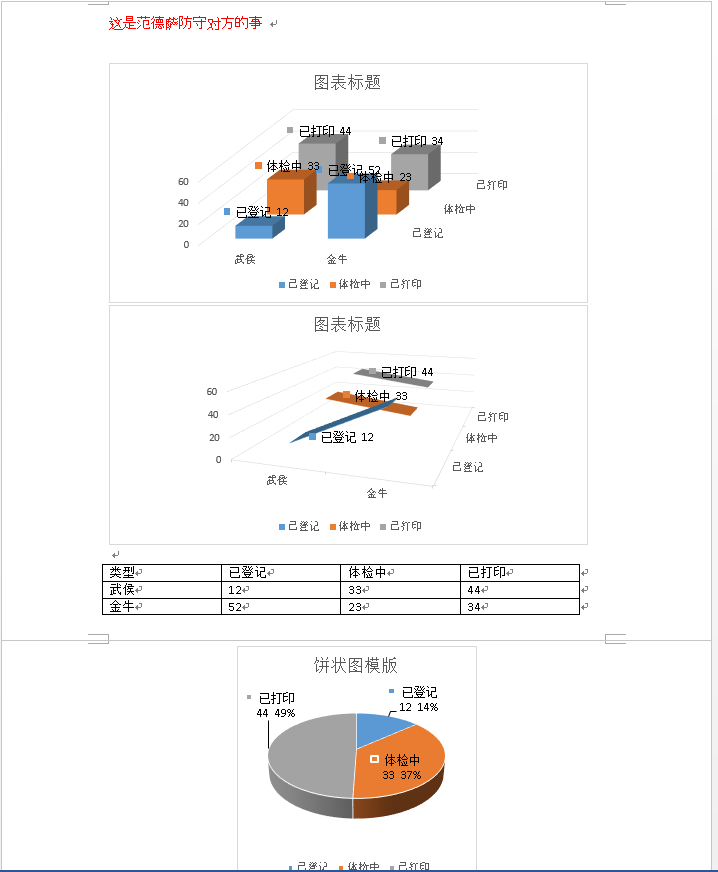
通过模版设计处理文档,测试效果
Aspose.Words 自定义文档模版生成操作类的更多相关文章
- word文档的生成、修改、渲染、打印,使用Aspose.Words
无需MS Word也可执行各种文档处理任务,包括文档的生成.修改.渲染.打印,文档格式转换和邮件合并等文档处理.
- 【Android Developers Training】 54. 打印自定义文档
注:本文翻译自Google官方的Android Developers Training文档,译者技术一般,由于喜爱安卓而产生了翻译的念头,纯属个人兴趣爱好. 原文链接:http://developer ...
- VS文档自动生成
VS2008文档自动生成 (发现,Sandcastle主要是用于C#项目.里面的注释都是XML格式的.不太适合VC的.最终还是得用Doxygen) 一.Sandcastle简介: Sandcastle ...
- 将C#文档注释生成.chm帮助文档
由于最近需要把以前的一个项目写一个文档,但一时又不知道写成怎样的,又恰好发现了可以生成chm的工具,于是乎我就研究了下,感觉还不错,所以也给大家分享下.好了,不多废话,下面就来实现一下吧. 生成前的准 ...
- 工具分享——将C#文档注释生成.chm帮助文档
由于最近需要把以前的一个项目写一个文档,但一时又不知道写成怎样的,又恰好发现了可以生成chm的工具,于是乎我就研究了下,感觉还不错,所以也给大家分享下.好了,不多废话,下面就来实现一下吧. 生成前的准 ...
- 优于 swagger 的 java markdown 文档自动生成框架-01-入门使用
设计初衷 节约时间 Java 文档一直是一个大问题. 很多项目不写文档,即使写文档,对于开发人员来说也是非常痛苦的. 不写文档的缺点自不用多少,手动写文档的缺点也显而易见: 非常浪费时间,而且会出错. ...
- Word 2010文档自动生成目录和某页插入页码
一.Word 2010文档自动生成目录 关于Word文档自动生成目录一直是我身边同学们最为难的地方,尤其是毕业论文,经常因为目录问题,被要求修改,而且每次修改完正文后,目录的内容和页码可能都会发生变化 ...
- 百度地图和高德地图坐标系的互相转换 四种Sandcastle方法生成c#.net帮助类帮助文档 文档API生成神器SandCastle使用心得 ASP.NET Core
百度地图和高德地图坐标系的互相转换 GPS.谷歌.百度.高德坐标相互转换 一.在进行地图开发过程中,我们一般能接触到以下三种类型的地图坐标系: 1.WGS-84原始坐标系,一般用国际GPS纪录仪记 ...
- 将C#文档注释生成.chm帮助文档(转)
由于最近需要把以前的一个项目写一个文档,但一时又不知道写成怎样的,又恰好发现了可以生成chm的工具,于是乎我就研究了下,感觉还不错,所以也给大家分享下.好了,不多废话,下面就来实现一下吧. 生成前的准 ...
随机推荐
- tf.nn.conv2d 参数介绍
tf.nn.conv2d是TensorFlow里面实现卷积的函数,参考文档对它的介绍并不是很详细,实际上这是搭建卷积神经网络比较核心的一个方法,非常重要 tf.nn.conv2d(input, fil ...
- python 套接字之select poll epoll
python下的select模块使用 以及epoll与select.poll的区别 先说epoll与select.poll的区别(总结) select, poll, epoll 都是I/O多路复用的具 ...
- sql server查询数据库的大小和各数据表的大小
查询出来的结果中各字段的详细说明参考MSDN资料:https://msdn.microsoft.com/zh-cn/library/ms188776.aspx 如果只是查询数据库的大小的话,直接使用以 ...
- 洛谷P2766 最长递增子序列问题
https://www.luogu.org/problemnew/show/P2766 注:题目描述有误,本题求的是最长不下降子序列 方案无限多时输出 n 网络流求方案数,长见识了 第一问: DP 同 ...
- Shell中eval的用法示例
功能说明:告知shell取出eval的参数,重新运算求出参数的内容. 语 法:eval [参数]补充说明:eval可读取一连串的参数,然后再依参数本身的特性来执行. 参 数:参数不限数目,彼此之间用分 ...
- Jenkins配置定时任务
在任务配置中,滚动到构建触发器-->勾选"Build periodically"-->在输入框中配置触发时间 以上配置,表示在6月13日23点触发. 如果配置成 00 ...
- js生成接口请求参数签名加密
js生成接口请求参数签名加密 定义规则:将所有参数字段按首字母排序, 拼接成key1 = value1 & key2 = value2的格式,再在末尾拼接上key = appSecret, 再 ...
- querySelectorAll 方法和 getElementsBy 系列方法的区别
本文是我在知乎上的一个回答:http://www.zhihu.com/question/24702250/answer/28695133 ————— 下面是正文 ————— 1. W3C 标准quer ...
- 20145209 2016-2017-2 《Java程序设计》第5周学习总结
20145209 2016-2017-2 <Java程序设计>第5周学习总结 教材学习内容总结 异常处理 & Collection与Map 异常继承架构 错误的对象继承java.l ...
- Anaconda+django写出第一个web app(二)
今天开始建立App中的第一个Model,命名为Tutorial. Model的定义在main文件夹下的models.py中通过类进行,我们希望Tutorial这个model包含三个属性:标题.内容和发 ...