
Java的I/O系统
1.File类
File类既能代表一个特定文件的名称,又能代表一个目录下的一组文件的名称。
如果我们调用不带参数的list()方法,便可以获得此File对象包含的全部列表。然而,如果我们想获得一个受限列表,例如,想得到所有扩展名为.java的文件,那么我们就要用到“目录过滤器”,这个类告诉我们怎样显示符合条件的File对象。
import java.util.regex.*;

import java.io.*;

import java.util.*;

public class DirList3 {

	public static void main(final String[] args) {

		File path = new File(".");

		String[] list;

		if(args.length == 0){

			list = path.list();

		}else{

			list = path.list(new FilenameFilter() {

				private Pattern pattern = Pattern.compile(args[0]);

				public boolean accept(File dir, String name) {

					return pattern.matcher(name).matches();

				}

			});

		}

		Arrays.sort(list, String.CASE_INSENSITIVE_ORDER);

		for(String dirItem : list){

			System.out.println(dirItem);

		}

	}

}
File类不仅仅只代表存在的文件或目录。也可以用File对象来创建新的目录或尚不存在的整个目录路径。我们还可以查看文件的特性(例如,大小、最后修改日期、读/写),检查某个File对象代表的是一个文件还是一个目录,并可以删除文件。
import java.io.*;

public class MakeDirectories {

	private static void usage() {

		System.err.println(

	      "Usage:MakeDirectories path1 ...\n" +

	      "Creates each path\n" +

	      "Usage:MakeDirectories -d path1 ...\n" +

	      "Deletes each path\n" +

	      "Usage:MakeDirectories -r path1 path2\n" +

	      "Renames from path1 to path2");

		System.exit(1);

	}

	private static void fileData(File f) {

	    System.out.println(

	    	"Absolute path: " + f.getAbsolutePath() +

	    	"\n Can read: " + f.canRead() +

	    	"\n Can write: " + f.canWrite() +

	    	"\n getName: " + f.getName() +

	    	"\n getParent: " + f.getParent() +

	    	"\n getPath: " + f.getPath() +

	    	"\n length: " + f.length() +

	    	"\n lastModified: " + f.lastModified());

	    if(f.isFile()){

	    	System.out.println("It's a file");

	    }else if(f.isDirectory()){

	    	System.out.println("It's a directory");

	    }

	}

	public static void main(String[] args) {

		if(args.length < 1){

			usage();

		}

		if(args[0].equals("-r")) {

			if(args.length != 3){

				usage();

			}

			File old = new File(args[1]),rname = new File(args[2]);

			old.renameTo(rname);

			fileData(old);

			fileData(rname);

			return; // Exit main

		}

		int count = 0;

		boolean del = false;

		if(args[0].equals("-d")) {

			count++;

			del = true;

		}

		count--;

		while(++count < args.length) {

			File f = new File(args[count]);

			if(f.exists()) {

				System.out.println(f + " exists");

				if(del) {

					System.out.println("deleting..." + f);

					f.delete();

				}

			}else { // Doesn't exist

				if(!del) {

					f.mkdirs();

					System.out.println("created " + f);

				}

			}

			fileData(f);

		}

	}

}
2.字节流
编程语言的I/O类库中常使用流这个抽象概念,它代表任何有能力产出数据的数据源对象或者是有能力接收数据的接收端对象。
Java类库中的I/O类分成输入和输出两部分。
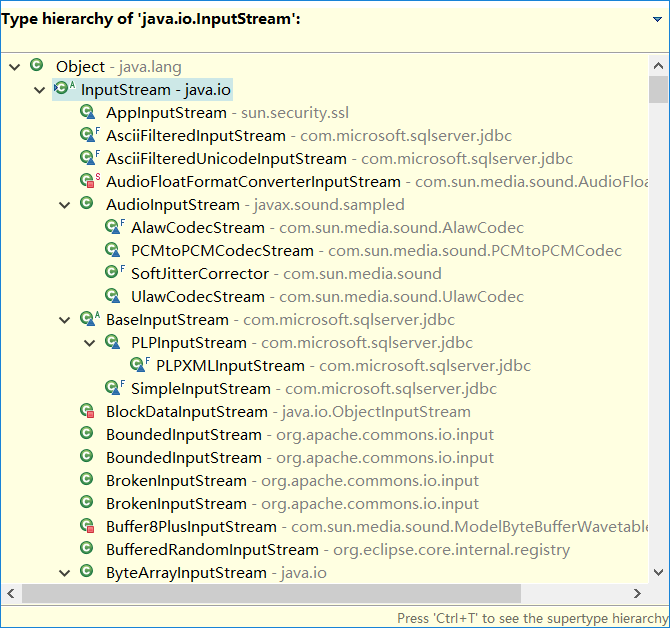
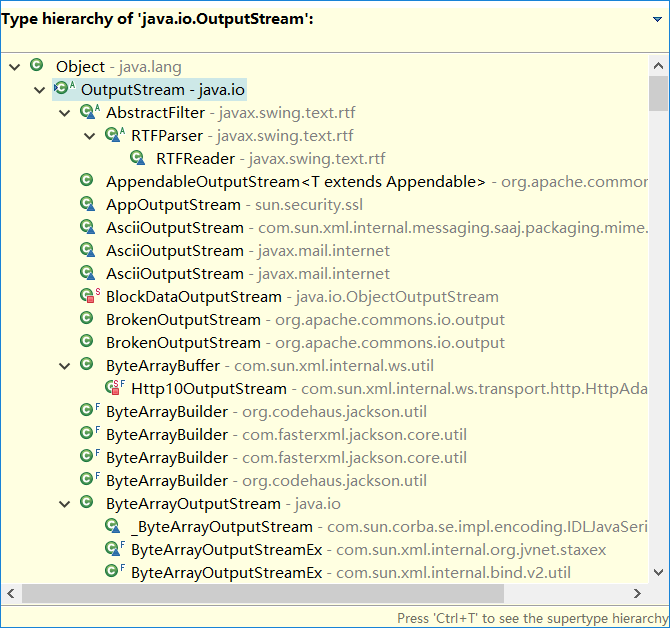
与输入有关的所有类都应该从InputStream继承,而与输出有关的所有类都应该从OutputStream继承。
3.字符流
Reader和Writer提供兼容Unicode与面向字符的I/O功能。
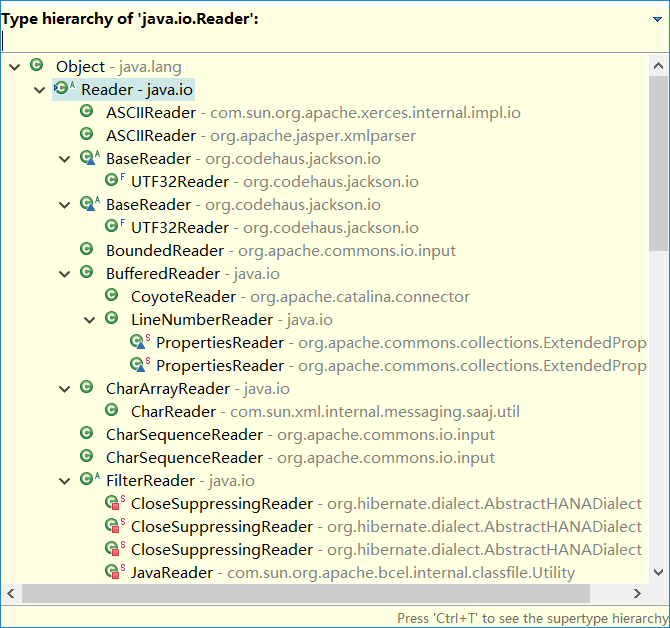
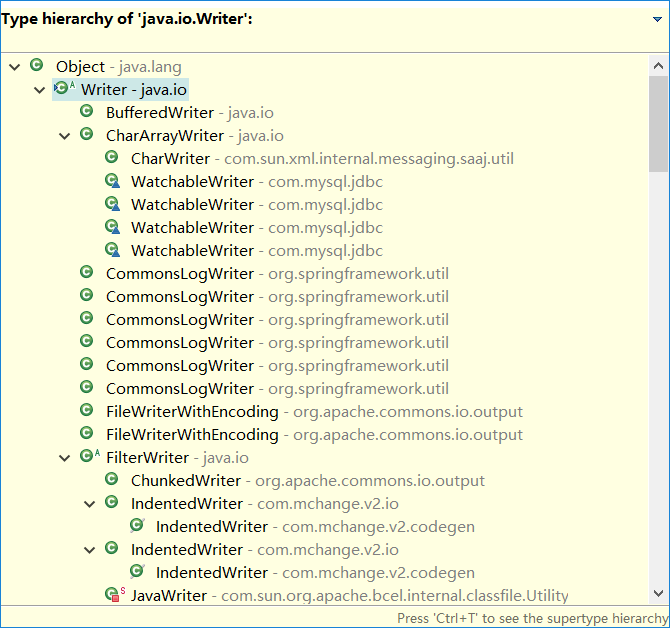
有时我们必须把来自于“字节”层次结构中的类和“字符”层次结构中的类结合起来使用。为了实现这个目的,要用到适配器类:InputStreamReader可以把InputStream转换为Reader,而OutputStreamWriter可以把OututStream转换为Writer。
4.I/O流的典型使用方式
4.1 缓冲输入文件
import java.io.*;

public class BufferedInputFile {

	// Throw exceptions to console:

	public static String read(String filename) throws IOException {

		// Reading input by lines:

		BufferedReader in = new BufferedReader(new FileReader(filename));

		String s;

		StringBuilder sb = new StringBuilder();

		while((s = in.readLine())!= null){

			sb.append(s + "\n");

		}

		in.close();

		return sb.toString();

	}

	public static void main(String[] args) throws IOException {

		System.out.print(read("BufferedInputFile.java"));

	}

}
4.2 从内存输入
public class MemoryInput {

	public static void main(String[] args) throws IOException {

		StringReader in = new StringReader(BufferedInputFile.read("MemoryInput.java"));

		int c;

		while((c = in.read()) != -1){

			System.out.print((char)c);

		}

	}

}
4.3 格式化的内存输入
public class FormattedMemoryInput {

	public static void main(String[] args) throws IOException {

		try {

			DataInputStream in = new DataInputStream(new ByteArrayInputStream(BufferedInputFile.read("FormattedMemoryInput.java").getBytes()));

			while(true){

				System.out.print((char)in.readByte());

			}

		}catch(EOFException e) {

			System.err.println("End of stream");

		}

	}

}
public class TestEOF {

	public static void main(String[] args) throws IOException {

		DataInputStream in = new DataInputStream(new BufferedInputStream(new FileInputStream("TestEOF.java")));

		while(in.available() != 0){

			System.out.print((char)in.readByte());

		}

	}

}
4.4 基本的文件输入
import java.io.*;

public class BasicFileOutput {

	static String file = "BasicFileOutput.out";

	public static void main(String[] args) throws IOException {

		BufferedReader in = new BufferedReader(new StringReader(BufferedInputFile.read("BasicFileOutput.java")));

		PrintWriter out = new PrintWriter(new BufferedWriter(new FileWriter(file)));

		// Here's the shortcut:

	    //PrintWriter out = new PrintWriter(file);

		int lineCount = 1;

		String s;

		while((s = in.readLine()) != null ){

			out.println(lineCount++ + ": " + s);

		}

		out.close();

		// Show the stored file:

		System.out.println(BufferedInputFile.read(file));

	}

}
4.5 存储和恢复数据
import java.io.*;

public class StoringAndRecoveringData {

	public static void main(String[] args) throws IOException {

		DataOutputStream out = new DataOutputStream(new BufferedOutputStream(new FileOutputStream("Data.txt")));

		out.writeDouble(3.14159);

		out.writeUTF("That was pi");

		out.writeDouble(1.41413);

		out.writeUTF("Square root of 2");

		out.close();

		DataInputStream in = new DataInputStream(new BufferedInputStream(new FileInputStream("Data.txt")));

		System.out.println(in.readDouble());

		// Only readUTF() will recover the

		// Java-UTF String properly:

		System.out.println(in.readUTF());

		System.out.println(in.readDouble());

		System.out.println(in.readUTF());

	}

}
4.6 读写随机访问文件
import java.io.*;

public class UsingRandomAccessFile {

	static String file = "rtest.dat";

	static void display() throws IOException {

		RandomAccessFile rf = new RandomAccessFile(file, "r");

		for(int i = 0; i < 7; i++){

			System.out.println("Value " + i + ": " + rf.readDouble());

		}

		System.out.println(rf.readUTF());

		rf.close();

	}

	public static void main(String[] args) throws IOException {

		RandomAccessFile rf = new RandomAccessFile(file, "rw");

		for(int i = 0; i < 7; i++){

			rf.writeDouble(i*1.414);

		}

		rf.writeUTF("The end of the file");

		rf.close();

		display();

		rf = new RandomAccessFile(file, "rw");

		rf.seek(5*8);

		rf.writeDouble(47.0001);

		rf.close();

		display();

	}

}
5.标准I/O
从标准输入中读取
按照标准I/O模型,Java提供了System.in、System.out和System.err。
import java.io.*;

public class Echo {

	public static void main(String[] args) throws IOException {

		BufferedReader stdin = new BufferedReader(new InputStreamReader(System.in));

		String s;

		while((s = stdin.readLine()) != null && s.length()!= 0){

			System.out.println(s);

		}

		// An empty line or Ctrl-Z terminates the program

	}

}
将System.out转换成PrintWriter
import java.io.*;

public class ChangeSystemOut {

	public static void main(String[] args) {

		PrintWriter out = new PrintWriter(System.out, true);

		out.println("Hello, world");

	}

}
标准I/O重定向
import java.io.*;

public class Redirecting {

	public static void main(String[] args) throws IOException {

		PrintStream console = System.out;

		BufferedInputStream in = new BufferedInputStream(new FileInputStream("Redirecting.java"));

		PrintStream out = new PrintStream(new BufferedOutputStream(new FileOutputStream("test.out")));

		//setIn(InputStream)、setOut(PrintStream)和setErr(PrintStream)对标准输入、输出和错误I/O流进行重定向。

		System.setIn(in);

		System.setOut(out);

		System.setErr(out);

		BufferedReader br = new BufferedReader(new InputStreamReader(System.in));

		String s;

	    while((s = br.readLine()) != null){

	    	System.out.println(s);

	    }

	    out.close(); // Remember this!

	    System.setOut(console);

	}

}
6.NIO
相关阅读:Java的NIO
Java的I/O系统的更多相关文章
- JAVA中获取当前系统时间及格式转换
JAVA中获取当前系统时间 一. 获取当前系统时间和日期并格式化输出: import java.util.Date;import java.text.SimpleDateFormat; publi ...
- java中的io系统详解 - ilibaba的专栏 - 博客频道 - CSDN.NET
java中的io系统详解 - ilibaba的专栏 - 博客频道 - CSDN.NET 亲,“社区之星”已经一周岁了! 社区福利快来领取免费参加MDCC大会机会哦 Tag功能介绍—我们 ...
- [JAVA] java_实例 获得系统字体
这个代码可以帮助理解java是如何获取系统字体并设置文字字体: import java.awt.*; import java.awt.event.*; import javax.swing.JComb ...
- 使用apache daemon让java程序在unix系统上以服务方式运行
通过使用apache_commons_daemon,可以让Java程序在unix系统上以服务器的方式运行. 当然,通过wrapper也是可以达到这样的目的,wrapper还可以指定java应用中用到的 ...
- Java电器商场小系统--简单的java逻辑
//商场类public class Goods { int no; //编号 String name; //商品名称 double price; //商品价格 int number; //商品数量 / ...
- Java高并发秒杀系统API之SSM框架集成swagger与AdminLTE
初衷与整理描述 Java高并发秒杀系统API是来源于网上教程的一个Java项目,也是我接触Java的第一个项目.本来是一枚c#码农,公司计划部分业务转java,于是我利用业务时间自学Java才有了本文 ...
- 《Java程序设计》win10系统学前准备
<Java程序设计>win10系统学前准备 Git的安装 在https://gitforwindows.org/中下载git for windows,下载完成后进行安装.当安装进行到这一步 ...
- Java中在java.sql.Date的系统时间上加上30天并写入oracle
在java.sql.Date的系统时间上加上30天,并写入oracle 思路:通过 Calendar.getInstance() 获得对象,然后 add() 方法添加 时间,再通过 new java. ...
- Appium(JAVA)Windows 7系统搭建及示例运行
Appium(JAVA)Windows 7系统搭建及示例运行 分类: Appium 2014-11-14 17:44 4323人阅读 评论(2) 收藏 举报 1.搭建Android环境 http:// ...
- OSGI 面向Java的动态模型系统
OSGI (面向Java的动态模型系统) OSGi(Open Service Gateway Initiative)技术是Java动态化模块化系统的一系列规范.OSGi一方面指维护OSGi规范的OSG ...
随机推荐
- ngxin 添加模块
if test -n "$NGX_ADDONS"; then echo configuring additional modules for ngx_addon_dir in $N ...
- Less 的用法
1. node.js node.js是一个前端的框架 自带一个包管理工具npm node.js 的安装 官网:http://nodejs.cn/ 在命令行检验是否安装成功 切换到项目目录,初始化了一个 ...
- PHP中 post方法 与 get方法 的区别
1.Get 方法通过 URL 请求来传递用户的数据,将表单内各字段名称与其内容,以成对的字符串连接,置于 action 属性所指程序的 url 后,如[url]http://www.domain.co ...
- 第九次psp例行报告
本周psp 本周进度条 代码累积折线图 博文字数累积折线图 饼状图
- 11.16 Daily Scrum
由于今天是工作小周期的最后一天,今天的主要任务是解决了一周留下的技术方面的难题.一些类似于悬浮窗和进度条的bug修复全部在今天得到了解决,修复了数据库的内存泄露bug,软件的搜索功能的完善也接近尾声. ...
- No.110_第三次团队会议
前端的易帜 前端在整个软件中有着举足轻重的地位.前端设计一般可以理解为视觉设计,前端开发则是前台代码的实现. 随着科技水平的提高和生产力的提高,人民对于审美的要求逐渐增高.在没有科技壁垒的情况下,是否 ...
- 【Alpha】阶段第七次Scrum Meeting
[Alpha]阶段第七次Scrum Meeting 工作情况 团队成员 今日已完成任务 明日待完成任务 刘峻辰 增加上课信息接口 编写按学院搜索课程接口 赵智源 构建后测试点测试框架 构建前测试点测试 ...
- 实验三 敏捷开发和XP实验
课程:Java程序设计实验 班级:1352 姓名: 于佳心 学号:20135206 成绩: 指导教师:娄嘉鹏 ...
- Runtime 类的使用
package com.System.Runtime; import java.io.IOException; /* RunTime 该类类主要代表了应用程序运行的环境. getRuntime() 返 ...
- 假如 GFW 遇上 ML
我稍微试了一下梯子 我稍微试了一下梯子,在有梯子的情况下进行google搜索,然后wireshark 抓包.所有问题跃然纸上 当前我认为:> 只要你和一个非国内的服务器长时高频交换数据,基本上就 ...