
mybatis映射文件mapper详解
mapper.xml映射文件主要是用来编写sql语句的,以及一些结果集的映射关系的编写,还有就是缓存的一些配置等等。
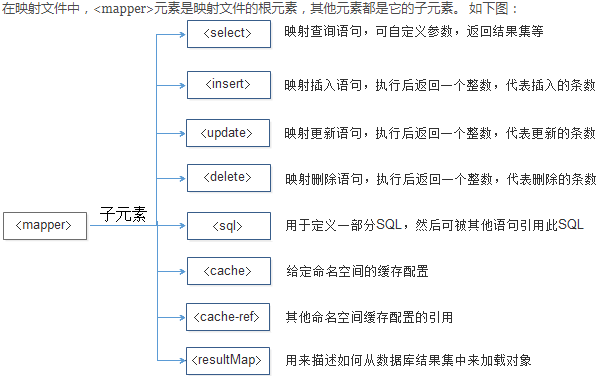
1.<select>元素
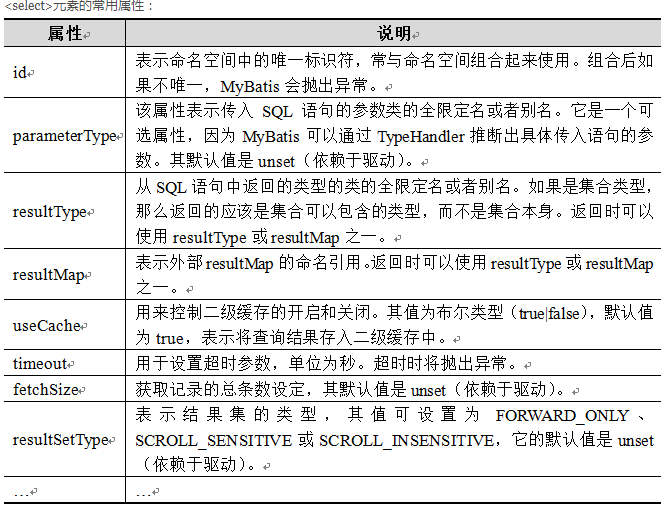
<select>元素就是sql查询语句。可以执行一些简单的查询操作,也可以是复杂的查询操作。例如:
<select id="findCustomerById" parameterType="Integer"

            resultType="com.itheima.po.Customer">

            select * from t_customer where id = #{id}

</select>
2.<insert>元素
<insert>元素用于映射插入语句,在执行完元素中定义的SQL语句后,会返回一个表示插入记录数的整数。
<insert>元素的配置示例如下:
<insert

      id="addCustomer"

      parameterType="com.itheima.po.Customer"

      flushCache="true"

      statementType="PREPARED"

      keyProperty=""

      keyColumn=""

      useGeneratedKeys=""

      timeout="20">

执行插入操作后,很多时候需要返回插入成功的数据生成的主键值,此时就可以通过上面讲解的3个属性来实现。
1.对于支持主键自助增长的数据库(如MySQL),可以通过如下配置实现:
<insert id="addCustomer" parameterType="com.itheima.po.Customer"

            keyProperty="id" useGeneratedKeys="true" >

      insert into t_customer(username,jobs,phone)

      values(#{username},#{jobs},#{phone})

</insert>
2.对于不支持主键自助增长的数据库(如Oracle),可以通过如下配置实现:
<insert id="insertCustomer" parameterType="com.itheima.po.Customer">

      <selectKey keyProperty="id" resultType="Integer" order="BEFORE">

            select if(max(id) is null, 1, max(id) +1) as newId from t_customer

      </selectKey>

      insert into t_customer(id,username,jobs,phone)

      values(#{id},#{username},#{jobs},#{phone})

</insert>
3.<update>和<delete>元素
<update>和<delete>元素的使用比较简单,它们的属性配置也基本相同。
1.<update>和<delete>元素的常用属性如下:
<update

      id="updateCustomer"

      parameterType="com.itheima.po.Customer"

      flushCache="true"

      statementType="PREPARED"

      timeout="20">

<delete

      id="deleteCustomer"

      parameterType="com.itheima.po.Customer"

      flushCache="true"

      statementType="PREPARED"

      timeout="20">
2.<update>和<delete>元素的使用示例如下:
<update id="updateCustomer" parameterType="com.itheima.po.Customer">

       update t_customer

       set username=#{username},jobs=#{jobs},phone=#{phone}

       where id=#{id}

</update>

<delete id="deleteCustomer" parameterType="Integer">

        delete from t_customer where id=#{id}

</delete>
4.<sql>元素
sql片段,可以在mapper文件中的任何地方引用。减少代码量。
例如:
<sql id="customerColumns">id,username,jobs,phone</sql>
定义sql片段,通过<include>元素的refid属性引用id为someinclude的代码片段
例如:
<select id="findCustomerById" parameterType="Integer"

         resultType="com.itheima.po.Customer">

    select

    <include refid="customerColumns"/>

    from tableName

    where id = #{id}

</select>
5.<resultMap>元素
<resultMap>元素表示结果映射集,是MyBatis中最重要也是最强大的元素。它的主要作用是定义映射规则、级联的更新以及定义类型转化器等。
<resultMap>元素中包含了一些子元素,它的元素结构如下所示:
<resultMap type="" id="">

       <constructor>    <!-- 类在实例化时,用来注入结果到构造方法中-->

             <idArg/>      <!-- ID参数;标记结果作为ID-->

             <arg/>          <!-- 注入到构造方法的一个普通结果-->

       </constructor>

       <id/>                 <!-- 用于表示哪个列是主键-->

       <result/>           <!-- 注入到字段或JavaBean属性的普通结果-->

       <association property="" />        <!-- 用于一对一关联 -->

       <collection property="" />          <!-- 用于一对多关联 -->

       <discriminator javaType="">      <!-- 使用结果值来决定使用哪个结果映射-->

            <case value="" />                   <!-- 基于某些值的结果映射 -->

       </discriminator>

</resultMap>
简单的结果集映射
    <resultMap id="BaseResultMap" type="cn.jason.bootmybatis.model.Tests">

        <id column="id" property="id" jdbcType="BIGINT"/>

        <result column="name" property="name" jdbcType="VARCHAR"/>

        <result column="age" property="age" jdbcType="INTEGER"/>

    </resultMap>

    <select id="selectByPrimaryKey" resultMap="BaseResultMap">

        select

        <include refid="Base_Column_List"/>

        from tests

        where id = #{id,jdbcType=BIGINT}

    </select>
mybatis映射文件mapper详解的更多相关文章
- 转载 Spring、Spring MVC、MyBatis整合文件配置详解
Spring.Spring MVC.MyBatis整合文件配置详解 使用SSM框架做了几个小项目了,感觉还不错是时候总结一下了.先总结一下SSM整合的文件配置.其实具体的用法最好还是看官方文档. ...
- Spring MVC、MyBatis整合文件配置详解
Spring:http://spring.io/docs MyBatis:http://mybatis.github.io/mybatis-3/ Building a RESTful Web Serv ...
- Mybatis(二):Mybatis的映射文件sqlmapper详解
MyBatis 真正的力量是在映射语句中.这里是奇迹发生的地方.对于所有的力量,SQL 映射的 XML 文件是相当的简单.当然如果你将它们和对等功能的 JDBC 代码来比较,你会发现映射文件节省了大约 ...
- Spring、Spring MVC、MyBatis整合文件配置详解
原文 http://www.cnblogs.com/wxisme/p/4924561.html 主题 MVC模式MyBatisSpring MVC 使用SSM框架做了几个小项目了,感觉还不错是时候总 ...
- 【转】Spring、Spring MVC、MyBatis整合文件配置详解
见:http://www.tuicool.com/articles/eyINveF web.xml的配置 web.xml应该是整个项目最重要的配置文件了,不过servlet3.0中已经支持注解配置方式 ...
- mybatis映射文件mapper.xml的写法(collections...)
转自:https://blog.csdn.net/two_people/article/details/51759881 在学习mybatis的时候我们通常会在映射文件这样写: <?xml ve ...
- Spring、Spring MVC、MyBatis整合文件配置详解2
使用SSM框架做了几个小项目了,感觉还不错是时候总结一下了.先总结一下SSM整合的文件配置.其实具体的用法最好还是看官方文档. Spring:http://spring.io/docs MyBatis ...
- Spring、Spring MVC、MyBatis 整合文件配置详解
使用SSM框架做了几个小项目了,感觉还不错是时候总结一下了.先总结一下SSM整合的文件配置.其实具体的用法最好还是看官方文档. Spring:http://spring.io/docs MyBatis ...
- spring, spring mvc, mybatis整合文件配置详解
转自:http://www.cnblogs.com/wxisme/p/4924561.html 使用SSM框架做了几个小项目了,感觉还不错是时候总结一下了.先总结一下SSM整合的文件配置.其实具体的用 ...
随机推荐
- maven web项目的web.xml报错The markup in the document following the root element must be well-formed.
maven项目里面的web.xml开头约束是这样的 <?xml version="1.0" encoding="UTF-8"?> <web-a ...
- Hibernate持久化类规则
注意事项: 提供无参的构造方法,因为在hibernate需要使用反射生成类的实例 提供私有属性,并对这些属性提供公共的setting和getting方法,因为在hibernate底层会将查询到的数据进 ...
- JSP之Bean
<jsp:useBean id=" " class" "/>创建JavaBean对象,并把创建的对象保存到域对象 比如:<jsp:useBea ...
- 第八周课程总结 & 实验报告(六)
第八周课程总结 一.包装类 介绍 装箱与拆箱 应用 二.异常 基本概念 基本格式 异常类的继承结构 throws关键字 throw关键字 Exception类和RuntimeException类 自定 ...
- XMLHttpRequest 对象属性参数参考
readyState:提供当前 HTML 的就绪状态. readyState可能返回的值: 0:请求未初始化(还没有调用 open()). 1:请求已经建立,但是还没有发送(还没有调用 send()) ...
- spark MLlib 概念 2:Stratified sampling 层次抽样
定义: In statistical surveys, when subpopulations within an overall population vary, it is advantageou ...
- C# 防火墙操作之启用与关闭
通过代码操作防火墙的方式有两种:一是代码操作修改注册表启用或关闭防火墙:二是直接操作防火墙对象来启用或关闭防火墙.不论哪一种方式,都需要使用管理员权限,所以操作前需要判断程序是否具有管理员权限. 1. ...
- ORCAD导网表:遇"No_connect" property
问题: Orcad Capture中将No Connect标识放置到了原本应该放置连线的管脚上,不知道怎么删除. 虽然添加一根Wire可以掩盖该管脚上已经添加的No Connect标识,但是到处网表的 ...
- Orchestrator MySQL主库故障切换的几种类型
Orchestrator 对MySQL主库的故障切换分为自动切换和手动切换. 手动切换又分为recover.force-master-failover.force-master-takeover以及g ...
- while循环嵌套
<1>while嵌套的格式 while 条件1: 条件1满足时,做的事情1 条件1满足时,做的事情2 条件1满足时,做的事情3 ...(省略)... while 条件2: 条件2满足时,做 ...