
css实现毛玻璃效果
css实现毛玻璃效果,效果图
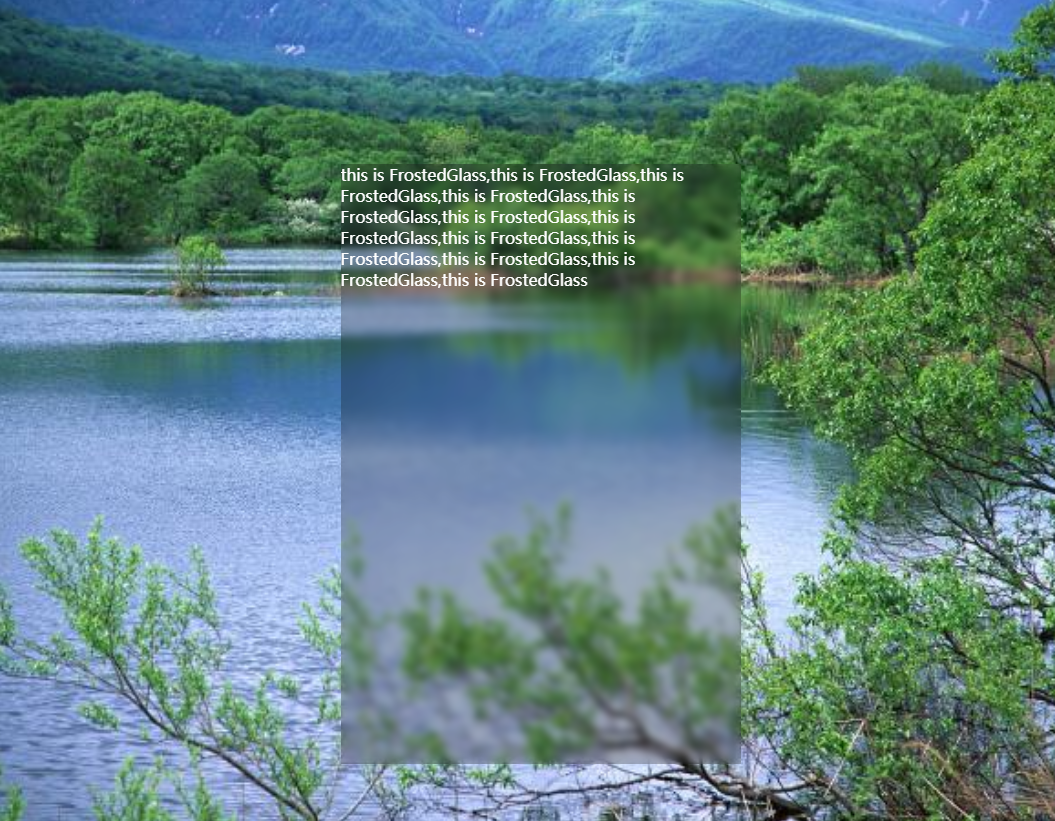
1,html代码
<div class="mainHolder">

  <div class="textHolder">

    <p>this is FrostedGlass,this is FrostedGlass,this is FrostedGlass,this is FrostedGlass,this is FrostedGlass,this is FrostedGlass,this is FrostedGlass,this is FrostedGlass,this is FrostedGlass,this is FrostedGlass,this is FrostedGlass,this is FrostedGlass</p>

  </div>

</div>
2,css
 * {

    box-sizing: border-box;

  }

  .mainHolder {

    width: 100%;

    height: 100%;

    background-image: url(1.jpg);

    background-attachment: fixed;

    background-position: center;

    background-size: cover;

    position: relative;

  }

  .textHolder {

    width: 400px;

    height: 600px;

    position: absolute;

    left: 33%;

    top: 20%;

    background: inherit;

    overflow: hidden;

  }

  .textHolder::before {

    content: '';

    position: absolute;

    top:0;

    right: 0;

    bottom: 0;

    left: 0;

    background: inherit;

    background-attachment: fixed;

    filter: blur(4px);

  }

  .textHolder::after {

    content: "";

    position: absolute;

    top:0;

    right: 0;

    bottom: 0;

    left: 0;

    background: rgba(0, 0, 0, 0.25);

  }

  p {

    z-index: 1;

    color: white;

    position: relative;

    margin: 0;

  }
css实现毛玻璃效果的更多相关文章
- CSS 实现毛玻璃效果
Part.1 HTML结构 <!-- 最外层盒子 --> <div class="box"> <!-- 添加毛玻璃效果盒子 --> <di ...
- 小tip: 使用CSS将图片转换成模糊(毛玻璃)效果
去年盛夏之时,曾写过“小tip: 使用CSS将图片转换成黑白”一文,本文的模式以及内容其实走得是类似路线.CSS3 → SVG → IE filter → canvas. 前段时间,iOS7不是瓜未熟 ...
- [转] 小tip: 使用CSS将图片转换成模糊(毛玻璃)效果 ---张鑫旭
by zhangxinxu from http://www.zhangxinxu.com本文地址:http://www.zhangxinxu.com/wordpress/?p=3804 去年盛夏之时, ...
- CSS遮罩效果和毛玻璃效果
前面的话 本文将详细介绍CSS遮罩效果和毛玻璃效果 遮罩效果 普通遮罩 一般地,处理全屏遮罩的方法是使用额外标签 <style>.overlay{ position:fixed; top: ...
- 《CSS揭秘》之毛玻璃效果知识点
实现代码: CodePen:毛玻璃效果 Dabblet:毛玻璃效果 HTML: <main> <blockquote> <em>"The only way ...
- CSS技巧收集——毛玻璃效果
先上 demo和 源码 其实毛玻璃的模糊效果技术上比较简单,只是用到了 css 滤镜(filter)中的 blur 属性.但是要做一个好的毛玻璃效果,需要注意很多细节. 比如我们需要将上图中页面中间的 ...
- css透明度、毛玻璃效果
透明度: 1.opacity 背景颜色和字体同时透明 2.background:rgba(255,255,255,0.2); 只是背景颜色透明,字体不透明 代码: .info{ backgr ...
- 实现一个成熟的底层毛玻璃效果(纯CSS)
写在前面 毛玻璃背景是一个很常见的网页样式,想要实现,其实并不难,但经过我在网上的搜索发现,大量实现方法都较为不规范,且把问题复杂化了(例如各种z-index属性和position的定位)现提供一个代 ...
- CSS 奇思妙想 | 全兼容的毛玻璃效果
通过本文,你能了解到 最基本的使用 CSS backdrop-filter 实现磨砂玻璃(毛玻璃)的效果 在至今不兼容 backdrop-filter 的 firefox 浏览器,如何利用一些技巧性的 ...
随机推荐
- dlopen用法
1. 包含头文件 #include<dlfcn.h> 2. 函数定义 void * dlopen(const char* pathName, int mode); pathName 指的 ...
- 如何使用git回退部分修改(转)
如何使用git回退部分修改(转) 很多时候,git新手容易误操作,比如,在levelIISZ-1.4.dev分支下,运行了git pull idc cpp-1.0的结果,这样做麻烦很大,经常导 ...
- python基础(变量、基础数据类型、流程控制)
今日内容html {overflow-x: initial !important;}:root { --bg-color:#ffffff; --text-color:#333333; --select ...
- iOS的navigationbar设置左边按钮文字
实例代码: - (void)viewDidLoad { [super viewDidLoad]; [self setTitle:@"Test"]; //以下是主要实现代码 UIBu ...
- ueditor+复制word+图片不能上传
最近公司做项目需要实现一个功能,在网页富文本编辑器中实现粘贴Word图文的功能. 我们在网站中使用的Web编辑器比较多,都是根据用户需求来选择的.目前还没有固定哪一个编辑器 有时候用的是UEditor ...
- unittest详解(一) unittest初识
unittest是python内置的一个单元测试框架,在学习怎么使用它之前,我们先来了解它的一些概念和原理. Test Case:测试用例,一个TestCase的实例就是一个测试用例.什么是测试用例呢 ...
- CodeForces451E Devu and Flowers
题目链接 问题分析 没有想到母函数的做法-- 其实直接看题思路挺简单的.发现如果每种花都有无限多的话,问题变得十分简单,答案就是\(s+n-1\choose n - 1\).然后发现\(n\)只有\( ...
- 前端js图片上传
前端js图片上传,原理用input type="file"获取图片然后把图片转换成base64编码传到后台. 图片上传 <!DOCTYPE html><html& ...
- war包部署到tomcat
1.maven web app打包成app.war.打包命令:mvn clean package Dmaven.test.skip=true war 是什么?里面有什么东西?a.web.app所有必 ...
- mybatis plus table doesn't exists
使用@TableName 注解即可 实际上就是建立bean与表名的连接