
Mybatis 自动生成mapper文件
在pom.xml下的<build>内加入:
 <build>

    <plugins>

      <plugin>

        <groupId>org.mybatis.generator</groupId>

        <artifactId>mybatis-generator-maven-plugin</artifactId>

        <version>1.3.7</version>

        <configuration>

          <configurationFile>${basedir}/src/main/resources/generatorConfig.xml</configurationFile>

          <overwrite>true</overwrite>

        </configuration>

        <dependencies>

          <dependency>

            <groupId>org.mariadb.jdbc</groupId>

            <artifactId>mariadb-java-client</artifactId>

            <version>2.3.0</version>

          </dependency>

        </dependencies>

      </plugin>

    </plugins>

  </build>
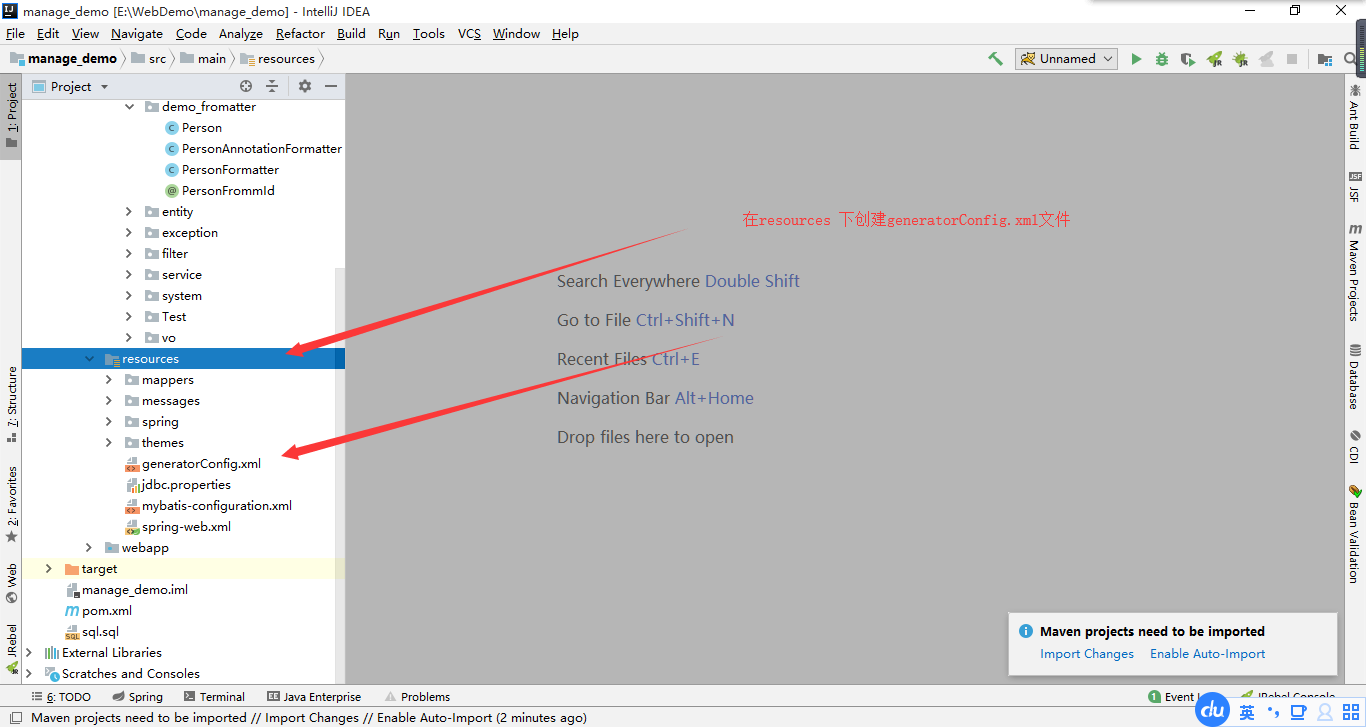
generatorConfig.xml:文件
<?xml version="1.0" encoding="UTF-8"?>

<!DOCTYPE generatorConfiguration

        PUBLIC "-//mybatis.org//DTD MyBatis Generator Configuration 1.0//EN"

        "http://mybatis.org/dtd/mybatis-generator-config_1_0.dtd">

<generatorConfiguration>

    <!--jdbc 驱动包,等-->

    <!--<classPathEntry location="/Program Files/IBM/SQLLIB/java/db2java.zip" />-->

    <context id="sss" targetRuntime="MyBatis3Simple">

        <commentGenerator>

            <property name="suppressAllComments" value="true" />

        </commentGenerator>

        <jdbcConnection driverClass="org.mariadb.jdbc.Driver"

                        connectionURL="jdbc:mariadb://localhost/employeedb"

                        userId="root"

                        password="666666">

        </jdbcConnection>

        <javaModelGenerator targetPackage="com.nf147.manage.entity" targetProject="src\main\java">

            <property name="trimStrings" value="true" />

        </javaModelGenerator>

        <sqlMapGenerator targetPackage="mappers"  targetProject="src\main\resources">

        </sqlMapGenerator>

        <javaClientGenerator type="XMLMAPPER" targetPackage="com.nf147.manage.dao"  targetProject="src\main\java">

        </javaClientGenerator>

        <table tableName="staff">   如果多个表把tableName="%" 改为百分号
<property name="useActualColumnNames" value="true"/> </table> </context> </generatorConfiguration>
Mybatis 自动生成mapper文件的更多相关文章
- 使用mybatis-generator插件结合tk.mybatis自动生成mapper二三事
本篇文章将介绍使用spring boot框架,引入mybatis-generator插件,结合tk.mybatis自动生成Mapper和Entity的一整套流程,其中包括最重要的踩坑与填坑. ...
- 使用mybatis-generator插件结合tk.mybatis自动生成mapper
本篇文章将介绍使用spring boot框架,引入mybatis-generator插件,结合tk.mybatis自动生成Mapper和Entity的一整套流程,其中包括最重要的踩坑与填坑. ...
- mybatis自动生成mapper,dao映射文件
利用Mybatis-Generator来帮我们自动生成mapper.xml文件,dao文件,model文件. 1.所需文件 关于Mybatis-Generator的下载可以到这个地址:https:// ...
- Mybatis自动生成xml文件、dao接口、实体类
Mybatis可以通过逆向工程,实现自动生成xml文件.dao接口.实体类 以下使用的是Intellij Idea进行自动生成 一.首先,要在pom.xml中导入插件,在<build>中加 ...
- mybatis自动生成mapper和pojo
1.在resources下新建generatorConfig.xml <?xml version="1.0" encoding="UTF-8"?> ...
- Mybatis逆向生成Mapper文件
本文参考博客 http://blog.csdn.net/for_my_life/article/details/51228098 1. 在resources根目录下添加generator.proper ...
- Mybatis自动生成Xml文件,针对字段类型为text等会默认产生XXXXWithBlobs的方法问题
默认情况下产生的Mapper.xml里面存在: 需要修改generatorConfiguration.xml,里面的table加属性,如: <table domainObjectName=&qu ...
- mybatis 自动生成xml文件配置
http://blog.csdn.net/techbirds_bao/article/details/9233599/
- mybatis自动生成model、dao及对应的mapper.xml文件
背景: 日常开发中,如果新建表,手动敲写model.dao和对应的mapper.xml文件,费时费力且容易出错, 所以采用mybatis自动生成model.dao及对应的mapper.xml文件.代码 ...
随机推荐
- ubuntu中安装Python3.7
一. 源码安装: 1. 官网源码下载: Python官网:https://www.python.org/downloads/ setuptools官网:https://pypi.org/project ...
- qt使用QWT注意事项
当继承某个QWT类时,有是使用O_OBJECT弘会出现问题 切记在工程文件里别忘了添加这一句 DEFINES+=QWT_DLL
- java json对象转换
引入的jar包: commons-beanutils-1.9.2.jar commons-collections-3.2.1.jar commons-lang-2.6.jar commons-logg ...
- CDH部署StreamSets
StreamSets是一个大数据采集工具,数据源支持包括结构化和半/非结构化,目标源支持HDFS,HBase,Hive,Kudu,Cloudera Search, ElasticSearch等.它包括 ...
- sqlserver2008 必知必会技巧-- 快速索引对象
对象资源管理器里面 -- 数据库 -- 表目录 ,然后按 f7 弹出 对象资源管理详细信息 , 里面有搜索栏 , 可以 使用 % 进行模糊查询 例如我们查包含 student的表 %student% ...
- 从零开始学MySQL(一)
如果您浏览过许多IT类的招聘职位,那么掌握数据库技能的重要性便不言自明了.因JAVA常常与MySQL所挂钩,因此兴起了写博客记载学习的念头,盼与君共勉.然,在进行MySQL语法的学习之前,我们无不面临 ...
- Qt Creator 4.9 发布
Qt Creator 4.8中引入了语言服务器协议支持,允许Qt Creator通过利用此标准轻松支持更多编程语言,使IDE和其他编程工具可以轻松地获得通用编程语言支持的交换格式.使用Qt Creat ...
- SpringCloud系列(一):Eureka 服务注册与服务发现
上一篇,我们介绍了服务注册中心,光有服务注册中心没有用,我们得发服务注册上去,得从它那边获取服务.下面我们注册一个服务到服务注册中心上去. 我们创建一个 hello-service 的 spring ...
- tensorflow中张量_常量_变量_占位符
1.tensor 在tensorflow中,数据是被封装在tensor对象中的.tensor是张量的意思,即包含从0到任意维度的张量.常数是0维度的张量,向量是1维度的张量,矩阵是二维度的张量,以及还 ...
- python grobal 的使用方法
写一个功能,运行报错,name 'number' is used prior to global declaration ,查资料梳理一下 因为这个函数需要调用多次,第一次调用的时候,走if语句,后面 ...