
Cloudera Manager5安装总结遇到问题及解决办法
安装过程中,由于网络终端,导致下面问题:
问题1:安装停止在获取安装锁
/tmp/scm_prepare_node.tYlmPfrT
using SSH_CLIENT to get the SCM hostname: 172.16.77.20 33950 22
opening logging file descriptor
正在启动安装脚本...正在获取安装锁...BEGIN flock 4
这段大概过了半个小时,关闭selinux ! disabled
问题2:不能选择主机
安装失败了,重新不能选主机
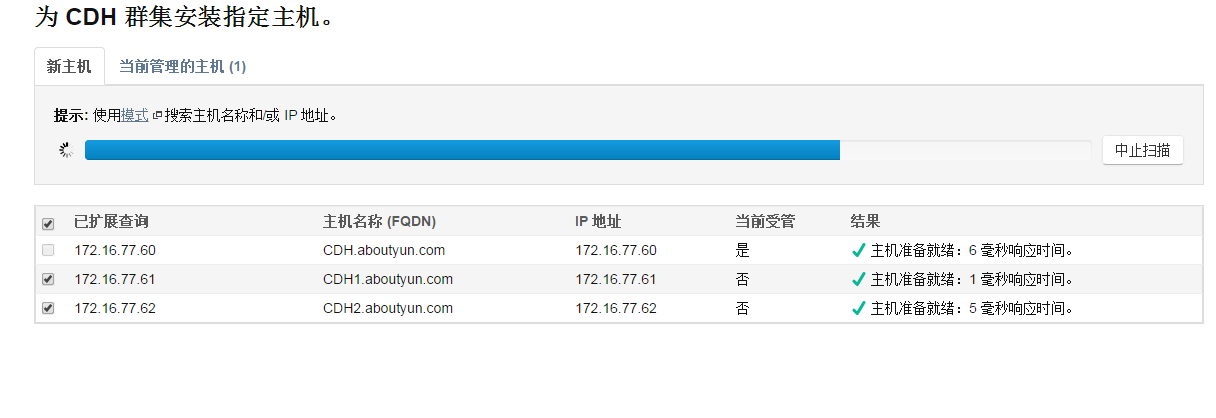
图1
解决方案,需要清理安装失败文件
卸载 Cloudera Manager 5.1.x.和 相关软件【官网翻译:高可用】

问题3:DNS反向解析PTR localhost:
描述:
DNS反向解析错误,不能正确解析Cloudera Manager Server主机名
日志:Detecting Cloudera Manager Server...
Detecting Cloudera Manager Server...
BEGIN host -t PTR 192.168.1.198
198.1.168.192.in-addr.arpa domain name pointer localhost.
END (0)
using localhost as scm server hostname
BEGIN which python
/usr/bin/python
END (0)
BEGIN python -c 'import socket; import sys; s = socket.socket(socket.AF_INET); s.settimeout(5.0); s.connect((sys.argv[1], int(sys.argv[2]))); s.close();' localhost 7182
Traceback (most recent call last):
File "<string>", line 1, in <module>
File "<string>", line 1, in connect
socket.error: [Errno 111] Connection refused
END (1)
could not contact scm server at localhost:7182, giving up
waiting for rollback request
解决方案:
将连不上的机器 /usr/bin/host 文件删掉,执行下面命令:
- sudo mv /usr/bin/host /usr/bin/host.bak
复制代码
说明:不明白cloudera的初衷,这里已经得到 Cloudera Manager Server的ip了,却还要把ip解析成主机名来连接由于DNS反向解析没有配置好,根据Cloudera Manager Server 的ip解析主机名却得到了localhost,造成之后的连接错误这里的解决方案是直接把/usr/bin/host删掉,这样Cloudera Manager就会直接使用 ip进行连接,就没有错了参考:
问题 4 NTP:
问题描述:Bad Health --Clock OffsetThe host's NTP service did not respond to a request for the clock offset.
解决:
配置NTP服务步骤参考:
CentOS配置NTP Server:国内常用NTP服务器地址及IP
修改配置文件:
[root@work03 ~]# vim /etc/ntp.conf# Use public servers from the pool.ntp.org project.# Please consider joining the pool (http://www.pool.ntp.org/join.html).
server s1a.time.edu.cn prefer
server s1b.time.edu.cn
server s1c.time.edu.cn
restrict 172.16.1.0 mask 255.255.255.0 nomodify <===放行局域网来源启动ntp
#service ntpd restart <===启动ntp服务
客户端同步时间(work02,work03):
ntpdate work01
说明:NTP服务启动需要大约五分钟时间,服务启动之前,若客户端同步时间,则会出现错误“no server suitable for synchronization found”
定时同步时间:
在work02和 work03上配置crontab定时同步时间crontab -e
00 12 * * * root /usr/sbin/ntpdate 192.168.56.121 >> /root/ntpdate.log 2>&1
问题 2.2
描述:
Clock Offset
- Ensure that the host's hostname is configured properly.
- Ensure that port 7182 is accessible on the Cloudera Manager Server (check firewall rules).
- Ensure that ports 9000 and 9001 are free on the host being added.
- Check agent logs in /var/log/cloudera-scm-agent/ on the host being added (some of the logs can be found in the installation details).
问题定位:
在对应host(work02、work03)上运行 'ntpdc -c loopinfo'
[root@work03 work]# ntpdc -c loopinfo
ntpdc: read: Connection refused解决:
开启ntp服务:
三台机器都开机启动 ntp服务
chkconfig ntpd on
问题 5 heartbeat:
错误信息:
Installation failed. Failed to receive heartbeat from agent.
解决:关闭防火墙
问题 6 Unknow Health:
Unknow Health
重启后:Request to theHost Monitor failed.
service --status-all| grep clo
机器上查看scm-agent状态:cloudera-scm-agent dead but pid file exists
解决:重启服务
service cloudera-scm-agent restartservice cloudera-scm-server restart
问题 7 canonial name hostname consistent:
Bad HealthThe hostname and canonical name for this host are not consistent when checked from a Java process.canonical name:4092 Monitor-HostMonitor throttling_logger WARNING (29 skipped) hostname work02 differs from the canonical name work02.xinzhitang.com解决:修改hosts 使FQDN和 hostname相同ps:虽然解决了但是不明白为什么主机名和主机别名要一样/etc/hosts192.168.1.185 work01 work01192.168.1.141 work02 work02192.168.1.198 work03 work03
问题 8 Concerning Health:
Concerning Health Issue-- Network Interface Speed --描述:The host has 2 network interface(s) that appear to be operating at less than full speed. Warning threshold: any.详细:This is a host health test that checks for network interfaces that appear to be operating at less than full speed.
A failure of this health test may indicate that network interface(s) may be configured incorrectly and may be causing performance problems. Use the ethtool command to check and configure the host's network interfaces to use the fastest available link speed and duplex mode.解决:本次测试修改了 Cloudera Manager 的配置,应该不算是真正的解决
Cloudera Manager5安装总结遇到问题及解决办法的更多相关文章
- Cloudera Manager5安装总结遇到问题及解决办法 CDH 5.8 on CentOS 7
问题导读:1.Cloudera Manager在线安装你认为有什么优点和缺点?2.Cloudera Manager安装过程中遇到,你认为该如何解决?3.在线安装addr.arpa domain nam ...
- 360或者金山毒霸可能会导致HP网络打印机驱动安装失败“数据无效”的解决办法
360或者金山毒霸可能会导致HP网络打印机驱动安装失败“数据无效”的解决办法 同事办公室的打印机是网线接口的那种网络打印机,不是直接连到电脑的那种,他电脑安装了360和金山毒霸,WIN10下安 ...
- 树莓派(Raspberry Pi 3)安装centos7后yum无法使用解决办法
树莓派(Raspberry Pi 3)安装centos7后yum无法使用解决办法 人穷,闲鱼淘了个二手的树莓派3 英国版,无奈咱也不会用,很无奈~ 安装教程百度到的差不多都可以,找个格式正常的一步一步 ...
- WIN10安装VC6.0无法使用的解决办法
WIN10安装VC6.0无法使用的解决办法 VC6.0确实已经太老了 VC6.0实在是很久以前的开发工具了,现在的win10已经对该软件不兼容,但是为了能使抱着怀旧情节的初学者们能像教科书或老前辈们一 ...
- Python安装时报缺少DLL的解决办法
准备开始学习Python,但是刚准备环境搭建时就遇到了下面的错误: 仔细的看了看,说是缺少DLL. 对于这个问题的解决办法: 方法一: 1. 在安装包上点右键以管理员身份运行2. C:\Users\用 ...
- Wdcp在安装memcached出现错误的解决办法
今天在安装memcached时出现了以下错误(tar: libevent-1.4.14b-stable.tar.gz: Cannot open: No such file or directory), ...
- Nodejs npm安装socket.io报错解决办法
安装socket.io时,报错,提示需要安装Microsoft visual studio 2005 或 Net framework 2.0 sdk,没有找到vcbuild.exe,解决办法是安装 . ...
- php5.4下安装ECshop出现错误的解决办法
转:http://www.programmernote.com/?p=65 1.安装是会提示 Warning: date_default_timezone_get(): It is not safe ...
- opnet安装及安装中出现问题的解决办法 分类: opnet 2014-04-06 21:50 397人阅读 评论(0) 收藏
我使用的opnet14.5 win7 64位系统的http://pan.baidu.com/s/1qWyfxnu,电脑先刷了win7 64位原版系统. 选择了VS2013+opnet14.5的安装方 ...
随机推荐
- curl 查看网站连接情况
curl -o /dev/null -s -w "nslookup_time :%{time_namelookup}\n time_connect: %{time_connect}\ntim ...
- Server-Side UI Automation Provider - WPF Sample
Server-Side UI Automation Provider - WPF Sample 2014-09-14 引用程序集 自动化对等类 WPF Sample 参考 引用程序集 返回 UIAut ...
- php-redis中文文档(转)
phpredis是php的一个扩展,效率是相当高有链表排序功能,对创建内存级的模块业务关系 很有用;以下是redis官方提供的命令使用技巧: 下载地址如下: https://github.com/ow ...
- hadoop多次格式化后,导致datanode启动不了
hadoop namenode -format多次格式化后,datanode启动不了 org.apache.hadoop.ipc.RemoteException(java.io.IOException ...
- hibernate工具类HibernateUtil详解
1.为什么要用hibernateUtil这个类,先看这段代码: //加载配置文件信息默认为hiberna.cfg.xml,如果不是的话那么就在config()方法里面去解析他 Con ...
- HDU 1525 (博弈) Euclid's Game
感觉这道题用PN大法好像不顶用了,可耻地看了题解. 考虑一下简单的必胜状态,某一个数是另一个数的倍数的时候是必胜状态. 从这个角度考虑一下:游戏进行了奇数步还是偶数步决定了哪一方赢. 如果b > ...
- POJ3592 Instantaneous Transference tarjan +spfa
链接:http://poj.org/problem?id=3592 题意:题目大意:给定一个矩阵,西南角为出发点,每个单位都有一订价值的金矿(#默示岩石,不成达,*默示时佛门,可以达到指定单位),队# ...
- 大数据导入Excel
在平时的项目中,将数据导出到Excel的需求是很常见的,在此对一些常见的方法做以总结,并提供一种大数据量导出的实现. OLEDB 使用OLEDB可以很方便导出Excel,思路很简单,处理时将Exc ...
- [Web前端系列之_Firebug_00_序]
[因] 以前一直把Firebug当做参考他人网站界面结构的工具,看看css,js等,没有深挖.这段时间在项目组里主要充当前台工作,也有空,就准备把前端给精通点,firebug作为入手点. [参考资料] ...
- OK335xS ethtool 移植
/******************************************************************* * OK335xS ethtool 移植 * 声明: * 由于 ...