
定向转发和重定向实现 <select >下拉表单数据传送
定向转发的特点:
(1). 实行转发时浏览器上的网址不变 (如果你这点忽视了,那你就要接受我无尽的鄙视吧! 哇咔咔~~~)
(2). 实行转发时 : 只有一次请求。 不信,看这下面的图: (俗话说,没图说个jb)

(3). 定向转发的网址必须是本站点的网址. (因为它不消除,消除数据)
(4) 定向转发:以前的request中存放的变量不会失效,就像把两个页面拼到了一起。
实现的两个API:
 RequestDispatcher rd

          = request.getRequestDispatcher("Demo_1/Login.jsp");

 rd.forward(request, response);
定向转发
关于定向转发实现selected选项功能:

上面这个控件的代码:
JSP代码:
 <%@ page language="java" import="java.util.*" pageEncoding="UTF-8"%>

 <%

 String path = request.getContextPath();

 String basePath = request.getScheme()+"://"+request.getServerName()+":"+request.getServerPort()+path+"/";

 %>

 <!DOCTYPE HTML PUBLIC "-//W3C//DTD HTML 4.01 Transitional//EN">

 <html>

   <head>

     <base href="<%=basePath%>">

     <title>注册页面</title>

     <meta http-equiv="pragma" content="no-cache">

     <meta http-equiv="cache-control" content="no-cache">

     <meta http-equiv="expires" content="0">

     <meta http-equiv="keywords" content="keyword1,keyword2,keyword3">

     <meta http-equiv="description" content="This is my page">

     <!--

     <link rel="stylesheet" type="text/css" href="styles.css">

     -->

   </head>

   <body>

   <%   String authority = (String) request.getAttribute("authority"); %>

      <form action="LoginServlet"    method="post" >

        username :<input type="text" name="username" value="<%=null==request.getAttribute("username")?"":request.getAttribute("username")%>"><br>

        password :<input type="password" name="password"><br>

        authority:

        <select name="authority">

              <option value="1"<%="1".equals(authority)?"selected":""%>>common user</option>

              <option value="2"<%="2".equals(authority)?"selected='selected'":""%>>administrator</option>

       </select><br>

        <input type="submit" value="submit">

      </form>

   </body>

 </html>
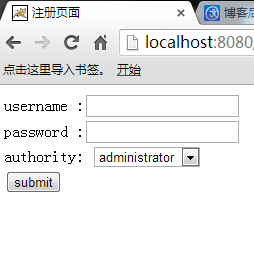
效果图:

关于: 然后需要一个Servlet 类: (即纯java文件)
 package Demo;

 import java.io.IOException;

 import java.io.PrintWriter;

 import javax.servlet.RequestDispatcher;

 import javax.servlet.ServletException;

 import javax.servlet.http.HttpServlet;

 import javax.servlet.http.HttpServletRequest;

 import javax.servlet.http.HttpServletResponse;

 import javax.servlet.http.HttpSession;

 public class LoginServlet extends HttpServlet {

     public void doGet(HttpServletRequest request, HttpServletResponse response)

             throws ServletException, IOException {

         String username = request.getParameter("username");

         String password =request.getParameter("password");

         String authority =request.getParameter("authority");

            Login log = new Login();

            HttpSession  session = request.getSession();

         if("1".equals(authority))

         {

               //  登录的是普通用户

           if("zhangsan".equals(username) && "123".equals(password))

           {

               //    将用户的信息放置到Session当中

                log.setUsername(username);

                log.setAuthority(authority);

                log.setPassword(password);

                session.setAttribute("log", log);

           }else {

               //定向转发

               request.setAttribute("username",username);

               request.setAttribute("password", password);

               request.setAttribute("authority",authority);

               RequestDispatcher  rd = request.getRequestDispatcher("Demo_1/Login.jsp");

                rd.forward(request, response);

           }

         }

         else if("2".equals(authority)){

           //    登录的是系统管理员

           if("Tom".equals(username) && "456".equals(password))

           {

               log.setAuthority(authority);

               log.setPassword(password);

               log.setUsername(username);

               session.setAttribute("log",log);

           }

           else  {

                    // 采取的是定向转发

               request.setAttribute("username",username);

               request.setAttribute("password", password);

               request.setAttribute("authority",authority);

                RequestDispatcher  rd = request.getRequestDispatcher("Demo_1/Login.jsp");

                rd.forward(request, response);

           }

         } else  {

             request.setAttribute("username",username);

             request.setAttribute("password", password);

             request.setAttribute("authority",authority);

             RequestDispatcher  rd = request.getRequestDispatcher("Demo_1/Login.jsp");

             rd.forward(request, response);

         }

     }

     public void doPost(HttpServletRequest request, HttpServletResponse response)

             throws ServletException, IOException {

                    this.doGet(request, response);

     }

 }
一个 javabean文件:
 package Demo;

 //设置一个JavaBean 类

 public class Login {

     private String username   ;

     private String password   ;

     private String authority  ;

     public String getUsername() {

         return username;

     }

     public void setUsername(String username) {

         this.username = username;

     }

     public String getPassword() {

         return password;

     }

     public void setPassword(String password) {

         this.password = password;

     }

     public String getAuthority() {

         return authority;

     }

     public void setAuthority(String authority) {

         this.authority = authority;

     }

 }
重定向的特点:
(1)执行重定向时浏览器上的网址改变.
(2)重定向实际上产生了两次请求 (看下面的图)

(3)执行重定向时 的网址可以是任何网址。
调用的 API 函数:
response.sendRedirect("Demo_1/Login.jsp? username="+username+"&authority="+authority);
对于定向转发和重定向的实际执行情况,可以简单的慨括为:
对于重定向:
发送请求 -->服务器运行-->响应请求,返回给浏览器一个新的地址与响应码-->浏览器根据响应码,判定该响应为重定向,自动发送一个新的请求给服务器,请求地址为之前返回的地址-->服务器运行-->响应请求给浏览器
对于定向的转发:
发送请求 -->服务器运行-->进行请求的重新设置,例如通过request.setAttribute(name,value)-->根据转发的地址,获取该地址的网页-->响应请求给浏览器
特别需要注意的是:
重定向:以前的request中存放的变量全部失效,并进入一个新的request作用域。
转发:以前的request中存放的变量不会失效,就像把两个页面拼到了一起。
然后运用重定向实现<select> 下拉列表的代码:
对于JSP:
 <%@ page language="java" import="java.util.*" pageEncoding="UTF-8"%>

 <%

 String path = request.getContextPath();

 String basePath = request.getScheme()+"://"+request.getServerName()+":"+request.getServerPort()+path+"/";

 %>

 <!DOCTYPE HTML PUBLIC "-//W3C//DTD HTML 4.01 Transitional//EN">

 <html>

   <head>

     <base href="<%=basePath%>">

     <title>注册页面</title>

     <meta http-equiv="pragma" content="no-cache">

     <meta http-equiv="cache-control" content="no-cache">

     <meta http-equiv="expires" content="0">

     <meta http-equiv="keywords" content="keyword1,keyword2,keyword3">

     <meta http-equiv="description" content="This is my page">

     <!--

     <link rel="stylesheet" type="text/css" href="styles.css">

     -->

   </head>

   <body>

    <%

       String username = request.getParameter("username");

       String authority = request.getParameter("authority");

    %>

      <form action="LoginServlet"    method="post" >

        username :<input type="text" name="username" <%= null == username ? "":username %> ><br>

        password :<input type="password" name="password"><br>

        authority:

        <select name="authority">

              <option value="1" <%= "1" == authority ?"":"selected"%> >common user</option>

              <option value="2" <%= "2" == authority ?"":"selected"%> >administrator</option>

       </select><br>

        <input type="submit" value="submit">

      </form>

   </body>

 </html>
对于Servlet类:
 package Demo;

 import java.io.IOException;

 import java.io.PrintWriter;

 import javax.servlet.RequestDispatcher;

 import javax.servlet.ServletException;

 import javax.servlet.http.HttpServlet;

 import javax.servlet.http.HttpServletRequest;

 import javax.servlet.http.HttpServletResponse;

 import javax.servlet.http.HttpSession;

 public class LoginServlet extends HttpServlet {

     public void doGet(HttpServletRequest request, HttpServletResponse response)

             throws ServletException, IOException {

         String username = request.getParameter("username");

         String password =request.getParameter("password");

         String authority =request.getParameter("authority");

            Login log = new Login();

            HttpSession  session = request.getSession();

         if("1".equals(authority))

         {

               //  登录的是普通用户

           if("zhangsan".equals(username) && "123".equals(password))

           {

               //    将用户的信息放置到Session当中

                log.setUsername(username);

                log.setAuthority(authority);

                log.setPassword(password);

                session.setAttribute("log", log);

           }else {

               //执行重定向函数

              response.sendRedirect("Demo_1/Login.jsp? username="+username+"&authority="+authority);

           }

         }

         else if("2".equals(authority)){

           //    登录的是系统管理员

           if("Tom".equals(username) && "456".equals(password))

           {

               log.setAuthority(authority);

               log.setPassword(password);

               log.setUsername(username);

               session.setAttribute("log",log);

           }

           else  {

 //               采取的是重定向

                response.sendRedirect("Demo_1/Login.jsp?username="+username+"&authority="+authority);

                   }

         } else  {

 //               采取的是重定向

             response.sendRedirect("Demo_1/Login.jsp?username="+username+"&authority="+authority);

         }

     }

     public void doPost(HttpServletRequest request, HttpServletResponse response)

             throws ServletException, IOException {

                    this.doGet(request, response);

     }

 }
对于JavaBean类:
 package Demo;

 //设置一个JavaBean 类

 public class Login {

     private String username   ;

     private String password   ;

     private String authority  ;

     public String getUsername() {

         return username;

     }

     public void setUsername(String username) {

         this.username = username;

     }

     public String getPassword() {

         return password;

     }

     public void setPassword(String password) {

         this.password = password;

     }

     public String getAuthority() {

         return authority;

     }

     public void setAuthority(String authority) {

         this.authority = authority;

     }

 }
显示的效果:
定向转发和重定向实现 <select >下拉表单数据传送的更多相关文章
- css解决select下拉表单option高度的办法
css在给select下拉表单设置样式如边框时可以轻松搞定,而我们在不喜欢其默认的下拉箭头的样式时试图通过background:url(图片路径)来修改之,则往往会出现浏览器的兼容性问题,在网上查了好 ...
- ajax处理select下拉表单
$('#gameid').change(function() { var gameid = $(this).val(); if (this.value != '') { $.ajax({ url: ' ...
- s:select下拉框validation验证
S:select下拉框验证: <td colspan="5"> <s:select name="vo.typeVO.corp" list=&q ...
- 自定义样式的select下拉框深入探索
第一个版本: 首先实现自定义select下拉框应该具有的功能,我是选择将原来的select隐藏掉,自己在jquery代码中动态写进去<dl><dd><dt>这样的结 ...
- jquery取消选择select下拉框
有三个select下拉框一个大类,两个小类隐藏,需要在选择大类的时候,小类显示同时清除另外的小类选择的项这需求有点儿.......... 下面是三个select: <select name=&q ...
- jQuery插件:模拟select下拉菜单
没搞那么复杂,工作中,基本够用.. <!doctype html> <html> <head> <meta charset="utf-8" ...
- html select 下拉箭头隐藏
html select 下拉箭头隐藏 <!DOCTYPE html> <html> <head lang="en"> <meta char ...
- jquery选中将select下拉框中一项后赋值给text文本框
jquery选中将select下拉框中一项后赋值给text文本框,出现无法将第一个下拉框的value赋值给文本框 因为select默认选中第一项..在选择第一项时,便导致无法激发onchange事件. ...
- js如何获取select下拉框的value以及文本内容
select下拉框在项目开发中是经常用到的,特别是在联级菜单方面的应用更为广泛.但是,对于一些初学者来说,如何获取下拉框子节点option的value值和文本内容,还是有一点难度的.其他的就不说了,现 ...
随机推荐
- The Pilots Brothers' refrigerator
2965 he Pilots Brothers' refrigerator Time Limit: 1000MS Memory Limit: 65536K Total Submissions: 1 ...
- Cheatsheet: 2015.02.01 ~ 02.28
Other API Best Practices: API Management Rewriting History with Git Rebase .NET Announcing Microsoft ...
- ARM寻址方式
寻址方式: 所谓寻址方式就是处理器根据指令中给出的信息来找到指令所需操作数的方式. 1.立即数寻址 2.寄存器寻址 3.寄存器间接寻址 就是寄存器中存放的是操作数在内存中的地址 例如以下指令: LDR ...
- 在服务器上log4net没写日志
登录到服务器上,发现log4net没写日志 在相应文件夹加上User用户的写权限后恢复正常了.
- poj 2985 The k-th Largest Group 树状数组求第K大
The k-th Largest Group Time Limit: 2000MS Memory Limit: 131072K Total Submissions: 8353 Accepted ...
- hd1496---->这道题是水水的数论吗?
题目:http://acm.hdu.edu.cn/showproblem.php?pid=1496 题意: Consider equations having the following form: ...
- iOS - UICollectionViewController
前言 NS_CLASS_AVAILABLE_IOS(6_0) @interface UICollectionView : UIScrollView @available(iOS 6.0, *) pub ...
- V8 引擎的sort算法
用的是快速排序,有点小问题 function ArraySort(comparefn) { // In-place QuickSort algorithm. // For short (length ...
- bootstrap学习笔记<九>(菜单,按钮。导航基本元素)
有了bootstrap作导航不再麻烦,几个样式,几个标签就能轻松搞定. 下面就来分解学习导航条的制作. 一.首先是下拉菜单 <div class="dropdown"> ...
- js 的小效果---->选项卡
js选项卡 <!doctype html> <html> <head> <meta charset="utf-8"> <t ...