
html5in24hours
http://www.html5in24hours.com/books/the-book/code/
1.浏览器测试 http://browsershots.org/
2.http://www.fontsquirrel.com/
常用字体:arial,helvetica,comic sans,courier,times new roman
3.重置样式:http://meyerweb.com/eric/tools/css/reset/
4.需要理解:http://www.html5in24hours.com/code-samples/hour4-code.html
移动设备检测及对HTML5的支持
在全局对象上检测属性
在创建的元素上检测属性
检测一个方法能否得到正确的返回值
检测能否保留元素值
5.
5.1设置、读取、删除cookie
5.2表单验证
5.3CDN云脚本 http://code.jquery.com/
6.
7.nothing
8.
HTML5及CSS3检测
如果使用了modernizr脚本,就不需要使用HTML5shiv脚本。
<script src="modernizr-#.#.min.js"></script>

<html class="no-js">
或者
<!-- [if lt IE 9] -->

<script src="http://html5shiv.googlecode.com/svn/trunk/html5.js">

</script>

<!-- [endif] -->
其他办法代码示例:
http://www.html5in24hours.com/code-samples/hour8-code.html
9.分节元素
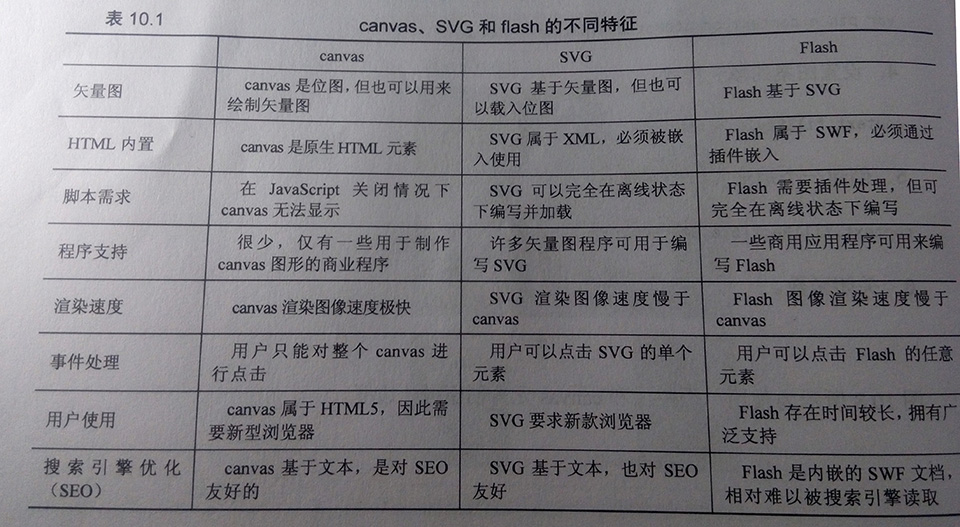
10.canvas
http://www.html5in24hours.com/code-samples/hour10-code.html
绘制线条、矩形、圆形等等
用图形作为画布的一部分或用作图案
比较:《HTML5移动应用开发》
11.
HTML5字体与排版
html entities
很多新属性尝试一下吧:
http://www.html5in24hours.com/code-samples/hour11-code.htm
12.HTML5音频与视频
为不支持HTML视频的低端IE浏览器创建回退选项,使用flash视频播放器,
<video controls height="600" width="800">

<source src="Shasta.mp4">

<source src="Shasta.theora.ogv">

<source src="Shasta.webm">

<!-- fallback to Flowplayer: -->

<a

href="Shasta.flv"

style="display:block;width:800px;height:600px"

id="player">

</a>

<script>

  flowplayer("player", "flowplayer/flowplayer-3.2.7.swf");

</script>

<script src="flowplayer/flowplayer-3.2.6.min.js"></script>

<script>

if (!Modernizr.video) {

  document.write('<p>Your browser does not support video playback, download the video: <a href="Shasta.mp4">MP4</a>, <a href="Shasta.theora.ogv">ogg/Theora</a>, <a href="Shasta.webm">WebM</a>');

}

</script>

</video>
使用API方法创建自定义播放控制器
<video height="600" width="800">

  <source src="Shasta.mp4">

  <source src="Shasta.theora.ogv">

  <source src="Shasta.webm">

</video>

<script>

  var video = document.getElementsByTagName('video')[0];

</script>

<p>

<button value="Play" class="play" onclick="video.play()">

<img src="data:images/Play.png" width="32" height="32" alt="Play"></button>

<button value="Pause" class="pause" onclick="video.pause()">

<img src="data:images/Pause.png" width="32" height="32" alt="Pause"></button>

<script>

var video = document.getElementsByTagName('video')[0];

video.onpause = video.onplay = function(e) {

  playPause.value = video.paused ? 'Play' : 'Pause';

}

function playPause() {

  if (video.paused || video.ended) {

    video.play();

  } else {

    video.pause();

  }

}

</script>

<button value="Play/Pause" id="playPause" onclick="playPause()">

<img src="data:images/PlayPause.png" width="26" height="28" alt="Play/Pause"></button>
预定播放器参考列表
http://praegnanz.de/html5video/index.php
13.HTML5表单
占位符文本、自动聚焦
<!-- Placeholder Text-->

<input type="text" id="name" placeholder="Fill in your full name">

<input type="text" value="Short comment field (140 char)" maxlength="140" size="50" onfocus="if (this.value == 'Short comment field (140 char)') { this.value = '';}" onblur="if (this.value == '') {this.value = 'Short comment field (140 char)';">

.ph {

color: #999;

}

.no-ph {

color: #000;

}

<input type="text" value="Short comment field (140 char)" maxlength="140" size="50" onfocus="if (this.value == 'Short comment field (140 char)') { this.value = ''; this.className = 'no-ph';}" onblur="if (this.value == '') {this.value = 'Short comment field (140 char)'; this.className='ph';}" class="ph">

if (!Modernizr.input.placeholder) { ... }

::-webkit-input-placeholder {

color: aliceblue;

background-color: #ccc;

}

:-moz-placeholder {

color: aliceblue;

background-color: #ccc;

}

<textarea id="comments" autofocus></textarea>

<!-- Autofocus -->

<input type="text" id="name" autofocus>

...

<script>

if (!Modernizr.input.autofocus) {

document.getElementById('name').focus();

}

</script>
数字类型
14.使用HTML5编辑内容与用户互动
代码熟悉
15.微格式与微数据
16.HTML5拖拽功能
IOS上拖拽接口的开源库http://www.gotproject.com/blog/post2.html
17.HTML5链接
<a>链接改进,可以环绕任意内容
<area>拥有与<a>同样属性的热点图
<link rel="">链接类型与关系
18.Web应用程序API和数据集
/*IOS中单击事件延迟解决方法*/

function iosClicks() {

var iOS = !!navigator.userAgent.match('iPhone OS') || !!

navigator.userAgent.match('iPad');

if (iOS) {

$('[onclick]').each(function() {

var onclick = $(this).attr('onclick');

$(this).removeAttr('onclick'); // Remove the onclick attribute

$(this).bind("click", function(e) {

e.preventDefault;

}); // prevent the click default action

$(this).bind('tap', onclick); // Turn taps into click

});

}

}
HTML5自定义属性对象dataset
19.WebSocket、Web Workers和文件
创建一个简单计算器
// worder.js  event listener

this.onmessage = function (event) {

    var data = event.data;

    switch (data.func) {

    case 'add':

        postMessage(addNumbers(data.one, data.two));

        break;

    case 'subtract':

        postMessage(subtractNumbers(data.one, data.two));

        break;

    case 'multiply':

        postMessage(multiplyNumbers(data.one, data.two));

        break;

    case 'divide':

        postMessage(divideNumbers(data.one, data.two));

        break;

    default:

        postMessage("Error: Unknown operation");

    }

};

function addNumbers(one, two) {

    return one + two;

}

function subtractNumbers(one, two) {

    return one - two;

}

function multiplyNumbers(one, two) {

    return one * two;

}

function divideNumbers(one, two) {

    if (two == 0) {

        return "no divide by zero";

    } else {

        return one / two;

    }

}
<!DOCTYPE HTML>

<html>

<head>

    <meta charset="UTF-8">

    <title>Web Workers Example</title>

    <script src="js/jquery.js"></script>

</head>

<body>

    <h1>A Calculator</h1>

    <!-- id、class未添加双引号-->

    <p>

        <button id=one class=number>1</button>

        <button id=two class=number>2</button>

        <button id=three class=number>3</button>

        <button id=divide class=fx>/</button>

    </p>

    <p>

        <button id=one class=number>4</button>

        <button id=two class=number>5</button>

        <button id=three class=number>6</button>

        <button id=multiply class=fx>*</button>

    </p>

    <p>

        <button id=one class=number>7</button>

        <button id=two class=number>8</button>

        <button id=three class=number>9</button>

        <button id=subtract class=fx>-</button>

    </p>

    <p>

        <button id=zero class="number">0</button>

        <button id=period class=number>.</button>

        <button id=add class=fx>+</button>

    </p>

    <p>

        <button id=clear>C</button>

        <button id=submit>=</button>

    </p>

    <p>

        First Number

    </p>

    <p>

        <input id=first readonly class=numbers>

    </p>

    <p>

        Second Number

    </p>

    <p>

        <input id=second readonly class=numbers>

    </p>

    <p>

        Result

    </p>

    <p>

        <input id=result readonly class=numbers>

    </p>

    <script>

        if (supportsWorkers()) {

            worker = new Worker("js/worker.js");

            // Watch for messages from the worker

            worker.onmessage = function(e){

            $("#result").val(e.data);

            };

        } else {

            alert("this calculator will not work in your browser, sorry ");

        }

        function supportsWorkers() {

            return !!window.Worker;

        }

        $(document).ready(function () {

            var next, cur, func, one, two, message;

            $(".number").click(function () {

                if (!next) {

                    cur = $("#first").val();

                    num = $(this).html();

                    num = cur + num;

                    // input first number

                    $("#first").val(num);

                } else {

                    cur = $("#second").val();

                    num = $(this).html();

                    num = cur + num;

                    $("#second").val(num);

                }

            });

            $(".fx").click(function () {

                next = 1;

                func = $(this).attr("id");

                one = parseFloat($("#first").val());

            });

            $("#clear").click(function () {

                $("input").attr('value', '');

                next = 0;

            });

            $("#submit").click(function () {

                two = parseFloat($("#second").val());

                message = {

                    'func': func,

                    'one': one,

                    'two': two

                };

                worker.postMessage(message);

            });

        });

    </script>

</body>

</html>
创建拖拽文件上传器
<!DOCTYPE HTML>

<html>

<head>

    <meta charset="UTF-8">

    <title>Drag and Drop File Uploader</title>

    <script src="jquery.min.js"></script>

    <link rel="stylesheet" href="css/ui-lightness/jquery-ui-1.8.18.custom.css"/>

    <script type="text/javascript" src="js/jquery-1.7.1.min.js">

    </script>

    <script src="js/jquery-ui-1.8.18.custom.min.js"></script>

</head>

<body>

    <div id="dropBox" dropzone="copy" style="height:500px;background:pink;">

        <p>Drop Image Files Here</p>

    </div>

    <div id="preview" style="height:200px;background:#ccc;"></div>

    <div id="progress" style="height:800px"></div>

</body>

</html>

<script>

    $(document).ready(function () {

        var dropbox = document.getElementById("dropBox")

            // init event handlers

        dropbox.addEventListener("dragenter", dragEnter, false);

        dropbox.addEventListener("dragexit", dragExit, false);

        dropbox.addEventListener("dragover", dragOver, false);

        dropbox.addEventListener("drop", drop, false);

        // initialize progressbar

        $("#progress").progressbar();

    });

    function dragEnter(e) {

        e.preventDefault();

    }

    function dragExit(e) {

        e.preventDefault();

    }

    function dragOver(e) {

        e.preventDefault();

    }

    function drop(e) {

        e.stopPropagation();

        e.preventDefault();

        var files = e.dataTransfer.files;

        var count = files.length;

        // only do the upload function if there are files dropped

        if (count > 0) {

            uploadFiles(files);

        }

    }

    function uploadFiles(files) {

        var i, file;

        for (i = 0; i < files.length; i++) {

            file = files[i];

            // make sure they are only image types

            if (!file.type.match('image.*')) {

                continue;

            }

            // make sure they are not too big

            if (file.size > 30000) {

                alert(file.name + " file size too large");

                continue;

            }

            var reader = new FileReader();

            // progress bar

            reader.onprogress = handleReaderProgress;

            // load done

            reader.onloadend = handleReaderLoadEnd;

            // begin the read operation

            reader.readAsDataURL(file);

        }

        $("#dropBox p").html("Complete. Upload more?");

    }

    function handleReaderProgress(e) {

        if (e.lengthComputable) {

            var loaded = (e.loaded / e.total);

            $("#progress").progressbar({

                value: loaded * 100

            });

        }

    }

    function handleReaderLoadEnd(e) {

            $("#progress").progressbar({

                value: 100

            });

            $("#preview")

                .append("<img class=preview src=" + e.target.result + ">");

    }

</script>
20.离线Web应用程序
http://www.cnblogs.com/brainmao/archive/2011/09/27/2193495.html
21.HTML5 Web存储
22.利用History API 控制浏览器历史记录
23.使用Geolocation添加地理位置检测
24.将HTML5应用程序转换为原生应用程序
html5in24hours的更多相关文章
随机推荐
- 九度 题目1437:To Fill or Not to Fill
题目描述: With highways available, driving a car from Hangzhou to any other city is easy. But since the ...
- Spring Web Flow 简介
Spring Web Flow 简介 博客分类: 转载 SSH 最近在TSS上看到了一片介绍Spring Web Flow的文章,顺便就翻译了下来,SWF的正式版估计要到6月份才能看到了,目前的例子都 ...
- BPMX3模拟登录
实现功能只需要输入一个帐号即可登录系统. 需要实现上面的功能需要: 1.编辑imitate.jsp页面 <%@page import="com.hotent.core.util.Con ...
- 原创:整理编辑jQuery全部思维导图【附下载地址】
主图 全部图已经打包:下载地址 2. 3. 4. 5. 6. 附上一点简单说明 Dom对象和jquer对象之间的转化 如何将一个jquery对象转换为DOM对象? test是一个span元素 var ...
- 闲聊CSS之关于clearfix--清除浮动[转]
.clearfix:after { content: " "; display: block; clear: both; height:; } .clearfix { zoom:; ...
- JS正则表达式基础
正则表达式的作用: 测试字符串的某个模式 替换文本 根据模式匹配从字符串中提取一个子字符串.可以用来在文本或输入字段中查找特定文字 [^\d]/g这是一个正则表达式,在JS中 ...
- 如何在datagridview 的head上绘制一个全选按钮
winform的项目中,经常要用到datagridview控件,但是为控件添加DataGridViewCheckBoxColumn来实现数据行选择这个功能的时候,经常需要提供全选反选功能,如果不重绘控 ...
- centos 5.5 安装 lnmp
centos5.5 安装 lnmp,一定要事先选好版本安装,建议自己下载安装. 1.相关文件目录: nginx: /www/nginx/下面mysql: /usr/share/mysql /usr/b ...
- 本地电脑localhost指向127.0.0.1的配置
windows系统电脑,我们如果想访问本机部署的项目,通常使用的是localhost来指向本机,但是有时候发现不行,我们不妨打开资源管理器,C:\Windows\System32\drivers\et ...
- [css3]文字过多以省略号显示
text-overflow:ellipsis; 优点: 1.不用通过程序限定字数 2.有利于SEO(实际上并未被截字,只是局限于宽度未被显示而已) width: 某个值; overflow: hidd ...