
转载:DRC
https://cn.mathworks.com/help/audio/ug/dynamic-range-control.html?requestedDomain=cn.mathworks.com
https://en.wikipedia.org/wiki/Dynamic_range_compression
Dynamic range control is the adaptive adjustment of the dynamic range of a signal. The dynamic range of a signal is the logarithmic ratio of maximum to minimum signal amplitude specified in dB.
You can use dynamic range control to:
Match an audio signal level to its environment
Protect AD converters from overload
Optimize information
Suppress low-level noise
Types of dynamic range control include:
Dynamic range compressor — Attenuates the volume of loud sounds that cross a given threshold. They are often used in recording systems to protect hardware and to increase overall loudness.

Dynamic range limiter — A type of compressor that brickwalls sound above a given threshold.
Dynamic range expander — Attenuates the volume of quiet sounds below a given threshold. They are often used to make quiet sounds even quieter.
Noise gate — A type of expander that brickwalls sound below a given threshold.
This tutorial shows how to implement dynamic range control systems using the compressor, expander, limiter, and noiseGate System objects from Audio System Toolbox™. The tutorial also provides an illustrated example of dynamic range limiting at various stages of a dynamic range limiting system.
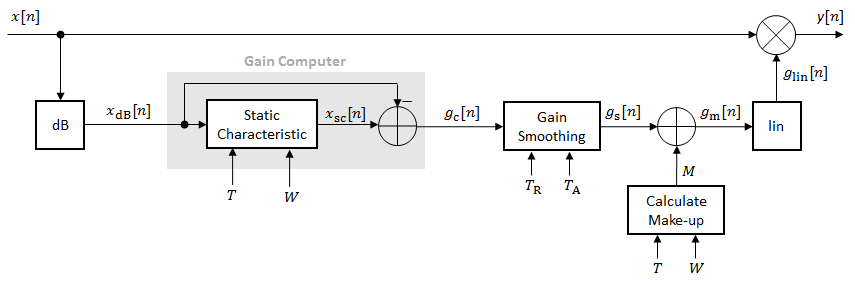
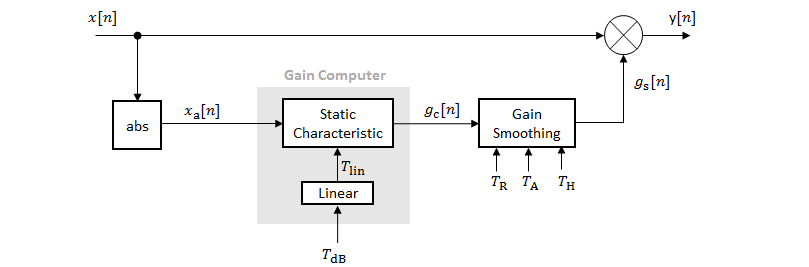
The diagram depicts a general dynamic range control system.

In a dynamic range control system, a gain signal is calculated in a sidechain and then applied to the input audio signal. The sidechain consists of:
Linear to dB conversion:x→xdB
Gain computation, by passing the dB signal through a static characteristic equation, and then taking the difference: gc=xsc−xdB
Gain smoothing over time: gc→gs
Addition of make-up gain (for compressors and limiters only): gs→gm
dB to linear conversion: gm→glin
Application of the calculated gain signal to the original audio signal: y=glin×x
Linear to dB Conversion
The gain signal used in dynamic range control is processed on a dB scale for all dynamic range controllers. There is no reference for the dB output; it is a straight conversion: xdB=20log10(x). You might need to adjust the output of a dynamic range control system to the range of your system.
Gain Computer
The gain computer provides the first rough estimate of a gain signal for dynamic range control. The principal component of the gain computer is the static characteristic. Each type of dynamic range control has a different static characteristic with different tunable properties:
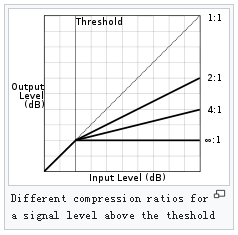
Threshold–– All static characteristics have a threshold. On one side of the threshold, the input is given to the output with no modification. On the other side of the threshold, compression, expansion, brickwall limiting, or brickwall gating is applied.Ratio–– Expanders and compressors enable you to adjust the input-to-output ratio of the static characteristic above or below a given threshold.The amount of gain reduction is determined by ratio: a ratio of 4:1 means that if input level is 4 dB over the threshold, the output signal level is reduced to 1 dB over the threshold. The gain and output level has been reduced by 3 dB:
The highest ratio of ∞:1 is often known as limiting. It is commonly achieved using a ratio of 60:1, and effectively denotes that any signal above the threshold is brought down to the threshold level once the attack time has expired.
KneeWidth–– Expanders, compressors, and limiters enable you to adjust the knee width of the static characteristic. The knee of a static characteristic is centered at the threshold. An increase in knee width creates a smoother transition around the threshold. A knee width of zero provides no smoothing and is known as a hard knee. A knee width greater than zero is known as a soft knee.
compressor/limiter/expander:
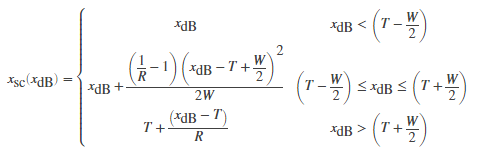
Compressor:
Limiter:
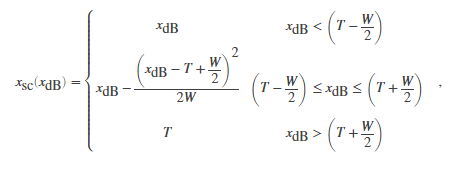
Expander:
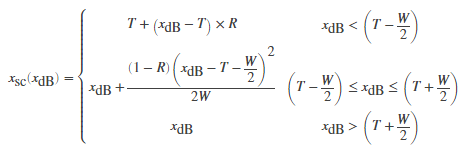
where T is the threshold, R is the compression ratio, and W is the knee width.
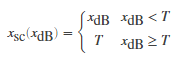
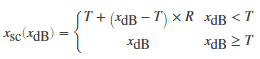
If you specified a hard knee, the gain computer has the following static characteristic:
Compressor:

Limiter:
Expander:
The computed gain, gc[n], is calculated as

Noise Gate:


In these static characteristic plots, the expander, limiter, and compressor each have a 10 dB knee width.

Gain Smoothing
All dynamic range controllers provide gain smoothing over time. Gain smoothing diminishes sharp jumps in the applied gain, which can result in artifacts and an unnatural sound. You can conceptualize gain smoothing as the addition of impedance to your gain signal.
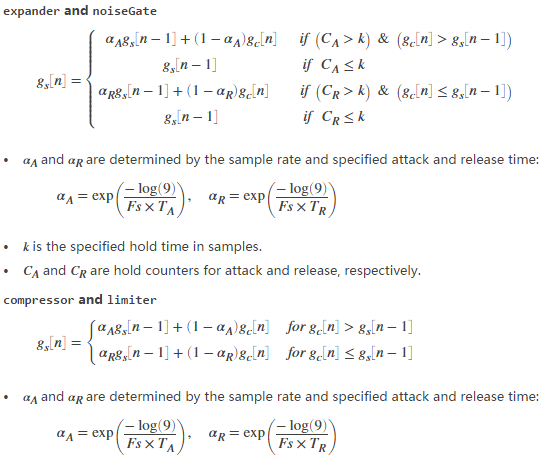
The expander and noiseGate objects have the same smoothing equation, because a noise gate is a type of expander. The limiter and compressor objects have the same smoothing equation, because a limiter is a type of compressor.
The type of gain smoothing is specified by a combination of attack time, release time, and hold time coefficients. Attack time and release time correspond to the time it takes the gain signal to go from 10% to 90% of its final value. Hold time is a delay period before gain is applied. See the algorithms of individual dynamic range controller pages for more detailed explanations.
Smoothing Equations
When the signal level goes above threshold, compressor operation is delayed by the attack setting. For an amount of time determined by the release after the input signal has fallen below the threshold, the compressor continues to apply dynamic range compression.

Attack and release:
The length of each period is determined by the rate of change and the required change in gain. For more intuitive operation, a compressor's attack and release controls are labeled as a unit of time (often milliseconds). This is the amount of time it takes for the gain to change a set amount of dB, decided by the manufacturer—often 10 dB. For example, if the compressor's time constants are referenced to 10 dB, and the attack time is set to 1 ms, it takes 1 ms for the gain to decrease by 10 dB, and 2 ms to decrease by 20 dB.
In many compressors the attack and release times are adjustable by the user. Some compressors, however, have the attack and release times determined by the circuit design and these cannot be adjusted by the user. Sometimes the attack and release times are 'automatic' or 'program dependent', meaning that the times change depending on the input signal. Because the loudness pattern of the source material is modified by the compressor it may change the character of the signal in subtle to quite noticeable ways depending on the settings used.
Gain Smoothing Example
Examine a trivial case of dynamic range compression for a two-step input signal. In this example, the compressor has a threshold of –10 dB, a compression ratio of 5, and a hard knee.

Several variations of gain smoothing are shown. On the top, a smoothed gain curve is shown for different attack time values, with release time set to zero seconds. In the middle, release time is varied and attack time is held constant at zero seconds. On the bottom, both attack and release time are specified by nonzero values.

Make-Up Gain
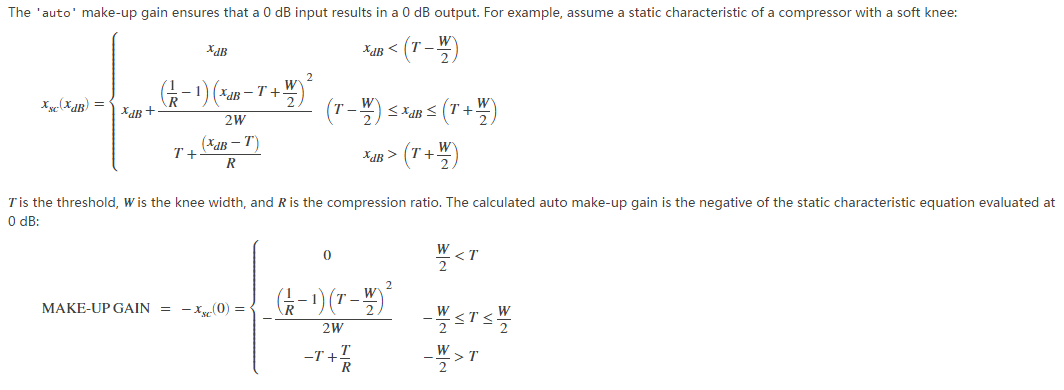
Make-up gain applies for compressors and limiters, where higher dB portions of a signal are attenuated or brickwalled. The dB reduction can significantly reduce total signal power. In these cases, make-up gain is applied after gain smoothing to increase the signal power. In Audio System Toolbox, you can specify a set amount of make-up gain or specify the make-up gain mode as 'auto'.
dB to Linear Conversion
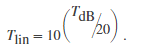
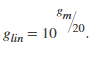
Once the gain signal is determined in dB, it is transferred to the linear domain:
Apply Calculated Gain
The final step in a dynamic control system is to apply the calculated gain by multiplication in the linear domain.
Example: Dynamic Range Limiter
The audio signal described in this example is a 0.5 second interval of a drum track. The limiter properties are:
Threshold = –15 dB
Knee width = 0 (hard knee)
Attack time = 0.004 seconds
Release time = 0.1 seconds
Make-up gain = 1 dB
To create a limiter System object™ with these properties, at the MATLAB® command prompt, enter:
dRL = limiter('Threshold',-15,...

              'KneeWidth',0,...

              'AttackTime',0.004,...

              'ReleaseTime',0.1,...

              'MakeUpGainMode','property',...

              'MakeUpGain',1);
This example provides a visual walkthrough of the various stages of the dynamic range limiter system.

Linear to dB Conversion
The input signal is converted to a dB scale element by element.

Gain Computer
The static characteristic brickwall limits the dB signal at –15 dB. To determine the dB gain that results in this limiting, the gain computer subtracts the original dB signal from the dB signal processed by the static characteristic.

Gain Smoothing
The relatively short attack time specification results in a steep curve when the applied gain is suddenly increased. The relatively long release time results in a gradual diminishing of the applied gain.

Make-Up Gain
Assume a limiter with a 1 dB make-up gain value. The make-up gain is added to the smoothed gain signal.

dB to Linear Conversion
The gain in dB is converted to a linear scale element by element.

Apply Calculated Gain
The original signal is multiplied by the linear gain.

References
[1] Zolzer, Udo. "Dynamic Range Control." Digital Audio Signal Processing. 2nd ed. Chichester, UK: Wiley, 2008.
[2] Giannoulis, Dimitrios, Michael Massberg, and Joshua D. Reiss. "Digital Dynamic Range Compressor Design –– A Tutorial And Analysis." Journal of Audio Engineering Society. Vol. 60, Issue 6, 2012, pp. 399–408.
转载:DRC的更多相关文章
- (转载)Eclipse将引用了第三方jar包的Java项目打包成可执行jar的两种方法
转载自:http://www.cnblogs.com/lanxuezaipiao/p/3291641.html 方案一:用Eclipse自带的Export功能 步骤1:准备主清单文件 "MA ...
- ORCAD常见DRC错误
一下就是网上整理的: https://blog.csdn.net/weixin_39671078/article/details/85344762 https://wenku.baidu.com/vi ...
- [转载]克服FPGA I/O引脚分配挑战--xilinx系列
转载走,放到自己的分类中好了 原文地址:I/O引脚分配挑战--xilinx系列">克服FPGA I/O引脚分配挑战--xilinx系列作者:方槍槍 http://www.eefocus ...
- drc实现
原理参考之前转载的matlab上关于DRC的描述. 目前主要实现了compressor和expander. compressor: Limit: expander: 实现代码: #include< ...
- (转载)Altium Designer 17 (AD17)
转载自:http://blog.csdn.net/qq_29350001/article/details/52199356 以前是使用DXP2004来画图的,后来转行.想来已经有一年半的时间没有画过了 ...
- 转:进行vivado开发时,Generate Bitstream报错[DRC NSTD-1],详细解决步骤
报错如下 [Drc 23-20] Rule violation (NSTD-1) Unspecified I/O Standard - 4 out of 142 logical ports use I ...
- Crystal Clear Applied: The Seven Properties of Running an Agile Project (转载)
作者Alistair Cockburn, Crystal Clear的7个成功要素,写得挺好. 敏捷方法的关注点,大家可以参考,太激动所以转载了. 原文:http://www.informit.com ...
- RTP与RTCP协议介绍(转载)
RTSP发起/终结流媒体.RTP传输流媒体数据 .RTCP对RTP进行控制,同步.RTP中没有连接的概念,本身并不能为按序传输数据包提供可靠的保证,也不提供流量控制和拥塞控制,这些都由RTCP来负责完 ...
- 《Walking the callstack(转载)》
本文转载自:https://www.codeproject.com/articles/11132/walking-the-callstack Download demo project with so ...
随机推荐
- Costco这样的超级零售商,能不能干掉电商?
名创优品创始人叶国富曾说过,Costco只是没有来到中国(大陆),如果它来了,中国现在的零售业全部都会"死光".叶国富的话,似乎一语成箴. 随着Costco正式入华,其正在彻底搅动 ...
- elasticsearch 5.5 query 过程 源码分析
(1)请求 transfer to 任意node 节点 标记为coordinate node server入口函数 transportSearchAction doExecute方法 coordin ...
- 常用的一些git命令整合
一.创建一个版本库 1.mkdir xxx 2.git init 使用git init命令将这个目录变成Git可以管理的仓库 这个版本仓库创建好了,xxx目录下有一个隐藏的.git目录(里面有暂存区( ...
- cli4适配移动端
1.首先在项目中安装以下依赖 npm install px2rem-loader --savenpm install amfe-flexible --savenpm install postcss-p ...
- 报错Exception in thread "main" java.lang.NoClassDefFoundError: javax/xml/bind/...
首先我的jdk是11.05的 这个是由于: 这个是 由于缺少了javax.xml.bind,在jdk10.0.1中没有包含这个包,所以我自己去网上下载了jdk 8,然后把jdk10.0.1换成jdk ...
- C++&C语言 -> //有一头母牛,它每年年初生一头小母牛。每头小母牛从第四个年头开始,每年年初也生一头小母牛。请编程实现在第n年的时候,共有多少头母牛?
/* a b c d 1 5 5 ...
- centos 7 源码安装openresty
Openresty 官网 http://openresty.org Openresty源码下载页面 http://openresty.org/en/download.html Openresty 简易 ...
- nginx 部署php项目 404
服务器重启了一下 然后访问程序报错404的情况 文件存在位置没有问题 niginx配置根目录没有问题 最后检查到端口的时候发现php-fpm的9000端口未打开 service php-fpm res ...
- hackme.inndy.tw的一些Writeup(5月30更新)
hackme.inndy.tw的一些Writeup(6月3日更新) 原文链接:http://www.cnblogs.com/WangAoBo/p/7706719.html 推荐一下https://ha ...
- 关于vue 里:class 的几种使用方式
最近一直在做vue项目 从网上搜索到的资料不太多.关于:class的使用 结合自己的实现 整理如下.接下来一篇写:style .其实从:class 这里可以想到:style的使用 也是类似的 一 cl ...