
position定位及实际应用
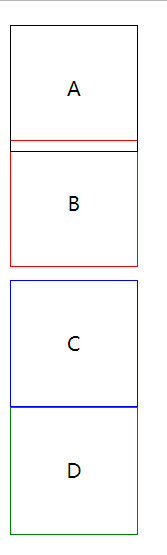
position: static; 静态定位 / 常规定位 / 自然定位
忽略top/right/bottom/left/z-index的影响,使元素回到自然流中
<!DOCTYPE html>

<html lang="en">

<head>

    <meta charset="UTF-8">

    <title>Document</title>

    <style>

        .block{

            width:100px;

            height:100px;

            line-height:100px;

            text-align:center;

            position: relative;

            top:10px;

        }

        .block:first-child{

            border:1px solid;

        }

        .block:nth-child(2){

            position: static;

            border:1px solid red;

        }

        .block:nth-child(3){

            border:1px solid blue;

        }

        .block:nth-child(4){

            border:1px solid green;

        }

    </style>

</head>

<body>

    <div class="block">A</div>

    <div class="block">B</div>

    <div class="block">C</div>

    <div class="block">D</div>

</body>

</html>
设置margin:auto为水平居中
<!DOCTYPE html>

<html lang="en">

<head>

    <meta charset="UTF-8">

    <title>Document</title>

    <style>

        .block{

            width:100px;

            height:100px;

            line-height:100px;

            text-align:center;

            position: static;

            margin:auto;

        }

        .block:first-child{

            border:1px solid;

        }

        .block:nth-child(2){

            border:1px solid red;

        }

        .block:nth-child(3){

            border:1px solid blue;

        }

        .block:nth-child(4){

            border:1px solid green;

        }

    </style>

</head>

<body>

    <div class="block">A</div>

    <div class="block">B</div>

    <div class="block">C</div>

    <div class="block">D</div>

</body>

</html>

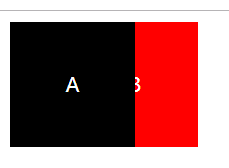
position:relative 相对定位
相对于自己在常规流中的位置,进行偏移
原来的空间依然预留
可以使浮动元素发生偏移,并控制堆叠顺序
<!DOCTYPE html>

<html lang="en">

<head>

    <meta charset="UTF-8">

    <title>Document</title>

    <style>

        .block{

            width:100px;

            height:100px;

            line-height:100px;

            text-align:center;

            color:white;

            float:left;

            position: relative;

        }

        .block:first-child{

            background:black;

            z-index:2;

        }

        .block:nth-child(2){

            background:red;

            left:-50px;

            z-index:1;

        }

    </style>

</head>

<body>

    <div class="block">A</div>

    <div class="block">B</div>

</body>

</html>
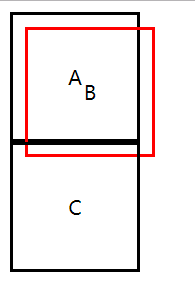
position:absolute;
参照物是最近定位的祖先元素
如果没有祖先元素被定位,则默认为body
<!DOCTYPE html>

<html lang="en">

<head>

    <meta charset="UTF-8">

    <title>Document</title>

    <style>

        .block{

            width:100px;

            height:100px;

            line-height:100px;

            text-align:center;

            border:2px solid;

            position: relative;

        }

        .block:nth-child(2){

            border-color:red;

            position: absolute;

            top:20px;

            left:20px;

        }

    </style>

</head>

<body>

    <div class="block">A</div>

    <div class="block">B</div>

    <div class="block">C</div>

</body>

</html>
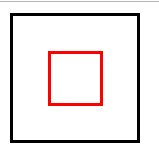
实现水平垂直居中定位:
1、给父元素设置:position: relative;
2、给子元素设置:
position: absolute;
top:0;
left:0;
right:0;
bottom:0;
margin:auto auto;
<!DOCTYPE html>

<html lang="en">

<head>

    <meta charset="UTF-8">

    <title>Document</title>

    <style>

        .parent{

            width:100px;

            height:100px;

            border:2px solid;

            position: relative;

        }

        .child{

            width:40px;

            height:40px;

            border:2px solid;

            border-color:red;

            position: absolute;

            top:0;

            left:0;

            right:0;

            bottom:0;

            margin:auto auto;

        }

    </style>

</head>

<body>

    <div class="parent">

        <div class="child"></div>

    </div>

</body>

</html>
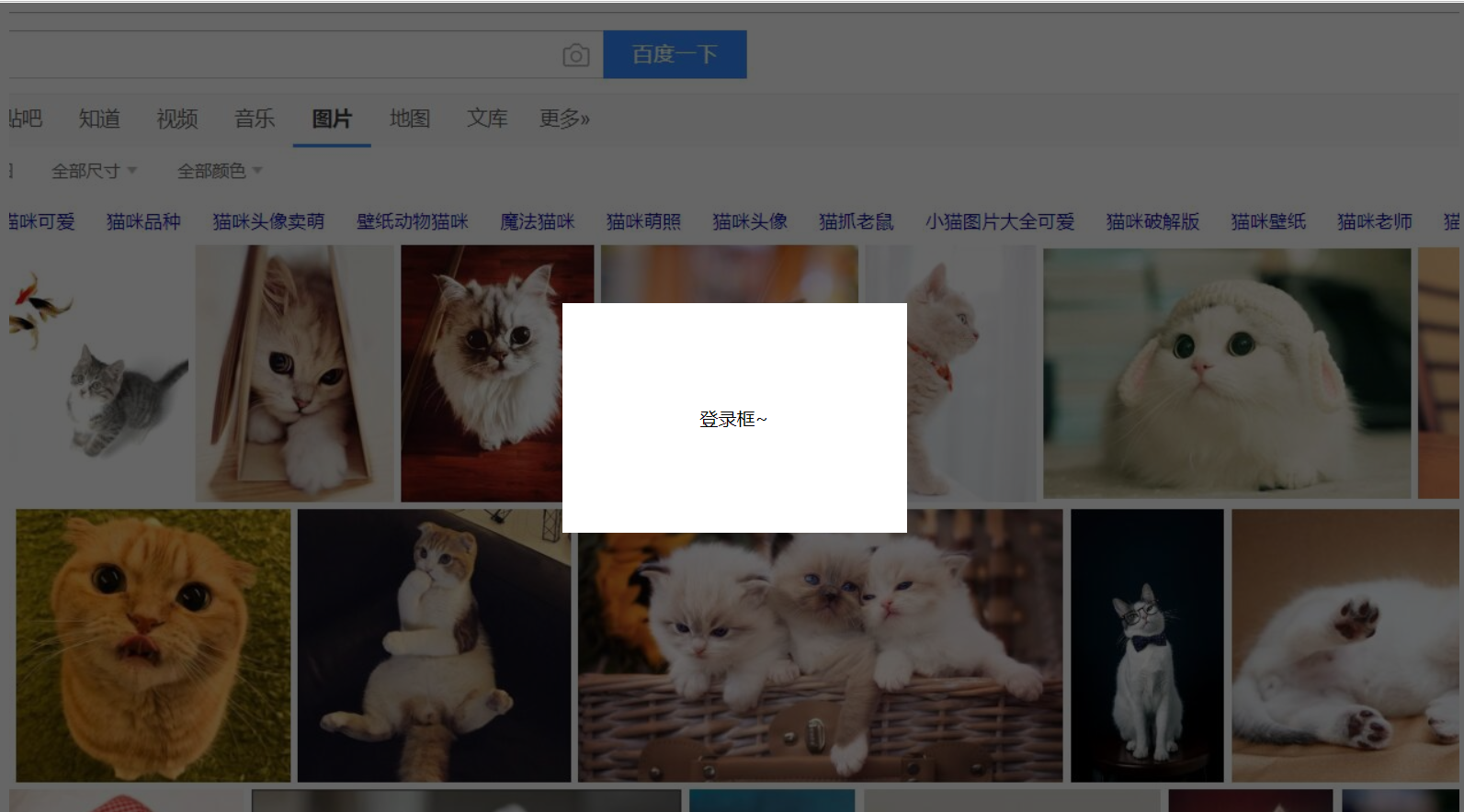
position:fixed;
继承position:absolute;的所有特征,区别是以视口做参照来定位
position:sticky;
与top偏移量结合使用
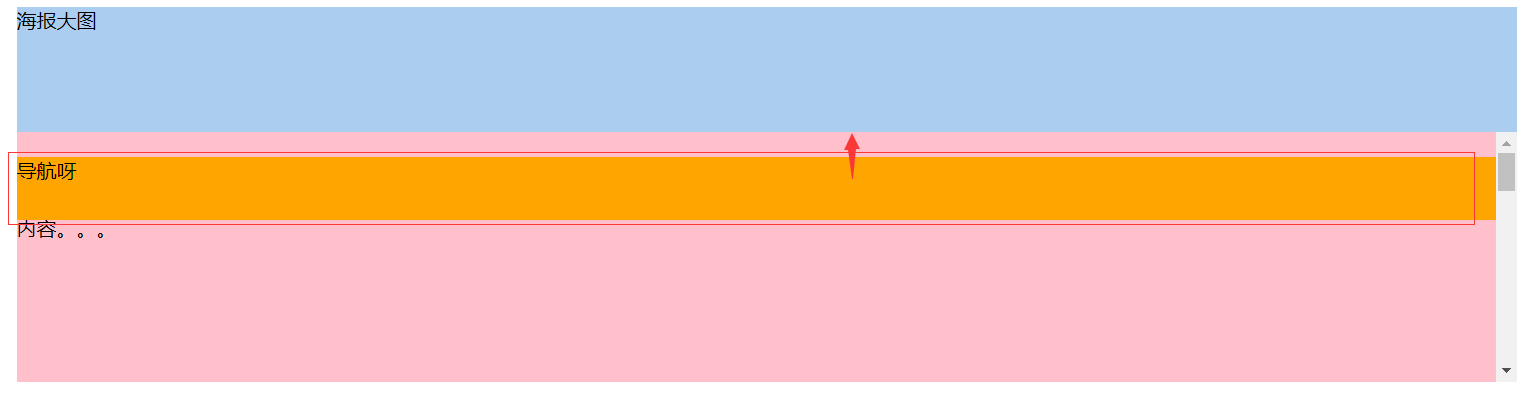
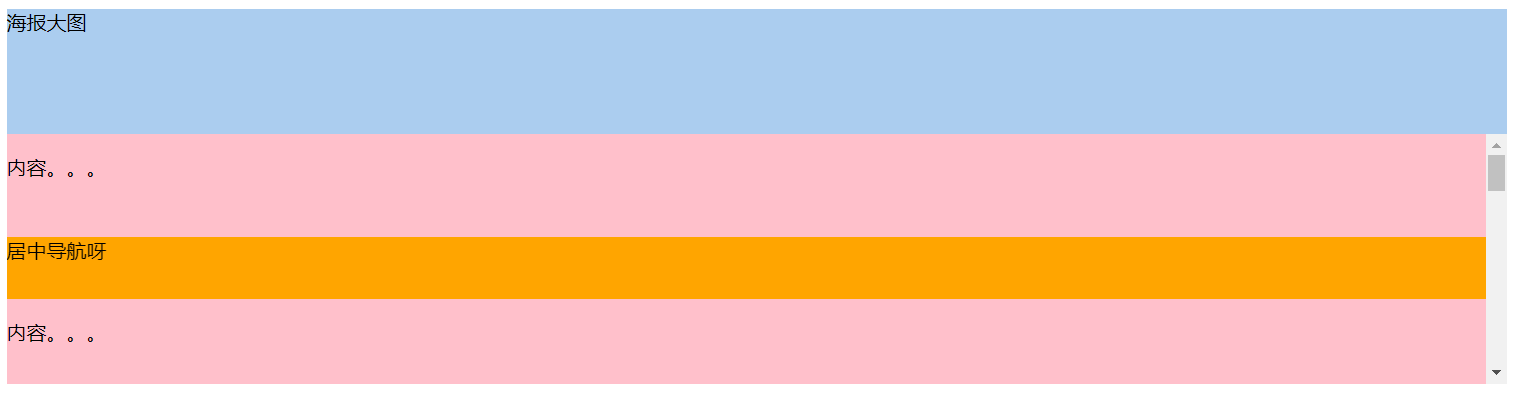
如果最近祖先元素有定位,则参考最近祖先元素;否则参考视口
<!DOCTYPE html>

<html lang="en">

<head>

    <meta charset="UTF-8">

    <title>Document</title>

    <style>

        .banner{

            width:1200px;

            height:100px;

            background:#abcdef;

            margin:0 auto;

        }

        .nav{

            width:1200px;

            height:50px;

            background:orange;

            margin:0 auto;

            position: sticky;

            top:0;

        }

        .container{

            width:1200px;

            height:1000px;

            background:pink;

            margin:0 auto;

        }

    </style>

</head>

<body>

    <div class="banner">海报大图</div>

    <div class="nav">导航呀</div>

    <div class="container">内容。。。</div>

</body>

</html>
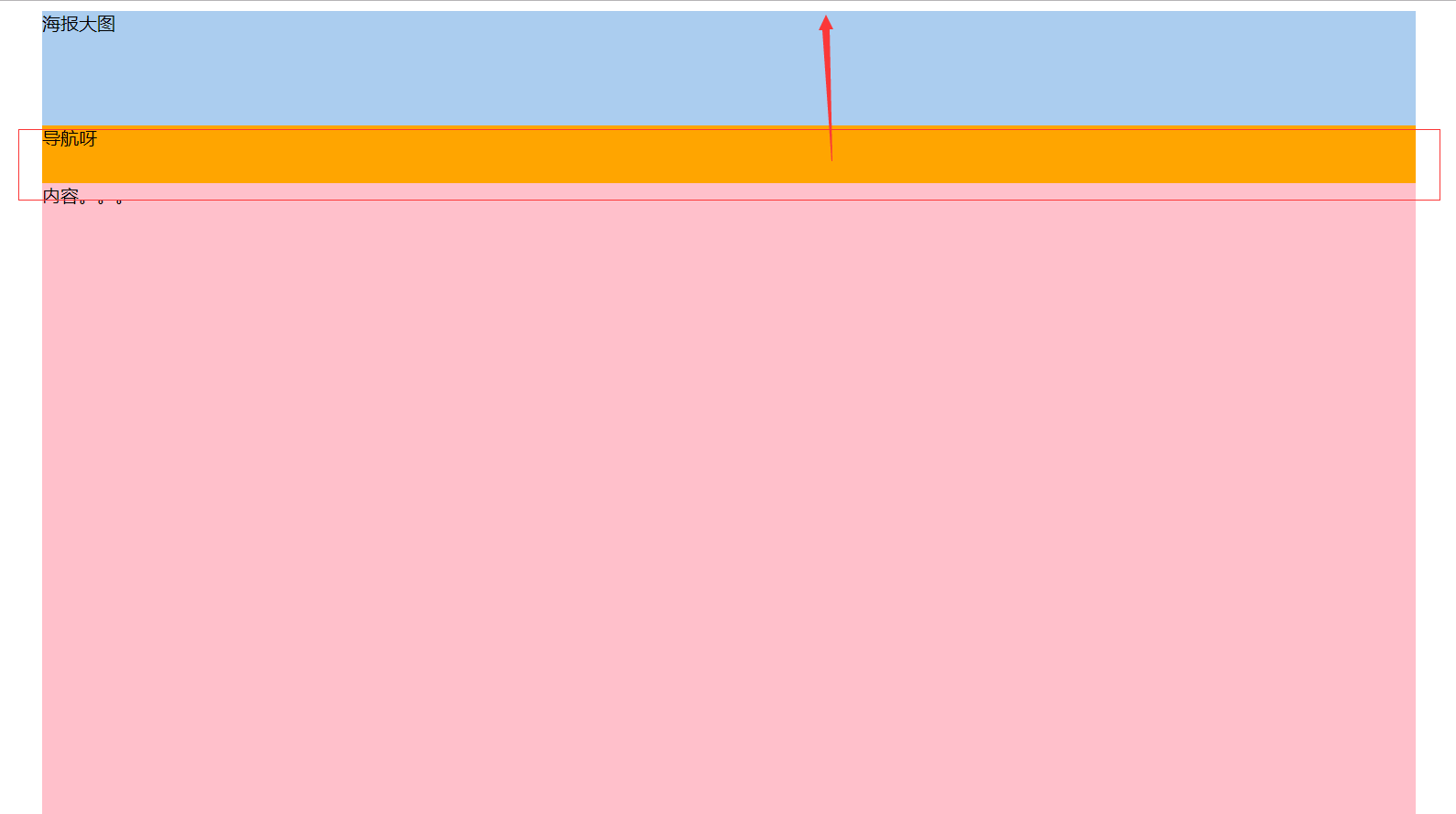
相对于最近定位的祖先元素做参考:
<!DOCTYPE html>

<html lang="en">

<head>

    <meta charset="UTF-8">

    <title>Document</title>

    <style>

        .banner{

            width:1200px;

            height:100px;

            background:#abcdef;

            margin:0 auto;

        }

        .nav{

            width:1200px;

            height:50px;

            background:orange;

            margin:0 auto;

            position: sticky;

            top:20px;

        }

        .container{

            width:1200px;

            height:200px;

            background:pink;

            margin:0 auto;

            position: relative;

            overflow-y: scroll;

            overflow-x: hidden;

        }

        p{

            height:1000px;

        }

    </style>

</head>

<body>

    <div class="banner">海报大图</div>

    <div class="container">

        <div class="nav">导航呀</div>

        <p>内容。。。</p>

    </div>

</body>

</html>
导航在居中位置
<!DOCTYPE html>

<html lang="en">

<head>

    <meta charset="UTF-8">

    <title>Document</title>

    <style>

        .banner{

            width:1200px;

            height:100px;

            background:#abcdef;

            margin:0 auto;

        }

        .nav{

            width:1200px;

            height:50px;

            background:orange;

            margin:0 auto;

            position: sticky;

            top:20px;

        }

        .container{

            width:1200px;

            height:200px;

            background:pink;

            margin:0 auto;

            position: relative;

            overflow-y: scroll;

            overflow-x: hidden;

        }

        p{

            height:1000px;

        }

        p:first-child{

            height:50px;

        }

    </style>

</head>

<body>

    <div class="banner">海报大图</div>

    <div class="container">

        <p>内容。。。</p>

        <div class="nav">居中导航呀</div>

        <p>内容。。。</p>

    </div>

</body>

</html>
www.caniuse.com 检测浏览器兼容性
弹出层的简单实例
<!DOCTYPE html>

<html lang="en">

<head>

    <meta charset="UTF-8">

    <title>Document</title>

    <style>

        .content{

            width:100%;

            height:1000px;

            background:url(bg.jpg) top center no-repeat;

        }

        .opacity{

            width:100%;

            height:100%;

            background-color:rgba(0,0,0,.6);

            position: fixed;

            top:0;

            left:0;

        }

        .login{

            width:300px;

            height:200px;

            text-align:center;

            line-height:200px;

            position: fixed;

            background-color:#fff;

            top:50%;

            left:50%;

            margin-top:-100px;

            margin-left:-150px;

        }

    </style>

</head>

<body>

    <div class="content"></div>

    <div class="opacity"></div>

    <div class="login">登录框~</div>

</body>

</html>
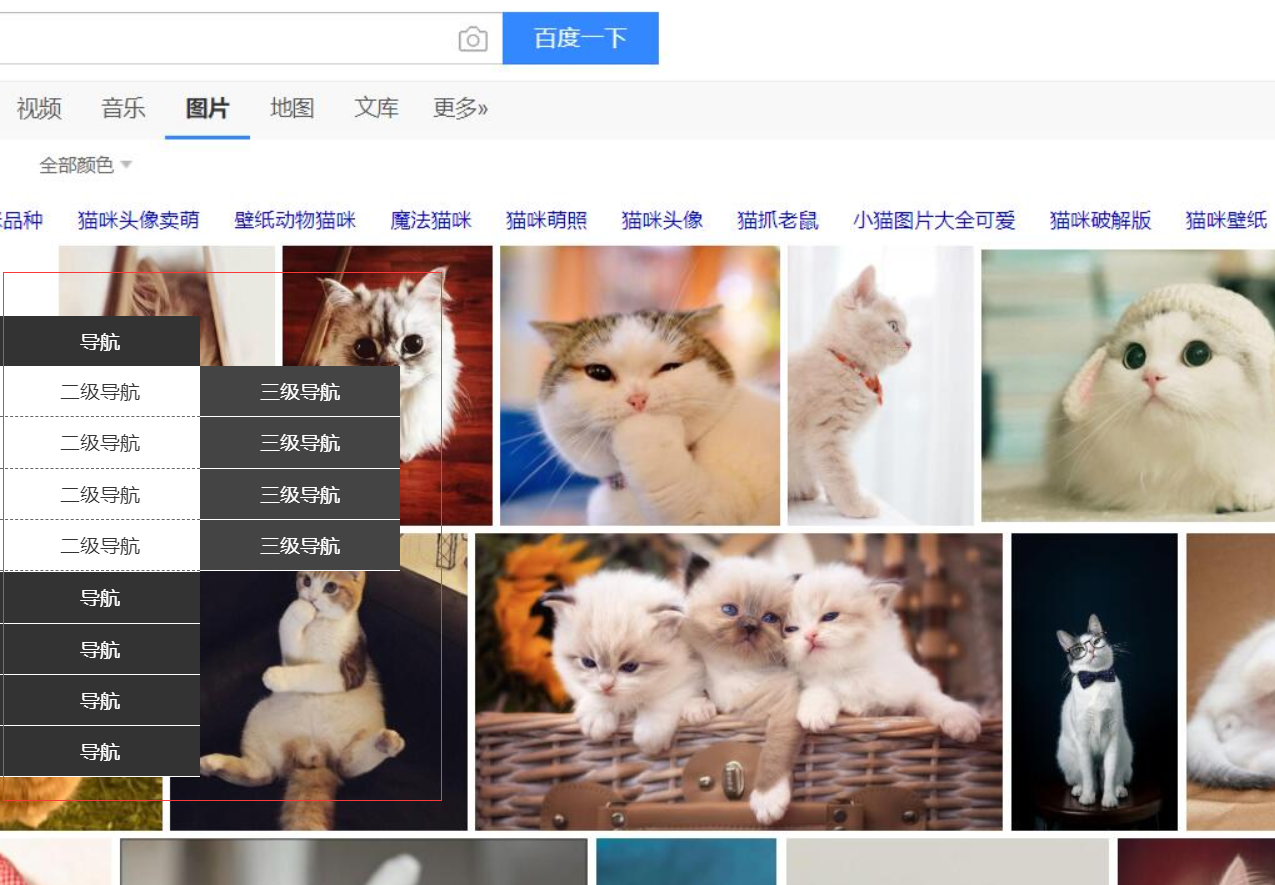
侧边栏导航实例
<!DOCTYPE html>

<html lang="en">

<head>

    <meta charset="UTF-8">

    <title>Document</title>

    <style>

        *{

            margin:0;

            padding:0;

        }

        ul{

            list-style:none;

        }

        .content{

            width:100%;

            height:1000px;

            background:url(bg.jpg) top center no-repeat;

        }

        .nav{

            width:160px;

            height:205px;

            position: fixed;

            left:0;

            top:50%;

            margin-top:-102px;

        }

        .nav-li{

            width:160px;

            height:auto;

            line-height:40px;

            border-bottom:1px solid #fff;

            color:#fff;

            background:#333;

            text-align: center;

            cursor:pointer;

        }

        .tit{

            width:160px;

            height:40px;

        }

        .nav-li ul{

            width:160px;

            height:auto;

            background:#fff;

            display: none;

        }

        .nav-li:hover ul{

            display: block

        }

        .nav-li ul li{

            width:160px;

            height:40px;

            color:#333;

            border-bottom:1px dashed #666;

            text-align: center;

            line-height:40px;

            position: relative;

        }

        .nav-li ul li:hover .subnav{

            display: block;

        }

        .subnav{

            position: absolute;

            width:160px;

            height:auto;

            top:0;

            left:160px;

            background:#444;

            display: none;

        }

        .subnav-item{

            width:160px;

            height:40px;

            border-bottom:1px solid #fff;

            color:#fff;

        }

    </style>

</head>

<body>

    <div class="content">

        <div class="nav">

            <div class="nav-li">

                <div class="tit">导航</div>

                <ul>

                    <li>

                        二级导航

                        <div class="subnav">

                            <div class="subnav-item">三级导航</div>

                            <div class="subnav-item">三级导航</div>

                            <div class="subnav-item">三级导航</div>

                            <div class="subnav-item">三级导航</div>

                        </div>

                    </li>

                    <li>二级导航</li>

                    <li>二级导航</li>

                    <li>二级导航</li>

                </ul>

            </div>

            <div class="nav-li">导航</div>

            <div class="nav-li">导航</div>

            <div class="nav-li">导航</div>

            <div class="nav-li">

                <div class="tit">导航</div>

                <ul>

                    <li>

                        二级导航

                        <div class="subnav">

                            <div class="subnav-item">三级导航</div>

                            <div class="subnav-item">三级导航</div>

                            <div class="subnav-item">三级导航</div>

                            <div class="subnav-item">三级导航</div>

                        </div>

                    </li>

                    <li>二级导航</li>

                    <li>二级导航</li>

                    <li>二级导航</li>

                </ul>

            </div>

        </div>

    </div>

</body>

</html>
position定位及实际应用的更多相关文章
- CSS Position 定位属性
本篇文章主要介绍元素的Position属性,此属性可以设置元素在页面的定位方式. 目录 1. 介绍 position:介绍position的值以及辅助属性. 2. position 定位方式:介绍po ...
- position定位
CSS盒模型和定位的类型 为了搞清楚定位首先你得了解CSS盒模型.在上一句中的链接是我写在InstantShift 中的一篇关于盒模型的文章.我在那篇文章做了详细的讲解并会在这篇文章中做一个快速的总结 ...
- 浅析CSS——元素重叠及position定位的z-index顺序
多次在项目中遇到html页面元素的非期待重叠错误,多数还是position定位情况下z-index的问题.其实每次解决类似问题思路大致都是一样的,说到底还是对z-index的理解比较模糊,可以解决问题 ...
- position定位的小问题
css中position定位有四个属性,分别是:static.fixed.relative.absolute. 其中,static是默认值,未脱离文档流,元素的位置即按照文档结构的顺序进行定位排序: ...
- (转)Position定位:relative | absolute
原文:http://hi.baidu.com/zxc0420/item/9ada5110845ba1e89c778a08 Position定位:relative | absolute 定位一直是WEB ...
- 元素重叠及position定位的z-index顺序
元素位置重叠的背景常识 (x)html文档中的元素默认处于普通流(normal flow)中,也就是说其顺序由元素在文档中的先后位置决定,此时一般不会产生重叠(但指定负边距可能产生重叠).当我们用cs ...
- 盒子模型&position定位
有时候深深的感觉语文这门课程其实很有用, 至少以前学的时候没有感觉到 直到现在阅读大量的别人的资料文章的时候或者是看一些题目....... 总之:认真阅读小心品味 当然,前面的孤言自语和本文无关,只是 ...
- CSS定位:几种类型的position定位的元素
当人们刚接触布局的时候都比较倾向于使用定位的方式.因为定位的概念看起来好像比较容易掌握.表面上你确切地指定了一个块元素所处的位置那么它就会坐落于那里.可是定位比你刚看到的时候要稍微复杂一点.对于定位来 ...
- 归纳篇(一)CSS的position定位和float浮动
近期会更新一系列博客,对基础知识再度做个巩固和梳理. 一.position定位 (一):position的属性 1.absolute:生成绝对定位的元素,相对于最近一级定位不是static的父元素来进 ...
- (转)浅析CSS——元素重叠及position定位的z-index顺序
多次在项目中遇到html页面元素的非期待重叠错误,多数还是position定位情况下z-index的问题.其实每次解决类似问题思路大致都是一样的,说到底还是对z-index的理解比较模糊,可以解决问题 ...
随机推荐
- node使用art-template的过滤器
引言 art-template过滤器在我看来,其实就是定义一个函数,模板字符串通过调用该函数处理相关的数据,得到相应的返回结果,显示在页面上.因此我们可以注册一个过滤器,处理相关的数据.这里使用nod ...
- VC实现快递查询
#include <iostream> #include <string> #include <cstdlib> #include <afxinet.h> ...
- 【WPF学习】第四十一章 变换
通过使用变换(transform),许多绘图任务将更趋简单:变换是通过不加通告地切换形状或元素使用的坐标系统来改变形状或元素绘制方式的对象.在WPF中,变换由继承自System.Windows.Med ...
- 题解【[AHOI2013]作业】
\[ \texttt{Preface} \] 数据貌似很水,据说 \(A_i\leq n\) ,连离散化都不需要. 不知道为啥设块大小为 \(\frac{n}{\sqrt m}\) 会一直 Runti ...
- 根据navigator.userAgent返回值识别 浏览器
function validBrowser(){ var u_agent = navigator.userAgent; var browser_name='Failed to identify the ...
- 【TensorFlow】TensorFlow基础 —— 模型的保存读取与可视化方法总结
TensorFlow提供了一个用于保存模型的工具以及一个可视化方案 这里使用的TensorFlow为1.3.0版本 一.保存模型数据 模型数据以文件的形式保存到本地: 使用神经网络模型进行大数据量和复 ...
- 动态主机配置协议-DHCP
一.DHCP 概述 当局域网中有大量的PC时.如果我们逐个为每台PC去手动配置IP.那这就是一个吃力也未必讨好的办法 累死你 而DHCP 刚好可以解决这个问题.DHCP全称(动态主机配置协议).使用的 ...
- NR / 5G - MAC Overview
- Tomcat 配置2 tomcat-users.xml
Tomcat的配置 Tomcat的主要配置文件有3个,分别是: Tomcat-users.xml. web.xml server.xml. 配置Tomcat-users.xml 该文 ...
- 意法半导体STM32MP157A MPU加持,米尔科技首款ST Linux开发板MYD-YA157C评测
ST公司去年推出了MPU系列芯片,MPU系列不同于以往产品,它既包含有ARM公司Cortex M 单片机核心,也包含有ARM公司Cortex A 应用处理器核心,以期将STM32单片机产品优势扩展到更 ...