
使用autotools工具用configure、make、make install编译安装linux工程的详细步骤
使用autotools工具用configure、make、make install编译安装linux工程的详细步骤
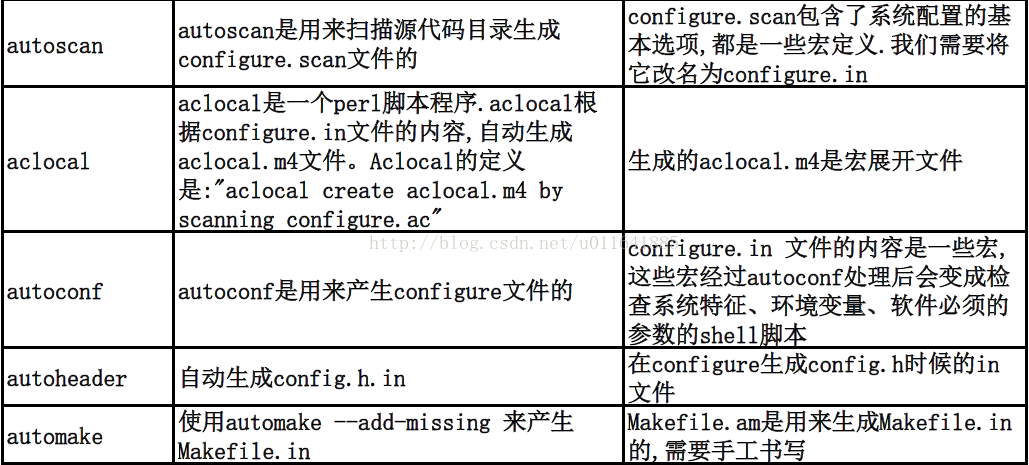
autotools是个系列工具,主要由autoconf、automake、perl语言环境和m4等组成,所包含的命令有5个:
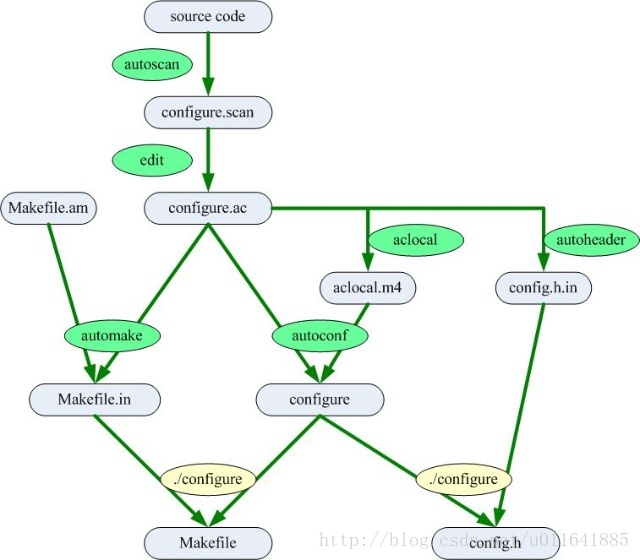
下图是autotools使用的流程图:
autotools的安装:
- apt-get install autoconf automake autotools-dev m4
autotools使用简单实例如下:
- 准备程序源代码
- mkdir demo_conf
- vi hello.cpp
内容如下:
- #include <iostream>
- using namespace std;
- int main(){
- cout << "hello\n";
- }
- 使用autoscan命令,扫描工作目录,生成configure.scan 文件
- $ autoscan
- $ ls
- autoscan.log configure.scan hello.cpp
- 将configure.scan文件重命名为configure.ac(或configure.in),并做适当修改。在configure.ac文件中,#号开始的是行注释,其他都是m4宏命令;configure.ac里面的宏的主要作用是侦测系统
- $ mv configure.scan configure.ac
- vi configure.ac
修改后的内容如下:
- # -*- Autoconf -*-
- # Process this file with autoconf to produce a configure script.
- AC_PREREQ([2.68])
- AC_INIT(hello, 1.0, zhunian0322@163.com)
- AC_CONFIG_SRCDIR([hello.cpp])
- AC_CONFIG_HEADERS([config.h])
- AM_INIT_AUTOMAKE(hello,1.0)
- # Checks for programs.
- AC_PROG_CXX
- # Checks for libraries.
- # Checks for header files.
- # Checks for typedefs, structures, and compiler characteristics.
- # Checks for library functions.
- AC_CONFIG_FILES([Makefile])
- AC_OUTPUT
configure.ac文件说明:
- AC_PREREQ 声明本文要求的autoconf版本.如本例中的版本2.68
- AC_INIT 用来定义软件的名称、版本、作者E-mail等
- AC_CONFIG_SRCDIR 用来侦测所制定的源码文件是否存在,确定源码目录的有效性。此处为当前目录下的hello.cpp
- AC_CONFIG_HEADERS 用于生成config.h文件,以便autoheader命令使用
- AM_INIT_AUTOMAKE 是通过手动添加的,他是automake所必备的宏,用于指定软件名和软件版本号
- AC_PROC_CXX 用来指定编译器。此处是g++ AC_PROC_CC是gcc
- AC_CONFIG_FILES 用于生成相应的Makefile文件
- AC_OUTPUT 用来设定configure 所要产生的文件,如果是Makefile,configure 会把它检查出来的结果带入makefile.in文件产生何时的Makefile。使用automake时,还需要一些其他的参数,这些额外的宏用aclocal工具产生
- 使用aclocal命令,扫描configure.ac文件生成aclocal.m4文件,该文件主要处理本地的宏定义,它根据已经安装的宏\用户定义宏和acinclude.m4文件中的宏将configure.ac文件需要的宏集中定义到aclocal.m4中
- $ aclocal
- $ ls
- aclocal.m4 autom4te.cache autoscan.log configure.ac hello.cpp
- 使用autoconf命令生成configure文件.这个命令将configure.ac文件中的宏展开,生成configure脚本。
- $ autoconf
- $ ls
- aclocal.m4 autom4te.cache autoscan.log configure configure.ac hello.cpp
- 使用autoheader命令生成config.h.in文件.该命令通常会中acconfig.h 文件中复制用户附加的符号定义
- $ autoheader
- $ ls
- aclocal.m4 autoscan.log configure hello.cpp
- autom4te.cache config.h.in configure.ac
- 手工创建Makefile.am 文件。automake工具会根据configure.in中的参量把Makefile.am转换成Makefile.in文件
- $ vi Makefile.am
增加一下内容:
- AUTUMAKE_OPTIONS = foreign
- bin_PROGRAMS = hello
- hello_SOURCES = hello.cpp
Makefile.am文件内容说明
- AUTOMAKE_OPTIONS 为设置automake 的选项.由于GNU对自己发布的软件有严格的规范,比如必须附带许可证声明文件COPYING等,否则automake执行时会报错.automake提供了3种软件等级:foreign、gnu、gnits,供用户选择。默认级别是gnu。
- bin_PROGRAMS 定义要产生的执行文件名。如果要产生多个执行文件,每个文件名用空格隔开
- hello_SOURCES 定义“hello”这个可以执行程序所需的原始文件。如果“hello”这个程序是由多个源文件所产生的,则必须把它所用到的所有源文件都列出来,并用空格隔开。如果要定义多个可执行程序,那么需要对每个可执行程序建立对应的file_SOURCES
- 使用automake 命令生成Makefile.in 文件.使用选项"--add-missing" 可以让automake自动添加一些必须的脚本文件
- $ automake --add-missing
- configure.ac:8: installing `./install-sh'; error while making link: Operation not supported
- configure.ac:8: installing `./missing'; error while making link: Operation not supported
- Makefile.am: installing `./INSTALL'; error while making link: Operation not supported
- <pre name="code" class="plain">Makefile.am: required file `./NEWS' not found
- Makefile.am: required file `./README' not found
- Makefile.am: required file `./AUTHORS' not found
- Makefile.am: required file `./ChangeLog' not found
Makefile.am: installing `./COPYING' using GNU General Public License v3 file; error while making link: Operation not supportedMakefile.am: Consider adding the COPYING file to the version control systemMakefile.am: for your code, to avoid questions about which license your project uses.Makefile.am: installing `./depcomp'; error while making link: Operation not supported说明:
- configure.ac:8: installing `./install-sh'; error while making link: Operation not supported
- configure.ac:8: installing `./missing'; error while making link: Operation not supported
- Makefile.am: installing `./depcomp'; error while making link: Operation not supported
- ##因为把工程放在FAT32分区上,而它不支持link.需要挪到ext3上
- Makefile.am: required file `./NEWS' not found
- Makefile.am: required file `./README' not found
- Makefile.am: required file `./AUTHORS' not found
- Makefile.am: required file `./ChangeLog' not found
- ##使用touch 命令创建这4个文件
- $ cp -rvf ../demo_conf/ /home/gino/
- $ cd /home/gino/demo_conf/
- $ touch NEWS
- $ touch README
- $ touch AUTHORS
- $ touch ChangeLog
- $ automake --add-missing
- $ ls
- aclocal.m4 autoscan.log config.h.in configure hello install-sh Makefile.in README
- AUTHORS ChangeLog config.log configure.ac hello.cpp Makefile missing stamp-h1
- autom4te.cache config.h config.status depcomp hello.o Makefile.am NEWS
- 使用configure命令,把Makefile.in 变成Makefile
- $ ./configure
- checking for a BSD-compatible install... /usr/bin/install -c
- checking whether build environment is sane... yes
- checking for a thread-safe mkdir -p... /bin/mkdir -p
- checking for gawk... no
- checking for mawk... mawk
- checking whether make sets $(MAKE)... yes
- checking for g++... g++
- checking whether the C++ compiler works... yes
- checking for C++ compiler default output file name... a.out
- checking for suffix of executables...
- checking whether we are cross compiling... no
- checking for suffix of object files... o
- checking whether we are using the GNU C++ compiler... yes
- checking whether g++ accepts -g... yes
- checking for style of include used by make... GNU
- checking dependency style of g++... gcc3
- configure: creating ./config.status
- config.status: creating Makefile
- config.status: creating config.h
- config.status: config.h is unchanged
- config.status: executing depfiles commands
Makefile的用法
- make 命令,用来执行编译代码,默认执行"make all"命令.
- make clean 命令清除编译时的obj文件.
- make install 命令把目标文件安装到系统中.
- make uninstall 命令把目标文件从系统中卸载.
- make dist 命令将程序和相关的文档打包为一个压缩文档,以供发布.
- make -n 非执行模式,输出所有执行命令,但不执行.
- make -c 读取Makefile之前改变到指定目录
- make -h 显示所有make选项
使用autotools工具用configure、make、make install编译安装linux工程的详细步骤的更多相关文章
- ./configure && make && make install 编译安装和卸载 (Linux)
./configure && make && make install 编译安装和卸载 (Linux) 正常的编译安装/卸载: 源码的安装一般由3个步骤组成:配置( ...
- Linux ./configure && make && make install 编译安装和卸载
正常的编译安装/卸载: 源码的安装一般由3个步骤组成:配置(configure).编译(make).安装(make install). configure文件是一个可执行的脚本文件,它有很多选项, ...
- Linux下./configure && make && make install 编译安装和卸载
正常的编译安装/卸载: 源码的安装一般由3个步骤组成:配置(configure).编译(make).安装(make install). configure文件是一个可执行的脚本文件,它有很多选项, ...
- 在Mac上利用压测工具Jmeter-Suite进行一次压测实践的保姆级详细步骤(参考腾讯云文章)
参考的文章 压测工具Jmeter-Suite详细操作步骤 写此文的目的 由于我是刚开始接触kubernetes和jmeter,所以在学习过程中遇到了很多很多问题,同时我很烦恼为什么网上没有文章是从真正 ...
- 转:configure/make/make install的作用 linux 安装 卸载 make uninstall
这些都是典型的使用GNU的AUTOCONF和AUTOMAKE产生的程序的安装步骤. ./configure 是用来检测你的安装平台的目标特征的.比如它会检测你是不是有CC或GCC,并不是需要CC或GC ...
- 在windows下执行./configure,make,makeinstall源码安装程序spice-gtk
使用MSYS软件,在我的上一篇博客中有软件下载地址.本文使用MSYS进行源码编译spice-gtk-0.33. 首先打开MSYS软件,进入你源码所在目录,例如:cd /c/Users/Admi... ...
- 使用autotools系列工具自动部署源代码编译安装
在Linux系统下开发一个较大的项目,完全手动建立Makefile是一件费力而又容易出错的工作.autotools系列工具只需用户输入简单的目标文件.依赖文件.文件目录等就可以比较轻松地生成Makef ...
- automake - 使用 autotools 工具集
一般而言,对于小项目或玩具程序,手动编写 Makefile 即可.但对于大型项目,手动编写维护 Makefile 成为一件费时费力的无聊工作. 本文介绍 autotools 工具集自动生成符合 Lin ...
- 大型项目使用Automake/Autoconf完成编译配置(标准的编译过程已经变成了简单的三部曲:configure/make/make install,)
使用过开源C/C++项目的同学们都知道,标准的编译过程已经变成了简单的三部曲:configure/make/make install, 使用起来很方便,不像平时自己写代码,要手写一堆复杂的Makefi ...
随机推荐
- SCIP:构造过程抽象--面向对象的解释
心智的活动,除了尽力产生各种简单的认知之外,主要表现为如下三个方面:(1)将若干简单认知组合为一个复合的认识,由此产出各种复杂的认知.(2)将两个认知放在一起对照,不管他们如何简单或者复杂,在这样做时 ...
- (十一)struts2的未知处理器
从struts2.1开始,struts2增加了未知处理器. 当用户请求未知Action,或指定Action里的未知方法,或Action处理结束后返回一个未知的result.struts2允许使用未知处 ...
- 通过Dapr实现一个简单的基于.net的微服务电商系统(三)——一步一步教你如何撸Dapr
目录:一.通过Dapr实现一个简单的基于.net的微服务电商系统 二.通过Dapr实现一个简单的基于.net的微服务电商系统(二)--通讯框架讲解 三.通过Dapr实现一个简单的基于.net的微服务电 ...
- Mariadb3—多表查询
1.内关联 select 字段名 from 表名1 inner join 表名2 on 表名1.字段名=表名2.字段名 where 条件 2.左关联 select 字段名 from 表名1 left ...
- python程序—一键部署keepalived+lvs
一个DS 两个RS keepalived端在/root下准备好已经修改好的配置文件 import paramiko # keepalived端 需要修改的信息 keepalived_ip='192.1 ...
- C语言小知识(基于Linux)——个人笔记,不定时更新
一.switch case语法,在case中定义变量时,需要在case的有效范围内使用花括号包起来,否则会编译报错: switch (name){ case "zhangSan": ...
- ASP.Net 管道模型 VS Asp.Net Core 管道 总结
1 管道模型 1 Asp.Net Web Form管道 请求进入Asp.Net工作进程后,由进程创建HttpWorkRequest对象,封装此次请求有关的所有信息,然后进入HttpRuntime类进 ...
- 你已经用上 5G 网络了吗?
随着各大手机厂商陆续推出 5G 手机,智能手机全面迎来 5G 浪潮.可能有人会发问:如此推崇 5G,5G 能为我们带来什么,我们的生活又会因此而改变多大呢? 什么是 5G? 简单地说,5G 就是第五代 ...
- 以 DEBUG 方式深入理解线程的底层运行原理
说到线程的底层运行原理,想必各位也应该知道我们今天不可避免的要讲到 JVM 了.其实大家明白了 Java 的运行时数据区域,也就明白了线程的底层原理,不过把这些东西明明白白写在纸面上的,网络上的文章并 ...
- aws EKS EFS storageclass PV PVC Pod
storageclass [root@localhost specs]# cat storageclass.yaml kind: StorageClass apiVersion: storage.k8 ...