
shiro框架整合ssm框架
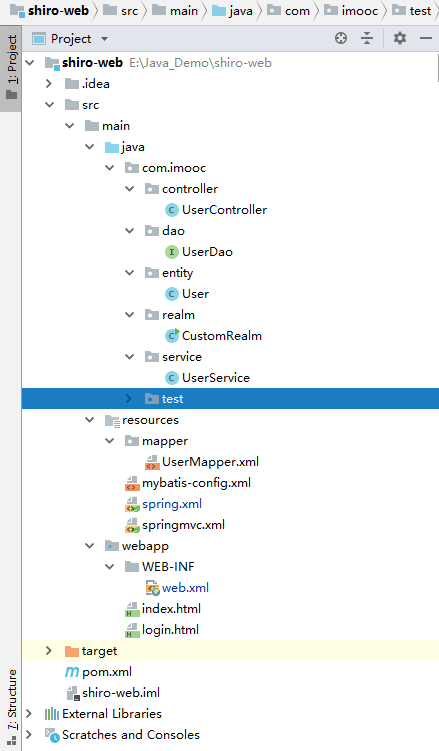
下面我通过一个web的maven项目来讲解如何将shiro整合ssm框架,具体结构如下图
一、引入依赖的jar包
<?xml version="1.0" encoding="UTF-8"?>

<!--

  Licensed to the Apache Software Foundation (ASF) under one

  or more contributor license agreements.  See the NOTICE file

  distributed with this work for additional information

  regarding copyright ownership.  The ASF licenses this file

  to you under the Apache License, Version 2.0 (the

  "License"); you may not use this file except in compliance

  with the License.  You may obtain a copy of the License at

   http://www.apache.org/licenses/LICENSE-2.0

  Unless required by applicable law or agreed to in writing,

  software distributed under the License is distributed on an

  "AS IS" BASIS, WITHOUT WARRANTIES OR CONDITIONS OF ANY

  KIND, either express or implied.  See the License for the

  specific language governing permissions and limitations

  under the License.

-->

<!-- $Id: pom.xml 642118 2008-03-28 08:04:16Z reinhard $ -->

<project xmlns="http://maven.apache.org/POM/4.0.0" xmlns:xsi="http://www.w3.org/2001/XMLSchema-instance" xsi:schemaLocation="http://maven.apache.org/POM/4.0.0 http://maven.apache.org/maven-v4_0_0.xsd">

  <modelVersion>4.0.0</modelVersion>

  <packaging>war</packaging>

  <name>shiro-web</name>

  <groupId>com.imooc</groupId>

  <artifactId>shiro-web</artifactId>

  <version>1.0-SNAPSHOT</version>

  <dependencies>

    <dependency>

      <groupId>org.springframework</groupId>

      <artifactId>spring-context</artifactId>

      <version>4.2.4.RELEASE</version>

    </dependency>

    <dependency>

      <groupId>org.springframework</groupId>

      <artifactId>spring-webmvc</artifactId>

      <version>4.2.4.RELEASE</version>

    </dependency>

    <dependency>

      <groupId>org.apache.shiro</groupId>

      <artifactId>shiro-core</artifactId>

      <version>1.4.0</version>

    </dependency>

    <dependency>

      <groupId>org.apache.shiro</groupId>

      <artifactId>shiro-spring</artifactId>

      <version>1.4.0</version>

    </dependency>

    <dependency>

      <groupId>org.apache.shiro</groupId>

      <artifactId>shiro-web</artifactId>

      <version>1.4.0</version>

    </dependency>

    <dependency>

      <groupId>mysql</groupId>

      <artifactId>mysql-connector-java</artifactId>

      <version>5.1.46</version>

    </dependency>

    <dependency>

      <groupId>org.mybatis</groupId>

      <artifactId>mybatis</artifactId>

      <version>3.4.6</version>

    </dependency>

    <dependency>

      <groupId>org.mybatis</groupId>

      <artifactId>mybatis-spring</artifactId>

      <version>1.3.2</version>

    </dependency>

    <dependency>

      <groupId>com.alibaba</groupId>

      <artifactId>druid</artifactId>

      <version>1.1.12</version>

    </dependency>

    <dependency>

      <groupId>org.springframework</groupId>

      <artifactId>spring-jdbc</artifactId>

      <version>4.2.4.RELEASE</version>

    </dependency>

    <dependency>

      <groupId>org.springframework</groupId>

      <artifactId>spring-test</artifactId>

      <version>4.2.4.RELEASE</version>

    </dependency>

    <dependency>

      <groupId>junit</groupId>

      <artifactId>junit</artifactId>

      <version>4.12</version>

      <scope>compile</scope>

    </dependency>

  </dependencies>

</project>
二、配置web.xml
<?xml version="1.0" encoding="UTF-8"?>

<web-app version="2.4"

         xmlns="http://java.sun.com/xml/ns/j2ee"

         xmlns:xsi="http://www.w3.org/2001/XMLSchema-instance"

         xsi:schemaLocation="http://java.sun.com/xml/ns/j2ee http://java.sun.com/xml/ns/j2ee/web-app_2_4.xsd">

  <!--shiro拦截器-->

  <filter>

    <filter-name>shiroFilter</filter-name>

    <filter-class>org.springframework.web.filter.DelegatingFilterProxy</filter-class>

  </filter>

  <filter-mapping>

    <filter-name>shiroFilter</filter-name>

    <url-pattern>/*</url-pattern>

  </filter-mapping>

  <!--spring配置监听器-->

  <listener>

    <listener-class>org.springframework.web.context.ContextLoaderListener</listener-class>

  </listener>

  <!--spring配置文件路径,启动时就加载-->

  <context-param>

    <param-name>contextConfigLocation</param-name>

    <param-value>classpath:spring.xml</param-value>

  </context-param>

  <!--springmvc的控制器-->

  <servlet>

    <servlet-name>springmvc</servlet-name>

    <servlet-class>org.springframework.web.servlet.DispatcherServlet</servlet-class>

    <init-param>

      <param-name>contextConfigLocation</param-name>

      <param-value>classpath:springmvc.xml</param-value>

    </init-param>

  </servlet>

  <servlet-mapping>

    <servlet-name>springmvc</servlet-name>

    <url-pattern>/</url-pattern>

  </servlet-mapping>

</web-app>
三、spring整合mybatis的配置文件,springmvc配置文件,mybatis配置文件,mabatis映射文件
1、spring整合mybatis的配置文件
<?xml version="1.0" encoding="UTF-8"?>
<beans xmlns="http://www.springframework.org/schema/beans"
       xmlns:xsi="http://www.w3.org/2001/XMLSchema-instance"
       xmlns:context="http://www.springframework.org/schema/context"
       xsi:schemaLocation="http://www.springframework.org/schema/beans http://www.springframework.org/schema/beans/spring-beans.xsd http://www.springframework.org/schema/context http://www.springframework.org/schema/context/spring-context.xsd">

    <!--扫描Service注解-->
    <context:component-scan base-package="com.imooc.service"/>

    <!--shiro的web过滤器-->
    <bean id="shiroFilter" class="org.apache.shiro.spring.web.ShiroFilterFactoryBean">
        <property name="securityManager" ref="securityManager"/>
        <property name="loginUrl" value="login.html"/>
        <property name="unauthorizedUrl" value="403.html"/>
        <property name="filterChainDefinitions">
            <value>
                <!--anon表示无需验证,authc表示需要验证-->
                /login.html = anon
                /sublogin = anon
                /* = authc
            </value>
        </property>
    </bean>

    <!--安全管理器-->
    <bean id="securityManager" class="org.apache.shiro.web.mgt.DefaultWebSecurityManager">
        <property name="realm" ref="realm"/>
    </bean>

    <!--自定义realm-->
    <bean id="realm" class="com.imooc.realm.CustomRealm">
        <property name="credentialsMatcher" ref="hashedCredentialsMatcher"/>
    </bean>

    <!--凭证匹配器-->
    <bean id="hashedCredentialsMatcher" class="org.apache.shiro.authc.credential.HashedCredentialsMatcher">
        <property name="hashAlgorithmName" value="md5"/>
        <property name="hashIterations" value="1"/>
    </bean>

    <!--数据库连接池-->
    <bean id="dataSource" class="com.alibaba.druid.pool.DruidDataSource">
        <property name="url" value="jdbc:mysql://localhost:3306/realm_test"/>
        <property name="username" value="root"/>
        <property name="password" value="123456"/>
    </bean>

    <!--sqlSessionFactory的形成,可看作spring和mybatis整合的重要一步-->
    <bean id="sqlSessionFactory" class="org.mybatis.spring.SqlSessionFactoryBean">
        <property name="dataSource" ref="dataSource"/>
        <property name="configLocation" value="classpath:mybatis-config.xml"/>
        <property name="typeAliasesPackage" value="com.imooc.entity"/>
        <property name="mapperLocations" value="classpath:mapper/*.xml"/>
    </bean>

    <!--自动扫描dao层,将对应的Mapper接口生成代理注入到Spring-->
    <bean class="org.mybatis.spring.mapper.MapperScannerConfigurer">
        <property name="sqlSessionFactoryBeanName" value="sqlSessionFactory"/>
        <property name="basePackage" value="com.imooc.dao"/>
    </bean>

</beans>
2、springmvc配置文件
<?xml version="1.0" encoding="UTF-8"?>

<beans xmlns="http://www.springframework.org/schema/beans"

       xmlns:xsi="http://www.w3.org/2001/XMLSchema-instance"

       xmlns:context="http://www.springframework.org/schema/context"

       xmlns:mvc="http://www.springframework.org/schema/mvc"

       xsi:schemaLocation="http://www.springframework.org/schema/beans http://www.springframework.org/schema/beans/spring-beans.xsd http://www.springframework.org/schema/context http://www.springframework.org/schema/context/spring-context.xsd http://www.springframework.org/schema/mvc http://www.springframework.org/schema/mvc/spring-mvc.xsd">

    <!--扫描Controller注解的控制器-->

    <context:component-scan base-package="com.imooc.controller"/>

    <!--设置配置方案-->

    <mvc:annotation-driven/>

    <!--找不到对应的Controller就扫描静态资源-->

    <mvc:resources mapping="/*" location="/"/>

</beans>
3、mybatis配置文件
<?xml version="1.0" encoding="UTF-8"?>

<!DOCTYPE configuration

        PUBLIC "-//mybatis.org//DTD Config 3.0//EN"

        "http://mybatis.org/dtd/mybatis-3-config.dtd">

<configuration>

    <!--只是idea生成模板的默认配置,可忽略-->

    <settings>

        <!-- Globally enables or disables any caches configured in any mapper under this configuration -->

        <setting name="cacheEnabled" value="true"/>

        <!-- Sets the number of seconds the driver will wait for a response from the database -->

        <setting name="defaultStatementTimeout" value="3000"/>

        <!-- Enables automatic mapping from classic database column names A_COLUMN to camel case classic Java property names aColumn -->

        <setting name="mapUnderscoreToCamelCase" value="true"/>

        <!-- Allows JDBC support for generated keys. A compatible driver is required.

        This setting forces generated keys to be used if set to true,

         as some drivers deny compatibility but still work -->

        <setting name="useGeneratedKeys" value="true"/>

    </settings>

    <!-- Continue going here -->

</configuration>
4、mabatis映射文件
<?xml version="1.0" encoding="UTF-8"?>

<!DOCTYPE mapper PUBLIC "-//mybatis.org//DTD Mapper 3.0//EN" "http://mybatis.org/dtd/mybatis-3-mapper.dtd">

<mapper namespace="com.imooc.dao.UserDao">

    <select id="getPasswordByName" parameterType="String" resultType="String">

        select password from users where username=#{username}

    </select>

    <select id="getRoles" parameterType="String" resultType="String">

        select role_name from user_roles where username=#{username}

    </select>

</mapper>
四、代码
1、Controller层
package com.imooc.controller;

import com.imooc.entity.User;

import org.apache.shiro.SecurityUtils;

import org.apache.shiro.authc.UsernamePasswordToken;

import org.apache.shiro.subject.Subject;

import org.springframework.stereotype.Controller;

import org.springframework.web.bind.annotation.RequestBody;

import org.springframework.web.bind.annotation.RequestMapping;

import org.springframework.web.bind.annotation.RequestMethod;

import org.springframework.web.bind.annotation.ResponseBody;

@Controller

public class UserController {

    @RequestMapping(value="/sublogin",method= RequestMethod.POST,produces = "application/json;charset=utf-8")

    @ResponseBody

    public String userLogin(User user){

        UsernamePasswordToken token=new UsernamePasswordToken(user.getName(),user.getPassword());

        Subject subject= SecurityUtils.getSubject();

        try{

            subject.login(token);

        }catch (Exception e){

            return e.getMessage();

        }

        if(subject.hasRole("admin")){

            return "权限正确";

        }

        return "权限失败";

    }

}
2、Service层
package com.imooc.service;

import com.imooc.dao.UserDao;

import org.springframework.beans.factory.annotation.Autowired;

import org.springframework.stereotype.Service;

import java.util.Set;

@Service

public class UserService {

    @Autowired

    private UserDao userDao;

    public Set<String> getRoles(String name) {

        Set<String> set=userDao.getRoles(name);

        return set;

    }

    public String getPasswordByName(String name) {

        String password=userDao.getPasswordByName(name);

        return password;

    }

}
3、自定义的Realm
package com.imooc.realm;

import com.imooc.dao.UserDao;

import com.imooc.service.UserService;

import org.apache.shiro.authc.AuthenticationException;

import org.apache.shiro.authc.AuthenticationInfo;

import org.apache.shiro.authc.AuthenticationToken;

import org.apache.shiro.authc.SimpleAuthenticationInfo;

import org.apache.shiro.authc.credential.HashedCredentialsMatcher;

import org.apache.shiro.authz.AuthorizationInfo;

import org.apache.shiro.authz.SimpleAuthorizationInfo;

import org.apache.shiro.crypto.hash.Md5Hash;

import org.apache.shiro.realm.AuthorizingRealm;

import org.apache.shiro.subject.PrincipalCollection;

import org.apache.shiro.util.ByteSource;

import org.springframework.beans.factory.annotation.Autowired;

import javax.annotation.Resource;

import java.util.ArrayList;

import java.util.HashMap;

import java.util.HashSet;

import java.util.Set;

public class CustomRealm extends AuthorizingRealm {

    @Autowired

    private UserService userService;

    //判断是否有角色权限

    protected AuthorizationInfo doGetAuthorizationInfo(PrincipalCollection principalCollection) {

        String name = (String) principalCollection.getPrimaryPrincipal();

        Set<String> roles = getRoleByName(name);

        SimpleAuthorizationInfo simpleAuthorizationInfo = new SimpleAuthorizationInfo();

        simpleAuthorizationInfo.setRoles(roles);

        return simpleAuthorizationInfo;

    }

    private Set<String> getRoleByName(String name) {

        Set<String> set = userService.getRoles(name);

        return set;

    }

    //判断是否有登陆权限

    protected AuthenticationInfo doGetAuthenticationInfo(AuthenticationToken authenticationToken) throws AuthenticationException {

        String name = (String) authenticationToken.getPrincipal();

        String password = getPassword(name);

        if (password == null) {

            return null;

        }

        SimpleAuthenticationInfo simpleAuthenticationInfo = new SimpleAuthenticationInfo(name, password, "abc");

        simpleAuthenticationInfo.setCredentialsSalt(ByteSource.Util.bytes(name));

        return simpleAuthenticationInfo;

    }

    private String getPassword(String name) {

        String password=userService.getPasswordByName(name);

        return password;

    }
4、Dao层
package com.imooc.dao;

import java.util.ArrayList;

import java.util.Set;

public interface UserDao {

    public String getPasswordByName(String name);

    public Set<String> getRoles(String name);

}
5、界面
<!DOCTYPE html>

<html lang="en">

<head>

    <meta charset="UTF-8">

    <title>登陆</title>

</head>

<body>

    <form action="sublogin" method="post">

        用户名:<input type="text" name="name"/>

        密码: <input type="password" name="password"/>

        <input type="submit" value="登陆">

    </form>

</body>

</html>
启动成功后如下:
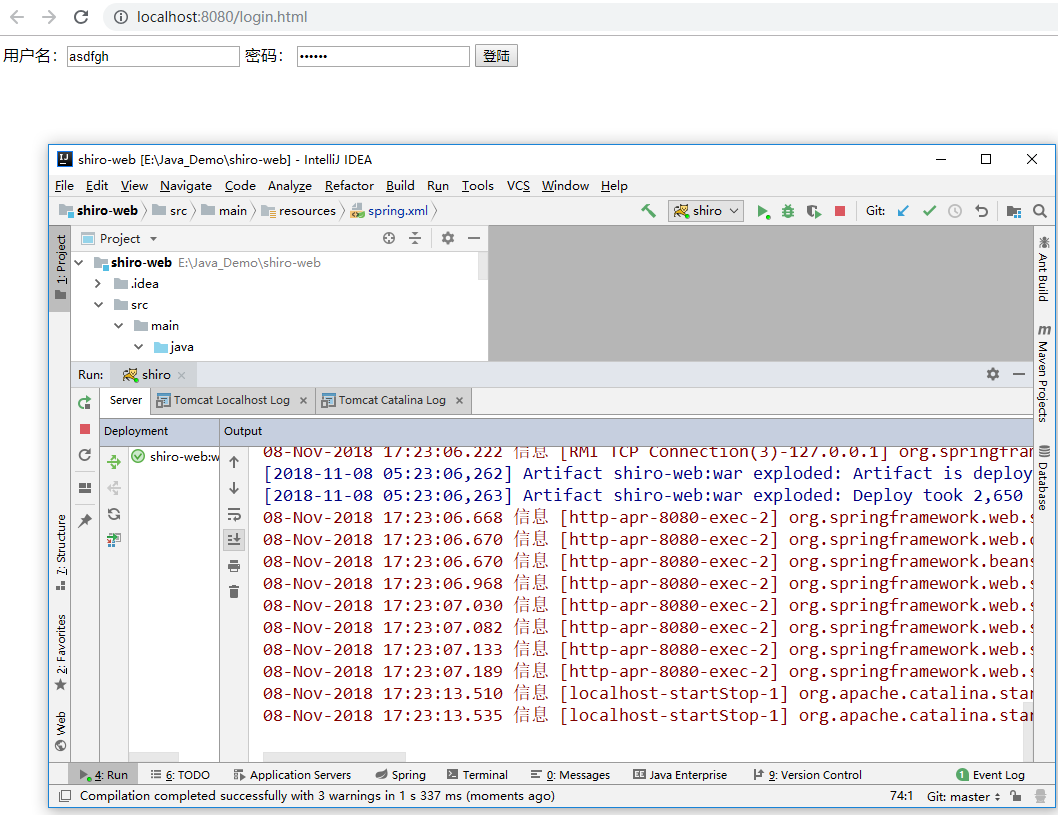
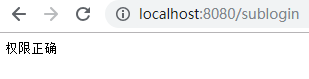
该demo的地址:https://github.com/professorxin/Java_Demo/tree/master/shiro-web,里面有sql脚本了。
shiro框架整合ssm框架的更多相关文章
- 基础框架整合-ssm框架+前后台交互完整教程
1.基本概念 ssm:spring+springMVC+mybatis 2.开发环境 Eclipse mars + jdk1.7 + maven + tomcat7 3.使用maven构建web项目 ...
- shiro权限控制(一):shiro介绍以及整合SSM框架
shiro安全框架是目前为止作为登录注册最常用的框架,因为它十分的强大简单,提供了认证.授权.加密和会话管理等功能 . shiro能做什么? 认证:验证用户的身份 授权:对用户执行访问控制:判断用户是 ...
- 整合SSM框架必备基础—SpringMVC(下)
在上一篇文章<整合SSM框架必备基础-SpringMVC(上)>中,胖达介绍了关于SpringMVC的诞生.优势以及执行流程等理论知识点,这篇文章打算在实操中加深一下对SpringMVC的 ...
- IDEA+Maven 整合SSM框架实现简单的增删改查(新手入门,傻瓜操作)
原博客地址:https://blog.csdn.net/khxu666/article/details/79851070 选用SSM框架的原因在目前的企业级Java应用中,Spring框架是必须的.S ...
- 用Maven整合SSM框架
前述 Maven 是专门用于构建和管理Java相关项目的工具,利用 Maven 的主要目的是统一维护 jar 包.关于 Maven 的安装在这篇里面就不说了. SSM(Spring+SpringMVC ...
- Spring_day04--Spring框架整合hibernate框架
Spring框架整合hibernate框架 1 把hibernate核心配置文件中配置数据库信息,把数据库信息在spring进行配置 2 把hibernate里面的sessionFactory创建交给 ...
- Spring 框架整合Struts2 框架和 Hibernate 框架
1. Spring 框架整合 Struts2 框架 // [第一种整合方式(不推荐)](http://www.cnblogs.com/linkworld/p/7718274.html) // 从 Se ...
- maven整合ssm框架
1.创建maven web工程 创建完成后,项目结构如下 2.项目配置文件 在pom.xml中添加SSM框架相关jar包的依赖关系,pom.xml代码如下 <?xml version=" ...
- 【SSM】Eclipse使用Maven创建Web项目+整合SSM框架
自己接触ssm框架有一段时间了,从最早的接触新版ITOO项目的(SSM/H+Dobbu zk),再到自己近期来学习到的<淘淘商城>一个ssm框架的电商项目.用过,但是还真的没有自己搭建过, ...
随机推荐
- osi七层模型与tcp/ip四层模型的差别
OSI 七层协议 应用层 表示层 会话层 运输层 网络层 数据链路层 物理层 TCP/IP 四层协议 应用层 运输层 网际层 网络接口层 五层协议: 应用层 为用户的应用进程提供服务 HTTP SMT ...
- System Verilog MCDF(一)
- 重新整理 .net core 实践篇—————服务与配置之间[十一二]
前言 前面基本介绍了,官方对于asp .net core 设计配置和设计服务的框架的一些思路.看下服务和配置之间是如何联系的吧. 正文 服务: public interface ISelfServic ...
- 永远的Ace 实验四 团队作业1:软件研发团队组建
项目 内容 课程班级博客链接 https://edu.cnblogs.com/campus/xbsf/2018CST/ 这个作业要求链接 https://www.cnblogs.com/nwnu-da ...
- FinFET与2nm晶圆工艺壁垒
FinFET与2nm晶圆工艺壁垒 谈到半导体工艺尺寸的时候,通常对于下面的一串数字耳熟能详:3um.2um.1.5um.1um.0.8um.0.5um.0.35um.0.25um.0.18um.0.1 ...
- Mobileye独创性创新
Mobileye独创性创新 尽管存在相似之处,但Nvidia的SFF无法与Mobileye的RSS相匹配,后者是领先的AV安全模型 迈向无人驾驶的未来,Mobileye继续以新的创新引领行业,不仅将使 ...
- NVIDIA GPU卷积网络的自动调谐
NVIDIA GPU卷积网络的自动调谐 针对特定设备和工作负载的自动调整对于获得最佳性能至关重要.这是关于如何为NVIDIA GPU调整整个卷积网络. NVIDIA GPU在TVM中的操作实现是以模板 ...
- 使用现代C++如何避免bugs(下)
使用现代C++如何避免bugs(下) About virtual functions Virtual functions hinder a potential problem: the thing ...
- 7, java数据结构和算法: 八皇后问题分析和实现 , 递归回溯
什么是八皇后问题: 指的是,在一个8 * 8的棋盘中, 放置8个棋子, 保证这8个棋子相互之间, 不在同一行,同一列,同一斜线, 共有多少种摆法? 游戏连接: http://www.4399.com/ ...
- IDA反汇编EXE添加一个启动时的消息框
IDA反汇编EXE添加一个启动时的消息框 上一篇文章介绍了用OD反汇编EXE添加一个启动时的消息框,这篇文章也是实现同样的效果,这边主要的思路还是将其反汇编得到汇编代码后,然后手动修改他的逻辑首先跳转 ...