
EmmyLua 注解功能
前言
网上配置 EmmyLua 的方法很多,此处就不做赘述(因此前提是你已经安装配置完EmmyLua)
本文仅是对 EmmyLua插件 内 注解功能 用法的代码演示。因为网上大部分EmmyLua配置教程中都没对此部分进行讲解,而实际lua开发时EmmyLua的注解功能几乎必不可缺,故作此文
注解的目的
我们在编写C#脚本时,IDE的相关插件能提示各类方法或成员以及描述:
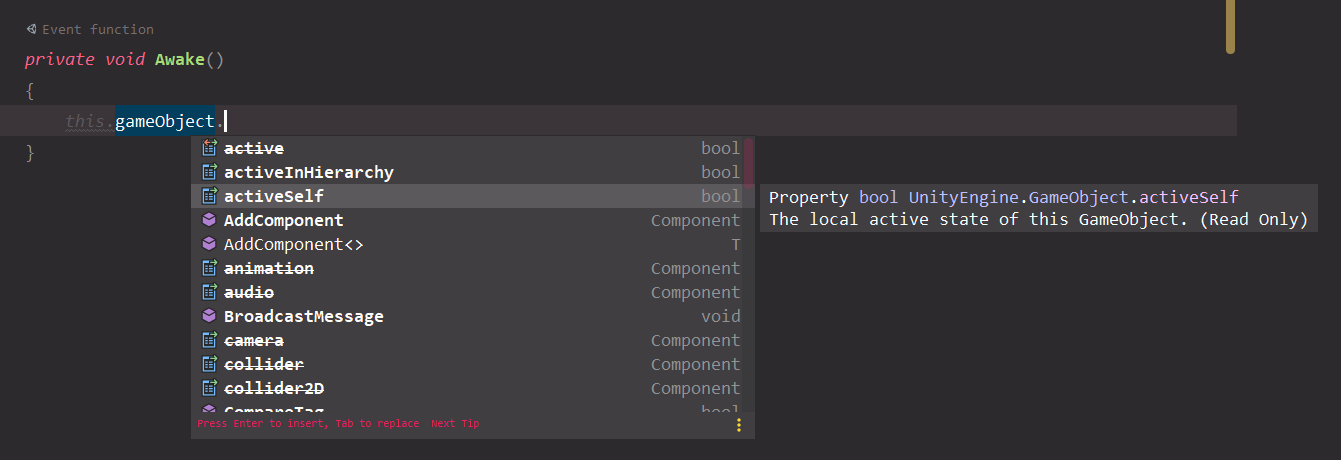
但Lua内,即便在安装完EmmyLua,不写注解的话,也就没有任何提示(灰色提示仅表示刚有写过该参数而已,完全不知道是成员变量或方法):
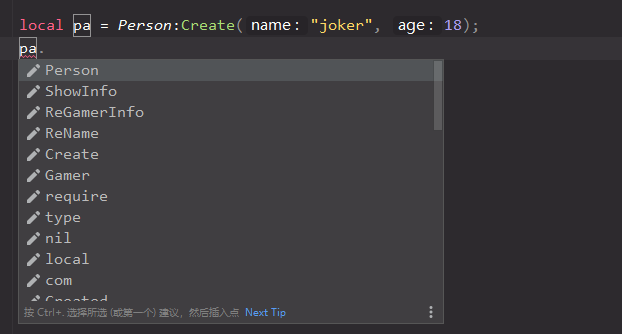
因此EmmyLua注解功能就是为了解决该问题:模拟实现OOP编程中代码提示
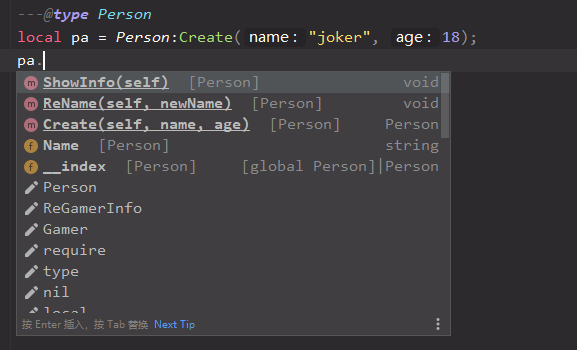
注解用法
类声明
基本格式:--@class MY_TYPE[:PARENT_TYPE] [@comment]
---@class Person 人

Person = {};

---@class Gamer : Person 玩家

Gamer = {};
变量类型
基本格式:---@type MY_TYPE[|OTHER_TYPE] [@comment]
PS:按上述官方用法,comment描述应当放在末尾,但我这试了下type不大行,可以放在顶部
---@type number 我的ID

myId = 1;

---玩家的表

---@type table<number, Gamer>

gamersTable = {};

---@type Person Person实例

personA;

---@type Gamer Gamer实例

gamerA;
变量的额外属性
即使该类未持有某属性,也可以通过添加注解,在提示内出现(PS:其实EmmyLua实现UnityAPI的提示也是基于此的)
基本格式:---@field [public|protected|private] field_name FIELD_TYPE[|OTHER_TYPE] [@comment]
---@class Person 人

---@field public Name string 名字

---@field private m_Age number 年龄

Person = {

    Name = "",

};
函数
---取得台词

---@param isCN boolean 是否是中文

---@param id number 台词字典ID

---@return string 台词

function GetLines(isCN, id)

    local str = "";    -- do something

    return str;

end
备注
在IDEA下,对目标使用Alt+Enter快捷键(或点小灯泡),可较方便自动补全注解:

完整事例
现有Person基类,Gamer类继承自Person,在Main.lua内实现两个类的创建及使用(直接粘到本地跑就行):
Main.lua:
require("Person");

require("Gamer");

---@type Person

local pa = Person:Create("joker", 18);

pa:ShowInfo();

pa:ReName("Joker");

pa:ShowInfo()

---@type Gamer

local ga = Gamer:Create("fox", 19, nil, nil);

ga:ShowInfo();

ga:ReName("Fox");

ga:ReGamerInfo("123", "456");

ga:ShowInfo();
Person.lua:
---@class Person 人类型

---@field public Name string 名字

---@field private m_Age number 年龄

Person = {

    Name = "",

    m_Age = 0,

};

Person.__index = Person;

---Create

---@param name string

---@param age number

function Person:Create(name, age)

    ---@type Person

    local t = {};

    setmetatable(t, Person);

    t:ReName(name);

    t:ReAge(age);

    return t;

end

---ReName

---@param newName string

---@public

function Person:ReName(newName)

    self.Name = newName;

end

---ReAge

---@param newAge number

---@private

function Person:ReAge(newAge)

    self.m_Age = newAge;

end

---ShowInfo

---@public

function Person:ShowInfo()

    print("Name = " .. self.Name .. ", Age = " .. self.m_Age);

end
Gamer.lua:
require("Person")

---@class Gamer : Person 玩家

---@field private SW string SW码

---@field private SteamId string Steam链接

Gamer = {

    SW = "",

    SteamId = "",

};

Gamer.__index = Gamer;

setmetatable(Gamer, Person);

function Gamer:Create(name, age, sw, steamId)

    ---@type Gamer

    local t = {};

    t = Person:Create(name, age);

    setmetatable(t, Gamer);

    t:ReGamerInfo(sw, steamId);

    return t;

end

---ReGamerInfo

---@param sw string

---@param steamId string

---@public

function Gamer:ReGamerInfo(sw, steamId)

    self.SW = sw or "0";

    self.SteamId = steamId or "0";

end

---ShowInfo

---@public

function Gamer:ShowInfo()

    print("Name = " .. self.Name .. ", Age = " .. self.m_Age .. ", SW = " .. self.SW .. ", SteamId = " .. self.SteamId);

end
PS:可以用 在Lua中实现面向对象特性——模拟类、继承、多态 - 马三小伙儿 大佬这篇的代码练手
EmmyLua 注解功能的更多相关文章
- Struts2的注解功能
我们知道通常情况下,Struts2是通过struts.xml配置的.但是随着系统规模的加大我们需要配置的文件会比较大,虽然我们可以根据不同的系统功能将不同模块的配置文件单独书写,然后通过<inc ...
- springboot~Compiler时开启插件的注解功能
对于IJ这个IDE工具来说,我们会安装一些插件来帮助我们更好的进行开发,像lombok就是一款不错的插件,使用注解的方式在项目编译时帮助我们生成代码,像getter,setter,tostring等等 ...
- Highcharts图表的注解功能
Highcharts图表的注解功能 在图表中,往往须要对图表总体或者部分元素进行对应注解.帮助浏览者阅读图表.尽管标签组labels能够实现类似的功能.可是其功能相对简单.要实现复杂的注解功能,用户能 ...
- @Deprecated注解功能
@Deprecated注解功能 标记不建议使用的方法,但是仍然可以用 当方法有更好的方法替换时,但是此方法还有使用时可以使用该注解
- mybatis的注解功能
一.mybatis 简单注解 关键注解词 : @Insert : 插入sql , 和xml insert sql语法完全一样 @Select : 查询sql, 和xml select sql语法完全一 ...
- spring源码解析:元注解功能的实现
前言 众所周知,spring 从 2.5 版本以后开始支持使用注解代替繁琐的 xml 配置,到了 springboot 更是全面拥抱了注解式配置.平时在使用的时候,点开一些常见的等注解,会发现往往在一 ...
- spring 中的一些注解功能--不定更新
1@Qualifier注解? 下面的示例将会在Customer的person属性中自动装配Person的值. public class Customer { @Autowired private Pe ...
- vert.x框架-使用spring注解功能
1.前言 习惯了spring注解风格,方便好用,现在用vert.x框架,怎么使用spring注解呢? 2.maven安装依赖包 <!--spring注解依赖包--> <depende ...
- spring--启用注解功能
<beans xmlns="http://www.springframework.org/schema/beans" xmlns:p="http://www.spr ...
随机推荐
- 菜鸡的Java笔记 - java 断言
断言:assert (了解) 所谓的断言指的是在程序编写的过程之中,确定代码执行到某行之后数据一定是某个期待的内容 范例:观察断言 public class Abnorma ...
- hover 背后的数学和图形学
前端开发中,hover是最常见的鼠标操作行为之一,用起来也很方便,CSS直接提供:hover伪类,js可以通过mouseover+mouseout事件模拟,甚至一些第三方库/框架直接提供了 hover ...
- Linux驱动实践:你知道【字符设备驱动程序】的两种写法吗?
作 者:道哥,10+年嵌入式开发老兵,专注于:C/C++.嵌入式.Linux. 关注下方公众号,回复[书籍],获取 Linux.嵌入式领域经典书籍:回复[PDF],获取所有原创文章( PDF 格式). ...
- [luogu3573]RAJ-Rally
先建一个$S$和$T$,$\forall 1\le i\le n$连边$(S,i)$和$(i,T)$,则最长路即为$S到T的最长路-2$ 对于这张DAG,求出一个拓扑序,点$i$为第$i$个(特别的, ...
- [hdu6761]Minimun Index
$lyndon\ word$(以下简写为Lw):对于一个字符串s,其为Lw当且仅当其的最小后缀为自身 性质:若$u<v$为LW,那么$uv$也为Lw(反证法即可证) $lyndon$分解:将一个 ...
- 测试平台系列(81) 编写在线执行Redis功能
大家好~我是米洛! 我正在从0到1打造一个开源的接口测试平台, 也在编写一套与之对应的完整教程,希望大家多多支持. 欢迎关注我的公众号测试开发坑货,获取最新文章教程! 回顾 上一节我们牛刀小试,编写了 ...
- springboot静态工具类bean的注入
工具类中调用数据.但是由于工具类方法一般都写成static,所以直接注入就存在问题. 所以写成了这样: package com.rm.framework.core; import org.spring ...
- Jenkins系列-权限管理
在实际工作中,存在多个团队都需要Jenkins来实现持续交付,但是又希望不同团队之间进行隔离,每个项目有自己的view, 只能看到自己项目的jenkins job. 但是,jenkins默认的权限管理 ...
- CF1455G Forbidden Value
本题教训我们: 如果遇到在返回值域范围的dp时,可以考虑线段树合并操作. 考虑最开始写作一个\(if:0;end\) 那么所有的\(if\)可以记作一个树状结构,\(set\)为子节点 先把所有\(s ...
- DirectX12 3D 游戏开发与实战第八章内容(上)
8.光照 学习目标 对光照和材质的交互有基本的了解 了解局部光照和全局光照的区别 探究如何用数学来描述位于物体表面上某一点的"朝向",以此来确定入射光照射到表面的角度 学习如何正确 ...