
SpringBoot学习之SpringBoot执行器
在以往的分布式开发当中,各个服务节点的监控必不可少。监控包含有很多方面,比如说:内存占用情况,节点是否健康等。在spring-boot会给我们提供相关资源监控叫做spring-boot-actuator, 通过执行器可以帮我管理和监控生产环境下的应用服务。
一。添加SpringBoot执行器的依赖(版本2.0.0.RELEASE)
添加gradle配置依赖:
dependencies {

    compile('org.springframework.boot:spring-boot-starter-actuator')

}
二。关于SpringBoot的端点
端点是一个提供给我们监控应用程序的功能点,SpringBoot提供了一系列内置端点叫我们使用,举个例子:health端点为我们提供了一个对我们基础程序的一个健康状态的监控
每个端点都可以打开或关闭,绝大多数的应用都可以通过http请求进行访问,springboot包含很多内置内置端点。tips:参考官网的
| ID | Description | Enabled by default |
|---|---|---|
|
|
Exposes audit events information for the current application. |
Yes |
|
|
Displays a complete list of all the Spring beans in your application. |
Yes |
|
|
Shows the conditions that were evaluated on configuration and auto-configuration classes and the reasons why they did or did not match. |
Yes |
|
|
Displays a collated list of all |
Yes |
|
|
Exposes properties from Spring’s |
Yes |
|
|
Shows any Flyway database migrations that have been applied. |
Yes |
|
|
Shows application health information. |
Yes |
|
|
Displays HTTP trace information (by default, the last 100 HTTP request-response exchanges). |
Yes |
|
|
Displays arbitrary application info. |
Yes |
|
|
Shows and modifies the configuration of loggers in the application. |
Yes |
|
|
Shows any Liquibase database migrations that have been applied. |
Yes |
|
|
Shows ‘metrics’ information for the current application. |
Yes |
|
|
Displays a collated list of all |
Yes |
|
|
Displays the scheduled tasks in your application. |
Yes |
|
|
Allows retrieval and deletion of user sessions from a Spring Session-backed session store. Not available when using Spring Session’s support for reactive web applications. |
Yes |
|
|
Lets the application be gracefully shutdown. |
No |
|
|
Performs a thread dump. |
Yes |
有几点要补充说明一下:
1). 我们访问的端点监控的地址规范是:/actuator/{ID}的方式访问,比如说:health端点默认被映射的路径就是/actuator/health
2) 并不是所有端点都可以通过http请求访问,以下表格列举了各个端点的状态值:
| ID | JMX | Web |
|---|---|---|
|
|
Yes |
No |
|
|
Yes |
No |
|
|
Yes |
No |
|
|
Yes |
No |
|
|
Yes |
No |
|
|
Yes |
No |
|
|
Yes |
Yes |
|
|
N/A |
No |
|
|
Yes |
No |
|
|
Yes |
Yes |
|
|
N/A |
No |
|
|
N/A |
No |
|
|
Yes |
No |
|
|
Yes |
No |
|
|
Yes |
No |
|
|
Yes |
No |
|
|
N/A |
No |
|
|
Yes |
No |
|
|
Yes |
No |
|
|
Yes |
No |
|
|
Yes |
No |
management.endpoints.web.exposure.include=*

management.endpoints.web.exposure.exclude=env,beans
3)当我们访问端点时,响应的数据会缓存一定的时间,我们可以通过这个属性进行配置:
management.endpoint.<id>.cache.time-to-live=10s
4) 我们也可以自己定义监视路径,默认情况是:/actuator/xxx,通过如下属性可以设置:
management.endpoints.web.base-path=/
5) 关于保护敏感端点,首先我们要添加对spring-security的依赖,并设置进行安全验证的用户名,密码以及角色,如果不使用spring-security就要慎重考虑暴露端口的端点了
三。关于Health端点
- health端点用于检测我们运行程序的健康状态,当程序宕机时,可以提供给开发人员相关的提示信息
- 默认情况下该端点只是显示简略的监控信息,不过我们可以通过management.endpoint.health.show-details属性来让其显示详细的监控信息
- 端点有如下几种状态: UP DOWN UNKNOW-SERVICE 从字面上我们很好理解
- 实现自定义健康监控:
package com.bdqn.lyrk.springboot.study.monitor;

import org.springframework.boot.actuate.health.Health;

import org.springframework.boot.actuate.health.HealthIndicator;

import org.springframework.stereotype.Component;

@Component

public class SelfMonitor implements HealthIndicator {

    @Override

    public Health health() {

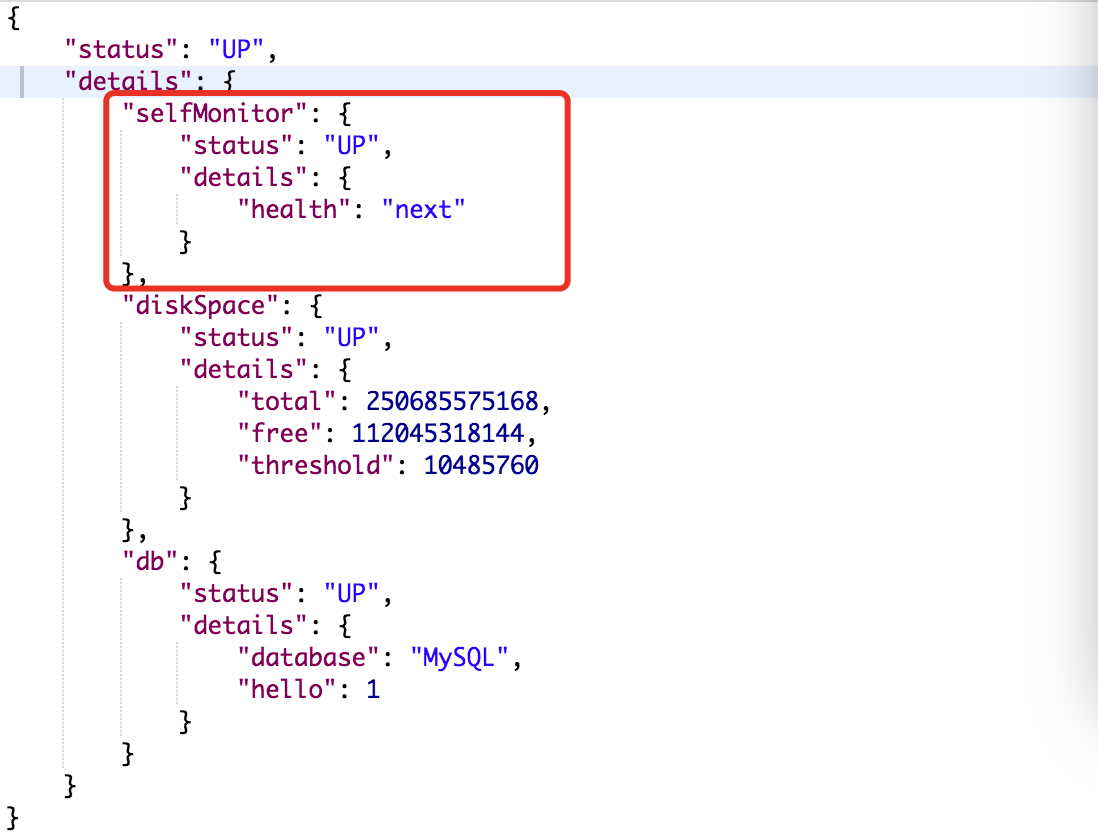
        return Health.up().withDetail("health","next").build();

    }

}
例子很简单,主要是实现HealthIndicator接口,当我们访问:http://localhost:8080/actuator/health时,我们可以看到相关监控信息,如下图:
SpringBoot学习之SpringBoot执行器的更多相关文章
- SpringBoot学习(八)-->SpringBoot之过滤器、监听器
本文将直接使用@WebFilter和@WebListener的方式,完成一个Filter 和一个 Listener. 过滤器(Filter)和 监听器(Listener)的注册方法和 Servlet ...
- SpringBoot学习(七)-->SpringBoot在web开发中的配置
SpringBoot在web开发中的配置 Web开发的自动配置类:在Maven Dependencies-->spring-boot-1.5.2.RELEASE.jar-->org.spr ...
- SpringBoot学习(六)-->SpringBoot的自动配置的原理
Spring Boot的自动配置的原理 Spring Boot在进行SpringApplication对象实例化时会加载META-INF/spring.factories文件,将该配置文件中的配置载入 ...
- SpringBoot学习(五)-->SpringBoot的核心
SpringBoot的核心 1.入口类和@SpringBootApplication Spring Boot的项目一般都会有*Application的入口类,入口类中会有main方法,这是一个标准的J ...
- SpringBoot学习(四)-->SpringBoot快速入门,开山篇
Spring Boot简介 Spring Boot的目的在于创建和启动新的基于Spring框架的项目.Spring Boot会选择最适合的Spring子项目和第三方开源库进行整合.大部分Spring ...
- SpringBoot学习<二>——SpringBoot的默认配置文件application和多环境配置
一.SpringBoot的默认文件appliction 上一篇文章已经说明,springboot启动会内嵌tomcat,端口也是默认的8080,如果我们想要改变端口如果做呢? 在springboot项 ...
- SpringBoot学习(一):SpringBoot入门
1.Spring Boot 简介 1) 简化Spring应用开发的一个框架: 2) 整个Spring技术栈的一个大整合: 3) J2EE开发的一站式解决方案: 2.微服务 2014,martin fo ...
- SpringBoot学习- 5、整合Redis
SpringBoot学习足迹 SpringBoot项目中访问Redis主要有两种方式:JedisPool和RedisTemplate,本文使用JedisPool 1.pom.xml添加dependen ...
- springboot 学习资源推荐
springboot 是什么?对于构建生产就绪的Spring应用程序有一个看法. Spring Boot优先于配置的惯例,旨在让您尽快启动和运行.(这是springboot的官方介绍) 我们为什么要学 ...
随机推荐
- MySql使用存储过程实现事务的提交或者回滚
DELIMITER $$ DROP PROCEDURE IF EXISTS test_sp1 $$ CREATE PROCEDURE test_sp1( ) BEGIN ; ; START TRANS ...
- bzoj千题计划280:bzoj4592: [Shoi2015]脑洞治疗仪
http://www.lydsy.com/JudgeOnline/problem.php?id=4592 注意操作1 先挖再补,就是补的范围可以包含挖的范围 SHOI2015 的题 略水啊(逃) #i ...
- [USACO13JAN] Seating
https://www.luogu.org/problem/show?pid=3071 题目描述 To earn some extra money, the cows have opened a re ...
- codevs 3342 绿色通道
codevs 3342 绿色通道 http://codevs.cn/problem/3342/ 难度等级:黄金 题目描述 Description <思远高考绿色通道>(Green Pass ...
- 【学习笔记】windows安装jhipster踏坑记录
序: 入职新公司第二天了,本来第一天是配置环境来着,配了一下午也没搞成那个jhipster的安装,每次以为应该正常的时候都是不对,yo是yeoman的指令,但是我是使用yarn管理的yeoman 纠结 ...
- python脚本,计算起点终点高程
import arcpy >>> import arcpy ... gd="D:/项目/shp/Pipe.gdb/ZK/GDPOINT" ... gx=" ...
- 记一下webstorm快键键
#####新建文件````ctrl+alt+insert````#####结构速写````div>ul>li*4>p | div>h1+p | input:text | div ...
- 利用封装、继承对Java代码进行优化
注:本文实例分别可以在oldcastle(未优化的代码)和newcastle(优化后的代码)中查看,网址见文末 城堡游戏: 城堡中有多个房间,用户通过输入north, south, east, wes ...
- Hadoop2.6.0实践:001 伪分布式环境搭建
##################### Centos6.4VM_01_os.rar ################################################准备工作/opt ...
- apigw鉴权分析(1-4)新浪微博开放平台 - 鉴权分析
一.访问入口 http://open.weibo.com/wiki/%E6%8E%88%E6%9D%83%E6%9C%BA%E5%88%B6%E8%AF%B4%E6%98%8E 微博开放接口的调用,如 ...