
【自然语言处理篇】--Chatterbot聊天机器人
一、前述
ChatterBot是一个基于机器学习的聊天机器人引擎,构建在python上,主要特点是可以自可以从已有的对话中进行学(jiyi)习(pipei)。
二、具体
1、安装
是的,安装超级简单,用pip就可以啦
pip install chatterbot2、流程
大家已经知道chatterbot的聊天逻辑和输入输出以及存储,是由各种adapter来限定的,我们先看看流程图,一会软再一起看点例子,看看怎么用。
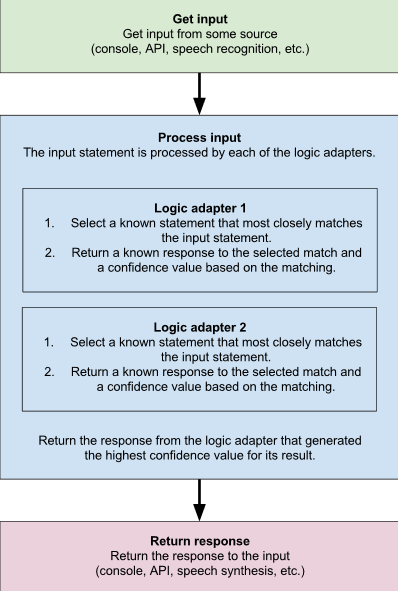
3、每个部分都设计了不同的“适配器”(Adapter)。
机器人应答逻辑 => Logic Adapters
Closest Match Adapter 字符串模糊匹配(编辑距离)
Closest Meaning Adapter 借助nltk的WordNet,近义词评估
Time Logic Adapter 处理涉及时间的提问
Mathematical Evaluation Adapter 涉及数学运算
存储器后端 => Storage Adapters
Read Only Mode 只读模式,当有输入数据到chatterbot的时候,数
据库并不会发生改变
Json Database Adapter 用以存储对话数据的接口,对话数据以Json格式
进行存储。
Mongo Database Adapter 以MongoDB database方式来存储对话数据
输入形式 => Input Adapters
Variable input type adapter 允许chatter bot接收不同类型的输入的,如strings,dictionaries和Statements
Terminal adapter 使得ChatterBot可以通过终端进行对话
HipChat Adapter 使得ChatterBot 可以从HipChat聊天室获取输入语句,通过HipChat 和 ChatterBot 进行对话
Speech recognition 语音识别输入,详见chatterbot-voice
输出形式 => Output Adapters
Output format adapter支持text,json和object格式的输出
Terminal adapter
HipChat Adapter
Mailgun adapter允许chat bot基于Mailgun API进行邮件的发送
Speech synthesisTTS(Text to speech)部分,详见chatterbot-voice
4、代码
基础版本
# -*- coding: utf- -*-

from chatterbot import ChatBot

# 构建ChatBot并指定Adapter

bot = ChatBot(

    'Default Response Example Bot',

    storage_adapter='chatterbot.storage.JsonFileStorageAdapter',#存储的Adapter

    logic_adapters=[

        {

            'import_path': 'chatterbot.logic.BestMatch'#回话逻辑

        },

        {

            'import_path': 'chatterbot.logic.LowConfidenceAdapter',#回话逻辑

            'threshold': 0.65,#低于置信度,则默认回答

            'default_response': 'I am sorry, but I do not understand.'

        }

    ],

    trainer='chatterbot.trainers.ListTrainer'#给定的语料是个列表

)

# 手动给定一点语料用于训练

bot.train([

    'How can I help you?',

    'I want to create a chat bot',

    'Have you read the documentation?',

    'No, I have not',

    'This should help get you started: http://chatterbot.rtfd.org/en/latest/quickstart.html'

])

# 给定问题并取回结果

question = 'How do I make an omelette?'

print(question)

response = bot.get_response(question)

print(response)

print("\n")

question = 'how to make a chat bot?'

print(question)

response = bot.get_response(question)

print(response)
结果:
How do I make an omelette?

I am sorry, but I do not understand.

how to make a chat bot?

Have you read the documentation?
处理时间和数学计算的Adapter
# -*- coding: utf-8 -*-

from chatterbot import ChatBot

bot = ChatBot(

    "Math & Time Bot",

    logic_adapters=[

        "chatterbot.logic.MathematicalEvaluation",

        "chatterbot.logic.TimeLogicAdapter"

    ],

    input_adapter="chatterbot.input.VariableInputTypeAdapter",

    output_adapter="chatterbot.output.OutputAdapter"

)

# 进行数学计算

question = "What is 4 + 9?"

print(question)

response = bot.get_response(question)

print(response)

print("\n")

# 回答和时间相关的问题

question = "What time is it?"

print(question)

response = bot.get_response(question)

print(response)
结果:
What is 4 + 9?

( 4 + 9 ) = 13

What time is it?

The current time is 05:08 PM
导出语料到json文件
# -*- coding: utf-8 -*-

from chatterbot import ChatBot

'''

如果一个已经训练好的chatbot,你想取出它的语料,用于别的chatbot构建,可以这么做

'''

chatbot = ChatBot(

    'Export Example Bot',

    trainer='chatterbot.trainers.ChatterBotCorpusTrainer'

)

# 训练一下咯

chatbot.train('chatterbot.corpus.english')

# 把语料导出到json文件中

chatbot.trainer.export_for_training('./my_export.json')
反馈式学习聊天机器人
# -*- coding: utf-8 -*-

from chatterbot import ChatBot

import logging

"""

反馈式的聊天机器人,会根据你的反馈进行学习

"""

# 把下面这行前的注释去掉,可以把一些信息写入日志中

# logging.basicConfig(level=logging.INFO)

# 创建一个聊天机器人

bot = ChatBot(

    'Feedback Learning Bot',

    storage_adapter='chatterbot.storage.JsonFileStorageAdapter',

    logic_adapters=[

        'chatterbot.logic.BestMatch'

    ],

    input_adapter='chatterbot.input.TerminalAdapter',#命令行端

    output_adapter='chatterbot.output.TerminalAdapter'

)

DEFAULT_SESSION_ID = bot.default_session.id

def get_feedback():

    from chatterbot.utils import input_function

    text = input_function()

    if 'Yes' in text:

        return True

    elif 'No' in text:

        return False

    else:

        print('Please type either "Yes" or "No"')

        return get_feedback()

print('Type something to begin...')

# 每次用户有输入内容,这个循环就会开始执行

while True:

    try:

        input_statement = bot.input.process_input_statement()

        statement, response = bot.generate_response(input_statement, DEFAULT_SESSION_ID)

        print('\n Is "{}" this a coherent response to "{}"? \n'.format(response, input_statement))

        if get_feedback():

            bot.learn_response(response,input_statement)

        bot.output.process_response(response)

        # 更新chatbot的历史聊天数据

        bot.conversation_sessions.update(

            bot.default_session.id_string,

            (statement, response, )

        )

    # 直到按ctrl-c 或者 ctrl-d 才会退出

    except (KeyboardInterrupt, EOFError, SystemExit):

        break
使用Ubuntu数据集构建聊天机器人
from chatterbot import ChatBot

import logging

'''

这是一个使用Ubuntu语料构建聊天机器人的例子

'''

# 允许打日志

logging.basicConfig(level=logging.INFO)

chatbot = ChatBot(

    'Example Bot',

    trainer='chatterbot.trainers.UbuntuCorpusTrainer'

)

# 使用Ubuntu数据集开始训练

chatbot.train()

# 我们来看看训练后的机器人的应答

response = chatbot.get_response('How are you doing today?')

print(response)
借助微软的聊天机器人
# -*- coding: utf-8 -*-

from chatterbot import ChatBot

from settings import Microsoft

'''

关于获取微软的user access token请参考以下的文档

https://docs.botframework.com/en-us/restapi/directline/

'''

chatbot = ChatBot(

    'MicrosoftBot',

    directline_host = Microsoft['directline_host'],

    direct_line_token_or_secret = Microsoft['direct_line_token_or_secret'],

    conversation_id = Microsoft['conversation_id'],

    input_adapter='chatterbot.input.Microsoft',

    output_adapter='chatterbot.output.Microsoft',

    trainer='chatterbot.trainers.ChatterBotCorpusTrainer'

)

chatbot.train('chatterbot.corpus.english')

# 是的,会一直聊下去

while True:

    try:

        response = chatbot.get_response(None)

    # 直到按ctrl-c 或者 ctrl-d 才会退出

    except (KeyboardInterrupt, EOFError, SystemExit):

        break
HipChat聊天室Adapter
# -*- coding: utf-8 -*-

from chatterbot import ChatBot

from settings import HIPCHAT

'''

炫酷一点,你可以接到一个HipChat聊天室,你需要一个user token,下面文档会告诉你怎么做

https://developer.atlassian.com/hipchat/guide/hipchat-rest-api/api-access-tokens

'''

chatbot = ChatBot(

    'HipChatBot',

    hipchat_host=HIPCHAT['HOST'],

    hipchat_room=HIPCHAT['ROOM'],

    hipchat_access_token=HIPCHAT['ACCESS_TOKEN'],

    input_adapter='chatterbot.input.HipChat',

    output_adapter='chatterbot.output.HipChat',

    trainer='chatterbot.trainers.ChatterBotCorpusTrainer'

)

chatbot.train('chatterbot.corpus.english')

# 没错,while True,会一直聊下去!

while True:

    try:

        response = chatbot.get_response(None)

    # 直到按ctrl-c 或者 ctrl-d 才会退出

    except (KeyboardInterrupt, EOFError, SystemExit):

        break
邮件回复的聊天系统
# -*- coding: utf-8 -*-

from chatterbot import ChatBot

from settings import MAILGUN

'''

这个功能需要你新建一个文件settings.py,并在里面写入如下的配置:

MAILGUN = {

    "CONSUMER_KEY": "my-mailgun-api-key",

    "API_ENDPOINT": "https://api.mailgun.net/v3/my-domain.com/messages"

}

'''

# 下面这个部分可以改成你自己的邮箱

FROM_EMAIL = "mailgun@salvius.org"

RECIPIENTS = ["gunthercx@gmail.com"]

bot = ChatBot(

    "Mailgun Example Bot",

    mailgun_from_address=FROM_EMAIL,

    mailgun_api_key=MAILGUN["CONSUMER_KEY"],

    mailgun_api_endpoint=MAILGUN["API_ENDPOINT"],

    mailgun_recipients=RECIPIENTS,

    input_adapter="chatterbot.input.Mailgun",

    output_adapter="chatterbot.output.Mailgun",

    storage_adapter="chatterbot.storage.JsonFileStorageAdapter",

    database="../database.db"

)

# 简单的邮件回复

response = bot.get_response("How are you?")

print("Check your inbox at ", RECIPIENTS)
一个中文的例子
注意chatterbot,中文聊天机器人的场景下一定要用python3.X,用python2.7会有编码问题。
#!/usr/bin/python

# -*- coding: utf-8 -*-

#手动设置一些语料

from chatterbot import ChatBot

from chatterbot.trainers import ListTrainer

Chinese_bot = ChatBot("Training demo")

Chinese_bot.set_trainer(ListTrainer)

Chinese_bot.train([

    '你好',

    '你好',

    '有什么能帮你的?',

    '想买数据科学的课程',

    '具体是数据科学哪块呢?'

    '机器学习',

])

# 测试一下

question = '你好'

print(question)

response = Chinese_bot.get_response(question)

print(response)

print("\n")

question = '请问哪里能买数据科学的课程'

print(question)

response = Chinese_bot.get_response(question)

print(response)
结果:
你好

你好

请问哪里能买数据科学的课程

具体是数据科学哪块呢?
利用已经提供好的小中文语料库
#!/usr/bin/python

# -*- coding: utf-8 -*-

from chatterbot import ChatBot

from chatterbot.trainers import ChatterBotCorpusTrainer

chatbot = ChatBot("ChineseChatBot")

chatbot.set_trainer(ChatterBotCorpusTrainer)

# 使用中文语料库训练它

chatbot.train("chatterbot.corpus.chinese")

# 开始对话

while True:

    print(chatbot.get_response(input(">")))
【自然语言处理篇】--Chatterbot聊天机器人的更多相关文章
- ChatterBot聊天机器人呢结构(五):ChatterBot对话流程
原文地址:http://www.bugingcode.com/blog/ChatterBot_Dialogue_process.html 创建机器人 部署机器人的各种属性,根据前面的章节里聊天机器人的 ...
- 学习笔记TF059:自然语言处理、智能聊天机器人
自然语言处理,语音处理.文本处理.语音识别(speech recognition),让计算机能够"听懂"人类语音,语音的文字信息"提取". 日本富国生命保险公司 ...
- 聊天机器人(chatbot)终极指南:自然语言处理(NLP)和深度机器学习(Deep Machine Learning)
在过去的几个月中,我一直在收集自然语言处理(NLP)以及如何将NLP和深度学习(Deep Learning)应用到聊天机器人(Chatbots)方面的最好的资料. 时不时地我会发现一个出色的资源,因此 ...
- 使用Botkit和Rasa NLU构建智能聊天机器人
欢迎大家前往云+社区,获取更多腾讯海量技术实践干货哦~ 我们每天都会听到关于有能力涉及旅游.社交.法律.支持.销售等领域的新型机器人推出的新闻.根据我最后一次查阅的数据,单单Facebook Me ...
- TensorFlow练习13: 制作一个简单的聊天机器人
现在很多卖货公司都使用聊天机器人充当客服人员,许多科技巨头也纷纷推出各自的聊天助手,如苹果Siri.Google Now.Amazon Alexa.微软小冰等等.前不久有一个视频比较了Google N ...
- Tensorflow打造聊天机器人
Tensorflow聊天机器人 聊天机器人也叫做对话系统,是一个热门领域.微软.facebook.苹果.google.微信.slack都在上面做了大的投入,这是一波新的试图改变人和服务交流的创业浪潮. ...
- AI中台——智能聊天机器人平台的架构与应用(分享实录)
内容来源:宜信技术学院第3期技术沙龙-线上直播|AI中台——智能聊天机器人平台 主讲人:宜信科技中心AI中台团队负责人王东 导读:随着“中台”战略的提出,目前宜信中台建设在思想理念及架构设计上都已经取 ...
- 开源项目——小Q聊天机器人V1.1
小Q聊天机器人V1.0 http://blog.csdn.net/baiyuliang2013/article/details/51386281 小Q聊天机器人V1.1 http://blog.csd ...
- 通过Django Channels设计聊天机器人WEB框架
这两个月都在忙着设计针对银联客服业务的智能聊天机器人,上一周已经交完设计报告,这一周还和部门同事一起分享了系统设计及运行效果.因为时间的关系,系统原型我使用了Flask+jQuery的组合,感觉用以原 ...
随机推荐
- Ubuntu配置SecureCRT登录
1. 命令行切换到root用户 备注:ubuntu默认root用户没有设置密码,切换需要首先设置密码 sudo passwd root 按照提示输入当前用户密码 按照提示输入要设置的root用户密码 ...
- (二)Maven的安装与环境配置
主要内容 在Windows上安装Maven 安装目录分析 在Windows上安装Maven 本机环境:Windows10,JDK9.0.4. 想要安装Maven,需要下载Maven的zip文件,并将其 ...
- Flask开发微电影网站(三)
页面完成后的最终布局 可以看到,页面共同的部分是顶部导航和底部导航 所以我们可以把页面顶部导航和底部导航部分单独定义一个文件home.html,然后让需要使用顶部导航和底部导航的页面都继承home.h ...
- Python logger 没打出行数
# !/user/bin/python # -*- coding: utf-8 -*- ''' subprocess : 需要在linux平台上测试 shell logging ''' import ...
- BZOJ_1864_[Zjoi2006]三色二叉树_树形DP
BZOJ_1864_[Zjoi2006]三色二叉树_树形DP 题意: 分析:递归建树,然后DP,从子节点转移. 注意到红色和蓝色没有区别,因为我们可以将红蓝互换而方案是相同的.这样的话我们只需要知道当 ...
- JAVA中正则表达式总结
昨天,我的朋友请教我正则表达式.我也好久没有写过正则表达式了,昨天刚好看了下如鹏网创始人杨中科老师关于正则表达式的讲解.使我加深了正则表达式的印像.现我把他总结下: 许多语言,包括Perl.PHP.P ...
- hibernate 一对一关系
一对一的另一种解决方式就是主键关联,在这种关联关系中,要求两个对象的主键必须保持一致,通过两个表的主键建立关联关系须外键参与. 没法传图 我就用这个表示吧 看id Copany Add ...
- hive新建分区表
hive新建分区表语句如下: create table table_name (col1_name string comment '备注1', col2_name string comment '备注 ...
- nodejs操作redis总结
本文总结常见的使用node操作redis服务,redis的key是唯一的,如果一个key所对应的存储类型是string,则不能再次覆盖式设置key为hash; 1. 启动redis 这里我们使用doc ...
- 啥?客户叫在DataGridView的左上角添加CheckBox?
效果图是这样的,如何把CheckBox放到左上角是最重要的. 添加方法 InitColumnInfo() 方法,代码如下. private void InitColumnInfo() { ; Data ...