
RocketMQ 使用情况梳理
个人梳理有限:欢迎大家 丰富此文档
2018年 12 月 RocketMQ 版本 不适用于 新版关系请勿参考
目前规划原则:
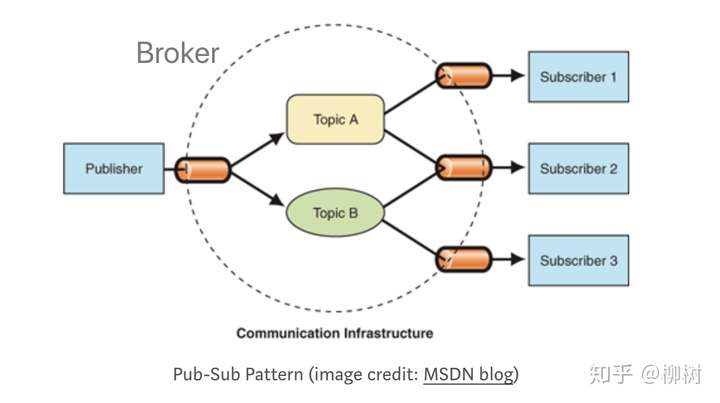
topic 创建基于业务 消费者基于模块 多对多关系 且消费自己的topic 不会影响别人 topic n↔n CID
基于业务topic 的分布表格: (后续有模块更新请自行更新文档或者联系我补上)
MQ: 使用原则和规范:
正确的顺序: 是先启动Consumer 后再启动producer。
- 所有业务目前使用同一个生产者 PID
- 所有topic 由主账号创建 并授权给子账号(dev/prod)
- topic 的创建基于业务(首次登陆,支付成功,行程结束等等)
- CID(消费者 ID)的创建基于应用 (每个应用如果需要创建一个CID 若需要(广播和集群)两种消费模式则创建两个CID 广播方式后缀加_BROADCAST区分)
- Consumer ID 和 Topic 的关系是 N:N。 同一个 Consumer ID 可以订阅多个 Topic,同一个 Topic 也可以对应多个 Consumer ID。
- 消息订阅一致性( 同一 CustomerID 的所有使用的模块 订阅的 topic和 tag 数量需要完全一致 )
- CID只消费自己授权订阅的 topic.
MQ 使用情况总结:
- 主账号创建的CustomerID 以主账号(或有最高权限的授权用户)的Access/Secret 的身份的登录 启动实例 消费者在线 且可以接收消息 并且可以突破订阅限制 订阅谁可以消费谁 (前提是订阅关系一致性 同一 CustomerID 的所有使用的模块 订阅的 topic和 tag 数量需要完全一致 )
- 主账号创建的CustomerID 以子账号dev(普通权限用户)Access/Secret 的身份的登录 启动实例 会出现 topic 消费者 不在线状态 (同当日线上状态) 6月之前建立的topic 和 CID 由于阿里云有补偿机制 仍旧可以运行. (这也是导致上线失败的原因: 当时线下用的 dev 具有最高权限 ,线上 prod 是普通用户权限)
- 子账号dev 登录阿里云,创建不同CustomerID 后 ,以子账号(普通权限用户) devAccess/Secret 的身份的登录 启动实例 消费者在线 且可以接收消息 并且可以突破订阅限制 订阅谁可以消费谁 但仅限于消费(子账号) 被授权的 topic.
未授权CID 为topic的消费者时 因为子账号有订阅消费权限 所以 子账号创建的 CID 可以订阅和消费 topic 但是不影响其他模块(其他 CID)消费
可行方案一:
每个模块实例都使用同一个子账号(Access/Secret相同) 不同模块使用使用同一个 CID时, 需要做到 消息订阅一致性( 同一 CustomerID 的所有使用的模块 订阅的 topic和 tag 数量需要完全一致 )
可行方案二: (个人推荐方案)
每个模块实例都使用同一个子账号(Access/Secret相同) 每个模块单独分配自己的CID(同一子账号dev 统一创建), 模块之间数据隔离, 要求各个模块自能用自己的 CID 且不要订阅自己模块不该订阅的 topic 和 tag (缺点:同一个子账号dev [Access/Secret相同] 订阅谁可以消费谁(但是不响应其他模块) 只要子账号被授权的 topic 每个CID 都可以订阅该topic)
1.主账号登录并创建topic
2.授权订阅权限给子账号(账号不能访问未授权的 topic)
3.子账号登录 topic管理中创建自己账号下的CID
4.程序中使用 同一子账号(Access/Secret) 但是自己模块的 CID 消费消息 相互不影响
最强隔离方案:
每个模块实例都使用不同子账号(Access/Secret不同) 每个模块单独分配自己子账号创建的CID.这样模块之间可以保障不能相互订阅和消费.
1.主账号登录并创建topic
2.授权订阅权限给子账号(账号不能访问未授权的 topic)
3.子账号登录 topic管理中创建自己账号下的CID
4.程序中使用 不同子账号(Access/Secret不同)下自己模块的 CID 消费消息 相互不影响
topic n↔n CID 图解:
https://pic2.zhimg.com/80/v2-b6ed65f370a766620718ad4227d5d4e5_hd.jpg
下

奉上 官方文档: https://help.aliyun.com/document_detail/34411.html?spm=a2c4g.11186623.4.5.565f7b25vcsskW
官方DEMO: https://github.com/AliwareMQ/mq-demo?spm=a2c4g.11186623.2.14.578018aaaNZL17 RocketMQ源码分析辅助: https://www.processon.com/view/5a6eb653e4b05680c3e94fec
个人梳理有限:欢迎大家 丰富此文档
测试用例:
;i++){            try {                Thread.sleep(100L); } catch (InterruptedException e) {                e.printStackTrace(); }            String  message = topic.concat(tag).concat("消息内容:").concat(String.valueOf(i)); Message msg = new Message( // // 在控制台创建的Topic,即该消息所属的Topic名称 topic, // Message Tag, // 可理解为Gmail中的标签,对消息进行再归类,方便Consumer指定过滤条件在MQ服务器过滤 tag, // Message Body // 任何二进制形式的数据, MQ不做任何干预, // 需要Producer与Consumer协商好一致的序列化和反序列化方式 message.getBytes()); // 设置代表消息的业务关键属性,请尽可能全局唯一,以方便您在无法正常收到消息情况下,可通过MQ控制台查询消息并补发 // 发送消息,只要不抛异常就是成功 // 打印Message ID,以便用于消息发送状态查询 SendResult sendResult = producer.send(msg); System.out.println("Send Message success. Message ID is: " + sendResult.getMessageId()); }        // 在应用退出前,可以销毁Producer对象 producer.shutdown(); }

    /** * 持续发送1w 条 MQ 消息 * @throws Exception */ @Test public void sendMQ() throws Exception {        sendTestMQ("topic_dev_xxx_trip_tomas", MQ_TAG_PAY); sendTestMQ("topic_dev_xxx_pay_tomas", MQ_TAG_PAY); }    /** * 子账号dev 子账号(普通权限用户) dev Access/Secret 的身份的登录 * CID 由子账号创建 并订阅topic (本例:topic_dev_xxx_trip_tomas和topic_dev_xxx_pay_tomas) * 启动实例 消费者在线 且可以接收消息 * @throws Exception */ @Test public void WithAuthCID() throws Exception {        Properties consumerProperties = new Properties(); consumerProperties.setProperty(PropertyKeyConst.ConsumerId, "CID_DEV_xxx_TRIP_TOMAS"); consumerProperties.setProperty(PropertyKeyConst.AccessKey, "xxx"); consumerProperties.setProperty(PropertyKeyConst.SecretKey, "xxx"); consumerProperties.setProperty(PropertyKeyConst.ONSAddr, "http://onsaddr-internet.aliyun.com/rocketmq/nsaddr4client-internet"); //consumerProperties.setProperty(PropertyKeyConst.MessageModel, PropertyValueConst.BROADCASTING); Consumer consumer = ONSFactory.createConsumer(consumerProperties); consumer.subscribe("topic_dev_xxx_trip_tomas", MQ_TAG_PAY, getMessageListener()); consumer.subscribe("topic_dev_xxx_pay_tomas", MQ_TAG_PAY, getMessageListener()); consumer.start(); System.out.println("reciveMQByDevWithAuthCID Started."); Thread.sleep(1000000000000l); }    /** * 子账号dev 子账号(普通权限用户) dev Access/Secret 的身份的登录 * CID 由子账号创建 并订阅topic (本例:topic_dev_xxx_trip_tomas和topic_dev_xxx_pay_tomas) * 启动实例 消费者在线 且可以接收消息 * PS. CID_DEV_xxx_TRIP_TOMAS 同一个 CID 可以启动多个实例 但是必须保证 每个实例订阅的 topic 和 tag 一致 不然会违反消息一致性原则 导致消息消费混乱 * @throws Exception */ @Test public void WithAuthCIDSecond() throws Exception {        Properties consumerProperties = new Properties(); consumerProperties.setProperty(PropertyKeyConst.ConsumerId, "CID_DEV_xxx_TRIP_TOMAS"); consumerProperties.setProperty(PropertyKeyConst.AccessKey, "xxx"); consumerProperties.setProperty(PropertyKeyConst.SecretKey, "xxx"); consumerProperties.setProperty(PropertyKeyConst.ONSAddr, "http://onsaddr-internet.aliyun.com/rocketmq/nsaddr4client-internet"); //consumerProperties.setProperty(PropertyKeyConst.MessageModel, PropertyValueConst.BROADCASTING); Consumer consumer = ONSFactory.createConsumer(consumerProperties); //正确方式(和上个实例一样) 消费成功 consumer.subscribe("topic_dev_xxx_trip_tomas", MQ_TAG_PAY, getMessageListener()); consumer.subscribe("topic_dev_xxx_pay_tomas", MQ_TAG_PAY, getMessageListener());

 //错误方式(和上个实例不一样) 消费失败 违反订阅关系一致性 consumer.subscribe("topic_dev_xxx_pay_tomas", MQ_TAG_PAY, getMessageListener());

 consumer.start(); System.out.println("WithAuthCIDSecond Started."); Thread.sleep(1000000000000l); }

    /** * 子账号dev 子账号(普通权限用户) dev Access/Secret 的身份的登录 * CID 由子账号创建 并订阅topic (本例:topic_dev_xxx_trip_tomas) * 启动实例 消费者在线 且可以接收消息 * PS. CID_DEV_xxx_TAKING_TOMAS 作为topic_dev_xxx_trip_tomas的消费者 不影响其他模块CID 订阅和消费任何topic * @throws Exception */ @Test public void WithAuthCID3() throws Exception {        Properties consumerProperties = new Properties(); consumerProperties.setProperty(PropertyKeyConst.ConsumerId, "CID_DEV_xxx_TAKING_TOMAS"); consumerProperties.setProperty(PropertyKeyConst.AccessKey, "xxx"); consumerProperties.setProperty(PropertyKeyConst.SecretKey, "xxx"); consumerProperties.setProperty(PropertyKeyConst.ONSAddr, "http://onsaddr-internet.aliyun.com/rocketmq/nsaddr4client-internet"); //consumerProperties.setProperty(PropertyKeyConst.MessageModel, PropertyValueConst.BROADCASTING); Consumer consumer = ONSFactory.createConsumer(consumerProperties); consumer.subscribe("topic_dev_xxx_trip_tomas", MQ_TAG_PAY, getMessageListener()); consumer.start(); System.out.println("reciveMQByDevWithOutAuthCID3 Started."); Thread.sleep(1000000000000l); }

    /** * 子账号dev 以子账号(普通权限用户) devAccess/Secret 的身份的登录 * 启动实例 消费者在线 且可以接收消息 并且可以突破订阅限制 订阅谁可以消费谁 但仅限于消费(子账号) 被授权的 topic * * 子账号CID不是 topic指定的消费者 强制作为为topic的消费者时 因为子账号有订阅消费权限 所以 子账号创建的 CID 可以订阅和消费 topic 但是不影响其他模块(其他 CID) * @throws Exception */ @Test public void WithOutAuthCID() throws Exception {        Properties consumerProperties = new Properties(); consumerProperties.setProperty(PropertyKeyConst.ConsumerId, "CID_DEV_xxx_COUPON_TOMAS"); consumerProperties.setProperty(PropertyKeyConst.AccessKey, "xxx"); consumerProperties.setProperty(PropertyKeyConst.SecretKey, "xxx"); consumerProperties.setProperty(PropertyKeyConst.ONSAddr, "http://onsaddr-internet.aliyun.com/rocketmq/nsaddr4client-internet"); //consumerProperties.setProperty(PropertyKeyConst.MessageModel, PropertyValueConst.BROADCASTING); Consumer consumer = ONSFactory.createConsumer(consumerProperties); consumer.subscribe("topic_dev_xxx_trip_tomas", MQ_TAG_PAY, getMessageListener()); consumer.start(); System.out.println("reciveMQByDevWithOutAuthCID Started."); Thread.sleep(1000000000000l); }

    /** * 子账号CID不是 topic指定的消费者 强制作为为topic的消费者时 因为子账号有订阅消费权限 所以 子账号创建的 CID 可以订阅和消费 topic 但是不影响其他模块(其他 CID) * @throws Exception */ @Test public void WithOutAuthCID2() throws Exception {        Properties consumerProperties = new Properties(); consumerProperties.setProperty(PropertyKeyConst.ConsumerId, "CID_DEV_xxx_ORDER_TOMAS"); consumerProperties.setProperty(PropertyKeyConst.AccessKey, "xxx"); consumerProperties.setProperty(PropertyKeyConst.SecretKey, "xxx"); consumerProperties.setProperty(PropertyKeyConst.ONSAddr, "http://onsaddr-internet.aliyun.com/rocketmq/nsaddr4client-internet"); consumerProperties.setProperty(PropertyKeyConst.MessageModel, PropertyValueConst.BROADCASTING); Consumer consumer = ONSFactory.createConsumer(consumerProperties); consumer.subscribe("topic_dev_xxx_trip_tomas", MQ_TAG_PAY, getMessageListener()); consumer.start(); System.out.println("reciveMQByDevWithOutAuthCID2 Started."); Thread.sleep(1000000000000l); }

    /** * 强隔离方案: * 每个模块实例都使用不同子账号(Access/Secret不同) 每个模块单独分配自己子账号创建的CID.这样模块之间可以保障不能相互订阅和消费. * 1.主账号登录并创建topic * 2.授权订阅权限给子账号(账号不能访问未授权的 topic) * 3.子账号登录 topic管理中创建自己账号下的CID * 4.程序中使用 不同子账号(Access/Secret不同)下自己模块的 CID 消费消息 相互不影响 * * @throws Exception */ @Test public void recivePayMQByCoodAccountWithAuthCID() throws Exception {        Properties consumerProperties = new Properties(); consumerProperties.setProperty(PropertyKeyConst.ConsumerId, "CID_DEV_xxx_TEST"); consumerProperties.setProperty(PropertyKeyConst.AccessKey, "xxx"); consumerProperties.setProperty(PropertyKeyConst.SecretKey, "xxx"); consumerProperties.setProperty(PropertyKeyConst.ONSAddr, "http://onsaddr-internet.aliyun.com/rocketmq/nsaddr4client-internet"); //consumerProperties.setProperty(PropertyKeyConst.MessageModel, PropertyValueConst.BROADCASTING); Consumer consumer = ONSFactory.createConsumer(consumerProperties); consumer.subscribe("topic_dev_xxx_trip_tomas", MQ_TAG_PAY, getMessageListener()); consumer.start(); System.out.println("recivePayMQByCoodAccountWithAuthCID Started."); //Thread.sleep(1000000000000l); }

    private MessageListener getMessageListener(){       return new MessageListener() {            @Override public Action consume(Message message, ConsumeContext consumeContext) {                try {                    log.info("receive message ={} ConsumeContext={}:", JSON.toJSONString(message), JSON.toJSONString(consumeContext)); } catch (Exception e) {                    log.error("{}", e); return Action.ReconsumeLater; }                return Action.CommitMessage; }        }; }
RocketMQ 使用情况梳理的更多相关文章
- paper 27 :图像/视觉显著性检测技术发展情况梳理(Saliency Detection、Visual Attention)
1. 早期C. Koch与S. Ullman的研究工作. 他们提出了非常有影响力的生物启发模型. C. Koch and S. Ullman . Shifts in selective visual ...
- paper 116:自然图像抠图/视频抠像技术梳理(image matting, video matting)
1. Bayesian Matting, Chuang, CVPR 2001.http://grail.cs.washington.edu/projects/digital-matting/paper ...
- rocketMq概念介绍
rocketMq官网 http://rocketmq.apache.org/ rocketMq逻辑概念介绍 rocketMq逻辑图 备注: 改图片分享自李占卫的网上家园 说明: 在rocketM ...
- 面渣逆袭:RocketMQ二十三问
基础 1.为什么要使用消息队列呢? 消息队列主要有三大用途,我们拿一个电商系统的下单举例: 解耦:引入消息队列之前,下单完成之后,需要订单服务去调用库存服务减库存,调用营销服务加营销数据--引入消息队 ...
- 消息队列的一些场景及源码分析,RocketMQ使用相关问题及性能优化
前文目录链接参考: 消息队列的一些场景及源码分析,RocketMQ使用相关问题及性能优化 https://www.cnblogs.com/yizhiamumu/p/16694126.html 消息队列 ...
- {Links}{Matting}{Saliency Detection}{Superpixel}Source links
自然图像抠图/视频抠像技术发展情况梳理(image matting, alpha matting, video matting)--计算机视觉专题1 http://blog.csdn.net/ansh ...
- WEB网络问题的排查【转】
Browser/Server结构主要是利用了不断成熟的Web浏览器技术:结合浏览器的多种脚本语言和ActiveX技术,用通用浏览器实现原来需要复杂专用软件才能实现的强大功能,同时节约了开发成本.B/S ...
- monkey测试===通过monkey测试检查app内存泄漏和cpu占用
最近一直在研究monkey测试.网上资料很多,但都是一个抄一个的.原创的很少 我把检查app内存泄漏的情况梳理一下: 参考资料: Monkey测试策略:https://testerhome.com/t ...
- OO博客作业-《JML之卷》
OO第三单元小结 一.JML语言理论基础以及应用工具链情况梳理 一句话来说,JML就是用于对JAVA程序设计逻辑的预先约定的一种语言,以便正确严格高效地完成程序以及展开测试,这在不能容忍细微错误的工程 ...
随机推荐
- 一行 Python
很多人学Python,除了它功能强大,简单易学外,代码行数少.语法简洁也是很吸引人的地方.那么,Python的语法到底有多简洁呢?一行Python代码,能实现什么丧心病狂的功能呢? 1.一行代码,实现 ...
- mask-rcnn代码解读(五):mask_iou的计算
我以为只有box能计算iou值,但我看了maskrcnn后,发现该模型对mask进行了iou的计算,该方法巧妙之处在于 mask1与mask2必须有相同的height and width,而后在同一个 ...
- GIT版本管理工具教程
目录 GIT版本管理工具教程 一 Git初始化 二 简单指令使用 基本操作 简单总结 三 Git进阶 Git三大区域 Git回滚 Git分支 Git工作流 四 Github代码管理仓库 第一步:注册G ...
- java--标准输入输出流
//读取键盘录入的数据写到a.txt //方式一 private static void method() throws IOException { //创建输入流对象 InputStream is ...
- 【原创】CentOS 7 安装airflow
该文是基于python虚拟化环境来安装,非虚拟化也是一样,虚拟化我只是不想破环系统环境. 安装python虚拟环境 pip install virtualenv 设置环境变量 sudo vi /etc ...
- Git学习笔记1-Git基础
1.创建版本库 $ mkdir /d/learngit #创建空目录 $ cd learngit #进入目录 $ git init #将该目录初始化成Git仓库 2.配置信息 1)配置用户信息: $ ...
- Linux7/Centos7用户密码安全
当Linux7/Centos7的用户root密码常用如下方式找回密码: 第一步:按e键进入内核启动页面如下: 第二步:在linux16一行LANG=zh_CN.UTF-8后面加rd.break con ...
- luoguP4393Sequence
https://www.luogu.org/problem/P4393 题意 给你n个点的一个数列,每次可以合并两个相邻的数为他们的最大值,且代价为这两个数的最大值,求将整个序列合并为1个数的最小代价 ...
- 20187101021-王方《面面相对象程序设计java》第十三周实验总结
项目 内容 这个作业属于哪个课程 https://www.cnblogs.com/nwnu-daizh/ 这个作业的要求在哪里 https://www.cnblogs.com/nwnu-daizh/p ...
- 01-人脸识别-基于MTCNN,框选人脸区域-detect_face_main
(本系列随笔持续更新) 搭建要求 详细的搭建过程在 参考资料1 中已经有啦. TensorFlow 1.6.0 OpenCV 2.4.8 仅仅是加载和读取图片的需要 Ubuntu 14.04 64bi ...