
springboot+thymeleaf 实现图片文件上传及回显
1. 创建一个springboot工程, 在此就不多说了(目录结构).
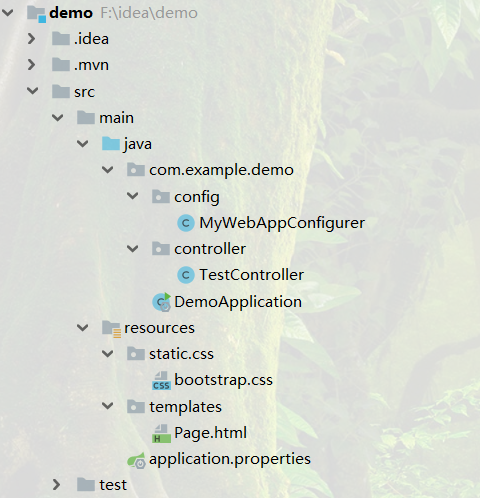
2. 写一个HTML页面
<!DOCTYPE html>

<html lang="en" xmlns:th="http://www.w3.org/1999/xhtml">

<head>

    <meta charset="UTF-8">

    <link rel="stylesheet" href="../css/bootstrap.css">

    <title>Title</title>

</head>

<body>

    <form action="../upload" method="post" enctype="multipart/form-data">

        <input type="file" name="file" accept="image/*">

        <br>

        <input type="submit" value="上传" class="btn btn-success">

    </form>

    [[${filename}]]

    <br>

    <img th:src="@{${filename}}" alt="图片">

</body>

</html>
3. 配置application.properties文件, 在配置文件中声明图片的绝对路径及相对路径
server.port=8899

file.upload.path=F://images/

file.upload.path.relative=/images/**
4. 创建一个MyWebAppConfigurer java文件实现WebMvcConfigurer接口, 配置资源映射路径
注: 笔者使用的springboot版本为 2.1.6
import org.springframework.beans.factory.annotation.Value;

import org.springframework.context.annotation.Configuration;

import org.springframework.web.servlet.config.annotation.ResourceHandlerRegistry;

import org.springframework.web.servlet.config.annotation.WebMvcConfigurer;

/**

 * 资源映射路径

 */

@Configuration

public class MyWebAppConfigurer implements WebMvcConfigurer {

    /**上传地址*/

    @Value("${file.upload.path}")

    private String filePath;

    /**显示相对地址*/

    @Value("${file.upload.path.relative}")

    private String fileRelativePath;

    @Override

    public void addResourceHandlers(ResourceHandlerRegistry registry) {

        registry.addResourceHandler(fileRelativePath).

                addResourceLocations("file:/" + filePath);

    }

}
5. 编写Controller层
import org.springframework.beans.factory.annotation.Value;

import org.springframework.stereotype.Controller;

import org.springframework.ui.Model;

import org.springframework.web.bind.annotation.RequestMapping;

import org.springframework.web.bind.annotation.RequestParam;

import org.springframework.web.multipart.MultipartFile;

import java.io.File;

import java.io.IOException;

@Controller

public class TestController {

    /**上传地址*/

    @Value("${file.upload.path}")

    private String filePath;

    // 跳转上传页面

    @RequestMapping("test")

    public String test() {

        return "Page";

    }

    // 执行上传

    @RequestMapping("upload")

    public String upload(@RequestParam("file") MultipartFile file, Model model) {

        // 获取上传文件名

        String filename = file.getOriginalFilename();

        // 定义上传文件保存路径

        String path = filePath+"rotPhoto/";

        // 新建文件

        File filepath = new File(path, filename);

        // 判断路径是否存在,如果不存在就创建一个

        if (!filepath.getParentFile().exists()) {

            filepath.getParentFile().mkdirs();

        }

        try {

            // 写入文件

            file.transferTo(new File(path + File.separator + filename));

        } catch (IOException e) {

            e.printStackTrace();

        }

        // 将src路径发送至html页面

        model.addAttribute("filename", "/images/rotPhoto/"+filename);

        return "Page";

    }

}
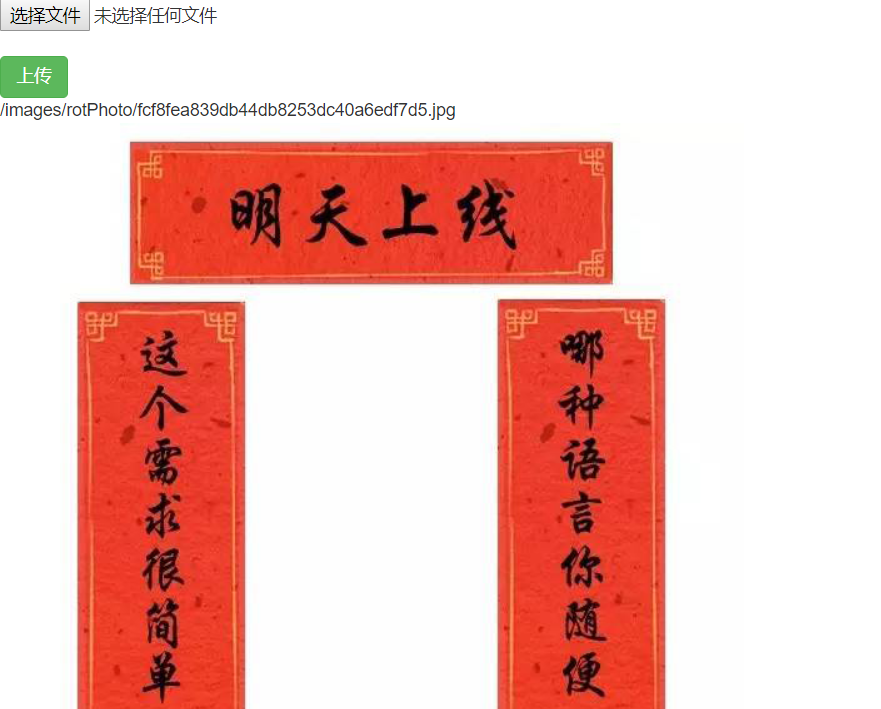
6. 完成
springboot+thymeleaf 实现图片文件上传及回显的更多相关文章
- Ajax图片异步上传并回显
1.jsp页面 <td width="20%" class="pn-flabel pn-flabel-h"></td> <td w ...
- springmvc图片文件上传接口
springmvc图片文件上传 用MultipartFile文件方式传输 Controller package com.controller; import java.awt.image.Buffer ...
- SpringMvc MultipartFile 图片文件上传
spring-servlet.xml <!-- SpringMVC上传文件时,需要配置MultipartResolver处理器 --> <bean id="multipar ...
- .Net Core 图片文件上传下载
当下.Net Core项目可是如雨后春笋一般发展起来,作为.Net大军中的一员,我热忱地拥抱了.Net Core并且积极使用其进行业务的开发,我们先介绍下.Net Core项目下实现文件上传下载接口. ...
- SpringBoot系列——附件管理:整合业务表单实现上传、回显、下载
前言 日常开发中,大多数项目都会涉及到附件上传.回显.下载等功能,本文记录封装通用附件管理模块,并与业务模块进行整合实现上传.回显.下载 我们之前已经对文件上传下载有过记录,传送门:基于"f ...
- 图片上传并回显Ajax异步篇
图片上传并回显Ajax异步篇 图片如何无刷新的上传到服务器呢?继前两篇文章后,我们来实战一下如何无刷新的异步上传图片,我们还是先看一下效果 在实战前呢,我们需要做些准备工作.比如说,了解一下FormD ...
- springboot实现简单的文件上传
承接上一篇,这里记录一下简单的springboot文件上传的方式 首先,springboot简单文件上传不需要添加额外的jar包和配置 这里贴一下后端controller层的实现代码 补一份前台的HT ...
- Springboot 一行代码实现文件上传 20个平台!少写代码到极致
大家好,我是小富~ 技术交流,公众号:程序员小富 又是做好人好事的一天,有个小可爱私下问我有没有好用的springboot文件上传工具,这不巧了嘛,正好我私藏了一个好东西,顺便给小伙伴们也分享一下,d ...
- PHP 图片文件上传代码
通过 PHP,可以把文件上传到服务器.里面加入一些图片的判断,如果不加判断文件的类型就可以上传任意格式的文件. 为了网站的安全,肯定不让上传php文件,如果有人进入你的后台,上传了一个php文件,你的 ...
随机推荐
- Linux for Matlab中文注释乱码(亲测有效)
中文注释乱码的原因是windows下的m文件采用的是gb2312编码,只要将所有的m文件转成 utf8文件,显示就正常了. 1.首先安装enca:sudo apt-get install enca 2 ...
- LG5201 「USACO2019JAN」Shortcut 最短路树
\(\mathrm{Shortcut}\) 问题描述 LG5201 题解 最短路树. 显然奶牛的路径就是从\(1\)走到各个草地,于是从\(1\)跑最短路,构建最短路树. 为了保证字典序,从\(1\) ...
- 学习input
认识input: 在网页中,我们经常都会遇到一些交互页面,比如登录.注册.评论等页面.你知道在html中用的是那些标签吗?今天我们要学习的就是其中最主要的一个标签,即<input>标签. ...
- PassGuard密码控件配置
运行环境 win服务器 系统server2008R2 C# ASP.NET服务器页面 前端部分 1.引用 //JS部分引用 <script type="text/javasc ...
- [LeetCode] 862. Shortest Subarray with Sum at Least K 和至少为K的最短子数组
Return the length of the shortest, non-empty, contiguous subarray of A with sum at least K. If there ...
- [LeetCode] 347. Top K Frequent Elements 前K个高频元素
Given a non-empty array of integers, return the k most frequent elements. Example 1: Input: nums = [ ...
- 挂载ESP(EFI)分区到Windows,并让资源管理器有权限读写
如果你的磁盘精灵经常原地自爆,但你又想读写ESP分区的文件,那么请看此贴 1 //例子如下 diskpart //运行Diskpart工具 list disk //列出所有磁盘 sel disk // ...
- div 中 id 和 class使用详解【转】
原文地址:https://blog.csdn.net/zxw136511485/article/details/71191053 在div 标签中,我们比较常见的属性是id 和class,那么这两个属 ...
- Windows 10 win 10 切换输入法的快捷键
Windows 10 win 10 切换输入法的快捷键 怎么切换输入法 中文 英文 切换 Windows键 + 空格键 切换输入法 Shift+Alt 切换中英文 Windows键形状如下 ...
- vulnhub之SP:Harrison靶机
下载地址:‘https://www.vulnhub.com/entry/sp-harrison,302/’ 环境:靶机放在virtualbox上运行,网卡模式 攻击机:kali Linux运行在VMw ...