
动态路由 RIP

不同网段之间进行通信,中间有多个路由器的情况下,我们可以通过配置RIP动态路由来实现数据转发。
实验拓扑
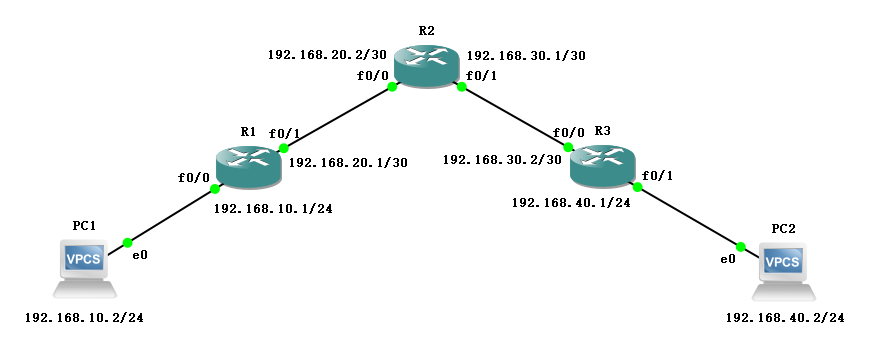
如图所示连接,地址规划如下:
| 名称 | 接口 | IP地址 |
|---|---|---|
| R1 | f0/0 | 192.168.10.1/24 |
| R1 | f0/1 | 192.168.20.1/30 |
| R2 | f0/0 | 192.168.20.2/30 |
| R2 | f0/1 | 192.168.30.1/30 |
| R3 | f0/0 | 192.168.30.2/30 |
| R3 | f0/1 | 192.168.40.1/24 |
| PC1 | e0 | 192.168.10.2/24 |
| PC2 | e0 | 192.168.40.2/24 |
配置方法
R1(config)#router rip

R1(config-router)#network 192.168.10.0

R1(config-router)#network 192.168.20.0

R1(config-router)#version 2

R1(config-router)#no auto-summary

R1(config-router)#ex
配置过程
配置 IP 地址
- R1
R1#conf t

Enter configuration commands, one per line.  End with CNTL/Z.

R1(config)#int f0/0

R1(config-if)#ip add 192.168.10.1 255.255.255.0

R1(config-if)#no sh

R1(config-if)#ex

R1(config)#int f0/1

R1(config-if)#ip add 192.168.20.1 255.255.255.252

R1(config-if)#no sh

R1(config-if)#ex

R1(config)#do show ip route

Codes: C - connected, S - static, R - RIP, M - mobile, B - BGP

       D - EIGRP, EX - EIGRP external, O - OSPF, IA - OSPF inter area

       N1 - OSPF NSSA external type 1, N2 - OSPF NSSA external type 2

       E1 - OSPF external type 1, E2 - OSPF external type 2

       i - IS-IS, su - IS-IS summary, L1 - IS-IS level-1, L2 - IS-IS level-2

       ia - IS-IS inter area, * - candidate default, U - per-user static route

       o - ODR, P - periodic downloaded static route

Gateway of last resort is not set

C    192.168.10.0/24 is directly connected, FastEthernet0/0

     192.168.20.0/30 is subnetted, 1 subnets

C       192.168.20.0 is directly connected, FastEthernet0/1
- R2
R2#conf t

Enter configuration commands, one per line.  End with CNTL/Z.

R2(config)#int f0/0

R2(config-if)#ip add 192.168.20.2 255.255.255.252

R2(config-if)#no sh

R2(config-if)#ex

R2(config)#int f0/1

R2(config-if)#ip add 192.168.30.1 255.255.255.252

R2(config-if)#no sh

R2(config-if)#ex

R2(config)#do show ip route

Codes: C - connected, S - static, R - RIP, M - mobile, B - BGP

       D - EIGRP, EX - EIGRP external, O - OSPF, IA - OSPF inter area

       N1 - OSPF NSSA external type 1, N2 - OSPF NSSA external type 2

       E1 - OSPF external type 1, E2 - OSPF external type 2

       i - IS-IS, su - IS-IS summary, L1 - IS-IS level-1, L2 - IS-IS level-2

       ia - IS-IS inter area, * - candidate default, U - per-user static route

       o - ODR, P - periodic downloaded static route

Gateway of last resort is not set

     192.168.30.0/30 is subnetted, 1 subnets

C       192.168.30.0 is directly connected, FastEthernet0/1

     192.168.20.0/30 is subnetted, 1 subnets

C       192.168.20.0 is directly connected, FastEthernet0/0
- R3
R3#conf t

Enter configuration commands, one per line.  End with CNTL/Z.

R3(config)#int f0/0

R3(config-if)#ip add 192.168.30.2 255.255.255.252

R3(config-if)#no sh

R3(config-if)#ex

R3(config)#int f0/1

R3(config-if)#ip add 192.168.40.1 255.255.255.0

R3(config-if)#no sh

R3(config-if)#ex

R3(config)#do show ip route

Codes: C - connected, S - static, R - RIP, M - mobile, B - BGP

       D - EIGRP, EX - EIGRP external, O - OSPF, IA - OSPF inter area

       N1 - OSPF NSSA external type 1, N2 - OSPF NSSA external type 2

       E1 - OSPF external type 1, E2 - OSPF external type 2

       i - IS-IS, su - IS-IS summary, L1 - IS-IS level-1, L2 - IS-IS level-2

       ia - IS-IS inter area, * - candidate default, U - per-user static route

       o - ODR, P - periodic downloaded static route

Gateway of last resort is not set

     192.168.30.0/30 is subnetted, 1 subnets

C       192.168.30.0 is directly connected, FastEthernet0/0

C    192.168.40.0/24 is directly connected, FastEthernet0/1
- PC1
PC1> ip 192.168.10.2 192.168.10.1

Checking for duplicate address...

PC1 : 192.168.10.2 255.255.255.0 gateway 192.168.10.1
- PC2
PC2> ip 192.168.40.2 192.168.40.1

Checking for duplicate address...

PC1 : 192.168.40.2 255.255.255.0 gateway 192.168.40.1
默认不可互通
PC1> ping 192.168.40.2

*192.168.10.1 icmp_seq=1 ttl=255 time=18.978 ms (ICMP type:3, code:1, Destination host unreachable)

*192.168.10.1 icmp_seq=2 ttl=255 time=12.061 ms (ICMP type:3, code:1, Destination host unreachable)

*192.168.10.1 icmp_seq=3 ttl=255 time=6.137 ms (ICMP type:3, code:1, Destination host unreachable)

*192.168.10.1 icmp_seq=4 ttl=255 time=7.963 ms (ICMP type:3, code:1, Destination host unreachable)

*192.168.10.1 icmp_seq=5 ttl=255 time=7.970 ms (ICMP type:3, code:1, Destination host unreachable)
PC2> ping 192.168.10.2

*192.168.40.1 icmp_seq=1 ttl=255 time=10.004 ms (ICMP type:3, code:1, Destination host unreachable)

*192.168.40.1 icmp_seq=2 ttl=255 time=6.786 ms (ICMP type:3, code:1, Destination host unreachable)

*192.168.40.1 icmp_seq=3 ttl=255 time=7.979 ms (ICMP type:3, code:1, Destination host unreachable)

*192.168.40.1 icmp_seq=4 ttl=255 time=10.064 ms (ICMP type:3, code:1, Destination host unreachable)

*192.168.40.1 icmp_seq=5 ttl=255 time=10.939 ms (ICMP type:3, code:1, Destination host unreachable)
配置 RIP
- R1
R1(config)#router rip

R1(config-router)#network 192.168.10.0

R1(config-router)#network 192.168.20.0

R1(config-router)#version 2

R1(config-router)#no auto-summary

R1(config-router)#ex
- R2
R2(config)#router rip

R2(config-router)#network 192.168.20.0

R2(config-router)#network 192.168.30.0

R2(config-router)#version 2

R2(config-router)#no auto-summary

R2(config-router)#ex
- R3
R3(config)#router rip

R3(config-router)#network 192.168.30.0

R3(config-router)#network 192.168.40.0

R3(config-router)#version 2

R3(config-router)#no auto-summary

R3(config-router)#ex
查看路由表
- R1
R1(config)#do show ip route

Codes: C - connected, S - static, R - RIP, M - mobile, B - BGP

       D - EIGRP, EX - EIGRP external, O - OSPF, IA - OSPF inter area

       N1 - OSPF NSSA external type 1, N2 - OSPF NSSA external type 2

       E1 - OSPF external type 1, E2 - OSPF external type 2

       i - IS-IS, su - IS-IS summary, L1 - IS-IS level-1, L2 - IS-IS level-2

       ia - IS-IS inter area, * - candidate default, U - per-user static route

       o - ODR, P - periodic downloaded static route

Gateway of last resort is not set

     192.168.30.0/30 is subnetted, 1 subnets

R       192.168.30.0 [120/1] via 192.168.20.2, 00:00:14, FastEthernet0/1

C    192.168.10.0/24 is directly connected, FastEthernet0/0

R    192.168.40.0/24 [120/2] via 192.168.20.2, 00:00:14, FastEthernet0/1

     192.168.20.0/30 is subnetted, 1 subnets

C       192.168.20.0 is directly connected, FastEthernet0/1
- R2
R2(config)#do show ip route

Codes: C - connected, S - static, R - RIP, M - mobile, B - BGP

       D - EIGRP, EX - EIGRP external, O - OSPF, IA - OSPF inter area

       N1 - OSPF NSSA external type 1, N2 - OSPF NSSA external type 2

       E1 - OSPF external type 1, E2 - OSPF external type 2

       i - IS-IS, su - IS-IS summary, L1 - IS-IS level-1, L2 - IS-IS level-2

       ia - IS-IS inter area, * - candidate default, U - per-user static route

       o - ODR, P - periodic downloaded static route

Gateway of last resort is not set

     192.168.30.0/30 is subnetted, 1 subnets

C       192.168.30.0 is directly connected, FastEthernet0/1

R    192.168.10.0/24 [120/1] via 192.168.20.1, 00:00:07, FastEthernet0/0

R    192.168.40.0/24 [120/1] via 192.168.30.2, 00:00:22, FastEthernet0/1

     192.168.20.0/30 is subnetted, 1 subnets

C       192.168.20.0 is directly connected, FastEthernet0/0
- R3
R3(config)#do show ip route

Codes: C - connected, S - static, R - RIP, M - mobile, B - BGP

       D - EIGRP, EX - EIGRP external, O - OSPF, IA - OSPF inter area

       N1 - OSPF NSSA external type 1, N2 - OSPF NSSA external type 2

       E1 - OSPF external type 1, E2 - OSPF external type 2

       i - IS-IS, su - IS-IS summary, L1 - IS-IS level-1, L2 - IS-IS level-2

       ia - IS-IS inter area, * - candidate default, U - per-user static route

       o - ODR, P - periodic downloaded static route

Gateway of last resort is not set

     192.168.30.0/30 is subnetted, 1 subnets

C       192.168.30.0 is directly connected, FastEthernet0/0

R    192.168.10.0/24 [120/2] via 192.168.30.1, 00:00:01, FastEthernet0/0

C    192.168.40.0/24 is directly connected, FastEthernet0/1

     192.168.20.0/30 is subnetted, 1 subnets

R       192.168.20.0 [120/1] via 192.168.30.1, 00:00:01, FastEthernet0/0
验证结果
PC1> ping 192.168.40.2

192.168.40.2 icmp_seq=1 timeout

192.168.40.2 icmp_seq=2 timeout

192.168.40.2 icmp_seq=3 timeout

192.168.40.2 icmp_seq=4 timeout

84 bytes from 192.168.40.2 icmp_seq=5 ttl=61 time=55.813 ms

PC1> ping 192.168.40.2

84 bytes from 192.168.40.2 icmp_seq=1 ttl=61 time=63.822 ms

84 bytes from 192.168.40.2 icmp_seq=2 ttl=61 time=54.815 ms

84 bytes from 192.168.40.2 icmp_seq=3 ttl=61 time=62.803 ms

84 bytes from 192.168.40.2 icmp_seq=4 ttl=61 time=56.948 ms

84 bytes from 192.168.40.2 icmp_seq=5 ttl=61 time=63.943 ms
PC2> ping 192.168.10.2

84 bytes from 192.168.10.2 icmp_seq=1 ttl=61 time=64.749 ms

84 bytes from 192.168.10.2 icmp_seq=2 ttl=61 time=62.858 ms

84 bytes from 192.168.10.2 icmp_seq=3 ttl=61 time=54.841 ms

84 bytes from 192.168.10.2 icmp_seq=4 ttl=61 time=62.966 ms

84 bytes from 192.168.10.2 icmp_seq=5 ttl=61 time=54.853 ms
动态路由 RIP的更多相关文章
- 六、路由详细介绍之动态路由RIP(了解一下就行)
动态路由分为距离矢量路由(RIP)和链路状态(OSPF和ISIS) 一.离矢量路由协议-RIP RIP协议现在基本上被淘汰. RIP动态路由协议工作原理,如上图: R12中有192.168.1.0和1 ...
- CCNA - Part12 - 路由协议 (1) - 静态路由,动态路由 RIP
路由器 在之前关于路由器的介绍中,我们知道它是网络互联的核心设备,用于连接不同的网络,在网络之间转发 IP 数据报.对于路由器来说,路由表是其内部最为重要的构成组件.当路由器需要转发数据时,就会按照路 ...
- H3C路由器配置——动态路由RIP协议
一.静态路由的不足 静态路由适用于:小规模的网络.架构不怎么调整的网络.没有环路的网络 二.RIP协议工作过程 2.1.工作特点 n路由信息协议RIP(Routing Information Prot ...
- Cisco动态路由(rip)
接Cisco静态路由,讨论一下Cisco动态路由. 实验环境布置 命令布置动态路由 Router0: Router>enable Router#configure terminal Router ...
- RIP、OSPF、BGP、动态路由选路协议、自治域AS
相关学习资料 tcp-ip详解卷1:协议.pdf http://www.rfc-editor.org/rfc/rfc1058.txt http://www.rfc-editor.org/rfc/rfc ...
- 三层交换机RIP动态路由实验
一. 实验目的 1. 掌握三层交换机之间通过RIP协议实现网段互通的配置方法. 2. 理解动态实现方式与静态方式的不同 二. 应用环境 当两台三层交换机级联时,为了保证每台交换机上所连接的 ...
- CISCO实验记录五:静态路由与RIP动态路由
一.实验要求 1.创建设备间静态路由 2.检查三层连通性 3.清空路由,使用RIP创建动态路由 4.检查路由表 二.实验操作 1.创建设备静态路由 #iip route 192.168.1.0 255 ...
- Cisco基础(二):三层交换vlan间通信、多交换机vlan间通信、三层交换配置路由、RIP动态路由配置、三层交换配置RIP动态路由
一.三层交换vlan间通信 目标: VLAN实现了广播域的隔离,同时也将VLAN间的通信隔离了.三层交换技术使得VLAN间可以通信. 通过三层交换实现VLAN间通信 方案: 为了解决了传统路由器低速. ...
- 动态路由及RIP协议
动态路由及 RIP协议 目录 一.动态路由协议 1.1.定义 1.2.特点 1.3.动态路由协议概述 1.4.度量值 1.5.收敛 1.6.静态路由和动态路由的比较 二.动态路由协议的分类 2.1.距 ...
随机推荐
- ESA2GJK1DH1K升级篇: 升级STM32 预热: 单片机定时 使用 http 获取云端文本文件里面的内容,然后显示在液晶屏
前言: 实现功能概要 STM32使用AT指令控制Wi-Fi以TCP方式连接咱上节安装的Web服务器,然后使用http的get协议获取云端文本文件里面的内容, 然后把获取的数据显示在OLED液晶屏. ...
- SCAN----Redis检索键值对
转载地址:http://redis.readthedocs.org/en/latest/key/scan.html SCAN SCAN cursor [MATCH pattern] [COUNT co ...
- CURL SSL为6的由来
起初,我直接用方倍工作室之前做微信接口调用时的http_request函数,发现能正常调用微信api的函数获取不了火星天气数据,然后又尝试用file_get_contents,仍然不行 一直出的错就是 ...
- Windows彻底卸载VMWare虚拟机详细步骤
不能卸载vmware ,原因是VMware的服务在运行中,停止服务就可以卸载了. 点击开始输入[services.msc],然后点击搜索到服务. 找到这个软件的图一的所有项,然后右键它属性. 全部设置 ...
- 【07月01日】A股滚动市净率PB历史新低排名
2010年01月01日 到 2019年07月01日 之间,滚动市净率历史新低排名. 上市三年以上的公司,2019年07月01日市净率在30以下的公司. 来源:A股滚动市净率(PB)历史新低排名. 1 ...
- c# winform禁止窗口多开
static class Program { /// <summary> /// 应用程序的主入口点. /// </summary> [STAThread] static vo ...
- Tomcat通过脚本自动部署
1:autodeploy_tomcat_app.sh now=`date +%Y%m%d%H%M%S` tomcatPath=/home/test/apache-tomcat- backupPath= ...
- jdk 1.6 新特性
JDK1.6新特性 1.DestTop类和SystemTray类 前者用于调度操作系统中的一些功能,例如: · 可以打开系统默认浏览器指定的URL地址: · 打开系统默认邮件客户端给指定的邮箱发信息: ...
- 一个萝卜一个坑#我的C坑_两局变量
前面的笔记慢慢补 全局变量和局部变量的区别: 1.首字母 尽量不用全局变量原因: 1.占内存 2.降低通用性和可靠性 3.降清晰度 若在同一源文件中,全局变量和局部变量同名,记住很重要的一条:实参决定 ...
- Centos 使用kubeadm安装Kubernetes 1.15.3
本来没打算搞这个文章的,第一里面有瑕疵(没搞定的地方),第二在我的Ubuntu 18 Kubernetes集群的安装和部署 以及Helm的安装 也有安装,第三 和社区的问文章比较雷同 https:// ...