
动态路由 RIP

不同网段之间进行通信,中间有多个路由器的情况下,我们可以通过配置RIP动态路由来实现数据转发。
实验拓扑
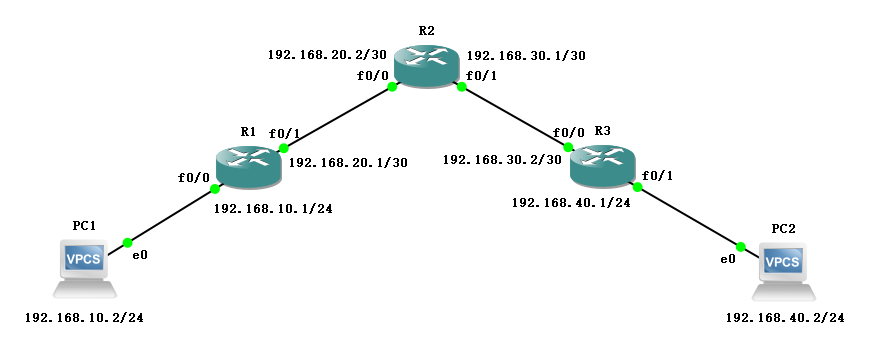
如图所示连接,地址规划如下:
| 名称 | 接口 | IP地址 |
|---|---|---|
| R1 | f0/0 | 192.168.10.1/24 |
| R1 | f0/1 | 192.168.20.1/30 |
| R2 | f0/0 | 192.168.20.2/30 |
| R2 | f0/1 | 192.168.30.1/30 |
| R3 | f0/0 | 192.168.30.2/30 |
| R3 | f0/1 | 192.168.40.1/24 |
| PC1 | e0 | 192.168.10.2/24 |
| PC2 | e0 | 192.168.40.2/24 |
配置方法
R1(config)#router rip

R1(config-router)#network 192.168.10.0

R1(config-router)#network 192.168.20.0

R1(config-router)#version 2

R1(config-router)#no auto-summary

R1(config-router)#ex
配置过程
配置 IP 地址
- R1
R1#conf t

Enter configuration commands, one per line.  End with CNTL/Z.

R1(config)#int f0/0

R1(config-if)#ip add 192.168.10.1 255.255.255.0

R1(config-if)#no sh

R1(config-if)#ex

R1(config)#int f0/1

R1(config-if)#ip add 192.168.20.1 255.255.255.252

R1(config-if)#no sh

R1(config-if)#ex

R1(config)#do show ip route

Codes: C - connected, S - static, R - RIP, M - mobile, B - BGP

       D - EIGRP, EX - EIGRP external, O - OSPF, IA - OSPF inter area

       N1 - OSPF NSSA external type 1, N2 - OSPF NSSA external type 2

       E1 - OSPF external type 1, E2 - OSPF external type 2

       i - IS-IS, su - IS-IS summary, L1 - IS-IS level-1, L2 - IS-IS level-2

       ia - IS-IS inter area, * - candidate default, U - per-user static route

       o - ODR, P - periodic downloaded static route

Gateway of last resort is not set

C    192.168.10.0/24 is directly connected, FastEthernet0/0

     192.168.20.0/30 is subnetted, 1 subnets

C       192.168.20.0 is directly connected, FastEthernet0/1
- R2
R2#conf t

Enter configuration commands, one per line.  End with CNTL/Z.

R2(config)#int f0/0

R2(config-if)#ip add 192.168.20.2 255.255.255.252

R2(config-if)#no sh

R2(config-if)#ex

R2(config)#int f0/1

R2(config-if)#ip add 192.168.30.1 255.255.255.252

R2(config-if)#no sh

R2(config-if)#ex

R2(config)#do show ip route

Codes: C - connected, S - static, R - RIP, M - mobile, B - BGP

       D - EIGRP, EX - EIGRP external, O - OSPF, IA - OSPF inter area

       N1 - OSPF NSSA external type 1, N2 - OSPF NSSA external type 2

       E1 - OSPF external type 1, E2 - OSPF external type 2

       i - IS-IS, su - IS-IS summary, L1 - IS-IS level-1, L2 - IS-IS level-2

       ia - IS-IS inter area, * - candidate default, U - per-user static route

       o - ODR, P - periodic downloaded static route

Gateway of last resort is not set

     192.168.30.0/30 is subnetted, 1 subnets

C       192.168.30.0 is directly connected, FastEthernet0/1

     192.168.20.0/30 is subnetted, 1 subnets

C       192.168.20.0 is directly connected, FastEthernet0/0
- R3
R3#conf t

Enter configuration commands, one per line.  End with CNTL/Z.

R3(config)#int f0/0

R3(config-if)#ip add 192.168.30.2 255.255.255.252

R3(config-if)#no sh

R3(config-if)#ex

R3(config)#int f0/1

R3(config-if)#ip add 192.168.40.1 255.255.255.0

R3(config-if)#no sh

R3(config-if)#ex

R3(config)#do show ip route

Codes: C - connected, S - static, R - RIP, M - mobile, B - BGP

       D - EIGRP, EX - EIGRP external, O - OSPF, IA - OSPF inter area

       N1 - OSPF NSSA external type 1, N2 - OSPF NSSA external type 2

       E1 - OSPF external type 1, E2 - OSPF external type 2

       i - IS-IS, su - IS-IS summary, L1 - IS-IS level-1, L2 - IS-IS level-2

       ia - IS-IS inter area, * - candidate default, U - per-user static route

       o - ODR, P - periodic downloaded static route

Gateway of last resort is not set

     192.168.30.0/30 is subnetted, 1 subnets

C       192.168.30.0 is directly connected, FastEthernet0/0

C    192.168.40.0/24 is directly connected, FastEthernet0/1
- PC1
PC1> ip 192.168.10.2 192.168.10.1

Checking for duplicate address...

PC1 : 192.168.10.2 255.255.255.0 gateway 192.168.10.1
- PC2
PC2> ip 192.168.40.2 192.168.40.1

Checking for duplicate address...

PC1 : 192.168.40.2 255.255.255.0 gateway 192.168.40.1
默认不可互通
PC1> ping 192.168.40.2

*192.168.10.1 icmp_seq=1 ttl=255 time=18.978 ms (ICMP type:3, code:1, Destination host unreachable)

*192.168.10.1 icmp_seq=2 ttl=255 time=12.061 ms (ICMP type:3, code:1, Destination host unreachable)

*192.168.10.1 icmp_seq=3 ttl=255 time=6.137 ms (ICMP type:3, code:1, Destination host unreachable)

*192.168.10.1 icmp_seq=4 ttl=255 time=7.963 ms (ICMP type:3, code:1, Destination host unreachable)

*192.168.10.1 icmp_seq=5 ttl=255 time=7.970 ms (ICMP type:3, code:1, Destination host unreachable)
PC2> ping 192.168.10.2

*192.168.40.1 icmp_seq=1 ttl=255 time=10.004 ms (ICMP type:3, code:1, Destination host unreachable)

*192.168.40.1 icmp_seq=2 ttl=255 time=6.786 ms (ICMP type:3, code:1, Destination host unreachable)

*192.168.40.1 icmp_seq=3 ttl=255 time=7.979 ms (ICMP type:3, code:1, Destination host unreachable)

*192.168.40.1 icmp_seq=4 ttl=255 time=10.064 ms (ICMP type:3, code:1, Destination host unreachable)

*192.168.40.1 icmp_seq=5 ttl=255 time=10.939 ms (ICMP type:3, code:1, Destination host unreachable)
配置 RIP
- R1
R1(config)#router rip

R1(config-router)#network 192.168.10.0

R1(config-router)#network 192.168.20.0

R1(config-router)#version 2

R1(config-router)#no auto-summary

R1(config-router)#ex
- R2
R2(config)#router rip

R2(config-router)#network 192.168.20.0

R2(config-router)#network 192.168.30.0

R2(config-router)#version 2

R2(config-router)#no auto-summary

R2(config-router)#ex
- R3
R3(config)#router rip

R3(config-router)#network 192.168.30.0

R3(config-router)#network 192.168.40.0

R3(config-router)#version 2

R3(config-router)#no auto-summary

R3(config-router)#ex
查看路由表
- R1
R1(config)#do show ip route

Codes: C - connected, S - static, R - RIP, M - mobile, B - BGP

       D - EIGRP, EX - EIGRP external, O - OSPF, IA - OSPF inter area

       N1 - OSPF NSSA external type 1, N2 - OSPF NSSA external type 2

       E1 - OSPF external type 1, E2 - OSPF external type 2

       i - IS-IS, su - IS-IS summary, L1 - IS-IS level-1, L2 - IS-IS level-2

       ia - IS-IS inter area, * - candidate default, U - per-user static route

       o - ODR, P - periodic downloaded static route

Gateway of last resort is not set

     192.168.30.0/30 is subnetted, 1 subnets

R       192.168.30.0 [120/1] via 192.168.20.2, 00:00:14, FastEthernet0/1

C    192.168.10.0/24 is directly connected, FastEthernet0/0

R    192.168.40.0/24 [120/2] via 192.168.20.2, 00:00:14, FastEthernet0/1

     192.168.20.0/30 is subnetted, 1 subnets

C       192.168.20.0 is directly connected, FastEthernet0/1
- R2
R2(config)#do show ip route

Codes: C - connected, S - static, R - RIP, M - mobile, B - BGP

       D - EIGRP, EX - EIGRP external, O - OSPF, IA - OSPF inter area

       N1 - OSPF NSSA external type 1, N2 - OSPF NSSA external type 2

       E1 - OSPF external type 1, E2 - OSPF external type 2

       i - IS-IS, su - IS-IS summary, L1 - IS-IS level-1, L2 - IS-IS level-2

       ia - IS-IS inter area, * - candidate default, U - per-user static route

       o - ODR, P - periodic downloaded static route

Gateway of last resort is not set

     192.168.30.0/30 is subnetted, 1 subnets

C       192.168.30.0 is directly connected, FastEthernet0/1

R    192.168.10.0/24 [120/1] via 192.168.20.1, 00:00:07, FastEthernet0/0

R    192.168.40.0/24 [120/1] via 192.168.30.2, 00:00:22, FastEthernet0/1

     192.168.20.0/30 is subnetted, 1 subnets

C       192.168.20.0 is directly connected, FastEthernet0/0
- R3
R3(config)#do show ip route

Codes: C - connected, S - static, R - RIP, M - mobile, B - BGP

       D - EIGRP, EX - EIGRP external, O - OSPF, IA - OSPF inter area

       N1 - OSPF NSSA external type 1, N2 - OSPF NSSA external type 2

       E1 - OSPF external type 1, E2 - OSPF external type 2

       i - IS-IS, su - IS-IS summary, L1 - IS-IS level-1, L2 - IS-IS level-2

       ia - IS-IS inter area, * - candidate default, U - per-user static route

       o - ODR, P - periodic downloaded static route

Gateway of last resort is not set

     192.168.30.0/30 is subnetted, 1 subnets

C       192.168.30.0 is directly connected, FastEthernet0/0

R    192.168.10.0/24 [120/2] via 192.168.30.1, 00:00:01, FastEthernet0/0

C    192.168.40.0/24 is directly connected, FastEthernet0/1

     192.168.20.0/30 is subnetted, 1 subnets

R       192.168.20.0 [120/1] via 192.168.30.1, 00:00:01, FastEthernet0/0
验证结果
PC1> ping 192.168.40.2

192.168.40.2 icmp_seq=1 timeout

192.168.40.2 icmp_seq=2 timeout

192.168.40.2 icmp_seq=3 timeout

192.168.40.2 icmp_seq=4 timeout

84 bytes from 192.168.40.2 icmp_seq=5 ttl=61 time=55.813 ms

PC1> ping 192.168.40.2

84 bytes from 192.168.40.2 icmp_seq=1 ttl=61 time=63.822 ms

84 bytes from 192.168.40.2 icmp_seq=2 ttl=61 time=54.815 ms

84 bytes from 192.168.40.2 icmp_seq=3 ttl=61 time=62.803 ms

84 bytes from 192.168.40.2 icmp_seq=4 ttl=61 time=56.948 ms

84 bytes from 192.168.40.2 icmp_seq=5 ttl=61 time=63.943 ms
PC2> ping 192.168.10.2

84 bytes from 192.168.10.2 icmp_seq=1 ttl=61 time=64.749 ms

84 bytes from 192.168.10.2 icmp_seq=2 ttl=61 time=62.858 ms

84 bytes from 192.168.10.2 icmp_seq=3 ttl=61 time=54.841 ms

84 bytes from 192.168.10.2 icmp_seq=4 ttl=61 time=62.966 ms

84 bytes from 192.168.10.2 icmp_seq=5 ttl=61 time=54.853 ms
动态路由 RIP的更多相关文章
- 六、路由详细介绍之动态路由RIP(了解一下就行)
动态路由分为距离矢量路由(RIP)和链路状态(OSPF和ISIS) 一.离矢量路由协议-RIP RIP协议现在基本上被淘汰. RIP动态路由协议工作原理,如上图: R12中有192.168.1.0和1 ...
- CCNA - Part12 - 路由协议 (1) - 静态路由,动态路由 RIP
路由器 在之前关于路由器的介绍中,我们知道它是网络互联的核心设备,用于连接不同的网络,在网络之间转发 IP 数据报.对于路由器来说,路由表是其内部最为重要的构成组件.当路由器需要转发数据时,就会按照路 ...
- H3C路由器配置——动态路由RIP协议
一.静态路由的不足 静态路由适用于:小规模的网络.架构不怎么调整的网络.没有环路的网络 二.RIP协议工作过程 2.1.工作特点 n路由信息协议RIP(Routing Information Prot ...
- Cisco动态路由(rip)
接Cisco静态路由,讨论一下Cisco动态路由. 实验环境布置 命令布置动态路由 Router0: Router>enable Router#configure terminal Router ...
- RIP、OSPF、BGP、动态路由选路协议、自治域AS
相关学习资料 tcp-ip详解卷1:协议.pdf http://www.rfc-editor.org/rfc/rfc1058.txt http://www.rfc-editor.org/rfc/rfc ...
- 三层交换机RIP动态路由实验
一. 实验目的 1. 掌握三层交换机之间通过RIP协议实现网段互通的配置方法. 2. 理解动态实现方式与静态方式的不同 二. 应用环境 当两台三层交换机级联时,为了保证每台交换机上所连接的 ...
- CISCO实验记录五:静态路由与RIP动态路由
一.实验要求 1.创建设备间静态路由 2.检查三层连通性 3.清空路由,使用RIP创建动态路由 4.检查路由表 二.实验操作 1.创建设备静态路由 #iip route 192.168.1.0 255 ...
- Cisco基础(二):三层交换vlan间通信、多交换机vlan间通信、三层交换配置路由、RIP动态路由配置、三层交换配置RIP动态路由
一.三层交换vlan间通信 目标: VLAN实现了广播域的隔离,同时也将VLAN间的通信隔离了.三层交换技术使得VLAN间可以通信. 通过三层交换实现VLAN间通信 方案: 为了解决了传统路由器低速. ...
- 动态路由及RIP协议
动态路由及 RIP协议 目录 一.动态路由协议 1.1.定义 1.2.特点 1.3.动态路由协议概述 1.4.度量值 1.5.收敛 1.6.静态路由和动态路由的比较 二.动态路由协议的分类 2.1.距 ...
随机推荐
- 安装Ruby 2.3.0
安装最新的redis集群需要用到的rb脚本要ruby2.3.0版本,centos7默认的是2.0.0,很显然报错不行,所以安装呗,使用rvm安装,安装步骤如下: yum -y install curl ...
- 【贪心】【P5521】[yLOI2019] 梅深不见冬
B [yLOI2019] 梅深不见冬 Background 风,吹起梅岭的深冬:霜,如惊涛一样汹涌:雪,飘落后把所有烧成空, 像这场,捕捉不到的梦. 醒来时已是多年之久,宫门铜环才长了铁锈, 也开始生 ...
- PATA1025PAT Ranking
需要注意的就是sort函数的应用,还有自己比较函数cmp的编写 在一个就是结构体的设计,排序时的考室内的排序,数组下标的处理 参考代码: #define _CRT_SECURE_NO_WARNINGS ...
- 神经机器翻译(seq2seq RNN)实现详解
http://c.biancheng.net/view/1947.html seq2seq 是一类特殊的 RNN,在机器翻译.文本自动摘要和语音识别中有着成功的应用.本节中,我们将讨论如何实现神经机器 ...
- Android Studio 之 ROM【2】, LiveData+ViewModel+AsyncTask+Repository
改造上一节 ROM[1], 1.利用 LiveData<List<Word>> 与 observe 中的 onChanged 配合,删除掉之前的textView更新函数(upd ...
- spring boot 启动原理详细解析
我们开发任何一个Spring Boot项目,都会用到如下的启动类 1 @SpringBootApplication 2 public class Application { 3 public stat ...
- 避免因为Arcgis Server服务设置不当导致Oracle Process溢出的方法
我之前写过一篇文章<arcsoc进程无限增长导致oracle processes溢出>(见链接:https://www.cnblogs.com/6yuhang/p/9379086.html ...
- es6和es5函数参数和arguments的差别
注: 这里说的 es5 代表的都是非严格模式下. es6之前函数的参数不能传默认值: function fn(a, b){ console.log(a) console.log(b) } fn(2) ...
- Vim 入门教程
Vim 入门教程 转载请保留以上信息 Vim 的教程相对比较零散,系统的教程比较少,我也阅读过不少教程,走过很 多弯路.借着 Vim-china 组织组建这一契机,整理下自己学习过的内容, 分享给大家 ...
- windows下隐藏磁盘分区(转)
在一定情况下有的人会想隐藏掉部分分区,比如双系统的情况 有两种方式 方法1: 删除盘符,适合在双系统的情况下隐藏掉另外一个系统相关的分区 请注意是删除盘符 不是删除分区 此电脑右键管理 点击磁盘管理 ...