
报错:Error starting Jetty. JSON Metrics may not be available.java.net.BindException:地址已在使用
报错背景:
刚在CDH中集成Flume插件,启动报错
报错现象:
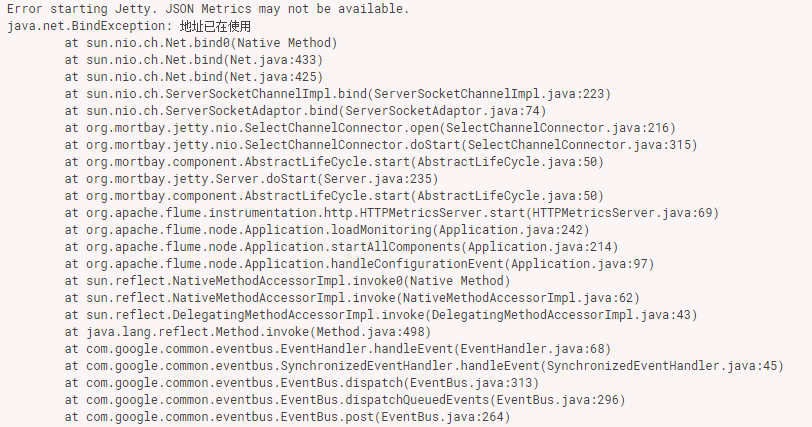
Error starting Jetty. JSON Metrics may not be available.

java.net.BindException: 地址已在使用

    at sun.nio.ch.Net.bind0(Native Method)

    at sun.nio.ch.Net.bind(Net.java:)

    at sun.nio.ch.Net.bind(Net.java:)

    at sun.nio.ch.ServerSocketChannelImpl.bind(ServerSocketChannelImpl.java:)

    at sun.nio.ch.ServerSocketAdaptor.bind(ServerSocketAdaptor.java:)

    at org.mortbay.jetty.nio.SelectChannelConnector.open(SelectChannelConnector.java:)

    at org.mortbay.jetty.nio.SelectChannelConnector.doStart(SelectChannelConnector.java:)

    at org.mortbay.component.AbstractLifeCycle.start(AbstractLifeCycle.java:)

    at org.mortbay.jetty.Server.doStart(Server.java:)

    at org.mortbay.component.AbstractLifeCycle.start(AbstractLifeCycle.java:)

    at org.apache.flume.instrumentation.http.HTTPMetricsServer.start(HTTPMetricsServer.java:)

    at org.apache.flume.node.Application.loadMonitoring(Application.java:)

    at org.apache.flume.node.Application.startAllComponents(Application.java:)

    at org.apache.flume.node.Application.handleConfigurationEvent(Application.java:)

    at sun.reflect.NativeMethodAccessorImpl.invoke0(Native Method)

    at sun.reflect.NativeMethodAccessorImpl.invoke(NativeMethodAccessorImpl.java:)

    at sun.reflect.DelegatingMethodAccessorImpl.invoke(DelegatingMethodAccessorImpl.java:)

    at java.lang.reflect.Method.invoke(Method.java:)

    at com.google.common.eventbus.EventHandler.handleEvent(EventHandler.java:)

    at com.google.common.eventbus.SynchronizedEventHandler.handleEvent(SynchronizedEventHandler.java:)

    at com.google.common.eventbus.EventBus.dispatch(EventBus.java:)

    at com.google.common.eventbus.EventBus.dispatchQueuedEvents(EventBus.java:)

    at com.google.common.eventbus.EventBus.post(EventBus.java:)

    at org.apache.flume.node.PollingPropertiesFileConfigurationProvider$FileWatcherRunnable.run(PollingPropertiesFileConfigurationProvider.java:)

    at java.util.concurrent.Executors$RunnableAdapter.call(Executors.java:)

    at java.util.concurrent.FutureTask.runAndReset(FutureTask.java:)

    at java.util.concurrent.ScheduledThreadPoolExecutor$ScheduledFutureTask.access$(ScheduledThreadPoolExecutor.java:)

    at java.util.concurrent.ScheduledThreadPoolExecutor$ScheduledFutureTask.run(ScheduledThreadPoolExecutor.java:)

    at java.util.concurrent.ThreadPoolExecutor.runWorker(ThreadPoolExecutor.java:)

    at java.util.concurrent.ThreadPoolExecutor$Worker.run(ThreadPoolExecutor.java:)

    at java.lang.Thread.run(Thread.java:)
报错原因:
我也没看懂具体原因,但是在解决的时候稀里糊涂就把报错解决了。
报错解决:
进入flume的配置目录:/etc/flume-ng/conf/
编辑文件:flume.conf
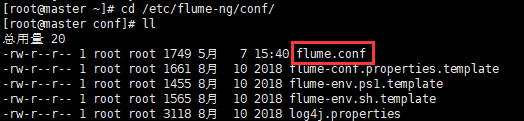
按照自己的需求填写相关语句
完成之后报错消失(CDH中的相同配置文件可能信息不同步,注意检查)
agent.sources = kafkaSource

agent.channels = memoryChannel

agent.sinks = hdfsSink

#-------- kafkaSource相关配置-----------------

agent.sources.kafkaSource.channels = memoryChannel

# 定义消息源类型

agent.sources.kafkaSource.type=org.apache.flume.source.kafka.KafkaSource

# 这里特别注意: 是kafka的zookeeper的地址

agent.sources.kafkaSource.zookeeperConnect=192.168.52.26:

# 配置消费的kafka topic

agent.sources.kafkaSource.topic=AlarmHis

agent.sources.kafkaSource.kafka.consumer.timeout.ms=

#------- memoryChannel相关配置-------------------------

# channel类型

agent.channels.memoryChannel.type=memory

# channel存储的事件容量

agent.channels.memoryChannel.capacity=

# 事务容量

agent.channels.memoryChannel.transactionCapacity=

#---------hdfsSink 相关配置------------------

agent.sinks.hdfsSink.type=hdfs

agent.sinks.hdfsSink.channel = memoryChannel

# 写到HDFS的路径

agent.sinks.hdfsSink.hdfs.path=hdfs://master:8020/yk/dl/alarm_his

#配置前缀和后缀

agent.sinks.hdfsSink.hdfs.filePrefix = AlarmHis

agent.sinks.hdfsSink.hdfs.fileSuffix=.txt

## 表示只要过了60**24秒钟,就切换生成一个新的文件

agent.sinks.hdfsSink.hdfs.rollInterval =

## 如果记录的文件大于1024**1024字节时切换一次

agent.sinks.hdfsSink.hdfs.rollSize =

## 当写了5个事件时触发

agent.sinks.hdfsSink.hdfs.rollCount =

## 收到了多少条消息往dfs中追加内容

agent.sinks.hdfsSink.hdfs.batchSize =

## 使用本地时间戳

agent.sinks.hdfsSink.hdfs.useLocalTimeStamp = true

agent.sinks.hdfsSink.hdfs.writeFormat=Text

#生成的文件类型,默认是Sequencefile,可用DataStream:为普通文本

agent.sinks.hdfsSink.hdfs.fileType=DataStream
报错:Error starting Jetty. JSON Metrics may not be available.java.net.BindException:地址已在使用的更多相关文章
- springboot启动报错,Error starting ApplicationContext. To display the conditions report re-run your application with 'debug' enabled.
报错: Error starting ApplicationContext. To display the conditions report re-run your application with ...
- 解决报错error the @annotation pointcut expression is only supported at Java 5
eclipse搭建环境后报错 error the @annotation pointcut expression is only supported at Java 5 错误意思大致是:注释切入点表达 ...
- 解决 docker 报错: Error starting daemon: error initializing graphdriver: backing file system is unsupported for this graph driver
CentOS 7.5 x64下 sudo yum install docker -y systemctl enable docker systemctl start docker 发现启动失败 jou ...
- spring boot启动报错Error starting ApplicationContext(未能配置数据源)
主要错误:Failed to configure a DataSource: 'url' attribute is not specified and no embedded datasource c ...
- 关于MyEclipse启动报错:Error starting static Resources;下面伴随Failed to start component [StandardServer[8005]]; A child container failed during start.的错误提示解决办法.
最后才发现原因是Tomcat的server.xml配置文件有问题:apache-tomcat-7.0.67\conf的service.xml下边多了类似与 <Host appBase=" ...
- 倍福TwinCAT(贝福Beckhoff)常见问题(FAQ)-点击运行按钮进入到运行状态报错Error starting TwinCAT System怎么办 AdsWarning1823怎么办
一般提示如下 点击Device,然后选中当前真正连接到的网卡 一般是由于重装系统之后,没有把本来是realtime capable的设备Install,所以找不到支持EtherCAT的设备导致 ...
- npm install 报错 error Unexpected end of JSON input while parsing near '...sShrinkwrap":false,"d' 解决办法
npm install 报错 : error Unexpected end of JSON input while parsing near '...sShrinkwrap":false,& ...
- node模拟后台返回json书写格式报错--Unexpected token ' in JSON at position 1
最近在学习Node的知识,就尝试写了一个注册登陆的简单功能,但是自己在模拟后台返回值的时候,总是报错Unexpected token ' in JSON at position 1,查找原因之后,是因 ...
- docker pull / docker login 报错 Error response from daemon: Get https://registry-1.docker.io/v2/: x509
docker pull 和 docker login 的时候报错 Error response from daemon: Get https://registry-1.docker.io/v2/: x ...
随机推荐
- 安装node.js 和 npm 的完整步骤
vue 生命周期 1,beforeCreate 组件刚刚被创建 2,created 组件创建完成 3,beforeMount 挂载之前 4,mounted 挂载之后 5,beforeDestory 组 ...
- keepalived 的 vrrp_script
[root@centos01 keepalived]# cat check_httpd.sh 脚本需要有执行权限 通常情况下,利用keepalived做热备,其中一台设置为master,一台设置为ba ...
- js文件夹上传下载组件
核心原理: 该项目核心就是文件分块上传.前后端要高度配合,需要双方约定好一些数据,才能完成大文件分块,我们在项目中要重点解决的以下问题. * 如何分片: * 如何合成一个文件: * 中断了从哪个分片开 ...
- 《挑战30天C++入门极限》C++运算符重载赋值运算符
C++运算符重载赋值运算符 自定义类的赋值运算符重载函数的作用与内置赋值运算符的作用类似,但是要要注意的是,它与拷贝构造函数与析构函数一样,要注意深拷贝浅拷贝的问题,在没有深拷贝浅拷贝的情况下 ...
- vue-router 的原理
1. hash 修改的时候:history.pushState('名字', null, '/xxx') || location.hash = '/xxx' 回退的时候:window.addEventL ...
- Java之ClassLoader基础知识
ClassLoader基本概念 Java程序并不是一个可执行文件,而是由许多独立的类文件组成的,每一个文件对应一个Java类.这些类文件并非全部装入内存,而是根据程序需要逐渐载入.并且ClassLoa ...
- MySQL事务(脏读、不可重复读、幻读)
1. 什么是事务? 是数据库操作的最小工作单元,是作为单个逻辑工作单元执行的一系列操作:这些操作作为一个整体一起向系统提交,要么都执行.要么都不执行:事务是一组不可再分割的操作集合(工作逻辑单元): ...
- ICEM——倒角的处理
原视频下载地址: https://pan.baidu.com/s/1miHMOuk 密码: knc4
- RabbitMQ入门学习系列(五) Exchange的Direct类型
快速阅读 利用Exchange的Direct类型,实现对队列的过滤,消费者启动以后,输入相应的key值,攻取该key值对应的在队列中的消息 . 从一节知道Exchange有四种类型 Direct,To ...
- web开发学习的网站
网易云课堂>imooc>coursera 网易云课堂 imooc.com 关于web的视频会多一些 最近要学一个付费的课程 http://www.v2ex.com/t/154242 ...