
Qt-网络与通信-UDP网络通讯
用户数据报协议是一种简单的轻量级、不可靠、面向数据、无连接的传出层协议,可以应用于在可靠性不是十分重要的场合,如短消息,广播信息等。
例如一下场合
网络数据大多为短消息
拥有大量客户端
对数据安全性无特殊要求
网络负担飞常重,但对响应速度要求高
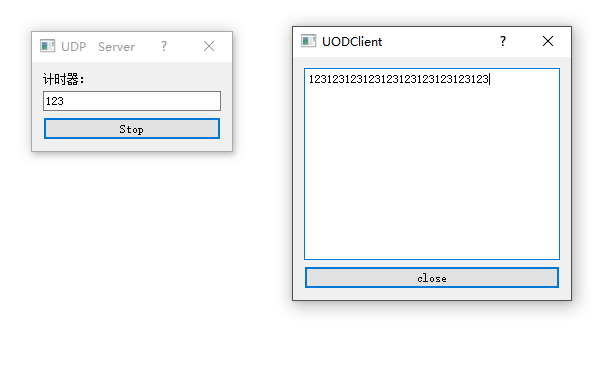
示例截图
服务器代码
.h
#ifndef UDPSERVER_H

#define UDPSERVER_H

#include <QDialog>

#include <QLabel>

#include <QLineEdit>

#include <QPushButton>

#include <QVBoxLayout>

#include <QUdpSocket>

#include <QTimer>

class UdpServer : public QDialog

{

    Q_OBJECT

public:

    UdpServer(QWidget *parent = 0);

    ~UdpServer();

public slots:

    void StartBtnClicked();

    void timeout();

private:

    QLabel *TimerLabel;

    QLineEdit *TextLineEdit;

    QPushButton *StartBtn;

    QVBoxLayout *mainLayout;

    int port;

    bool isStarted;

    QUdpSocket *udpSocket;

    QTimer *timer;

};

#endif // UDPSERVER_H
.cpp
#include "udpserver.h"

UdpServer::UdpServer(QWidget *parent)

    : QDialog(parent)

{

    setWindowTitle(tr("UDP Server"));

    TimerLabel = new QLabel(tr("计时器:"),this);

    TextLineEdit = new QLineEdit(this);

    StartBtn = new QPushButton(tr("Start"),this);

    mainLayout = new QVBoxLayout(this);

    mainLayout->addWidget(TimerLabel);

    mainLayout->addWidget(TextLineEdit);

    mainLayout->addWidget(StartBtn);

    connect(StartBtn,SIGNAL(clicked(bool)),this,SLOT(StartBtnClicked()));

    port = 5555;

    isStarted = false;

    udpSocket = new QUdpSocket(this);

    timer = new QTimer(this);

    connect(timer,SIGNAL(timeout()),this,SLOT(timeout()));

}

UdpServer::~UdpServer()

{

}

void UdpServer::StartBtnClicked()

{

    if(!isStarted)

    {

        StartBtn->setText("Stop");

        timer->start(1000);

        isStarted = true;

    }

    else

    {

        StartBtn->setText("Start");

        isStarted = false;

        timer->stop();

    }

}

void UdpServer::timeout()

{

    QString msg = TextLineEdit->text();

    int length = 0;

    if(msg =="")

    {

        return;

    }

    if((length = udpSocket->writeDatagram(msg.toLatin1(),msg.length(),QHostAddress::Broadcast,port)) != msg.length())

    {

        return;

    }

}
客户端代码
.h
#ifndef UDPCLIENT_H

#define UDPCLIENT_H

#include <QDialog>

#include <QVBoxLayout>

#include <QTextEdit>

#include <QPushButton>

#include <QUdpSocket>

class UdpClient : public QDialog

{

    Q_OBJECT

public:

    UdpClient(QWidget *parent = 0);

    ~UdpClient();

public slots:

    void CloseBtnClicked();

    void dataReceived();

private:

    QTextEdit *ReceiveTextEdit;

    QPushButton *CloseBtn;

    QVBoxLayout *mainLayout;

    int port;

    QUdpSocket *udpSocket;

};

#endif // UDPCLIENT_H
.cpp
#include "udpclient.h"

#include <QMessageBox>

#include <QHostAddress>

UdpClient::UdpClient(QWidget *parent)

    : QDialog(parent)

{

    setWindowTitle("UODClient");

    ReceiveTextEdit = new QTextEdit(this);

    CloseBtn = new QPushButton("close",this);

    mainLayout = new QVBoxLayout(this);

    mainLayout->addWidget(ReceiveTextEdit);

    mainLayout->addWidget(CloseBtn);

    connect(CloseBtn,SIGNAL(clicked(bool)),this,SLOT(CloseBtnClicked()));

    port = 5555;

    udpSocket = new QUdpSocket(this);

    connect(udpSocket,SIGNAL(readyRead()),this,SLOT(dataReceived()));

    bool result = udpSocket->bind(port);

    if(!result)

    {

        QMessageBox::information(this,"Error","udp socket create error!");

        return;

    }

}

UdpClient::~UdpClient()

{

}

void UdpClient::CloseBtnClicked()

{

    close();

}

void UdpClient::dataReceived()

{

    while (udpSocket->hasPendingDatagrams())

    {

        QByteArray datagram;

        datagram.resize(udpSocket->pendingDatagramSize());

        udpSocket->readDatagram(datagram.data(),datagram.size());

        QString msg = datagram.data();

        ReceiveTextEdit->insertPlainText(msg);

    }

}
工程连接:https://gitee.com/DreamLife-Technology_DreamLife/UDPProject

Qt-网络与通信-UDP网络通讯的更多相关文章
- 网络协议之UDP
前言 TCP协议在不可靠的网络环境上提供了可靠的通信通道,隐藏了大量的底层细节,使应用程序更加简洁.但有些应用并不需要这么高的可靠性,并不需要按序交付,而且TCP为了提高可靠性也增加了延时,在某些对延 ...
- UDP网络程序模型设计
UDP网络程序设计 1. UDP网络编程模型程序初始化 1.1服务器使用的函数 创建socket----->socket 绑定地址-------->bind 接受数据--------> ...
- 37.Qt网络与通信
1 获取本机网络与通信 在网络应用中,经常需要获得本机的主机名.IP地址和硬件地址等网络信息.运用QHostInfo,QNetWorkInterface,QNetworkAddressEntry可获得 ...
- 网络编程 单纯UDP通信
网络编程 单纯UDP通信 1,UDP发送端 2,UDP接收端 UDP发送端: #include <stdio.h> #include <unistd.h> #include & ...
- 网络通信协议、UDP通信、TCP通信
网络通信协议 网络通信协议有很多种,目前应用最广泛的是TCP/IP协议,它是一个包括TCP协议和IP协议,UDP协议和其它一些协议的协议组. IP地址和端口号 目前,IP地址广泛使用的版本是IPv4, ...
- python网络-Socket之udp编程(24)
一.udp简介 udp --- 用户数据报协议,是一个无连接的简单的面向数据报的运输层协议. udp不提供可靠性,它只是把应用程序传给IP层的数据报发送出去,但是并不能保证它们能到达目的地. udp在 ...
- TCP/IP协议网络编程以及UDP和TCP之传输协议
1.什么是TCP/IP协议? 网络编程协议有很多,目前应用最广泛的是TCP/IP协议(Transmission Control Protocal/Internet Protoal 传输控制协议/英特网 ...
- Raknet是一个基于UDP网络传输协议的C++网络库(还有一些其它库,比如nanomsg,fastsocket等等)
Raknet是一个基于UDP网络传输协议的C++网络库,允许程序员在他们自己的程序中实现高效的网络传输服务.通常情况下用于游戏,但也可以用于其它项目. Raknet有以下好处: 高性能 在同一台计算机 ...
- 分布式系统(二) --SOA 以及一些网络通信协议TCP/UDP SYN攻击
SOA(面向服务的架构):Service Oriented Architecture面向服务的架构.也就是把工程拆分成服务层.表现层两个工程.服务层中包含业务逻辑,只需要对外提供服务即可.表现层只需要 ...
随机推荐
- vue - 数据驱动,组件化, 双向绑定原理
1.数据驱动 传统的前端数据交互是用Ajax从服务端获取数据,然后操作DOM来改变视图: Vue.js 是一个提供了 MVVM 风格的双向数据绑定的 Javascript 库,专注于View 层.它让 ...
- 13、SpringBoot-CRUD员工修改操作/删除
对于修改连接的uri 在list.html中 <a class="btn btn-sm btn-primary" th:href="@{/update/} + ...
- master分支合并
一.Sourcetree简单介绍 通过Git可以进行对项目的版本管理,但是如果直接使用Git的软件会比较麻烦,因为是通过一条一条命令进行操作的. Sourcetree则可以与Git结合,提供图形界面 ...
- LeetCode22.括号生成 JavaScript
给出 n 代表生成括号的对数,请你写出一个函数,使其能够生成所有可能的并且有效的括号组合. 例如,给出 n = 3,生成结果为: [ "((()))", "(()())& ...
- OC - 时间日期类NSDate
OC - 时间日期类NSDate //NSDate 时间日期类 NSDate 二进制数据流 { //1.获取当前时间 零时区的时间 //显示的是格林尼治的时间: 年-月-日 时:分:秒:+时区 NSD ...
- 一站式学习Redis 从入门到高可用分布式实践
1:redis 是用c语言来实现的,速度快 持久化 单线程 复杂的数据类型有bitmap和hyperloglog和geo地理信息2:高可用.分布式 v2.8开始支持Redis-Sentinel(哨兵) ...
- UCanCode发布升级E-Form++可视化源码组件库2018全新版 !
2018年. 成都 UCanCode发布升级E-Form++可视化源码组件库2018全新版 ! --- 全面性能提升,UCanCode有史以来最强大的版本发布! E-Form++可视化源码组件库企业版 ...
- Django在windows系统下安装详情
1. Django 下载地址:https://www.djangoproject.com/download/ 2. 解压到跟python安装目录平级目录: 如下图: 3.通过cmd控制台安装djang ...
- morphia 框架 mongodb内嵌查询
mongodb中存储的文档格式如下,实现查询fromdata下did和dvid为指定值的数据 { "_id": { "$oid": "553f4a9f ...
- spring-quartz 定时器 给targetMethod传递参数
今天在做一个项目的时候,要给一个定时器任务的执行方法传递参数,在网上找了一下资料,可以使用arguments参数: <bean id="subsidyJobDetail" ...