
实战WCF中net.tcp和net.msmq绑定协议
平时很少写博文的,以前都是转载其他园友的文章,这几天有时间就自己尝试写一些wcf相关的文章,希望能给有需要的人带来一点帮助吧,水平有限再加上初次动手,写得不好还请多多包含!废话不多说了直接进入正题。
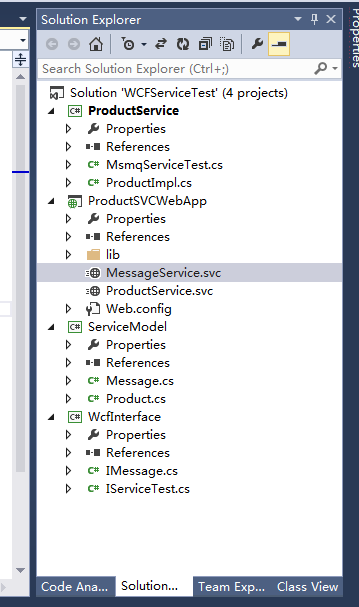
1.首先是项目结构(截图)命名不是很规范——仅自己练手用的
注意:WcfInterface是wcf的服务接口
ProductService是wcf的服务的实现
ProductSVCWebApp服务webapp
productservice.svc通过net.tcp绑定协议对外发布服务
messageservice.svc通过net.msmq绑定协议对外发布服务
主要是通过web.config中的servicemodel配置节点实现,该节点中主要分为3部分完全可通过手工配置:bindings绑定、behaviors行为、services服务配置对外发布的服务终结点endpoint——详情请见以下代码
ServiceModel是相关的数据契约
一、wcfinterface项目是独立的服务契约
1.IMessage服务接口
 using System;

 using System.Collections.Generic;

 using System.Linq;

 using System.Text;

 using System.Threading.Tasks;

 using System.ServiceModel;

 using ServiceModel;

 namespace WcfInterface

 {

     [ServiceContract]

     public interface IMessage

     {

         [OperationContract(IsOneWay=true)]

         void Send(Message log);

     }

 }
IMessage服务接口
2.IServiceTest服务接口
 using ServiceModel;

 using System;

 using System.Collections.Generic;

 using System.Linq;

 using System.ServiceModel;

 using System.Text;

 using System.Threading.Tasks;

 namespace WcfInterface

 {

     [ServiceContract]

     public interface IServiceTest

     {

         [OperationContract]

         int AddProduct(Product product);

         [OperationContract]

         Product GetProductById(int Id);

     }

 }
IServiceTest服务接口
二、ProductService类库
1.IMessage的服务实现
 using ServiceModel;

 using System;

 using System.Collections.Generic;

 using System.Linq;

 using System.Text;

 using System.Threading.Tasks;

 using WcfInterface;

 namespace ProductService

 {

     public class MsmqServiceTest:IMessage

     {

         private static IList<Message> list = new List<Message>();

         public void Send(ServiceModel.Message log)

         {

             list.Add(log);

         }

     }

 }
MsmqServiceTest实现IMessage接口
2.IServiceTest服务
 using System;

 using System.Collections.Generic;

 using System.Linq;

 using System.Text;

 using System.Threading.Tasks;

 using WcfInterface;

 using ServiceModel;

 namespace ProductService

 {

     public class ProductImpl : IServiceTest

     {

         private static  IList<Product> list = new List<Product>();

         public int AddProduct(Product product)

         {

             list.Add(product);

             return ;

         }

         public Product GetProductById(int Id)

         {

             return list.FirstOrDefault(p => p.Id.Equals(Id));

         }

     }

 }
IServiceTest服务契约的实现VProductImpl
三、数据契约类库ServiceModel
 using System;

 using System.Collections.Generic;

 using System.Linq;

 using System.Runtime.Serialization;

 using System.Text;

 using System.Threading.Tasks;

 namespace ServiceModel

 {

     [DataContract]

     public class Product

     {

         [DataMember]

         public int Id { get; set; }

         [DataMember]

         public string Name { get; set; }

         [DataMember]

         public decimal Cost { get; set; }

     }

 }
Product实体
 using System;

 using System.Collections.Generic;

 using System.Linq;

 using System.Text;

 using System.Threading.Tasks;

 using System.Runtime.Serialization;

 namespace ServiceModel

 {

     [DataContract]

    public class Message

     {

         [DataMember]

        public int Id { get; set; }

         [DataMember]

         public string Header { get; set; }

        [DataMember]

         public string Body { get; set; }

     }

 }
Message实体
四、ProductSVCWebapp
productservice.svc服务文件
<%@ ServiceHost Language="C#" Debug="true" Service="ProductService.MsmqServiceTest" %>
messageservice.svc服务文件
<%@ ServiceHost Language="C#" Debug="true" Service="ProductService.MsmqServiceTest" %>
web.config中servicemodel配置
 <system.serviceModel>

     <services>

       <service behaviorConfiguration="endpointbinding" name="ProductService.ProductImpl">

         <endpoint address="net.tcp://localhost/ProductService/ProductService.svc" binding="netTcpBinding" bindingConfiguration="tcpbindingtest" name="netTcpBinding_IServiceTest" contract="WcfInterface.IServiceTest"></endpoint>

       </service>

       <service name="ProductService.MsmqServiceTest">

         <endpoint address="net.msmq://localhost/private/ProductService/ProductService.svc" binding="netMsmqBinding" contract="WcfInterface.IMessage" bindingConfiguration="msmqbindingtest" name="netMsmqBinding_IMessage"></endpoint>

       </service>

     </services>

     <bindings>

       <netMsmqBinding>

         <binding name="msmqbindingtest" exactlyOnce="false">

           <security>

             <transport msmqProtectionLevel="None" msmqAuthenticationMode="None"/>

             <message clientCredentialType="None"/>

           </security>

         </binding>

       </netMsmqBinding>

       <netTcpBinding>

         <binding name="tcpbindingtest">

           <security mode="None">

             <transport protectionLevel="None" clientCredentialType="None"></transport>

             <message clientCredentialType="None" />

           </security>

         </binding>

       </netTcpBinding>

     </bindings>

     <behaviors>

       <serviceBehaviors>

         <behavior name="endpointbinding">

           <serviceMetadata httpGetEnabled="true" httpsGetEnabled="true" />

           <serviceDebug includeExceptionDetailInFaults="false" />

         </behavior>

         <behavior name="">

           <serviceMetadata httpGetEnabled="true" httpsGetEnabled="true" />

           <serviceDebug includeExceptionDetailInFaults="false" />

         </behavior>

       </serviceBehaviors>

     </behaviors>

     <serviceHostingEnvironment aspNetCompatibilityEnabled="true"

       multipleSiteBindingsEnabled="true" />

   </system.serviceModel>
web.config
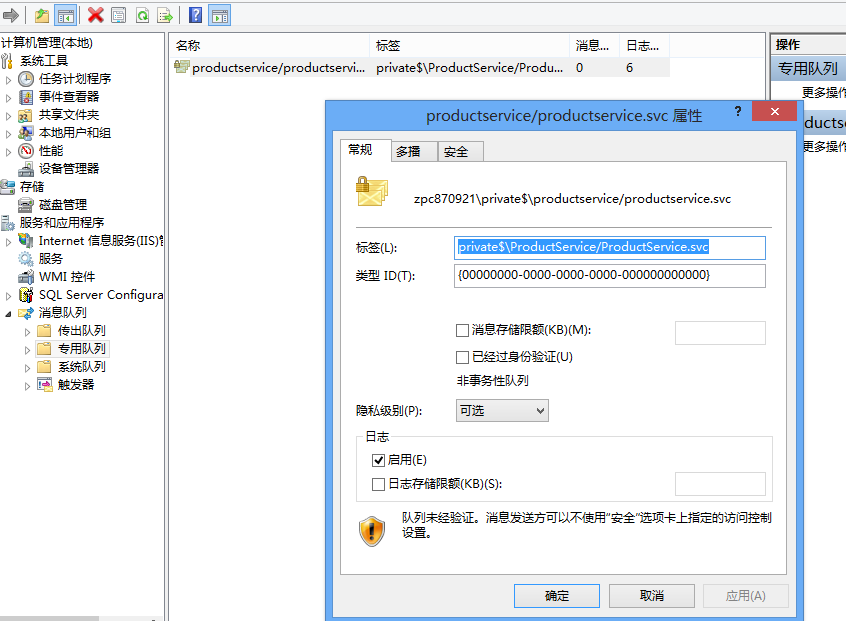
由于我这里用到msmq,建立私有的消息队列名字和address="net.msmq://localhost/private/ProductService/ProductService.svc"里的名字对应起来
五、部署——IIS承载服务及iis中相关配置
服务app以及web站点都需要启用协议net.msmq/net.tcp,另外服务还需要添加msmq和tcp的绑定
我的iis配置ProductService服务建立在defaultweb site下默认的defaultweb site已经添加了net.tcp和net.msmq,http绑定等
testwcf部署web站点

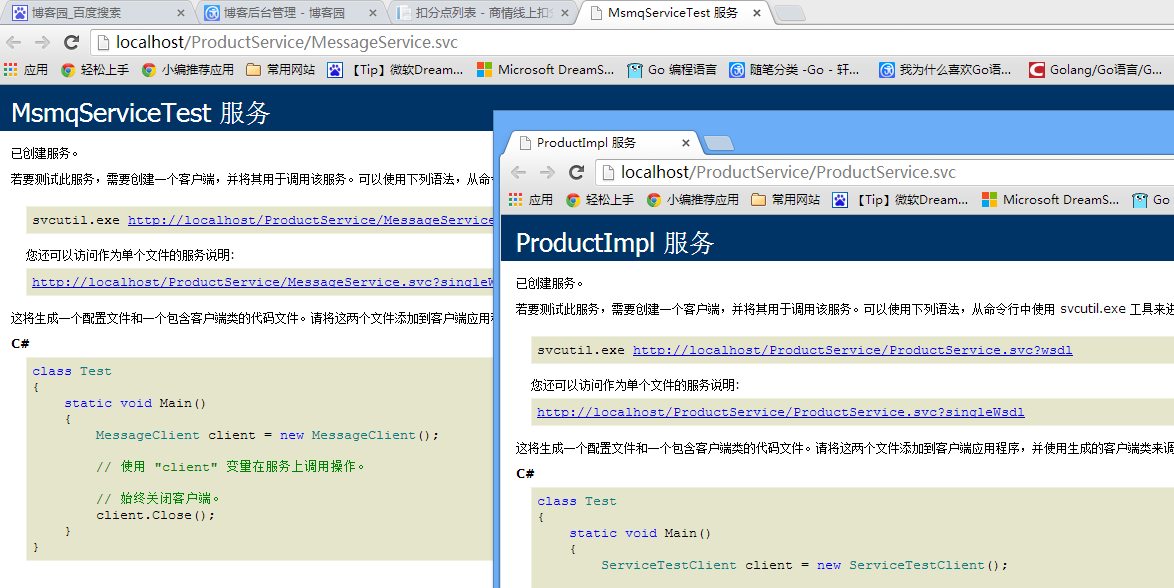
服务运行截图:
本人QQ:443813032 如有不妥之处,还请指正,互相学习,共同进步!!!近期研究go lang中,go将超过java,c成为未来10年最流行的语言,有人说它是20世纪的c语言!希望更多的人加入,一起将go发扬光大!!!
实战WCF中net.tcp和net.msmq绑定协议的更多相关文章
- 跟我一起学WCF(10)——WCF中事务处理
一.引言 好久没更新,总感觉自己欠了什么一样的,所以今天迫不及待地来更新了,因为后面还有好几个系列准备些,还有很多东西需要学习总结的.今天就来介绍下WCF对事务的支持. 二.WCF事务详解 2.1 事 ...
- 基于MSMQ绑定的WCF服务实现总结
一. 创建消息队列 1 1) 创建一个非事物性的私有队列 1 2)设置消息队列访问权限 2 二.创建WCF服务并绑定消息队列 4 1)创建HelloService服务 4 ...
- WCF中事务处理
一.引言 今天来介绍下WCF对事务的支持. 二.WCF事务详解 2.1 事务概念与属性 首先,大家在学习数据库的时候就已经接触到事务这个概念了.所谓事务,它是一个操作序列,这些操作要么都执行,要么都不 ...
- WCF初探-26:WCF中的会话
理解WCF中的会话机制 在WCF应用程序中,会话将一组消息相互关联,从而形成对话.会话”是在两个终结点之间发送的所有消息的一种相互关系.当某个服务协定指定它需要会话时,该协定会指定所有调用(即,支持调 ...
- WCF中常用的binding方式
WCF中常用的binding方式: BasicHttpBinding: 用于把 WCF 服务当作 ASMX Web 服务.用于兼容旧的Web ASMX 服务.WSHttpBinding: 比 Basi ...
- WCF中的标准绑定
使用过WCF的童鞋们都很清楚,绑定是必须的.我将这些绑定总结了下. 一.标准绑定简要说明 1.basicHttpBinding 基于WS-I Basic Profile 1.1 的web服务,所需的. ...
- C# WCF学习笔记(二)终结点地址与WCF寻址(Endpoint Address and WCF Addressing) WCF中的传输协议
URI的全称是 Uniform Rosource Identifire(统一资源标识),它唯一标识一个确定的网绐资源,同时也表示资源所处的位置及访问的方式(资源访问所用的网络协议). 对于Endpoi ...
- [No0000126]SSL/TLS原理详解与WCF中的WS-Security
SSL/TLS作为一种互联网安全加密技术 1. SSL/TLS概览 1.1 整体结构 SSL是一个介于HTTP协议与TCP之间的一个可选层,其位置大致如下: SSL:(Secure Socket La ...
- WCF中常用的binding方式 z
WCF中常用的binding方式: BasicHttpBinding: 用于把 WCF 服务当作 ASMX Web 服务.用于兼容旧的Web ASMX 服务. WSHttpBinding: 比 Bas ...
随机推荐
- docker/qemu中是如何对设备管理的
文件系统中包括实际的磁盘中可读可写的. 容器中看到的设备是啥子呢?--docker qemu也是一样,在qemu中添加一个设备的物理意义是啥子嘛 其实设备也没啥好新奇的,不就是一个普通的文件么,然后在 ...
- 洛谷 [SDOI2015]约数个数和 解题报告
[SDOI2015]约数个数和 题目描述 设\(d(x)\)为\(x\)的约数个数,给定\(N,M\),求$ \sum\limits^N_{i=1}\sum\limits^M_{j=1}d(ij)$ ...
- CentOS ninimal 安装后没有桌面-yellowcong
昨天,安装Centos后,发现没有桌面,主要是没有安装桌面环境导致 的这个问题,我们需要做的第一步是,安装一个桌面(GNOME Desktop,命令:yum groupinstall -y " ...
- bzoj 3771 Triple FFT 生成函数+容斥
Triple Time Limit: 20 Sec Memory Limit: 64 MBSubmit: 847 Solved: 482[Submit][Status][Discuss] Desc ...
- Docker Community Edition for CentOS
Docker CE for CentOS Docker CE for CentOS distribution is the best way to install the Docker platfor ...
- Windows下查看某个端口被哪个服务占用
1.查看某个端口是否被占用 打开命令行,输入:netstat -ano | findstr "3306" 2.查看端口被哪个服务占用 tasklist | findstr “PID ...
- 设备VMnet0上的网络桥接当前未在运行解决办法
问题: 今天把自己的VM从C盘挪到了D盘,然后再open所有VM都会显示网卡无法桥接了 “vmware 没有未桥接的主机网络适配器” 解决办法: 1.关闭所有VM 2.打开 编辑-虚拟网络编辑器,会发 ...
- Jquery 获取checkbox的checked问题以及解决方案
转载自:http://www.cnblogs.com/-run/archive/2011/11/16/2251250.html 这个郁闷了,今天写这个功能的时候发现了问题,上网找了好多资料对照,更加纠 ...
- 解读dbcp自动重连那些事
转载自:http://agapple.iteye.com/blog/791943 可以后另一篇做对比:http://agapple.iteye.com/blog/772507 同样的内容,不同的描述方 ...
- O(n^2)以及O(nlogn)时间复杂度的排序算法
O(n^2)的算法 都是做的升序. 简单选择排序 思路:每次选择还未排序的区间的最小值和未排序区间的第一个值交换. function selectSort(arr){ for(let i = 0; i ...