
实战WCF中net.tcp和net.msmq绑定协议
平时很少写博文的,以前都是转载其他园友的文章,这几天有时间就自己尝试写一些wcf相关的文章,希望能给有需要的人带来一点帮助吧,水平有限再加上初次动手,写得不好还请多多包含!废话不多说了直接进入正题。
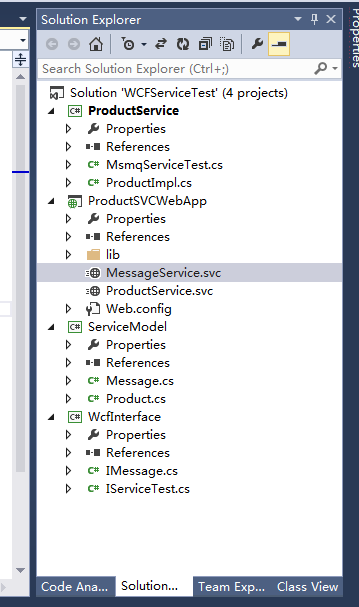
1.首先是项目结构(截图)命名不是很规范——仅自己练手用的
注意:WcfInterface是wcf的服务接口
ProductService是wcf的服务的实现
ProductSVCWebApp服务webapp
productservice.svc通过net.tcp绑定协议对外发布服务
messageservice.svc通过net.msmq绑定协议对外发布服务
主要是通过web.config中的servicemodel配置节点实现,该节点中主要分为3部分完全可通过手工配置:bindings绑定、behaviors行为、services服务配置对外发布的服务终结点endpoint——详情请见以下代码
ServiceModel是相关的数据契约
一、wcfinterface项目是独立的服务契约
1.IMessage服务接口
 using System;

 using System.Collections.Generic;

 using System.Linq;

 using System.Text;

 using System.Threading.Tasks;

 using System.ServiceModel;

 using ServiceModel;

 namespace WcfInterface

 {

     [ServiceContract]

     public interface IMessage

     {

         [OperationContract(IsOneWay=true)]

         void Send(Message log);

     }

 }
IMessage服务接口
2.IServiceTest服务接口
 using ServiceModel;

 using System;

 using System.Collections.Generic;

 using System.Linq;

 using System.ServiceModel;

 using System.Text;

 using System.Threading.Tasks;

 namespace WcfInterface

 {

     [ServiceContract]

     public interface IServiceTest

     {

         [OperationContract]

         int AddProduct(Product product);

         [OperationContract]

         Product GetProductById(int Id);

     }

 }
IServiceTest服务接口
二、ProductService类库
1.IMessage的服务实现
 using ServiceModel;

 using System;

 using System.Collections.Generic;

 using System.Linq;

 using System.Text;

 using System.Threading.Tasks;

 using WcfInterface;

 namespace ProductService

 {

     public class MsmqServiceTest:IMessage

     {

         private static IList<Message> list = new List<Message>();

         public void Send(ServiceModel.Message log)

         {

             list.Add(log);

         }

     }

 }
MsmqServiceTest实现IMessage接口
2.IServiceTest服务
 using System;

 using System.Collections.Generic;

 using System.Linq;

 using System.Text;

 using System.Threading.Tasks;

 using WcfInterface;

 using ServiceModel;

 namespace ProductService

 {

     public class ProductImpl : IServiceTest

     {

         private static  IList<Product> list = new List<Product>();

         public int AddProduct(Product product)

         {

             list.Add(product);

             return ;

         }

         public Product GetProductById(int Id)

         {

             return list.FirstOrDefault(p => p.Id.Equals(Id));

         }

     }

 }
IServiceTest服务契约的实现VProductImpl
三、数据契约类库ServiceModel
 using System;

 using System.Collections.Generic;

 using System.Linq;

 using System.Runtime.Serialization;

 using System.Text;

 using System.Threading.Tasks;

 namespace ServiceModel

 {

     [DataContract]

     public class Product

     {

         [DataMember]

         public int Id { get; set; }

         [DataMember]

         public string Name { get; set; }

         [DataMember]

         public decimal Cost { get; set; }

     }

 }
Product实体
 using System;

 using System.Collections.Generic;

 using System.Linq;

 using System.Text;

 using System.Threading.Tasks;

 using System.Runtime.Serialization;

 namespace ServiceModel

 {

     [DataContract]

    public class Message

     {

         [DataMember]

        public int Id { get; set; }

         [DataMember]

         public string Header { get; set; }

        [DataMember]

         public string Body { get; set; }

     }

 }
Message实体
四、ProductSVCWebapp
productservice.svc服务文件
<%@ ServiceHost Language="C#" Debug="true" Service="ProductService.MsmqServiceTest" %>
messageservice.svc服务文件
<%@ ServiceHost Language="C#" Debug="true" Service="ProductService.MsmqServiceTest" %>
web.config中servicemodel配置
 <system.serviceModel>

     <services>

       <service behaviorConfiguration="endpointbinding" name="ProductService.ProductImpl">

         <endpoint address="net.tcp://localhost/ProductService/ProductService.svc" binding="netTcpBinding" bindingConfiguration="tcpbindingtest" name="netTcpBinding_IServiceTest" contract="WcfInterface.IServiceTest"></endpoint>

       </service>

       <service name="ProductService.MsmqServiceTest">

         <endpoint address="net.msmq://localhost/private/ProductService/ProductService.svc" binding="netMsmqBinding" contract="WcfInterface.IMessage" bindingConfiguration="msmqbindingtest" name="netMsmqBinding_IMessage"></endpoint>

       </service>

     </services>

     <bindings>

       <netMsmqBinding>

         <binding name="msmqbindingtest" exactlyOnce="false">

           <security>

             <transport msmqProtectionLevel="None" msmqAuthenticationMode="None"/>

             <message clientCredentialType="None"/>

           </security>

         </binding>

       </netMsmqBinding>

       <netTcpBinding>

         <binding name="tcpbindingtest">

           <security mode="None">

             <transport protectionLevel="None" clientCredentialType="None"></transport>

             <message clientCredentialType="None" />

           </security>

         </binding>

       </netTcpBinding>

     </bindings>

     <behaviors>

       <serviceBehaviors>

         <behavior name="endpointbinding">

           <serviceMetadata httpGetEnabled="true" httpsGetEnabled="true" />

           <serviceDebug includeExceptionDetailInFaults="false" />

         </behavior>

         <behavior name="">

           <serviceMetadata httpGetEnabled="true" httpsGetEnabled="true" />

           <serviceDebug includeExceptionDetailInFaults="false" />

         </behavior>

       </serviceBehaviors>

     </behaviors>

     <serviceHostingEnvironment aspNetCompatibilityEnabled="true"

       multipleSiteBindingsEnabled="true" />

   </system.serviceModel>
web.config
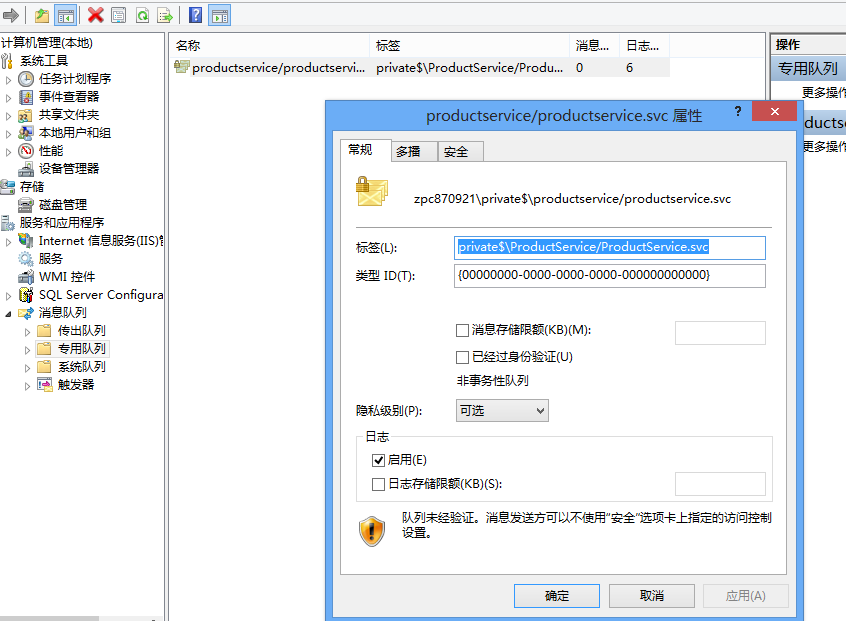
由于我这里用到msmq,建立私有的消息队列名字和address="net.msmq://localhost/private/ProductService/ProductService.svc"里的名字对应起来
五、部署——IIS承载服务及iis中相关配置
服务app以及web站点都需要启用协议net.msmq/net.tcp,另外服务还需要添加msmq和tcp的绑定
我的iis配置ProductService服务建立在defaultweb site下默认的defaultweb site已经添加了net.tcp和net.msmq,http绑定等
testwcf部署web站点

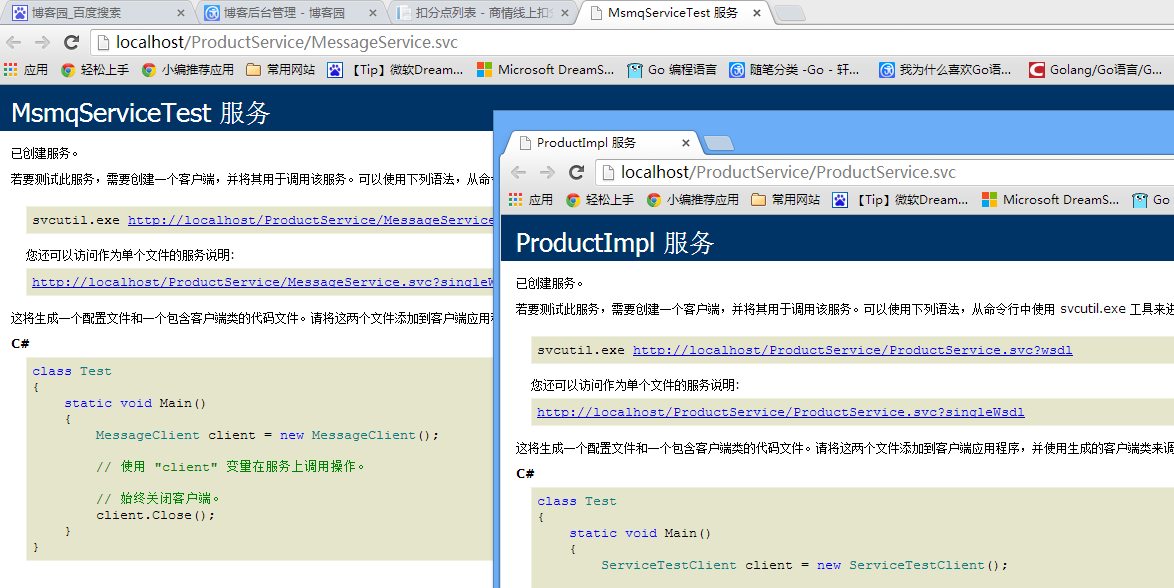
服务运行截图:
本人QQ:443813032 如有不妥之处,还请指正,互相学习,共同进步!!!近期研究go lang中,go将超过java,c成为未来10年最流行的语言,有人说它是20世纪的c语言!希望更多的人加入,一起将go发扬光大!!!
实战WCF中net.tcp和net.msmq绑定协议的更多相关文章
- 跟我一起学WCF(10)——WCF中事务处理
一.引言 好久没更新,总感觉自己欠了什么一样的,所以今天迫不及待地来更新了,因为后面还有好几个系列准备些,还有很多东西需要学习总结的.今天就来介绍下WCF对事务的支持. 二.WCF事务详解 2.1 事 ...
- 基于MSMQ绑定的WCF服务实现总结
一. 创建消息队列 1 1) 创建一个非事物性的私有队列 1 2)设置消息队列访问权限 2 二.创建WCF服务并绑定消息队列 4 1)创建HelloService服务 4 ...
- WCF中事务处理
一.引言 今天来介绍下WCF对事务的支持. 二.WCF事务详解 2.1 事务概念与属性 首先,大家在学习数据库的时候就已经接触到事务这个概念了.所谓事务,它是一个操作序列,这些操作要么都执行,要么都不 ...
- WCF初探-26:WCF中的会话
理解WCF中的会话机制 在WCF应用程序中,会话将一组消息相互关联,从而形成对话.会话”是在两个终结点之间发送的所有消息的一种相互关系.当某个服务协定指定它需要会话时,该协定会指定所有调用(即,支持调 ...
- WCF中常用的binding方式
WCF中常用的binding方式: BasicHttpBinding: 用于把 WCF 服务当作 ASMX Web 服务.用于兼容旧的Web ASMX 服务.WSHttpBinding: 比 Basi ...
- WCF中的标准绑定
使用过WCF的童鞋们都很清楚,绑定是必须的.我将这些绑定总结了下. 一.标准绑定简要说明 1.basicHttpBinding 基于WS-I Basic Profile 1.1 的web服务,所需的. ...
- C# WCF学习笔记(二)终结点地址与WCF寻址(Endpoint Address and WCF Addressing) WCF中的传输协议
URI的全称是 Uniform Rosource Identifire(统一资源标识),它唯一标识一个确定的网绐资源,同时也表示资源所处的位置及访问的方式(资源访问所用的网络协议). 对于Endpoi ...
- [No0000126]SSL/TLS原理详解与WCF中的WS-Security
SSL/TLS作为一种互联网安全加密技术 1. SSL/TLS概览 1.1 整体结构 SSL是一个介于HTTP协议与TCP之间的一个可选层,其位置大致如下: SSL:(Secure Socket La ...
- WCF中常用的binding方式 z
WCF中常用的binding方式: BasicHttpBinding: 用于把 WCF 服务当作 ASMX Web 服务.用于兼容旧的Web ASMX 服务. WSHttpBinding: 比 Bas ...
随机推荐
- Python执行Linux系统命令的4种方法
http://www.jb51.net/article/56490.htm (1) os.system 仅仅在一个子终端运行系统命令,而不能获取命令执行后的返回信息 复制代码代码如下: system( ...
- Dubbo 的 Helloworld
前提条件 安装好了 ZooKeeper 作为注册中心 服务端 <?xml version="1.0" encoding="UTF-8"?> < ...
- hdu 1695 GCD (欧拉函数+容斥原理)
GCD Time Limit: 6000/3000 MS (Java/Others) Memory Limit: 32768/32768 K (Java/Others)Total Submiss ...
- AGC017D Game on Tree(树型博弈)
题目大意: 给出一棵n个结点的树,以1为根,每次可以切掉除1外的任意一棵子树,最后不能切的话就为负,问是先手必胜还是后手必胜. 题解: 首先我们考虑利用SG函数解决这个问题 如果1结点有多个子节点,那 ...
- linux bash学习(一)
1.请你以 read 指令的用途,撰写一个 script ,他可以让使用者输入:1. first name 与 2. last name, 最后并且在屏幕上显示:“Your full name is: ...
- Could not resolve com.android.support:multidex:1.0.2
http://blog.csdn.net/goodlixueyong/article/details/50992835
- Hbase写入量大导致region过大无法split问题
最近在线上往hbase导数据,因为hbase写入能力比较强,没有太在意写的问题.让业务方进行历史数据的导入操作,中间发现一个问题,写入速度太快,并且业务数据集中到其中一个region,这个region ...
- 在Maven中怎么配置外部Jar
转摘自:http://liugang594.iteye.com/blog/1677712 假设我们有一个Maven的project,其中有些Jar包不是来自Maven库的,是存在本地的某些Jar文件, ...
- MySQL 配置文件及逻辑架构
配置文件: linux:/etc/my.cnf 默认配置文件:/usr/share/mysql/my-default.cnf windows:my.ini 主要日志文件: 二 ...
- C#与数据库的连接的三种方式
学习了.net的知识从C#一直到MVC,我一直觉得基础很重要,最近有复习一下数据库连接的三种方式 1 返回结果集的一张表 public static DataTable ExecuteDataTabl ...