
Android——Intent,Bundle
- Intent——切换activity
intent.setClass(first.this,second.class);

startActivity(intent);
- Bundle——切换时数据传递
//跳转

Intent intent = new Intent();

//跳转时数据传输

Bundle bundle = new Bundle();

intent.setClass(MainActivity.this, SecondActivity.class);

bundle.putString("message", str);

intent.putExtras(bundle);

startActivity(intent);
Bundle bundle = this.getIntent().getExtras();
String message = bundle.getString("message");
Source Code:
package com.example.intent;

import android.os.Bundle;

import android.R.string;

import android.app.Activity;

import android.content.Intent;

import android.view.Menu;

import android.view.View;

import android.view.View.OnClickListener;

import android.widget.Button;

import android.widget.EditText;

public class MainActivity extends Activity {

    private EditText myText;

    @Override

    protected void onCreate(Bundle savedInstanceState) {

        super.onCreate(savedInstanceState);

        setContentView(R.layout.activity_main);

        Button button = (Button)findViewById(R.id.button1);

        myText = (EditText)findViewById(R.id.editText1);

        button.setOnClickListener(new OnClickListener() {

            @Override

            public void onClick(View v) {

                String str = myText.getText().toString();

                //跳转

                Intent intent = new Intent();

                //跳转时数据传输

                Bundle bundle = new Bundle();

                intent.setClass(MainActivity.this, SecondActivity.class);

                bundle.putString("message", str);

                intent.putExtras(bundle);

                startActivity(intent);

            }

        });

    }

}
MainActiviy.java
package com.example.intent;

import android.app.Activity;

import android.os.Bundle;

import android.view.TextureView;

import android.widget.TextView;

public class SecondActivity extends Activity{

    @Override

    public void onCreate(Bundle savedInstanceState) {

        super.onCreate(savedInstanceState);

        setContentView(R.layout.second);

        Bundle bundle = this.getIntent().getExtras();

        String message = bundle.getString("message");

        TextView myText = (TextView)findViewById(R.id.textView2);

        myText.setText(message);

    }

}
SecondAcitivity.java
<?xml version="1.0" encoding="utf-8"?>

<resources>

    <string name="app_name">Intent</string>

    <string name="action_settings">Settings</string>

    <string name="hello_world">Hello world!</string>

    <string name="Tree">TreeDream</string>

</resources>
strings.xml
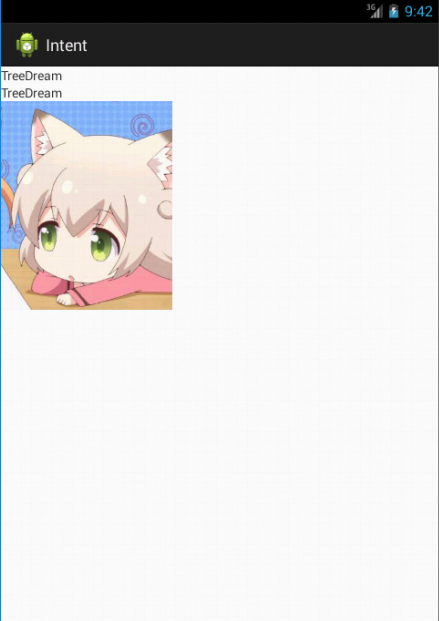
<?xml version="1.0" encoding="utf-8"?>

<LinearLayout xmlns:android="http://schemas.android.com/apk/res/android"

    android:layout_width="match_parent"

    android:layout_height="match_parent"

    android:orientation="vertical" >

    <TextView

        android:id="@+id/textView1"

        android:layout_width="wrap_content"

        android:layout_height="wrap_content"

        android:text="@string/Tree" />

    <TextView

           android:id="@+id/textView2"

        android:layout_width="wrap_content"

        android:layout_height="wrap_content"

        android:text="TextView" />

    <ImageView

        android:id="@+id/imageView1"

        android:layout_width="wrap_content"

        android:layout_height="wrap_content"

        android:src="@drawable/x" />

</LinearLayout>
second.xml
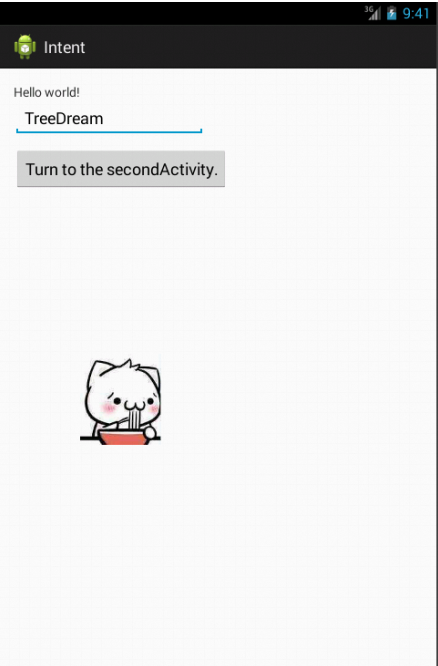
<RelativeLayout xmlns:android="http://schemas.android.com/apk/res/android"

    xmlns:tools="http://schemas.android.com/tools"

    android:layout_width="match_parent"

    android:layout_height="match_parent"

    android:paddingBottom="@dimen/activity_vertical_margin"

    android:paddingLeft="@dimen/activity_horizontal_margin"

    android:paddingRight="@dimen/activity_horizontal_margin"

    android:paddingTop="@dimen/activity_vertical_margin"

    tools:context=".MainActivity" >

    <TextView

        android:id="@+id/textView1"

        android:layout_width="wrap_content"

        android:layout_height="wrap_content"

        android:text="@string/hello_world" />

    <Button

        android:id="@+id/button1"

        android:layout_width="wrap_content"

        android:layout_height="wrap_content"

        android:layout_alignLeft="@+id/textView1"

        android:layout_below="@+id/textView1"

        android:layout_marginTop="51dp"

        android:text="Turn to the secondActivity." />

    <EditText

        android:id="@+id/editText1"

        android:layout_width="wrap_content"

        android:layout_height="wrap_content"

        android:layout_alignParentLeft="true"

        android:layout_below="@+id/textView1"

        android:ems="10" >

        <requestFocus />

    </EditText>

    <ImageView

        android:id="@+id/imageView1"

        android:layout_width="wrap_content"

        android:layout_height="wrap_content"

        android:layout_centerVertical="true"

        android:layout_toRightOf="@+id/textView1"

        android:src="@drawable/y" />

</RelativeLayout>
activity_main.xml
Android——Intent,Bundle的更多相关文章
- Android中Bundle和Intent的区别
Bundle的作用,以及和Intent的区别: 一.Bundle: A mapping from String values to various Parcelable types 键值对的集合 类继 ...
- android Intent介绍
Android中提供了Intent机制来协助应用间的交互与通讯,Intent负责对应用中一次操作的动作.动作涉及数据.附加数据进行描述,Android则根据此Intent的描述,负责找到对应的组件,将 ...
- Android Intent (可通过URL启动 Activity)
Intent分为两大类: (1)显性的(Explicit) (2)隐性的(Implicit) 对于隐性意图,在某些时候, 应用程序只是想启动具有某种特征的组件, 并不想和某个特定的组件耦合. 使用In ...
- Android之Bundle类
API文档说明 1.介绍 用于不同Activity之间的数据传递 1.重要方法 clear():清除此Bundle映射中的所有保存的数据. clone():克隆当前Bundle containsKey ...
- android Intent.ACTION_SEND
ACTION_SEND intent 可以把自己的应用添加到系统的发送(分享)列表中. <intent-filter> <action android:name="andr ...
- [Android] Intent详解
[转]http://www.cnblogs.com/engine1984/p/4146621.html [正文] Intent组件虽然不是四大组件,但却是连接四大组件的桥梁,学习好这个知识,也非常的重 ...
- 关于android中Bundle的使用
1.Android using Bundle for sharing variables 注:android中使用Bundle来共享变量,下例中Activity1和Activity2通过bundl ...
- Android Intent 用法全面总结
[代码全屏查看]-Android Intent 用法全面总结 // [1].[代码] 调用拨号程序 跳至 [1] [2] [3] [4] [5] [6] [7] [8] [9] [10] [11] / ...
- 【转】Android Intent Action 大全
String ADD_SHORTCUT_ACTION 动作:在系统中添加一个快捷方式.. “android.intent.action.ADD_SHORTCUT” String ALL_APPS_AC ...
随机推荐
- 小众软件:Windows 下优化软件推荐—— Dism++ | 强迫症晚期患者福音 - 少数派
Windows 下优化软件推荐—— Dism++ | 强迫症晚期患者福音 - 少数派 https://sspai.com/post/41992 官方网站免费下载
- docker jenkins安装(一)
https://hub.docker.com/r/jenkins/jenkins jenkins的docker官方镜像地址 https://jenkins.io/ jenkins官方网站 环境: ...
- PIXI 太空玉兔游戏(6)
想法来源 出于练习看到这篇文章 没有什么难度 效果如下,接下来会用pixijs讲解如何实现 创建应用及舞台 HTML部分只创建标签引入 pixi.min.js 即可: <script ...
- [转]NetCat简介
NetCat是一个非常简单的Unix工具,可以读.写TCP或UDP网络连接(network connection).它被设计成一个可靠的后端(back-end) 工具,能被其它的程序或脚本直接地或容易 ...
- Angular4+NodeJs+MySQL 入门-04 接口调用类
上一篇文章说一下,后台接口的创建,这篇说一下如果调用接口. 创建一个目录helpers 此目录下有三个文件分别是 ApiClient.ts.clientMiddleware.ts.Core.ts,前面 ...
- Java中的时间处理
日期时间组件使用 java.util.Date:实现类,其对象具有时间.日期组件.java.util.Calendar:抽象类,其对象具有时间.日期组件.java.sql.Date:实现类,其对象具有 ...
- 1、java线程模型
要了解多线程,先需要把java线程模型搞清楚,否则有时候很难理清楚一个问题. 硬件多线程: 物理机硬件的并发问题跟jvm中的情况有不少相似之处,物理机的并发处理方案对于虚拟机也有相当大的参考意义.在买 ...
- ife task0003学习笔记(一):JavaScript作用域
在学习JavaScript作用域概念之前,首先要明白几个概念:执行环境.变量对象.作用域链. 一.JavaScript执行环境(execution context): 在<Professiona ...
- 腾讯云CDB的AI技术实践:CDBTune
欢迎大家前往腾讯云+社区,获取更多腾讯海量技术实践干货哦~ 作者:邢家树,高级工程师,目前就职于腾讯TEG基础架构部数据库团队.腾讯数据库技术团队维护MySQL内核分支TXSQL,100%兼容原生My ...
- FZU 2213——Common Tangents——————【两个圆的切线个数】
Problem 2213 Common Tangents Accept: 7 Submit: 8Time Limit: 1000 mSec Memory Limit : 32768 KB ...