
C# winform间窗体传值简单Demo
form1是用来接收值的
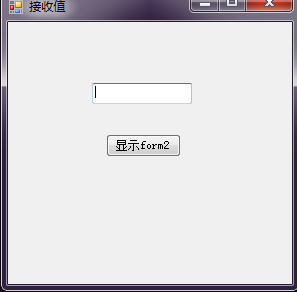
 using System;

 using System.Collections.Generic;

 using System.ComponentModel;

 using System.Data;

 using System.Drawing;

 using System.Linq;

 using System.Text;

 using System.Threading.Tasks;

 using System.Windows.Forms;

 namespace DelegateEventDemo

 {

     public partial class Form1 : Form

     {

         public Form1()

         {

             InitializeComponent();

         }

         Form2 f2 = new Form2();

         private void Form1_Load(object sender, EventArgs e)

         {

             this.Text = "接收值";

             f2.DelegateEvent += new Form2.DelegateMessage(GetText);

         }

         private void GetText(string msg)

         {

             this.textBox1.Text = msg;

         }

         private void button1_Click(object sender, EventArgs e)

         {

             f2.Show();

         }

     }

 }
Form1代码
form2是发送值的
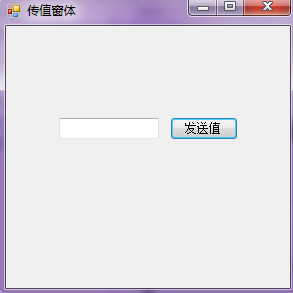
 using System;

 using System.Collections.Generic;

 using System.ComponentModel;

 using System.Data;

 using System.Drawing;

 using System.Linq;

 using System.Text;

 using System.Threading.Tasks;

 using System.Windows.Forms;

 namespace DelegateEventDemo

 {

     public partial class Form2 : Form

     {

         public Form2()

         {

             InitializeComponent();

         }

         public delegate void DelegateMessage(string txt);//声明一个委托

         public event DelegateMessage DelegateEvent;//声明委事件

         private void Form2_Load(object sender, EventArgs e)

         {

             this.Text = "传值窗体";

         }

         private void button1_Click(object sender, EventArgs e)

         {

             DelegateEvent(this.textBox1.Text);

         }

     }

 }
From2代码
1.委托是把方法当做参数一样使用
a)委托(int a,int b)
方法(int a,int b)
{
return a+b;
}
委托 委托对象=new 委托(方法名);
int sum=委托对象(5,3);
结果 sum=8;
C# winform间窗体传值简单Demo的更多相关文章
- CS中委托与事件的使用-以Winform中跨窗体传值为例
场景 委托(Delegate) 委托是对存有某个方法的引用的一种引用类型变量. 委托特别用于实现事件和回调方法. 声明委托 public delegate int MyDelegate (string ...
- WinForm跨窗体传值
1.另一窗体建公共变量listdataRow public List<DataGridViewRow> listdataRow = new List<DataGridViewRow& ...
- Winform 委托窗体传值
有窗体Form1和窗体Form2,单击Form1按钮弹出Form2,单击Form2吧Form2的textBox控件文本传给Form1的label控件. 窗体1里: 实例化Form2,注册Form2的事 ...
- C#winform跨窗体传值和调用事件的办法
有三个窗体,分别是Main主窗体,Form1窗体1,From2窗体2,其中Main是主窗体,Form1窗体1是一个消息通知窗体,Form2窗体2主窗体的一个子窗体,程序启动时,消息框窗体1弹出,通过消 ...
- C#学习笔记(31)——委托窗体传值
说明(2017-11-23 19:31:53): 1. 关于委托和窗体传值,一下午在网上查阅了大量资料,基本就是CSDN的论坛和博客园的文章,大家都在举例子,烧水.鸿门宴,看评论说还看到过沙漠足球的, ...
- WinForm窗体间如何传值
窗体间传递数据,无论是父窗体操作子窗体,还是子窗体操作符窗体,有以下几种方式: 公共静态变量: 使用共有属性: 使用委托与事件: 通过构造函数把主窗体传递到从窗体中: 一.通过静态变量 特点:传值是双 ...
- WinForm窗体间如何传值的几种方法
(转) 窗体间传递数据,无论是父窗体操作子窗体,还是子窗体操作符窗体,有以下几种方式: 公共静态变量: 使用共有属性: 使用委托与事件: 通过构造函数把主窗体传递到从窗体中: 一.通过静态变量 特点: ...
- c# winform 窗体间的传值
1.父窗体传值给子窗体: 1) 父窗体: FrmXX frm = ,); frm.Owner = this; frm.ShowDialog(); 子窗体: ; public FrmXX(int ty, ...
- .NET开发之窗体间的传值转化操作
DOTNET开发之窗体间的传值转化操作 好想把自己最近学到的知识写下来和各位朋友分享,也希望得到大神的指点.今天终于知道自己要写点什么,就是关于WPF开发时简单的界面传值与简单操作. 涉及两个界面:一 ...
随机推荐
- [C#] 等待启动的进程执行完毕
有能有时候我们启动了一个进程,必须等到此进程执行完毕,或是,一段时间, 关闭进程后再继续往下走. Example sample1 等待应用程序执行完毕 //等待应用程序执行完毕 private voi ...
- Java微信公众平台开发(一)--接入微信公众平台
转自:http://www.cuiyongzhi.com/post/38.html (一)接入流程解析 在我们的开发过程中无论如何最好的参考工具当然是我们的官方文档了:http://mp.weixin ...
- python子进程模块subprocess详解与应用实例 之三
二.应用实例解析 2.1 subprocess模块的使用 1. subprocess.call >>> subprocess.call(["ls", " ...
- 刷题向》POJ2823 单调队列裸题(<不会做,请自裁>系列)
最近BZOJ炸了,而我的博客上又更新了一些基本知识,所以这里刷一些裸题,用以丰富知识性博客 POJ2823 滑动的窗口 这是一道经典的单调队题,我记得我刚学的时候就是用这道题作为单调队列的例题,算 ...
- 485. Max Consecutive Ones最长的连续1的个数
[抄题]: Given a binary array, find the maximum number of consecutive 1s in this array. Example 1: Inpu ...
- 532. K-diff Pairs in an Array绝对值差为k的数组对
[抄题]: Given an array of integers and an integer k, you need to find the number of unique k-diff pair ...
- 使用原理视角看 Git
1. Git 的玩法 欢迎来到 Coding 技术小馆,我叫谭贺贺,目前我在 Coding.net 主要负责 WebIDE 与 Codeinsight 的开发.我今天带来的主要内容是 Git 的原理与 ...
- Spring Boot 启动失败,描述/Description: Cannot determine embedded database driver class for database type NONE
异常截图====> 快速解决方式==> 在SpringBoot的启动类上面添加注解:@EnableAutoConfiguration(exclude={DataSourceAutoConf ...
- spark源码阅读之network(2)
在上节的解读中发现spark的源码中大量使用netty的buffer部分的api,该节将看到netty核心的一些api,比如channel: 在Netty里,Channel是通讯的载体(网络套接字或组 ...
- C++函数后面加throw关键字简记
看代码时候看到fun() throw()的用法,找到一篇blog解释很简单,如下: C++函数后面加关键字throw(something)限制,是对这个函数的异常安全性作出限制. 举例及解释如下: v ...