
Flask之endpoint错误View function mapping is overwriting an existing endpoint function: ***
最近在学习Flask, 其中遇到了一个错误, 发现这个问题和Flask, 路由有关系, 所以就记了下来
错误代码:
from flask import Flask, render_template, request, redirect, session

app = Flask(__name__)

app.secret_key = "wang"

def confirm(func):  # 负责确认用户有没有登陆的装饰器

    def inner(*args, **kwargs):

        if session.get("auth"):  # 判断用户的session中没有user

            return func(*args, **kwargs)  # 通过

        else:  # 跳转登陆页面, 并携带当前访问的url

            next_url = request.path

            return redirect(f'/login?next={next_url}')

    return inner

@app.route('/')

@confirm

def index():

    return "index"

@app.route('/login', methods=["GET", "POST"])

def login():

    msg = ''

    if request.method == "POST":

        auth = request.form.get('auth')

        if auth == 'wang':  # 简单认证

            session['auth'] = auth  # 设置session

            next_url = request.args.get('next_url', "/")  # 获取用户之前访问的url, 进行跳转

            return redirect(next_url)

        else:

            msg = "口令错误"

    return render_template("login.html", msg=msg)

@app.route('/shopping')

@confirm

def shopping():

    return "购物"

if __name__ == '__main__':

    app.run(debug=True)
报错:
诡异的是, 我不启动flask, 只是解释一遍, 也会报错
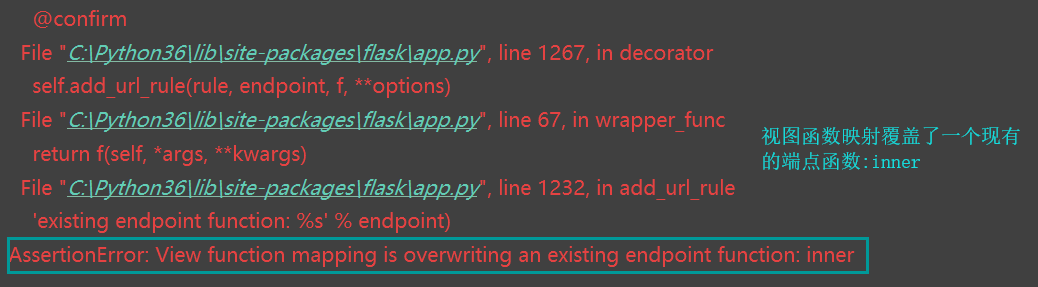
报错分析
分析报错提示
根据报错的提示, 说我的代码存在重复的函数, 然后就开始检查我的函数, 发现函数名并没有重复, 难道就这样排除函数名的嫌疑吗? NONONO
可能是我对装饰器的理解还不够, 找了好半天才发现这个问题, 原来是装饰器的原因, 为什么呢?
为什么说是因为装饰器, 才会出现函数覆盖的问题?
再来温习一下装饰器
def test(func):  # 装饰器

    """

    test

    :param func: 其实就是要装饰的函数

    :return:

    """

    def inner(*args, **kwargs):

        start = time.time()

        func(*args, **kwargs)

        end = time.time()

        return end - start

    return inner

def outer(a, b):  # 被装饰的函数

    for n in range(a):

        for j in range(b):

            a = n + j

outer = test(outer)  # 这里因为使用语法糖, 这种方式更能表示出问题

# 在这一步可以说对outer进行了重新的赋值,

# 现在outer就等于test这个函数的返回值, 并且将原本的outer传了进去

# test函数的返回值是一个inner

# 在inner函数中就包括了原本的outer, 并且这个outer在inner函数中是加了括号的

# 也就是说, 当inner被调用的时候, 原本的outer也会被调用

# 刚刚说test函数返回的是inner函数

# 当outer = test(outer)执行完之后, 新的outer就等于inner了

# 到这只需要知道现在的outer一样不是原来的outer了, 而是指向了inner, 在inner内部调用原来的outer

print(outer(100000, 200))  # 这是调用函数, 不能改变这个调用方式
再来看flask中app.route中的源码
flask使用装饰器来绑定一个url和视图的关系, 带着遇到的问题来看看源码中做了些什么
@app.route('/shopping')     ①

@confirm

def shopping():

    return "购物"

def route(self, rule, **options):

    def decorator(f):

        endpoint = options.pop('endpoint', None)  # ② 从参数中弹出endpoint, 没有的话就是None

        self.add_url_rule(rule, endpoint, f, **options) # ③

        return f

@setupmethod

    def add_url_rule(self, rule, endpoint=None, view_func=None,

                     provide_automatic_options=None, **options):

        if endpoint is None:  # ④ endpoint如果为None

            endpoint = _endpoint_from_view_func(view_func)  # ⑤ 将试图视图函数传了进去, 返回视图函数的__name__

def _endpoint_from_view_func(view_func):

    assert view_func is not None, 'expected view func if endpoint is not provided.'

    ~~~~ 其实执行的就是 inner.__name__, 因为此时的shopping, 已经不是原来的shopping, 而是装饰器内部返回的函数

    return view_func.__name__  # ⑥ 因为没有定义endpoint, 所以在返回视图函数的名字
看上面的代码应该就知道是哪里重复了, 原因就是, 都是调用了inner.__name__, 所以拿到的endpoint值都是一样的才会提示重复了函数名
就是源码中的这一段抛出的异常
        if view_func is not None:

            old_func = self.view_functions.get(endpoint)

            if old_func is not None and old_func != view_func:

                raise AssertionError('View function mapping is overwriting an '

                                     'existing endpoint function: %s' % endpoint)

            self.view_functions[endpoint] = view_func
如何解决这个问题
方法一
根据源码可以看看出是因为, endpoint重复才导致的, 当endpoint为None时, 就会调用inner.__name__, 就会导致重复, 那么我们不让endpoint为空, 那就不会调用inner.__name__了
也就不会出现重复的问题了.
现在来看看在哪里可以定义这个endpoint.
还记得源码中是从哪里去endpoint的吗, 是不是下面这里
endpoint = options.pop('endpoint', None)
是从option中pop出去的, option就是route(self, rule, **options)的一个形参, 也就是说你在使用app.route的时候可以传一个endpoint的键值对
只需要对两个视图的route装饰器添加一个参数即可, 看代码吧, 红色部分是新添加的
@app.route('/', endpoint="index")

@confirm

def index():

    return "index"

@app.route('/shopping', endpoint="shopping")

@confirm

def shopping():

    return "购物"
这样既可以了, 不信你试试
方法二
使用functools.wraps
不太推荐这种方法, 因为flask本身的不稳定性, 所以要尽可能的少用第三方的模块, 下面只提供了代码
def confirm(func, *args, **kwargs):

    @wraps(func)

    def inner():

        if session.get('user'):

            return func(*args, **kwargs)

        else:

            next_url= request.path

            return redirect('/login?next=%s' % (next_url,))

    return inner
Flask之endpoint错误View function mapping is overwriting an existing endpoint function: ***的更多相关文章
- 【Flask】报错解决方法:AssertionError: View function mapping is overwriting an existing endpoint function: main.user
运行Flask时出现了一个错误, AssertionError: View function mapping is overwriting an existing endpoint function: ...
- AssertionError: View function mapping is overwriting an existing endpoint function: insertCase
首先,理解这个错误是什么意思,以及出现的原因: 使用Flask定义URL的时候,如果出现"AssertionError: View function mapping is overwriti ...
- AssertionError: View function mapping is overwriting an existing endpoint function: admin.main
刚才给views.py文件添加了一个路由地址: @admin_view.route('/test', methods=["get", "post"]) @log ...
- "AssertionError: View function mapping is overwriting an existing endpoint function"如何解决
使用Flask定义URL的时候,如果出现"AssertionError: View function mapping is overwriting an existing endpoint ...
- STM32F4 Alternate function mapping
#define GPIO_AF0_MCO // MCO (MCO1 and MCO2) Alternate Function mapping #define GPIO_AF0_RTC_50Hz // ...
- jFinal中报对应模型不存在的错误(The Table mapping of model: demo.User not exists)
jFinal中报对应模型不存在的错误(The Table mapping of model: demo.User not exists) 贴出错误: java.lang.RuntimeExceptio ...
- d3.svg.line()错误:TypeError: d3.svg.line is not a function
var line_generator= d3.svg.line() .x(function (d,i) { return i; }) .y(function (d) { return d; }) 错误 ...
- Function Programming - First Class(一等公民function)
引用外界一等公民的定义:"在JavaScript世界中函数却是一等公民,它不仅拥有一切传统函数的使用方式(声明和调用),而且可以做到像简单值一样赋值.传参.返回,这样的函数也称之为第一级函数 ...
- javax.websocket.DeploymentException: Multiple Endpoints may not be deployed to the same path [/websocket/{sid}] : existing endpoint was class com.sanyi.qibaobusiness.framework.webSocket.WebSocketServe
报错: javax.websocket.DeploymentException: Multiple Endpoints may not be deployed to the same path [/w ...
随机推荐
- linux C之判断文件或目录是否存在 access函数
http://blog.sina.com.cn/s/blog_6a1837e90100uh5d.html access():判断是否具有存取文件的权限 相关函数 stat,open,chmod, ...
- RBG灯颜色渐变(颜色要尽可能多)程序分析
相信很多调过RBG灯的朋友都是通过分别改变R.B.G的占空比来改变颜色的,但是不是发现了一个问题,那就是不管怎样调都很难实现几十种颜色的变化,一般只有是7种颜色的渐变.下面给朋友们分享一个可以实现几十 ...
- file中mkdirs和mkdir的区别-文件上传
mkdirs()可以建立多级文件夹, mkdir()只会建立一级的文件夹, 如下: new File("/tmp/one/two/three").mkdirs(); 执行后, 会建 ...
- 关于Cookie 的HttpOnly属性(java/web操作cookie+Tomcat操作jsessionid)
关于Cookie的其它只是不在累述.本文主要讲讲自己在项目中遇到的cookie的HttpOnly属性问题 Cookie的HttpOnly属性说明 cookie的两个新的属性secure和Httponl ...
- 不要在using语句中调用WCF服务
如果你调用WCF服务时,像下面的代码这样在using语句中进行调用,需要注意一个问题. using (CnblogsWcfClient client = new CnblogsWcfClient()) ...
- Docker 容器中相关软件安装
Docker 容器中相关软件安装 1.介绍 我们从docker hub下载的centos镜像是只有很少的命令,需要单独安装我们所需的相关软件. 2.安装软件 安装yum-utils软件包 该软件包是辅 ...
- php文件编程
一:文件常见操作 流的概念:当数据从程序(内存)->文件(磁盘),我们称为输出流,当数据从文件(磁盘)->程序(内存),我们称为输入流 1,获取文件信息 <?php //打开文件 f ...
- js alert 封装 layui
方式一: var aaa = function(){ function _alert(aa){ layer.msg(aa, { time: 2000, //2s后自动关闭 alert("最高 ...
- Windows 系统 Unicode 文件名操作(新建、重命名、枚举、复制)全攻略
常见的那些文件操作函数都不支持,于是为了达到目的,需要各种方法配合,应该是不如其他语言方便.我只是想看看Perl到底是否适合做这件事,于是折腾了一回. 文件的建立: 模块:Win32 Code: [全 ...
- Python:dict字典
#字典dict------->唯一的映射类型 1.数据类型的划分 数据类型划分为可变数据类型和不可变数据类型. 不可变数据类型:tupe(元组).bool.int.str 可 ...