
Android-Dialog风格Activity开发
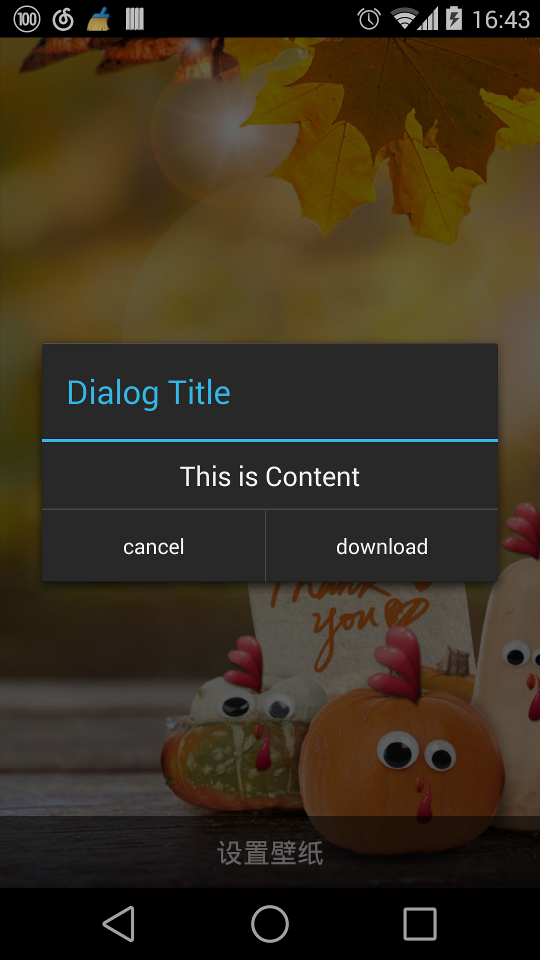
1.设置窗口风格 :
①在Manifest中设置主题属性android:theme="@android:style/Theme.Dialog",或者 Theme.Holo.Dialog.
②在Activity的onCreate方法中设置,必须在setContentView之前调用setTheme(android.R.style.Theme_Holo_Dialog)
使用Theme.Holo.Dialog为Android 4.X风格,效果较佳;而Theme.Dialog风格是2.X风格,较为落伍.
2.设置布局属性:
在调整界面的过程中,会发现Dialog风格的Activity和AlertDialog界面效果相差较大,这主要是因为AlertDialog使用了特性的属性.
例如:
Button风格 : style="?android:attr/buttonBarButtonStyle"
Button外层Layout风格 : style="?android:attr/buttonBarStyle"
水平分割线 : android:background="?android:attr/dividerHorizontal"
内容字体字号 : android:textAppearance="?android:attr/textAppearanceMedium"
以下是样例:
<?xml version="1.0" encoding="utf-8"?><LinearLayout xmlns:android="http://schemas.android.com/apk/res/android"

    android:layout_width="match_parent"

    android:layout_height="match_parent"

    android:gravity="center_horizontal"

    android:orientation="vertical" >

    <TextView

        android:id="@+id/live_wallpaper_dialog_content"

        android:layout_width="wrap_content"

        android:layout_height="wrap_content"

        android:layout_marginBottom="5dp"

        android:layout_marginTop="5dp"

        android:gravity="center_vertical|center_horizontal"

        android:text="This is Content"

        android:textAppearance="?android:attr/textAppearanceMedium" />

    <View

        android:layout_width="match_parent"

        android:layout_height="1dp"

        android:background="?android:attr/dividerHorizontal" />

    <LinearLayout

        style="?android:attr/buttonBarStyle"

        android:layout_width="match_parent"

        android:layout_height="wrap_content"

        android:measureWithLargestChild="true" >

        <Button

            android:id="@+id/live_wallpaper_dialog_cancel"

            style="?android:attr/buttonBarButtonStyle"

            android:layout_width="wrap_content"

            android:layout_height="wrap_content"

            android:layout_weight="1"

            android:text="cancel" />

        <Button

            android:id="@+id/live_wallpaper_dialog_download"

            style="?android:attr/buttonBarButtonStyle"

            android:layout_width="wrap_content"

            android:layout_height="wrap_content"

            android:layout_weight="1"

            android:text="download" />

    </LinearLayout>

</LinearLayout>

3.如何设置点击空白处不退出Activity :
AlertDialog是设置setCanceledOnTouchOutside(false)来实现的.
而Activity是通过设置setFinishOnTouchOutside(false);来达到效果.
Android-Dialog风格Activity开发的更多相关文章
- Android四种Activity的加载模式(转)
建议首先阅读下面两篇文章,这样才可以更好的理解Activity的加载模式: Android的进程,线程模型: http://www.cnblogs.com/ghj1976/archive/2011/0 ...
- Android四种Activity的加载模式
建议首先阅读下面两篇文章,这样才可以更好的理解Activity的加载模式: Android的进程,线程模型 http://www.cnblogs.com/ghj1976/archive/2011/04 ...
- Android 如何利用Activity的Dialog风格完成弹出框设计
在我们使用Dialog时,如果需要用到很多自己设计的控件,虽然可以让弹出框显示出我们需要的界面,但却无法找到地方完成控制代码的编写,如何解决这个问题呢,我们可以将Activity伪装成Dialog弹出 ...
- 【转载】Android Metro风格的Launcher开发系列第二篇
前言: 各位小伙伴们请原谅我隔了这么久才开始写这一系列的第二篇博客,没办法忙新产品发布,好了废话不说了,先回顾一下:在我的上一篇博客Android Metro风格的Launcher开发系列第一篇写了如 ...
- Android Metro风格的Launcher开发系列第三篇
前言: 各位小伙伴,又到了每周更新文章了时候了,本来是周日能发出来呢,这不是赶上清明节吗,女王大人发话了,清明节前两天半陪她玩,只留给我周一下午半天时间写博客,哪里有女王哪里就有压迫呀有木有!好了闲话 ...
- android dialog,popupwindow,toast窗口的添加机制
Dialog 窗口添加机制 代码示例 首先举两个例子: 例子1 在Activity中 @OnClick(R.id.but) void onClick() { Log.d("LiaBin&qu ...
- Android 面试题--Activity
1.什么是 Activity?Activity是Android组件中最基本也是最为常见用的四大组件(Activity,Service服务,Content Provider内容提供,BroadcastR ...
- Android系统Google Maps开发实例浅析
Google Map(谷歌地图)是Google公司提供的电子地图服务.包括了三种视图:矢量地图.卫星图片.地形地图.对于Android系统来说,可以利用Google提供的地图服务来开发自己的一些应用. ...
- Android 编码风格规范,很赞哦
1. 前言 这份文档参考了 Google Java 编程风格规范和 Google 官方 Android 编码风格规范.该文档仅供参考,只要形成一个统一的风格,见量知其意就可. 1.1 术语说明 在本文 ...
随机推荐
- php获取两个日期之间的所有日期
function getDates($start, $end) { $dt_start = strtotime($start); $dt_end = strtotime($end); do{ echo ...
- PHP超全局变量$_ENV详解,及$_ENV为空的可能原因
PHP中的$_ENV存储了一些系统的环境变量,因为牵扯到实际的操作系统,所以不可能给出$_ENV的完整列表. $_ENV为空的可能原因: 你的php.ini的variables_order值为&qu ...
- 水晶报表导出完美EXCEL表格
水晶报表自带的导出Excel不太完美(这一点与SQL的SSRS相比就差太远了),导出的文件没有网格线,而且非常容易出现跨行跨列的现象,要做一个符合要求的报表还真要花不少的时间与精力去调试. 下面我简单 ...
- RequireJs 入门
官网:http://www.requirejs.cn/ 使用方法: 1.引入require.js 可以在底部引入: <script type="text/javascript" ...
- Jenkins任务优先分配到原来的执行节点上
Jenkins一般部署采用master-salve架构,这样可以同时构建多个任务. jenkins任务构建时默认使用第一次随机分配的机器,这样可以增量拉取代码,减少gitlab或者github的负担. ...
- C++之类静态成员变量和静态成员函数
1.静态成员变量必须在类外初始化 2.静态成员变量在类中不占内存字节: 3.静态成员变量,被所有的类对象共 享 class G {public: static int a; //静态成员变量 int ...
- Python中调用其他程序的方式
前言 在Python中,可以方便地使用os模块来运行其他脚本或者程序,这样就可以在脚本中直接使用其他脚本或程序提供的功能,而不必再次编写实现该功能的代码.为了更好地控制运行的进程, 可以使用win32 ...
- Excel 对应.xml/.ftl 配置(中爆导出范文)
<?xml version="1.0"?><Workbook xmlns="urn:schemas-microsoft-com:office:sprea ...
- 【重点突破】—— 当better-scroll 遇见Vue
前言:在学习黄轶老师的<Vue.js高仿饿了么外卖App>课程中接触到了better-scroll第三方JavaScript组件库,这是黄轶老师自己基于iscroll重写的库.这里结合黄轶 ...
- vue 项目中 自定义 webpack 的 配置文件(webpack.config.babel.js)
webpack.config.babel.js,这样命名是想让webpack在编译的时候自动识别es6的语法,现在貌似不需要这样命名了,之前用webpack1.x的时候貌似是需要的 let path ...