
iOS_多线程(一)
– 充分发挥多核处理器优势,将不同线程任务分配给不同的处理器,真正进入“并行运算”状态
– 共享资源的“争夺”
– 从第二个线程开始都是512KB
– 这些数值不能通过编译器开关或线程API函数更改
iOS的三种多线程技术
以下两点是苹果专门开发的“并发”技术,使得程序员可以不再去 关心线程的具体使用问题
• NSThread:
– 优点:NSThread 比其他两个轻量级,使用简单
– 缺点:需要自己管理线程的生命周期、线程同步、加锁、睡眠以 及唤醒等。线程同步对数据的加锁会有一定的系统开销
• NSOperation:
– 不需要关心线程管理,数据同步的事情,可以把精力放在自己需要执行的操作上
– NSOperation是面向对象的 • GCD:
#import "ViewController.h"

@interface ViewController ()

{

    NSUInteger _tickets;//总票数

}

@property (weak, nonatomic) IBOutlet UITextView *textView;

@end

@implementation ViewController

- (void)viewDidLoad {

    [super viewDidLoad];

    self.textView.text = @"";

    self.textView.layoutManager.allowsNonContiguousLayout = NO;

    //初始化总票数

    _tickets = ;

    //创建线程,并启动线程

    //1.售票线程1

    NSThread *thread1 = [[NSThread alloc]initWithTarget:self selector:@selector(threadSellMethod) object:nil];

    //设置线程的名字

    [thread1 setName:@"售票线程-1"];

    //启动线程

    [thread1 start];

    //2.售票线程2

    NSThread *thread2 = [[NSThread alloc]initWithTarget:self selector:@selector(threadSellMethod) object:nil];

    //设置线程的名字

    [thread2 setName:@"售票线程-2"];

    //启动线程

    [thread2 start];

}

/**

 *  更新UI

 */

-(void)appendTextView:(NSString *)text

{

    //1.获取textView中已有的内容

    NSMutableString *string = [[NSMutableString alloc]initWithString:self.textView.text];

    NSRange range = NSMakeRange(string.length, );

    //2.追加新的内容并显示

    [string appendString:[NSString stringWithFormat:@"%@\n",text]];

    [self.textView setText:string];

    //3.滚动视图

    [self.textView scrollRangeToVisible:range];

}

/**

 *  线程执行的方法-售票

 */

-(void)threadSellMethod

{

    while (YES)

    {

        //判断是否有剩余票数

        if (_tickets >  )

        {

            //1.更新UI

            NSString *info = [NSString stringWithFormat:@"总票数:%ld,当前线程:%@",_tickets,[[NSThread currentThread]name]];

            [self performSelectorOnMainThread:@selector(appendTextView:) withObject:info waitUntilDone:YES];

            //2.售票

            _tickets--;

            //3.模拟休息时间

            if ([[[NSThread currentThread]name] isEqualToString:@"售票进程-1"])

            {

                [NSThread sleepForTimeInterval:0.3f];

            }

            else

            {

                [NSThread sleepForTimeInterval:0.2f];

            }

        }

        else

        {

            //1.更新UI

            NSString *info = [NSString stringWithFormat:@"已无剩余票数,当前线程:%@",[[NSThread currentThread]name] ];

            [self performSelectorOnMainThread:@selector(appendTextView:) withObject:info waitUntilDone:YES];

            //2.退出线程

            break;

        }

    }

}

@end
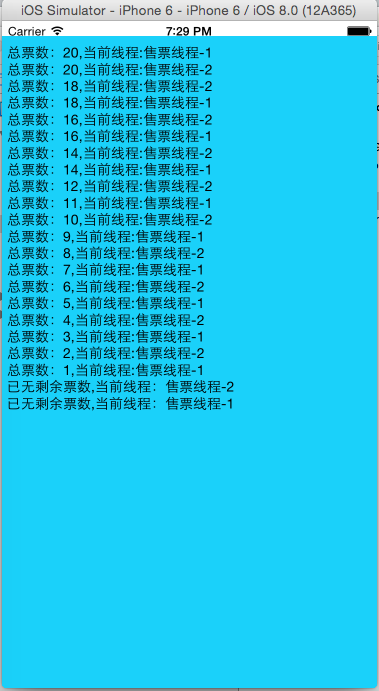
//NSThread的实例方法创建多线程
//1.售票线程1

    NSThread *thread1 = [[NSThread alloc]initWithTarget:self selector:@selector(threadSellMethod) object:nil];

    //设置线程的名字

    [thread1 setName:@"售票线程-1"];

    //启动线程

    [thread1 start];
//等效于:

 //NSThread的类方法创建多线程
[NSThread detachNewThreadSelector:@selector(threadSellMethod) toTarget:self withObject:@"售票线程-1"];
#import "ViewController.h"

@interface ViewController ()

{

    NSUInteger _tickets;//总票数

}

@property (weak, nonatomic) IBOutlet UITextView *textView;

//@property(strong,nonatomic)NSLock *lock;

//@property(strong,nonatomic)NSCondition *condition;

@end

@implementation ViewController

- (void)viewDidLoad {

    [super viewDidLoad];

    self.textView.text = @"";

    self.textView.layoutManager.allowsNonContiguousLayout = NO;

    //初始化总票数

    _tickets = ;

    //创建线程锁

//    self.lock = [[NSLock alloc]init];

//    self.condition = [[NSCondition alloc]init];

    //创建线程,并启动线程

    //1.售票线程1

    NSThread *thread1 = [[NSThread alloc]initWithTarget:self selector:@selector(threadSellMethod) object:nil];

    //设置线程的名字

    [thread1 setName:@"售票线程-1"];

    //启动线程

    [thread1 start];

    //2.售票线程2

    NSThread *thread2 = [[NSThread alloc]initWithTarget:self selector:@selector(threadSellMethod) object:nil];

    //设置线程的名字

    [thread2 setName:@"售票线程-2"];

    //启动线程

    [thread2 start];

}

/**

 *  更新UI

 */

-(void)appendTextView:(NSString *)text

{

    //1.获取textView中已有的内容

    NSMutableString *string = [[NSMutableString alloc]initWithString:self.textView.text];

    NSRange range = NSMakeRange(string.length, );

    //2.追加新的内容并显示

    [string appendString:[NSString stringWithFormat:@"%@\n",text]];

    [self.textView setText:string];

    //3.滚动视图

    [self.textView scrollRangeToVisible:range];

}

/**

 *  线程执行的方法-售票

 */

-(void)threadSellMethod

{

    while (YES)

    {

        //判断是否有剩余票数

        if (_tickets >  )

        {

            /**

             *  加锁应该是在有竞争资源的地方

             */

            //访问竞争资源前进行加锁

//            [self.lock lock];

//            [self.condition lock];

            /**

             *  需要同步的代码块放入synchronized块中

             */

            @synchronized(self)

            {

                @autoreleasepool

                {

                    //1.更新UI

                    NSString *info = [NSString stringWithFormat:@"总票数:%ld,当前线程:%@",_tickets,[[NSThread currentThread]name]];

                    [self performSelectorOnMainThread:@selector(appendTextView:) withObject:info waitUntilDone:YES];

                    //2.售票

                    _tickets--;

                }

            }

            //访问完竞争资源后进行解锁

//            [self.condition unlock];

//            [self.lock unlock];

            //3.模拟休息时间

            if ([[[NSThread currentThread]name] isEqualToString:@"售票进程-1"])

            {

                [NSThread sleepForTimeInterval:0.3f];

            }

            else

            {

                [NSThread sleepForTimeInterval:0.2f];

            }

        }

        else

        {

            //1.更新UI

            NSString *info = [NSString stringWithFormat:@"已无剩余票数,当前线程:%@",[[NSThread currentThread]name] ];

            [self performSelectorOnMainThread:@selector(appendTextView:) withObject:info waitUntilDone:YES];

            //2.退出线程

            break;

        }

    }

}

@end
运行结果如图:
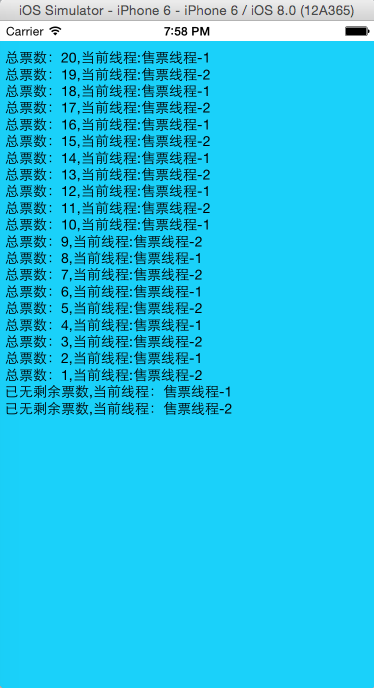
现在再来看运行结果,发现上个案例中出现的问题已经解决了,每个只会出现一次。
再来看程序的代码部分,案例中使用了给出了三个解决同步安全问题的办法,代码中标出的蓝色部分是NSLock、NSCondition的用法,案例中使用的是@synchronized同步块。解决同步安全的逻辑思路“加锁”->"修改"->"解锁"。当当前线程正在使用竞争资源时,阻挡掉其他线程对竞争资源的访问。
在程序中还用到了内存管理的自动释放池。
• Objective-C可以凭借@autoreleasepool使用内存资源,并需要时回收资源
- (void)setMaxConcurrentOperationCount:(NSInteger)cnt;
在此案例中,不多做解释,直接代码搞起。
第一个案例通过NSInvocationOperation类进行实现
#import "ViewController.h"

@interface ViewController ()

{

    NSUInteger _tickets;

}

@property (weak, nonatomic) IBOutlet UITextView *textView;

@end

@implementation ViewController

- (void)viewDidLoad {

    [super viewDidLoad];

    //初始化票数

    _tickets = ;

    //设置textView

    self.textView.text = @"";

    //创建NSOperation

    NSInvocationOperation *operation1 = [[NSInvocationOperation alloc]initWithTarget:self selector:@selector(operationSaleMethod:) object:@"售票线程-1"];

    NSInvocationOperation *operation2 = [[NSInvocationOperation alloc]initWithTarget:self selector:@selector(operationSaleMethod:) object:@"售票线程-2"];

    //创建NSOperationQueue队列

    NSOperationQueue *queue = [[NSOperationQueue alloc]init];

    //为operation1添加依赖,只有当operation2执行完毕时,operation1才能执行。

    [operation1 addDependency:operation2];

    //将operation加入到队列

    [queue addOperation:operation1];

    [queue addOperation:operation2];

}

#pragma mark - 更新UI

-(void)appendTextView:(NSString *)text

{

    //1.先获取原先的内容

    NSMutableString *str = [[NSMutableString alloc]initWithString:self.textView.text];

    NSRange range = NSMakeRange(str.length, );

    //2.追加新的内容

    [str appendString:[NSString stringWithFormat:@"%@\n",text]];

    [self.textView setText:str];

    //3.滚动textView

    [self.textView scrollRangeToVisible:range];

}

#pragma mark - 线程调用的方法

-(void)operationSaleMethod:(NSString *)name

{

    while (YES)

    {

        //判断剩余票数

        if (_tickets > )

        {

            @synchronized(self)

            {

                NSString *info = [NSString stringWithFormat:@"总的票数:%ld,当前线程:%@",_tickets,name];

                [[NSOperationQueue mainQueue]addOperationWithBlock:^{

                    [self appendTextView:info];

                }];

                //卖票

                _tickets--;

            }

            if ([name isEqualToString:@"售票线程-1"])

            {

                //线程休眠

                [NSThread sleepForTimeInterval:0.3f];

            }

            else

            {

                [NSThread sleepForTimeInterval:0.2f];

            }

        }

        else

        {

            //更新UI

            NSString *info = [NSString stringWithFormat:@"已无剩余票数,当前线程:%@",name];

            [[NSOperationQueue mainQueue]addOperationWithBlock:^{

                [self appendTextView:info];

            }];

            break;

        }

    }

}

@end
案例2:通过NSBlockOperation进行实现
#import "ViewController.h"

@interface ViewController ()

{

    NSInteger _tickets;

}

@property (weak, nonatomic) IBOutlet UITextView *textView;

@end

@implementation ViewController

- (void)viewDidLoad {

    [super viewDidLoad];

    //初始化票数

    _tickets = ;

    //设置textView

    self.textView.text = @"";

    //创建NSOperationQueue队列

    NSOperationQueue *queue = [[NSOperationQueue alloc]init];

    //设置线程的并行数量

    [queue setMaxConcurrentOperationCount:];

    //在队列中添加block的operation

    [queue addOperationWithBlock:^{

        [self operationSaleMethod:@"售票线程-1"];

    }];

    [queue addOperationWithBlock:^{

        [self operationSaleMethod:@"售票线程-2"];

    }];

    NSBlockOperation *operation = [NSBlockOperation blockOperationWithBlock:^{

        [self operationSaleMethod:@"售票线程-3"];

    }];

    //将线程添加到队列中去

    [queue addOperation:operation];

}

#pragma mark - 更新UI

-(void)appendTextView:(NSString *)text

{

    //1.先获取原先的内容

    NSMutableString *str = [[NSMutableString alloc]initWithString:self.textView.text];

    NSRange range = NSMakeRange(str.length, );

    //2.追加新的内容

    [str appendString:[NSString stringWithFormat:@"%@\n",text]];

    [self.textView setText:str];

    //3.滚动textView

    [self.textView scrollRangeToVisible:range];

}

#pragma mark - 线程调用的方法

-(void)operationSaleMethod:(NSString *)name

{

    while (YES)

    {

        //判断剩余票数

        if (_tickets > )

        {

            @synchronized(self)

            {

                NSString *info = [NSString stringWithFormat:@"总的票数:%ld,当前线程:%@",_tickets,name];

                [[NSOperationQueue mainQueue]addOperationWithBlock:^{

                    [self appendTextView:info];

                }];

                //卖票

                _tickets--;

            }

            if ([name isEqualToString:@"售票线程-1"])

            {

                //线程休眠

                [NSThread sleepForTimeInterval:0.3f];

            }

            else

            {

                [NSThread sleepForTimeInterval:0.2f];

            }

        }

        else

        {

            //更新UI

            NSString *info = [NSString stringWithFormat:@"已无剩余票数,当前线程:%@",name];

            [[NSOperationQueue mainQueue]addOperationWithBlock:^{

                [self appendTextView:info];

            }];

            break;

        }

    }

}

@end
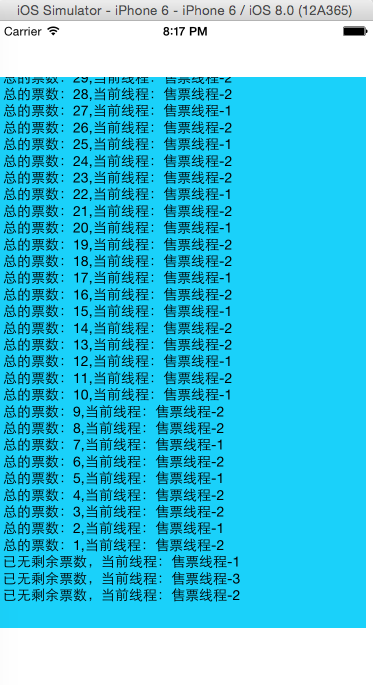
以上两个案例的运行结果一致,如图:
如果希望当其中一个线程执行完毕之后,再去执行另外一个线程,可以通过依赖来实现。
//为operation1添加依赖,只有当operation2执行完毕时,operation1才能执行。

    [operation1 addDependency:operation2];
累死啦!!
iOS_多线程(一)的更多相关文章
- IOS_多线程_ASI_AFN_UIWebView
H:/0730/00_多线程4票种_ViewController.h // // ViewController.h // 卖票 // // Created by apple on 13-7-29. / ...
- IOS_多线程
苹果的Cocoa框架支持的多线程机制有三中NSThread.GCD.NSOperation. NSThread:是官方推荐的也是最主要的线程创建方式,可是须要开发这自己去管理线程的生命周期比如线程同步 ...
- iOS_多线程(二)
上篇中我们分享了NSThread.NSOperation&NSOperationQueue如何实现多线程,今天我们来看下第三种实现多线程的方式:GCD(Grand Central Dispat ...
- Python中的多进程与多线程(一)
一.背景 最近在Azkaban的测试工作中,需要在测试环境下模拟线上的调度场景进行稳定性测试.故而重操python旧业,通过python编写脚本来构造类似线上的调度场景.在脚本编写过程中,碰到这样一个 ...
- 多线程爬坑之路-Thread和Runable源码解析之基本方法的运用实例
前面的文章:多线程爬坑之路-学习多线程需要来了解哪些东西?(concurrent并发包的数据结构和线程池,Locks锁,Atomic原子类) 多线程爬坑之路-Thread和Runable源码解析 前面 ...
- 多线程爬坑之路-学习多线程需要来了解哪些东西?(concurrent并发包的数据结构和线程池,Locks锁,Atomic原子类)
前言:刚学习了一段机器学习,最近需要重构一个java项目,又赶过来看java.大多是线程代码,没办法,那时候总觉得多线程是个很难的部分很少用到,所以一直没下决定去啃,那些年留下的坑,总是得自己跳进去填 ...
- Java多线程
一:进程与线程 概述:几乎任何的操作系统都支持运行多个任务,通常一个任务就是一个程序,而一个程序就是一个进程.当一个进程运行时,内部可能包括多个顺序执行流,每个顺序执行流就是一个线程. 进程:进程 ...
- .NET基础拾遗(5)多线程开发基础
Index : (1)类型语法.内存管理和垃圾回收基础 (2)面向对象的实现和异常的处理基础 (3)字符串.集合与流 (4)委托.事件.反射与特性 (5)多线程开发基础 (6)ADO.NET与数据库开 ...
- Java多线程基础——对象及变量并发访问
在开发多线程程序时,如果每个多线程处理的事情都不一样,每个线程都互不相关,这样开发的过程就非常轻松.但是很多时候,多线程程序是需要同时访问同一个对象,或者变量的.这样,一个对象同时被多个线程访问,会出 ...
随机推荐
- (转)Resources和AssetBundle(新旧版)学习
Resources: Resources的缺点:1.与显示Inspector上直接引用相比,Resources使用不方便. 2.不管你Resources上的资源是否调用了,当你发布的时候, ...
- ios -过滤字符串特殊字符
//过滤 " [ ] " + (NSString *)onTwoCommseparatedWithString:(NSString *)string { //过滤 " [ ...
- windows 下XAMPP 使用Nginx替代apache作为服务器
说实话, 在windows下使用Nginx 着实有点不太方便, 但因项目需求, 又不想换系统(虽然可以搞个虚拟机玩), 只能用Nginx了 好了, 不多说了. 开始... 首先我用的是xampp包(A ...
- LeetCode: Validate Binary Search Tree [098]
[题目] Given a binary tree, determine if it is a valid binary search tree (BST). Assume a BST is defin ...
- java打开后台程序
try{ String cmds="java -version"; Process p = Runtime.getRuntime().exec(cmds); int exitVal ...
- mysql的体系架构和存储引擎
定义数据库和实例 数据库:物理操作系统的文件或其他形式文件类型的集合.在mysql数据库中,数据库文件可以是frm.MYD.MYI.ibd结尾的文件. 实例:MySQL数据库由后台线程以及一个共享内存 ...
- Python成长之路(常用模块学习)
Python 拥有很多很强大的模块 主要写一下常用的几个吧 大概就是这些内容了 模块介绍 time &datetime模块 random os sys shutil json & pi ...
- 从ELK到EFK
https://my.oschina.net/itshare/blog/775466 http://blog.51cto.com/467754239/1700828 日志系统 日志就是程序产生的,遵循 ...
- js实现文字列表无缝向上滚动
body{font-size:12px} #demo{overflow:hidden; height:80px; width:280px; margin:90px auto; position:rel ...
- springMVC中使用 RequestBody 及 Ajax POST请求 415 (Unsupported Media Type)
使用POST请求的时候一直报错: Ajax 未设置 contentType 时会报 415 . 后台 RequestBody 承接前台参数,故对参数data的要求为“必传”“JSON”,否则会报40 ...