
京东口红top 30分析
一、抓取商品id
分析网页源码,发现所有id都是在class=“gl-item”的标签里,可以利用bs4的select方法查找标签,获取id:
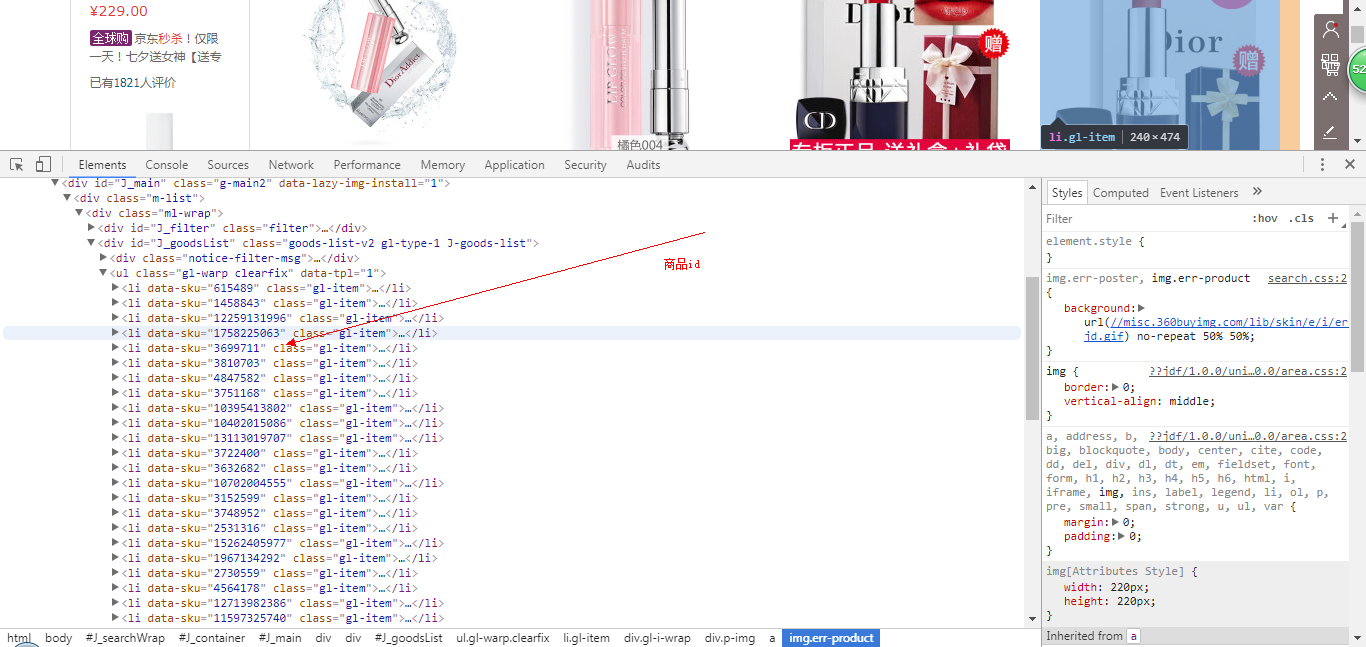
获取id后,分析商品页面可知道每个商品页面就是id号不同,可构造url:
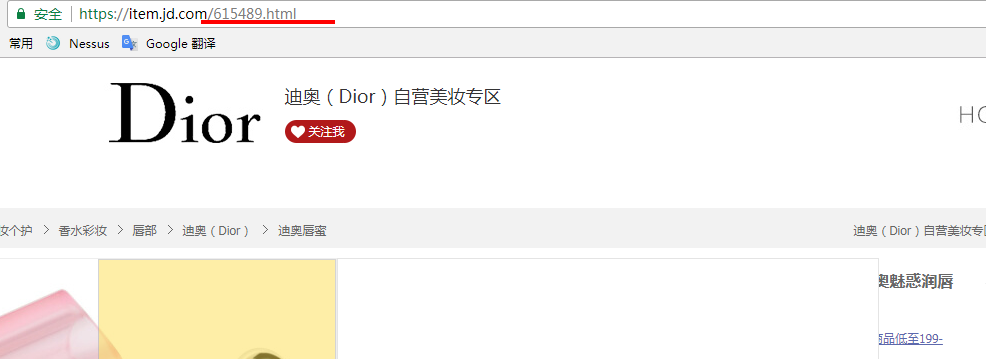
将获取的id和构造的url保存在列表里,如下源码:
 def get_product_url(url):

     global pid

     global links

     req = urllib.request.Request(url)

     req.add_header("User-Agent",

                    'Mozilla/5.0 (Windows NT 10.0; Win64; x64) AppleWebKit/537.36 '

                    '(KHTML, like Gecko) Chrome/60.0.3112.101 Safari/537.36')

     req.add_header("GET", url)

     content = urllib.request.urlopen(req).read()

     soup = bs4.BeautifulSoup(content, "lxml")

     product_id = soup.select('.gl-item')

     for i in range(len(product_id)):

         lin = "https://item.jd.com/" + str(product_id[i].get('data-sku')) + ".html"

         # 获取链接

         links.append(lin)

         # 获取id

         pid.append(product_id[i].get('data-sku'))
二、获取商品信息
通过商品页面获取商品的基本信息(商品名,店名,价格等):
         product_url = links[i]

         req = urllib.request.Request(product_url)

         req.add_header("User-Agent",

                        'Mozilla/5.0 (Windows NT 6.1; Win64; x64; rv:56.0) Gecko/20100101 Firefox/56.0')

         req.add_header("GET", product_url)

         content = urllib.request.urlopen(req).read()

         # 获取商品页面源码

         soup = bs4.BeautifulSoup(content, "lxml")

         # 获取商品名

         sku_name = soup.select_one('.sku-name').getText().strip()

         # 获取商店名

         try:

             shop_name = soup.find(clstag="shangpin|keycount|product|dianpuname1").get('title')

         except:

             shop_name = soup.find(clstag="shangpin|keycount|product|zcdpmc_oversea").get('title')

         # 获取商品ID

         sku_id = str(pid[i]).ljust(20)

         # 获取商品价格
通过抓取评论的json页面获取商品热评、好评率、评论:
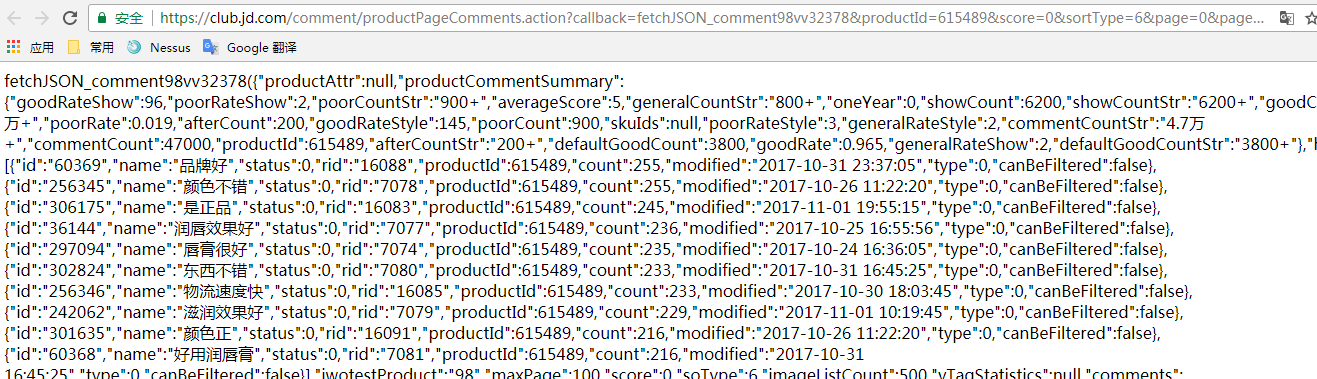
获取热评源码:
 def get_product_comment(product_id):

     comment_url = 'https://club.jd.com/comment/productPageComments.action?' \

                   'callback=fetchJSON_comment98vv16496&' \

                   'productId={}&' \

                   'score=0&' \

                   'sortType=6&' \

                   'page=0&' \

                   'pageSize=10' \

                   '&isShadowSku=0'.format(str(product_id))

     response = urllib.request.urlopen(comment_url).read().decode('gbk', 'ignore')

     response = re.search(r'(?<=fetchJSON_comment98vv16496\().*(?=\);)', response).group(0)

     response_json = json.loads(response)

     # 获取商品热评

     hot_comments = []

     hot_comment = response_json['hotCommentTagStatistics']

     for h_comment in hot_comment:

         hot = str(h_comment['name'])

         count = str(h_comment['count'])

         hot_comments.append(hot + '(' + count + ')')

     return ','.join(hot_comments)
获取好评率源码:
 def get_good_percent(product_id):

     comment_url = 'https://club.jd.com/comment/productPageComments.action?' \

                   'callback=fetchJSON_comment98vv16496&' \

                   'productId={}&' \

                   'score=0&' \

                   'sortType=6&' \

                   'page=0&' \

                   'pageSize=10' \

                   '&isShadowSku=0'.format(str(product_id))

     response = requests.get(comment_url).text

     response = re.search(r'(?<=fetchJSON_comment98vv16496\().*(?=\);)', response).group(0)

     response_json = json.loads(response)

     # 获取好评率

     percent = response_json['productCommentSummary']['goodRateShow']

     percent = str(percent) + '%'

     return percent
获取评论源码:
 def get_comment(product_id, page):

     global word

     comment_url = 'https://club.jd.com/comment/productPageComments.action?' \

                   'callback=fetchJSON_comment98vv16496&' \

                   'productId={}&' \

                   'score=0&' \

                   'sortType=6&' \

                   'page={}&' \

                   'pageSize=10' \

                   '&isShadowSku=0'.format(str(product_id), str(page))

     response = urllib.request.urlopen(comment_url).read().decode('gbk', 'ignore')

     response = re.search(r'(?<=fetchJSON_comment98vv16496\().*(?=\);)', response).group(0)

     response_json = json.loads(response)

     # 写入评论.csv

     comment_file = open('{0}\\评论.csv'.format(path), 'a', newline='', encoding='utf-8', errors='ignore')

     write = csv.writer(comment_file)

     # 获取用户评论

     comment_summary = response_json['comments']

     for content in comment_summary:

         # 评论时间

         creation_time = str(content['creationTime'])

         # 商品颜色

         product_color = str(content['productColor'])

         # 商品名称

         reference_name = str(content['referenceName'])

         # 客户评分

         score = str(content['score'])

         # 客户评论

         content = str(content['content']).strip()

         # 记录评论

         word.append(content)

         write.writerow([product_id, reference_name, product_color, creation_time, score, content])

     comment_file.close()
整体获取商品信息源码:
 def get_product_info():

     global pid

     global links

     global word

     # 创建评论.csv

     comment_file = open('{0}\\评论.csv'.format(path), 'w', newline='')

     write = csv.writer(comment_file)

     write.writerow(['商品id', '商品', '颜色', '评论时间', '客户评分', '客户评论'])

     comment_file.close()

     # 创建商品.csv

     product_file = open('{0}\\商品.csv'.format(path), 'w', newline='')

     product_write = csv.writer(product_file)

     product_write.writerow(['商品id', '所属商店', '商品', '价格', '商品好评率', '商品评价'])

     product_file.close()

     for i in range(len(pid)):

         print('[*]正在收集数据。。。')

         product_url = links[i]

         req = urllib.request.Request(product_url)

         req.add_header("User-Agent",

                        'Mozilla/5.0 (Windows NT 6.1; Win64; x64; rv:56.0) Gecko/20100101 Firefox/56.0')

         req.add_header("GET", product_url)

         content = urllib.request.urlopen(req).read()

         # 获取商品页面源码

         soup = bs4.BeautifulSoup(content, "lxml")

         # 获取商品名

         sku_name = soup.select_one('.sku-name').getText().strip()

         # 获取商店名

         try:

             shop_name = soup.find(clstag="shangpin|keycount|product|dianpuname1").get('title')

         except:

             shop_name = soup.find(clstag="shangpin|keycount|product|zcdpmc_oversea").get('title')

         # 获取商品ID

         sku_id = str(pid[i]).ljust(20)

         # 获取商品价格

         price_url = 'https://p.3.cn/prices/mgets?pduid=1580197051&skuIds=J_{}'.format(pid[i])

         response = requests.get(price_url).content

         price = json.loads(response)

         price = price[0]['p']

         # 写入商品.csv

         product_file = open('{0}\\商品.csv'.format(path), 'a', newline='', encoding='utf-8', errors='ignore')

         product_write = csv.writer(product_file)

         product_write.writerow(

             [sku_id, shop_name, sku_name, price, get_good_percent(pid[i]), get_product_comment(pid[i])])

         product_file.close()

         pages = int(get_comment_count(pid[i]))

         word = []

         try:

             for j in range(pages):

                 get_comment(pid[i], j)

         except Exception as e:

             print("[!!!]{}商品评论加载失败!".format(pid[i]))

             print("[!!!]Error:{}".format(e))

         print('[*]第{}件商品{}收集完毕!'.format(i + 1, pid[i]))         # 的生成词云

         word = " ".join(word)

         my_wordcloud = WordCloud(font_path='C:\Windows\Fonts\STZHONGS.TTF', background_color='white').generate(word)

         my_wordcloud.to_file("{}.jpg".format(pid[i]))
将商品信息和评论写入表格,生成评论词云:
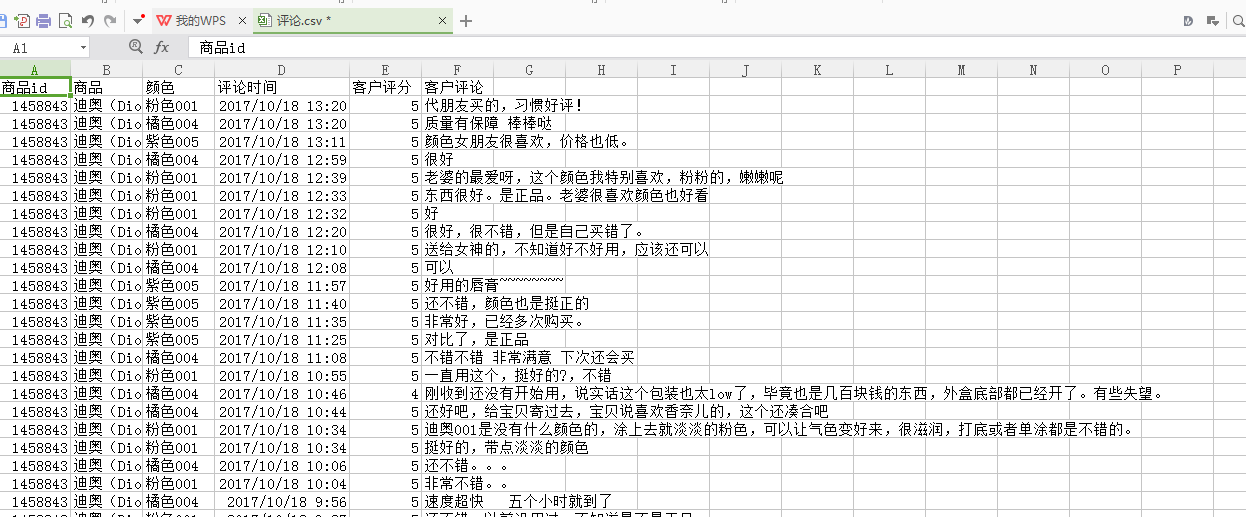





三、总结
在爬取的过程中遇到最多的问题就是编码问题,获取页面的内容requset到的都是bytes类型的要decode(”gbk”),后来还是存在编码问题,最后找到一些文章说明,在后面加“ignore”可以解决,由于爬取的量太大,会有一些数据丢失,不过数据量够大也不影响对商品分析。
京东口红top 30分析的更多相关文章
- Oracle SQL篇(三)Oracle ROWNUM 与TOP N分析
首先我们来看一下ROWNUM: 含义解释: 1.rownum是oracle为从查询返回的行的编号,返回的第一行分配的是1,第二行是2,依此类推.这是一个伪列,可以用于限制查询返回的总行数. 2 ...
- Learn golang: Top 30 Go Tutorials for Programmers Of All Levels
https://stackify.com/learn-go-tutorials/ What is Go Programming Language? Go, developed by Google in ...
- 值得收藏!国外最佳互联网安全博客TOP 30
如果你是网络安全从业人员,其中重要的工作便是了解安全行业的最新资讯以及技术趋势,那么浏览各大安全博客网站或许是信息来源最好的方法之一.最近有国外网站对50多个互联网安全博客做了相关排名,小编整理其中排 ...
- Top 30 Nmap Command Examples For Sys/Network Admins
Nmap is short for Network Mapper. It is an open source security tool for network exploration, securi ...
- linux中的调试知识---基础gdb和strace查看系统调用信息,top性能分析,ps进程查看,内存分析工具
1 调试一般分为两种,可以通过在程序中插入打印语句.有点能够显示程序的动态过程,比较容易的检查出源程序中的有关信息.缺点就是效率比较低了,而且需要输入大量无关的数据. 2 借助相关的调试工具. 3 有 ...
- SSO单点登录、跨域重定向、跨域设置Cookie、京东单点登录实例分析
最近在研究SSO单点登录技术,其中有一种就是通过js的跨域设置cookie来达到单点登录目的的,下面就已京东商城为例来解释下跨域设置cookie的过程 涉及的关键知识点: 1.jquery ajax跨 ...
- HTML JS文字闪烁实现(项目top.htm分析)
<!DOCTYPE HTML PUBLIC "-//W3C//DTD HTML 4.0 Transitional//EN"> <!-- saved from ur ...
- 移动开发day4_京东移动页面
复习 父项身上有哪些属性 可以设置 主轴方向 fd flex-direction : row; column; 主轴子项的排列方式 j justify-content: flex-start;flex ...
- 转:XBMC源代码分析
1:整体结构以及编译方法 XBMC(全称是XBOX Media Center)是一个开源的媒体中心软件.XBMC最初为Xbox而开发,可以运行在Linux.OSX.Windows.Android4.0 ...
随机推荐
- 在0~N个数字中,取指定个数的不重复数字,要求这些数字的和为指定值,求所有结果
using System; using System.Collections.Generic; using System.Linq; using System.Text; namespace Cons ...
- MySQL索引优化实例说明
下面分别创建三张表,并分别插入1W条简单的数据用来测试,详情如下: [1] test_a 有主键但无索引 CREATE TABLE `test_a` ( `id` int(10) unsign ...
- Zend Framework 3.0 安装及创建初始化项目教程
前言: 最近开始接触关于PHP的框架的学习,然而PHP的框架少说也有七八种. 百度了一下,有人说ThinkPHP简单暴力的,有人说Laravel高大上的,等等等等,难以抉择. 最终我还是选择先从接触Z ...
- Sql Server——查询(一)
查询数据就是对数据库中的数据进行筛选显示.显示数据的表格只是一个"虚拟表". 查询 (1)对列的筛选: 1.查询表中所有数据: select * from 表名 ...
- 关于逆元的概念、用途和可行性的思考(附51nod 1013 和 51nod 1256)
[逆元的概念] 逆元和单位元这个概念在群中的解释是: 逆元是指数学领域群G中任意一个元素a,都在G中有唯一的逆元a',具有性质a×a'=a'×a=e,其中e为该群的单位元. 群的概念是: 如果独异 ...
- 你真的会阅读Java的异常信息吗?
给出如下异常信息: java.lang.RuntimeException: level 2 exception at com.msh.demo.exceptionStack.Test.fun2(Tes ...
- Linux Bash Shell字符串截取
#!/bin/bash#定义变量赋值时等号两边不能有空格,否则会报命令不存在 # 运行shell脚本两种方式 # 1.作为解释参数 /bin/sh test.sh ; 2.作为可执行文件 chmo ...
- Docker入门之五数据管理
在Docker使用过程中,需要对数据进行持久化或需要在多个容器之间进行数据共享,就会涉及容器的数据管理操作.主要有两种方式:1.数据卷 2.数据卷容器. 一.数据卷 数据卷是一个可供容器使用的特殊目录 ...
- PHP CodeBase: 生成N个不重复的随机数
有25幅作品拿去投票,一次投票需要选16幅,单个作品一次投票只能选择一次.前面有个程序员捅了漏子,忘了把投票入库,有200个用户产生的投票序列为空.那么你会如何填补这个漏子? <?php /* ...
- Java高级工程师进阶路线
第一部分:宏观方面 一. JAVA.要想成为JAVA(高级)工程师肯定要学习JAVA.一般的程序员或许只需知道一些JAVA的语法结构就可以应付了.但要成为JAVA(高级) 工程师,您要对JAVA做比较 ...