
OpenXml读取word内容(二)
注意事项
上一篇已经说明,这次就不一一说了,直接来正文;
word内容
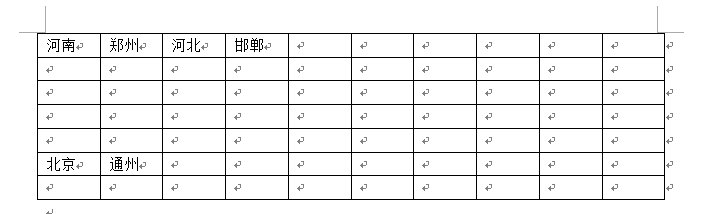
相关代码
方法1
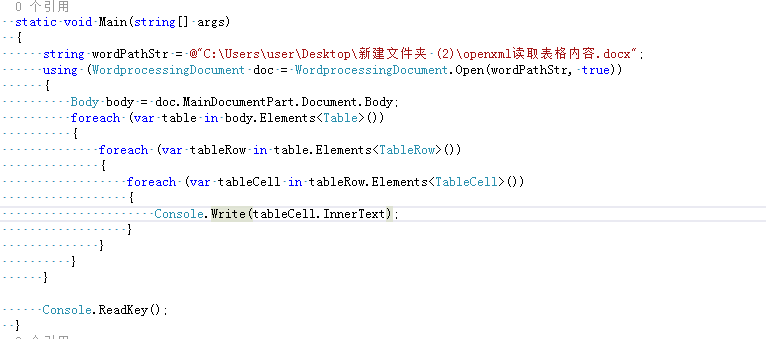
  static void Main(string[] args)

         {

             string wordPathStr = @"C:\Users\user\Desktop\新建文件夹 (2)\openxml读取表格内容.docx";

             using (WordprocessingDocument doc = WordprocessingDocument.Open(wordPathStr, true))

             {

                 Body body = doc.MainDocumentPart.Document.Body;

                 foreach (var table in body.Elements<Table>())

                 {

                     foreach (var tableRow in table.Elements<TableRow>())

                     {

                         foreach (var tableCell in tableRow.Elements<TableCell>())

                         {

                             Console.Write(tableCell.InnerText);

                         }

                     }

                 }

             }

             Console.ReadKey();

         }
或

  static void Main(string[] args)

         {

             string wordPathStr = @"C:\Users\user\Desktop\新建文件夹 (2)\openxml读取表格内容.docx";

             using (WordprocessingDocument doc = WordprocessingDocument.Open(wordPathStr, true))

             {

                 Body body = doc.MainDocumentPart.Document.Body;

                 var tableCellList=body.Elements<OpenXmlElement>();

                 foreach (var table in body.Elements<Table>())

                 {

                     foreach (var tableRow in table.Elements<TableRow>())

                     {

                         Console.Write(tableRow.InnerText);

                     }

                 }

             }

             Console.ReadKey();

         }
或

  static void Main(string[] args)

         {

             string wordPathStr = @"C:\Users\user\Desktop\新建文件夹 (2)\openxml读取表格内容.docx";

             using (WordprocessingDocument doc = WordprocessingDocument.Open(wordPathStr, true))

             {

                 Body body = doc.MainDocumentPart.Document.Body;

                 var tableCellList=body.Elements<OpenXmlElement>();

                 foreach (var table in body.Elements<Table>())

                 {

                     Console.Write(table.InnerText);

                 }

             }

             Console.ReadKey();

         }
方法2
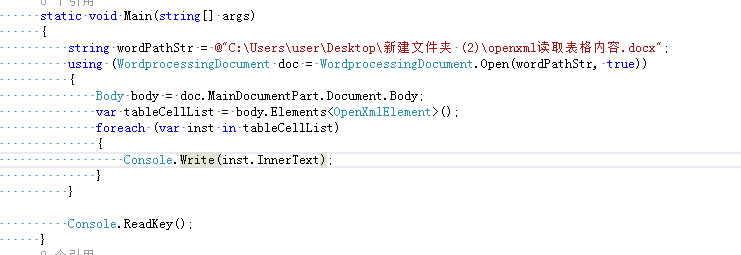
     static void Main(string[] args)

         {

             string wordPathStr = @"C:\Users\user\Desktop\新建文件夹 (2)\openxml读取表格内容.docx";

             using (WordprocessingDocument doc = WordprocessingDocument.Open(wordPathStr, true))

             {

                 Body body = doc.MainDocumentPart.Document.Body;

                 var tableCellList = body.Elements<OpenXmlElement>();

                 foreach (var inst in tableCellList)

                 {

                     Console.Write(inst.InnerText);

                 }

             }

             Console.ReadKey();

         }
注:方法1和方法2使用场景,以后慢慢来介绍;
控制台显示

OpenXml读取word内容(二)的更多相关文章
- OpenXml读取word内容(一)
OpenXml读取word内容注意事项 1.使用OpenXml读取word内容,word后缀必须是".docx":如果word后缀是".doc"需要转成&quo ...
- OpenXml读取word内容注意事项
OpenXml读取word内容注意事项 1.使用OpenXml读取word内容,word后缀必须是".docx":如果word后缀是".doc"需要转成&quo ...
- OpenXml读取word内容(三)
内容和表格内容一起读: word内容: 代码: public static void ReadWordByOpenXml(string path) { using (WordprocessingDoc ...
- java读取word内容
暂时只写读取word内容的方法. 依赖的jar: poi-3.9-20121203.jarpoi-ooxml-3.9-20121203.jarxmlbeans-2.3.0.jar package co ...
- python如何转换word格式、读取word内容、转成html
# python如何转换word格式.读取word内容.转成html? import docx from win32com import client as wc # 首先将doc转换成docx wo ...
- C#读取word内容实践
C#读取word文档是如何实现的呢?我们可以使用FileStream对象来把文本文件里面的信息读取出来,但是对于word文档来说就不能使用这样的方法了. 这种情况下C#读取word文档的实现我们需要使 ...
- c#读取word内容,c#提取word内容
Post by 54admin, 2009-5-8, Views:575 1: 对项目添加引用,Microsoft Word 11.0 Object Library 2: 在程序中添加 using W ...
- C# 读取Word内容控件
在Word中,借助内容控件,可设计出具有特定功能的文档或模板.以下表格中简单介绍了几种常用的内容控件. 名称 简介 下拉列表内容控件 下拉列表包含了一个预先定义好的列表.和组合框不同的是下拉列表不允许 ...
- 我的第八个java程序--读取word内容
package World; import java.io.FileNotFoundException; import java.io.IOException; import org.apache.p ...
随机推荐
- 理解Java包
本质上,包是一个唯一命名的类的集合,将类集合到包里面的主要原因,是为了当在应用程序中使用预先编写的类时避免与类自身可能引起的明明冲突.用于包中的类名不会妨碍另一个包或程序中的类名,因为此时,包中的类名 ...
- Linux分区规划与xshell使用排错
1.1 没有重要数据 /boot 200M 存放系统的引导信息 内核 swap 交换分区 防止内存用光了 临时的一个内存 如果你的内存小于8G swap是内存的1.5倍 如果你的 ...
- 0_Simple__cudaOpenMP
在OpenMP的多线程程序中,各线程分别调用CUDA进行计算.OpenMP的简单示例. ▶ 源代码: #include <omp.h> #include <stdio.h> # ...
- npminstall无法安装node-sass
cannot download "https://hithub.com/sass/node-sass/releases/download/v3.13.0/win32-x64-46_bindi ...
- Pycharm,Python原生IDE?
老套路,安装和使用(Win7x64.JDK神马滴早已装好). 1.安装 网上下下来后就这东西 Next D盘路径 我选择.我喜欢 开装 好慢,以后用光纤 O了 桌面小图标 2.使用 以管理员身份打开软 ...
- Scrum Meeting Alpha - 4
Scrum Meeting - NewTeam // 地点:新主楼F座二楼 任务反馈 团队成员 完成任务 计划任务 安万贺 确定了API部分的目录结构及包装方式,完成了部分API的包装https:// ...
- 如何用 Graylog 管理日志?- 每天5分钟玩转 Docker 容器技术(93)
上一节已经部署好了 Graylog,现在学习如何用它来管理日志. 首先启动测试容器. docker run -d \ --log-driver=gelf \ --log-opt gelf-addres ...
- 有关ActiveXObject的兼容性问题(浏览器的特有属性)
这个问题还得从一开始时候学习有关javascript中有关对文件的一些操作. 对于每个前端的人应该都清楚有关File对象,其中包括多种方法,就不一一描述了,比如说她是通过FileSystemObjec ...
- Velocity(2)——常用语法
Velocity是一个基于java的模板引擎(template engine),它允许任何人仅仅简单的使用模板语言(template language)来引用由java代码定义的对象.作为一个比较完善 ...
- [转载] Linux的Top命令解析
转载自http://www.jb51.net/LINUXjishu/34604.html.http://blog.csdn.net/hello_yang213/article/details/7455 ...