
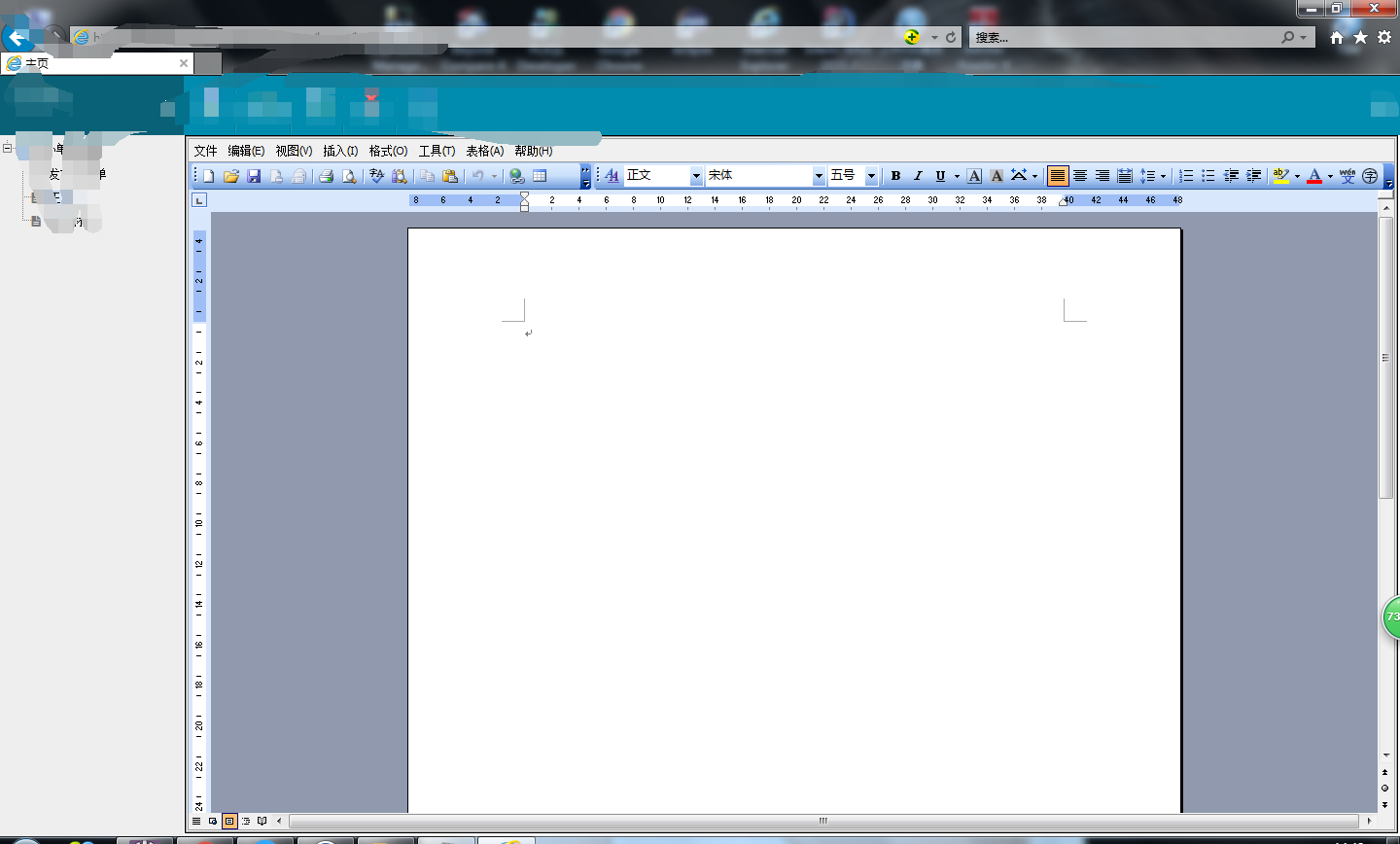
word在线问题
1.js代码如下
var sdata = "";
$(function(){
var pathdoc = path.split(".");
var explorer =navigator.userAgent ;
if(pathdoc[1]=="pdf"){
$("#printid").attr("src","../file_FileDownload_prints.action?path="+path);
}
if(pathdoc[1]=="doc"){
if((window.ActiveXObject || "ActiveXObject" in window)){
$("#printid").hide();
$("#1c").show();
var r = $("#1c");
var y = {};
//把自定义控件word 的各个属性存到数组中
y['id'] = r.attr("id");
y['ctype'] = 'word';
y['height'] = r.attr("height");
y['width'] = r.attr("weight");
y['uname'] = '';
y['ucode'] = '';
y['ctime'] = webform.getTime();
var cJ= webform;
if (cJ) {
y['uname'] = cJ.getUserName();
y['ucode'] = cJ.getUser();
cJ = null
}
//定义一个新的office方法,将属性数组y闯过去
var cT = new Office(y);
g_ctrls[r.attr("id")] = cT;
cT.render(r);
}else{
webform.confirm("是否下载word打印?",downloadword,"","","",wordclose);
}
}
})
function downloadword(){
$("#printid").attr("src","../file_FileDownload_prints.action?path="+path);
$(parent.document).find(".co-win-gray").hide();
$(parent.document).find(".co-win-uploaddiv").hide();
}
function wordclose(){
$(parent.document).find(".co-win-gray").hide();
$(parent.document).find(".co-win-uploaddiv").hide();
}
Office = function(c) {
this.divid = c['id'];
this.myobj = null;
this.ctype = c['ctype'];
this.shost = window.location.href.substr(0, window.location.href.lastIndexOf('cops'));
//word控件打开的时候执行的事件
this.openFile = function() {
try{
var a = '';
a = this.shost+"/file_FileDownload_fileUploadword.action?path="+path;
try {
//文件名为空,打开后台原始给出的文件
if (this.ctype == 'word') {
this.myobj.Open(a, true, "Word.Document");
}
} catch (e) {
a = '';
}
if (a == '') {
return;
}
//this.myobj封装好的方法
/*this.myobj.ProtectDoc(0, 2, "0x0xx0x0x0x");*/
/*this.myobj.ShowRevisions(1);
this.myobj.SetTrackRevisions(1);
this.myobj.SetCurrUserName(c['uname']);
this.myobj.SetCurrTime(c['ctime']);
this.myobj.Titlebar = false;*/
/*this.myobj.Menubar = false;*/
a = '';
}catch(e){
return;
}
}
//表单加载后执行的事件,执行打开word
this.render = function(a) {
a.append('<object id="' + c['id'] + 'x' + '" name="' + c['id'] + 'x' + '" style="visibility:visible;left: 0px; width: 100%; top: 0px; height: 100%;" classid="clsid:00460182-9E5E-11D5-B7C8-B8269041DD57" codebase="dsoframer.ocx#version=2,3,0,1"><PARAM NAME="_ExtentX" VALUE="19923"><PARAM NAME="_ExtentY" VALUE="16325"><PARAM NAME="BorderColor" VALUE="-2147483632"><PARAM NAME="BackColor" VALUE="-2147483643"><PARAM NAME="ForeColor" VALUE="-2147483640"><PARAM NAME="TitlebarColor" VALUE="-2147483635"><PARAM NAME="TitlebarTextColor" VALUE="-2147483634"><PARAM NAME="BorderStyle" VALUE="1"><PARAM NAME="Titlebar" VALUE="0"><PARAM NAME="Toolbars" VALUE="1"><PARAM NAME="Menubar" VALUE="1"><param name="_ExtentX" value="21458"><param name="_ExtentY" value="6350"><param name="BorderColor" value="-2147483632"><param name="BackColor" value="-2147483643"><param name="ForeColor" value="-2147483640"><param name="TitlebarColor" value="-2147483635"><param name="TitlebarTextColor" value="-2147483634"><param name="BorderStyle" value="1"><param name="Titlebar" value="0"><param name="Toolbars" value="1"><param name="Menubar" value="1"></object>');
try{
this.myobj = document.all[c['id'] + 'x'];
this.openFile();
window.scrollTo(c['height'])
}catch(e){
return;
}
}
};
2.java后台代码如下
public void fileUploadword() throws IOException{
if(getWriter() == false) return;
String path = request.getParameter("path");
path = Resource.getValue("temp")+ "Temp\\"+path;
//out.write(relativelyPath);
OpenFileByStream(path,true);
}
public void OpenFileByStream(String strUrl,Boolean isLocal) {
if(isLocal != true){
strUrl = request.getRealPath(strUrl.substring(strUrl.indexOf('/') + 1)).replace("\\", "/");
try {
strUrl = java.net.URLDecoder.decode(strUrl, "UTF-8");
} catch (UnsupportedEncodingException e1) {
e1.printStackTrace();
}
}
File fi = new File(strUrl);
boolean fileIs = (fi.exists());
if (fileIs) { //如果文件存在
response.reset();
response.setCharacterEncoding("gb2312");
// response.addHeader("WWW-Authenticate", "BASIC");
response.setHeader("WWW-Authenticate", "BASIC");
// response.setHeader("Cache-Control", "no-cache");
// response.setHeader("Pragma", "no-cache");
String extName = strUrl.substring(strUrl.lastIndexOf("."),
strUrl.length()).toUpperCase(); //后缀名转换为大写
boolean strName = (extName.endsWith(".DOC")
|| extName.endsWith(".DOCX") || extName.endsWith(".PDF")
|| extName.endsWith(".PPT") || extName.endsWith(".PPTX")
|| extName.endsWith(".TXT") || extName.endsWith(".XLS")
|| extName.endsWith(".XLSX") || extName.endsWith(".BMP")
|| extName.endsWith(".GIF") || extName.endsWith(".IEF")
|| extName.endsWith(".JPEG") || extName.endsWith(".JPG")
|| extName.endsWith(".PNG") || extName.endsWith(".TIFF")
|| extName.endsWith(".TIF"));
if (strName) {
if (".DOC".equals(extName)) {
response.setHeader("Content-type","application/msword");
} else if (".DOCX".equals(extName)) {
response.setHeader("Content-type","application/vnd.openxmlformats-officedocument.wordprocessingml.document");
} else if (".PDF".equals(extName)) {
response.setHeader("Content-type","application/pdf");
} else if (".TXT".equals(extName)) {
response.setHeader("Content-type","text/html");
} else if (".XLS".equals(extName)) {
response.setHeader("Content-type","application/vnd.ms-excel");
} else if (".XLSX".equals(extName)) {
response.setHeader("Content-type","application/vnd.openxmlformats-officedocument.spreadsheetml.sheet");
} else if (".PPT".equals(extName)) {
response.setHeader("Content-type","application/vnd.ms-powerpoint");
} else if (".PPTX".equals(extName)) {
response.setHeader("Content-type","application/vnd.openxmlformats-officedocument.presentationml.presentation");
} else if (".BMP".equals(extName)) {
response.setHeader("Content-type","image/bmp");
} else if (".GIF".equals(extName)) {
response.setHeader("Content-type","image/gif");
} else if (".IEF".equals(extName)) {
response.setHeader("Content-type","image/ief");
} else if (".JPEG".equals(extName)) {
response.setHeader("Content-type","image/jpeg");
} else if (".JPG".equals(extName)) {
response.setHeader("Content-type","image/jpeg");
} else if (".PNG".equals(extName)) {
response.setHeader("Content-type","image/png");
} else if (".TIFF".equals(extName)) {
response.setHeader("Content-type","image/tiff");
} else if (".TIF".equals(extName)) {
response.setHeader("Content-type","image/tif");
}
/*
* try { TransmitFile.downLoad(response, strUrl);
* response.flushBuffer(); } catch (Exception e) {
* e.printStackTrace(); }
*/
BufferedInputStream bis = null;
BufferedOutputStream bos = null;
try {
response.reset();
response.setCharacterEncoding("gb2312");
response.setContentType("application/x-msdownload");
String filename = strUrl.substring(
strUrl.lastIndexOf("/") + 1, strUrl.length());
// response.setHeader("Content-Disposition","attachment;filename="+new
// String(filename.getBytes("gb2312"),"iso8859-1"));
response.setHeader("Content-Disposition", "filename="
+ new String(filename.getBytes("gb2312"),
"iso8859-1"));
bis = new BufferedInputStream(new FileInputStream(strUrl));
bos = new BufferedOutputStream(response.getOutputStream());
byte[] buff = new byte[2048];
int bytesread;
while (-1 != (bytesread = bis.read(buff, 0, buff.length))) { //读取文件
bos.write(buff, 0, bytesread);
}
response.flushBuffer(); //将缓冲区的内容输出出来
} catch (Exception e) {
e.printStackTrace();
} finally {
if (bis != null) {
try {
bis.close(); //关闭流
} catch (IOException e) {
e.printStackTrace();
}
}
if (bos != null) {
try {
bos.close(); //关闭流
} catch (IOException e) {
e.printStackTrace();
}
}
}
// out.flush();
// out.close();
} else {
out.write("The file type is not supported in view.");
}
}
else{
out.write("The file is not exist.");
}
}、
word在线问题的更多相关文章
- word在线编辑\生成图片(包含截图与合并)
1.业务原因 word编辑后的文章复制到html编辑器(fck等)会发生排版错乱的情况,于是混沌了.需要有一个新的方法来终结,于是产生了word能不能在线编辑,后台保存,前台显示灯一系列问题. 2.首 ...
- 借助flexpaper实现word在线预览和打印
为了实现word能够在web上尽量以原始的排版样式展现出来,选择基于activex控件的方式太过于依赖某种浏览器,并且存在可能需要花费金钱购买相应的控件产品:于是借助flexpaper这种flash展 ...
- pdf转word在线转换器
昨天大学辅导员联系我让我pdf转word,一番搜索终于找到一款免费好用的在线转换器,亲测好使免费
- 实现pdf word在线浏览和下载
这篇实现的是在线展示pdf和word并且不能显示下载和打印按钮 一 下载功能: 因为html5给a标签新添加了一个属性download,这个属性可以直接实现下载文件的功能:<a href=&qu ...
- 实现word在线预览 有php的写法 也有插件似
<?php //header("Content-type:text/html;charset=utf-8"); //word转html 展示 $lj=$_GET['file' ...
- [转载]java开发实现word在线编辑及流转
OA公文流转系统主要用于处理企业日常工作中内外部的各种公文,包括了公文的拟稿.审批.传阅.公告.归档,多层上级可以对下级撰写的公文进行逐级审批或修改,待最高级人员确认无误后即可进行核稿和发文等操作,最 ...
- [原创]java开发实现word在线编辑及流转
OA公文流转系统主要用于处理企业日常工作中内外部的各种公文,包括了公文的拟稿.审批.传阅.公告.归档,多层上级可以对下级撰写的公文进行逐级审批或修改,待最高级人员确认无误后即可进行核稿和发文等操作,最 ...
- word在线预览编辑器
https://blog.csdn.net/liuli283/article/details/73776685 https://blog.csdn.net/mxljiayou/article/deta ...
- php实现word在线浏览功能。
http://laoniangke.com/php/2012/10/08/php-doc-webview.html
随机推荐
- Java IO(3)非阻塞式输入输出(NIO)
在上篇<Java IO(2)阻塞式输入输出(BIO)>的末尾谈到了什么是阻塞式输入输出,通过Socket编程对其有了大致了解.现在再重新回顾梳理一下,对于只有一个“客户端”和一个“服务器端 ...
- 回溯法之求n个集合的幂集
幂集:有一个集合A,集合A的幂集是由集合A的全部子集所组成的集合. 集合中的每一个元素仅仅有两种状态:属于幂集的元素集或不属于幂集的元素集. 集合{1,2,3},用一棵二叉树来表示. 递归函数 voi ...
- SharePoint 2013 引发类型为“System.ArgumentException”的异常。 參数名: encodedValue
SharePoint 2013 引发类型为"System.ArgumentException"的异常. 參数名: encodedValue 具体错误信息 说明: 运行当前 Web ...
- 豌豆夹Redis解决方式Codis源代码剖析:Proxy代理
豌豆夹Redis解决方式Codis源代码剖析:Proxy代理 1.预备知识 1.1 Codis Codis就不详细说了,摘抄一下GitHub上的一些项目描写叙述: Codis is a proxy b ...
- 教女朋友学Python运行环境搭建
下班比较早,吃了饭没什么事,就和女朋友一起研究了Python. 编程语言有很多,为什么选择它呢?因为它火吧,没什么好解释的,下面开始第一步,环境搭建.网上的教程实在太多,各种系统的各种版本,本地链接下 ...
- java萌新尝试搭建WordPress记录
问题1:安装好PHP环境没找好mysql路径,导致不能调用数据库模块 解决方案:重装一次,参考链接 https://www.cnblogs.com/yangxia-test/p/4174372.htm ...
- Netty学习笔记(一):接收nodejs模拟表单上传的文件
好久不写博客了,也好久不写代码了,这两天临时遇上一个事情,觉得不难,加上觉得手有些生,就动手做了一下,结果遇上了不少坑,有新坑,有老坑,痛苦无比,现在总算差不多了,赶紧记录下来,希望以后不再重复这种痛 ...
- java8 新特性入门 stream/lambda
Java 8 中的 Stream 是对集合(Collection)对象功能的增强,它专注于对集合对象进行各种非常便利.高效的聚合操作(aggregate operation),或者大批量数据操作 (b ...
- 截取ip 不加引号
ip a |grep /26 |cut -b10- | cut -d / -f 1
- 记一次生产环境Nginx日志骤增的问题排查过程
摘要:众所周知,Nginx是目前最流行的Web Server之一,也广泛应用于负载均衡.反向代理等服务,但使用过程中可能因为对Nginx工作原理.变量含义理解错误,或是参数配置不当导致Nginx工作异 ...