
unity3D:游戏分解之曲线
一提到曲线,很多新手就头疼了,包括我。查了很多资料,终于有个大概的了解。想深入了解曲线原理的,推荐一个链接http://www.cnblogs.com/jay-dong/archive/2012/09/26/2704188.html
之前写了一篇博文《unity3D:游戏分解之角色移动和相机跟随》,里面用到了曲线插值,这里算是对上篇博文的一个补充
先看一下曲线的效果
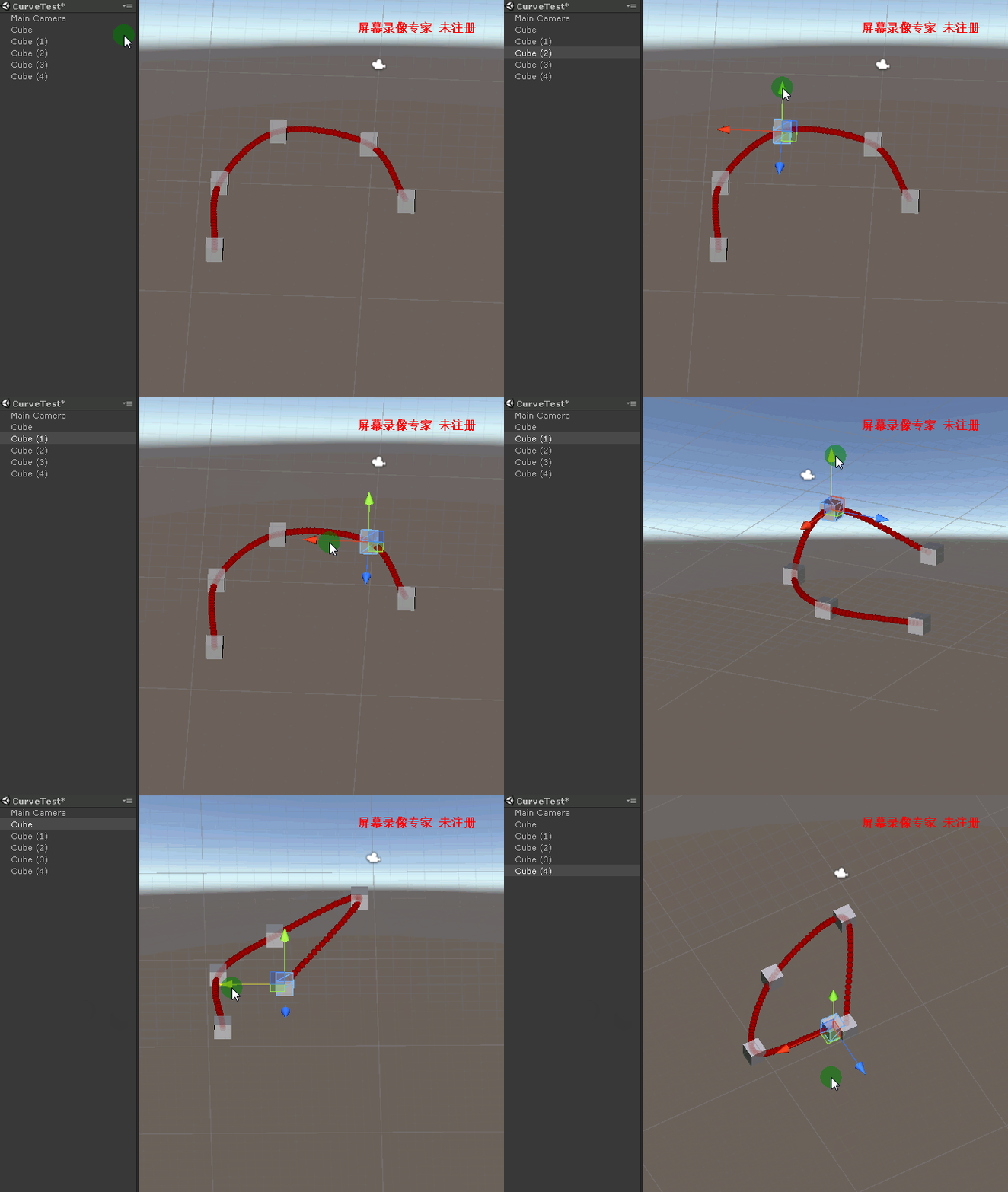
在使用NGUI的过程中,发现iTween.cs里面有两个很有用的方法,一个是输入指定路点数组,一个就是曲线的插值算法。今天我们主要就用到这两个方法来实现曲线效果。
 public static Vector3[] PathControlPointGenerator(Vector3[] path)

     {

         Vector3[] suppliedPath;

         Vector3[] vector3s;

         //create and store path points:

         suppliedPath = path;

         //populate calculate path;

         int offset = ;

         vector3s = new Vector3[suppliedPath.Length + offset];

         Array.Copy(suppliedPath, , vector3s, , suppliedPath.Length);

         //populate start and end control points:

         //vector3s[0] = vector3s[1] - vector3s[2];

         vector3s[] = vector3s[] + (vector3s[] - vector3s[]);

         vector3s[vector3s.Length - ] = vector3s[vector3s.Length - ] + (vector3s[vector3s.Length - ] - vector3s[vector3s.Length - ]);

         //is this a closed, continuous loop? yes? well then so let's make a continuous Catmull-Rom spline!

         if (vector3s[] == vector3s[vector3s.Length - ])

         {

             Vector3[] tmpLoopSpline = new Vector3[vector3s.Length];

             Array.Copy(vector3s, tmpLoopSpline, vector3s.Length);

             tmpLoopSpline[] = tmpLoopSpline[tmpLoopSpline.Length - ];

             tmpLoopSpline[tmpLoopSpline.Length - ] = tmpLoopSpline[];

             vector3s = new Vector3[tmpLoopSpline.Length];

             Array.Copy(tmpLoopSpline, vector3s, tmpLoopSpline.Length);

         }

         return (vector3s);

     }

     //andeeee from the Unity forum's steller Catmull-Rom class ( http://forum.unity3d.com/viewtopic.php?p=218400#218400 ):

     public static Vector3 Interp(Vector3[] pts, float t)

     {

         int numSections = pts.Length - ;

         int currPt = Mathf.Min(Mathf.FloorToInt(t * (float)numSections), numSections - );

         float u = t * (float)numSections - (float)currPt;

         if(currPt == )

         {

             int dsd = ;

         }

         Vector3 a = pts[currPt];

         Vector3 b = pts[currPt + ];

         Vector3 c = pts[currPt + ];

         Vector3 d = pts[currPt + ];

         return .5f * (

             (-a + 3f * b - 3f * c + d) * (u * u * u)

             + (2f * a - 5f * b + 4f * c - d) * (u * u)

             + (-a + c) * u

             + 2f * b

         );

     }
直接上完整代码,把这个脚本放到相机上,然后在场景中拖几个物件作为路点,就可以实现上面的效果
 using System;

 using System.Collections.Generic;

 using UnityEngine;

 namespace Fish.Study.Curve

 {

     /// <summary>

     /// 曲线测试

     /// </summary>

     public class CurveTest : MonoBehaviour

     {

         //路点

         public GameObject[] GameObjectList;

         //各路点的坐标

         public List<Vector3> TransDataList = new List<Vector3>();

         void Start()

         {

         }

         //Gizmos

         void OnDrawGizmos()

         {

             //1个点是不能画出曲线的,2个点实际上是直线

             if (GameObjectList.Length <= ) return;

             TransDataList.Clear();

             for (int i = ; i < GameObjectList.Length; ++i)

             {

                 TransDataList.Add(GameObjectList[i].transform.position);

             }

             if (TransDataList != null && TransDataList.Count > )

             {

                 DrawPathHelper(TransDataList.ToArray(), Color.red);

             }

         }

         public Vector3[] GetCurveData()

         {

             if (TransDataList != null && TransDataList.Count > )

             {

                 var v3 = (TransDataList.ToArray());

                 Vector3[] vector3s = PathControlPointGenerator(v3);

                 return vector3s;

             }

             return null;

         }

         //NGUI iTween.cs中的方法,输入路径点

         public static Vector3[] PathControlPointGenerator(Vector3[] path)

         {

             Vector3[] suppliedPath;

             Vector3[] vector3s;

             //create and store path points:

             suppliedPath = path;

             //populate calculate path;

             int offset = ;

             vector3s = new Vector3[suppliedPath.Length + offset];

             Array.Copy(suppliedPath, , vector3s, , suppliedPath.Length);

             //populate start and end control points:

             vector3s[] = vector3s[] + (vector3s[] - vector3s[]);

             vector3s[vector3s.Length - ] = vector3s[vector3s.Length - ] + (vector3s[vector3s.Length - ] - vector3s[vector3s.Length - ]);

             //is this a closed, continuous loop? yes? well then so let's make a continuous Catmull-Rom spline!

             if (vector3s[] == vector3s[vector3s.Length - ])

             {

                 Vector3[] tmpLoopSpline = new Vector3[vector3s.Length];

                 Array.Copy(vector3s, tmpLoopSpline, vector3s.Length);

                 tmpLoopSpline[] = tmpLoopSpline[tmpLoopSpline.Length - ];

                 tmpLoopSpline[tmpLoopSpline.Length - ] = tmpLoopSpline[];

                 vector3s = new Vector3[tmpLoopSpline.Length];

                 Array.Copy(tmpLoopSpline, vector3s, tmpLoopSpline.Length);

             }

             return (vector3s);

         }

         //曲线插值函数

         public static Vector3 Interp(Vector3[] pts, float t)

         {

             int numSections = pts.Length - ;

             int currPt = Mathf.Min(Mathf.FloorToInt(t * (float)numSections), numSections - );

             float u = t * (float)numSections - (float)currPt;

             Vector3 a = pts[currPt];

             Vector3 b = pts[currPt + ];

             Vector3 c = pts[currPt + ];

             Vector3 d = pts[currPt + ];

             return .5f * (

                 (-a + 3f * b - 3f * c + d) * (u * u * u)

                 + (2f * a - 5f * b + 4f * c - d) * (u * u)

                 + (-a + c) * u

                 + 2f * b

             );

         }

         //画曲线

         private void DrawPathHelper(Vector3[] path, Color color)

         {

             Vector3[] vector3s = PathControlPointGenerator(path);

             //Line Draw:

             Vector3 prevPt = Interp(vector3s, );

             int SmoothAmount = path.Length * ;

             for (int i = ; i <= SmoothAmount; i++)

             {

                 float pm = (float)i / SmoothAmount;

                 Vector3 currPt = Interp(vector3s, pm);

                 Gizmos.color = color;

                 Gizmos.DrawSphere(currPt, 0.2f);

                 prevPt = currPt;

             }

         }

     }

 }
unity3D:游戏分解之曲线的更多相关文章
- Unity3d游戏中自定义贝塞尔曲线编辑器[转]
关于贝塞尔曲线曲线我们再前面的文章提到过<Unity 教程之-在Unity3d中使用贝塞尔曲线>,那么本篇文章我们来深入学习下,并自定义实现贝塞尔曲线编辑器,贝塞尔曲线是最基本的曲线,一般 ...
- Unity3D游戏开发初探—2.初步了解3D模型基础
一.什么是3D模型? 1.1 3D模型概述 简而言之,3D模型就是三维的.立体的模型,D是英文Dimensions的缩写. 3D模型也可以说是用3Ds MAX建造的立体模型,包括各种建筑.人物.植被. ...
- Unity3D游戏在iOS上因为trampolines闪退的原因与解决办法
http://7dot9.com/?p=444 http://whydoidoit.com/2012/08/20/unity-serializer-mono-and-trampolines/ 确定具体 ...
- unity3d 游戏插件 溶解特效插件 - Dissolve Shader
unity3d 游戏插件 溶解特效插件 - Dissolve Shader 链接: https://pan.baidu.com/s/1hr7w39U 密码: 3ed2
- 将Unity3D游戏移植到Android平台上
将Unity3D游戏移植到Android平台是一件很容易的事情,只需要在File->Build Settings中选择Android平台,然后点击Switch Platform并Build出ap ...
- 从一点儿不会开始——Unity3D游戏开发学习(一)
一些废话 我是一个windows phone.windows 8的忠实粉丝,也是一个开发者,开发数个windows phone应用和两个windows 8应用.对开发游戏一直抱有强烈兴趣和愿望,但奈何 ...
- unity3d游戏无法部署到windows phone8手机上的解决方法
今天搞了个unity3d游戏,准备部署到自己的lumia 920上,数据线连接正常,操作正常,但是“build”以后,始终无法部署到手机上,也没有在选择的目录下生产任何相关文件.(你的系统必须是win ...
- Unity3D游戏UI开发经验谈
原地址:http://news.9ria.com/2013/0629/27679.html 在Unity专场上,108km创始人梁伟国发表了<Unity3D游戏UI开发经验谈>主题演讲.他 ...
- Unity3D游戏开发之连续滚动背景
Unity3D游戏开发之连续滚动背景 原文 http://blog.csdn.net/qinyuanpei/article/details/22983421 在诸如天天跑酷等2D游戏中,因为游戏须要 ...
随机推荐
- 在Oracle中添加用户登录名称
第一步,打开Oracle客户端单击 “帮助”-->"支持信息"-->”TNS名“,加入红色部分.页面如下: 第二步,再次打开Oracle客户端时,就会显示数据库了,只需 ...
- DevExpress ChartControl 设置它的标题
private void SetHZTitle(ref ChartControl chartControl, string HTitle) { chartControl.Titles.Clear(); ...
- Unity Android路径及注意事项
Application.temporaryCachePath==/storage/emulated/0/Android/data/com.***.***/cache Application.persi ...
- javascript中类式继承和原型式继承的实现方法和区别
在所有面向对象的编程中,继承是一个重要的话题.一般说来,在设计类的时候,我们希望能减少重复性的代码,并且尽量弱化对象间的耦合(让一个类继承另一个类可能会导致二者产生强耦合).关于“解耦”是程序设计中另 ...
- linux 基础(1)
第一章 Linux 基础知识(一) 一.硬件介绍: 由一条总线把CPU.内存和I/O设备串联起来并与其他设备进行通信.CPU负责运算,内存用于储存临时变量,硬盘用于储存数据.1.1处理器CPU 从内存 ...
- centos GUI界面与命令行的切换
Linux 系统任何时候都运行在一个指定的运行级上,并且不同的运行级的程序和服务都不同,所要完成的工作和所要达到的目的都不同.Centos设置了如下表所示的运行级,并且系统可以在这些运行级别之间进行切 ...
- day_1 练习2
#!/usr/bin/env python# -*- coding:utf-8 -*-'''b. 功能要求: v = 2000 要求用户输入总资产,例如:2000 显示商品列表,让用户根据序号选择商品 ...
- 模仿下拉框datalist的jquery插件的一点小经验
原本项目里是用h5的新属性data-list,但是这个下拉框的数据太多,而data-list似乎没有设置高度的地方,所以写了个小插件,期间也发现了一些bug,目前这个版本算是可以一用的版本,故写一下这 ...
- hive的表的基本操作
环境简介 实验环境使用的是cloudera-quickstart-vm-5.0环境. 内容摘要 创建表 修改表名 修改表中的列名 添加列 删除列 替换列 正文 Alter Table 语句 上面所述的 ...
- 白话讲session
什么是session Session一般译作会话,牛津词典对其的解释是进行某活动连续的一段时间.从不同的层面看待session,它有着类似但不全然相同的含义.比如,在web应用的用户看来,他打开浏览器 ...