
自定义EditText实现一键删除数据
转载请注明出处http://blog.csdn.net/xiaanming/article/details/11066685
自定义EditText带删除小图标,
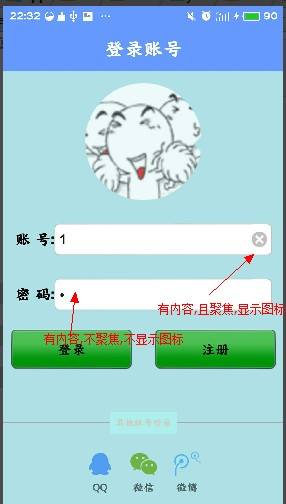
实现的功能:
点击删除小图标,删除当前输入框中所有内容
删除图标默认不显示,当输入框获得焦点后显示,
实现的操作:
在Edittext的DrawableRight中添加一张删除图标,作为删除功能的小图标
因为Edittext不能为图片设置点击监听事件,因此我们需要自定义Edittext在onTouchEvent方法中模拟按钮点击的操作
当我们触摸抬起(就是ACTION_UP的时候)的范围 大于输入框左侧到清除图标左侧的距离,小与输入框左侧到清除图片右侧的距离,我们则认为是点击清除图片,
xml文件:
<?xml version="1.0" encoding="utf-8"?>

<RelativeLayout xmlns:android="http://schemas.android.com/apk/res/android"

   android:layout_width="match_parent"

    android:layout_height="match_parent"

    android:fitsSystemWindows="true"

    android:background="#B0E0E6"

    >

    <TextView

         android:id="@+id/activity_login_ttitle"

        android:layout_width="match_parent"

        android:layout_height="wrap_content"

        android:text="登录账号"

        android:textColor="#ffffff"

        android:background="#6699ff"

        android:padding="15dp"

        android:textSize="25sp"

        android:gravity="center"/>

    <ImageView

        android:id="@+id/activity_login_icon"

        android:layout_width="150dp"

        android:layout_height="150dp"

        android:layout_centerHorizontal="true"

        android:layout_below="@id/activity_login_ttitle"

        android:layout_margin="15dp"/>

  <LinearLayout

      android:id="@+id/activity_login_ll_layout2"

      android:layout_width="match_parent"

      android:layout_height="wrap_content"

      android:orientation="horizontal"

      android:gravity="center_vertical"

      android:layout_below="@id/activity_login_icon"

      android:padding="15dp"

      >

      <TextView

          android:layout_width="wrap_content"

          android:layout_height="match_parent"

          android:textSize="20sp"

          android:gravity="center_vertical"

          android:textColor="#000000"

          android:text="账 号:"/>

      <com.my.myapp.customeView.CustomeEditext

          android:id="@+id/activity_login_et_user"

          android:layout_width="match_parent"

          android:layout_height="match_parent"

          android:textSize="18sp"

          android:singleLine="true"

          android:background="@drawable/edittext_bg_selector"

          android:drawableRight="@drawable/delete_selector"

          android:hint="请输入账号"/>

  </LinearLayout>

    <LinearLayout

        android:id="@+id/activity_login_ll_layout3"

        android:layout_width="match_parent"

        android:layout_height="wrap_content"

        android:orientation="horizontal"

        android:gravity="center_vertical"

        android:padding="15dp"

        android:layout_below="@id/activity_login_ll_layout2">

        <TextView

            android:layout_width="wrap_content"

            android:layout_height="match_parent"

            android:textSize="20sp"

            android:gravity="center_vertical"

            android:textColor="#000000"

            android:text="密 码:"/>

        <com.my.myapp.customeView.CustomeEditext

            android:id="@+id/activity_login_et_password"

            android:layout_width="match_parent"

            android:layout_height="match_parent"

            android:textSize="18sp"

            android:inputType="textPassword"

            android:singleLine="true"

            android:background="@drawable/edittext_bg_selector"

            android:drawableRight="@drawable/delete_selector"

            android:hint="请输入密码"/>

    </LinearLayout>

    <LinearLayout

        android:id="@+id/activity_login_ll_layout4"

        android:layout_width="match_parent"

        android:layout_height="wrap_content"

        android:orientation="horizontal"

        android:padding="10dp"

        android:gravity="center_horizontal"

        android:layout_below="@id/activity_login_ll_layout3">

        <Button

            android:id="@+id/activity_login_btn_login"

            android:layout_width="0dp"

            android:layout_height="match_parent"

            android:layout_weight="1"

            android:text="登录"

            android:textSize="18sp"

            android:padding="15dp"

            android:onClick="onLocalLogin"

            android:background="@drawable/btn__login_style_selector"

            />

        <Button

            android:id="@+id/activity_login_register"

            android:layout_width="0dp"

            android:layout_height="match_parent"

            android:layout_weight="1"

            android:text="注册"

            android:textSize="18sp"

            android:layout_gravity="right"

            android:layout_marginLeft="30dp"

            android:padding="15dp"

            android:onClick="onLocalLogin"

            android:background="@drawable/btn__login_style_selector"/>

    </LinearLayout>

    <LinearLayout

        android:id="@+id/activity_login_ll_layout5"

        android:layout_width="match_parent"

        android:layout_height="wrap_content"

        android:layout_alignParentBottom="true"

        android:gravity="center"

        android:padding="10dp"

        >

        <TextView

            android:id="@+id/activity_login_tv_qq"

            android:layout_width="wrap_content"

            android:layout_height="match_parent"

            android:text="QQ"

            android:gravity="center"

            android:drawableTop="@drawable/ssdk_oks_classic_qq"

            android:layout_margin="5dp"

            android:onClick="onOtherLogin"

            android:clickable="true"/>

        <TextView

            android:id="@+id/activity_login_tv_wechat"

            android:layout_width="wrap_content"

            android:layout_height="match_parent"

            android:text="微信"

            android:gravity="center"

            android:drawableTop="@drawable/ssdk_oks_classic_wechat"

            android:layout_margin="5dp"

            android:onClick="onOtherLogin"

            android:clickable="true"/>

        <TextView

            android:id="@+id/activity_login_tv_email"

            android:layout_width="wrap_content"

            android:layout_height="match_parent"

            android:text="微博"

            android:gravity="center"

            android:layout_margin="5dp"

            android:drawableTop="@drawable/ssdk_oks_classic_tencentweibo"

            android:onClick="onOtherLogin"

            android:clickable="true"/>

    </LinearLayout>

    <RelativeLayout

        android:layout_width="match_parent"

        android:layout_height="30dp"

        android:layout_above="@id/activity_login_ll_layout5"

     >

    <TextView

        android:layout_width="match_parent"

        android:layout_height="1dp"

        android:background="@android:color/darker_gray"

        android:layout_centerInParent="true"

        />

    <TextView

        android:layout_width="wrap_content"

        android:layout_height="wrap_content"

        android:text="其他账号登录"

        android:textColor="#CDCDC1"

        android:padding="7dp"

        android:background="#AFEEEE"

        android:layout_centerInParent="true"

        android:layout_centerHorizontal="true"

        android:textSize="12dp"

        />

    </RelativeLayout>

</RelativeLayout>
源代码:
import android.content.Context;

import android.graphics.drawable.Drawable;

import android.text.Editable;

import android.text.TextWatcher;

import android.util.AttributeSet;

import android.view.MotionEvent;

import android.view.View;

import android.view.View.OnFocusChangeListener;

import android.view.animation.Animation;

import android.view.animation.CycleInterpolator;

import android.view.animation.TranslateAnimation;

import android.widget.EditText;

public class ClearEditText extends EditText implements

        OnFocusChangeListener, TextWatcher {

    /**

     * 删除按钮的引用

     */

    private Drawable mClearDrawable;

    /**

     * 控件是否有焦点

     */

    private boolean hasFoucs;

    public ClearEditText(Context context) {

        this(context, null);

    }

    public ClearEditText(Context context, AttributeSet attrs) {

        //这里构造方法也很重要,不加这个很多属性不能再XML里面定义

        this(context, attrs, android.R.attr.editTextStyle);

    }

    public ClearEditText(Context context, AttributeSet attrs, int defStyle) {

        super(context, attrs, defStyle);

        init();

    }

    private void init() {

        //获取EditText的DrawableRight,假如没有设置我们就使用默认的图片

        mClearDrawable = getCompoundDrawables()[2];

        if (mClearDrawable == null) {

//            throw new NullPointerException("You can add drawableRight attribute in XML");

            mClearDrawable = getResources().getDrawable(R.drawable.delete_selector);

        }

        mClearDrawable.setBounds(0, 0, mClearDrawable.getIntrinsicWidth(), mClearDrawable.getIntrinsicHeight());

        //默认设置隐藏图标

        setClearIconVisible(false);

        //设置焦点改变的监听

        setOnFocusChangeListener(this);

        //设置输入框里面内容发生改变的监听

        addTextChangedListener(this);

    }

    /**
- setClearIconVisible()方法,设置隐藏和显示清除图标的方法,我们这里不是调用setVisibility()方法,setVisibility()这个方法是针对View的,我们可以调用setCompoundDrawables(Drawable left, Drawable top, Drawable right, Drawable bottom)来设置上下左右的图标
setOnFocusChangeListener(this) 为输入框设置焦点改变监听,如果输入框有焦点,我们判断输入框的值是否为空,为空就隐藏清除图标,否则就显示
- addTextChangedListener(this) 为输入框设置内容改变监听,其实很简单呢,当输入框里面的内容发生改变的时候,我们需要处理显示和隐藏清除小图标,里面的内容长度不为0我们就显示,否是就隐藏,但这个需要输入框有焦点我们才改变显示或者隐藏,为什么要需要焦点,比如我们一个登陆界面,我们保存了用户名和密码,在登陆界面onCreate()的时候,我们把我们保存的密码显示在用户名输入框和密码输入框里面,输入框里面内容发生改变,导致用户名输入框和密码输入框里面的清除小图标都显示了,这显然不是我们想要的效果,所以加了一个是否有焦点的判断
setShakeAnimation(),这个方法是输入框左右抖动的方法,,当用户名错误,输入框就在哪里抖动,感觉挺好玩的,其实主要是用到一个移动动画,然后设置动画的变化率为正弦曲线
效果:
自定义EditText实现一键删除数据的更多相关文章
- Web jquery表格组件 JQGrid 的使用 - 7.查询数据、编辑数据、删除数据
系列索引 Web jquery表格组件 JQGrid 的使用 - 从入门到精通 开篇及索引 Web jquery表格组件 JQGrid 的使用 - 4.JQGrid参数.ColModel API.事件 ...
- FreeSql (九)删除数据
删除是一个非常危险的操作,FreeSql对删除支持并不强大,仅支持了单表有条件的删除方法. 不想过多的介绍拉长删除数据的系列文章,删除数据的介绍仅此一篇. 若Where条件为空的时候执行方法,Free ...
- sql server编写archive通用模板脚本实现自动分批删除数据
博主做过比较多项目的archive脚本编写,对于这种删除数据的脚本开发,肯定是一开始的话用最简单的一个delete语句,然后由于部分表数据量比较大啊,索引比较多啊,会发现删除数据很慢而且影响系统的正常 ...
- 使用Amazon EMR和Apache Hudi在S3上插入,更新,删除数据
将数据存储在Amazon S3中可带来很多好处,包括规模.可靠性.成本效率等方面.最重要的是,你可以利用Amazon EMR中的Apache Spark,Hive和Presto之类的开源工具来处理和分 ...
- MySQL不建议delete删除数据
InnoDB存储架构 从这张图可以看到,InnoDB存储结构主要包括两部分:逻辑存储结构和物理存储结构. 逻辑上是由表空间tablespace -> 段segment或者inode -> ...
- CRL快速开发框架系列教程四(删除数据)
本系列目录 CRL快速开发框架系列教程一(Code First数据表不需再关心) CRL快速开发框架系列教程二(基于Lambda表达式查询) CRL快速开发框架系列教程三(更新数据) CRL快速开发框 ...
- 读书笔记--SQL必知必会16--更新和删除数据
16.1 更新数据 使用UPDATE语句更新或修改表中的数据.必须有足够的安全权限. 更新表中的特定行 更新表中的所有行 使用UPDATE时一定要细心,不要省略WHERE子句. SET命令用来将新值赋 ...
- 一键删除.svn文件bat脚本
用过SVN或CVS版本控制工具的朋友,在享受着它们给我们带来的方便的同时,也许也在为这么一件事情苦恼: 如果某个目录在SVN或CVS版本控制工具的控制之下时.该目录下以及该子孙目录下都会有一个.svn ...
- MySQL数据库5 - 插入数据,修改数据,删除数据
一.插入数据 1. 所有列都插入值 INSERT [INTO] TABLE_NAME VALUES(V1,V2....Vn); 特点:列值同数,列值同序 eg: insert into users v ...
随机推荐
- AcceptEx与WSAEventSelect和Accept
(转自论坛的一个帖子http://bbs.csdn.net/topics/280032853) AcceptEx主要用于向完成端口 投递一个或多个的连接请求..当有连接时进来,这里分两种情况: 1.A ...
- Android读取assets目录下的资源
1.获取资源的输入流 资源文件 sample.txt 位于 $PROJECT_HOME/assets/ 目录下,可以在 Activity 中通过 Context.getAssets().open(“s ...
- 可以binidng属性的属性【项目】
1:binding后台bool[]数据以及后台ObservableCollection数据 分别见下面xaml的Visibility和Text的Binding public bool[] Rubber ...
- Eclipse报错 Unable to execute dex: Multiple dex files define Lcom/kenai/jbosh/AbstractAttr
这个错误时jar包重复造成的!! 看看有没有多的private Libary 删除即可!!!
- 本地存储(cookie&sessionStorage&localStorage)
好文章,最全面.就查它吧:https://segmentfault.com/a/1190000004556040 1.DOM存储:https://developer.mozilla.org/zh-CN ...
- js 原型的内存分析
使用构造器的弊端:http://www.cnblogs.com/a757956132/p/5258897.html 示例 将行为设置为全局的行为,如果将所有的方法都设计为全局函数的时候, 这个函数就可 ...
- 在类库中使用Session
昨天在做优化网站代码的时候,突发奇想想将页面的代码和业务逻辑代码分离开.就是页面下的.cs文件只用于收集前台上的数据而业务处理都放到一些类库中.可是问题来了,在类库中是无法直接使用Session.在网 ...
- Flex中实现类似Javascript的confirm box
Javascript是阻塞的,你可以使用confirm()来获取用户的选择,并根据用户的选择结果继续下面的操作. Flex是非阻塞的,在执行过程中没有类似JS中confirm()那种等待用户选择后继续 ...
- Bit Twiddling Hacks
http://graphics.stanford.edu/~seander/bithacks.html Bit Twiddling Hacks By Sean Eron Andersonseander ...
- HRESULT 0x80131515 解决方法
http://254698001.blog.51cto.com/2521548/1339696 很多朋友在加载DLL是发生这样的错误:HRESULT: 0x80131515. 解决方法是,在DLL文件 ...