
Java ZIP File Example---refernce
In this tutorial we are going to see how to ZIP a file in Java. ZIP is an archive file format that enables data compression and it is mostly used on files and folders. A ZIP file may contain one or more compressed files or folders. Many compression algorithms have been used by several ZIP implementations, which are ubiquitous in many platforms. It is also possible to store a file in a ZIP archive file without compressing it.
Let’s start with a simple example of adding a single file to a ZIP archive.
1. Add a single file to a ZIP archive
In this example we are adding a regular file to a ZIP archive using java.util.zip utility classes.
ZipFileExample.java:
package com.javacodegeeks.core.zip;

import java.io.*;

import java.util.zip.ZipEntry;

import java.util.zip.ZipOutputStream;

public class ZipFileExample {

    private static final String INPUT_FILE = "C:\\Users\\nikos\\Desktop\\TestFiles\\testFile.txt";

    private static final String OUTPUT_FILE = "C:\\Users\\nikos\\Desktop\\TestFiles\\testFile.zip";

    public static void main(String[] args) {

        zipFile(new File(INPUT_FILE), OUTPUT_FILE);

    }

    public static void zipFile(File inputFile, String zipFilePath) {

        try {

            // Wrap a FileOutputStream around a ZipOutputStream

            // to store the zip stream to a file. Note that this is

            // not absolutely necessary

            FileOutputStream fileOutputStream = new FileOutputStream(zipFilePath);

            ZipOutputStream zipOutputStream = new ZipOutputStream(fileOutputStream);

            // a ZipEntry represents a file entry in the zip archive

            // We name the ZipEntry after the original file's name

            ZipEntry zipEntry = new ZipEntry(inputFile.getName());

            zipOutputStream.putNextEntry(zipEntry);

            FileInputStream fileInputStream = new FileInputStream(inputFile);

            byte[] buf = new byte[1024];

            int bytesRead;

            // Read the input file by chucks of 1024 bytes

            // and write the read bytes to the zip stream

            while ((bytesRead = fileInputStream.read(buf)) > 0) {

                zipOutputStream.write(buf, 0, bytesRead);

            }

            // close ZipEntry to store the stream to the file

            zipOutputStream.closeEntry();

            zipOutputStream.close();

            fileOutputStream.close();

            System.out.println("Regular file :" + inputFile.getCanonicalPath()+" is zipped to archive :"+zipFilePath);

        } catch (IOException e) {

            e.printStackTrace();

        }

    }

}
The code is pretty self explanatory,but let’s go through each step:
- First we wrap a
FileOutputStreamaround aZipOutputStreamto store the zip stream to a file. Note that this is not absolutely necessary, as you can redirect theZipOutputStreamto any other stream destination you like, e.g a socket. - Then we create a new
ZipEntrythat represents a file entry in the zip archive. We append this entry to the zip output stream. This is necessary as a zip entry marks the begging and ending of each file or folder that is archived in the zip file. It is also important to name that entry, so that you know how to later unzip it. - We create a
FileInputStreamto read the input file in chucks f 1024 bytes. - We then append those bytes to to zip output stream.
- We close the
ZipEntry. This positions the stream’s “cursor” at the end of this entry, preparing it to receive a new zip entry.
Now if we run the above code this is the output:
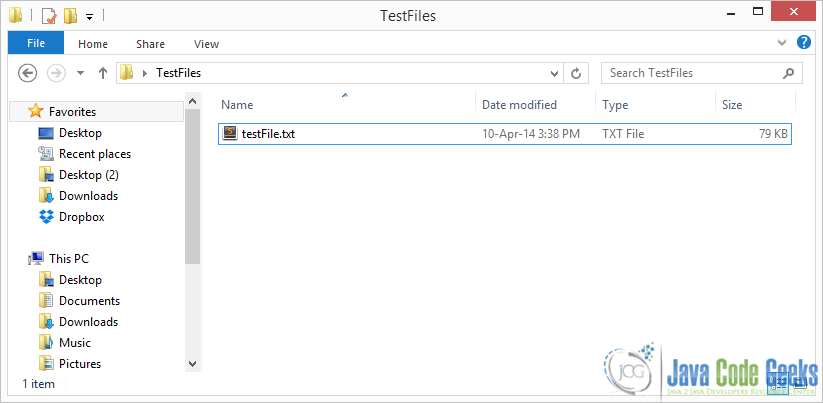
Regular file :C:\Users\nikos\Desktop\TestFiles\testFile.txt is zipped to archive :C:\Users\nikos\Desktop\TestFiles\testFile.zipHere is the folder before zipping this single file:
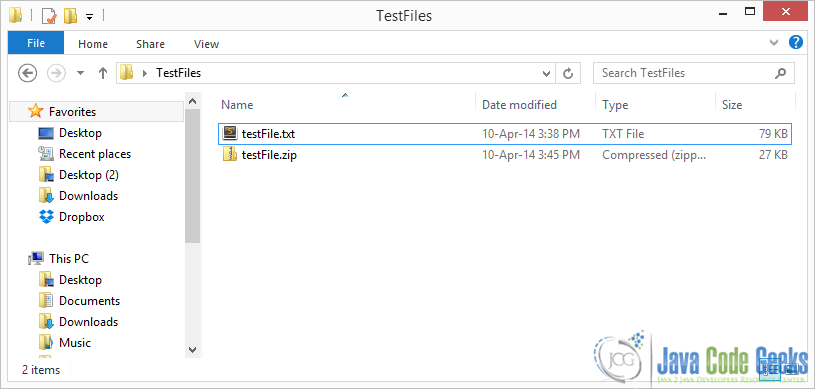
And this is after zipping “testFile.txt” :
2. Add a single folder to a ZIP archive
Now let’s see how you can add a simple folder, that contains only files to a zip archive.
ZipFileExample.java:
package com.javacodegeeks.core.zip;

import org.omg.CosNaming.NamingContextExtPackage.StringNameHelper;

import java.io.*;

import java.net.URI;

import java.util.zip.ZipEntry;

import java.util.zip.ZipOutputStream;

public class ZipFileExample {

    private static final String INPUT_FOLDER = "C:\\Users\\nikos\\Desktop\\TestFiles";

    private static final String ZIPPED_FOLDER = "C:\\Users\\nikos\\Desktop\\TestFiles.zip";

    public static void main(String[] args) {

        zipSimpleFolder(new File(INPUT_FOLDER),"", ZIPPED_FOLDER);

    }

    public static void zipSimpleFolder(File inputFolder, String parentName ,String zipFilePath ){

        try {

            FileOutputStream fileOutputStream = new FileOutputStream(zipFilePath);

            ZipOutputStream zipOutputStream = new ZipOutputStream(fileOutputStream);

            String myname = parentName +inputFolder.getName()+"\\";

            ZipEntry folderZipEntry = new ZipEntry(myname);

            zipOutputStream.putNextEntry(folderZipEntry);

            File[] contents = inputFolder.listFiles();

            for (File f : contents){

                if (f.isFile())

                    zipFile(f,myname,zipOutputStream);

            }

            zipOutputStream.closeEntry();

            zipOutputStream.close();

        } catch (FileNotFoundException e) {

            e.printStackTrace();

        } catch (IOException e) {

            e.printStackTrace();

        }

    }

    public static void zipFile(File inputFile,String parentName,ZipOutputStream zipOutputStream) {

        try {

            // A ZipEntry represents a file entry in the zip archive

            // We name the ZipEntry after the original file's name

            ZipEntry zipEntry = new ZipEntry(parentName+inputFile.getName());

            zipOutputStream.putNextEntry(zipEntry);

            FileInputStream fileInputStream = new FileInputStream(inputFile);

            byte[] buf = new byte[1024];

            int bytesRead;

            // Read the input file by chucks of 1024 bytes

            // and write the read bytes to the zip stream

            while ((bytesRead = fileInputStream.read(buf)) > 0) {

                zipOutputStream.write(buf, 0, bytesRead);

            }

            // close ZipEntry to store the stream to the file

            zipOutputStream.closeEntry();

            System.out.println("Regular file :" + inputFile.getCanonicalPath()+" is zipped to archive :"+ZIPPED_FOLDER);

        } catch (IOException e) {

            e.printStackTrace();

        }

    }

}
The basic goal here is to zip a folder that contains only flat files. An important thing to notice here is that we create ZipEntry for the folder and add it to the archive. Then we create a Zip entry for each file in the folder. After zipping all the files in the folder and having created and closed all file zip entries we finally close the zip entry of the folder. Another important thing to notice is that we’ve added aparentName argument in the methods. That is basically to easily calculate the absolute path of each file in order to place it in the correct folder in the archive. Our situation here is very simple as we have only one parent folder in the archive.
Now if we run the above code this is the output:
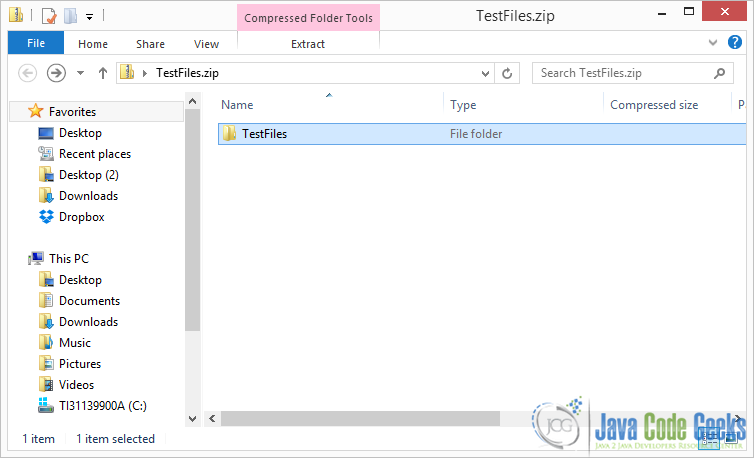
Regular file :TestFiles\testFile.txt is zipped to archive :C:\Users\nikos\Desktop\TestFiles.zipHere is the zipped folder :
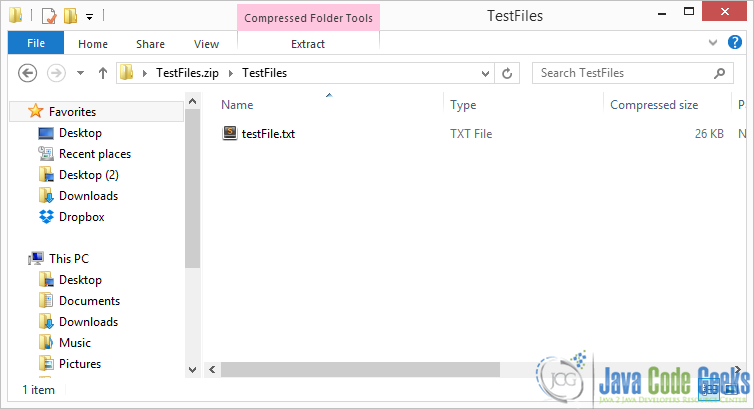
And you can see that it contains a singe file:
3. Add a complete directory tree to a ZIP archive
In this section we are going to add a complete directory tree in the archive. This means that our parent directory might not only contain flat files, but a folder as well, which in turn might contain other files and folders etc.
Let’s see a recursive solution:
ZipFileExample.java:
package com.javacodegeeks.core.zip;

import java.io.File;

import java.io.FileNotFoundException;

import java.io.FileOutputStream;

import java.io.FileInputStream;

import java.io.IOException;

import java.util.zip.ZipEntry;

import java.util.zip.ZipOutputStream;

public class ZipFileExample {

    private static final String INPUT_FOLDER = "C:\\Users\\nikos\\Desktop\\TestFiles";

    private static final String ZIPPED_FOLDER = "C:\\Users\\nikos\\Desktop\\TestFiles.zip";

    public static void main(String[] args) {

        try {

            zip( INPUT_FOLDER, ZIPPED_FOLDER);

        } catch (IOException e) {

            e.printStackTrace();

        }

    }

    public static void zip(String inputFolder,String targetZippedFolder)  throws IOException {

        FileOutputStream fileOutputStream = null;

        fileOutputStream = new FileOutputStream(targetZippedFolder);

        ZipOutputStream zipOutputStream = new ZipOutputStream(fileOutputStream);

        File inputFile = new File(inputFolder);

        if (inputFile.isFile())

            zipFile(inputFile,"",zipOutputStream);

        else if (inputFile.isDirectory())

            zipFolder(zipOutputStream,inputFile,"");

        zipOutputStream.close();

    }

    public static void zipFolder(ZipOutputStream zipOutputStream,File inputFolder, String parentName)  throws IOException {

        String myname = parentName +inputFolder.getName()+"\\";

        ZipEntry folderZipEntry = new ZipEntry(myname);

        zipOutputStream.putNextEntry(folderZipEntry);

        File[] contents = inputFolder.listFiles();

        for (File f : contents){

            if (f.isFile())

                zipFile(f,myname,zipOutputStream);

            else if(f.isDirectory())

                zipFolder(zipOutputStream,f, myname);

        }

        zipOutputStream.closeEntry();

    }

    public static void zipFile(File inputFile,String parentName,ZipOutputStream zipOutputStream) throws IOException{

        // A ZipEntry represents a file entry in the zip archive

        // We name the ZipEntry after the original file's name

        ZipEntry zipEntry = new ZipEntry(parentName+inputFile.getName());

        zipOutputStream.putNextEntry(zipEntry);

        FileInputStream fileInputStream = new FileInputStream(inputFile);

        byte[] buf = new byte[1024];

        int bytesRead;

        // Read the input file by chucks of 1024 bytes

        // and write the read bytes to the zip stream

        while ((bytesRead = fileInputStream.read(buf)) > 0) {

            zipOutputStream.write(buf, 0, bytesRead);

        }

        // close ZipEntry to store the stream to the file

        zipOutputStream.closeEntry();

        System.out.println("Regular file :" + parentName+inputFile.getName() +" is zipped to archive :"+ZIPPED_FOLDER);

    }

}
As you can see inside zipFolder method we simply add a recursive call if the file we are trying to zip is a directory. That’s it. Notice that we create our ZipOutputStream to the top level zip method, so that all methods calls from then on can use the same instance of that stream. If we left the code as before, every time zipFolder was called, a new ZipOutputStream would be created, something that we definitely don’t want.
To test this, I’ve copied an Eclipse Project folder in my TestFiles folder.
Now if we run the above code this is the output:
Regular file :TestFiles\EJBInterceptor\EJBInterceptorEAR\.project is zipped to archive :C:\Users\nikos\Desktop\TestFiles.zip

Regular file :TestFiles\EJBInterceptor\EJBInterceptorEAR\.settings\org.eclipse.wst.common.component is zipped to archive :C:\Users\nikos\Desktop\TestFiles.zip

Regular file :TestFiles\EJBInterceptor\EJBInterceptorEAR\.settings\org.eclipse.wst.common.project.facet.core.xml is zipped to archive :C:\Users\nikos\Desktop\TestFiles.zip

Regular file :TestFiles\EJBInterceptor\EJBInterceptorEAR\EarContent\META-INF\application.xml is zipped to archive :C:\Users\nikos\Desktop\TestFiles.zip

Regular file :TestFiles\EJBInterceptor\InterceptorsEJB\.classpath is zipped to archive :C:\Users\nikos\Desktop\TestFiles.zip

Regular file :TestFiles\EJBInterceptor\InterceptorsEJB\.project is zipped to archive :C:\Users\nikos\Desktop\TestFiles.zip

Regular file :TestFiles\EJBInterceptor\InterceptorsEJB\.settings\org.eclipse.jdt.core.prefs is zipped to archive :C:\Users\nikos\Desktop\TestFiles.zip

Regular file :TestFiles\EJBInterceptor\InterceptorsEJB\.settings\org.eclipse.wst.common.component is zipped to archive :C:\Users\nikos\Desktop\TestFiles.zip

Regular file :TestFiles\EJBInterceptor\InterceptorsEJB\.settings\org.eclipse.wst.common.project.facet.core.xml is zipped to archive :C:\Users\nikos\Desktop\TestFiles.zip

Regular file :TestFiles\EJBInterceptor\InterceptorsEJB\build\classes\com\javacodegeeks\enterprise\ejb\interceptor\SecondInterceptor.class is zipped to archive :C:\Users\nikos\Desktop\TestFiles.zip

Regular file :TestFiles\EJBInterceptor\InterceptorsEJB\build\classes\com\javacodegeeks\enterprise\ejb\interceptor\SimpleInterceptor.class is zipped to archive :C:\Users\nikos\Desktop\TestFiles.zip

Regular file :TestFiles\EJBInterceptor\InterceptorsEJB\build\classes\com\javacodegeeks\enterprise\ejb\SimpleEJB.class is zipped to archive :C:\Users\nikos\Desktop\TestFiles.zip

Regular file :TestFiles\EJBInterceptor\InterceptorsEJB\build\classes\META-INF\ejb-jar.xml is zipped to archive :C:\Users\nikos\Desktop\TestFiles.zip

...
Now you can use this simple zip method as a utility to zip a normal file or a complete file path.
Here you can see the zipped folder:
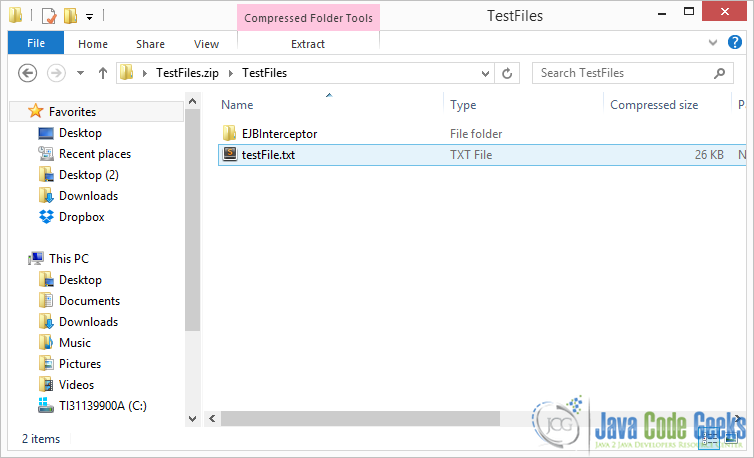
And from there you can navigate the file path. For example :
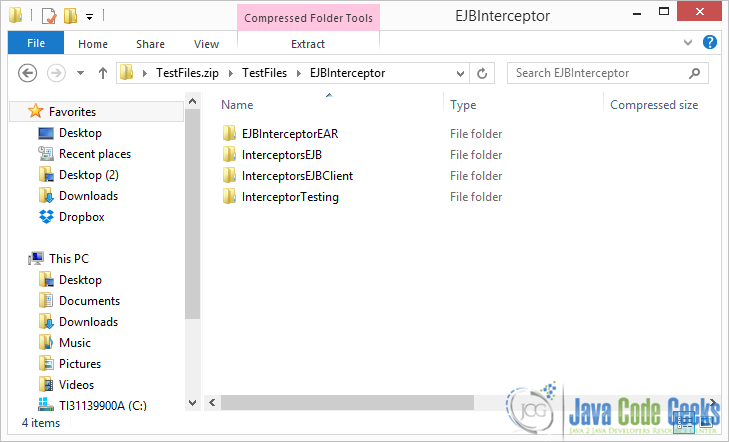
4. Compressing files
java.util.zip basically offers two methods to compressed the files that you add in the archive: STORED and DEFLATED. In STORED method, you basically store the files uncompressed, it just stores the raw bytes. DEFLATED on the other hand uses the LZ77 alogrithm and Huffman code to perform compression on the files. You can specify which compression algorithm you want to use at each individualZipEntry using setMethod(ZipEntry.STORED) or setMethod(ZipEntry.DEFLATED) ZipEntry API methods.
Additionally you can specify other characteristics of the compressed components, to increase security and consistency of the contents of the archive. These include the size of the file and the check sum of the file. For the check sum java.util.zip offers a utility to calculate CRC32 checksum of the file. You can then add it to the ZipEntry using its setCrc API method. It is not always advisable to compress all the files in DEFLATED mode, because it simply takes more time.
Download Source Code
This was a Java ZIP File Example. You can download the source code of this example here : ZIPFileExample.zip
Java ZIP File Example---refernce的更多相关文章
- 07-09 07:28:38.350: E/AndroidRuntime(1437): Caused by: java.lang.ClassNotFoundException: Didn't find class "com.example.googleplay.ui.activity.MainActivity" on path: DexPathList[[zip file "/data/app/c
一运行,加载mainActivity就报错 布局文件乱写一通,然后急着运行,报莫名其妙的错误: 07-09 07:28:38.350: E/AndroidRuntime(1437): Caused b ...
- java.util.zip.ZipException:ZIP file must have at least one entry
1.错误描述 java.util.zip.ZipException:ZIP file must have at least one entry 2.错误原因 由于在导出文件时,要将导出的文件压缩到压缩 ...
- 解决使用maven的java web项目导入后出现的有关问题 -cannot be read or is not a valid ZIP file
解决使用maven的java web项目导入后出现的有关问题 -cannot be read or is not a valid ZIP file 错误问题:虽然查找repository目录下是有 ...
- Tomcat启动报错:org.apache.catalina.LifecycleException: Failed to start component...java.util.zip.ZipException: error in opening zip file
1.项目环境 IntelliJ IDEA2018.1.6 apache-tomcat-8.0.53 基于springboot开发的项目 maven3.5.3 2.出现问题 从svn同步下项目 启动to ...
- java.lang.IllegalStateException: Zip File is closed
最近在研究利用sax读取excel大文件时,出现了以下的错误: java.lang.IllegalStateException: Zip File is closed at org.apache.po ...
- [java ] java.util.zip.ZipException: error in opening zip file
严重: Failed to processes JAR found at URL [jar:file:/D:/tools/apache-tomcat-7.0.64_2/webapps/bbs/WEB- ...
- 【POI】解析xls报错:java.util.zip.ZipException: error in opening zip file
今天使用POI解析XLS,报错如下: Servlet.service() for servlet [rest] in context with path [/cetBrand] threw excep ...
- Caused by: java.lang.ClassNotFoundException: Didn't find class "** *** ** **" on path: DexPathList[[zip file "/data/app/*** *** ***-2/base.apk"],nativeLibraryDirectories
Caused by: java.lang.ClassNotFoundException: Didn't find class "** *** ** **" on path: Dex ...
- Caused by: java.util.zip.ZipException: zip file is empty
1.问题描述:mybranch分支代码和master分支的代码一模一样,mybranch代码部署到服务器上没有任何问题,而master代码部署到服务器上运行不起来. 2.解决办法: (1)登陆服务器启 ...
随机推荐
- 【转】IOS的处理touch事件处理(依照手指的移动移动一个圆,开发环境用的ios7,storyboard)-- 不错
原文网址:http://blog.csdn.net/baidu_nod/article/details/32934565 先看下页面的效果图: 首先定义这个ball它有两个属性和两个方法: @prop ...
- Js获取Cookie值的方法
function getCookie(name) { var prefix = name + "=" var start = document.cookie.indexOf(pre ...
- 修改linux用户密码
对于初学者来说,如何修改linux用户密码也不是件容易的事,其实非常简单,下面举例说明: 如果是以root身份登录,修改root密码.只要输入 passwd 就会出现: New password: ...
- 淘宝JAVA中间件Diamond详解(一)---简介&快速使用
大家好,今天开始为大家带来我们通用产品团队的产品 —— diamond的专题,本次为大家介绍diamond的概况和快速使用. 一.概况 diamond是淘宝内部使用的一个管理持久配置的系统,它的特点是 ...
- Android UI -- 布局介绍(布局包括FrameLayout, LinearLayout, RelativeLayout, GridLayout)
首先介绍常用布局类 FrameLayout 最简单的布局管理器. 这个布局管理类有几个特性: 添加组件默认在左上角的. 如果添加多个组件会叠加到一起,并且都在左上角.(可以通过一gravity属性改变 ...
- theano学习指南5(翻译)- 降噪自动编码器
降噪自动编码器是经典的自动编码器的一种扩展,它最初被当作深度网络的一个模块使用 [Vincent08].这篇指南中,我们首先也简单的讨论一下自动编码器. 自动编码器 文献[Bengio09] 给出了自 ...
- position属性
所有主流浏览器支持position属性: 任何版本的ie浏览器都不支持属性值“inherit”. position属性规定元素的定位类型,任何元素都可以定位,不过绝对定位或固定元素会生成一个块级框,不 ...
- 本地已有SVN项目导入到eclipse中
有时候在本地上checkout了项目,在eclipse中不希望重新checkout一次,可以如下操作: 1.在project上右键-> team -> share project -> ...
- homework-05 服务器与客户端
首先非常抱歉第三次和第四次作业我没交上来,不想找借口强调原因,但是这两次作业我一定会补上,到时候会@助教.谢谢 回到这次作业! 这次作业邹老师没说博客的格式,所以在这里就没有什么回答问题的东西了.这次 ...
- elecworks无法连接至协同服务器
http://jingyan.baidu.com/article/597a0643759e1c312b524385.html 在安装路径中找到Server文件夹,在文件夹中你可以看到只有一个文件[Ew ...