
React开发项目例子
一、需求
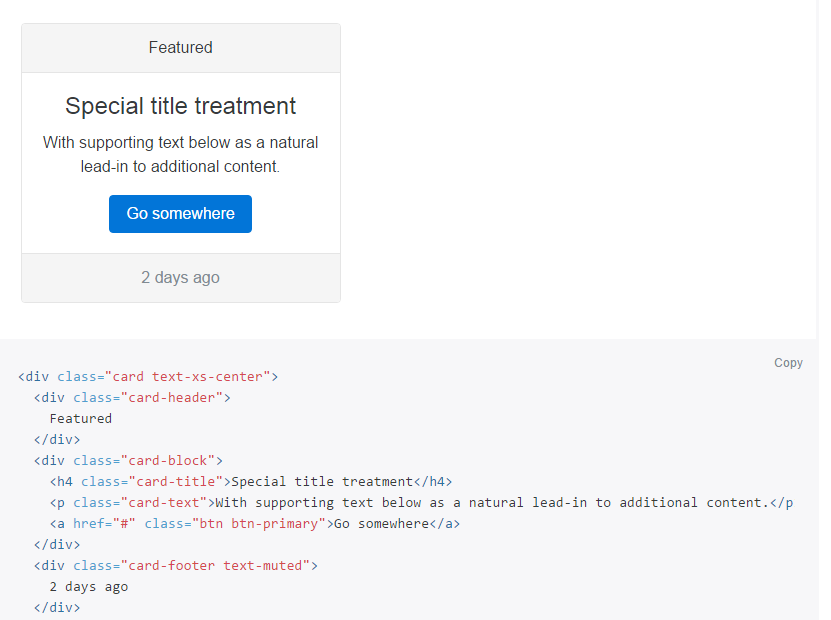
1.分析:用react开发一个类似bootstrap4中的card组件http://v4-alpha.getbootstrap.com/components/card/,界面类似如下:
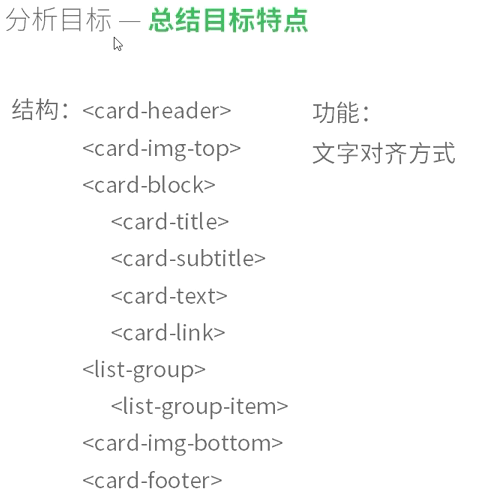
2.确定发目标:
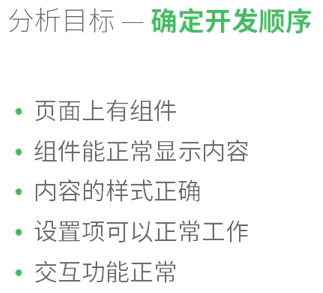
3.确定开发顺序
4.开发流程介绍

测试采用TDD

二、代码
1.Card.js
 var React = require('react/addons');

 var Card = React.createClass({

     getInitialState: function() {

         return this.props.content;

     },

     handleClick: function() {

         this.setState({

             blocks : [{

                 title: "Allen Iverson(已关注)",

                 subtitle: "PG",

                 text: "Cool player",

                 links: [{

                     url:"http://www.163.com",

                     name:"链接1"

                 }, {

                     url:"http://www.g.cn",

                     name:"链接2"

                 }

                 ]

             }]

         })

     },

     render: function(){

         var content = this.state;

         var blocks = [];

         for(var i = 0; i < content.blocks.length; i++){

             var block = content.blocks[i];

             var links = [];

             for(var i = 0; i < block.links.length; i++){

                 links.push(<a onClick={this.handleClick} className="card-link" href={block.links[i].url}>{block.links[i].name}</a>);

             }

             blocks.push(<div className="card-block">

                         <h4 className="card-title">{block.title}</h4>

                         <h6 className="card-subtitle">{block.subtitle}</h6>

                         <p className="card-text">{block.text}</p>

                         <p>

                             {links}

                         </p>

                     </div>

                 );

         }

         var listGroup = [];

         for(var i = 0; i < content.listGroup.length; i++){

             listGroup.push(<li className="list-group-item">{content.listGroup[i]}</li>);

         }

         var option = this.props.option ? "card text-xs-" + this.props.option : "card";

         return <div className="container-fluid">

              <div className="row">

                 <div className="col-sm-4">

                     <div className={option}>

                         <div className="card-header">{content.header}</div>

                         <img className="card-img-top" src={content.imgTop.url} alt={content.imgTop.alt}></img>

                         {blocks}

                         <ul className="list-group list-group-flush">

                         {listGroup}

                         </ul>

                         <img className="card-img-bottom" src={content.imgBottom.url} alt={content.imgBottom.alt}></img>

                         <div className="card-footer">{content.footer}</div>

                     </div>

                 </div>

             </div>

         </div>

     }

 })

 module.exports = Card
2.test.jsx
 var React = require('react/addons');

 var jasmineReact = require('jasmine-react-helpers');

 var TestUtils = React.addons.TestUtils;

 var Card = require('./Card.jsx');

 describe('Card component', function(){

     var card;

     var content;

     beforeEach(function(){

         //渲染

         var blocks = [

             {

                 title: "Allen Iverson",

                 subtitle: "PG",

                 text: "Cool player",

                 links: [{

                     url:"http://www.163.com",

                     name:"链接1"

                 }, {

                     url:"http://www.g.cn",

                     name:"链接2"

                 }

                 ]

             }

         ];

         var header = "76ers";

         var footer = "mvp";

         var listGroup = ["艾弗森1996年6月26日被费城76人队选中,成为NBA状元秀,绰号答案(The Answer)","场均出战41.1分钟,获得26.7分、6.2次助攻和2.2次抢断"];

         var imgTop = {

             url: "http://a1.hoopchina.com.cn/attachment/Day_100424/43_3842044_665ae051136b4b8.jpg",

             alt: "dribble"

         };

         var imgBottom = {

             url: "http://www.onlinedown.net/bigsoftimg/androidimg/260000/255860_0.jpg",

             alt: "crossover"

         }

         var content = {

             blocks: blocks,

             header: header,

             footer: footer,

             listGroup: listGroup,

             imgBottom: imgBottom,

             imgTop: imgTop

         }

         card = TestUtils.renderIntoDocument(<Card content={content} option="center"></Card>);

     })

     afterEach(function(){

         React.unmountComponentAtNode(React.findDOMNode(card))

     })

     it('should exist', function(){

         expect(!!React.findDOMNode(card)).toBe(true)

         //card = TestUtils.renderIntoDocument(<Card content={content}></Card>);

         //expect(React.findDOMNode(card).textContent).toContain('Hello world')

     });

     it('should have correct structure', function(){

         //测试

         //card = TestUtils.renderIntoDocument(<Card content={content}></Card>);

         var content = React.findDOMNode(card).textContent;

         expect(content).toContain("Allen");

         expect(content).toContain("76ers");

         expect(content).toContain("mvp");

         expect(content).toContain("艾弗森");

         expect(React.findDOMNode(card).getElementsByTagName("img")[0].alt).toContain("dribble");

         expect(React.findDOMNode(card).getElementsByTagName("img")[1].alt).toContain("crossover");

     });

     it('should have correct style', function() {

         var cardBox = React.findDOMNode(card).getElementsByClassName("card");

         expect(!!cardBox.length).toBe(true);

     });

     it('should correctly use options', function() {

         var cardBox = React.findDOMNode(card).getElementsByClassName("text-xs-center");

         expect(!!cardBox.length).toBe(true);

     });

     it('should be response', function() {

         TestUtils.Simulate.click(React.findDOMNode(card).getElementsByTagName("a")[0]);

         var content = React.findDOMNode(card).textContent;

         expect(content).toContain("已关注");

     });

 })
3.show.jsx
 var React = require('react/addons');

 var Card = require('./Card.jsx');

 var blocks = [

     {

         title: "Allen Iverson",

         subtitle: "PG",

         text: "Cool player",

         links: [{

             url:"http://www.163.com",

             name:"链接1"

         }, {

             url:"http://www.g.cn",

             name:"链接2"

         }

         ]

     }

 ];

 var header = "76ers";

 var footer = "mvp";

 var listGroup = ["艾弗森1996年6月26日被费城76人队选中,成为NBA状元秀,绰号答案(The Answer)","场均出战41.1分钟,获得26.7分、6.2次助攻和2.2次抢断"];

 var imgTop = {

     url: "http://a1.hoopchina.com.cn/attachment/Day_100424/43_3842044_665ae051136b4b8.jpg",

     alt: "dribble"

 };

 var imgBottom = {

     url: "http://www.onlinedown.net/bigsoftimg/androidimg/260000/255860_0.jpg",

     alt: "crossover"

 }

 var content = {

     blocks: blocks,

     header: header,

     footer: footer,

     listGroup: listGroup,

     imgBottom: imgBottom,

     imgTop: imgTop

 }

 React.render(<Card content={content} option="right"></Card>, document.body);
四、运行结果(bootstrap的css无效果)

源码:http://files.cnblogs.com/files/shamgod/BootstrapCard.zip
React开发项目例子的更多相关文章
- react实战项目开发(2) react几个重要概念以及JSX语法
前言 前面我们已经学习了利用官方脚手架搭建一套可以应用在生产环境下的React开发环境.那么今天这篇文章主要先了解几个react重要的概念,以及讲解本文的重要知识JSX语法 React重要概念 [思想 ...
- Expo大作战(三)--针对已经开发过react native项目开发人员有针对性的介绍了expo,expo的局限性,开发时项目选型注意点等
简要:本系列文章讲会对expo进行全面的介绍,本人从2017年6月份接触expo以来,对expo的研究断断续续,一路走来将近10个月,废话不多说,接下来你看到内容,讲全部来与官网 我猜去全部机翻+个人 ...
- react 开发 PC 端项目(一)项目环境搭建 及 处理 IE8 兼容问题
步骤一:项目环境搭建 首先,你不应该使用 React v15 或更高版本.使用仍然支持 IE8 的 React v0.14 即可. 技术选型: 1.react@0.14 2.bootstrap3 3. ...
- react 前端项目技术选型、开发工具、周边生态
react 前端项目技术选型.开发工具.周边生态 声明:这不是一篇介绍 React 基础知识的文章,需要熟悉 React 相关知识 主架构:react, react-router, redux, re ...
- 【腾讯Bugly干货分享】React Native项目实战总结
本文来自于腾讯bugly开发者社区,非经作者同意,请勿转载,原文地址:http://dev.qq.com/topic/577e16a7640ad7b4682c64a7 “8小时内拼工作,8小时外拼成长 ...
- React Native 项目运行在 Web 浏览器上面
React Native 的出现,让前端工程师拥有了使用 JavaScript 编写原生 APP 的能力.相比之前的 Web app 来说,对于性能和用户体验提升了非常多. 但是 React Nati ...
- 用Inferno代替React开发高性能响应式WEB应用
什么是Inferno Inferno可以看做是React的另一个精简.高性能实现.它的使用方式跟React基本相同,无论是JSX语法.组件的建立.组件的生命周期,还是与Redux或Mobx的配合.路由 ...
- Immutable.js 以及在 react+redux 项目中的实践
来自一位美团大牛的分享,相信可以帮助到你. 原文链接:https://juejin.im/post/5948985ea0bb9f006bed7472?utm_source=tuicool&ut ...
- React开发实时聊天招聘工具 -第一章
第一章 课程道学 6个页面 弱化css Antd-mobile作为组件库 Redux 状态管理 React-Router 路由 Axios异步请求 后端Express框架 Socket.io 数据库: ...
随机推荐
- LANMP 如何禁止访问 .htaccess 文件
很多朋友问我,为什么他已经在 Apache 规则里面加了禁止别人直接下载 .htaccess 文件,为什么还是可以下载? 其实这个很简单,因为 .htaccess 在 LANMP 环境下,当他作为文件 ...
- 如何开启MYSQL远程连接权限
开启MYSQL远程连接权限 //建议设置固定IP mysql> GRANT ALL PRIVILEGES ON *.* TO root@"8.8.8.8" IDENTIFIE ...
- django post分号引发的问题
利用jquery的ajax传值 $.ajax({ type:"POST", url:"", data:"content"=content, ...
- ERROR 1005 (HY000): Can't create table'matrix.system_log' (errno: 150)
CREATE TABLE `user` (`id` bigint(32) NOT NULL AUTO_INCREMENT ,`name` varchar(32) CHARACTER SET utf8 ...
- Python中的除法
在C/C++语言对于整形数执行除法会进行地板除(舍去小数部分).例如 int a=15/10; a的结果为1. 同样的在Java中也是如此,所以两个int型的数据相除需要返回一个浮点型数据的时候就需要 ...
- C/C++运算符优先级
运算符优先级从高至低 优先级 操作符 描述 例子 结合性 1 ()[]->.::++-- 调节优先级的括号操作符数组下标访问操作符通过指向对象的指针访问成员的操作符通过对象本身访问成员的操作符作 ...
- Lightmapping
当游戏场景包含了大量的多边形时,实时光源和阴影对游戏性能的影响会很大.这时更适合使用Lightmapping技术,将光线效果预渲染成贴图使用到多边形上模拟光影效果.这种方式不用担心光源数量和阴影对性能 ...
- SAP如何使用关于序列号的表
- 获取不到app.config里面的数据库连接字符串的解决方法
今天在自己的类库里添加了对app.config文件的数据库连接字符串的引用,但是返回的居然是Null,纳闷了.然后在网上找到了答案原来是我的app.config文件加错了地方,应该加到启动项目里面,而 ...
- FMS (端口问题)如何穿透防火墙
转自http://www.cnblogs.com/zhchongyao/archive/2010/01/22/1653803.html 先是管理端口,就是fms2_console文件连接到server ...