
Hadoop上路-04_HBase0.98.0入门
以下操作在Hadoop分布式集群基础上进行。
一。分布式环境搭建
下载:http://www.apache.org/dyn/closer.cgi/hbase/ ,hbase-0.98.0-hadoop2-bin.tar.gz。
1.在master主控机安装HBase
1)解压
SHELL$ tar -zxvf hbase-0.98.0-hadoop2-bin.tar.gz
SHELL$ mv hbase-0.98.0-hadoop2 ~/hbase0.98.0hadoop2
2)配置环境变量
(1)修改/etc/profile文件
SHELL$ sudo gedit /etc/profile

(2)验证
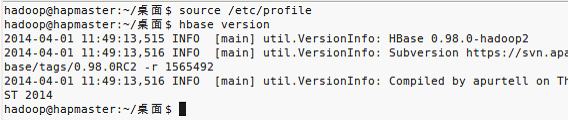
3)修改%HBASE%/conf/hbase-env.sh

4)修改$HBASE_HOME/conf/hbase-site.xml
<?xml version="1.0"?>

<?xml-stylesheet type="text/xsl" href="configuration.xsl"?>

<configuration>

    <property>

        <!-- hbase的master主机名和端口 -->

        <name>hbase.master</name>

        <value>hdfs://192.168.1.240:60000</value>

    </property>

    <property>

        <!-- Hbase数据保存目录 -->

        <name>hbase.rootdir</name>

        <!-- 主机和端口号与$HADOOP_HOME/.../core-site.xml的fs.defaultFS的主机和端口号一致 -->

        <value>hdfs://192.168.1.240:9000/hbase</value>

    </property>

    <property>

        <!-- 开启分布式 -->

        <name>hbase.cluster.distributed</name>

        <value>true</value>

    </property>

    <property>

        <!-- hbase集群中zookeeper的主机各节点,使用奇数可尽量确保选举leader公平 -->

        <name>hbase.zookeeper.quorum</name>

        <!-- value>hapsalve1,hapsalve2,hapsalve3</value -->

        <value>192.168.1.241,192.168.1.242,192.168.1.243</value>

    </property>

    <property>

        <!-- hbase临时文件位置。www.cuiweiyou.com -->

        <name>hbase.tmp.dir</name>

        <value>/home/hadoop/hbase0.98.0hadoop2/hbase-tmp</value>

    </property>

    <property>

        <!-- hbase临时zookeeper数据存放位置。威格灵博客 -->

        <name>hbase.zookeeper.property.dataDir</name>

        <value>/home/hadoop/hbase0.98.0hadoop2/zookeeper-temp</value>

    </property>

</configuration>
5)$HBASE_HOME/conf/regionservers 文件增加

2.把HBase复制到slave从属机
SHELL$ sudo scp -rpv /home/hadoop/hbase0.98.0hadoop2/ hadoop@hapslave*:/home/hadoop/
3.启动HBase集群
在Hadoop集群启动后,再启动HBase集群。
SHELL$ start-hbase.sh

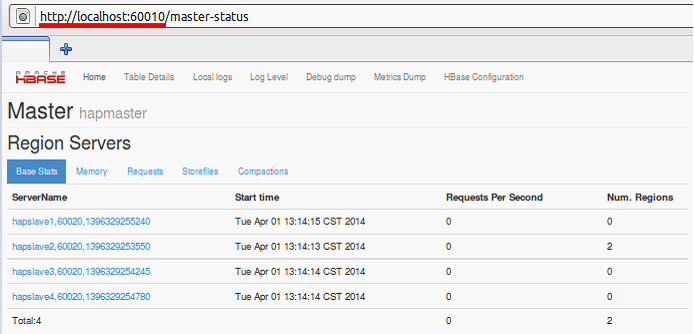
在主控机通过web界面查看(本例配置4个节点):
4.停止HBase集群
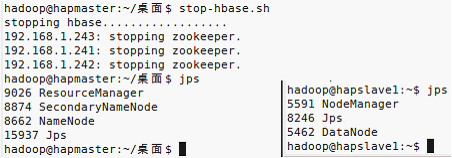
SHELL$ stop-hbase.sh
二。HBase Shell
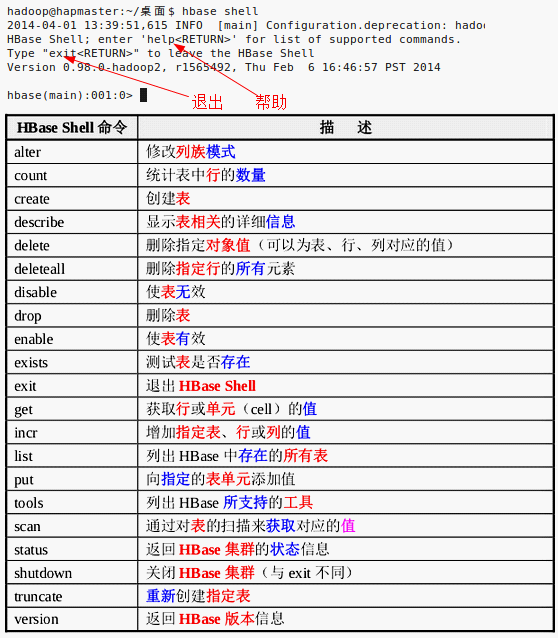
SHELL$ hbase shell
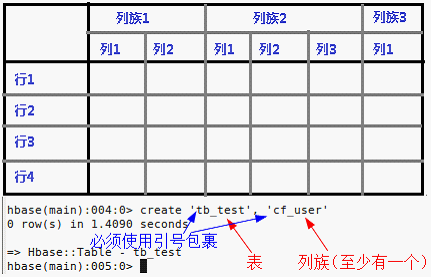
1.建表create
2.列出全部表list

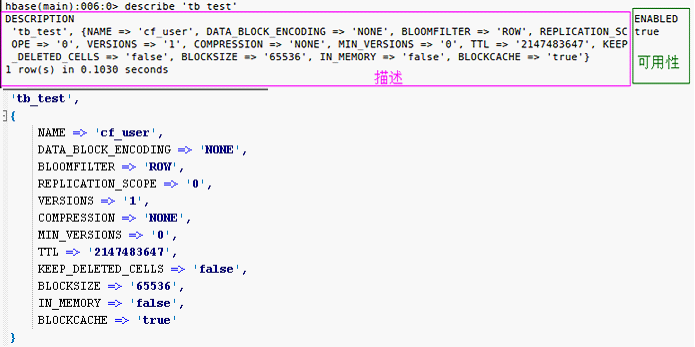
3.表描述describe
4.删除表disable,drop

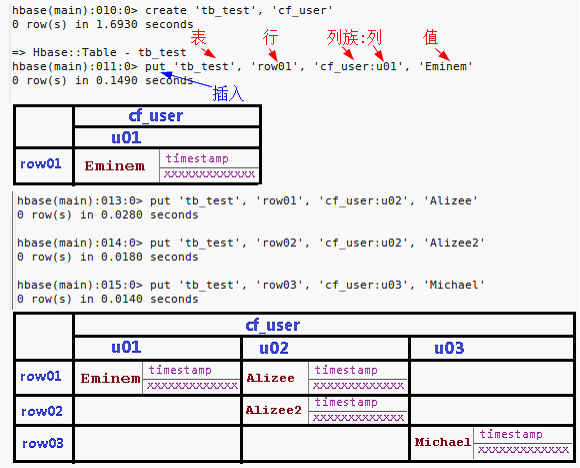
5.插入条目put
6.展示全表scan

7.查询条目get

8.更新条目put

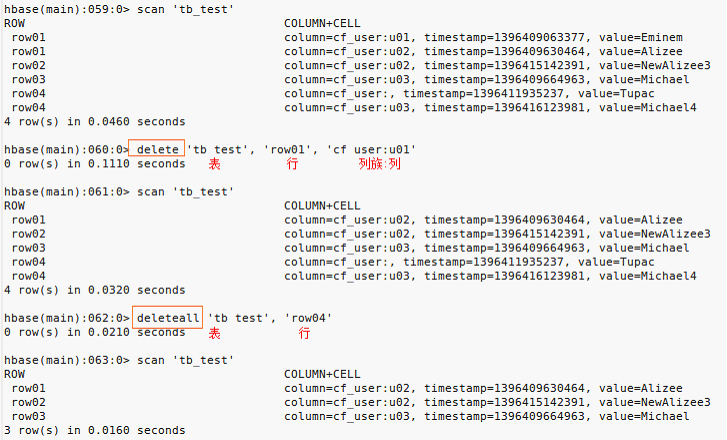
9.删除条目delete
清空表:
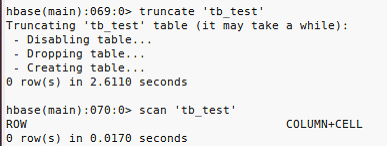
truncate是一个能够快速清空资料表内所有资料的SQL语法。并且能针对具有自动递增值的字段,做计数重置归零重新计算的作用
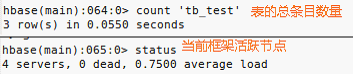
10.统计参数
三。JavaAPI
全部API在%HBase%/docs目录里,完全是英文的。
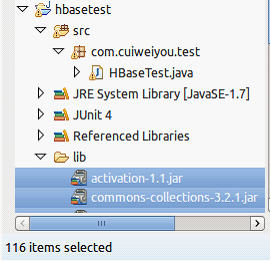
本例所须全部jar都可以在%HBase安装目录%/lib目录中找到。图省事,我一股脑儿全导入了。
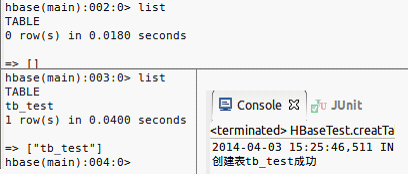
1.创建一张表
package com.cuiweiyou.test;

// www.cuiweiyou.com

import java.io.IOException;

import java.util.Iterator;

import java.util.List;

import org.apache.hadoop.conf.Configuration;

import org.apache.hadoop.hbase.Cell;

import org.apache.hadoop.hbase.CellUtil;

import org.apache.hadoop.hbase.HBaseConfiguration;

import org.apache.hadoop.hbase.HColumnDescriptor;

import org.apache.hadoop.hbase.HTableDescriptor;

import org.apache.hadoop.hbase.TableName;

import org.apache.hadoop.hbase.client.Delete;

import org.apache.hadoop.hbase.client.Get;

import org.apache.hadoop.hbase.client.HBaseAdmin;

import org.apache.hadoop.hbase.client.HTable;

import org.apache.hadoop.hbase.client.Put;

import org.apache.hadoop.hbase.client.Result;

import org.apache.hadoop.hbase.client.ResultScanner;

import org.apache.hadoop.hbase.client.Scan;

import org.apache.hadoop.hbase.util.Bytes;

import org.junit.Test;

public class HBaseTest {

    //创建表

    @Test

    public void creatTable() throws Exception {

        String strTBName = "tb_test";    //表

        String strColFamily = "cf";        //列族

        //配置

        Configuration conf = HBaseConfiguration.create();

        conf.set("hbase.zookeeper.quorum", "192.168.1.241,192.168.1.242,192.168.1.243");

        //管理员

        HBaseAdmin hbaseAdmin = new HBaseAdmin(conf);

        //addColumn(String tableName, HColumnDescriptor column)            //向一个已经存在的表添加咧

        //checkHBaseAvailable(HBaseConfiguration hbaseConf)                //静态函数,查看HBase是否处于运行状态

        //deleteTable(byte[] tableName)                                    //删除一个已经存在的表

        //enableTable(byte[] tableName)                                    //使表处于有效状态

        //disableTable(byte[] tableName)                                //使表处于无效状态

         //HTableDescriptor[] listTables()                                //列出所有用户控件表项

        //modifyTable(byte[] tableName, HTableDescriptor tableDesc)        //修改表的模式,是异步的操作,耗时

        //tableExists(String tableName)                                    //检查表是否存在

        //表名称

        TableName tableName = TableName.valueOf(strTBName);

        //表描述器

        HTableDescriptor tableDesc = new HTableDescriptor(tableName);

        //removeFamily(byte[] column)            //移除一个列族

        //getName()                                //获取表的名字

        //getValue(byte[] key)                    //获取属性的值

        //setValue(String key, String value)    //设置属性的值

        tableDesc.addFamily(new HColumnDescriptor(strColFamily));//添加列族

        //创建一个表,同步操作

        hbaseAdmin.createTable(tableDesc);


        System.out.println("创建表" +  strTBName + "成功");

    }

}
2.添加一条记录
    //为表添加数据

    @Test

    public void addData() throws IOException {

        String strTBName = "tb_test";

        String strColFamily = "cf";

        String strColumn = "col";        //列名

        String strRowKey = "row1";        //行号

        String strValue = "values";        //值

        Configuration conf = HBaseConfiguration.create();

        conf.set("hbase.zookeeper.quorum", "192.168.1.241,192.168.1.242,192.168.1.243");

        //表实例

        HTable table = new HTable(conf, strTBName);

        //close()                                                        释放所有的资源或挂起内部缓冲区中的更新

        //exists(Get get)                                                检查Get实例所指定的值是否存在于HTable的列中

        //get(Get get)                                                    获取指定行的某些单元格所对应的值

        //getEndKeys()                                                    获取当前一打开的表每个区域的结束键值

        //getScanner(byte[] family)                                        获取当前给定列族的scanner实例

        //getTableDescriptor()                                            获取当前表的HTableDescriptor实例

        //getTableName()                                                获取表名

        //isTableEnabled(HBaseConfiguration conf, String tableName)        检查表是否有效

        // 获取所有的列族

        HColumnDescriptor[] columnFamilies = table.getTableDescriptor().getColumnFamilies();

        //HColumnDescriptor的常用方法:

        //getName()                                //获取列族的名字

        //getValue(byte[] key)                    //获取对应的属性的值

        //setValue(String key, String value)    //设置对应属性的值

        //插入器

        Put put = new Put(Bytes.toBytes(strRowKey));// 设置行号,RowKey

        //add(byte[] family, byte[] qualifier, byte[] value)            将指定的列和对应的值添加到Put实例中

        //add(byte[] family, byte[] qualifier, long ts, byte[] value)    将指定的列和对应的值及时间戳添加到Put实例中

        //getRow()                                                        获取Put实例的行

        //getRowLock()                                                    获取Put实例的行锁

        //getTimeStamp()                                                获取Put实例的时间戳

        //isEmpty()                                                        检查familyMap是否为空

        //setTimeStamp(long timeStamp)                                    设置Put实例的时间戳


        for (int i = 0; i < columnFamilies.length; i++) {

            String familyName = columnFamilies[i].getNameAsString(); // 获取列族名


            //指定列族

            if (familyName.equals(strColFamily)) {

                //插入

                put.add(Bytes.toBytes(familyName), Bytes.toBytes(strColumn), Bytes.toBytes(strValue));

            }

        }


        table.put(put);    //运行插入器


        System.out.println("存入数据完毕");

    }

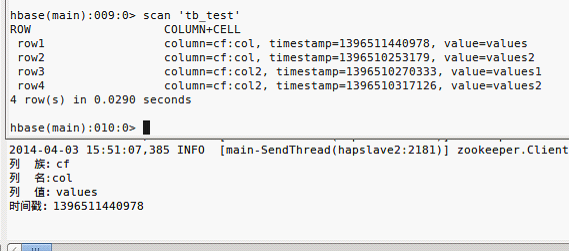
3.读取指定行记录
    //根据RowKey查询整行

    @Test

    public void getRow() throws IOException {

        String strTBName = "tb_test";

        String strRowKey = "row1";

        Configuration conf = HBaseConfiguration.create();

        conf.set("hbase.zookeeper.quorum", "192.168.1.241,192.168.1.242,192.168.1.243");

        HTable table = new HTable(conf, strTBName);    //获取表实例


        //查询器

        Get get = new Get(Bytes.toBytes(strRowKey));    //查询指定行

        //addColumn(byte[] family, byte[] qualifier)    获取指定列族和列修饰符对应的列

        //addFamily(byte[] family)                        通过指定的列族获取其对应列的所有列

        //setTimeRange(long minStamp,long maxStamp)        获取指定取件的列的版本号

        //setFilter(Filter filter)                        当执行Get操作时设置服务器端的过滤器

        Result result = table.get(get);

        //containsColumn(byte[] family, byte[] qualifier)        检查指定的列是否存在

        //getFamilyMap(byte[] family)                            获取对应列族所包含的修饰符与值的键值对

        //getValue(byte[] family, byte[] qualifier)                获取对应列的最新值


        List<Cell> listCells = result.listCells();    //指定行、全部列族的全部列

        for (Cell cell : listCells) {

            System.out.println("列  族:" + Bytes.toString(CellUtil.cloneFamily(cell)));

            System.out.println("列  名:" + Bytes.toString(CellUtil.cloneQualifier(cell)));

            System.out.println("列  值:" + Bytes.toString(CellUtil.cloneValue(cell)));

            System.out.println("时间戳:" + cell.getTimestamp());

        }

    }
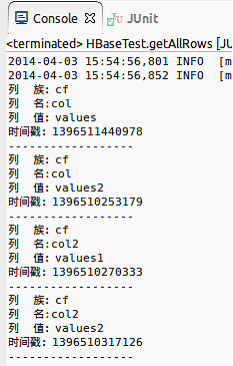
4.显示所有数据
    //遍历全部条目

    @Test

    public void getAllRows() throws IOException {

        String strTBName = "tb_test";

        Configuration conf = HBaseConfiguration.create();

        conf.set("hbase.zookeeper.quorum", "192.168.1.241,192.168.1.242,192.168.1.243");

        HTable table = new HTable(conf, strTBName);    //获取表实例

        //扫描器

        ResultScanner resultScanner = table.getScanner(new Scan());    //针对全表的查询器

        Iterator<Result> results = resultScanner.iterator();

        while(results.hasNext()) {

            Result result = results.next();

            List<Cell> cells = result.listCells();

            for(Cell cell : cells) {

                System.out.println("列  族:" + Bytes.toString(CellUtil.cloneFamily(cell)));

                System.out.println("列  名:" + Bytes.toString(CellUtil.cloneQualifier(cell)));

                System.out.println("列  值:" + Bytes.toString(CellUtil.cloneValue(cell)));

                System.out.println("时间戳:" + cell.getTimestamp() + "\n------------------");

            }

        }

    }
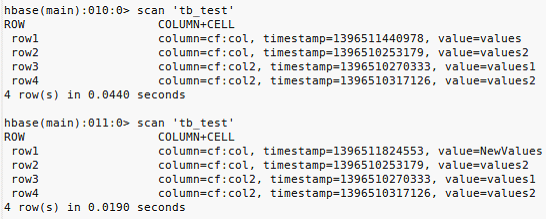
5.更新条目
    //更新表中某行的某一列

    @Test

    public void updateTable() throws IOException {

        String strTBName = "tb_test";

        String strColFamily = "cf";

        String strColumn = "col";

        String strRowKey = "row1";

        String strNewValue = "NewValues";

        Configuration conf = HBaseConfiguration.create();

        conf.set("hbase.zookeeper.quorum", "192.168.1.241,192.168.1.242,192.168.1.243");

        HTable table = new HTable(conf, strTBName);    //获取表实例

        Put put = new Put(Bytes.toBytes(strRowKey));

        //仍然是插入操作(已知列族,已知列,新值)

        put.add(Bytes.toBytes(strColFamily), Bytes.toBytes(strColumn), Bytes.toBytes(strNewValue));

        table.put(put);

        System.out.println("更新结束");

    }
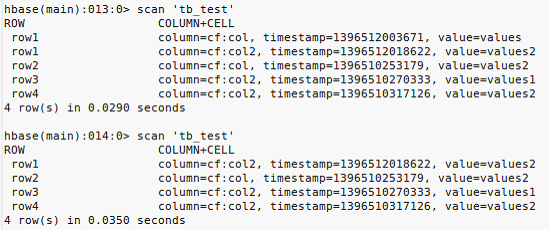
6.删除单元格
    //删除指定行的指定的列(删除单元格)

    @Test

    public void deleteColumn() throws IOException {

        String strTBName = "tb_test";

        String strColFamily = "cf";

        String strColumn = "col";

        String strRowKey = "row1";

        Configuration conf = HBaseConfiguration.create();

        conf.set("hbase.zookeeper.quorum", "192.168.1.241,192.168.1.242,192.168.1.243");

        HTable table = new HTable(conf, strTBName);    //获取表实例

        //删除器

        Delete del = new Delete(Bytes.toBytes(strRowKey));

        del.deleteColumns(Bytes.toBytes(strColFamily), Bytes.toBytes(strColumn));

        table.delete(del);


        System.out.println("行:" + strRowKey + ",列族:"+ strColFamily +",列:"+ strColumn +",删除完毕");

    }
7.删除整行
    //删除整行

    @Test

    public void deleteAllColumn() throws IOException {

        String strTBName = "tb_test";

        String strRowKey = "row1";

        Configuration conf = HBaseConfiguration.create();

        conf.set("hbase.zookeeper.quorum", "192.168.1.241,192.168.1.242,192.168.1.243");

        HTable table = new HTable(conf, strTBName);    //获取表实例

        Delete deleteAll = new Delete(Bytes.toBytes(strRowKey));

        table.delete(deleteAll);

        System.out.println("这一行全删除了");

    }

8.删除表单
    //删除表

    @Test

    public void deleteTable() throws IOException {

        String strTBName = "tb_test";


        Configuration conf = HBaseConfiguration.create();

        conf.set("hbase.zookeeper.quorum", "192.168.1.241,192.168.1.242,192.168.1.243");

        HBaseAdmin admin = new HBaseAdmin(conf);

        admin.disableTable(strTBName);

        admin.deleteTable(strTBName);

        System.out.println(strTBName + "表 删除了");

    }

- end
威格灵博客:www.cuiweiyou.com
Hadoop上路-04_HBase0.98.0入门的更多相关文章
- Hadoop上路-01_Hadoop2.3.0的分布式集群搭建
一.配置虚拟机软件 下载地址:https://www.virtualbox.org/wiki/downloads 1.虚拟机软件设定 1)进入全集设定 2)常规设定 2.Linux安装配置 1)名称类 ...
- Hadoop学习笔记(1) ——菜鸟入门
Hadoop学习笔记(1) ——菜鸟入门 Hadoop是什么?先问一下百度吧: [百度百科]一个分布式系统基础架构,由Apache基金会所开发.用户可以在不了解分布式底层细节的情况下,开发分布式程序. ...
- hadoop+spark集群搭建入门
忽略元数据末尾 回到原数据开始处 Hadoop+spark集群搭建 说明: 本文档主要讲述hadoop+spark的集群搭建,linux环境是centos,本文档集群搭建使用两个节点作为集群环境:一个 ...
- HBase-0.98.0和Phoenix-4.0.0分布式安装指南
目录 目录 1 1. 前言 1 2. 约定 2 3. 相关端口 2 4. 下载HBase 2 5. 安装步骤 2 5.1. 修改conf/regionservers 2 5.2. 修改conf/hba ...
- ASP.NET Core 1.0 入门——了解一个空项目
var appInsights=window.appInsights||function(config){ function r(config){t[config]=function(){var i= ...
- ASP.NET Core 1.0 入门——Application Startup
var appInsights=window.appInsights||function(config){ function r(config){t[config]=function(){var i= ...
- ps6 安装失败-FATAL: Payload '{3F023875-4A52-4605-9DB6-A88D4A813E8D} Camera Profiles Installer 6.0.98.0' information not found in Media_db.
点击 '错误摘要' Exit Code: 34 -------------------------------------- Summary ----------------------------- ...
- Omnet++ 4.0 入门实例教程
http://blog.sina.com.cn/s/blog_8a2bb17d01018npf.html 在网上找到的一个讲解omnet++的实例, 是4.0下面实现的. 我在4.2上试了试,可以用. ...
- 《VC++ 6简明教程》即VC++ 6.0入门精讲 学习进度及笔记
VC++6.0入门→精讲 2013.06.09,目前,每一章的“自测题”和“小结”三个板块还没有看(备注:第一章的“实验”已经看完). 2013.06.16 第三章的“实验”.“自测题”.“小结”和“ ...
随机推荐
- SQL Server 的事务和锁(二)-Range S-S锁
在这篇随笔中,我们的主要关注点在 Key-Range Lock.Key-Range Lock有 S-S.S-U.I-N.X-X几种情况.我们一个一个来说,力求明白.遗憾的是,这里可能会比较冗长,那么死 ...
- MD5Encoder加密支持utf-8
import java.security.MessageDigest; public class MD5Encoder { public static String encode(String str ...
- Nodejs新建博客练习(一)安装express并新建项目
安装express npm install -g express-generator 新建工程 express blog //新建项目 cd blog && npm install / ...
- Windows XP与Windows 7系统常见漏洞
1.Windows XP系统常见漏洞 Windows XP系统常见的漏洞有UPNP服务漏洞.升级程序漏洞.帮助和支持中心漏洞.压缩文件夹漏洞.服务拒绝漏洞.Windows Media Player漏洞 ...
- OC之Block的用法和实现委托
Block的基本概念 Block的基本用法 Block实现委托机制 一.Block的基本概念 Block是程序的代码块,这个代码块可以在需要的时候执行.IOS开发中,block到处可见,所以学好很重要 ...
- PHP trim()函数的一些用法
string trim ( string $str [, string $charlist ] ) - 去除字符串首尾处的空白字符(或者其他字符) trim()函数当第二个参数为空时,默认去掉空格.制 ...
- PHP使用外部命令导出数据库,备份到服务器并下载到本地
<?php // $dumpFileName目录要有可写权限 $DbHost = 'localhost'; $DbUser = 'root'; $DbPwd = '123456'; $DbNam ...
- msql_DDL_创建table
• 语法: create table 表名(• 列名1 列类型 [<列的完整性约束>],• 列名2 列类型 [<列的完整性约束>],• ... ... ); • PRIMARY ...
- 转:实体ToolTip显示XData
首先要说明,实现方式不是我的原创,其中ToolTip的实现转自这里,然后XData的设置和获取来自Kean的博客,当然我自己也做了点研究,在这里,然后把这两个技术结合起来就是你将要看到的东西. 先上效 ...
- Houdini FX 14 重磅推出!(附下载方式)
把之前发布在新浪的博客搬过来了,新浪广告太多,影响阅读和观感,博客园很清净~ SideFX于2015年1月在官网发布Houdini FX 14,喜爱尝鲜.充满好奇心的我迫不及待的装上Apprentic ...