
基于nerdctl+buildkitd+containerd实现镜像构建
1、容器技术简介
容器技术除了的docker之外,还有coreOS的rkt、google的gvisor、以及docker开源的containerd、redhat的podman、阿⾥的pouch等,为了保证容器⽣态的标准性和健康可持续发展,包括Linux 基⾦会、Docker、微软、红帽、⾕歌和IBM等公司在2015年6⽉共同成⽴了⼀个叫open container(OCI)的组织,其⽬的就是制定开放的标准的容器规范,⽬前OCI⼀共发布了两个规范,分别是runtime spec和image format spec,有了这两个规范,不同的容器公司开发的容器只要兼容这两个规范,就可以保证容器的可移植性和相互可操作性。
containerd官网:https://containerd.io/
gvisor官网:https://gvisor.dev/
podman官网:https://podman.io
pouch项目地址:https://github.com/alibaba/pouch
buildkit: 从Docker公司的开源出来的⼀个镜像构建⼯具包,⽀持OCI标准的镜像构建,项目地址https://github.com/moby/buildkit
2、buildkitd组成部分
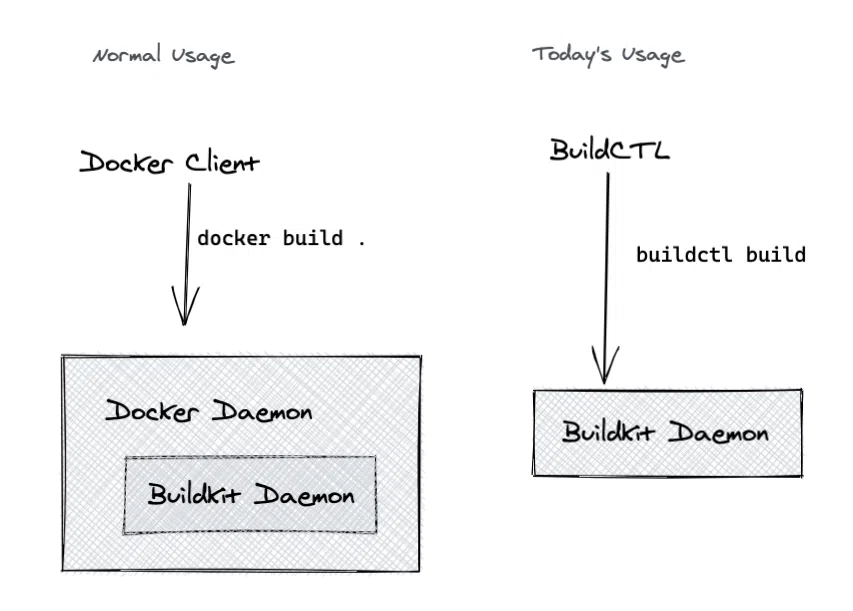
buildkitd(服务端),⽬前⽀持runc和containerd作为镜像构建环境,默认是runc,可以更换为containerd。
buildctl(客户端),负责解析Dockerfile⽂件,并向服务端buildkitd发出构建请求。
3、部署buildkitd
3.1、下载二进制包
wget https://github.com/moby/buildkit/releases/download/v0.11.6/buildkit-v0.11.6.linux-amd64.tar.gz
解压压缩包,将二进制文件软连接至path环境变量
root@k8s-master01:/usr/local/src# ls

buildkit-v0.11.6.linux-amd64.tar.gz

root@k8s-master01:/usr/local/src# tar xf buildkit-v0.11.6.linux-amd64.tar.gz

root@k8s-master01:/usr/local/src# ls

bin  buildkit-v0.11.6.linux-amd64.tar.gz

root@k8s-master01:/usr/local/src# cd bin

root@k8s-master01:/usr/local/src/bin# ls

buildctl               buildkit-qemu-arm   buildkit-qemu-mips64    buildkit-qemu-ppc64le  buildkit-qemu-s390x  buildkitd

buildkit-qemu-aarch64  buildkit-qemu-i386  buildkit-qemu-mips64el  buildkit-qemu-riscv64  buildkit-runc

root@k8s-master01:/usr/local/src/bin# ln -s /usr/local/src/bin/* /usr/local/bin/

root@k8s-master01:/usr/local/src/bin# buildctl --help

NAME:

   buildctl - build utility

USAGE:

   buildctl [global options] command [command options] [arguments...]

VERSION:

   v0.11.6

COMMANDS:

   du        disk usage

   prune     clean up build cache

   build, b  build

   debug     debug utilities

   help, h   Shows a list of commands or help for one command

GLOBAL OPTIONS:

   --debug                enable debug output in logs

   --addr value           buildkitd address (default: "unix:///run/buildkit/buildkitd.sock")

   --tlsservername value  buildkitd server name for certificate validation

   --tlscacert value      CA certificate for validation

   --tlscert value        client certificate

   --tlskey value         client key

   --tlsdir value         directory containing CA certificate, client certificate, and client key

   --timeout value        timeout backend connection after value seconds (default: 5)

   --help, -h             show help

   --version, -v          print the version

root@k8s-master01:/usr/local/src/bin#
能够正常在bash中执行buildkit --help ,表示对应命令已经正常软连接至path环境中。
3.2、提供buildkit.socket文件
root@k8s-master01:/usr/local/src/bin# cat /lib/systemd/system/buildkit.socket

[Unit]

Description=BuildKit

Documentation=https://github.com/moby/buildkit

[Socket]

ListenStream=%t/buildkit/buildkitd.sock

[Install]

WantedBy=sockets.target

root@k8s-master01:/usr/local/src/bin#
3.3、提供buildkit.service文件
root@k8s-master01:/usr/local/src/bin# cat /lib/systemd/system/buildkitd.service

[Unit]

Description=BuildKit

Requires=buildkit.socket

After=buildkit.socketDocumentation=https://github.com/moby/buildkit

[Service]

ExecStart=/usr/local/bin/buildkitd --oci-worker=false --containerd-worker=true

[Install]

WantedBy=multi-user.target

root@k8s-master01:/usr/local/src/bin#
3.4、启动buildiktd服务
root@k8s-master01:/usr/local/src/bin# systemctl daemon-reload

root@k8s-master01:/usr/local/src/bin# systemctl enable buildkitd

Created symlink /etc/systemd/system/multi-user.target.wants/buildkitd.service → /lib/systemd/system/buildkitd.service.

root@k8s-master01:/usr/local/src/bin# systemctl restart buildkitd

root@k8s-master01:/usr/local/src/bin# systemctl status buildkitd

● buildkitd.service - BuildKit

     Loaded: loaded (/lib/systemd/system/buildkitd.service; enabled; vendor preset: enabled)

     Active: active (running) since Wed 2023-05-31 13:32:38 UTC; 4s ago

   Main PID: 12191 (buildkitd)

      Tasks: 9 (limit: 4571)

     Memory: 7.8M

        CPU: 125ms

     CGroup: /system.slice/buildkitd.service

             └─12191 /usr/local/bin/buildkitd --oci-worker=false --containerd-worker=true

May 31 13:32:38 k8s-master01.ik8s.cc systemd[1]: Started BuildKit.

May 31 13:32:38 k8s-master01.ik8s.cc buildkitd[12191]: time="2023-05-31T13:32:38Z" level=warning msg="using host network as the default"

May 31 13:32:38 k8s-master01.ik8s.cc buildkitd[12191]: time="2023-05-31T13:32:38Z" level=warning msg="git source cannot be enabled: failed to find git

binary: exec: \"git\": executable file not found in $PATH"

May 31 13:32:38 k8s-master01.ik8s.cc buildkitd[12191]: time="2023-05-31T13:32:38Z" level=info msg="found worker \"kffvitvra0b27yi956wa4xcal\", labels=m

ap[org.mobyproject.buildkit.worker.containerd.namespace:buildkit org.mobyproject.buildkit.worker.containerd.uuid:f27e8d21-8b1d-44ac-9233-f55b9b028fc0 o

rg.mobyproject.buildkit.worker.executor:containerd org.mobyproject.buildkit.worker.hostname:k8s-master01.ik8s.cc org.mobyproject.buildkit.worker.networ

k:host org.mobyproject.buildkit.worker.selinux.enabled:false org.mobyproject.buildkit.worker.snapshotter:overlayfs], platforms=[linux/amd64 linux/amd64

/v2 linux/386]"

May 31 13:32:38 k8s-master01.ik8s.cc buildkitd[12191]: time="2023-05-31T13:32:38Z" level=info msg="found 1 workers, default=\"kffvitvra0b27yi956wa4xcal

\""

May 31 13:32:38 k8s-master01.ik8s.cc buildkitd[12191]: time="2023-05-31T13:32:38Z" level=warning msg="currently, only the default worker can be used."

May 31 13:32:38 k8s-master01.ik8s.cc buildkitd[12191]: time="2023-05-31T13:32:38Z" level=info msg="running server on /run/buildkit/buildkitd.sock"

root@k8s-master01:/usr/local/src/bin#
4、基于nginx代理⾃签名证书harbor并实现https
4.1、将harbor修改为http协议
停止harbor服务
root@harbor:/app/harbor# docker-compose down

[+] Running 13/13

  Container notary-server       Removed                                                                                                          0.8s

  Container nginx               Removed                                                                                                          1.7s

  Container harbor-jobservice   Removed                                                                                                          0.7s

  Container trivy-adapter       Removed                                                                                                          0.6s

  Container notary-signer       Removed                                                                                                          0.5s

  Container harbor-portal       Removed                                                                                                          0.3s

  Container harbor-core         Removed                                                                                                          3.5s

  Container harbor-db           Removed                                                                                                          0.7s

  Container registry            Removed                                                                                                          0.5s

  Container redis               Removed                                                                                                          0.5s

  Network harbor_notary-sig     Removed                                                                                                          0.8s

  Network harbor_harbor         Removed                                                                                                          0.2s

  Network harbor_harbor-notary  Removed                                                                                                          0.5s

root@harbor:/app/harbor#
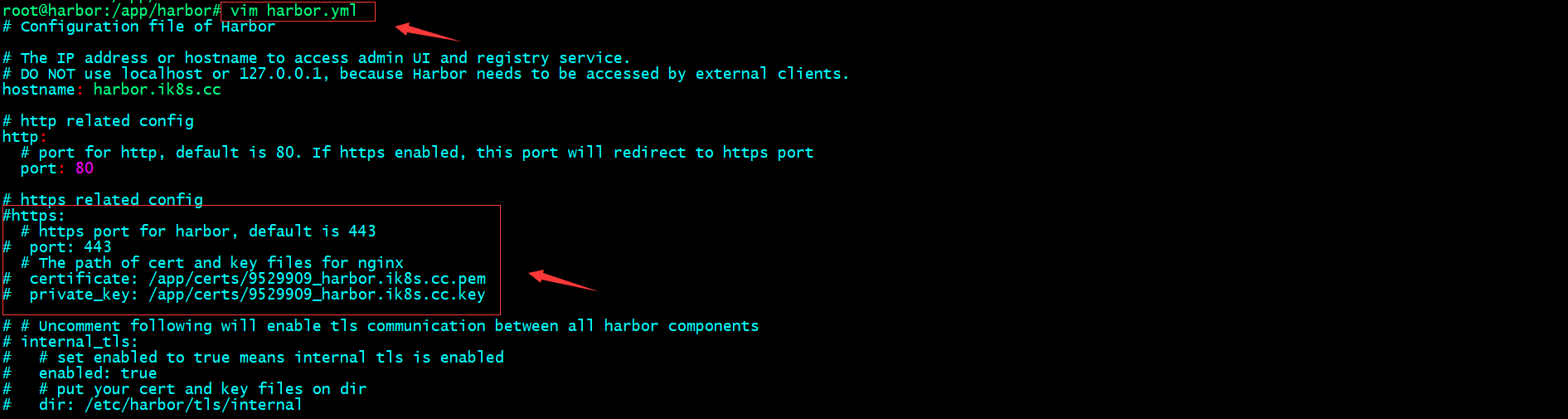
修改harbor配置文件,注释https和证书的配置
重新prepare
root@harbor:/app/harbor# ls

LICENSE  common  common.sh  docker-compose.yml  harbor.v2.8.0.tar.gz  harbor.yml  harbor.yml.tmpl  install.sh  prepare

root@harbor:/app/harbor# ./prepare

prepare base dir is set to /app/harbor

WARNING:root:WARNING: HTTP protocol is insecure. Harbor will deprecate http protocol in the future. Please make sure to upgrade to https

Clearing the configuration file: /config/db/env

Clearing the configuration file: /config/registry/passwd

Clearing the configuration file: /config/registry/config.yml

Clearing the configuration file: /config/registry/root.crt

Clearing the configuration file: /config/notary/notary-signer-ca.crt

Clearing the configuration file: /config/notary/notary-signer.key

Clearing the configuration file: /config/notary/server-config.postgres.json

Clearing the configuration file: /config/notary/server_env

Clearing the configuration file: /config/notary/notary-signer.crt

Clearing the configuration file: /config/notary/signer_env

Clearing the configuration file: /config/notary/signer-config.postgres.json

Clearing the configuration file: /config/notary/root.crt

Clearing the configuration file: /config/trivy-adapter/env

Clearing the configuration file: /config/core/env

Clearing the configuration file: /config/core/app.conf

Clearing the configuration file: /config/jobservice/env

Clearing the configuration file: /config/jobservice/config.yml

Clearing the configuration file: /config/registryctl/env

Clearing the configuration file: /config/registryctl/config.yml

Clearing the configuration file: /config/nginx/conf.d/notary.upstream.conf

Clearing the configuration file: /config/nginx/conf.d/notary.server.conf

Clearing the configuration file: /config/nginx/nginx.conf

Clearing the configuration file: /config/log/rsyslog_docker.conf

Clearing the configuration file: /config/log/logrotate.conf

Clearing the configuration file: /config/portal/nginx.conf

Generated configuration file: /config/portal/nginx.conf

Generated configuration file: /config/log/logrotate.conf

Generated configuration file: /config/log/rsyslog_docker.conf

Generated configuration file: /config/nginx/nginx.conf

Generated configuration file: /config/core/env

Generated configuration file: /config/core/app.conf

Generated configuration file: /config/registry/config.yml

Generated configuration file: /config/registryctl/env

Generated configuration file: /config/registryctl/config.yml

Generated configuration file: /config/db/env

Generated configuration file: /config/jobservice/env

Generated configuration file: /config/jobservice/config.yml

loaded secret from file: /data/secret/keys/secretkey

Generated configuration file: /compose_location/docker-compose.yml

Clean up the input dir

root@harbor:/app/harbor#
启动harbor
root@harbor:/app/harbor# docker-compose up -d

[+] Running 10/10

  Network harbor_harbor        Created                                                                                                           0.2s

  Container harbor-log         Started                                                                                                           1.2s

  Container registry           Started                                                                                                           2.5s

  Container harbor-portal      Started                                                                                                           2.7s

  Container registryctl        Started                                                                                                           2.7s

  Container harbor-db          Started                                                                                                           2.7s

  Container redis              Started                                                                                                           2.6s

  Container harbor-core        Started                                                                                                           3.2s

  Container harbor-jobservice  Started                                                                                                           4.2s

  Container nginx              Started                                                                                                           4.3s

root@harbor:/app/harbor#
如果你给harbor添加的有service文件,也可以使用systemctl stop/start harbor来停止/启动harbor
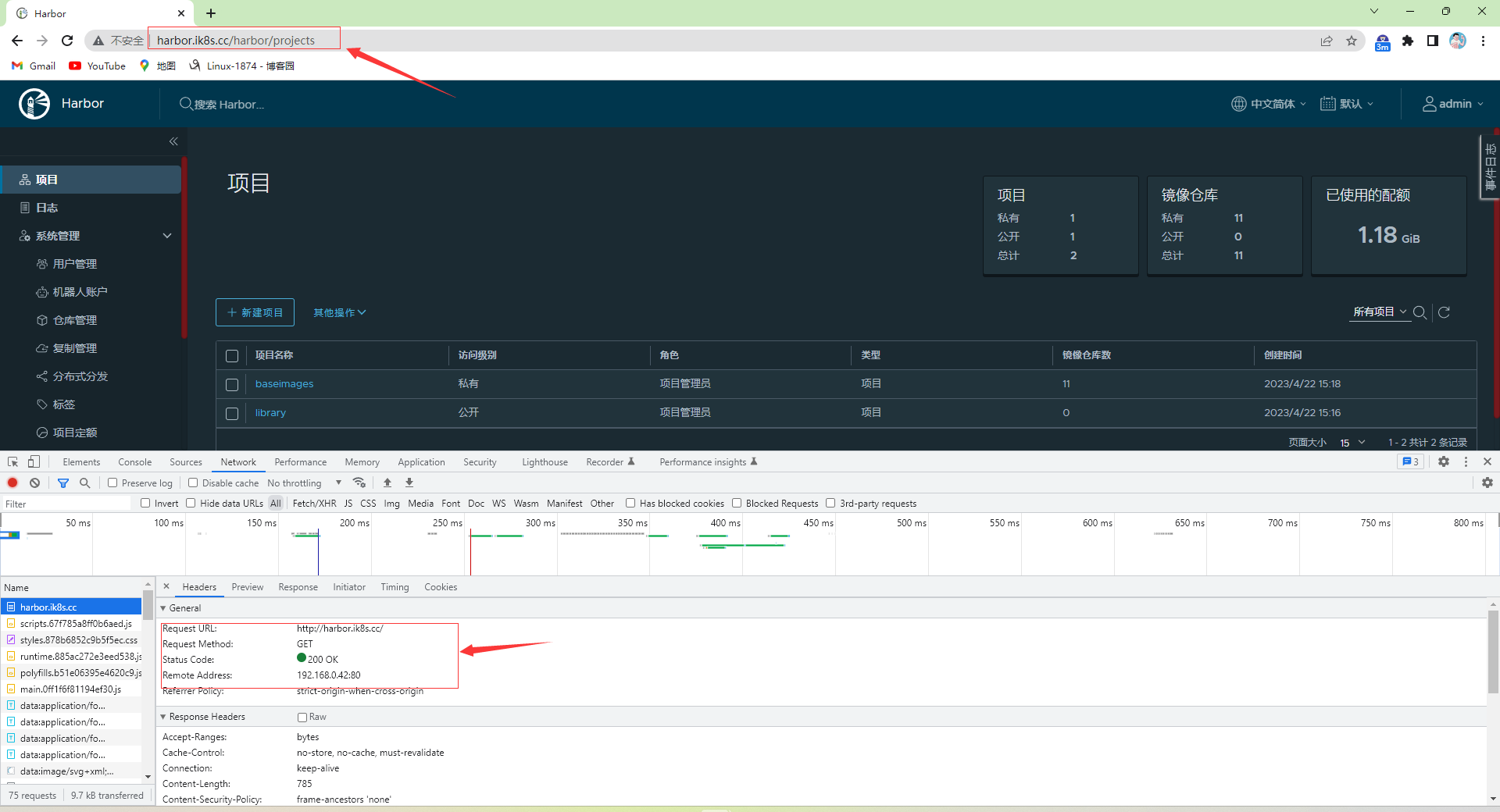
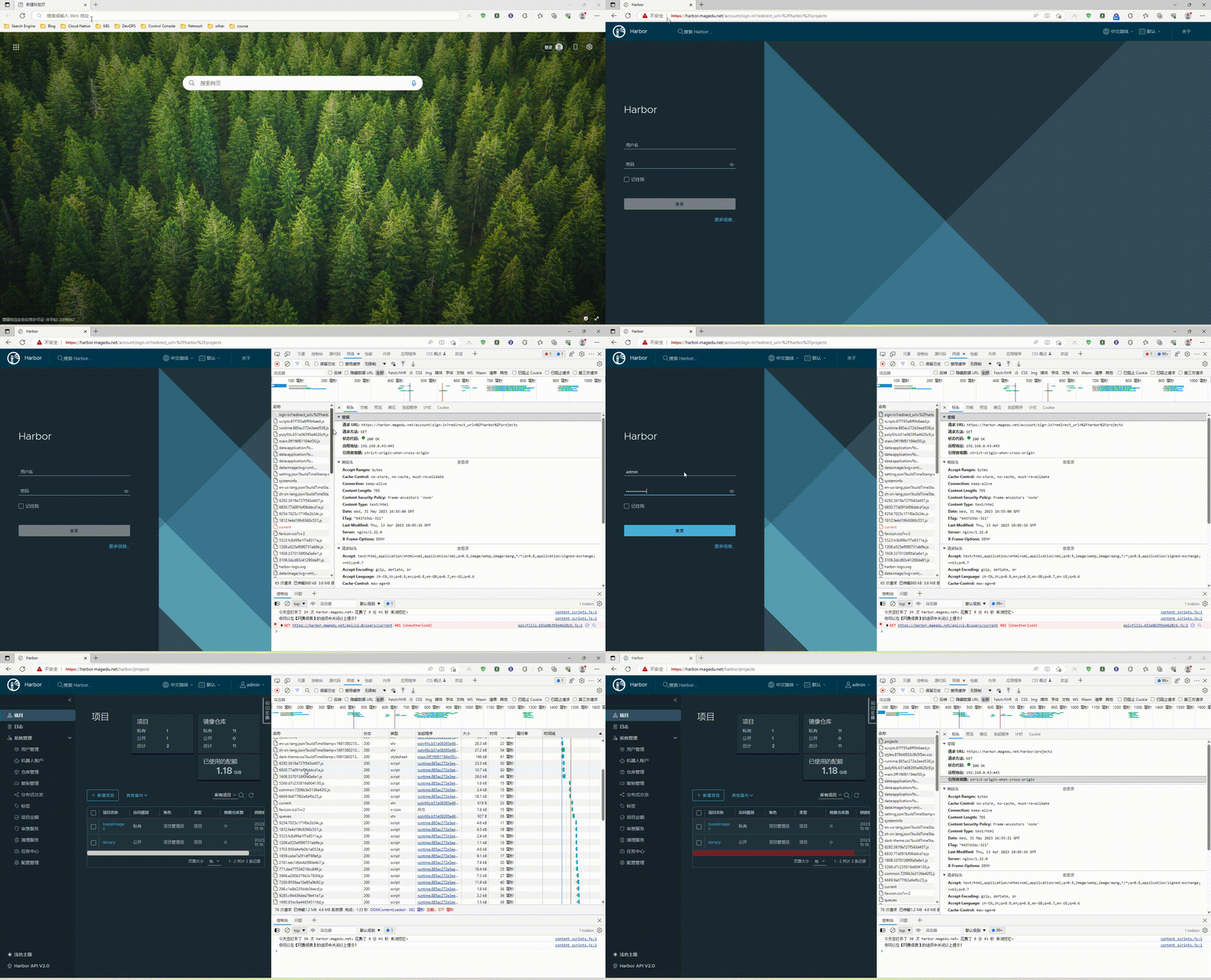
验证harbor是否可以正常登录?
4.2、nginx实现harbor的反向代理
4.2.1、nginx安装及配置
root@k8s-deploy:~# cd /usr/local/src/

root@k8s-deploy:/usr/local/src# wget https://nginx.org/download/nginx-1.22.0.tar.gz

--2023-05-31 13:59:55--  https://nginx.org/download/nginx-1.22.0.tar.gz

Resolving nginx.org (nginx.org)... 52.58.199.22, 3.125.197.172, 2a05:d014:edb:5704::6, ...

Connecting to nginx.org (nginx.org)|52.58.199.22|:443... connected.

HTTP request sent, awaiting response... 200 OK

Length: 1073322 (1.0M) [application/octet-stream]

Saving to: ‘nginx-1.22.0.tar.gz’

nginx-1.22.0.tar.gz                        100%[=======================================================================================>]   1.02M  37.8KB/s    in 27s

2023-05-31 14:00:23 (38.9 KB/s) - ‘nginx-1.22.0.tar.gz’ saved [1073322/1073322]

root@k8s-deploy:/usr/local/src# tar xf nginx-1.22.0.tar.gz

root@k8s-deploy:/usr/local/src# cd nginx-1.22.0

root@k8s-deploy:/usr/local/src/nginx-1.22.0# ./configure --prefix=/apps/nginx \

> --with-http_ssl_module \

> --with-http_v2_module \

> --with-http_realip_module \

> --with-http_stub_status_module \

> --with-http_gzip_static_module \

> --with-pcre \

> --with-stream \

> --with-stream_ssl_module \

> --with-stream_realip_module

上述报错没有找到http模块依赖的PCRE库
解决办法:安装libpcre3 libpcre3-dev
root@k8s-deploy:/usr/local/src/nginx-1.22.0# apt install libpcre3 libpcre3-dev -y
安装上述依赖后,重新configure

上述报错没有找到ssl模块依赖的openssl库
解决办法:安装openssl libssl-dev
root@k8s-deploy:/usr/local/src/nginx-1.22.0# apt install openssl libssl-dev -y
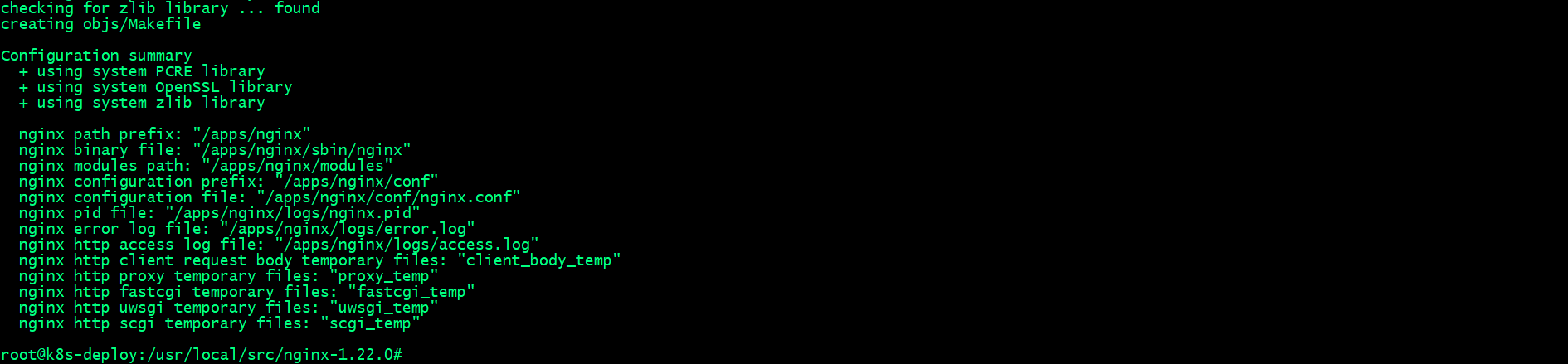
执行上述./configure 没有报错,并且能够看到上述截图,表示编译环境通过检查,可以进行下一步编译和安装
编译安装nginx
root@k8s-deploy:/usr/local/src/nginx-1.22.0# make && make install
创建证书⽬录,并生成私钥,证书
4.2.1.1、创建证书⽬录,并生成ca私钥
root@k8s-deploy:/apps/nginx/sbin# mkdir /apps/nginx/certs

root@k8s-deploy:/apps/nginx/sbin# cd /apps/nginx/certs

root@k8s-deploy:/apps/nginx/certs# openssl genrsa -out ca.key 4096
4.2.1.2、用ca私钥生成ca自签名证书
root@k8s-deploy:/apps/nginx/certs# openssl req -x509 -new -nodes -sha512 -days 3650 \

>  -subj "/C=CN/ST=Beijing/L=Beijing/O=Personal-CA/OU=Personal/CN=CA.com" \

>  -key ca.key \

>  -out ca.crt

root@k8s-deploy:/apps/nginx/certs# ls

ca.crt  ca.key

root@k8s-deploy:/apps/nginx/certs#
4.2.1.3、生成harbor服务器私钥
root@k8s-deploy:/apps/nginx/certs# openssl genrsa -out magedu.net.key 4096

root@k8s-deploy:/apps/nginx/certs# ls

ca.crt  ca.key  magedu.net.key

root@k8s-deploy:/apps/nginx/certs#
4.2.1.4、用harbor服务器私钥生成生成证书签名请求csr文件
root@k8s-deploy:/apps/nginx/certs# openssl req -sha512 -new \

>     -subj "/C=CN/ST=Beijing/L=Beijing/O=test/OU=Personal/CN=magedu.net" \

>     -key magedu.net.key \

>     -out magedu.net.csr

root@k8s-deploy:/apps/nginx/certs# ls

ca.crt  ca.key  magedu.net.csr  magedu.net.key

root@k8s-deploy:/apps/nginx/certs#
4.2.1.5、使用ca证书和私钥为harbor服务器签发证书
root@k8s-deploy:/apps/nginx/certs# openssl x509 -req -sha512 -days 3650 \

>     -CA ca.crt -CAkey ca.key -CAcreateserial \

>     -in magedu.net.csr \

>     -out magedu.net.crt

Certificate request self-signature ok

subject=C = CN, ST = Beijing, L = Beijing, O = test, OU = Personal, CN = magedu.net

root@k8s-deploy:/apps/nginx/certs# ls

ca.crt  ca.key  magedu.net.crt  magedu.net.csr  magedu.net.key

root@k8s-deploy:/apps/nginx/certs#
编辑nginx配置文件,配置证书和反向代理harbor
root@k8s-deploy:/apps/nginx/certs# cat /apps/nginx/conf/nginx.conf

worker_processes  1;

events {

    worker_connections  1024;

}

http {

    client_max_body_size 1000m;

    server {

        listen       80;

        listen       443 ssl;

        ssl_certificate /apps/nginx/certs/magedu.net.crt;

        ssl_certificate_key /apps/nginx/certs/magedu.net.key;

        ssl_session_cache shared:sslcache:20m;

        ssl_session_timeout 10m;

        location / {

                if ($scheme = http ){

                        rewrite / https://harbor.magedu.net permanent;

                }

                proxy_pass http://192.168.0.42;

        }

    }

}

root@k8s-deploy:/apps/nginx/certs#
检查nginx配置文件语法
root@k8s-deploy:/apps/nginx/certs# cd ..

root@k8s-deploy:/apps/nginx# /apps/nginx/sbin/nginx -t

nginx: the configuration file /apps/nginx/conf/nginx.conf syntax is ok

nginx: configuration file /apps/nginx/conf/nginx.conf test is successful

root@k8s-deploy:/apps/nginx#
启动nginx
root@k8s-deploy:/apps/nginx# /apps/nginx/sbin/nginx

root@k8s-deploy:/apps/nginx# ss -tnl

State            Recv-Q            Send-Q                       Local Address:Port                       Peer Address:Port           Process

LISTEN           0                 511                                0.0.0.0:80                              0.0.0.0:*

LISTEN           0                 4096                         127.0.0.53%lo:53                              0.0.0.0:*

LISTEN           0                 128                                0.0.0.0:22                              0.0.0.0:*

LISTEN           0                 511                                0.0.0.0:443                             0.0.0.0:*

root@k8s-deploy:/apps/nginx#
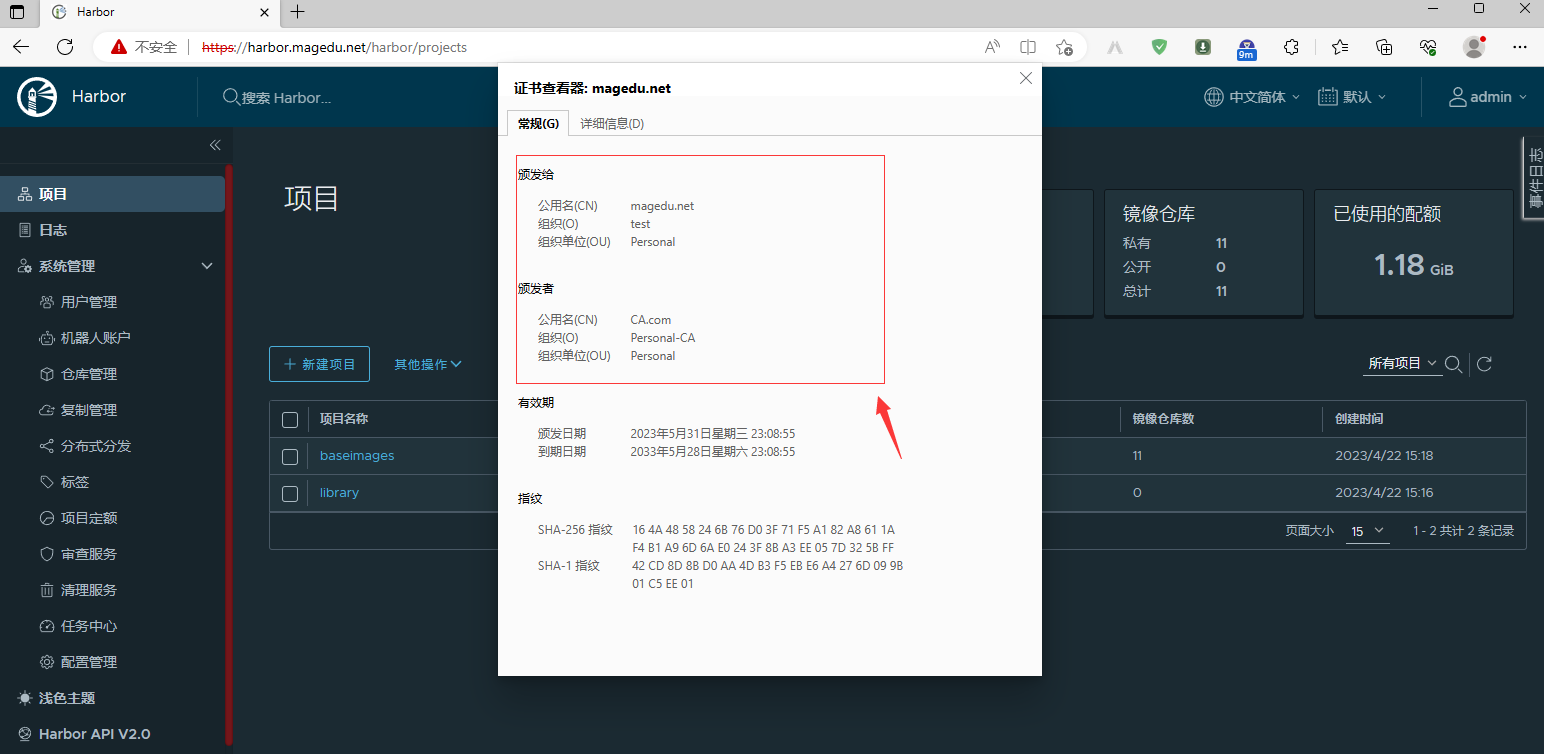
4.2.2、浏览器访问测试nginx 看看是否反向代理给harbor?是否为https?
查看证书信息
4.2.3、buildkitd配置⽂件
root@k8s-master01:/usr/local/src/bin# cat /etc/buildkit/buildkitd.toml

[registry."harbor.magedu.net"]

  http = true

  insecure = true

root@k8s-master01:
4.2.4、nerdctl配置⽂件
root@k8s-master01:/usr/local/src/bin# cat /etc/nerdctl/nerdctl.toml

namespace = "k8s.io"

debug = false

debug_full = false

insecure_registry = true

root@k8s-master01:/usr/local/src/bin#
5、测试镜像构建
5.1、nerdctl常⽤命令
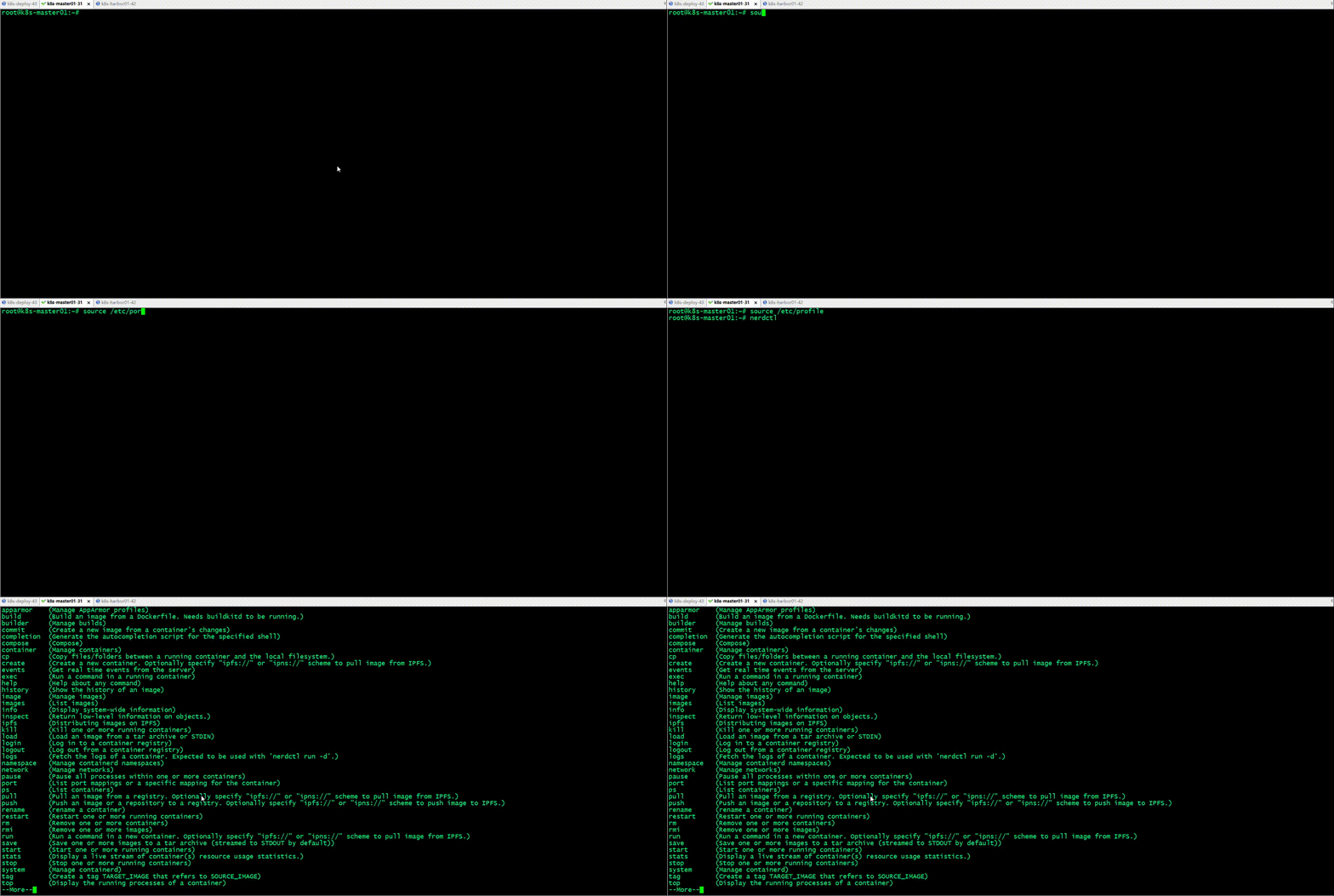
5.1.1 给nerdctl添加命令补全
root@k8s-master01:~# echo "source <(nerdctl completion bash)" >> /etc/profile

root@k8s-master01:~# cat /etc/profile

# /etc/profile: system-wide .profile file for the Bourne shell (sh(1))

# and Bourne compatible shells (bash(1), ksh(1), ash(1), ...).

if [ "${PS1-}" ]; then

  if [ "${BASH-}" ] && [ "$BASH" != "/bin/sh" ]; then

    # The file bash.bashrc already sets the default PS1.

    # PS1='\h:\w\$ '

    if [ -f /etc/bash.bashrc ]; then

      . /etc/bash.bashrc

    fi

  else

    if [ "$(id -u)" -eq 0 ]; then

      PS1='# '

    else

      PS1='$ '

    fi

  fi

fi

if [ -d /etc/profile.d ]; then

  for i in /etc/profile.d/*.sh; do

    if [ -r $i ]; then

      . $i

    fi

  done

  unset i

fi

source <(nerdctl completion bash)

root@k8s-master01:~# source /etc/profile
5.1.2、登录harbor仓库
root@k8s-master01:~# nerdctl login harbor.magedu.net

Enter Username: admin

Enter Password:

WARN[0005] skipping verifying HTTPS certs for "harbor.magedu.net"

WARNING: Your password will be stored unencrypted in /root/.docker/config.json.

Configure a credential helper to remove this warning. See

https://docs.docker.com/engine/reference/commandline/login/#credentials-store

Login Succeeded

root@k8s-master01:~# nerdctl login --insecure-registry https://harbor.magedu.net

WARN[0000] skipping verifying HTTPS certs for "harbor.magedu.net"

WARNING: Your password will be stored unencrypted in /root/.docker/config.json.

Configure a credential helper to remove this warning. See

https://docs.docker.com/engine/reference/commandline/login/#credentials-store

Login Succeeded

root@k8s-master01:~#
自签名证书一般通过--insecure-registry 选项来指定该仓库是一个不安全的仓库
5.2、自签名harbor证书分发
5.2.1、创建证书⽬录
root@k8s-master01:~# mkdir -pv /etc/containerd/certs.d/harbor.magedu.net

mkdir: created directory '/etc/containerd/certs.d'

mkdir: created directory '/etc/containerd/certs.d/harbor.magedu.net'

root@k8s-master01:~#
5.2.2、证书格式转换
root@k8s-deploy:~# cd /apps/nginx/certs/

root@k8s-deploy:/apps/nginx/certs# openssl x509 -inform PEM -in magedu.net.crt -out magedu.net.cert

root@k8s-deploy:/apps/nginx/certs#
5.2.3、开始分发证书至镜像构建服务器
root@k8s-deploy:/apps/nginx/certs# scp ca.crt magedu.net.cert magedu.net.key 192.168.0.31:/etc/containerd/certs.d/harbor.magedu.net/

ca.crt                                                                                                               100% 2041     1.5MB/s   00:00

magedu.net.cert                                                                                                      100% 1915     1.6MB/s   00:00

magedu.net.key                                                                                                       100% 3272     2.9MB/s   00:00

root@k8s-deploy:/apps/nginx/certs#
5.2.4、镜像构建服务器上验证证书
root@k8s-master01:~# cd /etc/containerd/certs.d/harbor.magedu.net

root@k8s-master01:/etc/containerd/certs.d/harbor.magedu.net# ll

total 20

drwxr-xr-x 2 root root 4096 May 31 17:49 ./

drwxr-xr-x 3 root root 4096 May 31 17:44 ../

-rw-r--r-- 1 root root 2041 May 31 17:49 ca.crt

-rw-r--r-- 1 root root 1915 May 31 17:49 magedu.net.cert

-rw------- 1 root root 3272 May 31 17:49 magedu.net.key

root@k8s-master01:/etc/containerd/certs.d/harbor.magedu.net#
5.2.5、删除原有登录信息,重新登录harbor
root@k8s-master01:~# rm -rf .docker/config.json

root@k8s-master01:~# nerdctl login harbor.magedu.net

Enter Username: admin

Enter Password:

WARN[0005] skipping verifying HTTPS certs for "harbor.magedu.net"

WARNING: Your password will be stored unencrypted in /root/.docker/config.json.

Configure a credential helper to remove this warning. See

https://docs.docker.com/engine/reference/commandline/login/#credentials-store

Login Succeeded

root@k8s-master01:~#
5.3、镜像构建
root@k8s-master01:~/ubuntu# ll

total 1120

drwxr-xr-x  3 root root    4096 May 31 18:40 ./

drwx------ 11 root root    4096 May 31 18:40 ../

-rw-r--r--  1 root root     846 May 31 18:39 Dockerfile

-rw-r--r--  1 root root     266 May 31 18:40 build-command.sh

-rw-r--r--  1 root root   38751 Aug  5  2022 frontend.tar.gz

drwxr-xr-x  3 root root    4096 May 31 18:37 html/

-rw-r--r--  1 root root 1073322 May 24  2022 nginx-1.22.0.tar.gz

-rw-r--r--  1 root root    2812 Oct  3  2020 nginx.conf

-rw-r--r--  1 root root    1139 Aug  5  2022 sources.list

root@k8s-master01:~/ubuntu# cat Dockerfile

FROM ubuntu:22.04

ADD sources.list /etc/apt/sources.list

RUN apt update && apt  install -y iproute2  ntpdate  tcpdump telnet traceroute nfs-kernel-server nfs-common  lrzsz tree  openssl libssl-dev libpcre3 libpcre3-dev zlib1g-dev ntpdate tcpdump telnet traceroute  gcc openssh-server lrzsz tree  openssl libssl-dev libpcre3 libpcre3-dev zlib1g-dev ntpdate tcpdump telnet traceroute iotop unzip zip make

ADD nginx-1.22.0.tar.gz /usr/local/src/

RUN cd /usr/local/src/nginx-1.22.0 && ./configure --prefix=/apps/nginx && make && make install  && ln -sv /apps/nginx/sbin/nginx /usr/bin

RUN groupadd  -g 2088 nginx && useradd  -g nginx -s /usr/sbin/nologin -u 2088 nginx && chown -R nginx.nginx /apps/nginx

ADD nginx.conf /apps/nginx/conf/

ADD frontend.tar.gz /apps/nginx/html/

EXPOSE 80 443

#ENTRYPOINT ["nginx"]

CMD ["nginx","-g","daemon off;"]

root@k8s-master01:~/ubuntu# cat build-command.sh

#!/bin/bash

#docker build -t harbor.magedu.net/myserver/nginx:v1 .

#docker push harbor.magedu.net/myserver/nginx:v1

/usr/local/bin/nerdctl build -t harbor.magedu.net/magedu/nginx-base:1.22.0 .

/usr/local/bin/nerdctl push harbor.magedu.net/magedu/nginx-base:1.22.0

root@k8s-master01:~/ubuntu#
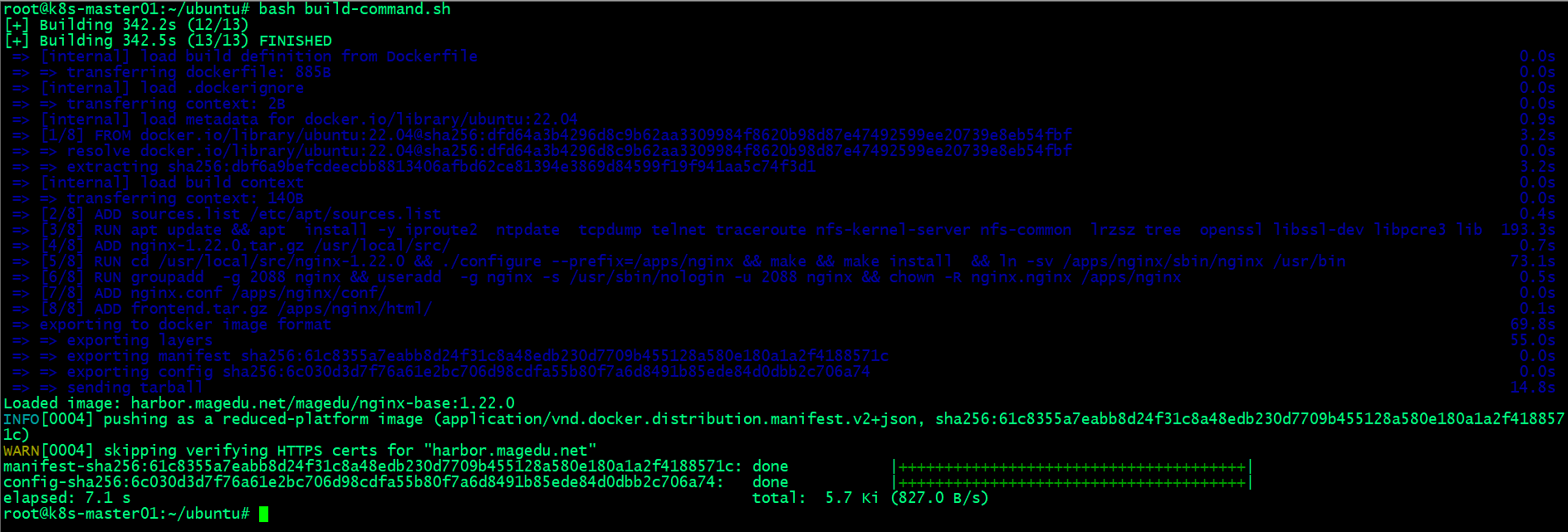
5.4、通过脚本⾃动构建并把镜像上传到镜像仓库
root@k8s-master01:~/ubuntu# bash build-command.sh
5.5、验证镜像是否上传到harbor仓库?
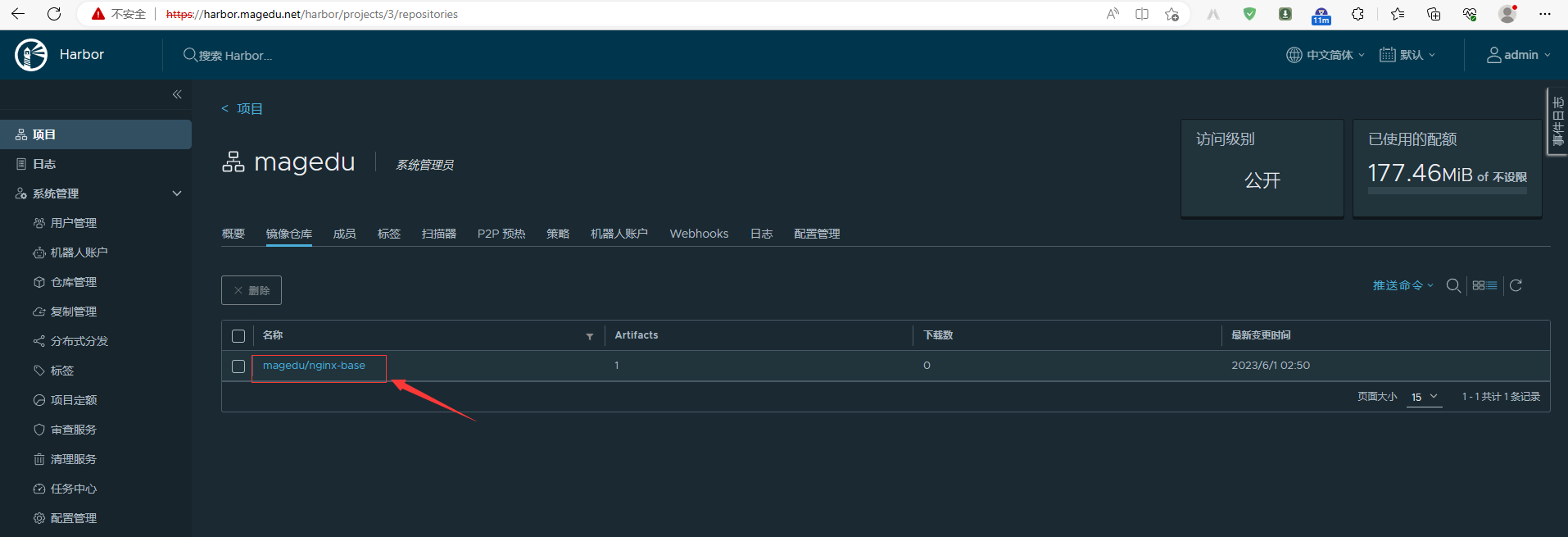
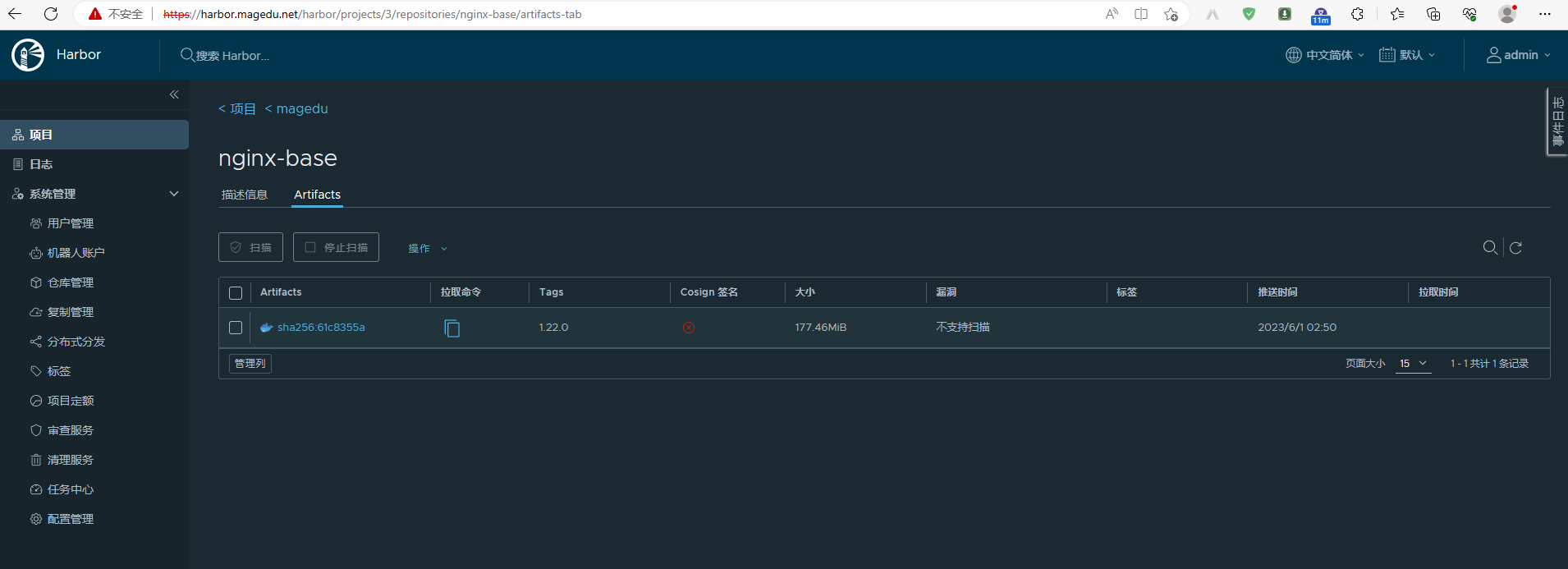
6、基于⾃定义镜像创建测试容器
6.1、nerdctl命令
root@k8s-node01:~# nerdctl run -d -p 80:80 harbor.magedu.net/magedu/nginx-base:1.22.0

WARN[0000] skipping verifying HTTPS certs for "harbor.magedu.net"

harbor.magedu.net/magedu/nginx-base:1.22.0:                                       resolved       |++++++++++++++++++++++++++++++++++++++|

manifest-sha256:61c8355a7eabb8d24f31c8a48edb230d7709b455128a580e180a1a2f4188571c: done           |++++++++++++++++++++++++++++++++++++++|

config-sha256:6c030d3d7f76a61e2bc706d98cdfa55b80f7a6d8491b85ede84d0dbb2c706a74:   done           |++++++++++++++++++++++++++++++++++++++|

layer-sha256:4da3a93ac27213414b4de065a2603d7acbec5bd63d6198a62ad732fa7ac6afa0:    done           |++++++++++++++++++++++++++++++++++++++|

layer-sha256:26039d49560ee304c7a41e00617e216bedb7e9c6b74263db5afe68a23425f286:    done           |++++++++++++++++++++++++++++++++++++++|

layer-sha256:61967fbfff474bb397fbc7752b2097a1211fd9e22c85ce679d2b80c29477ca8d:    done           |++++++++++++++++++++++++++++++++++++++|

layer-sha256:4179b69841babb645626f43f9f4eb8bf4fc9be92ef9819ea8d9335408178a497:    done           |++++++++++++++++++++++++++++++++++++++|

layer-sha256:9e0da806173e5c7f5188ed9222e6caf214b43f6e0ed1f961ed8261cb4fbf9429:    done           |++++++++++++++++++++++++++++++++++++++|

layer-sha256:1739bcae88003d009cb72941ca5085074a0d1257c971a3838e0d6402f010b38e:    done           |++++++++++++++++++++++++++++++++++++++|

layer-sha256:f8a2ffd8882321b57192cce8fcaebab3657bb30e073e4f21eee91b3f44488809:    done           |++++++++++++++++++++++++++++++++++++++|

elapsed: 18.6s                                                                    total:  149.3  (8.0 MiB/s)

af08bef4d635f3f888c87120cc830b37e3f53121012ad59500a30c20ac065319

root@k8s-node01:~#
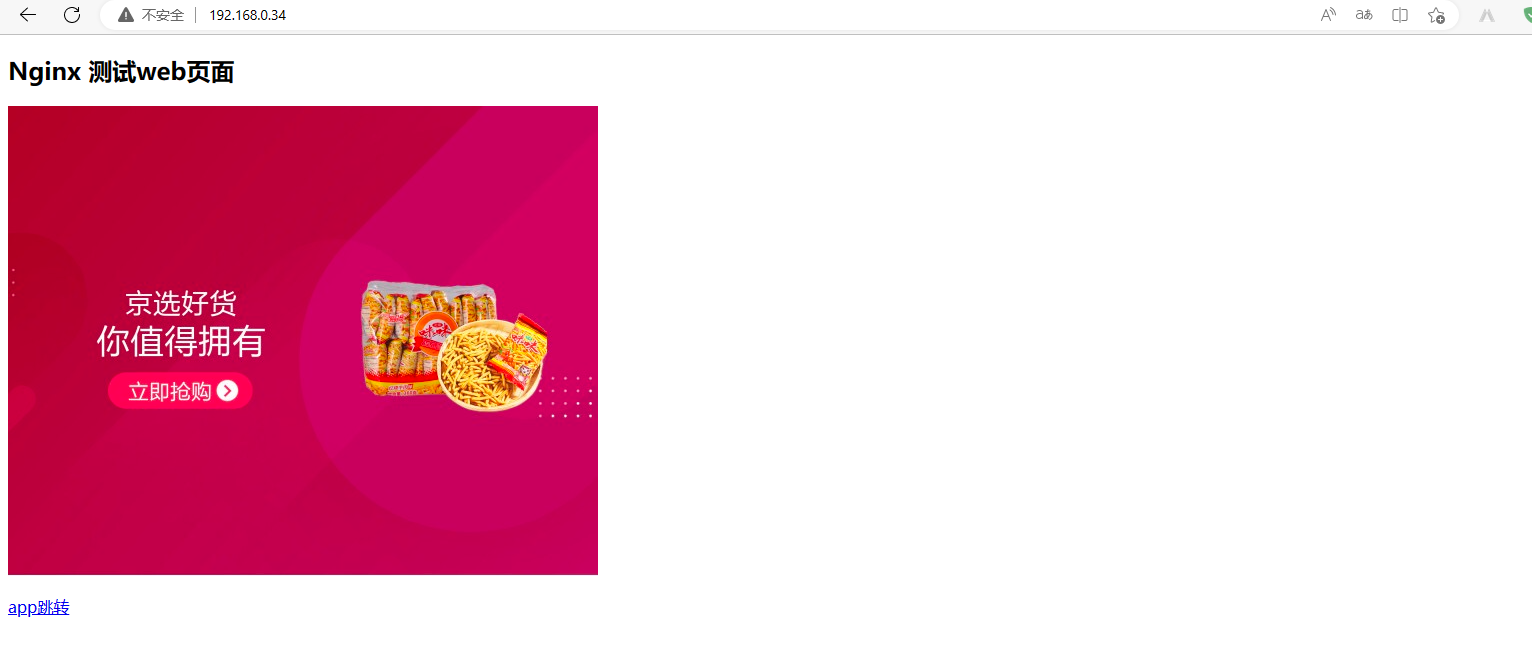
访问容器
基于nerdctl+buildkitd+containerd实现镜像构建的更多相关文章
- 基于 Sealos 的镜像构建能力,快速部署自定义 k8s 集群
Sealos 是一个快速构建高可用 k8s 集群的命令行工具,该工具部署时会在第一个 k8s master 节点部署 registry 服务(sealos.hub),该域名通过 hosts 解析到第一 ...
- howto:在构建基于debian的docker基础镜像时,更换国内包源
debian经常被用作构建应用镜像的基础镜像,如微软在构建linux下的dotnetcore基础镜像时,提供了基于debian 8(jessie)和debian 9(stretch)的镜像. 由于这些 ...
- 自定义构建基于.net core 的基础镜像
先说一个问题 首先记录一个问题,今天在用 Jenkins 构建项目的时候突然出现包源的错误: /usr/share/dotnet/sdk/2.2.104/NuGet.targets(114,5): e ...
- [笔记] 基于nvidia/cuda的深度学习基础镜像构建流程 V0.2
之前的[笔记] 基于nvidia/cuda的深度学习基础镜像构建流程已经Out了,以这篇为准. 基于NVidia官方的nvidia/cuda image,构建适用于Deep Learning的基础im ...
- docker之NGINX镜像构建
Nginx是一个高性能的Web和反向代理服务器,它具有很多非常优越的特性:1.作为Web服务器.2.作为负载均衡服务器.3.作为邮件代理服务器.4.安装及配置简单.接下来我们介绍在docker构建ng ...
- Docker镜像构建
一.简介 在构建容器化应用时,相当重要的步骤莫过于镜像制作,本文将介绍镜像制作方法以及镜像制作的建议.通常镜像的制作有两种方式: 使用现有的容器使用docker commit 生成镜像 使用Docke ...
- Docker镜像构建(五)
Docker 镜像介绍 Docker镜像构建分为两种,一种是手动构建,另一种是Dockerfile(自动构建) 手动构建docker镜像 案例:我们基于centos镜像进行构建,制作自己的nginx镜 ...
- vitess基础镜像构建流程Centos
以下列出了构建vitess使用的Centos镜像的简单流程,由于较早基础版本是Centos7.2的,重新构建可以基于最新的Centos版本构建 1.基础镜像拉取 #拉取官方版本 docker pull ...
- OpenShift应用镜像构建(4) - fabric8-maven-plugin
适合开发的构建fabric8-maven-plugin 在项目过程中越来越多的出现在开发阶段就需要把部分微服务直接做容器化发布,然后自己的代码还需要和这些发布后的微服务进行调用的开发过程,这个阶段基本 ...
- redhat quay 集成镜像构建
redhat quay 可以类似docker hub 那样进行镜像的构建,以下是一个学习,但是在测试中发现流程是可以通的,但是 quay 在对于dockerfile 内容处理上有bug,造成build ...
随机推荐
- Netty 高性能之零拷贝
更多内容,前往个人博客 零拷贝是指避免在用户态(User-space)与内核态(Kernel-space)之间来回拷贝数据的技术. 一.传统 IO 传统 IO(InputStream/OutputSt ...
- nginx中的proxy_pass配置
Nginx 是最常用的反向代理工具之一,一个指令 proxy_pass搞定反向代理,对于接口代理.负载均衡很是实用,但 proxy_pass指令后面的参数很有讲究,通常一个/都可能引发一个血案. 通常 ...
- uniapp安卓离线打包权限问题
安卓离线打包需要在androidManifest.xml配置 在 manifest 节点下面加上权限(对应uniapp当中manifest.json当中安卓的权限配置),例如: <manifes ...
- [JavaScript]JS屏蔽浏览器右键菜单/粘贴/复制/剪切/选中 [转载]
前两天在解决一个项目缺陷时,突发感兴趣,了解一下~ 1 JS事件 document.oncontextmenu // 右键菜单 document.onpaste //粘贴 document.oncop ...
- 四月九号java知识
1.do{}while();和while(){}结构最主要区别就是前者后面要一个分号 2.System.out.print();与System.out.println();的区别后者输出换行, 前者不 ...
- 被吐槽 GitHub仓 库太大,直接 600M 瘦身到 6M,这下舒服了
大家好,我是小富- 前言 忙里偷闲学习了点技术写了点demo代码,打算提交到我那 2000Star 的Github仓库上,居然发现有5个Issues,最近的一条日期已经是2022/8/1了,以前我还真 ...
- Linux中如何通过yum或者apt下载安装MySQL
一. yum mysql5.7以下 mysql5.7以上 Centos8 可以,但是需要重新配置文件 可以,但是需要重新配置文件 可以,但是需要重新配置文件 Centos7 可以直接yum,但是是 ...
- 如何根据需求选择合适的数据库管理工具?Navicat OR DBeaver
1.写在前面 在阅读本文之前,糖糖给大家准备了Navicat和DBeaver安装包,在公众号内回复"Navicat"或"DBeaver"或"数据库管理 ...
- List嵌套排序并取第一个对象
using Newtonsoft.Json;using 嵌套List排序; //示例listvar exampleString = "{\"code\":1,\" ...
- Eclipse中添加Shell脚本(如start.sh)
Eclipse中添加Shell脚本(如start.sh) 使用eclipse时,我们有时候会在自己的工程文件下添加一些脚本(比如将Qt代码在eclipse中运行生成moc文件时,或者要拷贝 ...