
MinIO实现文件上传
一、使用Docker安装minio
docker run -d -p 9000:9000 -p 9001:9001 --name minio -e MINIO_ACCESS_KEY=qbb -e MINIO_SECRET_KEY=startqbb -v /opt/minio/data:/data -v /opt/minio/config:/root/.minio minio/minio server /data --console-address ":9000" --address ":9001"
- MINIO_ACCESS_KEY:指定的是"用户名",可以这么理解,后面我们文件上传需要使用
- MINIO_SECRET_KEY:指定的是"密码",可以这么理解,后面我们文件上传需要使用
二、创建一个Project工程(我是用的是Gradle,大家也可以使用Maven)
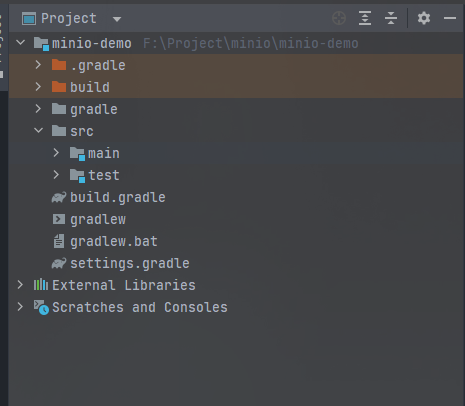
三、实现文件上传
1、导入相关依赖
plugins {

    id 'java'

}

group 'com.qbb'

version '1.0-SNAPSHOT'

repositories {

    mavenCentral()

}

dependencies {

    testImplementation 'org.junit.jupiter:junit-jupiter-api:5.8.1'

    testRuntimeOnly 'org.junit.jupiter:junit-jupiter-engine:5.8.1'

    implementation 'org.springframework.boot:spring-boot-starter-web:2.7.3'

    implementation 'mysql:mysql-connector-java:8.0.29'

    implementation 'org.springframework.boot:spring-boot-starter-test:2.7.3'

    implementation 'org.projectlombok:lombok:1.18.24'

    implementation 'io.springfox:springfox-swagger2:3.0.0'

    implementation 'io.springfox:springfox-swagger-ui:3.0.0'

    implementation 'io.minio:minio:8.4.3'

}

test {

    useJUnitPlatform()

}
2、修改配置文件
# application.yml

server:

  port: 8080

spring:

  profiles:

    active: dev

#    include: dev

  application:

    name: minio

  #  这个mvc的配置是springboot2.6.1不支持swagger3的折衷配置,后面考虑升级Springboot版本或降级版本

  mvc:

    pathmatch:

      matching-strategy: ant_path_matcher

  servlet:

    multipart:

      # 设置 上传文件的大小

      max-file-size: 100MB

      # 设置 整个请求的大小

      max-request-size: 150MB

# application-dev.yml

swagger:

  enabled: true

app:

  minio:

    endpoint: http://192.168.119.159:9001

    accessKey: qbb

    secretKey: startqbb

    bucket: qbb
3、主启动类
package com.qbb.minio;

import org.springframework.boot.SpringApplication;

import org.springframework.boot.autoconfigure.SpringBootApplication;

/**

 * @author QiuQiu&LL (个人博客:https://www.cnblogs.com/qbbit)

 * @version 1.0

 * @date 2022-09-19  15:45

 * @Description:

 */

@SpringBootApplication

public class Application {

    public static void main(String[] args) {

        SpringApplication.run(Application.class, args);

    }

}
4、Swagger3配置类
package com.qbb.minio.config;

import io.swagger.annotations.ApiOperation;

import org.springframework.beans.factory.annotation.Value;

import org.springframework.context.annotation.Bean;

import org.springframework.context.annotation.Configuration;

import springfox.documentation.builders.ApiInfoBuilder;

import springfox.documentation.builders.PathSelectors;

import springfox.documentation.builders.RequestHandlerSelectors;

import springfox.documentation.oas.annotations.EnableOpenApi;

import springfox.documentation.service.ApiInfo;

import springfox.documentation.service.Contact;

import springfox.documentation.spi.DocumentationType;

import springfox.documentation.spring.web.plugins.Docket;

/**

 * @author QiuQiu&LL (个人博客:https://www.cnblogs.com/qbbit)

 * @version 1.0

 * @date 2022-09-19  15:45

 * @Description: Swagger配置

 */

@Configuration

@EnableOpenApi

public class SwaggerConfig {

    @Value("${swagger.enabled}")

    boolean swaggerEnabled;

    @Value("${spring.application.name}")

    String name;

    @Bean

    public Docket createRestApi() {

        return new Docket(DocumentationType.OAS_30).apiInfo(apiInfo())

                // 是否开启

                .enable(swaggerEnabled).select()

                // 扫描的路径使用@Api的controller

                .apis(RequestHandlerSelectors.withMethodAnnotation(ApiOperation.class))

                // 指定路径处理PathSelectors.any()代表所有的路径

                .paths(PathSelectors.any()).build();

    }

    private ApiInfo apiInfo() {

        return new ApiInfoBuilder()

                .title("Swagger3接口文档")

                .description(name + "接口文档")

                //作者信息

                .contact(new Contact("startqbb", "https://www.cnblogs.com/qbbit", "startqbb@163.com"))

                .version("1.0")

                .build();

    }

}
5、Minio配置类
package com.qbb.minio.config;

import io.minio.MinioClient;

import lombok.Data;

import org.springframework.boot.context.properties.ConfigurationProperties;

import org.springframework.boot.context.properties.EnableConfigurationProperties;

import org.springframework.context.annotation.Bean;

import org.springframework.context.annotation.Configuration;

/**

 * @author QiuQiu&LL (个人博客:https://www.cnblogs.com/qbbit)

 * @version 1.0

 * @date 2022-09-19  15:57

 * @Description:

 */

@EnableConfigurationProperties

@ConfigurationProperties(prefix = "app.minio")

@Configuration

@Data

public class MinioConfig {

    private String endpoint;

    private String accessKey;

    private String secretKey;

    private String bucket;

    @Bean

    public MinioClient minioClient() {

        return MinioClient.builder()

                .endpoint(endpoint)

                .credentials(accessKey, secretKey)

                .build();

    }

}
6、Minio工具类
package com.qbb.minio.util;

import com.qbb.minio.config.MinioConfig;

import io.minio.*;

import io.minio.http.Method;

import io.minio.messages.Bucket;

import io.minio.messages.DeleteObject;

import io.minio.messages.Item;

import lombok.extern.slf4j.Slf4j;

import org.junit.platform.commons.util.StringUtils;

import org.springframework.beans.factory.annotation.Autowired;

import org.springframework.stereotype.Component;

import org.springframework.util.FastByteArrayOutputStream;

import org.springframework.web.multipart.MultipartFile;

import javax.annotation.Resource;

import javax.servlet.ServletOutputStream;

import javax.servlet.http.HttpServletResponse;

import java.time.LocalDate;

import java.time.format.DateTimeFormatter;

import java.util.ArrayList;

import java.util.LinkedList;

import java.util.List;

import java.util.UUID;

/**

 * @author QIUQIU&LL (个人博客:https://www.cnblogs.com/qbbit)

 * @version 1.0

 * @date 2022-09-19  16:44

 * @Description:

 */

@Component

@Slf4j

public class MinioUtil {

    @Autowired

    private MinioConfig minioConfig;

    @Resource

    private MinioClient minioClient;

    /**

     * 查看存储bucket是否存在

     *

     * @return boolean

     */

    public Boolean bucketExists(String bucketName) {

        boolean found;

        try {

            found = minioClient.bucketExists(BucketExistsArgs.builder().bucket(bucketName).build());

        } catch (Exception e) {

            e.printStackTrace();

            return false;

        }

        return found;

    }

    /**

     * 创建存储bucket

     */

    public void makeBucket(String bucketName) {

        try {

            minioClient.makeBucket(MakeBucketArgs.builder()

                    .bucket(bucketName)

                    .build());

        } catch (Exception e) {

            e.printStackTrace();

        }

    }

    /**

     * 删除存储bucket

     *

     * @return Boolean

     */

    public Boolean removeBucket(String bucketName) {

        try {

            minioClient.removeBucket(RemoveBucketArgs.builder()

                    .bucket(bucketName)

                    .build());

        } catch (Exception e) {

            e.printStackTrace();

            return false;

        }

        return true;

    }

    /**

     * 获取全部bucket

     */

    public List<Bucket> getAllBuckets() {

        try {

            return minioClient.listBuckets();

        } catch (Exception e) {

            e.printStackTrace();

        }

        return null;

    }

    /**

     * 文件上传

     *

     * @param file 上传的文件

     * @return

     */

    public String upload(MultipartFile file) {

        String originalFilename = file.getOriginalFilename();

        if (StringUtils.isBlank(originalFilename)) {

            throw new RuntimeException();

        }

        String fileName = UUID.randomUUID().toString().replace("-", "") + "_" + originalFilename;

        // 日期目录

        // SimpleDateFormat dateFormat = new SimpleDateFormat("yyyy/MM/dd");

        // String datePath = dateFormat.format(new Date());// 日期目录:2021/10/27

        // 也可以使用JDK1.8的新时间类LocalDate/LocalDateTime

        LocalDate now = LocalDate.now();

        DateTimeFormatter formatter = DateTimeFormatter.ofPattern("yyyy/MM/dd");

        String formatDatePath = formatter.format(now);

        // 加一个时间戳

        long timeMillis = System.currentTimeMillis();

        String objectName = formatDatePath + "/" + timeMillis + fileName;

        try {

            PutObjectArgs objectArgs = PutObjectArgs.builder()

                    .bucket(minioConfig.getBucket())

                    .object(objectName)

                    .stream(file.getInputStream(), file.getSize(), -1)

                    .contentType(file.getContentType())

                    .build();

            minioClient.putObject(objectArgs);

        } catch (Exception e) {

            e.printStackTrace();

            return null;

        }

        return objectName;

    }

    /**

     * 预览图片

     *

     * @param fileName 文件名称

     * @return 图片地址

     */

    public String preview(String fileName) {

        // 查看文件地址

        GetPresignedObjectUrlArgs build = GetPresignedObjectUrlArgs.builder()

                .bucket(minioConfig.getBucket())

                .object(fileName)

                .method(Method.GET)

                .build();

        try {

            return minioClient.getPresignedObjectUrl(build);

        } catch (Exception e) {

            e.printStackTrace();

        }

        return null;

    }

    /**

     * 文件下载

     *

     * @param fileName 文件名称

     * @param res      response

     */

    public void download(String fileName, HttpServletResponse res) {

        GetObjectArgs objectArgs = GetObjectArgs.builder().bucket(minioConfig.getBucket())

                .object(fileName).build();

        try (GetObjectResponse response = minioClient.getObject(objectArgs)) {

            byte[] buf = new byte[1024];

            int len;

            try (FastByteArrayOutputStream os = new FastByteArrayOutputStream()) {

                while ((len = response.read(buf)) != -1) {

                    os.write(buf, 0, len);

                }

                os.flush();

                byte[] bytes = os.toByteArray();

                res.setCharacterEncoding("utf-8");

                // 设置强制下载不打开

                // res.setContentType("application/force-download");

                res.addHeader("Content-Disposition", "attachment;fileName=" + fileName);

                try (ServletOutputStream stream = res.getOutputStream()) {

                    stream.write(bytes);

                    stream.flush();

                }

            }

        } catch (Exception e) {

            e.printStackTrace();

        }

    }

    /**

     * 查看文件对象

     *

     * @return 存储bucket内文件对象信息

     */

    public List<Item> listObjects(String bucketName) {

        if (StringUtils.isBlank(bucketName) || !bucketExists(bucketName)) {

            return null;

        }

        Iterable<Result<Item>> results = minioClient.listObjects(

                ListObjectsArgs.builder().bucket(bucketName).build());

        List<Item> items = new ArrayList<>();

        try {

            for (Result<Item> result : results) {

                items.add(result.get());

            }

        } catch (Exception e) {

            e.printStackTrace();

            return null;

        }

        return items;

    }

    /**

     * 获取单个桶中的所有文件对象名称

     *

     * @param bucket 桶名称

     * @return {@link List}<{@link String}>

     */

    public List<String> getBucketObjectName(String bucket) {

        boolean exsit = bucketExists(bucket);

        if (exsit) {

            List<String> listObjetcName = new ArrayList<>();

            try {

                Iterable<Result<Item>> myObjects = minioClient.listObjects(ListObjectsArgs.builder().bucket(bucket).build());

                for (Result<Item> result : myObjects) {

                    Item item = result.get();

                    listObjetcName.add(item.objectName());

                }

                return listObjetcName;

            } catch (Exception e) {

                e.printStackTrace();

            }

        }

        return null;

    }

    /**

     * 删除

     *

     * @param fileName 文件名称

     * @return true|false

     */

    public boolean remove(String fileName) {

        try {

            minioClient.removeObject(RemoveObjectArgs.builder().bucket(minioConfig.getBucket()).object(fileName).build());

        } catch (Exception e) {

            return false;

        }

        return true;

    }

    /**

     * 批量删除文件

     *

     * @param bucket      桶名称

     * @param objectNames 对象名称

     * @return boolean

     */

    public boolean removeObjects(String bucket, List<String> objectNames) {

        boolean exsit = bucketExists(bucket);

        if (exsit) {

            try {

                List<DeleteObject> objects = new LinkedList<>();

                for (String str : objectNames) {

                    objects.add(new DeleteObject(str));

                }

                minioClient.removeObjects(RemoveObjectsArgs.builder().bucket(bucket).objects(objects).build());

                return true;

            } catch (Exception e) {

                log.error("removeObjects", e);

            }

        }

        return false;

    }

}
7、测试
package com.qbb.minio.controller;

import com.qbb.minio.config.MinioConfig;

import com.qbb.minio.util.MinioUtil;

import io.minio.messages.Bucket;

import io.swagger.annotations.Api;

import io.swagger.annotations.ApiOperation;

import io.swagger.annotations.ApiParam;

import lombok.extern.slf4j.Slf4j;

import org.springframework.util.StringUtils;

import org.springframework.web.bind.annotation.*;

import org.springframework.web.multipart.MultipartFile;

import javax.annotation.Resource;

import javax.servlet.http.HttpServletResponse;

import java.util.List;

/**

 * @author QiuQiu&LL (个人博客:https://www.cnblogs.com/qbbit)

 * @version 1.0

 * @date 2022-09-19  15:45

 * @Description:

 */

@Slf4j

@Api(tags = "MinIO")

@RestController

@RequestMapping("/minio")

public class FileUploadController {

    @Resource

    MinioConfig minioConfig;

    @Resource

    MinioUtil minioUtil;

    @ApiOperation("测试程序")

    @GetMapping("/hello")

    public String hello() {

        return "hello";

    }

    @ApiOperation("文件上传")

    @PostMapping("/upload")

    public String upload(@ApiParam("文件") MultipartFile file) {

        try {

            /**

             * 这里应该放在service层处理的,将上传的文件路径存入数据库,我就不这么麻烦了,直接返回给前端

             */

            String bucket = minioConfig.getBucket();

            String endpoint = minioConfig.getEndpoint();

            // 1.检查存储桶是否已经存在

            boolean isExist = minioUtil.bucketExists(bucket);

            if (isExist) {

                log.info("Bucket already exists");

            } else {

                // 不存在则创建一个名为bucket的存储桶,用于存储照片的zip文件。

                minioUtil.makeBucket(bucket);

            }

            // 2.上传

            String objectName = minioUtil.upload(file);

            // 3.访问路径

            return endpoint + "/" + bucket + "/" + objectName;

        } catch (Exception e) {

            e.printStackTrace();

            throw new RuntimeException("文件上传异常!!!");

        }

    }

    @ApiOperation("文件下载")

    @GetMapping("/download")

    public void download(@RequestParam("fileName") String fileName, HttpServletResponse response) {

        minioUtil.download(fileName, response);

    }

    @ApiOperation("文件删除")

    @DeleteMapping("/remove")

    public String remove(@RequestParam("fileName") String fileName) {

        boolean flag = minioUtil.remove(fileName);

        if (flag) {

            return "success";

        }

        return "error";

    }

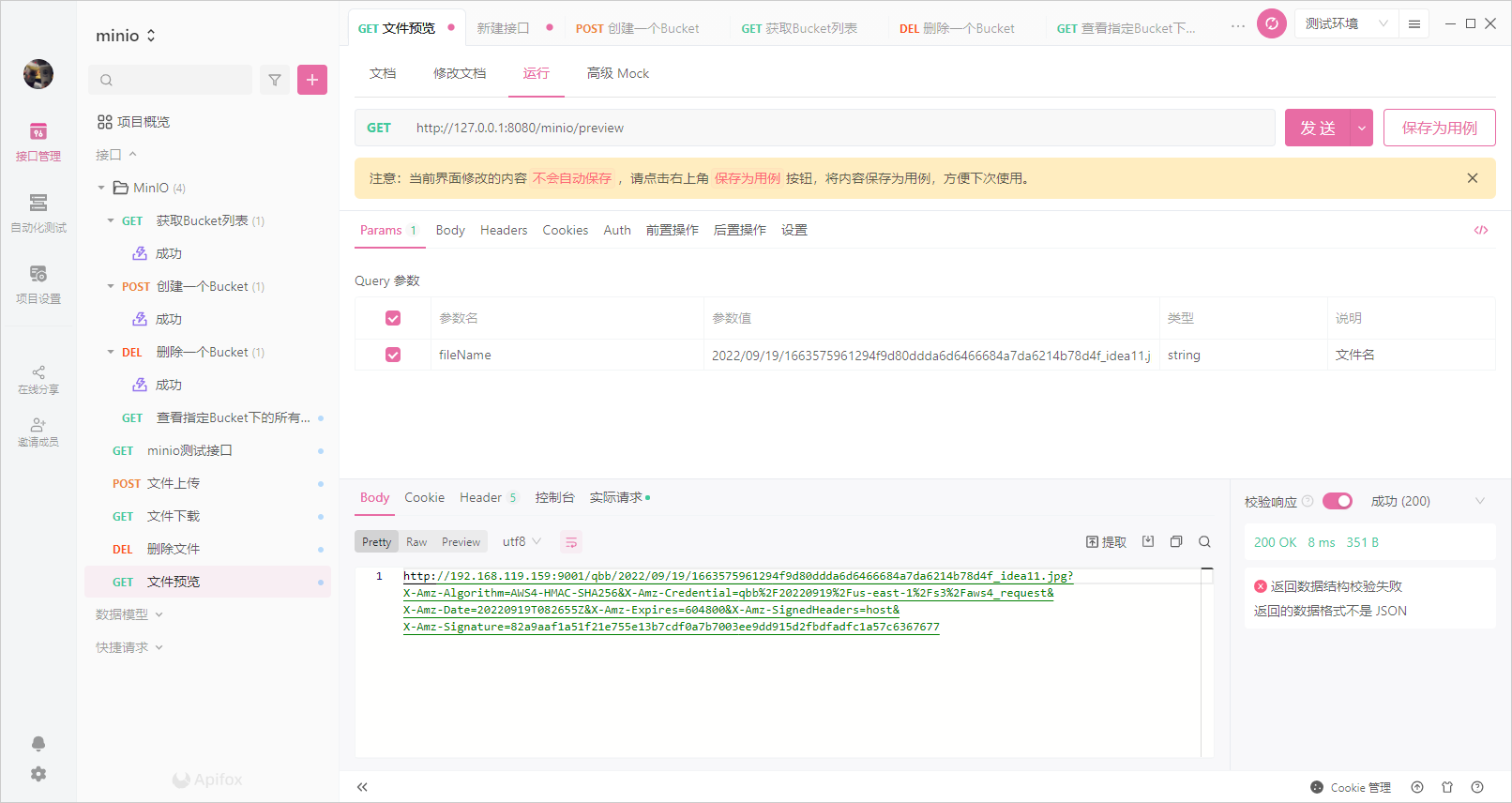
    @ApiOperation("文件预览")

    @GetMapping("/preview")

    public String preview(@RequestParam("fileName") String fileName) {

        String url = minioUtil.preview(fileName);

        if (!StringUtils.isEmpty(url)) {

            return url;

        }

        return "error";

    }

    @ApiOperation("获取Bucket列表")

    @GetMapping("/getAllBuckets")

    public List<Bucket> getAllBuckets() {

        return minioUtil.getAllBuckets();

    }

    @ApiOperation("创建一个Bucket")

    @PostMapping("/makeBucket/{bucketName}")

    public String makeBucket(@PathVariable("bucketName") String bucketName) {

        minioUtil.makeBucket(bucketName);

        return "success";

    }

    @ApiOperation("删除一个Bucket")

    @DeleteMapping("/removeBucket/{bucketName}")

    public String removeBucket(@PathVariable("bucketName") String bucketName) {

        Boolean isSuccess = minioUtil.removeBucket(bucketName);

        if (isSuccess) {

            return "success";

        }

        return "error";

    }

    @ApiOperation("查看Bucket中的所有Object")

    @GetMapping("/getBucketObjectName/{bucketName}")

    public List<String> getBucketObjectName(@PathVariable("bucketName") String bucketName) {

        return minioUtil.getBucketObjectName(bucketName);

    }

}
MinIO实现文件上传的更多相关文章
- minio实现文件上传下载和删除功能
https://blog.csdn.net/tc979907461/article/details/106673570?utm_medium=distribute.pc_relevant_t0.non ...
- springCloud 微服务通过minio实现文件上传和文件下载接口
直接上代码吧,好多文章的下载都写的不明不白的,让人理解错,气死了!! 文件上传功能 文件上传很简单,首先你得部署好minio,然后写好配置信息,我的是动态读取nacos上配置的yml @Autowir ...
- minio文件上传与下载
目录 一.minio简介 二.minio安装 一.java中使用 一.minio简介 MinIO 是在 GNU Affero 通用公共许可证 v3.0 下发布的高性能对象存储. 它是与 Amazon ...
- UniApp文件上传(SpringBoot+Minio)
UniApp文件上传(SpringBoot+Minio) 一.Uni文件上传 (1).文件上传的问题 UniApp文件上传文档 uni.uploadFile({ url: 'https://www.e ...
- 94、springboot+minio实现分片上传(超大文件快速上传)
设计由来 在实际的项目开发中常遇到超大附件上传的情况,有时候客户会上传GB大小的文件,如果按照普通的MultipartFile方式来接收上传的文件,那么无疑会把服务器给干崩溃,更别说并发操作了.于是笔 ...
- Springboot 一行代码实现文件上传 20个平台!少写代码到极致
大家好,我是小富~ 技术交流,公众号:程序员小富 又是做好人好事的一天,有个小可爱私下问我有没有好用的springboot文件上传工具,这不巧了嘛,正好我私藏了一个好东西,顺便给小伙伴们也分享一下,d ...
- jquery.uploadify文件上传组件
1.jquery.uploadify简介 在ASP.NET中上传的控件有很多,比如.NET自带的FileUpload,以及SWFUpload,Uploadify等等,尤其后面两个控件的用户体验比较好, ...
- 11、Struts2 的文件上传和下载
文件上传 表单准备 要想使用 HTML 表单上传一个或多个文件 须把 HTML 表单的 enctype 属性设置为 multipart/form-data 须把 HTML 表单的method 属性设置 ...
- Java FtpClient 实现文件上传服务
一.Ubuntu 安装 Vsftpd 服务 1.安装 sudo apt-get install vsftpd 2.添加用户(uftp) sudo useradd -d /home/uftp -s /b ...
- 小兔Java教程 - 三分钟学会Java文件上传
今天群里正好有人问起了Java文件上传的事情,本来这是Java里面的知识点,而我目前最主要的精力还是放在了JS的部分.不过反正也不麻烦,我就专门开一贴来聊聊Java文件上传的基本实现方法吧. 话不多说 ...
随机推荐
- 在Jupyter中使用AI写代码,如有神助,太惊艳了
昨晚看到一个可以在JupyterLab中使用的AI代码辅助工具jupyter-ai,它的交互确实非常棒,可以直接聊天,也可以就笔记中的代码提问,最出彩的是生成笔记功能,还是蛮惊艳的. 这里就极简介绍一 ...
- 【译】.NET 8 拦截器(interceptor)
通常情况下,出于多种原因,我不会说我喜欢写关于预览功能的文章.我的大多数帖子旨在帮助人们解决他们可能遇到的问题,而不是找个肥皂盒或打广告.但是我认为我应该介绍这个 .NET 预览特性,因为它是我在 . ...
- 教你2种方法,将iOS设备通过MQTT协议连接到华为云物联网平台
本文分享自华为云社区<如何将iOS设备通过MQTT协议连接到华为云物联网平台: Flutter和Swift两种方法>,作者: 张俭 . 前言 当今时代,物联网技术正逐步改变我们的生活和工作 ...
- Dubbo3应用开发—XML形式的Dubbo应用开发和SpringBoot整合Dubbo开发
Dubbo3程序的初步开发 Dubbo3升级的核心内容 易⽤性 开箱即⽤,易⽤性⾼,如 Java 版本的⾯向接⼝代理特性能实现本地透明调⽤功能丰富,基于原⽣库或轻量扩展即可实现绝⼤多数的 微服务治理能 ...
- elementui vue表单提交向别的组件传参失效 路由传参格式
目录 表单提交向别的组件传参失效 路由传参格式 表单提交向别的组件传参失效 methods: { submitForm(formName) { this.$refs[formName].validat ...
- FreeSWITCH添加h264编码及pcap视频提取
操作系统 :CentOS 7.6_x64.Windows 10_x64 FreeSWITCH版本 :1.10.9 Python版本:3.9.2 一.启用h264相关模块 这里以 mod_openh26 ...
- Go 多版本管理工具
Go 多版本管理工具 目录 Go 多版本管理工具 一.go get 命令 1.1 使用方法: 二.Goenv 三.GVM (Go Version Manager) 四.voidint/g 4.1 安装 ...
- Vocabulary
词汇(Vocabulary) blackmail ( n.) :the obtaining of money or advancement by threatening to make known u ...
- 深入解析Go非类型安全指针:技术全解与最佳实践
本文全面深入地探讨了Go非类型安全指针,特别是在Go语言环境下的应用.从基本概念.使用场景,到潜在风险和挑战,文章提供了一系列具体的代码示例和最佳实践.目的是帮助读者在保证代码安全和效率的同时,更加精 ...
- 【ZJCTF 2019】NiZhuanSiWei
[ZJCTF 2019]NiZhuanSiWei 收获 file_get_contents绕过 include联想伪协议 熟悉__tostring魔术方法的使用 题目 代码: <?php $te ...